

How to Find Any Corporate Email Address: Methods, Tools, and Real Accuracy Data
You exported 500 leads from your CRM, loaded them into a sequence, and hit send. Forty-seven bounced. Your domain reputation took a hit, deliverability tanked for two weeks, and your SDR manager wants answers. The problem wasn't your messaging or your list - it was the email data.
Anyone can find a corporate email address. Finding an accurate one is the part most teams get wrong.
Three Fastest Paths
Here's how to locate a corporate email, depending on your situation:
Email finder tool. The fastest option at any volume. Paste a domain, upload a CSV, or use a Chrome extension. If you're doing more than a handful of lookups, this is where you start - a good finder handles verification automatically so you're not guessing.
Domain search. When you know the company but not the person, a domain search returns all known contacts at that organization. Think of it as the "give me everyone at acme.com" approach, and it's the go-to method when you need business emails across an entire org chart.
Manual Google operators. Free, surprisingly effective for one-off searches, and the right move when you need a single hard-to-find contact.
Pick your method based on volume. One contact? Google it. Ten to fifty? Use a free tier. Hundreds or thousands? You need a paid tool with bulk upload and verification baked in.
Corporate Email Patterns by Company Size
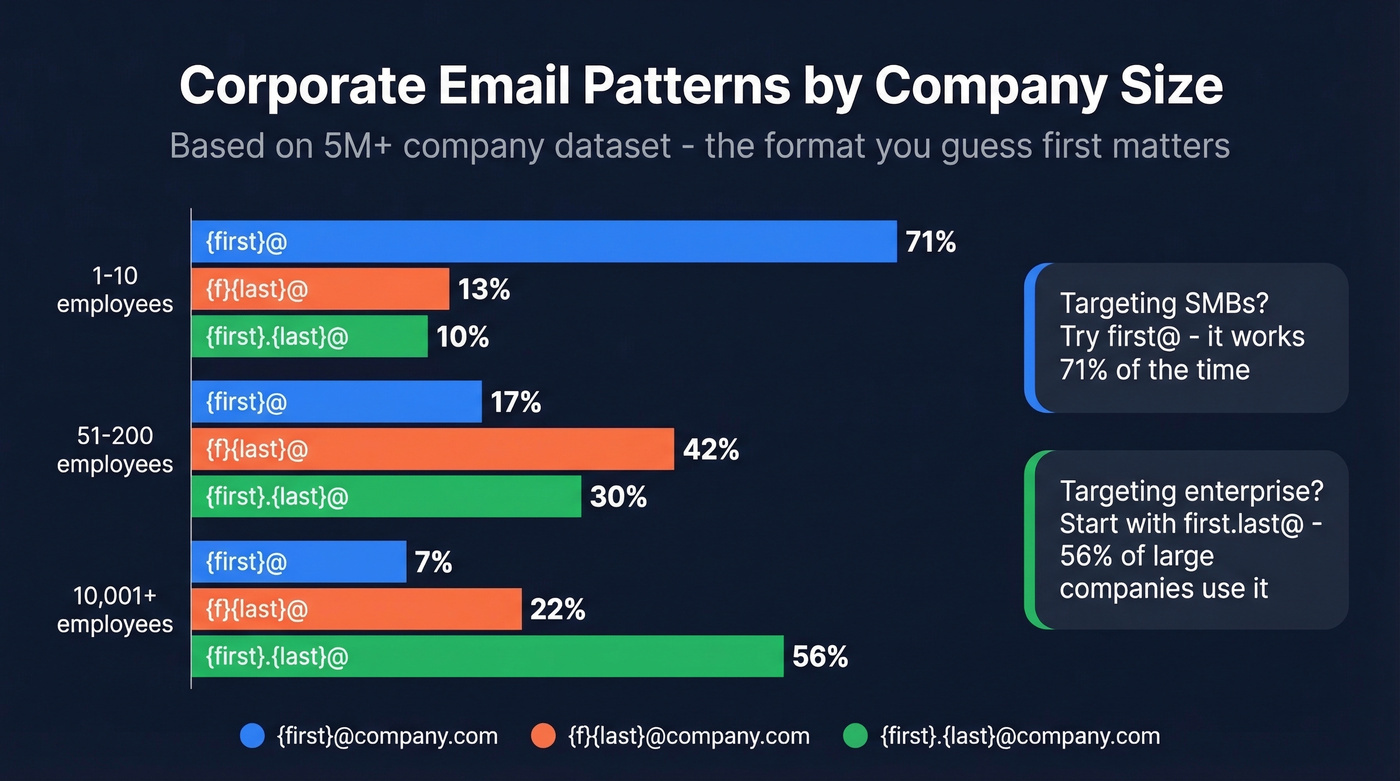
Before you reach for any tool, understand how companies actually structure their email addresses. A dataset of over 5 million companies breaks down the most common patterns by headcount, and the differences are significant.
| Company Size | {first}@ | {f}{last}@ | {first}.{last}@ |
|---|---|---|---|
| 1-10 employees | 71% | 13% | 10% |
| 51-200 employees | 17% | 42% | 30% |
| 10,001+ employees | 7% | 22% | 56% |
The overall winner across all company sizes is {first}@company.com at 61%. But that number is heavily skewed by small businesses. A 5-person startup likely uses jane@acme.com. A Fortune 500 company almost certainly uses jane.smith@acme.com.
If you're targeting enterprises, start with first.last@. For SMBs, try first@ first. Knowing the likely format matters for the permutation method below - it saves you from generating a dozen wrong guesses.
Free Methods to Find Business Emails
Not every lookup needs a paid tool. For small lists or one-off searches, these five steps are genuinely effective.
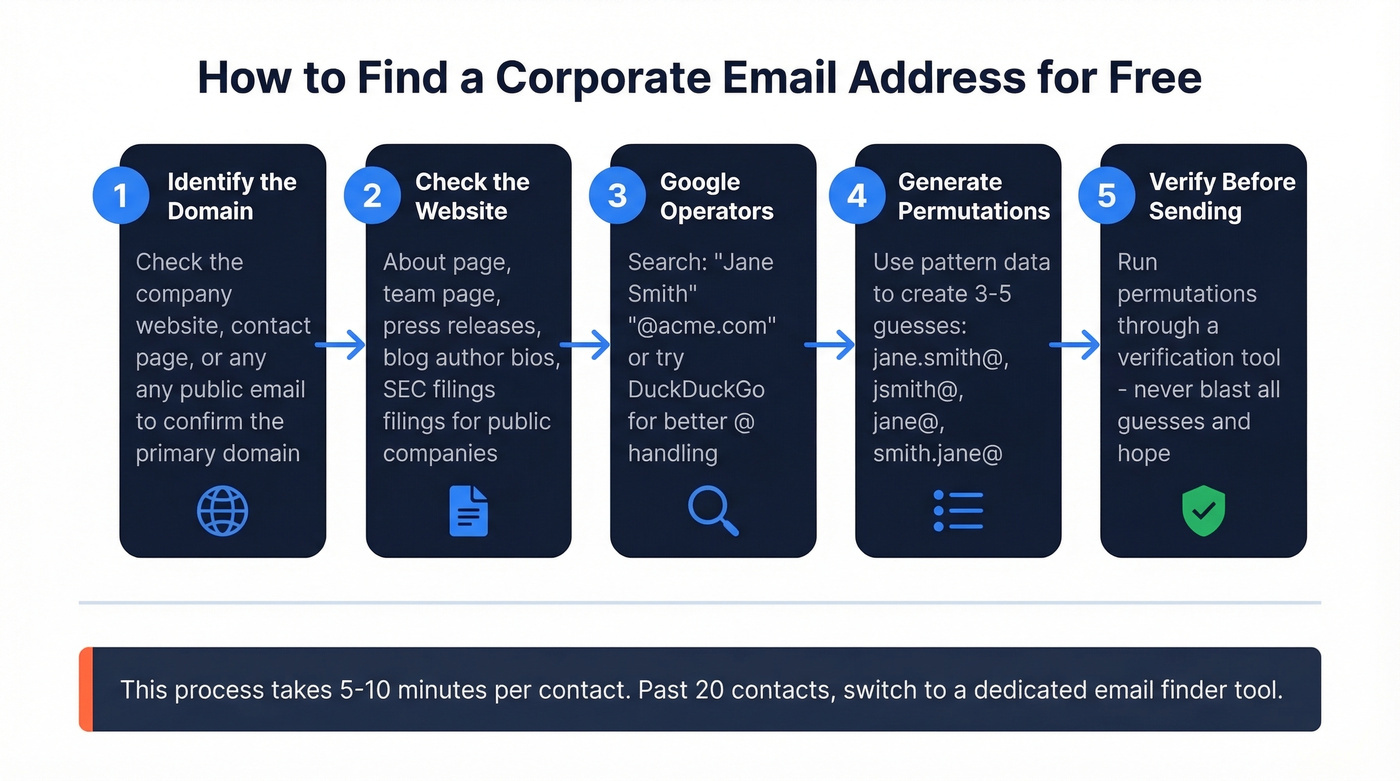
Step 1: Identify the domain. Find the company's primary email domain. Usually it's the website domain, but some companies use variations (e.g., @microsoft.com vs. @ms.com). Check the company's contact page or any publicly listed email to confirm.
Step 2: Check the company website. Look at the About page, team page, press releases, and investor relations sections. Publicly listed companies often have executive contact info in SEC filings. Blog author bios sometimes include email addresses. Tedious, but free and first-party.
Step 3: Try Google operators. Two queries handle most situations. For a specific person:
"Jane Smith" "@acme.com"
This searches the entire indexed web for that name appearing alongside the domain - the quotation marks are essential because they tell the search engine to match those exact phrases. For a broader search:
site:acme.com "email" "contact" "Jane Smith"
DuckDuckGo sometimes handles @domain queries better than Google, which occasionally strips the @ symbol. Worth trying both.
Step 4: Generate permutations. Take the person's name, the company domain, and the pattern data from the previous section. Generate 3-5 likely permutations: jane.smith@acme.com, jsmith@acme.com, jane@acme.com, smith.jane@acme.com.
Step 5: Verify before sending. Run those permutations through a free email verification tool - don't just send to all of them. Blasting five guesses and hoping one sticks is how you end up on a blacklist.
These approaches break down past about 20 contacts. You're spending 5-10 minutes per email when a tool does it in seconds. For lists of 50+ prospects, switch to a dedicated email finder.
Tools to Find Corporate Email Addresses
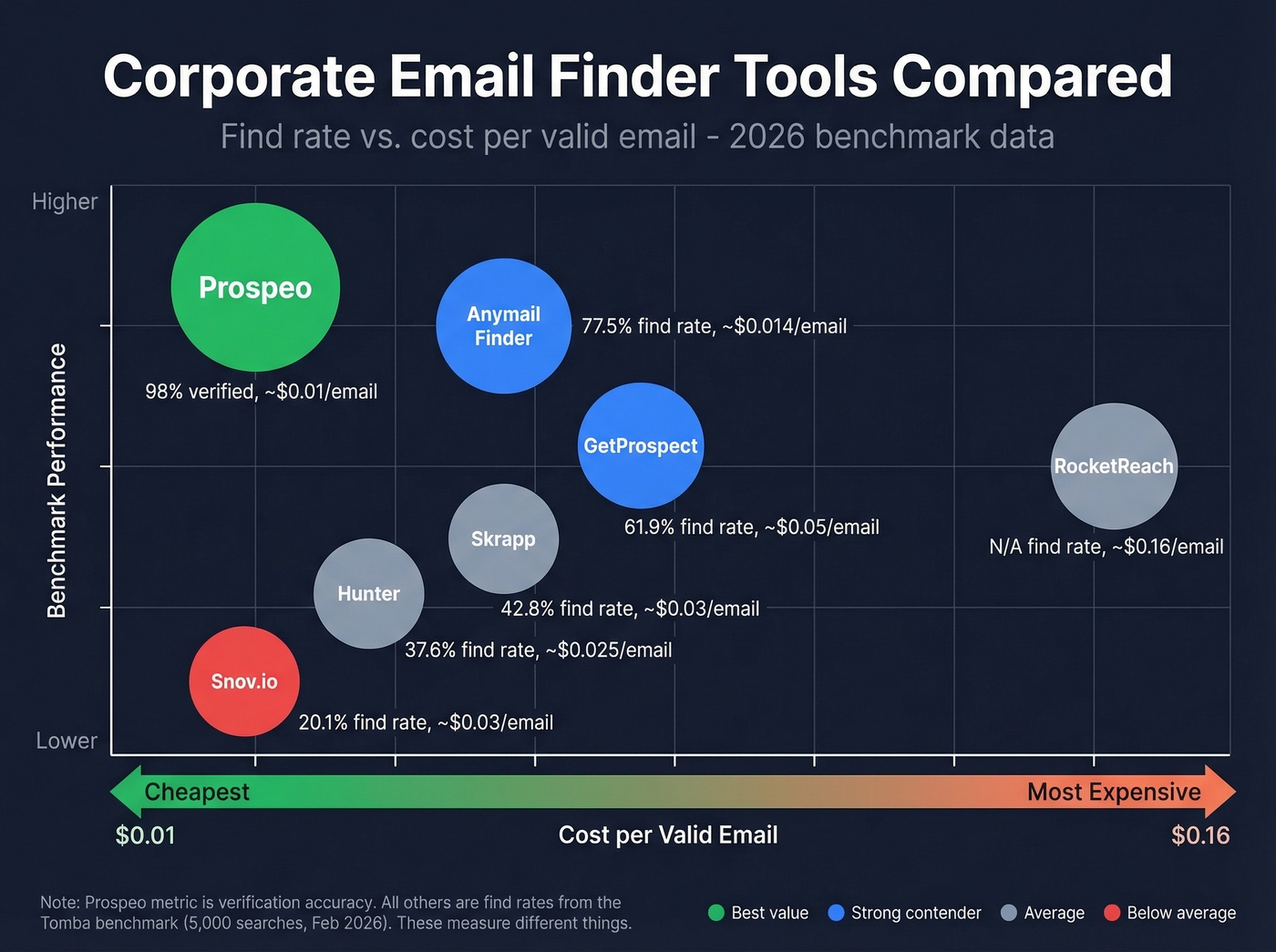
A note on the benchmark numbers below: Hunter through Skrapp are find rates from the Tomba benchmark (how often the tool returned a valid email). Prospeo's 98% is verification accuracy (whether emails are actually valid). These are different metrics - find rate tells you coverage, verification accuracy tells you whether your campaign bounces.
| Tool | Free Tier | Paid From | Cost/Valid Email | Benchmark Metric | Best For |
|---|---|---|---|---|---|
| Prospeo | 75 emails/mo | ~$0.01/email | ~$0.01 | 98% verified | Accuracy + scale |
| Hunter | 50 credits/mo | $34/mo (annual) | ~$0.025 | 37.6% find rate | Brand recognition |
| Anymail Finder | 100 credits | $14/mo | ~$0.014 | 77.5% find rate | Budget teams |
| Snov.io | 50 credits/mo | $29.25/mo (annual) | ~$0.03 | 20.1% find rate | Outreach suite |
| GetProspect | 50 valid/mo | $49/mo | ~$0.05 | 61.9% find rate | Valid-only billing |
| RocketReach | Limited | $80/user/mo | ~$0.16 | N/A | Enterprise lookups |
| Skrapp | 100 credits | ~$30/mo | ~$0.03 | 42.8% find rate | Light free usage |

Prospeo
Prospeo delivers 98% verified email accuracy through a proprietary 5-step verification process with catch-all handling, spam-trap removal, and honeypot filtering. The database covers 300M+ professional profiles on a 7-day data refresh cycle - the industry average is six weeks, which means most tools serve you stale data by default.
The Chrome extension (40,000+ users) works on any website and inside CRMs, and the API returns a 92% match rate for enrichment workflows. Bulk CSV upload handles large lists natively. Whether you need to locate work emails for a handful of prospects or thousands, Prospeo pairs with your existing outreach stack - HubSpot, Salesforce, Clay, Lemlist, Instantly, Smartlead, Zapier, Make, and more.
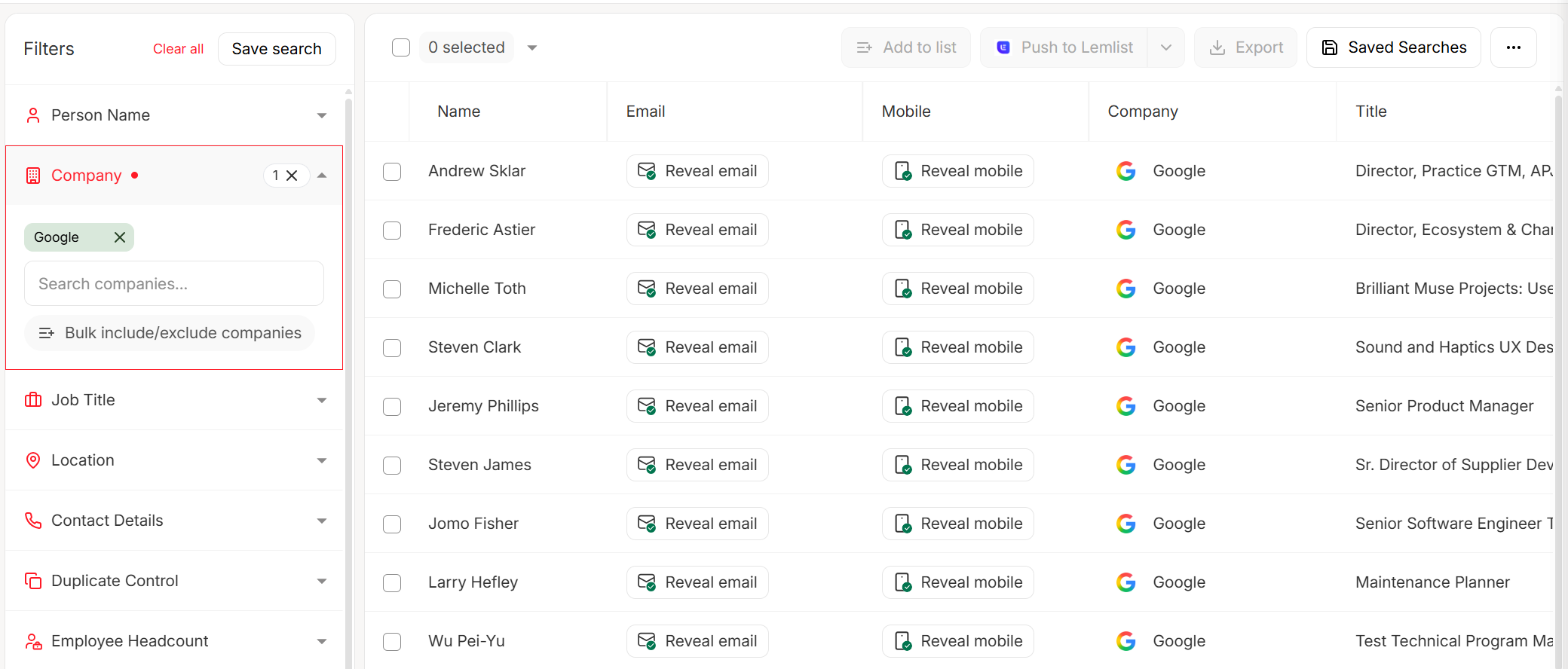
Pricing is dead simple: free tier gives you 75 emails/month, paid plans run about $0.01 per email with no contracts. We've seen teams cut bounce rates from ~35% to under 4% after switching from lower-quality providers.

You just read the pattern data - 71% of small companies use first-name emails, 56% of enterprises use first.last. Prospeo's 5-step verification checks every permutation against 300M+ profiles so you never send to the wrong format. Bounce rates drop from 35% to under 4%.
Skip the guesswork - get verified corporate emails at $0.01 each.
Hunter
Hunter is the most recognized name in email finding, and the ecosystem - campaigns, domain search, outreach features - is mature. If brand trust and a polished UX matter to your team, Hunter delivers on both.
The accuracy story is more complicated. In the Tomba benchmark (5,000 searches), Hunter returned valid emails at a 37.6% find rate. The Saleshandy test put it at 90% on a smaller 100-contact sample. That's a wide spread, and it means performance varies significantly by dataset and industry.
Free gets you 50 credits/month. Starter is $49/mo ($34/mo annual) for 2,000 credits. Growth runs $149/mo ($104/mo annual) for 10,000 credits. Scale hits $299/mo ($209/mo annual) for 25,000. All plans include unlimited users, which is genuinely generous. The most recognized name in the space, but not the most consistent - and at $49/month for 2,000 credits, not the cheapest either.
Anymail Finder
Anymail Finder's billing model is its killer feature: you only spend a credit when the tool returns a verified, valid email. Not-found results and duplicates are free, and risky emails don't cost credits. That changes the economics entirely.
The Tomba benchmark put Anymail Finder at a 77.5% find rate - solidly in the top tier. Plans start at $14/month, and you get 100 free credits to test. For budget-conscious teams who'd rather pay less and get fewer but better results, it's a smart pick. Not ideal for high-volume bulk lookups or API-first workflows, but excellent for cost control.
Snov.io
Snov.io is a full outreach platform: email finding, verification, drip campaigns, and a CRM bundled together. Starter is $39/mo or $29.25/mo billed annually with 1,000 credits. Pro S is $74.25/mo billed annually with 5,000 credits. Unused credits roll over with plan autorenewal.
Here's the thing - each search and each verification costs 1 credit, so finding and verifying the same email burns 2 credits. The LinkedIn automation add-on runs $69/mo per slot. Benchmark results are inconsistent: 20.1% find rate in the Tomba test, 79% in Saleshandy's. Skip this one unless you specifically need the outreach suite and can budget for the add-on costs.
GetProspect
GetProspect charges only for valid emails - accept-all emails are free until you hit your valid-email limit. Free tier gives you 50 valid emails/month plus 100 verifications. The Tomba benchmark put its find rate at 61.9%, which is middling. Paid plans start at $49/month ($34/month billed annually). Fair billing model, but the find rate means you'll likely need to supplement with another tool for harder-to-reach contacts.
RocketReach and Skrapp
RocketReach runs $80-$300/user/month. Enterprise-grade pricing for enterprise-grade needs.
Skrapp offers a free plan with 100 credits and paid plans starting around $30/month. The Tomba benchmark put it at a 42.8% find rate - enough for casual prospecting but not reliable for serious outbound.
We didn't include Apollo, ZoomInfo, or Cognism here. They're full sales intelligence platforms, not dedicated email finders. If you need intent data, org charts, and built-in dialers, those are worth evaluating separately.
Manual Google operators work for one contact. At 50+, you're burning hours on a problem Prospeo solves in seconds. Upload a CSV, search a domain, or use the Chrome extension across 300M+ profiles - all verified on a 7-day refresh cycle, not the 6-week industry average.
75 free verified emails per month. No credit card, no contracts.
Accuracy Benchmarks: What the Tests Actually Show
Let's be honest: every email finder tool claims "95%+ accuracy" on their marketing page, and almost none of them can back it up in independent testing. The gap between vendor claims and reality is the single biggest problem in this space.
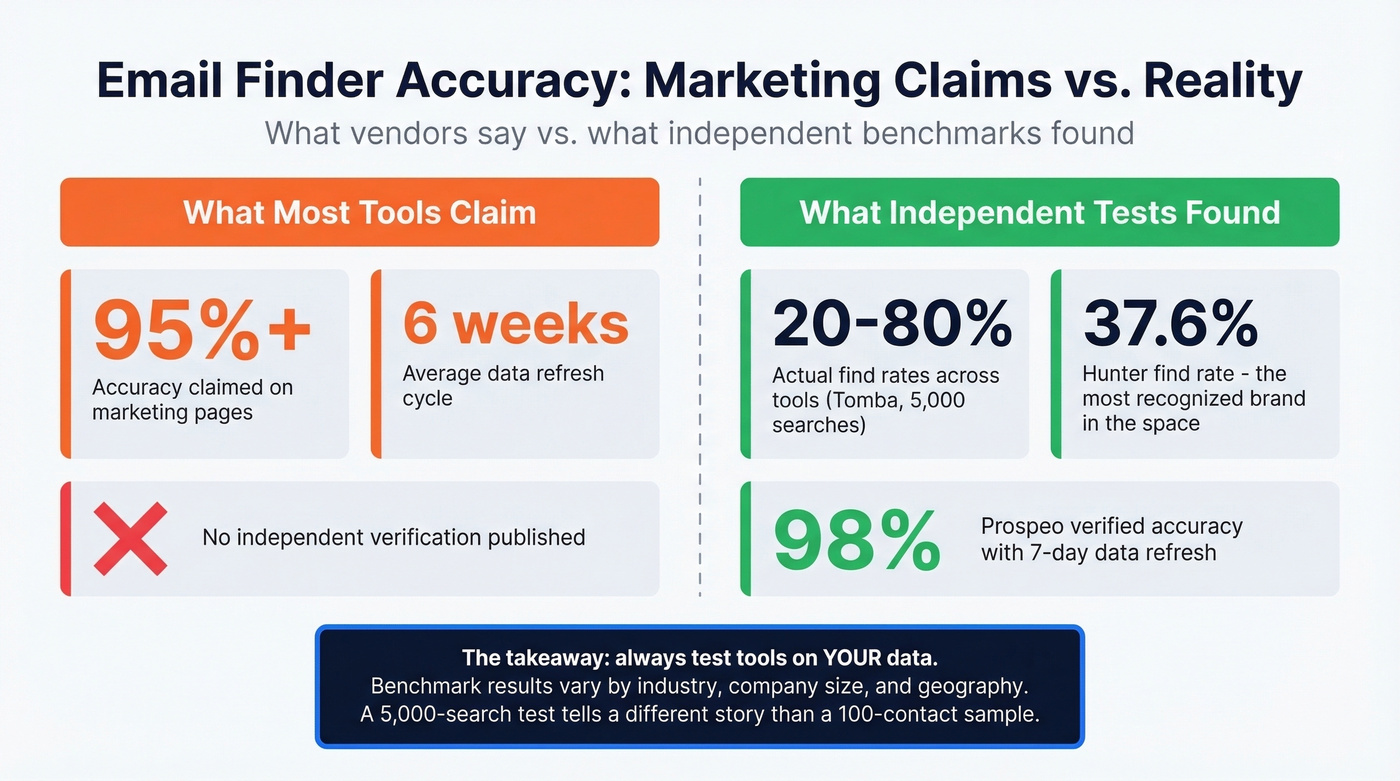
The Tomba benchmark ran 5,000 identical searches across 9 tools in February 2026 - 2,500 by domain and 2,500 by company name. The top performer (Tomba itself, so take that with a grain of salt) hit 80.3%. Hunter came in at 37.6%. Snov.io at 20.1%. These are find rates - the percentage of searches that returned a valid email at all.

The Saleshandy test used a smaller sample (100 verified contacts across 15 tools) and got different numbers: Hunter at 90%, Snov.io at 79%, RocketReach at 83%. The discrepancy tells you something important - results vary wildly depending on the dataset, the industries covered, and the seniority of contacts.
Find rate and verification accuracy are different metrics. A tool can have lower coverage but extremely strong verification on the emails it does return. If your priority is deliverability, verification accuracy and data freshness matter more than raw "found something" rates.
In our experience, the only benchmark that truly matters is your own. Run a test with 100-200 contacts from your actual ICP. If your provider's data is stale, you'll see it fast: older contacts bounce, and your sender reputation pays the price.
Bulk Email Finding at Scale
The question that comes up constantly on r/sales and in outbound communities: "I have 500 company names, no contacts - now what?" Knowing how to get corporate email addresses in bulk separates teams that scale from teams that stall.
For one-time bulk jobs, CSV upload is the simplest path. Upload a spreadsheet with names and domains, let the tool match and verify, export the results. For ongoing workflows where new leads flow in daily or CRM records need enrichment, API integration is the move - connect your CRM or automation tool, pass in company + name data, get verified emails back programmatically.
A simple rule of thumb: fewer than 50 lookups at a time, one-by-one search is fine. Between 50 and 500, use CSV upload. Above 500 on a recurring basis, invest the time to set up an API workflow. The setup time pays for itself in the first batch.
Mistakes That Kill Deliverability
Finding emails is half the battle. Keeping your sender reputation intact is the other half.
Treating "accept-all" as "valid." Accept-all (catch-all) domains accept every email sent to them, regardless of whether the mailbox exists. A verification tool will flag these as "accept-all," not "valid." Sending to them without additional risk scoring is gambling with your bounce rate. We've watched teams wreck a perfectly good domain this way - it's frustrating because it's so avoidable.
Verifying once and sending forever. Email addresses decay fast. After four weeks, roughly 2% of a verified list goes invalid - people change jobs, companies restructure, domains expire. Verify immediately before sending, not when you first collected the data.
Ignoring bounce rate thresholds. Keep your bounce rate below 2%, ideally under 1%. Above 2%, ESPs start throttling you. Above 5%, you're looking at potential blacklisting. One bad send can take weeks to recover from.
Skipping warm-up. Verification doesn't replace domain and mailbox warm-up. Even a perfectly verified list will trigger spam filters if you're sending 500 cold emails from a brand-new domain on day one. Warm up for 2-3 weeks minimum before scaling volume.
If you're scaling volume, pair verification with a real email deliverability plan and track email bounce rate by campaign.
Compliance Basics
Most sales teams don't think about compliance until something goes wrong.
Under GDPR, B2B cold email is generally permissible under the "legitimate interest" basis - you're contacting someone in their professional capacity about something relevant to their role. But you must offer a clear opt-out mechanism and honor unsubscribe requests promptly. CAN-SPAM requires a physical mailing address in every email, a functioning unsubscribe link, and honest subject lines. CCPA adds the right for California residents to know what data you've collected and request deletion.
Practically, this means: include an unsubscribe link, use a real business address, don't mislead in your subject line, and remove people who opt out quickly. For EMEA contacts, add a brief privacy notice explaining why you're reaching out. None of this is hard - it just needs to be systematic.
If you're unsure where the line is, start with a simple policy on cold email marketing and document your ethics in sales standards.
FAQ
Is it legal to find someone's corporate email?
Yes, for B2B outreach. Under GDPR, contacting professionals at their work email falls under legitimate interest, provided you offer an opt-out. CAN-SPAM requires a physical address and unsubscribe link in every message. The act of finding the address is legal - compliance obligations apply to how you use it.
How do I find a business email with just a name?
Start with Google operators: "Jane Smith" "@acme.com". If that fails, use a dedicated email finder - enter the person's name and company domain, and the tool matches against its database and returns a verified result. Most tools offer free tiers for one-off lookups.
What's the most common corporate email format?
{first}@company.com leads at 61% overall across a 5-million-company dataset. But enterprises with 10,000+ employees favor {first}.{last}@ at 56%. Match your guess to the company's headcount for the best odds.
How accurate are email finder tools really?
Vendor claims hover around 95%+. Independent tests tell a different story - find rates range from 17% to 80% depending on the tool and dataset. Verification accuracy and find rate are separate metrics. Test with 100-200 contacts from your actual ICP before committing to any provider.
How often should I re-verify email lists?
Every 2-4 weeks. After four weeks, approximately 2% of a verified list becomes invalid due to job changes and domain turnover. For active outbound campaigns, verify the day you send - not the day you built the list.