

Free Email Lookup by Name: What Actually Works in 2026
You type a name into a free email finder and expect magic. What you get is a signup wall, a credit limit, and - if you're lucky - an email that bounces anyway. One frustrated user on r/sales tested five different tools against emails they'd already found manually on company websites. The result? Every single tool missed about 80% of them.
The gap between what free email lookup by name promises and what it delivers is wide. Here's how to actually get results.
What You Need (Quick Version)
Your best path depends on how often you need this:
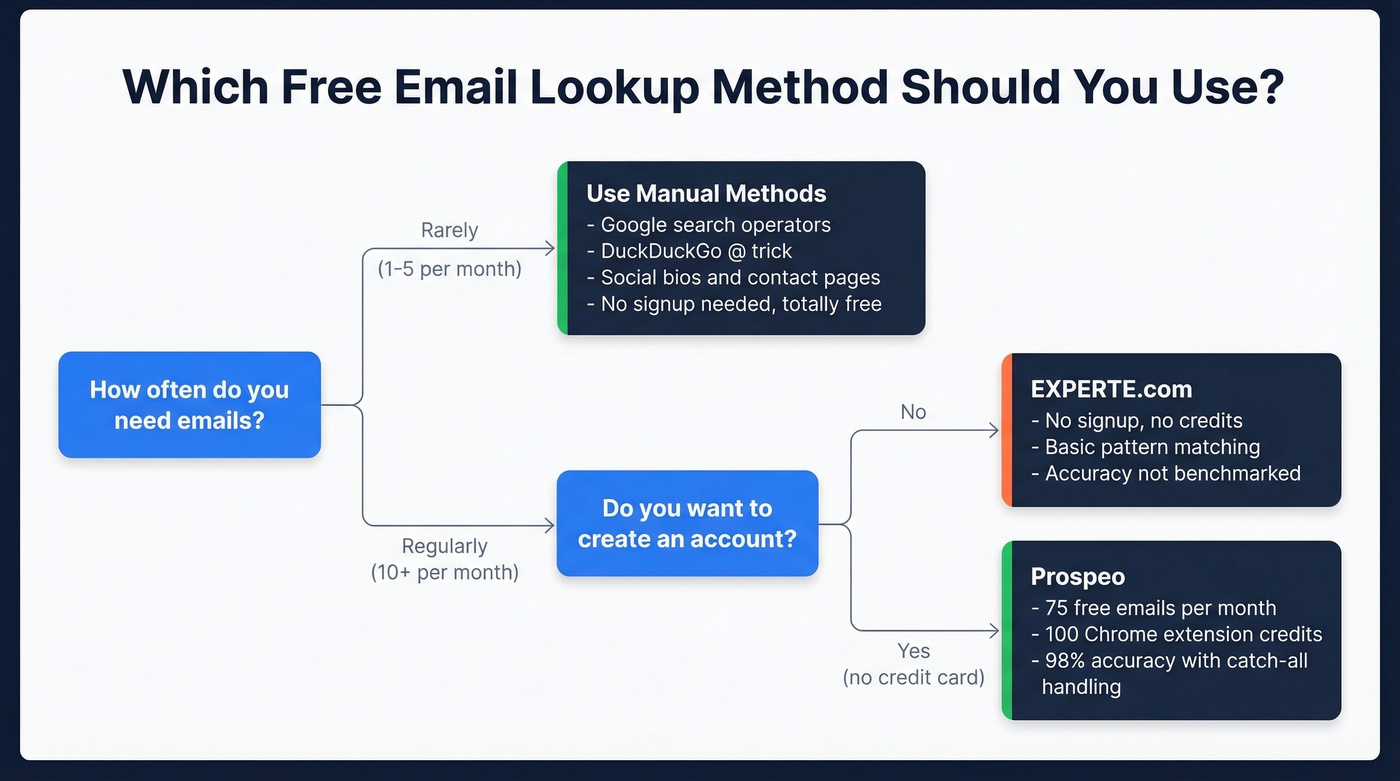
- One-off lookup, no signup: Use Google search operators or the DuckDuckGo "@domain.com" trick (details below). Free, instant, no account needed.
- Regular lookups, best free tier: Prospeo gives you 75 free emails per month plus 100 Chrome extension credits, with 98% email accuracy and catch-all handling. No credit card required.
- Quick check, truly zero friction: EXPERTE.com runs basic lookups with no signup and no account creation at all.
Why Finding an Email by Name Is So Hard
Here's what most people don't realize until they've wasted an hour: almost every email finder tool requires a company name or domain alongside the person's name. You can't just type "John Smith" and get a working email address. As one Reddit user put it, some web apps can sometimes handle name-only searches, but API lookups almost always require a company name or website.
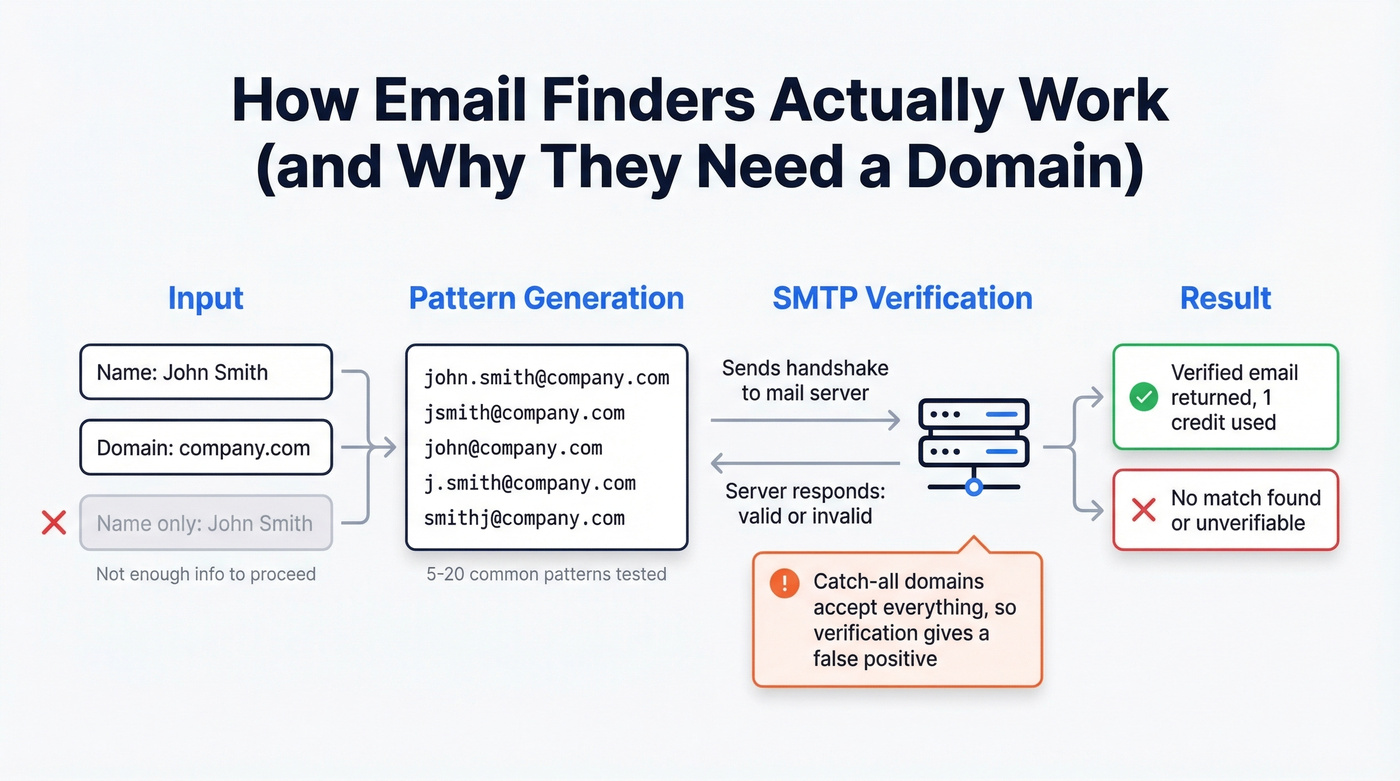
The reason is mechanical. Most email finders generate common name permutations against a domain - firstname.lastname@, f.lastname@, firstname@ - and then verify each candidate via an SMTP handshake with the mail server. Without a domain, there's nothing to permute against. That's the fundamental constraint, and no amount of marketing copy changes it.
Then there's the "free" part. Most tools gate their free tier behind a business email signup. You'll get 10 to 50 credits, burn through them in a single session, and hit a paywall. Be wary of "unlimited free" claims on Reddit - many are self-promotional posts for unvetted tools. The tools that genuinely offer no-signup lookups are doing basic pattern matching or scraping publicly available data, neither of which is reliable at scale.
If you only need five or fewer emails per month, don't sign up for anything. The manual methods below will get you there faster than creating yet another account.
How to Find Emails Without Any Tool
Before you sign up for anything, these manual approaches work surprisingly well for one-off lookups.
Google Search Operators
The classic approach still works. Try "firstname lastname" "@company.com" in Google. You can also try "firstname lastname" email site:company.com to surface contact pages, press releases, or team bios. Speed is instant, accuracy depends entirely on whether the email has been published somewhere public, and scalability is essentially zero - this is a one-at-a-time method.
DuckDuckGo Email Trick
Underrated. DuckDuckGo's exact-match search handles the "@" pattern better than Google or Bing, so searching "@company.com" "firstname lastname" can surface published email addresses that other engines filter out. The hit rate per search is noticeably higher because results aren't filtered as aggressively. Still zero scalability, but for a single lookup it's often the fastest path.
Social Bios and Contact Pages
Check the person's professional profiles, Twitter/X bio, GitHub profile, and personal website. Company "About" or "Team" pages are another reliable source - smaller companies especially tend to publish individual emails rather than a generic info@ address. If you're connected with someone on a professional network, their contact info section sometimes displays their email directly. Fast when you know where to look, high accuracy when you find something, low scalability.
WHOIS Lookup
Tools like ViewDNS.info and Whoxy (20 free searches per day, no signup) let you look up domain registration records , which sometimes include the registrant's email. The big caveat: post-2018 GDPR regulations mean most EU domain records are now redacted. This works best for US-based domains registered before privacy protections became standard. It's a long shot, but it takes 30 seconds.

Manual methods work for one-off lookups, but they don't scale. Prospeo gives you 75 free email lookups per month with 98% accuracy, catch-all handling, and spam-trap filtering - the exact things that make free tools silently fail.
Find verified emails by name in seconds, not hours.
Best Free Email Lookup by Name Tools
When manual methods aren't enough, these tools offer genuinely usable free tiers. One important distinction before we get into specifics: some tools only deduct credits for valid results (Hunter, Skrapp), while others charge for every lookup regardless. That difference matters when you're working with a small free allocation.
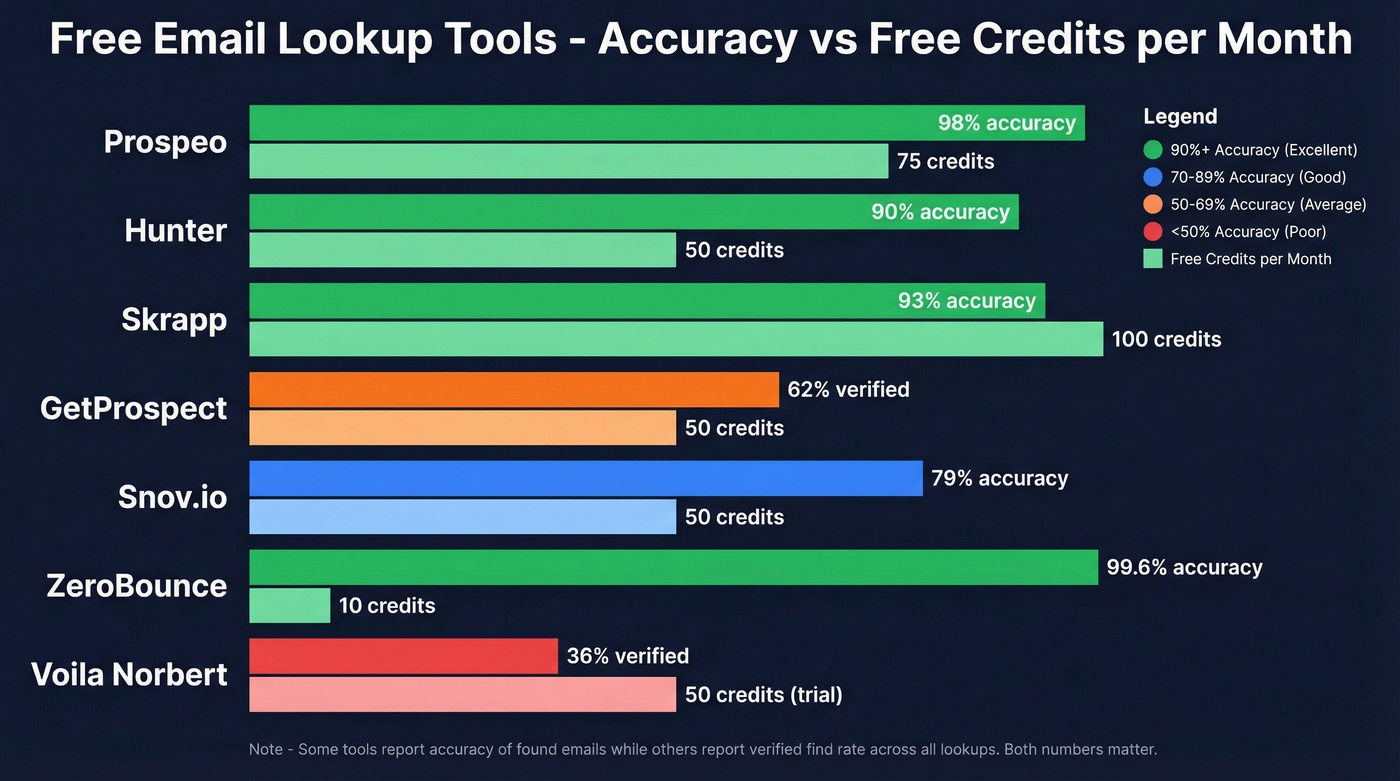
Also worth understanding upfront: there's a critical difference between "accuracy of found emails" and "verified find rate." A tool can be 95% accurate on the emails it does find while only finding emails for 30% of your list. Both numbers matter, and we'll call out both where data exists.
| Tool | Free/Month | Signup? | Accuracy | Best For |
|---|---|---|---|---|
| Prospeo | 75 emails + 100 ext. credits | Yes (no CC) | 98% | Overall accuracy |
| Hunter | 50 searches | Yes | ~90% | Verification + domain |
| Skrapp | 100 credits | Yes | ~93% | Highest free credits |
| GetProspect | 50 emails | Yes | ~62% verified | Chrome extension |
| Snov.io | 50 credits | Yes | ~79% | International leads |
| ZeroBounce | 10 queries | Yes (biz email) | 99.6% | Verification-first |
| EXPERTE.com | Unlimited (basic) | No | Not benchmarked | Zero-friction checks |
| Voila Norbert | 50 (trial) | Yes | ~36% verified | Simple UI |
Prospeo
Prospeo's free tier is the most generous among accuracy-focused tools: 75 emails per month plus 100 Chrome extension credits, no credit card, no contracts. The 98% email accuracy comes from a proprietary 5-step verification process that includes catch-all handling, spam-trap removal, and honeypot filtering - which matters because catch-all domains are where most tools silently fail. In our testing, catch-all mishandling is the single biggest reason campaigns see unexpected bounces.

The database covers 300M+ professional profiles with a 7-day data refresh cycle, compared to the 6-week industry average. That freshness gap is significant when you're emailing people who change jobs every 18-24 months. You search by name and company, get a verified result back in seconds, and can push it straight to Lemlist, Instantly, or your CRM. Paid plans start at roughly $0.01 per email.
Hunter
Hunter is probably the most recognized name in email finding. The free tier gives you 50 searches per month, and the credit system is straightforward: 1 credit per email found via Domain Search, Email Finder, or Bulk Email Finder; 0.5 credits per verification; and 1 credit per 10 results in bulk domain search.
In the Saleshandy 100-contact test, Hunter hit ~90% accuracy on found emails. But in the larger Anymailfinder 5,000-contact benchmark, its verified find rate dropped to 37.6%. The consensus on r/sales is that Hunter works better as a verification layer than a primary finder - solid for confirming emails you've already sourced, less reliable for cold discovery. If you're comparing options, see our breakdown of Hunter alternatives. Paid plans start around $24/month.

Skrapp
Use this if you need the highest free credit count and don't mind slightly lower accuracy. Skrapp gives you 100 free credits per month, making it a solid choice for moderate-volume name-based lookups at no cost. In the 5,000-contact benchmark, Skrapp's verified rate landed at 42.8%, which beats Hunter and Voila Norbert but trails the top performers.
Skip this if accuracy is your top priority. A 42.8% verified rate means more than half your lookups won't return a confirmed email. For bulk prospecting on a budget, though, Skrapp's free tier plus paid plans starting around $49/month make it a reasonable option. If you want to dig into the credit math, check Skrapp pricing.
GetProspect
Best for one-at-a-time prospecting while browsing company websites. GetProspect offers 50 free new email addresses each month plus 100 verification credits in your first workspace. The Chrome extension is its strongest feature - it pulls contact data as you browse, which fits naturally into a research workflow. The verified find rate in the 5,000-contact benchmark was 61.9%, middle-of-the-pack. Paid plans run around $49/month for 1,000 valid emails.
Skip it if you need bulk lookups. The free tier burns fast and the extension-first design doesn't lend itself to list building.
Snov.io
Snov.io's 50 free credits per month come bundled with basic automation features, which is appealing if you want finding and sequencing in one platform. Reddit users flag it as particularly useful for international leads where other tools have thinner coverage. The accuracy numbers are less impressive - 79% in the Saleshandy test, and just 20.1% verified rate in the larger benchmark. Paid plans start around $29-39/month.
Other Options Worth Knowing
ZeroBounce boasts 99.6% accuracy on its name-based email finder, but the free tier is tiny - just 10 queries per month, and you need a business/premium domain email to sign up. Best for verification-first workflows where you already have emails and need to clean them. If you're building a verification stack, compare options in our guide to Bouncer alternatives.
EXPERTE.com is the rare truly no-signup option. No account, no credits to track. The accuracy isn't benchmarked against the other tools here, but for a quick "does this email pattern exist?" check, nothing beats it on convenience.
Voila Norbert offers 50 searches as a free trial. The UI is clean and simple, but the 36% verified rate in the 5,000-contact benchmark is rough. It also doesn't check for catch-all addresses, which means you're flying blind on a significant chunk of domains.
The Accuracy Problem Nobody Talks About
Here's a number that should make you uncomfortable: according to ZeroBounce data, nearly 28% of all emails checked in 2024 were invalid or risky, up from 22% just two years earlier. The email data quality problem is getting worse, not better.
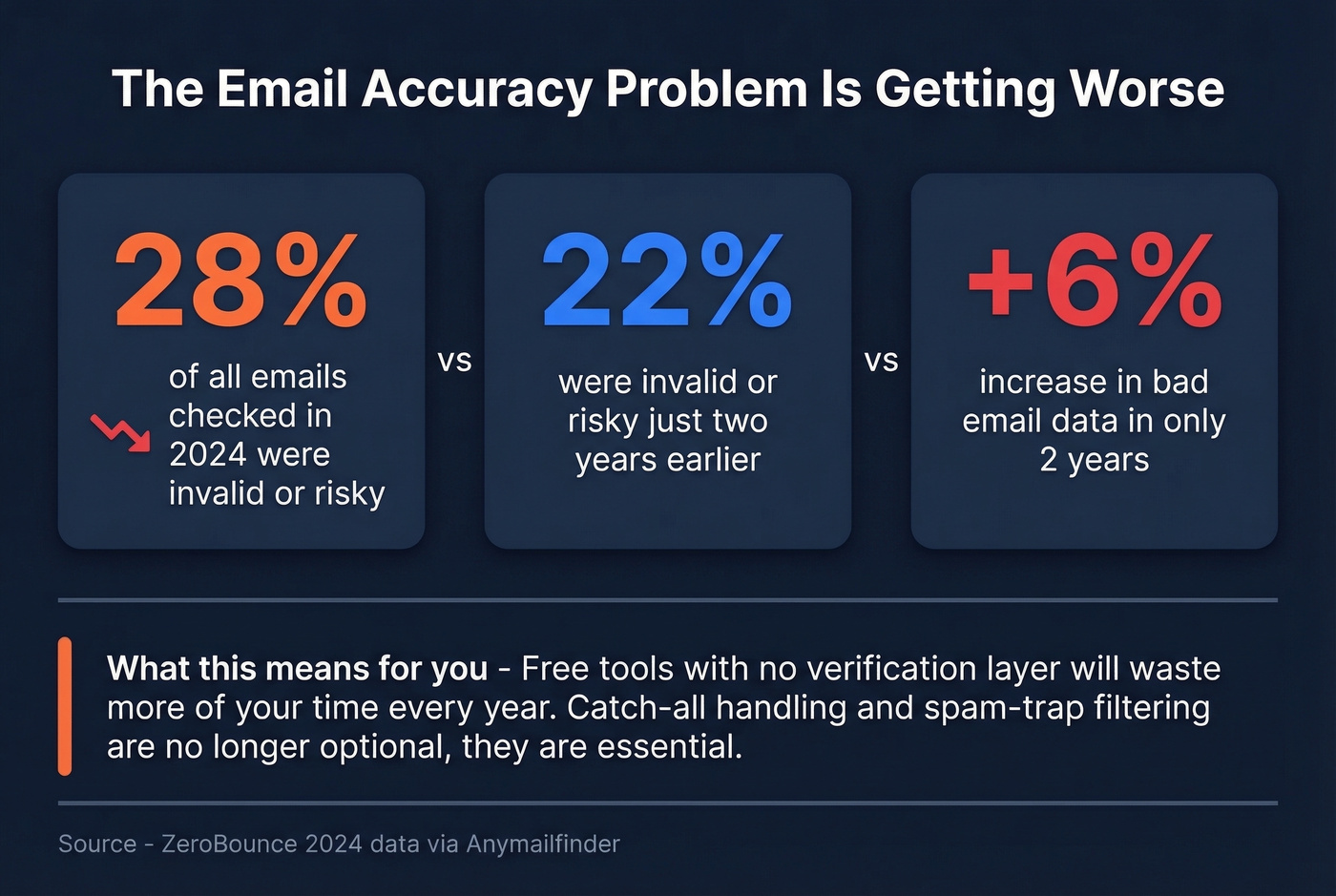
The benchmarks tell a messy story. In the Saleshandy 100-contact test, accuracy ranged from 79% to 98% depending on the tool. In the Anymailfinder 5,000-contact benchmark, verified find rates ranged from 20% to 77.5%. Those are wildly different numbers, and the gap matters because only 8.5% of outreach emails receive a response in the first place. If a quarter of your list bounces before it even reaches an inbox, your effective response rate craters.
We've seen this play out repeatedly: teams that skip verification see bounce rates above 10%, which triggers ESP throttling and tanks deliverability for their entire domain. The tools that separate themselves are the ones that tell you when they can't verify rather than guessing and hoping. Anyone running a free email lookup by name should treat verification as non-negotiable, not optional. For a deeper dive, use our email deliverability guide and our breakdown of email reputation tools.
What to Do After You Find an Email
Finding the email is half the battle. Here's how to make sure it actually lands.
Verify close to send time. Email addresses go stale fast - people change jobs, companies restructure. Verify within a month of sending. If you're using a tool with real-time verification built in, you can skip this step entirely. If you need a quick workflow, see how to check if an email exists.
Understand verification statuses. "Valid" means confirmed deliverable. "Catch-all" means the domain accepts everything - roughly 70% of catch-all emails actually work, but you won't know which ones until you send. "Risky" and "invalid" are self-explanatory.
Use separate sending infrastructure for risky addresses. Don't send to catch-all or risky emails from your primary domain. Set up a separate sending domain and IP to protect your main sender reputation. Most cold email platforms like Instantly and Smartlead make this easy to configure. If you're troubleshooting, start with how to improve sender reputation.
Keep bounce rate under 5%. This is the threshold where ESPs start throttling you. We've seen bounce rates crater entire campaigns when teams skip verification - if you're consistently above 5%, your data source is the problem, not your copy. Use these email bounce rate benchmarks and fixes to diagnose the root cause.
Combine name and phone number when possible. If you have a phone number alongside the name, some tools and professional network searches can cross-reference both data points to improve match accuracy significantly over name-only lookups.
Most free email finders burn your credits on unverified guesses. Prospeo's 5-step verification and 7-day data refresh mean the emails you find actually land - under 4% bounce rate across 15,000+ companies using it today.
Get 75 free email lookups with 98% accuracy, no credit card required.
FAQ
Can I find someone's email with just their name?
Rarely. Almost every email finder requires a company name or domain alongside the person's name. Name-only lookups work for high-profile individuals with large public footprints - published authors, executives at well-known companies. For everyone else, pair the name with a company domain to get usable results.
Which free email finder is the most accurate?
Prospeo leads accuracy benchmarks at 98% with its 5-step verification and catch-all handling. Hunter hits ~90% on found emails, and Skrapp lands around 93%. The critical distinction is "accuracy on found emails" versus "verified find rate" - most tools quietly underperform on the second metric.
Do email finders work for personal emails?
Most email finder tools focus exclusively on professional business addresses. Personal email discovery - Gmail, Yahoo, Outlook - is unreliable, often inaccurate, and raises significant privacy concerns. For personal addresses, manual methods like checking social bios or personal websites are more appropriate than automated tools.