

Best Gmail Email Extractors in 2026: Safe Tools, DIY Methods, and the Step Everyone Skips
You need every email address from your Gmail in a spreadsheet. Google Takeout choked mid-alphabet - one Reddit user reports their export consistently stops at the same point in the E's. The first Gmail email extractor you found on the Chrome Web Store wants permission to read all your emails, and the cybersecurity community flagged it as a privacy risk.
Now what?
Three paths actually work: vetted tools, DIY scripts, and a verification step that most guides skip entirely.
Our Picks (TL;DR)
| Pick | Tool | One-Line Verdict | Starting Price |
|---|---|---|---|
| Best for B2B outreach | Prospeo | Skip inbox mining - search 143M+ verified emails at 98% accuracy | Free (75 emails/mo) |
| Best Gmail add-on | Digital Inspiration | Security-audited, extracts from all fields, data stays in your Google account | $49.95/yr |
| Best free method | Google Apps Script | Full control, no extensions, data never leaves Google | Free |
Four approaches exist for getting emails out of Gmail: Chrome extensions (convenient but risky), Google Workspace add-ons (safer, sandboxed permissions), DIY scripts (free, full control), and external databases that skip the inbox entirely and give you fresher data. The right choice depends on whether you need a one-time archive or ongoing verified contacts for outreach.
Not All Extraction Tools Are Safe
A widely-installed extractor on the Chrome Web Store - published by Conversion Boooster SL - has been flagged by the cybersecurity community for storing email data on external servers. The post alleges the extension can read your emails, inject remote code, and run scheduled tasks even with no tabs open. Vet every extension yourself.
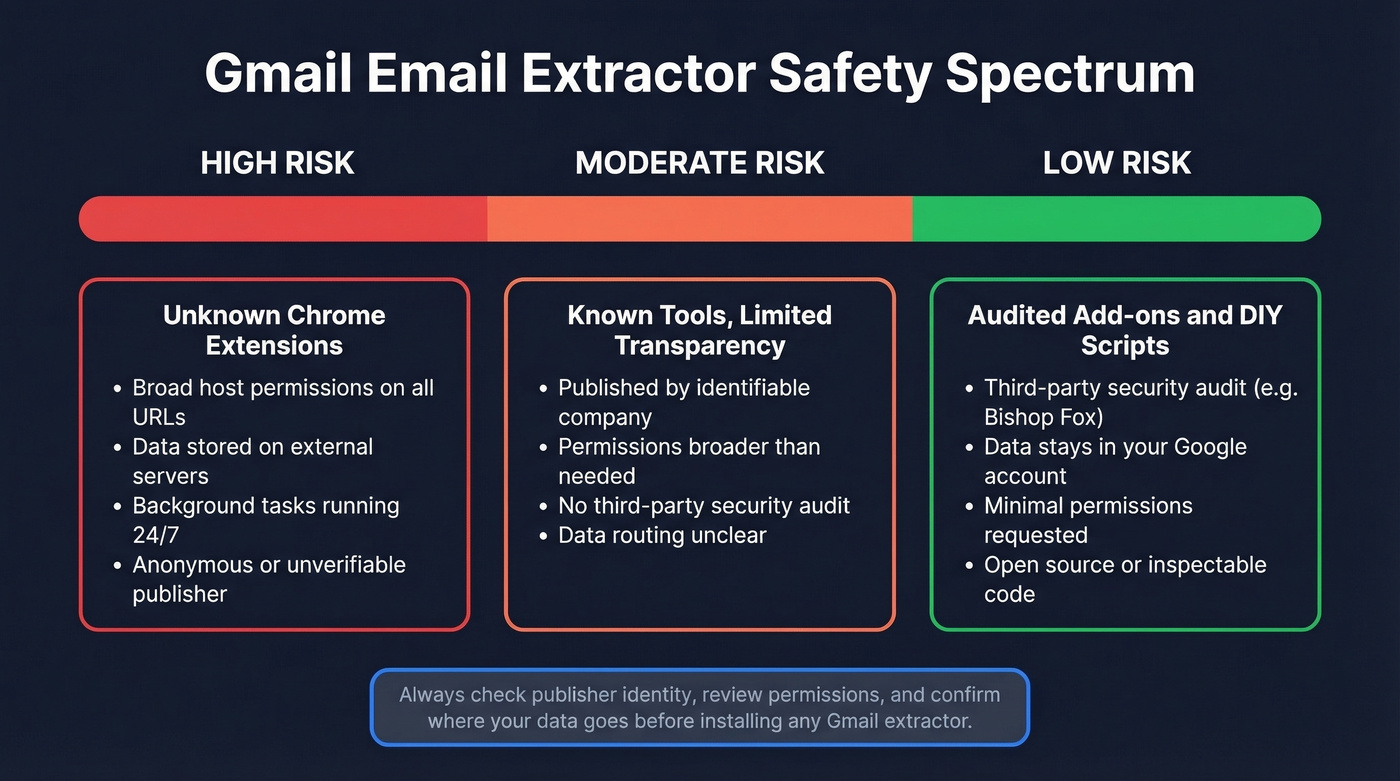
Even smaller extensions carry risk. A 2,000-user extractor was classified as "high risk impact" by third-party auditors because of broad host permissions (http://*/* and https://*/*). That classification doesn't automatically mean malicious, but it means the extension can access data on every site you visit. For a tool that only needs to read your Gmail, that's far more access than necessary.
Before You Install: Safety Checklist
- Check the publisher's identity. A real company with a website and contact info is a baseline requirement. Anonymous developers are a red flag.
- Review permissions. If an extension requests access to all URLs, ask why a Gmail tool needs that.
- Look for third-party security audits. Digital Inspiration's add-on was audited by Bishop Fox - that's rare and worth rewarding.
- Confirm data stays in your Google account. If the tool routes data through external servers, your emails are on someone else's infrastructure.
- Check for background processes. Extensions that run scheduled tasks when you're not using them are doing something you didn't ask for.
Best Tools for Gmail Email Extraction
Prospeo
Use this if you need verified B2B contact data for outreach and don't want to mine stale inbox addresses.
Skip this if you specifically need to archive every address from your personal Gmail history - Prospeo searches a live database instead of your inbox.
Here's the thing: extracting emails from Gmail gives you addresses that were valid when someone emailed you. That could've been last week or 2019. Prospeo takes a different approach entirely - you search a database of 300M+ professional profiles with 30+ filters and get back verified emails at 98% accuracy. For B2B outreach, stale inbox data just doesn't compete.
The 5-step verification process catches spam traps, honeypots, and catch-all domains before you ever hit send. Data refreshes every 7 days - not the 6-week industry average - which matters when you're running outbound sequences. The Chrome extension (40,000+ users) finds verified emails from any website in one click. Pricing starts free: 75 emails per month, no credit card. Paid plans work out to roughly $0.01 per email, which is a fraction of what you'd spend cleaning a stale Gmail export after the fact.

Digital Inspiration Address Extractor
Use this if you need a polished, non-technical way to pull every address from your Gmail into a spreadsheet.
This is our pick for a dedicated Gmail add-on. It extracts addresses from To, From, Cc, Subject, and message body fields - not just senders. Deduplication is automatic, and incremental runs mark processed emails with an "Extracted" label so you don't re-process the same threads.
The security story is what sets it apart. The infrastructure and source code were audited by Bishop Fox, and all data stays in your Google account. Nothing routes through external servers. We've tested a lot of Gmail add-ons, and this level of transparency is genuinely unusual.
One Reddit user reported the add-on no longer works, but it remains listed and supported on Digital Inspiration's site. Standard Edition runs $49.95/year with a 10,000 email/day extraction limit. Enterprise is $79.95/year with unlimited volume.
Mailparser
Mailparser solves a different problem. Instead of bulk-extracting addresses from your inbox, it parses structured data from incoming emails on an ongoing basis - order confirmations, lead notifications, form submissions forwarded to a dedicated inbox. Output goes to CSV, webhooks, or integrations. Plans start at $29.95/mo for 250 emails/month, scaling to $299.95/mo for 10,000. Free trial available, no credit card required. Best for teams automating email-to-CRM workflows rather than one-time extraction.
GMass
Already using GMass for cold email campaigns inside Gmail? Its built-in extraction features save you from adding another tool. The free tier lets you send up to 50 emails/day while testing, and paid plans start around $25/mo.
One caveat: GMass's web-based email verifier has been unavailable due to abuse. Verification still works via the GMass extension (by checking a "Verify" box) and via the API on paid plans. It's a solid send-and-extract combo, not a standalone extractor.
Hunter.io
Well-known email finder with domain search and built-in verification. Free tier gives you 25 searches/month; paid plans start at $49/mo. Hunter isn't a Gmail extractor - it finds emails by company domain. But many people searching for inbox extraction tools actually need an email finder, and Hunter fills that gap.
If you’re comparing options, see our breakdown of Hunter alternatives.
Clearout
Budget-friendly bulk email verification. Free tier includes 100 credits, paid plans from $14/mo. Useful as a post-extraction verification step when budget is tight.
For more options, compare email verification tools.
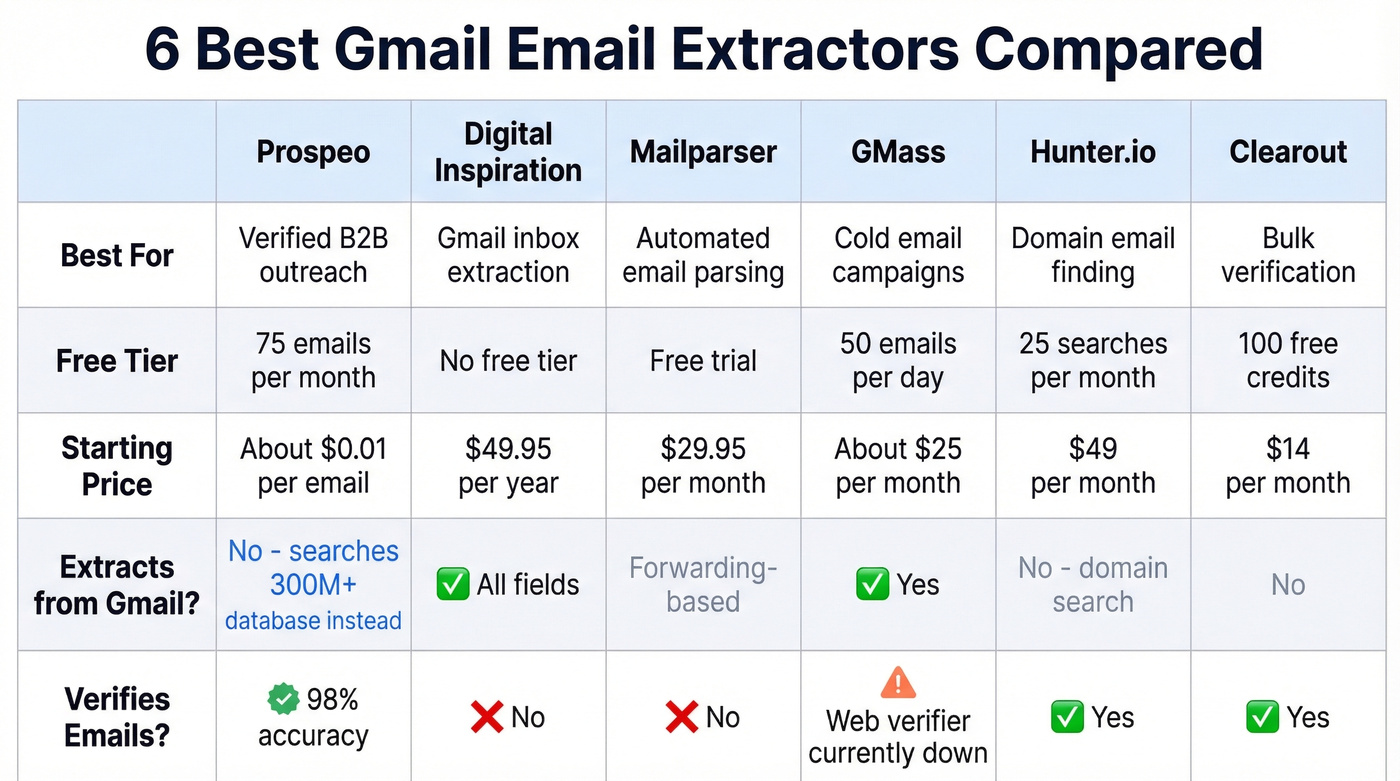
Tool Comparison
| Tool | Free Tier | Starting Price | Best For | Extracts from Gmail? | Verifies Emails? |
|---|---|---|---|---|---|
| Prospeo | 75 emails/mo | ~$0.01/email | Verified B2B outreach | No (143M+ DB instead) | 98% accuracy |
| Digital Inspiration | No | $49.95/yr | Gmail inbox extraction | All fields | No |
| Mailparser | Free trial | $29.95/mo | Automated parsing | Forwarding-based | No |
| GMass | 50 emails/day | ~$25/mo | Cold email users | Yes | Web verifier down |
| Hunter.io | 25 searches/mo | $49/mo | Domain email finding | No | Yes |
| Clearout | 100 credits | $14/mo | Bulk verification | No | Yes |

Gmail extractors give you addresses from 2019. Prospeo gives you 98% accurate emails verified this week. Search 300M+ profiles with 30+ filters - no inbox permissions, no privacy risk, no stale data.
Skip the inbox. Start with emails that actually work.
Extract Emails with Google Apps Script (Free)
This is the safest free method. Your data never leaves your Google account, you control every line of code, and it works even when Google Takeout fails for large exports.

Step 1: Open Google Sheets, go to Extensions -> Apps Script.
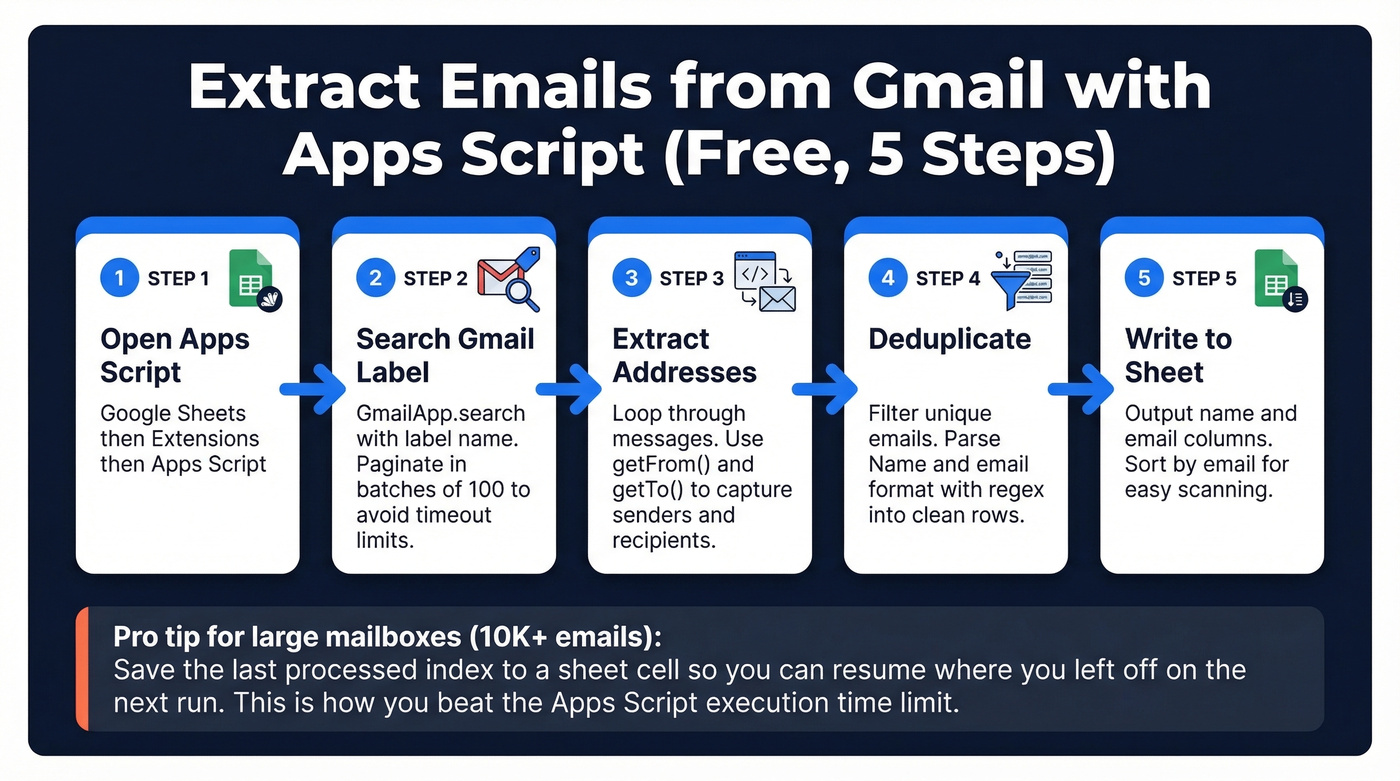
Step 2: Use GmailApp.search("label:" + labelName) to pull threads from a specific Gmail label. Ben Collins's tutorial walks through the full implementation.
Step 3: Iterate through messages with getFrom() and getTo() to capture both sender and recipient addresses. Push everything into an array.
Step 4: Deduplicate with a simple filter: emailArray.filter((item, pos) => emailArray.indexOf(item) == pos). The script parses "Name" <email@domain> format via regex and outputs clean name/email rows.
Step 5: Write results to your sheet. Sort by email column for easy scanning.
Scaling for large mailboxes: The critical trick is pagination in batches of 100 - use GmailApp.search(query, startIndex, 100) in a loop until no threads return. Without this, you'll hit Apps Script execution time limits on any label with more than a few thousand threads. That limit is the single biggest gotcha with this method, and most tutorials don't mention it.
For truly massive inboxes (10K+ emails), build resume logic that saves the last processed index to a sheet cell and picks up where it left off on the next run. One Reddit user solved their Takeout failure exactly this way - batching with resume logic and appending to the same spreadsheet.
If you’re doing this for outreach, pair extraction with data enrichment so your sheet isn’t just raw addresses.
Python + IMAP (Developer Option)
For developers who want full programmatic control outside Google's ecosystem, Python's imaplib library connects directly to Gmail via IMAP4_SSL('imap.gmail.com'). You can search by sender, date range, or any IMAP search key, then parse message headers with the email library.
The main friction point is authentication. Gmail blocks standard password login - you'll need either an app password or OAuth2 credentials. Once past that hurdle, you get unlimited flexibility: filter by sender with con.search(None, 'FROM', '"someone@example.com"'), parse raw messages with email.message_from_bytes(msg_data[0][1]), batch process across folders, and output to any format. The GeeksforGeeks walkthrough covers the basic flow, though you'll need to add modern auth handling.
Verify Before You Send
Extracting emails is the easy part. Making sure they're still valid? That's where most teams fall apart.
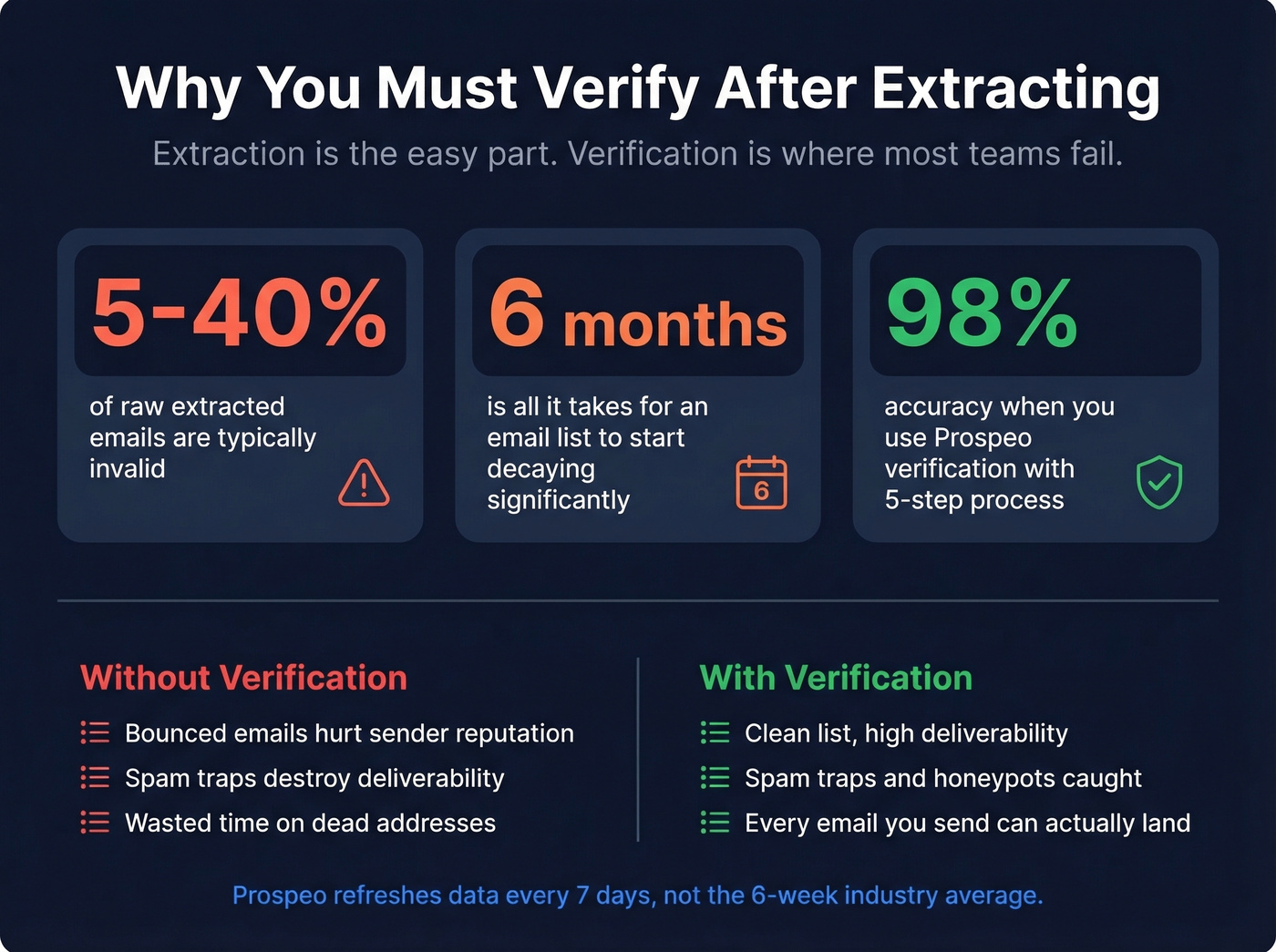
Let's be honest: if your extracted list is more than 6 months old, assume a large chunk of it is garbage. Depending on the source, raw lists typically contain 5-40% invalid addresses. An email address that was valid when someone emailed you in 2022 could now be a dead mailbox, a recycled spam trap, or a catch-all domain that accepts everything but delivers nothing. Sending to these addresses doesn't just waste your time - it damages your domain reputation with every bounce.
If you want to benchmark and fix bounces, see our guide to email bounce rate.
We've seen teams waste entire weeks cleaning stale Gmail exports when they could've started with verified data. Real results tell the story: Meritt dropped their bounce rate from 35% to under 4% after switching to verified contact data. If you're working with an extracted list, run it through a verification service before you send a single email. Even a free tier with 75-100 checks is enough to sample your list and see how bad the damage is.
To go deeper on deliverability, use an email deliverability guide and a sender reputation checklist.
You just spent time extracting emails from Gmail. Now half will bounce. Prospeo's 5-step verification catches spam traps, honeypots, and dead addresses before they torch your domain - at roughly $0.01 per verified email.
Clean data costs less than cleaning up bounced campaigns.
Is Extracting Emails from Gmail Legal?
Extracting emails from your own inbox to build a contact list sits in a gray area. The emails were sent to you, but that doesn't grant consent to add senders to a marketing campaign.
GDPR treats email addresses as personal data. Processing requires a legal basis - typically consent or legitimate interest. Fines reach up to euro20M or 4% of global annual revenue. That applies to any EU resident's data, regardless of where your company is based.
CAN-SPAM is less restrictive on collection but strict on sending: accurate headers, a physical mailing address, a clear unsubscribe link, and honoring opt-outs within 10 business days. Penalties run up to $46,517 per email.
If you’re unsure about list sourcing, read Is it illegal to buy email lists?.
Quick Compliance Checklist
- Extracting contacts you've personally corresponded with: generally fine
- Adding those contacts to a marketing list without consent: risky under GDPR
- Cold outreach in the US: CAN-SPAM focuses on meeting specific sending requirements (headers, address, unsubscribe, opt-out handling)
- Always include an unsubscribe mechanism and your physical address
- Keep records of where each address came from - you'll need them if challenged
FAQ
Can I extract emails from Gmail without a Chrome extension?
Yes. Google Apps Script pulls every address from any Gmail label into Google Sheets - free, no extension required, and your data never leaves your Google account. Python with imaplib over IMAP is another extension-free option with full programmatic control.
Is it safe to use an email extractor extension?
Some have been flagged for storing data on external servers and running background processes. Before installing, check the publisher's identity, review permissions, and look for third-party security audits like Bishop Fox's review of Digital Inspiration's add-on. Avoid extensions requesting access to all URLs.
What's the best free Gmail email extractor?
Google Apps Script. It's built into Google Workspace, handles large mailboxes with pagination in batches of 100, and keeps your data inside your Google account. No installs, no permissions to grant, no external servers involved.
How do I verify emails after extracting them?
Run your extracted list through a verification service before sending - raw lists typically contain 5-40% invalid addresses depending on age and source. Prospeo's free tier covers 75 verifications per month at 98% accuracy, and Clearout offers 100 free credits for budget-conscious teams.
Is extracting email addresses from Gmail legal?
Extracting your own contacts is generally fine. Using those addresses for unsolicited marketing triggers GDPR (fines up to euro20M) and CAN-SPAM ($46,517 per email). Always include an unsubscribe link, honor opt-outs within 10 business days, and document where each address originated.