

Gmail Promotions Tab: What It Is, What Changed, and How to Win in 2026
You just sent your best campaign. Open rates are half what they were last year. Everything's landing in Promotions. Your CEO asks why email revenue is down.
Here's the thing: the Gmail Promotions tab isn't your enemy. It's a sorting layer, not a death sentence - and after Gmail's September 2025 update, the rules for winning inside it changed significantly.
The Short Version
- Promotions is inbox, not spam. 79.7% of Gmail users check it at least weekly. Your emails are being seen.
- The September 2025 "Most Relevant" update rewards engagement history, not cosmetic email design tricks. A clean, engaged list does more than a fancy template ever will.
- The fastest path to better visibility: verify your list, segment by engagement, and add Gmail annotations for deal badges and product carousels.
What Is the Promotions Tab?
Gmail sorts your inbox into five tabs: Primary, Social, Promotions, Updates, and Forums. The Promotions tab is where marketing and commercial emails land - newsletters, sale announcements, product updates from brands you've subscribed to.
The critical distinction: Promotions isn't spam. Gmail's spam filtering is entirely separate from category sorting, and categorized messages are still in the inbox. Think of tabs as a filing cabinet, not a trash can. Gmail uses machine learning to decide tab placement, factoring in sender patterns, content signals, and how you've interacted with similar messages before.
Do People Actually Check It?
Yes - and the data is more encouraging than most marketers assume. A Mailgun consumer survey reported by Oracle found that among Gmail users with tabs enabled, 79.7% check Promotions at least weekly and 51% check it every day.
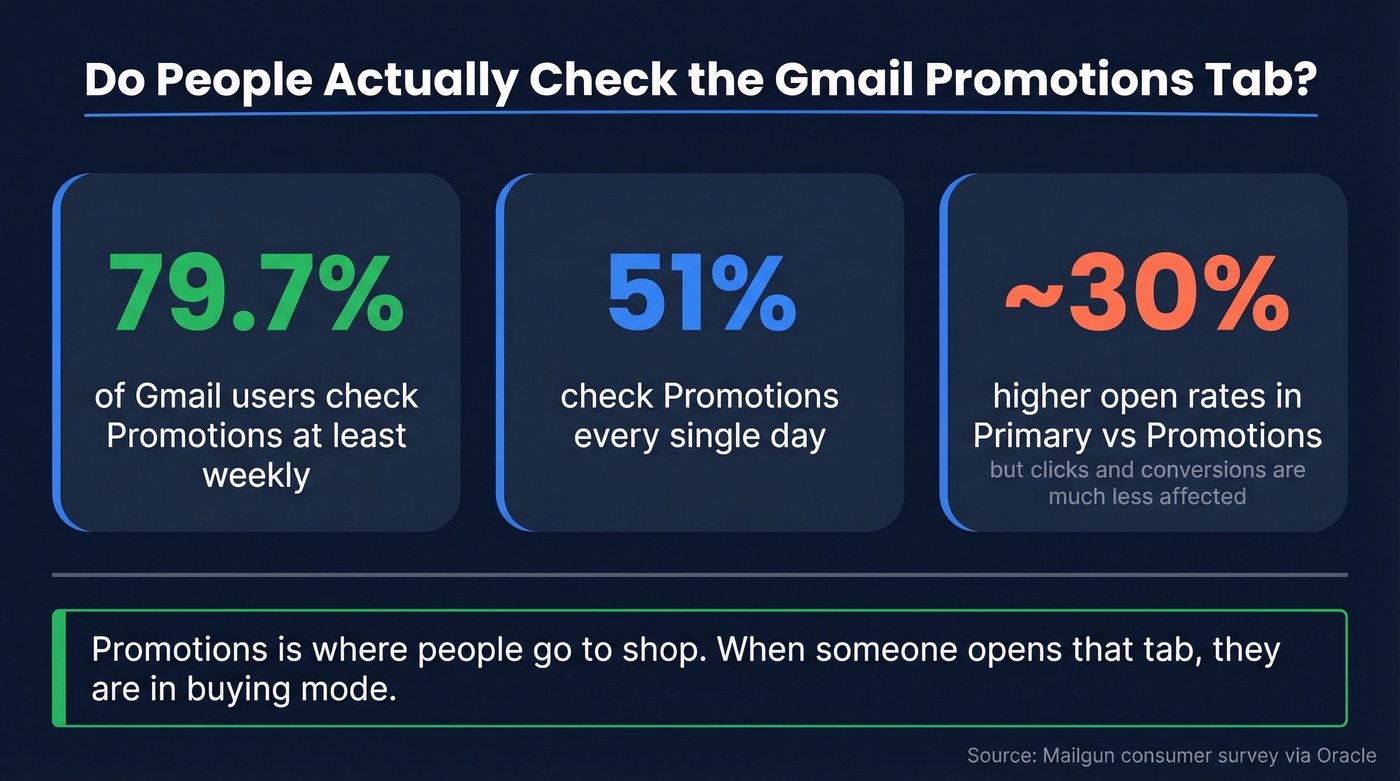
Landing in Primary does boost open rates - roughly 30% higher than Promotions placement. But downstream metrics like clicks and conversions are much less affected. Opens inflate in Primary partly because of tab visibility, not because recipients are more interested.
Promotions is where people go to shop. When someone opens that tab, they're in buying mode. Primary is where they read emails from coworkers. Which mindset do you actually want your offer in front of?
How Does Gmail Classify Emails?
Gmail's categorization engine is ML-driven and weighs several signal types:
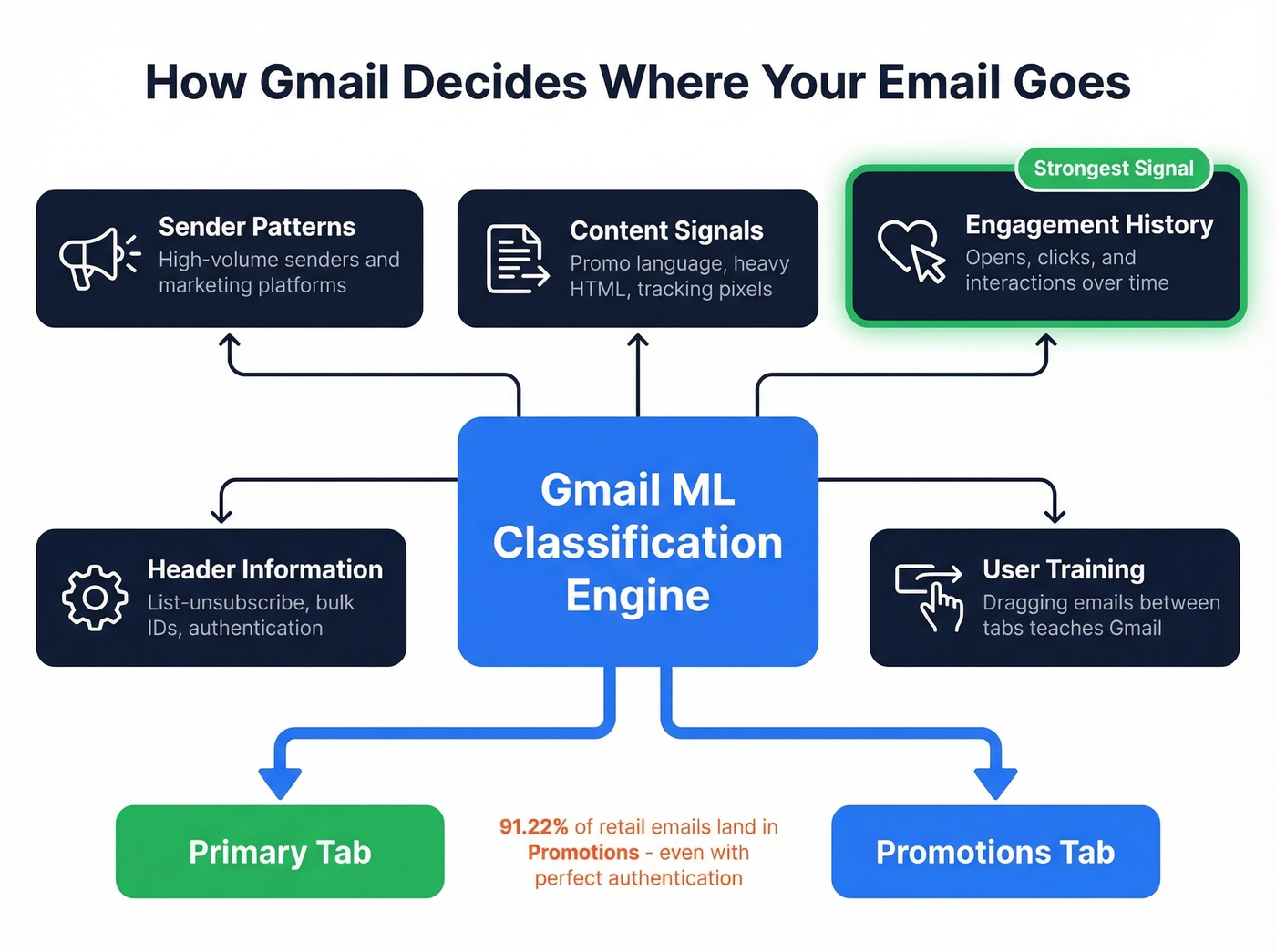
- Sender patterns - high-volume senders, especially those using marketing platforms, often get categorized as promotional
- Content signals - promotional language, multiple images, heavy HTML, and tracking pixels push toward Promotions
- Engagement history - how recipients interact with your emails over time
- Header information - list-unsubscribe headers, bulk-sender identifiers, and authentication records
- User training - when a recipient drags your email to a different tab, Gmail learns
In one retail benchmark, 91.22% of retail emails land in Promotions. Even with 99.89% SPF/DKIM compliance, authentication alone doesn't prevent promotional categorization. Authentication keeps you out of spam, not out of Promotions.
Most "avoid Promotions" advice is outdated. Single-word subject line tricks don't move the needle. Gmail weighs sender patterns and engagement history far more heavily than whether your subject line has an emoji in it.

Gmail's "Most Relevant" sorting buries senders with bad engagement. The fastest fix? Stop sending to invalid addresses. Prospeo's 5-step verification catches spam traps, honeypots, and catch-all domains - delivering 98% email accuracy at $0.01 per email.
Clean your list before Gmail's algorithm cleans it for you.
The September 2025 Update
On September 11, 2025, Google announced the biggest change to the Promotions tab in years. The tab shifted from chronological ("Most Recent") to algorithmic ("Most Relevant") sorting by default. Users can switch back, but relevance is now the default experience.
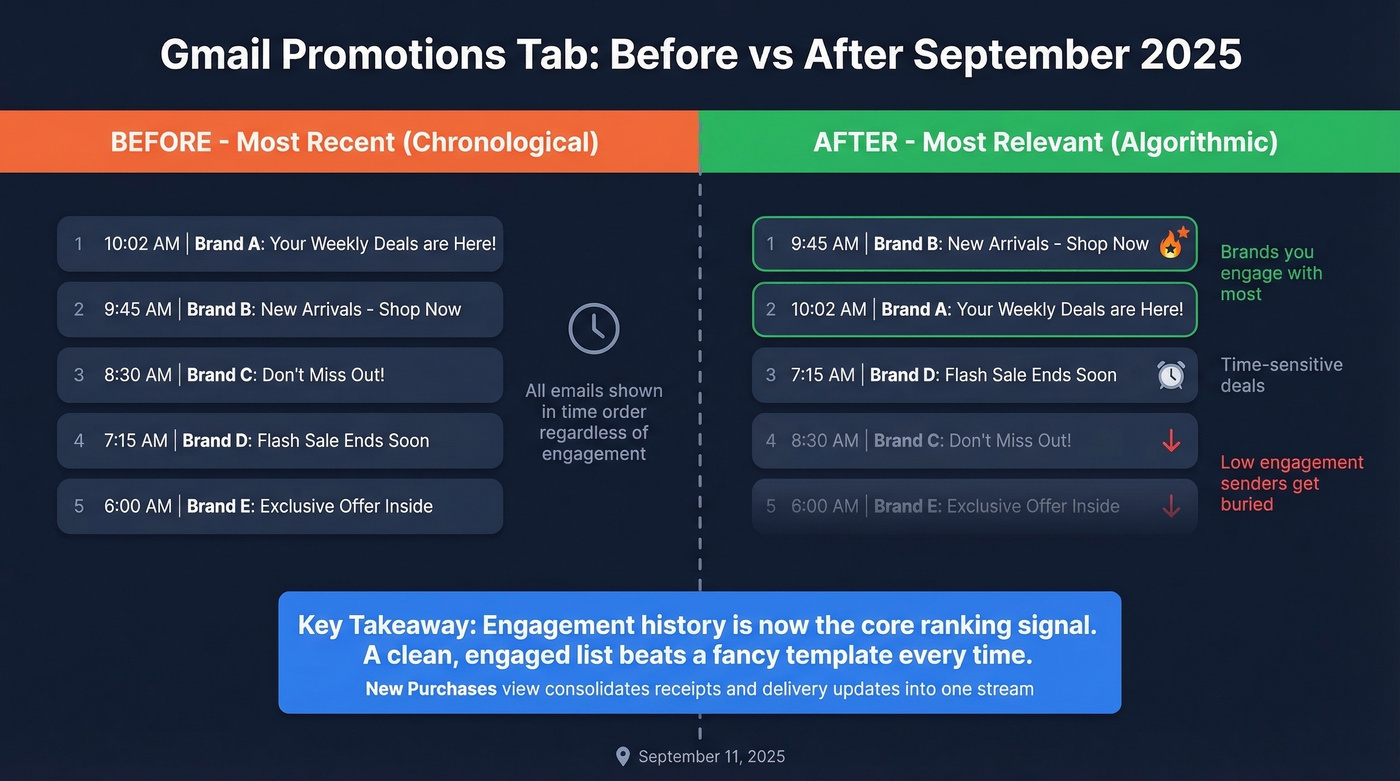
"Most Relevant" surfaces offers from brands a recipient engages with most, plus nudges for time-sensitive deals. If your list is full of inactive subscribers who never open your emails, Gmail buries you. Engagement history became the core ranking signal.
Google also introduced a Purchases view that consolidates receipts, order confirmations, and delivery updates into a single stream. Packages arriving within 24 hours can surface at the top of Primary - a nice touch for e-commerce brands.
Let's be honest about what this means: stop trying to escape Promotions. Google has placed paid ads there since 2023. It's a revenue center for them. It's permanent. Optimize for it instead.
What Happens When Tabs Disappear?
If your tabs suddenly vanished, the most common culprit is a settings change you don't remember making. Some users intentionally hide Promotions to consolidate everything into a single stream, but this can cause its own problems - like marketing emails cluttering Primary.
- Check Smart Features. Settings → General → "Smart Features and Personalization." If disabled, Gmail can remove tabs entirely. Re-enable it. This is the fix Reddit users consistently report.
- Verify inbox type. Settings → Inbox → Inbox type must be "Default" for tabs to appear.
- Check filters. A filter can reroute emails before they reach Promotions. Review Settings → Filters and Blocked Addresses.
- Restart and clear cache. On mobile, force-close Gmail. On desktop, try incognito to rule out extension interference.
Moving Emails to Primary
For a specific sender's emails, you have a few options - but only one we'd trust long-term.
Create a filter. Go to Settings → Filters → Create new filter. Enter the sender's address, then set "Categorize as: Primary" and "Never send it to Spam." That's it.
You can also drag-and-drop an email from Promotions to Primary (Gmail will ask to do this for future messages), add the sender to Contacts, or disable tabs entirely. Those methods work in the moment but aren't always consistent. The filter is the one that sticks.
Marketer Optimization Tactics
Since you can't reliably escape Promotions, the winning strategy is to dominate inside it. On r/Emailmarketing, senders report that even stripped-down, plain-text emails still land in Promotions after the 2025 update. The design of your email isn't the main variable anymore - your engagement history is.
Engagement Segmentation
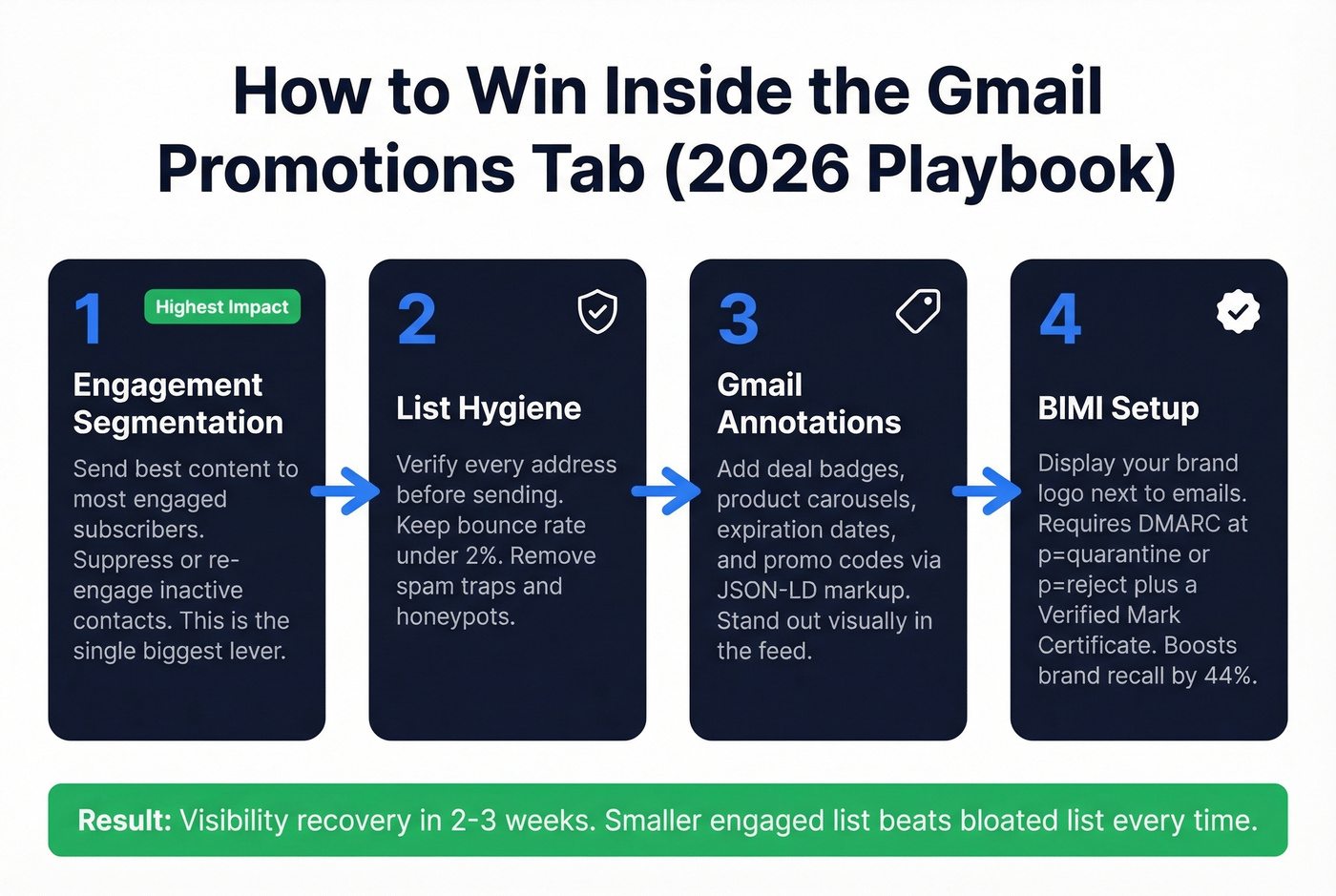
This is the single biggest lever. Gmail's "Most Relevant" sorting rewards senders whose recipients actually open, click, and interact. Segment aggressively: send your best content to your most engaged subscribers, and suppress or re-engage inactive contacts.
We've seen senders recover visibility within two to three weeks of cleaning their lists and tightening segments. A smaller, engaged list outperforms a bloated one every time - and it's not close.
List Hygiene
High bounce rates from unverified addresses damage sender reputation, pushing emails deeper into Promotions or straight into spam. Verify every address before you send. Prospeo runs 5-step verification with spam-trap and honeypot removal, catching the bad data that silently tanks deliverability. You can verify your first 75 emails free.

Keep your bounce rate under 2%. That's the threshold where problems start compounding. If you need a deeper benchmark breakdown, see bounce rate.
Gmail Annotations
Gmail annotations let you add deal badges, product carousels, expiration dates, and promo codes directly to your email's preview via JSON-LD or Microdata. Gmail also auto-extracts deal info and logos without markup, but manual annotations give you more control over what recipients see before they even open the message. If you're running promotions with specific discount codes or time-limited offers, annotations are worth the setup effort - they make your email visually distinct in a crowded feed where every other message looks like a plain subject line and preview snippet.
If you're testing different preview treatments, pair this with preview snippet experiments.
BIMI
Brand Indicators for Message Identification displays your brand logo next to your emails in the inbox. RedSift research shared by Litmus shows BIMI increases brand recall by 44%. It requires DMARC enforcement at p=quarantine or p=reject, plus a Verified Mark Certificate - expect a few weeks of setup if you're starting from scratch. In a crowded Promotions feed, a recognizable logo makes your email the one that gets clicked.
To get the foundations right, review DMARC and your SPF setup.
List hygiene isn't optional after the 2025 Promotions update - it's the ranking signal. Prospeo refreshes 300M+ profiles every 7 days (not 6 weeks like competitors), so you're never emailing stale contacts that tank your sender reputation.
Bounce rates under 4% start with data that's actually fresh.
Tabs Are Everywhere Now
Gmail isn't the only inbox sorting marketing emails into a separate view. This is standard across major email clients.
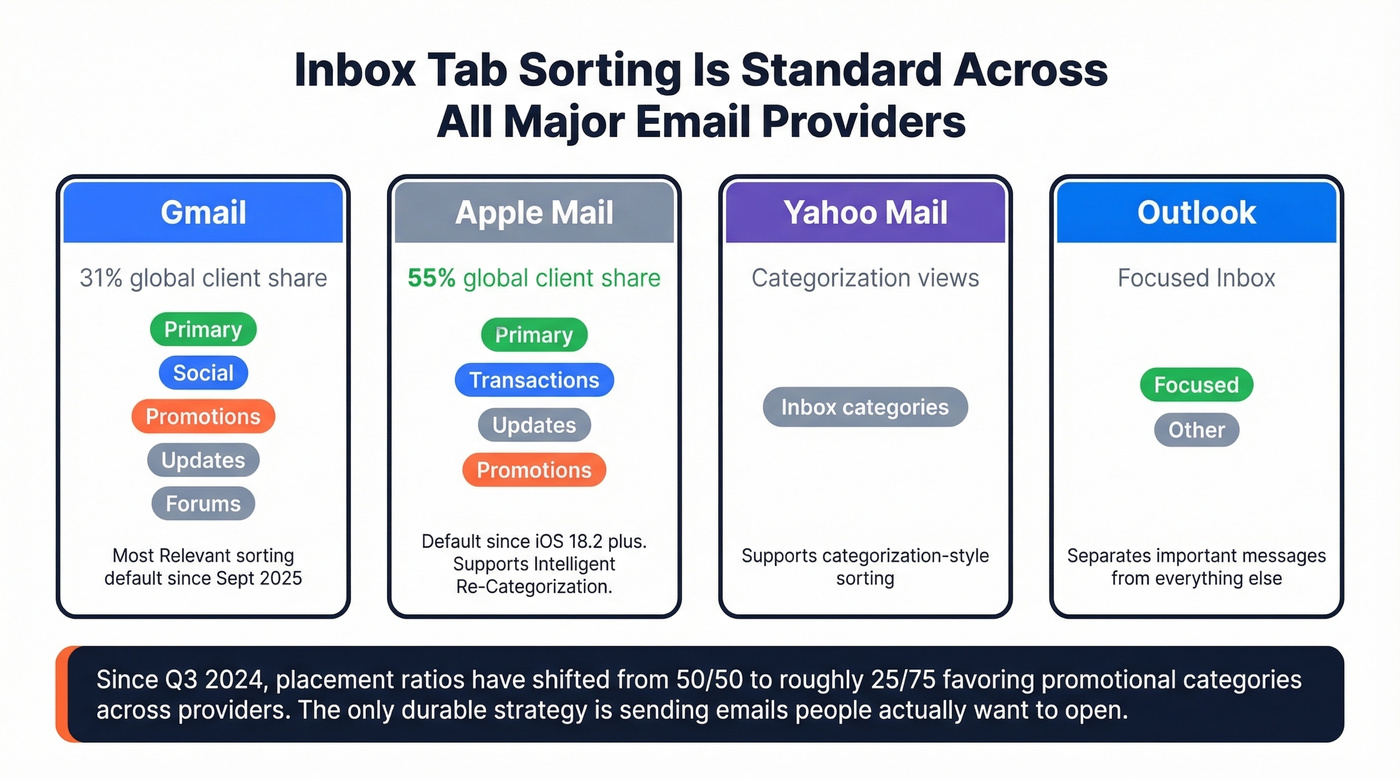
| Provider | Tab / Category Names | Notes |
|---|---|---|
| Gmail | Primary, Social, Promotions, Updates, Forums | Default inbox experience for most users |
| Apple Mail | Primary, Transactions, Updates, Promotions | Enabled by default starting iOS 18.2+ |
| Yahoo Mail | Inbox categorization views | Supports categorization-style sorting |
| Outlook | Focused / Other | Focused Inbox separates important messages |
Apple Mail's categories are enabled by default starting iOS 18.2+, and Apple Mail holds roughly 55% of global email client share compared to Gmail's 31%. Apple Mail also uses Intelligent Re-Categorization, which can mirror time-sensitive messages into Primary even if they were initially categorized elsewhere - something Gmail doesn't do.
Since Q3 2024, some senders have seen placement ratios shift from 50/50 Primary/Promotions to roughly 25/75, with more emails landing in promotional categories across providers. "Solving" Gmail's sorting doesn't solve the cross-ISP reality. The only durable strategy is sending emails people actually want to open - regardless of which tab they land in.
If you're building a repeatable system for outbound, align this with your email deliverability and sender reputation playbooks.
FAQ
Is the Gmail Promotions tab the same as spam?
No. Promotions is inside your inbox - it's a category, not a penalty. Gmail's spam filtering is entirely separate from tab categorization, and messages in Promotions are still delivered inbox messages that 79.7% of users check weekly.
Can I permanently move a sender to Primary?
Create a filter: Settings → Filters → new filter with the sender's address → "Categorize as: Primary" and "Never send it to Spam." This is the most reliable method. Drag-and-drop works in the moment but isn't always consistent long-term.
How do I keep marketing emails out of spam?
Authenticate with SPF, DKIM, and DMARC. Keep your bounce rate under 2% by verifying addresses before sending. Segment your list to send only to engaged subscribers, since engagement history is a dominant signal Gmail uses to rank emails after the September 2025 update.
Why did my Gmail tabs disappear?
The most common cause is disabling "Smart Features and Personalization" in Gmail settings. Re-enable it under Settings → General, then confirm your inbox type is set to "Default" under Settings → Inbox. Tabs only appear with the Default inbox type active.