

Gmail Rate Limits: The Complete Reference (Plus What Google Won't Tell You)
A user on r/Gmail got blocked after sending 12 emails. Not 500. Not 2,000. Twelve. Gmail rate limits are supposed to be straightforward - 500/day for personal accounts, 2,000/day for Workspace - but the reality is messier. Gmail enforces behavioral rules that shut you down well below those caps, and the error messages won't tell you why.
We've spent enough time debugging these blocks for our own outreach and for customers that we can walk you through what's actually happening under the hood.
Quick Reference
- Personal Gmail: 500 emails/day, 100 recipients/message
- Google Workspace: 2,000 emails/day, 2,000 total recipients/message (max 500 external)
- Real-world safe limit for outreach: 100-150/day on Workspace. Never use free Gmail for cold email.
- Gmail blocks accounts based on behavior, not just quotas - you can get blocked at 15 emails
- The fix: clean data, proper authentication, gradual warm-up
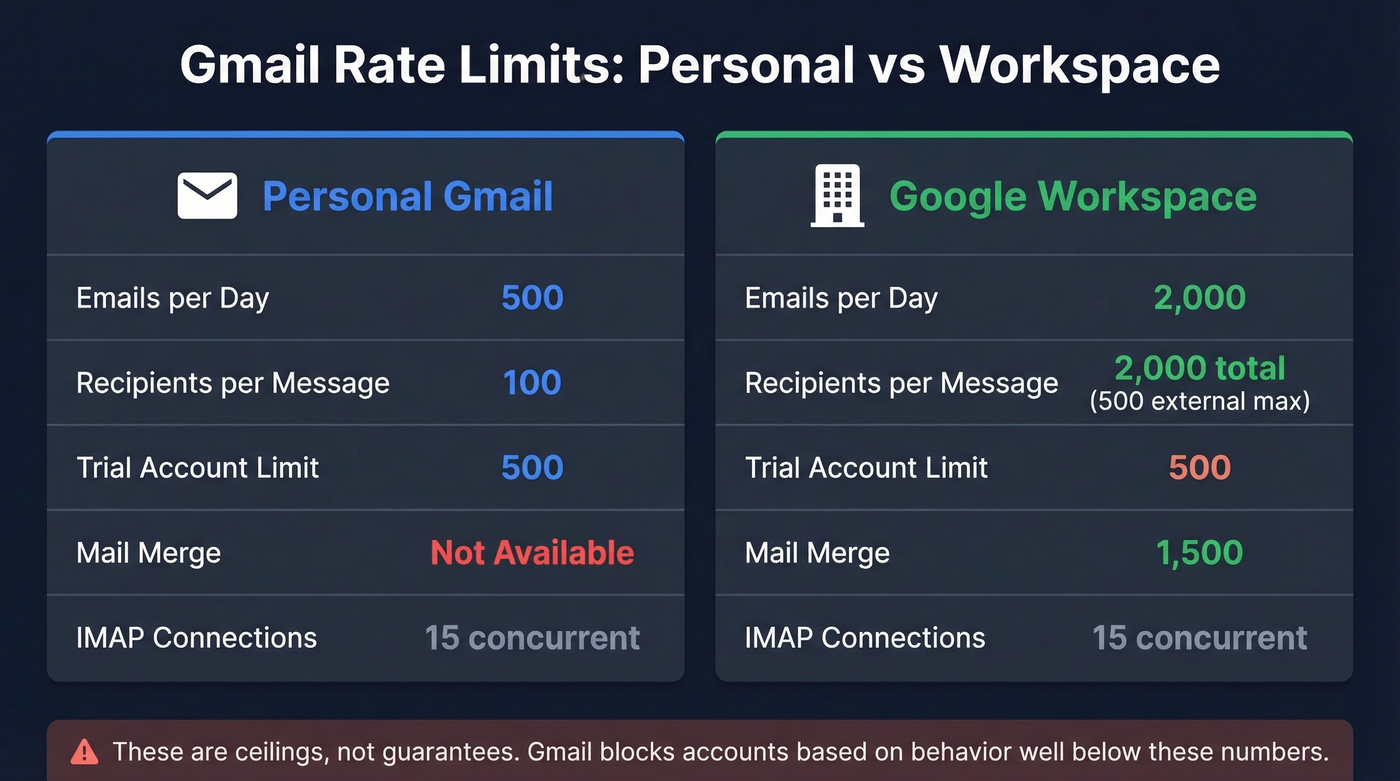
Every Sending Limit in One Table
The core caps (500/day for consumer Gmail, 2,000/day for Workspace) are well documented by Google's own support pages. The "safe sending" guidance below comes from cold email deliverability research and community practice. Some connection and bandwidth limits are less clearly documented in a single official source, so we've included widely-cited operational limits for completeness.
| Limit Type | Personal Gmail | Google Workspace |
|---|---|---|
| Emails/day | 500 | 2,000 |
| Recipients/message | 100 | 2,000 total (max 500 external) |
| Trial Workspace | 500 | - |
| Total recipients/day (Workspace) | N/A | ~10,000 |
| Mail merge (Workspace Std) | N/A | 1,500 |
| IMAP connections | 15 concurrent | 15 concurrent |
| IMAP download | 2,500 MB/day | 2,500 MB/day |
| IMAP upload | 500 MB/day | 500 MB/day |
| API quota | Varies by method | Varies by method |
The daily limit runs on a rolling 24-hour window, not a midnight reset. If you sent 400 emails at 3 PM yesterday, your full quota won't return until 3 PM today.
The 15 concurrent IMAP connections catch people off guard too. A desktop client, laptop, phone, and tablet can exhaust that limit just through normal sync activity.
What Counts Toward Your Limit
Every recipient address counts as one, regardless of how it got there:
- New emails (each To, CC, and BCC address = 1)
- Replies and forwards
- Vacation/auto-responder messages
- Emails sent from aliases tied to your account
- Warm-up emails from tools like Lemwarm or Mailreach
- Messages sent through Google Groups
Send one email to 50 CC'd people and you've burned 50 of your daily quota in a single click. That's the most common way people accidentally blow through limits.
Why Gmail Blocks You Below the Limit
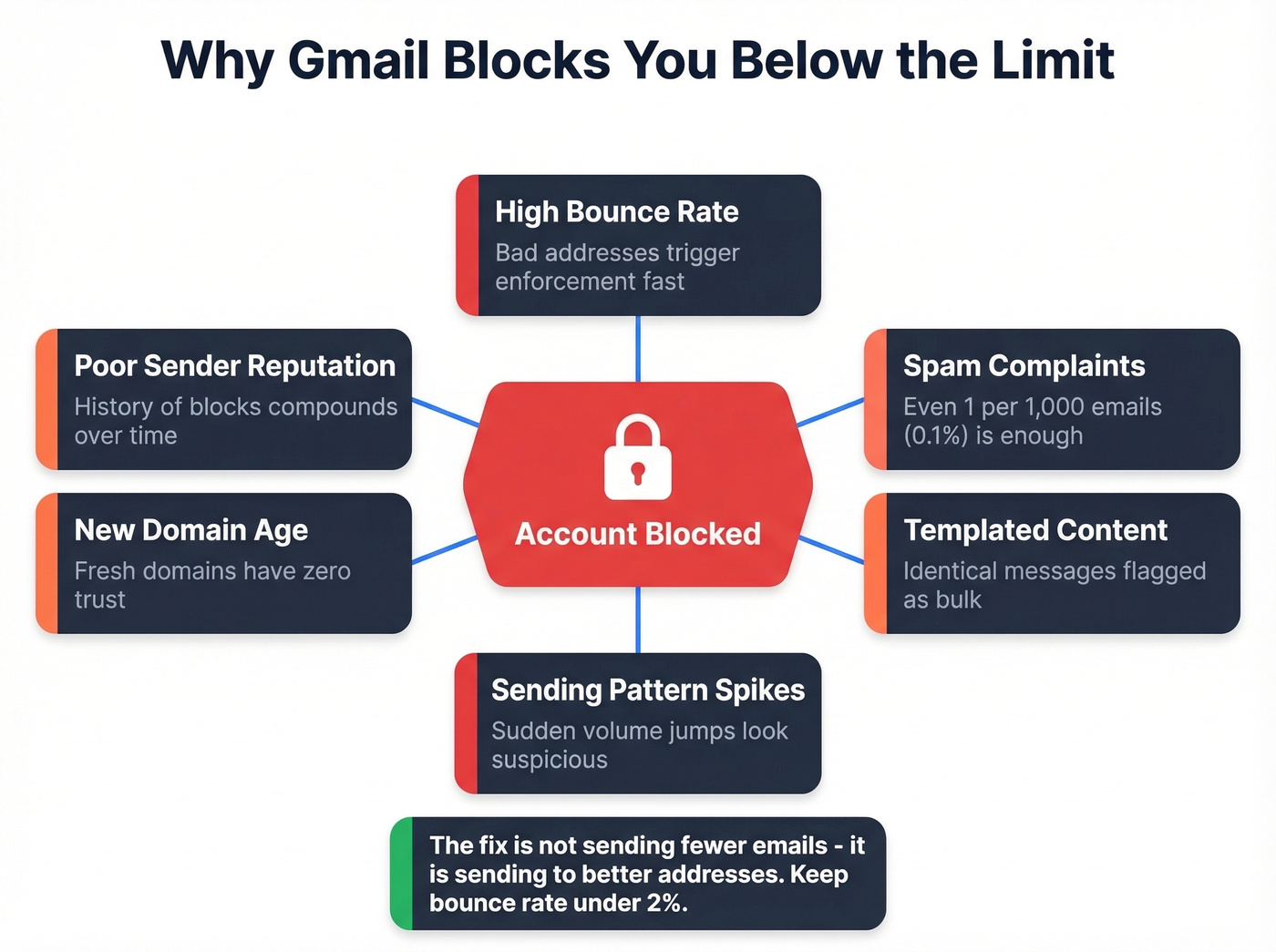
The 500/2,000 numbers are ceilings, not guarantees. Gmail runs behavioral enforcement underneath those quotas, and the system is opaque by design.
One Reddit user reported getting blocked after sending just 12-15 emails per day using Boomerang for scheduled sends. The block resolved the next day but recurred randomly - classic behavior-based enforcement. Another got locked out after about a dozen emails and was still blocked two days later.
Here's the thing: sub-quota blocks trigger from bounce rate spikes, spam complaints (even one per 1,000 emails - that 0.1% threshold is real), templated content, sending pattern anomalies, new domain age, and poor sender reputation. In practice, you'll run into three different problems that feel similar: temporary throttling, a daily sending cap, or a deeper account restriction. The error messages rarely clarify which one you're dealing with, which is genuinely frustrating when you're trying to diagnose the issue.

Most Gmail rate limit blocks are bounces in disguise. Prospeo's 5-step verification delivers 98% email accuracy - catching invalid addresses, spam traps, and honeypots before they torch your sender reputation. At $0.01 per email, clean data costs less than a single blocked inbox.
Stop debugging Gmail blocks. Start sending to verified addresses.
Error Messages Decoded
- "You have reached a limit for sending mail" - Daily quota hit, or Gmail's behavioral filter thinks you have
- "Message Blocked" - Content or reputation trigger. Your email looked spammy.
- "Message rejected" - Recipient-side rejection from the receiving server
- HTTP 429 (API) - Too many requests too fast
- HTTP 403 (API) - Quota exhausted or permission denied
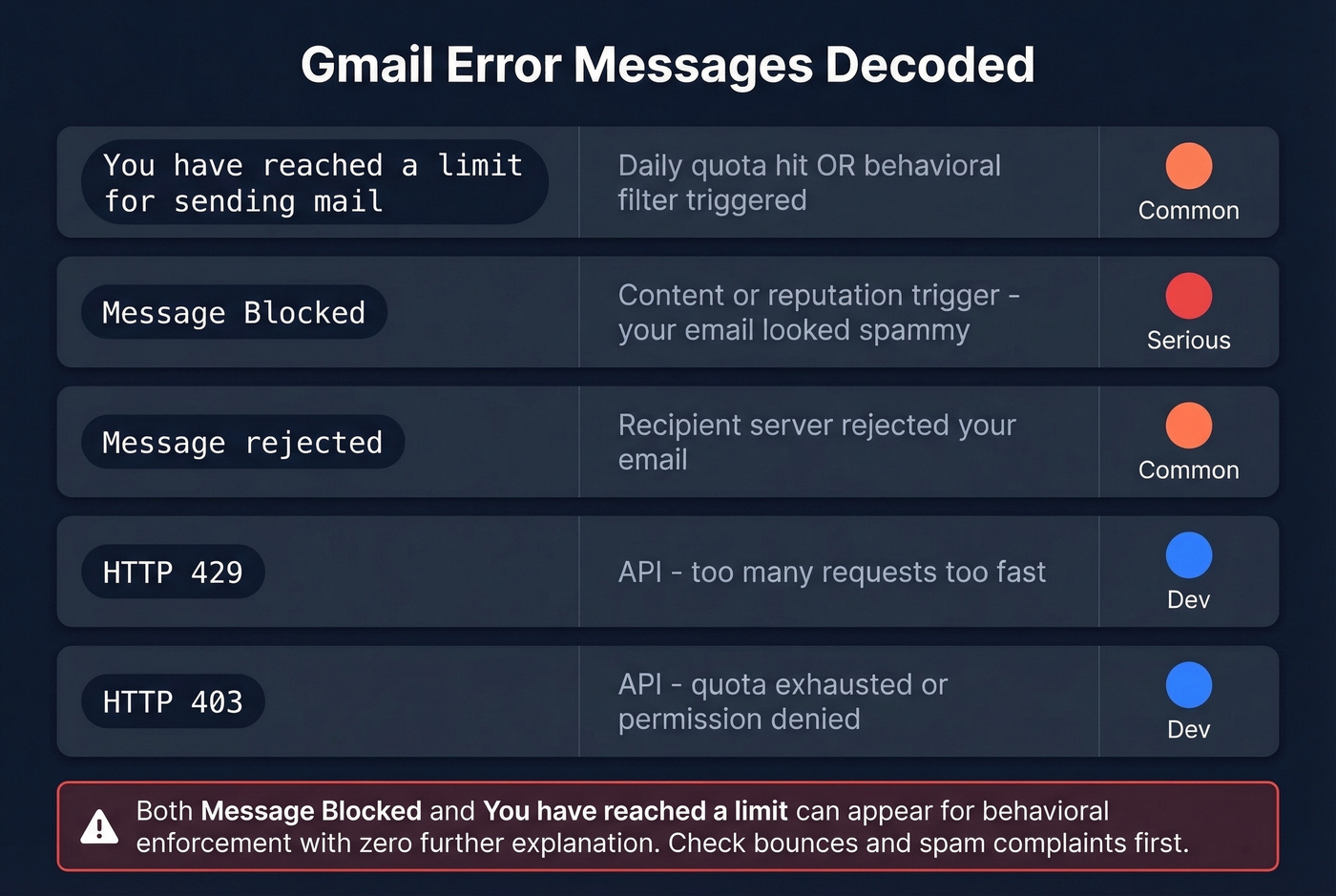
The fact that "Message Blocked" and "You have reached a limit" can both appear for behavioral enforcement - with zero further explanation - is one of Gmail's worst UX failures. We've seen teams waste hours chasing the wrong root cause because the error pointed them in the wrong direction.
What to Do When You Hit a Limit
- Stop sending immediately. Every additional attempt can extend the block.
- Wait 48 hours, not just 24. Google's help content references 24 hours, but real blocks often last longer.
- Check your sent folder for bounces and spam complaints. These are the root cause more often than volume.
- If you're still blocked, try g.co/recover or accounts.google.com/signin/recovery.
- Verify SPF/DKIM/DMARC are properly configured on your domain. Missing authentication makes everything worse.
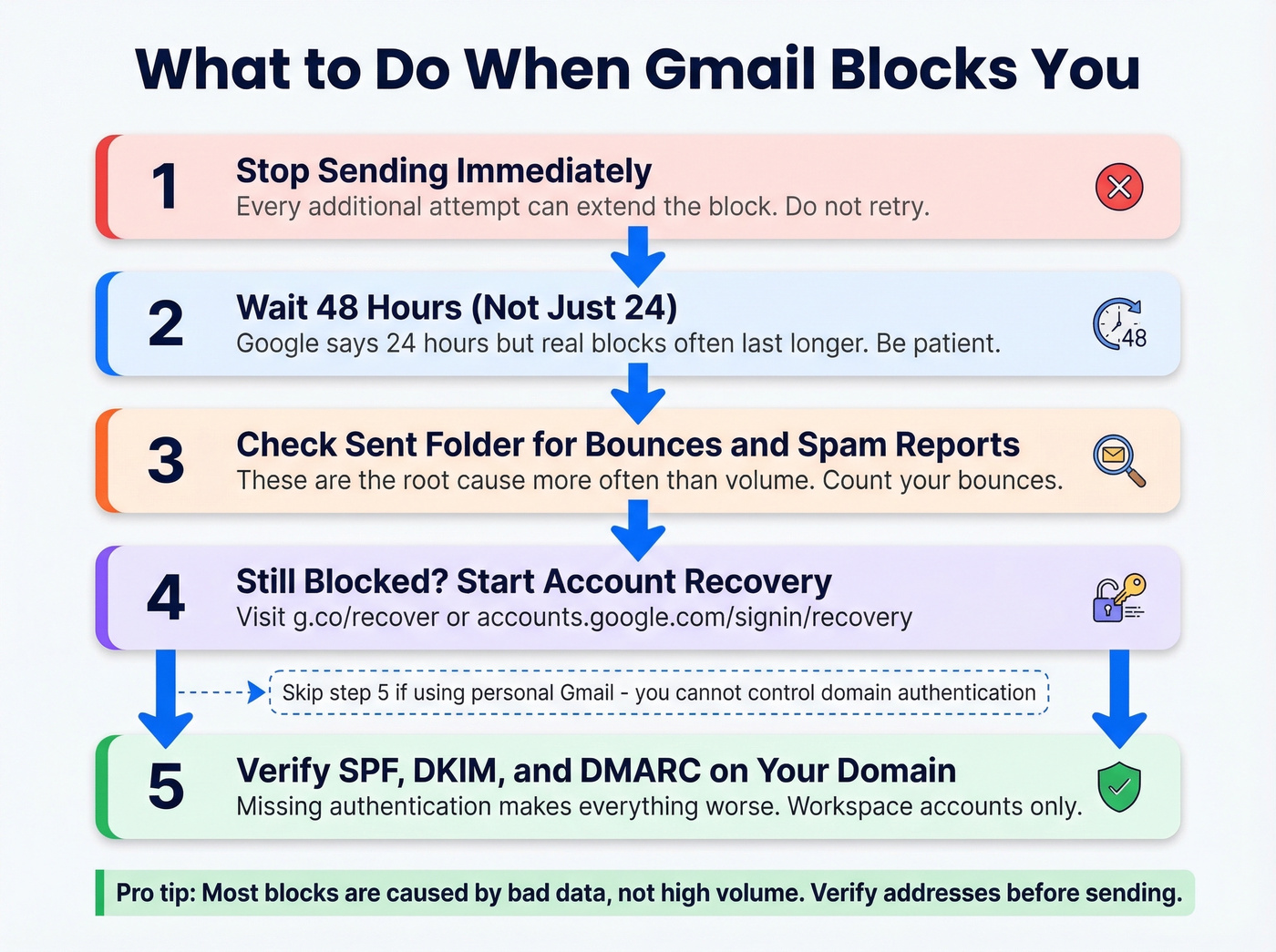
Skip step 5 if you're on a personal Gmail account - you don't control domain authentication there, which is one more reason free Gmail isn't viable for outreach.
Safe Limits for Cold Outreach
The 2,000/day limit is a ceiling, not a target. Experienced cold emailers treat 100-150 emails per day per Workspace inbox as the practical safe zone. The consensus on r/coldemail is even more conservative: 10-15 emails per inbox per day, with 2-3 inboxes per domain, giving you 30-45 sends per domain.
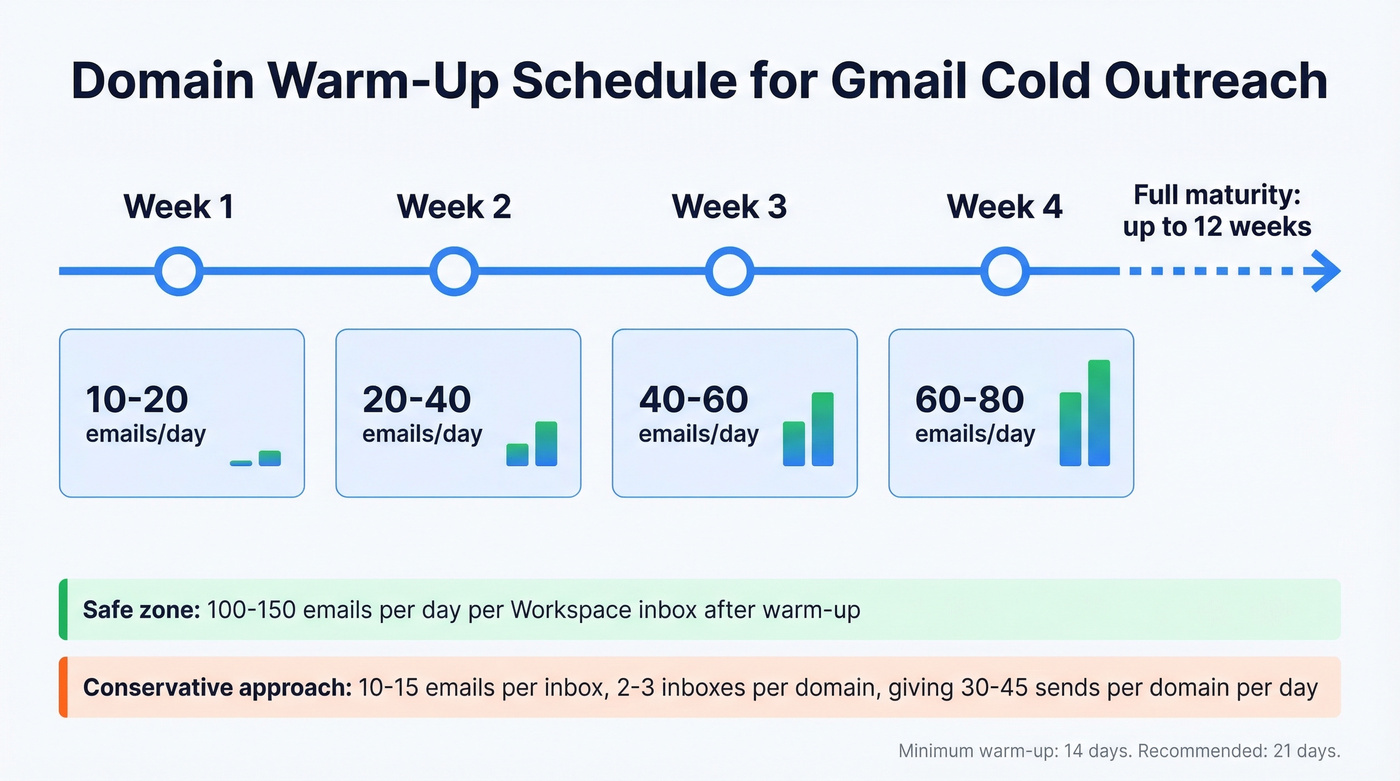
New domains need a warm-up ramp:
| Week | Emails/Day |
|---|---|
| Week 1 | 10-20 |
| Week 2 | 20-40 |
| Week 3 | 40-60 |
| Week 4 | 60-80 |
Minimum warm-up period is 14 days; 21 is better. Full domain maturity can take up to 12 weeks, but you can start sending cautiously after 2-3 weeks. Keep warm-up running after you launch campaigns - it maintains engagement signals that protect your deliverability.
Let's be honest about something most guides won't say directly: the majority of Gmail sending limit problems are actually data quality problems wearing a disguise. Bad addresses cause bounces, bounces trigger behavioral enforcement, enforcement triggers blocks. The fix isn't sending fewer emails - it's sending to better addresses. In our experience, if your bounce rate stays under 2%, you'll almost never see a sub-quota block.
Preventing Blocks Before They Happen
Verify every address before it enters a sequence. Prospeo's 5-step verification catches invalid addresses, handles catch-all domains, removes spam traps, and filters honeypots - 98% email accuracy at roughly $0.01 per email. Verified data keeps bounce rates under 2%, which keeps Gmail's behavioral enforcement off your back.
Beyond verification: configure SPF, DKIM, and DMARC on every sending domain. Google requires OAuth 2.0 for IMAP/SMTP access in many setups, and password-based authentication is widely deprecated or disabled. Monitor your spam complaint rate closely. That 0.1% threshold isn't a suggestion; crossing it risks domain blacklisting.
If you want a deeper playbook on keeping volume safe, start with email deliverability and then dial in your email velocity so your sending pattern looks human.

You're warming up domains for weeks, throttling to 15 emails a day, and still getting blocked - because the addresses are bad. Prospeo verifies every email across catch-all domains, removes honeypots, and refreshes data every 7 days. Teams using Prospeo keep bounce rates under 2% and never hit behavioral enforcement.
Fix the data and Gmail stops punishing you. It's that simple.
API Quotas for Developers
If you're hitting Gmail's API programmatically, the quota system has its own quirks. "Per user" means the Gmail account being accessed, not your developer account. Each account gets its own quota bucket.
The real gotcha is burst sensitivity. One developer on Stack Overflow reported getting 429 errors after just 5-6 successful sends in a script designed to send 100 emails every 10 minutes. The daily total looked fine, but per-second quota unit consumption was way over.
Implement exponential backoff: 1 second plus random jitter, then 2s, 4s, 8s, 16s. If you're still getting 429s after that, you're trying to use the Gmail API as a bulk mailer. Don't. Use SendGrid, Mailgun, or Amazon SES for volume sending - they're built for it, and you won't be fighting Google's rate limiter every step of the way.
If you're doing outreach at scale, it's also worth standardizing your sequence management so you don't accidentally create spammy patterns across inboxes.
FAQ
How long does a Gmail rate limit block last?
Most blocks lift within 24-48 hours, but some users report restrictions lasting up to 72 hours when triggered by spam complaints or high bounce rates. Wait at least two full days before attempting to send again. If you're still locked out, use g.co/recover to start account recovery.
Does Gmail count CC and BCC toward the daily limit?
Yes. Every recipient address - To, CC, and BCC - counts as one toward your daily sending limit. An email sent to 10 CC'd people uses 10 of your 500 or 2,000 quota.
How do I avoid Gmail rate limits for cold email?
Use Google Workspace (never free Gmail), warm up your domain for 2-3 weeks, stay under 100-150 emails per day, and configure SPF/DKIM/DMARC on your domain. Most blocks come from bounces and spam complaints, not raw volume. Verify every address before sending to keep bounce rates under 2% and avoid triggering behavioral enforcement.