

Gmail Sending Limit Size: Every Cap Explained
You hit send on a 22 MB presentation deck. Gmail rejects it. The stated limit is 25 MB, so what gives?
The answer involves encoding overhead that Google doesn't explain in the error message - and it's just one of a dozen caps scattered across four different support pages. Here's every Gmail sending limit size you need to know in 2026.
Every Cap at a Glance
| Limit | Free Gmail | Workspace (Starter-Plus) | Enterprise Plus |
|---|---|---|---|
| Attachment limit (send) | 25 MB | 25 MB | 50 MB |
| Incoming message size limit | 50 MB | 50 MB | 70 MB |
| Max files per email | 500 | 500 | 500 |
| Daily sending cap | 500 | 2,000 | 2,000 |
| Recipients per message | 100 | 100 | 100 |
| Practical file limit* | ~17-18 MB | ~17-18 MB | ~35 MB |
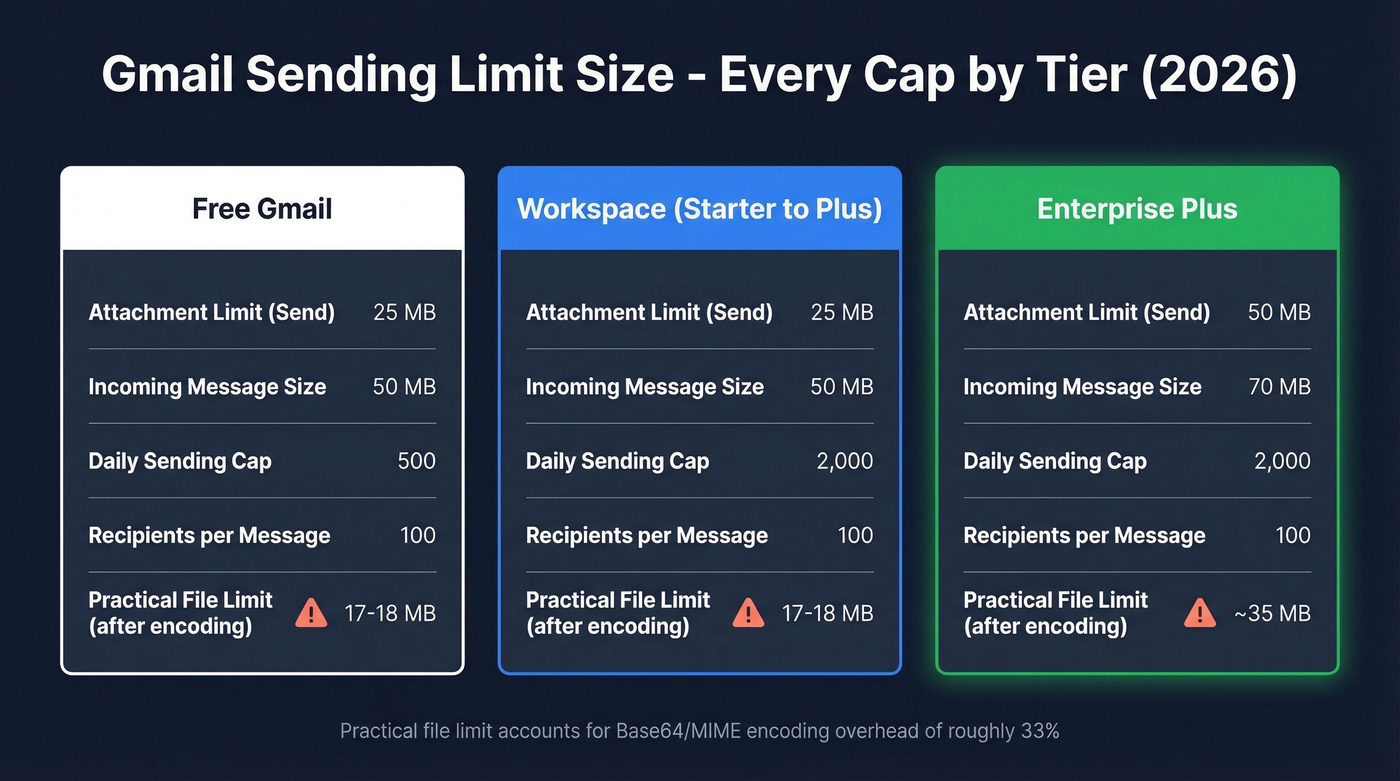
*After Base64/MIME encoding overhead. More on this below.
The daily caps run on a rolling 24-hour window, not a calendar-day reset. That distinction matters more than most people realize - you can't just wait until midnight.
What 25 MB Actually Means
Gmail's 25 MB cap sounds generous until you understand how email works under the hood. Every attachment gets encoded in Base64/MIME format before transmission, and that encoding inflates file size by roughly 33%. The total message size - headers, body text, and encoded attachments combined - must stay under the cap.
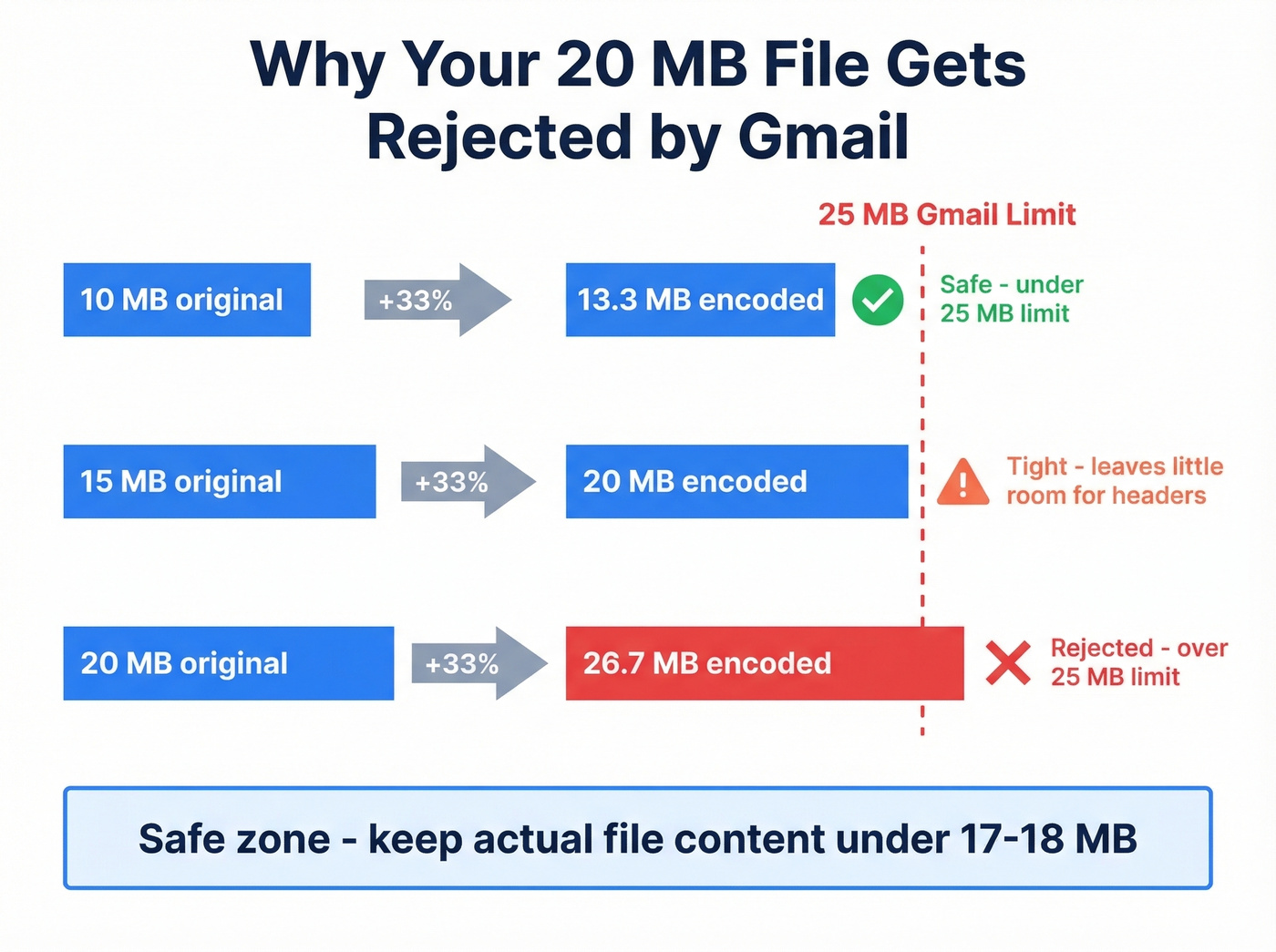
Here's the encoding math that trips everyone up:
- A 10 MB file becomes ~13.3 MB after encoding
- A 20 MB file becomes ~27 MB after encoding - over the limit
- A 15 MB file becomes ~20 MB - safe, but tighter than you'd think
Safe maximum: keep actual file content under 17-18 MB.
Inline images count toward the limit too. That signature logo your marketing team insists on? It's eating into your attachment budget on every single email. And if you exceed 25 MB total, Gmail uploads the attachments to Google Drive and inserts a Drive link instead - sometimes without warning you clearly.
Enterprise Plus Gets 50 MB
Google finally moved the needle. As of February 23, 2026, Enterprise Plus accounts can send attachments up to 50 MB directly and receive incoming messages up to 70 MB. The feature is admin-configurable, so your IT team needs to flip the switch.
But here's the thing - this is Enterprise Plus only. Business Starter, Standard, Plus, and Enterprise Standard all stay at 25 MB. If you're on any of those tiers, nothing changed for you.
Daily Sending Limits
Each recipient counts as one send. An email to 50 people in the To field burns 50 of your daily quota. CC and BCC addresses count the same way.
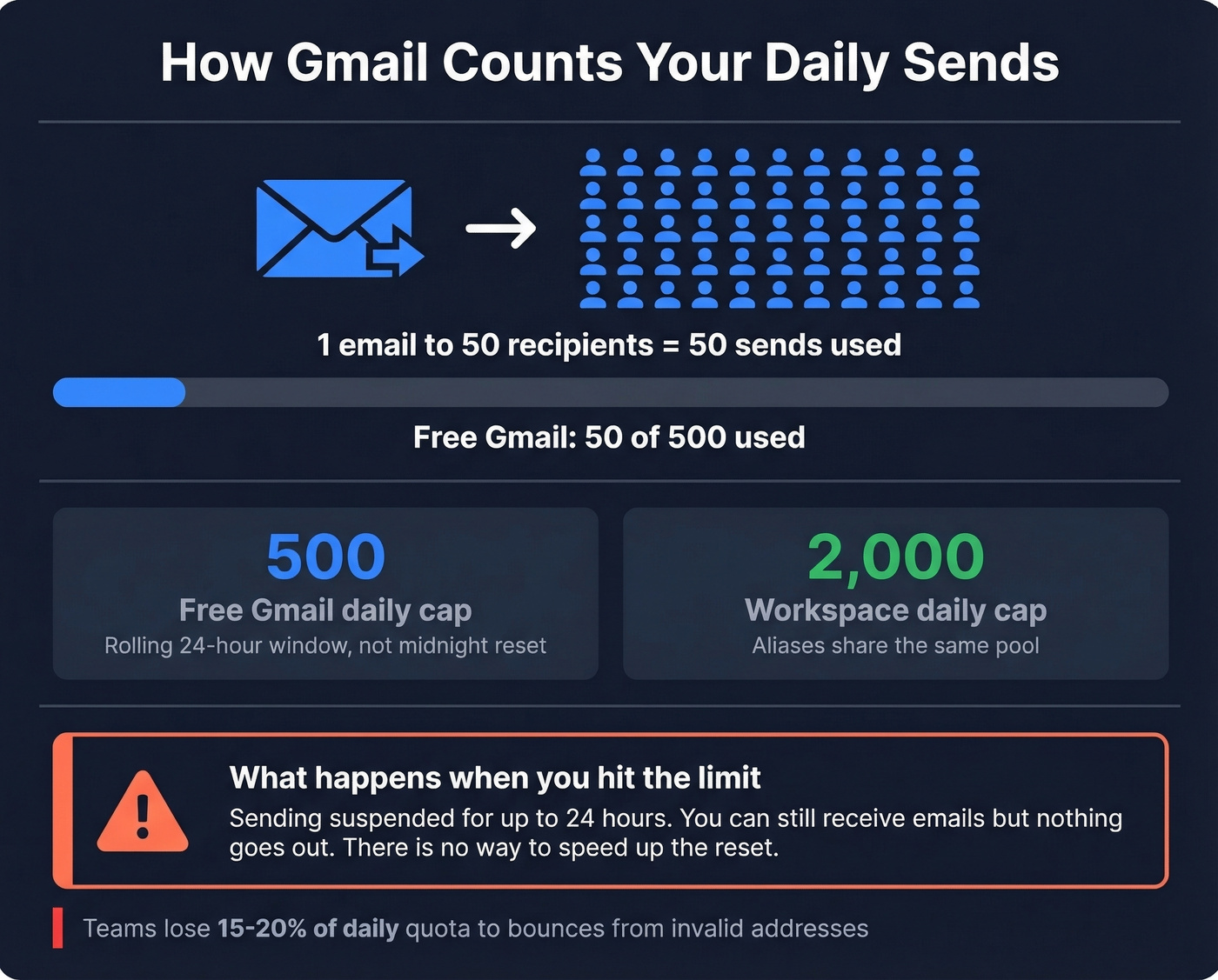
Free Gmail accounts cap at 500 emails per rolling 24 hours. Google Workspace bumps that to 2,000. Aliases don't help - your primary address and all aliases share the same pool. Gmail also throttles send rate at around 20 outgoing emails per hour, so you can trigger a temporary slowdown before you even approach the daily cap. (If you're planning outreach, it helps to understand email velocity so you don't get throttled early.)
What happens when you exceed the limit: Gmail suspends your sending ability for up to 24 hours. You can still receive emails, but nothing goes out. For a sales team running sequences, that's a dead day.
When you're working within 500 or 2,000 sends per day, every bounce is a wasted slot. We've seen teams lose 15-20% of their daily quota to invalid addresses before a single real prospect sees the email. Before launching any outbound campaign, verify your list - Prospeo catches invalid addresses at 98% accuracy, and the free tier gives you 75 verifications per month, enough to gut-check a list before you burn sends on dead addresses. (If you want the deeper mechanics, see our guide to email bounce rate and what it does to performance.)

With only 500-2,000 sends per day, every bounce is a wasted slot you can't get back. Prospeo's 98% email accuracy means your Gmail quota goes to real inboxes, not dead addresses. Start with 75 free verifications per month.
Stop burning Gmail sends on emails that don't exist.
Blocked File Types
Gmail blocks certain file types outright - the message bounces with no delivery, no notification to the recipient. The critical rule most people miss: these files are blocked even when they're inside .zip, .tar, or .gz archives. Gmail scans inside compressed files recursively.
Commonly blocked extensions include:
- .exe, .bat, .cmd, .com - Windows executables and scripts
- .dll, .cpl - System libraries
- .apk, .appx - Mobile/Windows app packages
- .cab, .chm - Windows installer and help files
- .iso, .img - Disk image files
This list isn't exhaustive - Google maintains a full reference that gets updated periodically. If you need to send an executable to a colleague, use Google Drive or a file-sharing service. Zipping it won't help.
How Gmail Compares to Other Providers
| Provider | Send Limit | Receive Limit | Large File Workaround |
|---|---|---|---|
| Gmail | 25 MB (50 MB Ent+) | 50 MB (70 MB Ent+) | Google Drive (15 GB free) |
| Outlook / M365 | 20 MB (web) / 34 MB (app) | 34 MB | OneDrive |
| Yahoo Mail | 25 MB | 25 MB | None built-in |
| iCloud Mail | 20 MB | 20 MB | Mail Drop (5 GB/file) |
| ProtonMail | 25 MB | 25 MB | Drive link workaround |
| Zoho Mail | 20 MB (personal) | - | - |
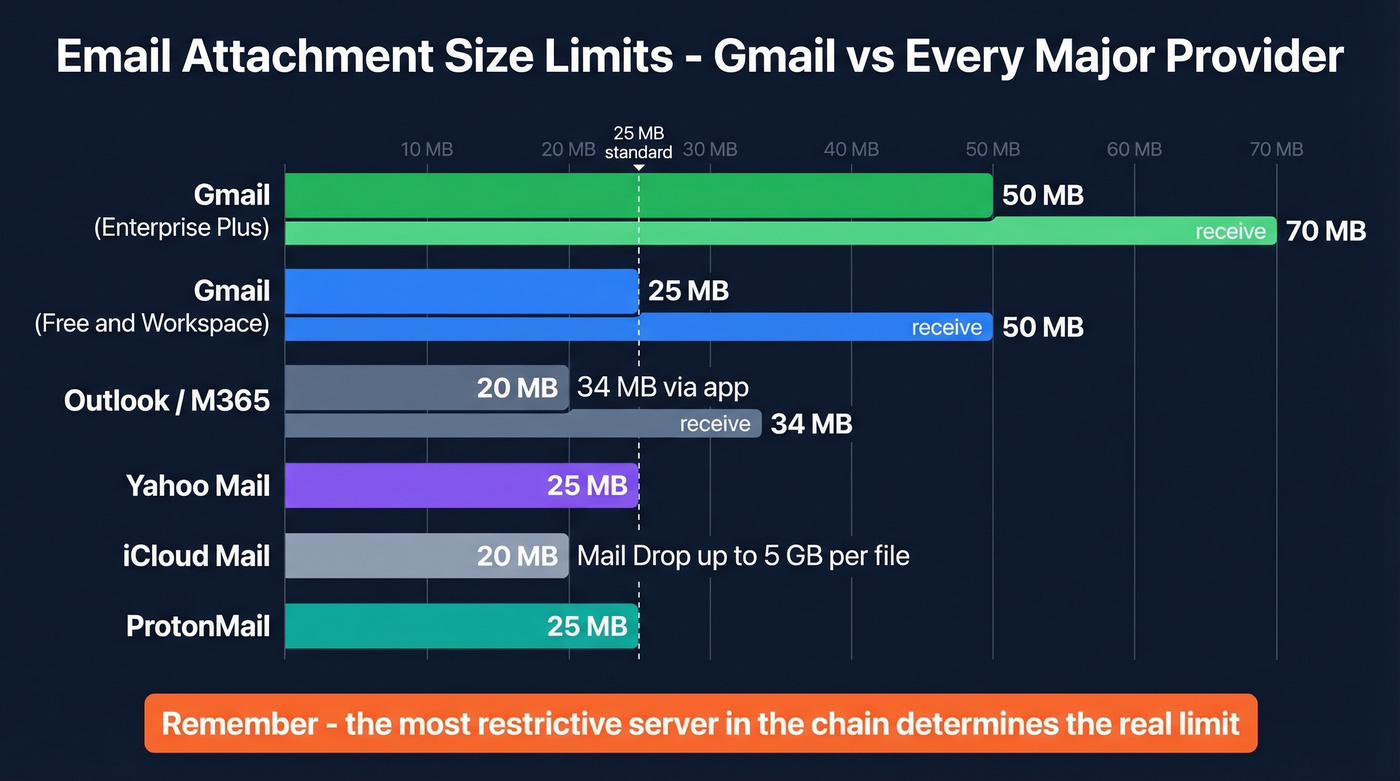
There's a hidden variable these numbers don't capture: the "most restrictive hop" principle. Your email passes through multiple servers between sender and recipient, and if any server in that chain has a smaller cap, the message fails. That's why a 24 MB attachment can work for one recipient and bounce for another - it depends entirely on the infrastructure between you and them. (This is also why email deliverability isn't just about spam filters.)
How to Send Files Over 25 MB
Google Drive Links (Best Default)
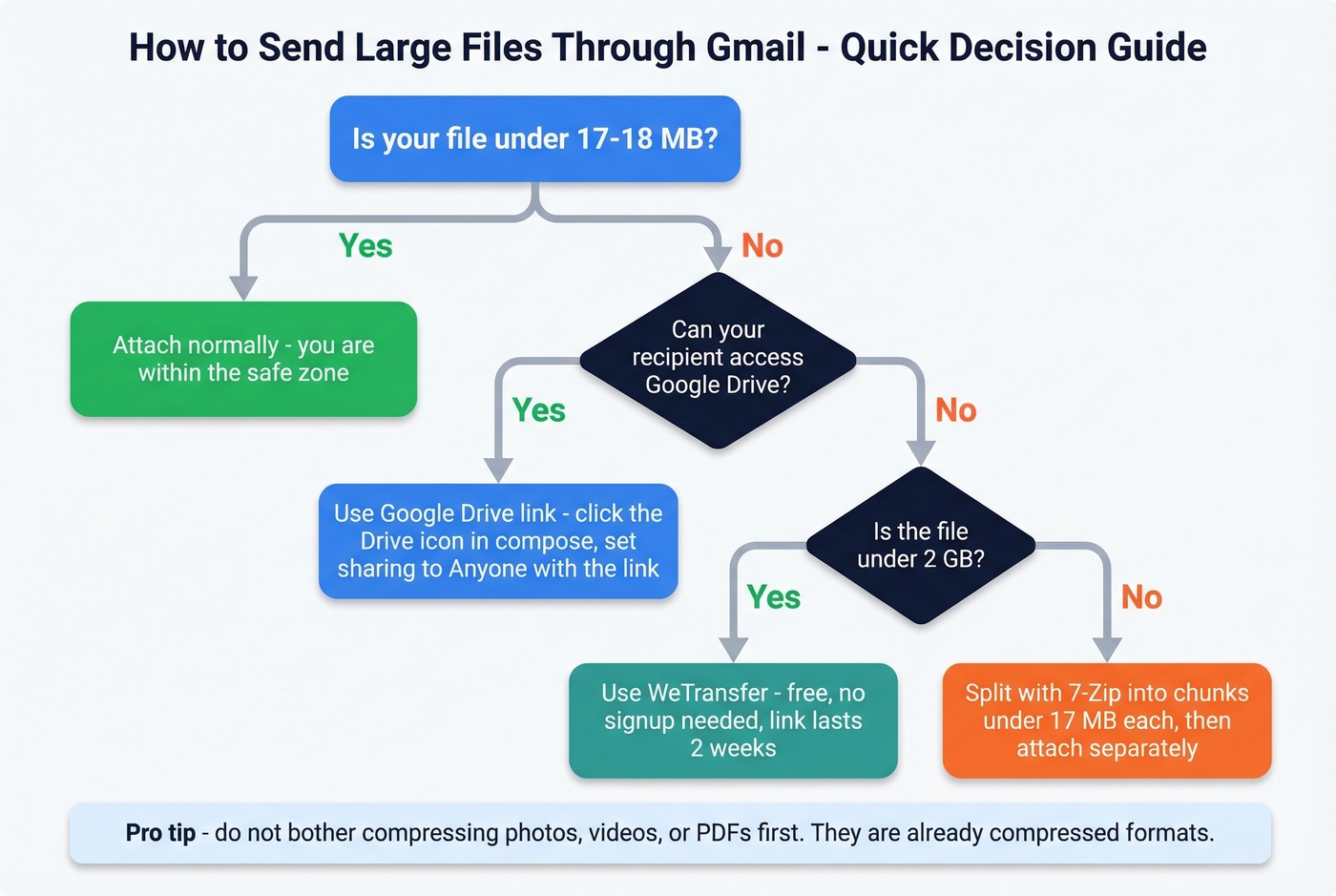
In Gmail's compose window, click the Drive icon and select "Insert as Drive Link." Gmail also does this automatically when attachments exceed 25 MB - it uploads to your Drive and swaps in a link. Your Drive comes with 15 GB free, which covers most file-sharing needs.
Two annoyances to know about. First, the permission pitfall: you set sharing to "anyone with the link can view," but the recipient still can't open it. This happens constantly with corporate and legal recipients whose IT departments block Google domains entirely. A Reddit thread about sending large files to a solicitor captures this frustration perfectly - even with permissions wide open, the recipient's system wouldn't cooperate. Second, Gmail dumps auto-uploaded files into your Drive's root folder with no organization. You'll need to move them manually if you want to find them later.
Direct Download Services
When your recipient can't access Google Drive - and in regulated industries like legal and healthcare, that's more common than you'd think - WeTransfer is the simplest fallback. The free tier handles files up to 2 GB with no registration required, and files stay available for two weeks. Dropbox works too, especially if the recipient already has an account.
Let's be honest: most people overthink this. If your file is over 25 MB and you're not sure about the recipient's IT setup, skip Drive entirely and send a WeTransfer link. It works in almost every environment.
File Splitting (Last Resort)
For truly massive files, tools like 7-Zip can split archives into parts. A 50 MB file becomes five 10 MB chunks that each slide under the limit.
Don't bother compressing first, though. Photos, videos, and PDFs are already compressed formats - zipping a 30 MB video saves maybe 2 MB and adds an extra step for your recipient. Just split and send.
Troubleshooting Common Issues
Gmail converts small files (3-4 MB) to Drive links. This shouldn't happen, but Reddit users report it on specific setups like Firefox on macOS Sequoia. The likely culprits are a browser extension interfering with Gmail's compose window or a client-specific bug. Try a different browser or incognito mode first.
You hit the daily cap and can't send. You're locked out for up to 24 hours from the moment you exceeded the limit. You can still receive mail. There's no way to speed up the reset - plan your sends accordingly. (If you're doing outreach, it's worth reading the bulk email threshold guide so you don't trip limits unexpectedly.)
A 20 MB file gets rejected. Gmail says 25 MB, but encoding makes your 20 MB file roughly 27 MB on the wire. The error message doesn't explain this. Keeping actual file content under 17-18 MB is the reliable safe zone.
Gmail's daily caps punish bad data harder than any spam filter. Teams using unverified lists lose 15-20% of their quota to bounces before a single prospect reads a word. Prospeo's 5-step verification catches invalid addresses at 98% accuracy - at roughly $0.01 per email.
Clean your list before Gmail throttles your outreach.
FAQ
What's the actual Gmail attachment size limit?
About 17-18 MB of real file content. Gmail's stated 25 MB cap includes Base64/MIME encoding overhead, which inflates files by roughly 33%. A 20 MB file becomes ~27 MB after encoding and gets auto-converted to a Google Drive link or rejected outright.
Does Google Workspace increase the file size cap?
Standard Workspace tiers - Business Starter through Enterprise Standard - keep the same 25 MB send cap. Only Enterprise Plus, as of February 2026, allows 50 MB attachments and 70 MB incoming messages. The feature requires admin activation.
How long does a Gmail sending suspension last?
Up to 24 hours from when you hit the limit. The cap runs on a rolling 24-hour window, not a calendar-day reset, so waiting until midnight won't help. You can still receive emails during the suspension period.
Can I send .exe files through Gmail inside a zip archive?
No. Gmail blocks executable file types even inside .zip, .tar, or .gz archives - it scans compressed files recursively. The message bounces entirely and the recipient gets nothing. Use Google Drive or WeTransfer instead.
How can I avoid wasting sends on invalid emails?
Use an email verification tool before launching campaigns. Prospeo verifies addresses at 98% accuracy with a free tier of 75 checks per month - enough to validate a small list and avoid burning daily quota on bounces.