

Gmail Workspace SMTP Settings: The 2026 Setup Guide
You're staring at a "connection refused" error, your copier won't scan to email, and half the guides online still reference Less Secure Apps - a setting Google killed years ago. Here are the exact Gmail Workspace SMTP settings you need, the authentication method that actually works, and the sending limits that'll keep you out of trouble.
Quick Reference Table
Most users need [smtp.gmail.com](https://developers.google.com/workspace/gmail/imap/imap-smtp) with an App Password. Workspace admins managing devices at scale need [smtp-relay.gmail.com](https://knowledge.workspace.google.com/admin/gmail/advanced/route-outgoing-smtp-relay-messages-through-google) with IP allowlisting.
| Setting | smtp.gmail.com | smtp-relay.gmail.com |
|---|---|---|
| Port | 587 (TLS) or 465 (SSL) | 587 (TLS), 465 (SSL), or 25 |
| Encryption | TLS/SSL required | TLS supported - require it in Admin Console |
| Auth | App Password | SMTP auth or IP allowlist |
| Daily limit | 500 (free) / 2,000 (Workspace) | Up to ~10,000 messages/day per domain |
Copy those into your client or device and you're 80% done. The rest covers the gotchas.
Google Didn't Kill SMTP Passwords
This confusion won't die. Google deprecated Less Secure App access - the toggle that let apps authenticate with your raw Gmail password. That's gone. But SMTP itself works fine. The r/homelab thread that panicked about this? The OP updated their own post after realizing they'd misread the announcement.
Here's the fix: enable 2-Step Verification, then generate an App Password. Search "App Passwords" in your Google Account security settings, generate a code, and use that 16-character string as your SMTP password. We've seen this trip up dozens of Workspace admins who assumed SMTP was dead. It isn't. If you're migrating from legacy Google Apps, the same App Password approach applies - the server addresses and ports haven't changed since the rebrand.
Which SMTP Method Do You Need?
Google offers three server addresses people confuse constantly. Only two are for sending.
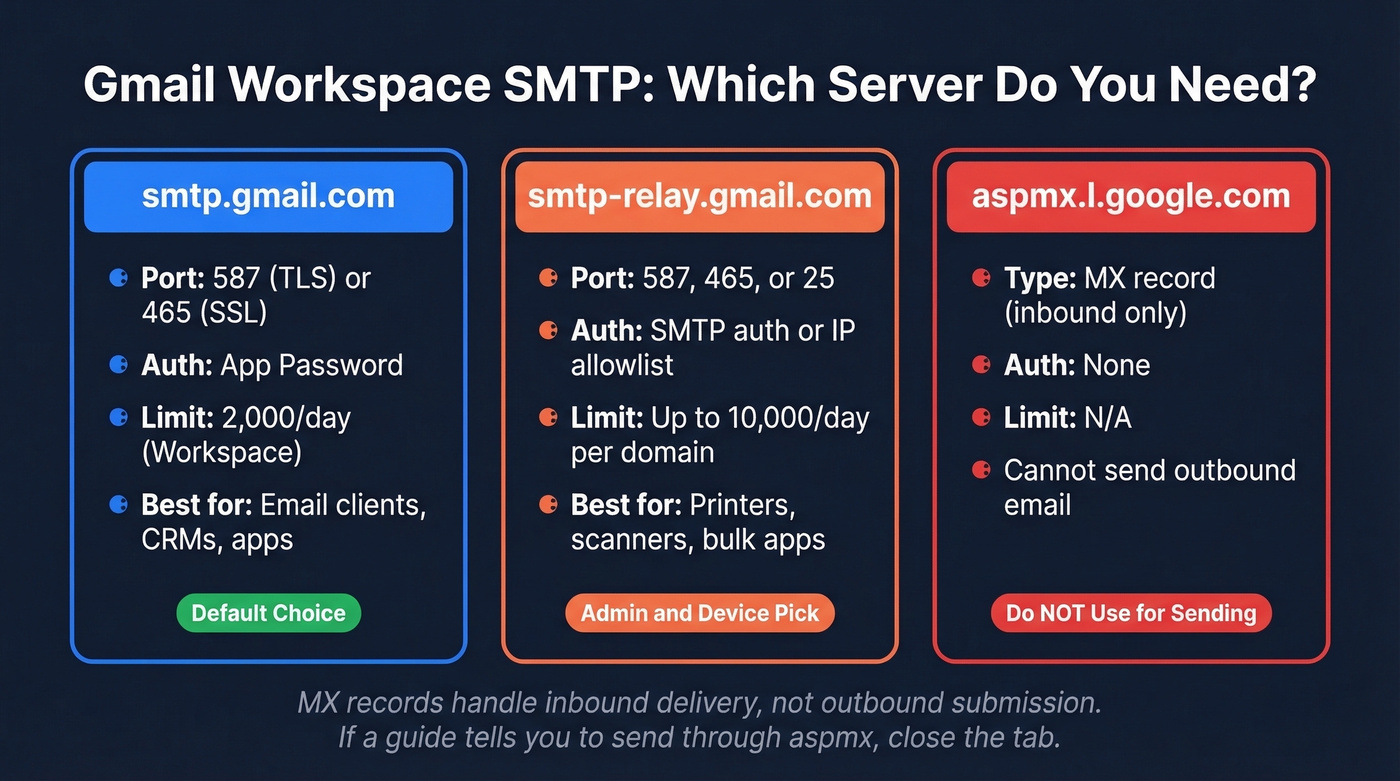
| Method / Server | Use Case | Auth | Daily Limit | Verdict |
|---|---|---|---|---|
| Standard - smtp.gmail.com | Email clients, apps, CRMs | App Password | 500-2,000 | Default choice |
| Relay - smtp-relay.gmail.com | Devices, bulk apps | SMTP auth or IP allowlist | Up to ~10,000/day per domain | Admin/device pick |
| MX - aspmx.l.google.com | Inbound routing only | None | N/A | Don't use this |
That third row trips people up constantly. A recent r/gsuite thread showed someone running nslookup, finding aspmx.l.google.com, and trying to send through it. It'll never work - MX records handle inbound delivery, not outbound submission. If you see that address in a guide, close the tab.

You just spent time perfecting your SMTP config - don't waste it sending to dead addresses. Prospeo's 5-step email verification catches invalid addresses, spam traps, and honeypots before they torch your domain reputation. 98% accuracy, 143M+ verified emails.
Fix your list before you fix your ports. 75 free verifications, no card required.
Setting Up the SMTP Relay Service
If you're a Workspace admin configuring relay for devices or server-side apps, here's the walkthrough:
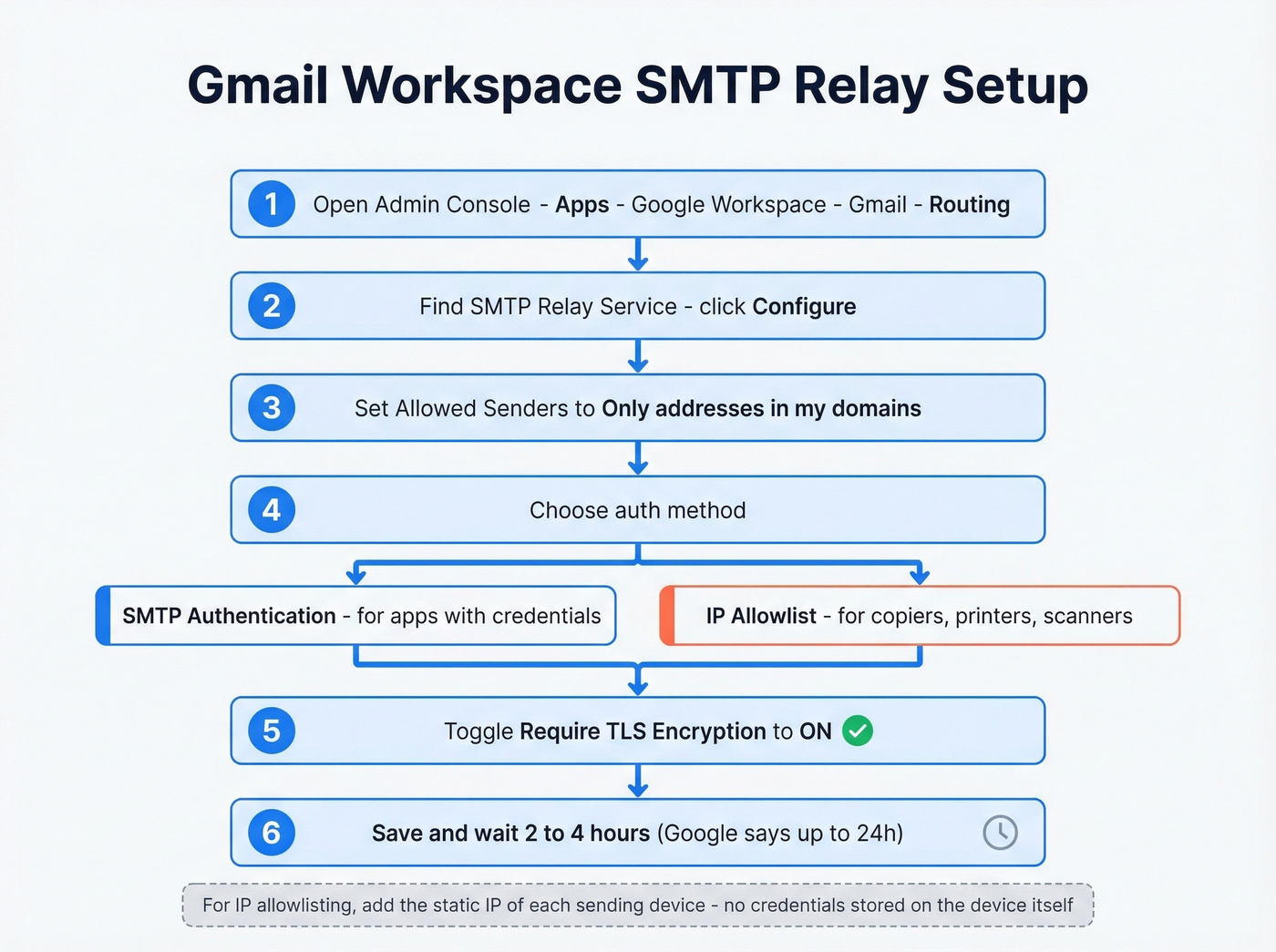
- Open the Admin Console -> Apps -> Google Workspace -> Gmail -> Routing
- Scroll to SMTP Relay Service -> click Configure
- Set Allowed senders to "Only addresses in my domains"
- Choose auth: Require SMTP Authentication for apps with credentials, or Restrict by IP address for devices like copiers
- Toggle Require TLS encryption to ON
- Save and wait - Google says up to 24 hours, though in our experience it's usually 2-4 hours
For IP allowlisting, add the static IP of each sending device. This is the cleanest approach for printers and scanners that don't support OAuth, and it means no credentials are stored on the device itself.
Sending Limits
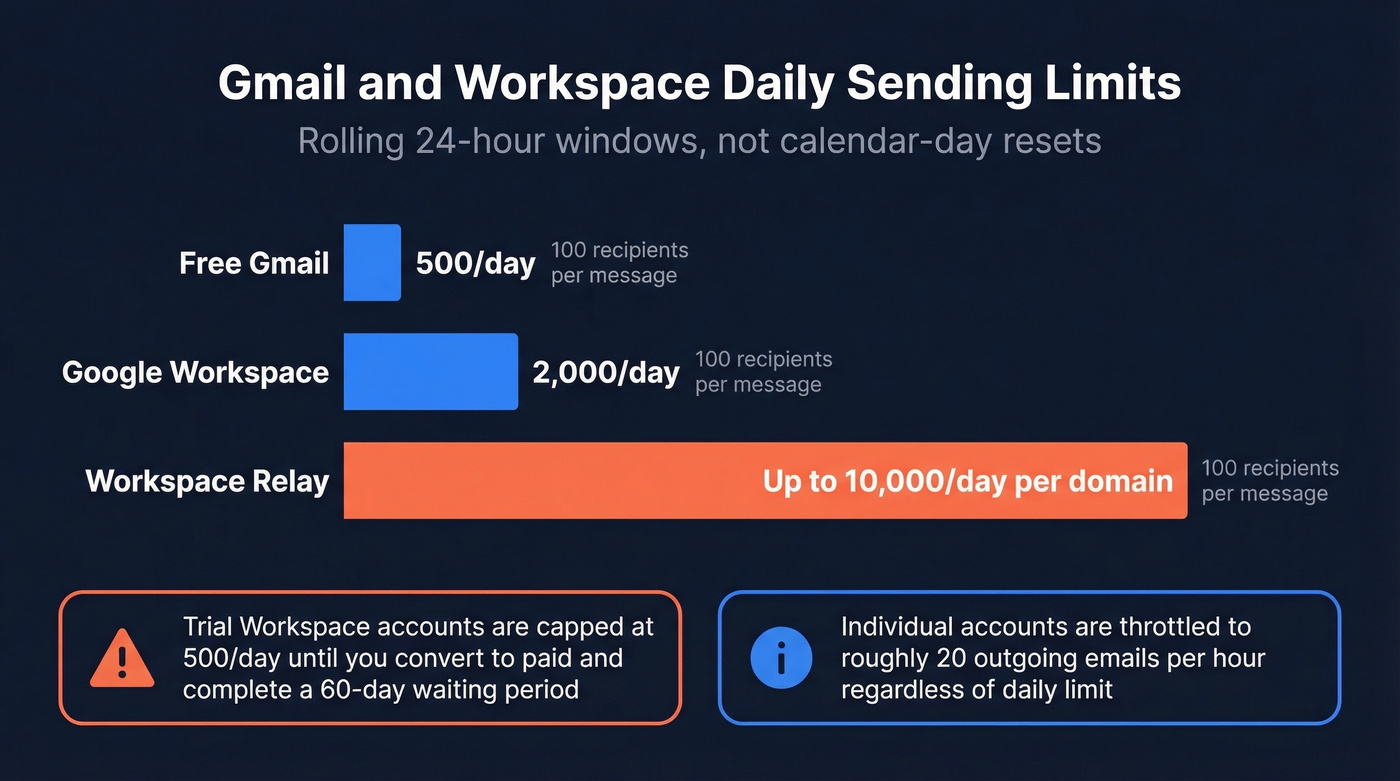
Google enforces rolling 24-hour windows, not calendar-day resets. Each recipient in To, CC, and BCC counts as one message toward your quota.
| Account Type | Daily Limit | Per-Message Recipients |
|---|---|---|
| Free Gmail | 500 | 100 |
| Google Workspace | 2,000 | 100 |
| Workspace Relay | Up to ~10,000/day per domain | 100 |
Individual Gmail and Workspace accounts are throttled to roughly 20 outgoing emails per hour. Relay throughput is higher, but Google doesn't publish exact figures. If you're trying to tune safe throughput, see our guide on email velocity.
One thing that catches people off guard: trial Workspace accounts are capped at 500 emails/day until you convert to paid and complete a 60-day waiting period.
Common Use Cases
Email clients like Outlook, Thunderbird, and Apple Mail: use smtp.gmail.com on port 587 with TLS and your App Password. Ninety seconds, done.
WordPress and CMS platforms default to PHP mail(), which most hosts block or route through unauthed servers. Your transactional emails land in spam or vanish entirely. Install WP Mail SMTP, point it at smtp.gmail.com, and authenticate with an App Password. We've debugged this for three different client sites and it's always the same root cause - the host's default mail function just isn't reliable.
Printers, scanners, and copiers caused the most panic when Less Secure Apps went away. K-12 admins on r/k12sysadmin were scrambling to keep scan-to-email working. The fix: smtp-relay.gmail.com on port 587 with TLS, copier's IP added to the relay allowlist. No password stored on the device.
CRM and outreach tools connect via smtp.gmail.com with an App Password or through OAuth. But delivery plumbing doesn't matter if half your addresses bounce. Verify your contact list before sequences hit send - Prospeo handles this at 98% accuracy, keeping your bounce rate and domain reputation intact. If you're running outbound at scale, it helps to understand the email deliverability basics and track your email bounce rate.

Let's be honest: if your bounce rate is above 5%, your SMTP configuration isn't the problem. Your data is. Fix the list first, then worry about ports. If you suspect spam traps are part of the issue, start with spam trap removal.
Troubleshooting Common Errors
| Error | Cause | Fix |
|---|---|---|
| 429 "Rate Limit Exceeded" | Hit hourly or daily quota | Throttle sending; respect the Retry-After header |
| 550 5.4.5 "Daily user sending quota exceeded" | Exceeded daily sending quota | Wait for the rolling window to clear or move to relay |
| 403 "Insufficient Auth Scopes" | OAuth token missing Gmail scopes | Re-authorize with correct scopes |
| Connection refused | Wrong server or port | Confirm smtp.gmail.com:587 |
| "aspmx.l.google.com doesn't work" | Using MX record as SMTP server | Switch to smtp.gmail.com or smtp-relay.gmail.com |
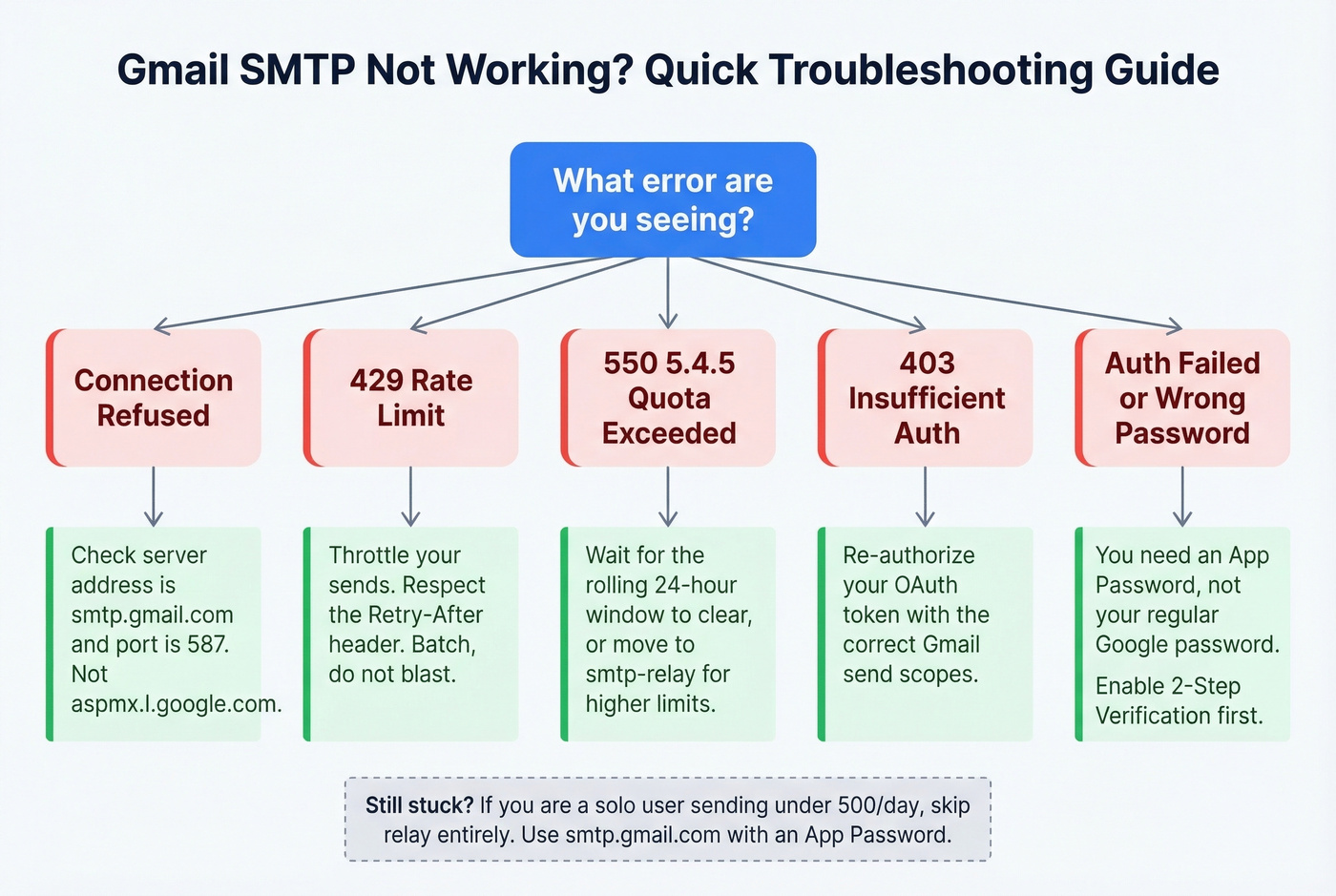
For persistent 429 errors, batch your sends rather than blasting all at once. Google's rate limiter is aggressive on individual accounts, and hammering retries just makes it worse.
Skip the relay setup entirely if you're a solo user sending under 500 emails a day - it's unnecessary complexity. Standard SMTP with an App Password is all you need. If you're also working on authentication and domain trust, review DMARC alignment and use these SPF record examples to sanity-check your DNS.
Bounce rates above 5% aren't an SMTP problem - they're a data problem. Prospeo refreshes 300M+ contacts every 7 days (not 6 weeks like competitors), so the emails you load into your CRM or outreach tool actually connect. At $0.01 per email, cleaning your list costs less than one bounced sequence.
Stop blaming your SMTP config. Start with accurate data.
FAQ
Can I still use a password with Gmail SMTP?
Yes - an App Password, not your regular Google password. Enable 2-Step Verification first, then generate a 16-character App Password under your account security settings. Less Secure App access is gone permanently, but App Passwords work with any SMTP client that accepts a username and password.
What's the difference between smtp.gmail.com and smtp-relay.gmail.com?
smtp.gmail.com authenticates as a single user mailbox with an App Password and caps at 2,000 messages/day. smtp-relay.gmail.com is admin-managed, supports IP allowlisting for passwordless device auth, and handles up to ~10,000 messages per domain per day. For teams running multiple devices or server-side applications, relay is the way to go.
Do the old Google Apps SMTP settings still work?
Google Apps was rebranded to Google Workspace, but the underlying server addresses and ports haven't changed. You still use smtp.gmail.com or smtp-relay.gmail.com with port 587/TLS - the only difference is authentication now requires an App Password or OAuth instead of a plain password.
How do I configure scan-to-email on a copier?
Use smtp-relay.gmail.com on port 587 with TLS enabled. In the Admin Console, add the copier's static IP to the SMTP Relay Service allowlist under Gmail -> Routing. No password is stored on the device, which is more secure than embedding credentials in a machine anyone can access.
How do I keep bounce rates low when sending through Workspace?
Verify every address before sending. Tools like Prospeo run a 5-step verification process that includes catch-all detection and spam-trap removal, delivering 98% email accuracy across 143M+ verified addresses. Keeping bounces under 2% protects your domain reputation and prevents Google from throttling your account.