

How to Set Up GoDaddy DMARC (And What Most Guides Get Wrong)
You just got a bounce report that makes no sense. Your domain's authenticated, your SPF looks right, and somehow a chunk of your outbound is landing in spam - or getting rejected outright. The problem isn't your content. It's your GoDaddy DMARC record, and there's a good chance it's either missing or set to a default you didn't choose.
What You Need (Quick Version)
- Check if GoDaddy already added a default DMARC record. Domains registered or transferred recently often have one set to
p=quarantine. - If yes, edit it to point reports to your own email address. If no record exists, add a TXT record with Host =
_dmarcand start withp=none. - Set up SPF and DKIM first. DMARC is useless without them. It's a policy layer that tells receivers what to do when SPF and DKIM fail - if neither exists, there's nothing to evaluate.
Why DMARC Matters in 2026
Two deadlines changed everything. In February 2024, Google and Yahoo began requiring DMARC for anyone sending more than 5,000 emails per day to their users. A p=none policy was enough to satisfy the requirement, but you needed something in DNS.
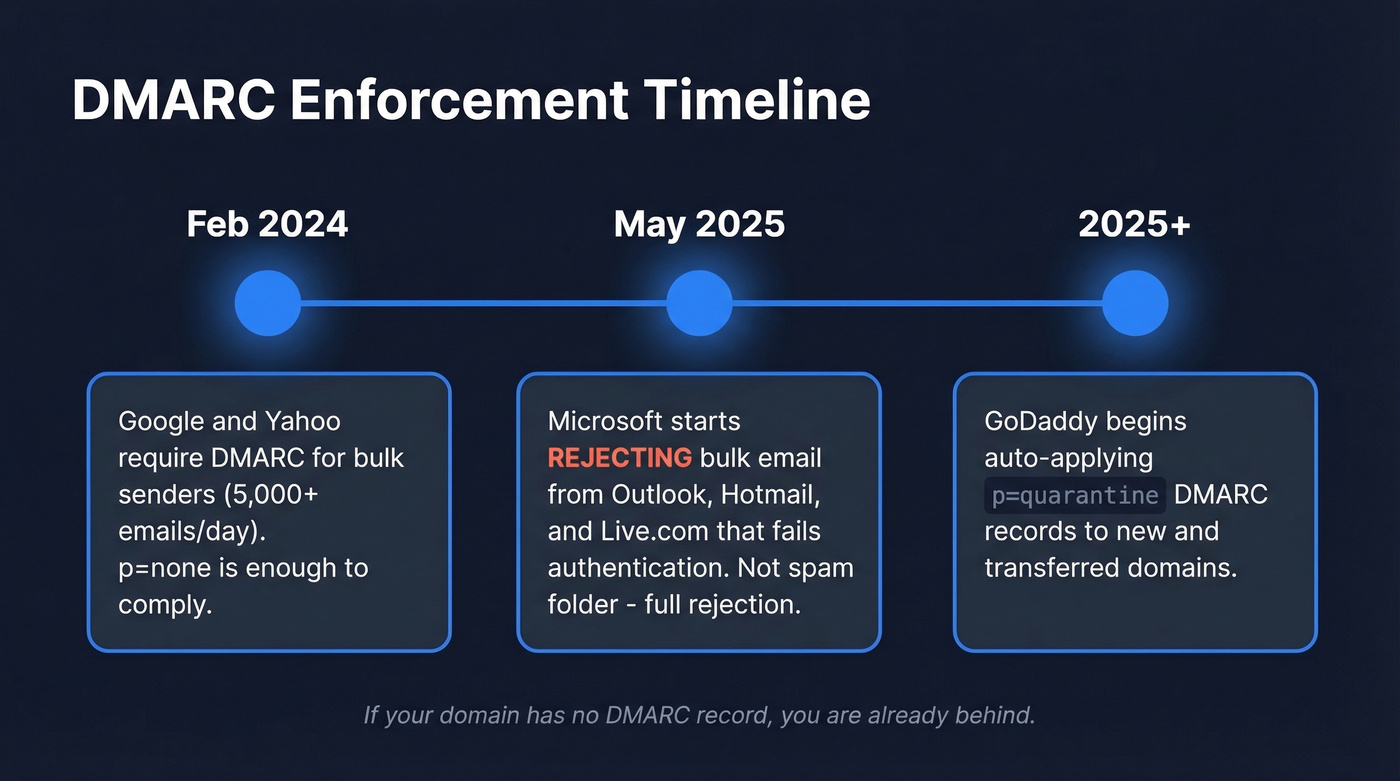
Then Microsoft raised the stakes. Starting May 5, 2025, Outlook.com, Hotmail, and Live.com began rejecting bulk email that doesn't meet authentication requirements. Not quarantining - rejecting. Your carefully crafted outbound sequence doesn't land in spam. It doesn't land at all.
DMARC handles the authentication side of deliverability. It proves you're you. But authentication alone doesn't protect your sender reputation if you're blasting emails to addresses that don't exist. Bounces wreck the very reputation DMARC is trying to protect - and we've seen this firsthand with teams who nail their DNS setup but still crater their deliverability by sending to stale lists. A good deliverability rate sits between 95% and 99%, and you can't hit that number without both halves working together: authentication and data quality.
GoDaddy's Auto-Applied Policy
As of 2025, GoDaddy began adding a default DMARC record to newly registered and transferred domains. The default policy is p=quarantine, which routes mail that fails checks to the recipient's spam/quarantine handling rather than rejecting it outright.
Credit where it's due - most registrars still leave domains wide open. But there's a catch: many users who discover the default record also see aggregate reports (rua) going to an onsecureserver.net address. That means GoDaddy gets the DMARC telemetry unless you change the rua tag. You don't.
Important: This default applies to new registrations and transfers. If your domain predates the rollout, you probably don't have a DMARC record at all. The practical move is the same either way: check your
_dmarcrecord and set it intentionally.
How to check: Run dig TXT _dmarc.yourdomain.com from your terminal, or use MXToolbox's DMARC lookup. If you see a record you didn't create, that's the default you need to review.
Prerequisites: SPF and DKIM
Don't touch DMARC until these are in place.
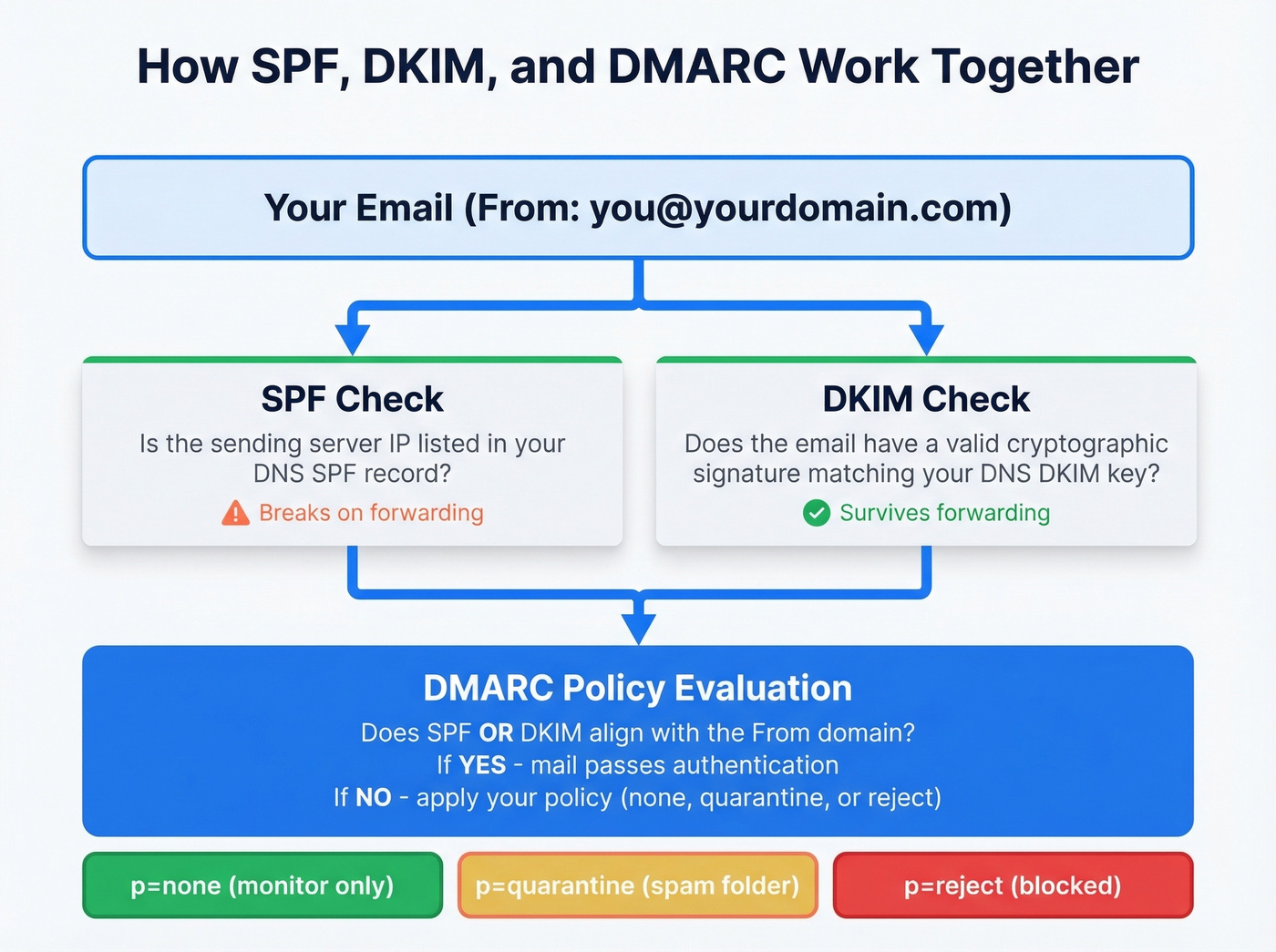
SPF record: Add a TXT record that includes your email provider's sending servers. For Google Workspace: include:_spf.google.com. For Microsoft 365: include:spf.protection.outlook.com. Multiple senders go in a single SPF record. (If you want to sanity-check syntax, see these SPF record examples.)
DKIM signing: Enable this in your email provider's admin console, not in GoDaddy. You'll generate DKIM keys and publish them as CNAME or TXT records in DNS. GoDaddy just hosts the records. (If you’re unsure it’s actually signing, follow a quick checklist to verify DKIM is working.)
Alignment matters: DMARC passes if either SPF or DKIM aligns with your From domain. DKIM is the more reliable bet because it survives email forwarding - SPF breaks the moment someone forwards your message. For a deeper breakdown, see DMARC alignment.
GoDaddy has a help article covering SPF, DKIM, and DMARC setup for their hosting email. If you're using Workspace or M365, follow your provider's documentation for the DKIM piece.
Step-by-Step DNS Record Setup
If your domain doesn't have a DMARC record yet, or you need to edit the default:
- Log into your GoDaddy account and navigate to My Products → DNS for the domain you're configuring.
- Click Add New Record or find the existing
_dmarcTXT record if GoDaddy already created one. - Set the fields:
- Type: TXT
- Host/Name:
_dmarc - Value:
v=DMARC1; p=none; rua=mailto:dmarc@yourdomain.com - TTL: Leave at default
- Click Save.
If GoDaddy already added a default record, edit it - don't add a second one. Having two DMARC records on the same domain breaks evaluation entirely. Replace the rua address with your own so you actually receive the reports.
The starter record above uses p=none, which means receivers won't take action on failing mail - they'll just send you reports. This is intentional. You want visibility before enforcement.

You just spent time perfecting your DMARC setup so mail actually reaches inboxes. Don't waste that effort sending to stale addresses that bounce and tank your sender reputation. Prospeo's 98% email accuracy and 7-day data refresh keep your bounce rate under control - the other half of the deliverability equation your DNS can't solve.
Authenticated domains deserve verified data. Start at $0.01 per email.
DMARC Tag Reference
| Tag | What It Does | Recommended Value |
|---|---|---|
v |
Protocol version | DMARC1 (required) |
p |
Policy for your domain | Start none, move to reject |
rua |
Aggregate report address | mailto:you@yourdomain.com |
ruf |
Forensic report address | Skip it (mostly dead) |
sp |
Subdomain policy | Same as p unless needed |
adkim |
DKIM alignment mode | r (relaxed) |
aspf |
SPF alignment mode | r (relaxed) |
pct |
% of mail policy applies to | 100 (lower during ramp) |
fo |
Failure reporting options | 1 (report if either fails) |
ri |
Report interval (seconds) | 86400 (daily) |
A note on ruf: forensic reports were designed to give per-message failure details. In practice, major providers largely don't send them anymore due to privacy concerns. Don't waste time configuring it - aggregate reports via rua are your working dataset.
Example Records to Copy
You don't need a DMARC generator - the syntax is simple enough to write by hand. Here are the three records you'll use as you progress through enforcement stages.
Monitoring only (start here):
v=DMARC1; p=none; rua=mailto:dmarc@yourdomain.com
Quarantine with gradual rollout:
v=DMARC1; p=quarantine; pct=25; rua=mailto:dmarc@yourdomain.com
Full enforcement:
v=DMARC1; p=reject; rua=mailto:dmarc@yourdomain.com
Replace dmarc@yourdomain.com with an address you actually monitor. If you'd rather not clutter your inbox with XML files, use a monitoring tool like dmarcian or EasyDMARC - they'll give you a dedicated rua address and parse reports into dashboards.
How to Verify Your Record
Once you've saved the record, confirm it's live:
- Command line: Run
dig TXT _dmarc.yourdomain.comand look for your record. On Windows, usenslookup -type=TXT _dmarc.yourdomain.com. - Online checker: MXToolbox's DMARC tool or dmarcian's DMARC inspector will validate syntax and flag errors.
- Real-world test: Send an email to a Gmail address, open it, click the three dots → "Show original," and look for
dmarc=passin the authentication results header.
GoDaddy DNS changes often propagate quickly, but worst case is 48 hours if DNS caching is aggressive upstream.
Common Mistakes to Avoid
The auto-append trap. This is the #1 mistake, and threads on r/email and r/gsuite show people hitting it constantly. When you enter a Host/Name value in GoDaddy's DNS manager, the system automatically appends your domain. So if you type _dmarc.yourdomain.com in the Host field, GoDaddy creates _dmarc.yourdomain.com.yourdomain.com - a completely broken record that'll never resolve.
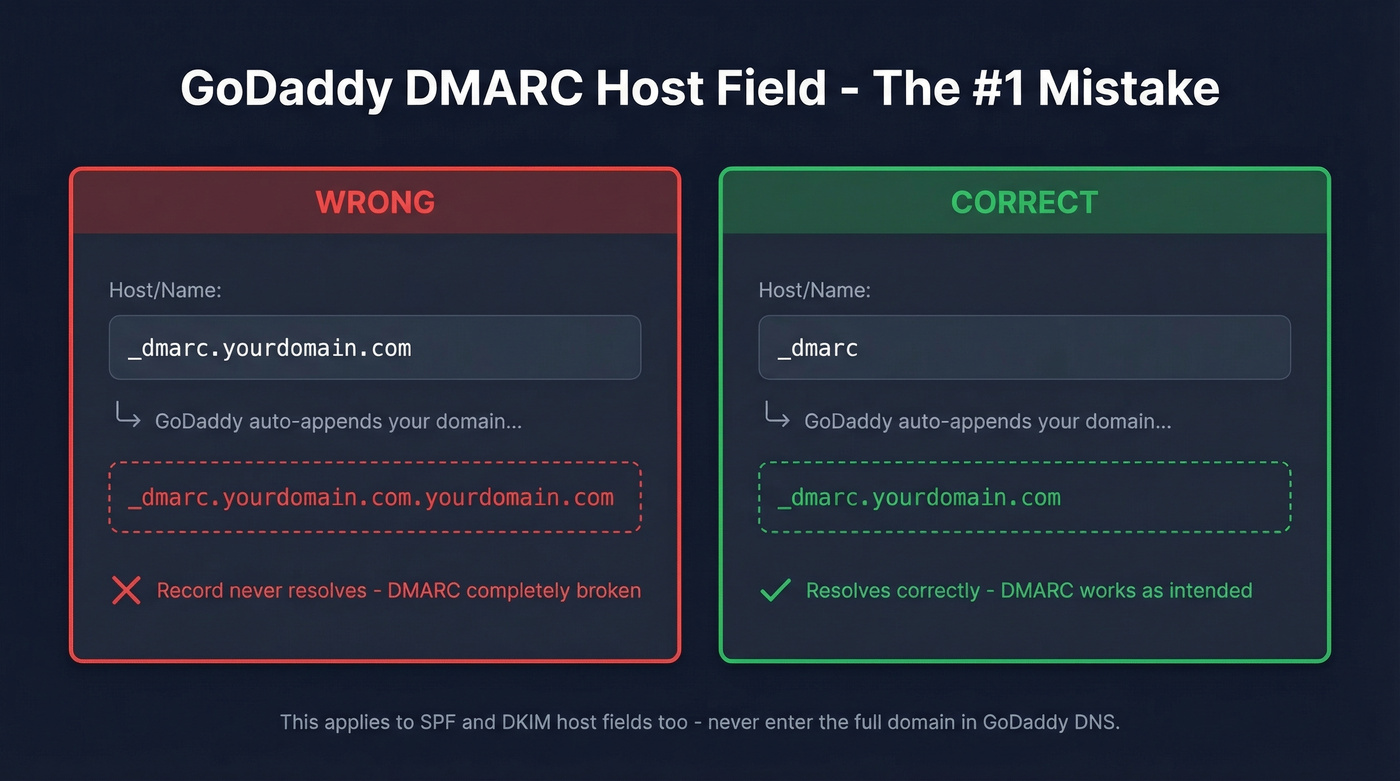
Do this: Enter _dmarc in the Host field. Nothing else.
Not this: _dmarc.yourdomain.com or _dmarc.example.com.
Duplicate records. If GoDaddy already created a default DMARC record and you add a second one instead of editing, you'll have two TXT records at _dmarc. Receivers see conflicting records and treat your authentication as broken. Always edit the existing record.
Quoting and TTL quirks. Don't add extra quotes around your TXT value. After saving, give it a few minutes before troubleshooting - TTL defaults are typically in the 600-3600 second range, and your record is usually visible within that window.
Reading Your Aggregate Reports
Once your rua address starts receiving reports - usually within 24-48 hours - you'll get XML files from every major mailbox provider that processed your email. The key fields to watch: source_ip tells you which server sent mail claiming to be your domain, count shows message volume from that IP, disposition reveals what the receiver did, and the SPF/DKIM columns show whether authentication passed or failed.
Unfamiliar IPs with authentication failures? That's either spoofing or a legitimate sender you forgot to authorize - a marketing tool, a ticketing system, a third-party vendor sending on your behalf. This is exactly why you start with p=none: identify these sources before you start rejecting their mail. Free tools like dmarcian or EasyDMARC will parse the XML into readable dashboards so you aren't squinting at raw XML in your inbox.
If you’re also fighting spam placement, pair authentication with a broader email deliverability guide so you’re not guessing.
Policy Progression: none → reject
The recommended path is straightforward. Run p=none for 2-4 weeks while you collect reports and fix alignment issues. Then move to p=quarantine with pct=10, ramping to 25%, 50%, and 100% over several weeks. Once quarantine at 100% shows no legitimate failures for at least two weeks, switch to p=reject.
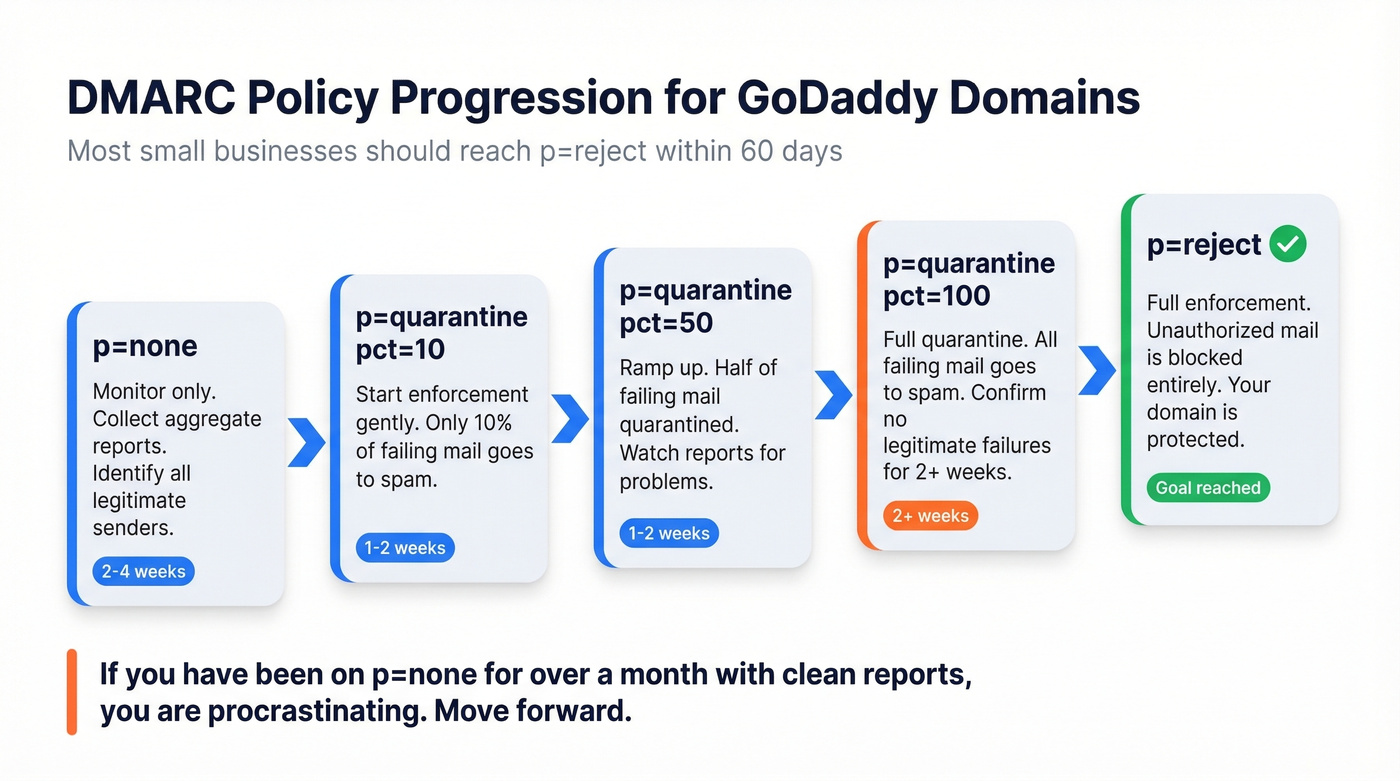
Here's the thing: if you've been sitting on p=none for more than a month with clean reports, you're procrastinating. We've watched teams sit on monitoring mode for six months because nobody owned the project. The whole point of DMARC is enforcement. p=none is a means to an end, not a permanent state.
Most small businesses on GoDaddy should reach p=reject within 60 days. If your email setup is just Google Workspace or M365 plus one marketing tool, you don't have the complex sender ecosystem that justifies months of monitoring. Set it up, verify it works, enforce it.
Once your authentication is airtight, make sure you aren't undermining it by sending to dead addresses. Every bounce chips away at the sender reputation DMARC is working to protect. Tools like Prospeo catch invalid addresses, spam traps, and honeypots before they hit your sending infrastructure - authentication and data quality are the two halves of deliverability, and you need both. (If you’re tracking this, start with email bounce rate benchmarks and fixes, then work on how to improve sender reputation.)

Teams that nail SPF, DKIM, and DMARC still crater deliverability by sending to dead addresses. Meritt cut their bounce rate from 35% to under 4% and tripled pipeline to $300K/week using Prospeo's verified contact data. Your DNS is dialed in - now fix the data feeding your sequences.
Stop bouncing emails your DMARC record worked so hard to authenticate.
FAQ
Do I need DMARC if I don't send bulk email?
Yes. DMARC prevents others from spoofing your domain regardless of your sending volume. Even if you send 10 emails a day, someone else could send 10,000 pretending to be you. Every domain benefits from a published policy - Google and Microsoft now expect one.
Can I have multiple DMARC records on one domain?
No - only one TXT record at _dmarc is allowed per domain. If GoDaddy added a default and you create a second one, receivers can't determine which to use and authentication fails. Always edit the existing record instead of adding a new one.
Why am I still getting spoofed after setting p=reject?
DMARC protects your exact domain only. It can't stop lookalike domains like yourcompany-support.com or display-name spoofing. For those threats, you need brand monitoring and user education alongside your enforcement policy.
How long does DNS propagation take on GoDaddy?
Typically minutes, worst case up to 48 hours. Verify with dig TXT _dmarc.yourdomain.com or MXToolbox. If it's not showing after an hour, confirm you entered _dmarc in the Host field - not the full domain name, which GoDaddy will double-append.
What free tools help monitor DMARC reports?
Dmarcian and EasyDMARC both offer free tiers that parse XML aggregate reports into visual dashboards. They're the fastest way to go from "I have no idea what this XML means" to "I can see exactly who's sending as my domain."