

How to Set Up DMARC on GoDaddy for Office 365 (and Fix What Breaks)
A chunk of your outbound emails never arrived, and you're staring at a bounce report trying to figure out why. Half the problem is list quality. The other half? Your domain's authentication is misconfigured - and getting DMARC right on GoDaddy with Office 365 is one of the trickiest combos out there.
We've walked dozens of teams through this exact setup, and the same mistakes come up every time. Let's get it right.
Why Email Authentication Matters in 2026
DMARC adoption jumped from under 43% in 2023 to roughly 54% by 2024, and enforcement pressure has only increased since. Gmail and Yahoo now require bulk senders to implement DMARC with a minimum policy of p=none. Skip it, and your bulk mail is far more likely to get rejected or routed to spam.
Here's the uncomfortable stat: about 75% of domains sitting at p=none have no plans to enforce. They check the compliance box without actually protecting their domain from spoofing. If you're sending cold outbound or transactional email from M365 through a GoDaddy domain, you can't afford to be in that group.
What You'll Set Up (In Order)
Get this sequence wrong and you'll chase phantom failures for hours.
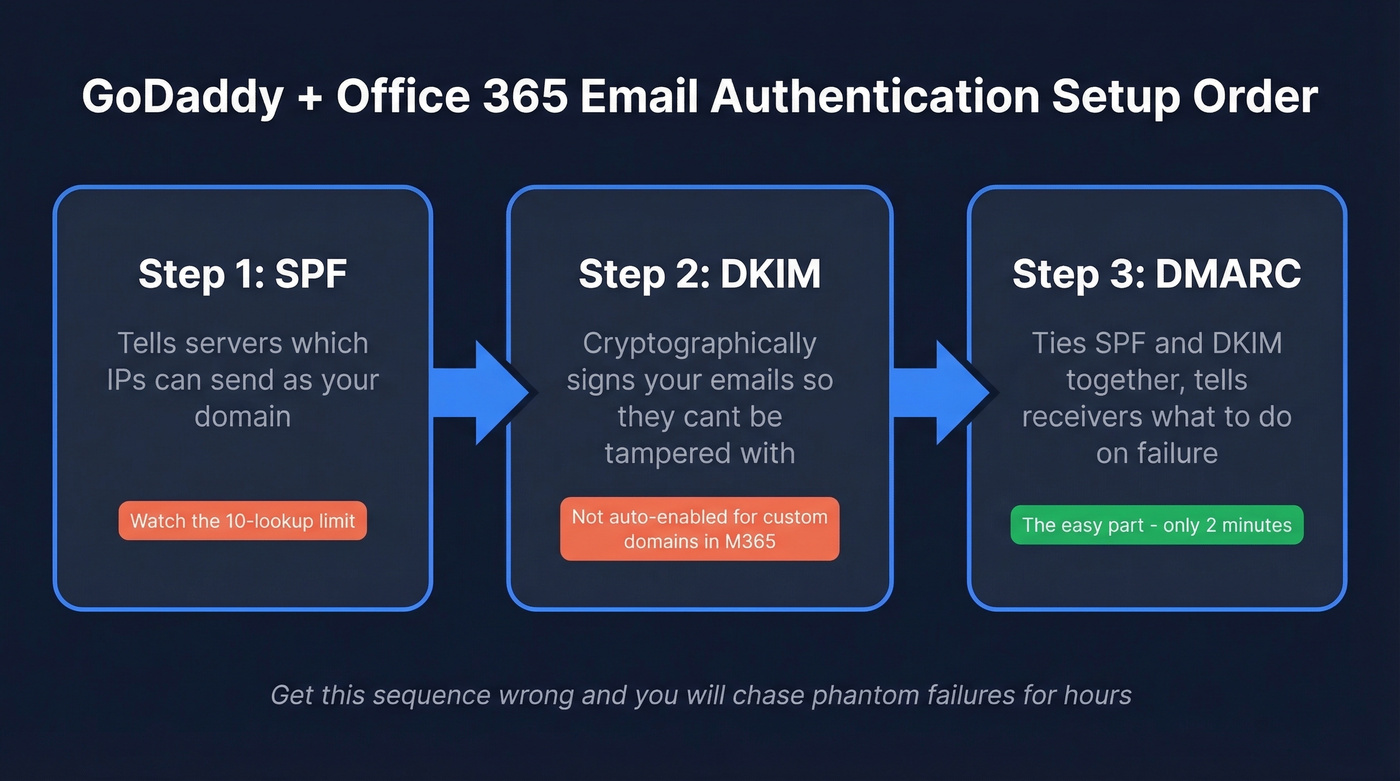
- SPF - tells receiving servers which IPs can send as your domain
- DKIM - cryptographically signs your emails so they can't be tampered with
- DMARC - ties SPF and DKIM together and tells receivers what to do when checks fail
DMARC itself is the easy part. SPF and DKIM are where things break.
The SPF Record You Need
The #1 confusion on r/sysadmin with this combo: some domains show include:secureserver.net while others show include:spf.protection.outlook.com. Which one do you actually need?
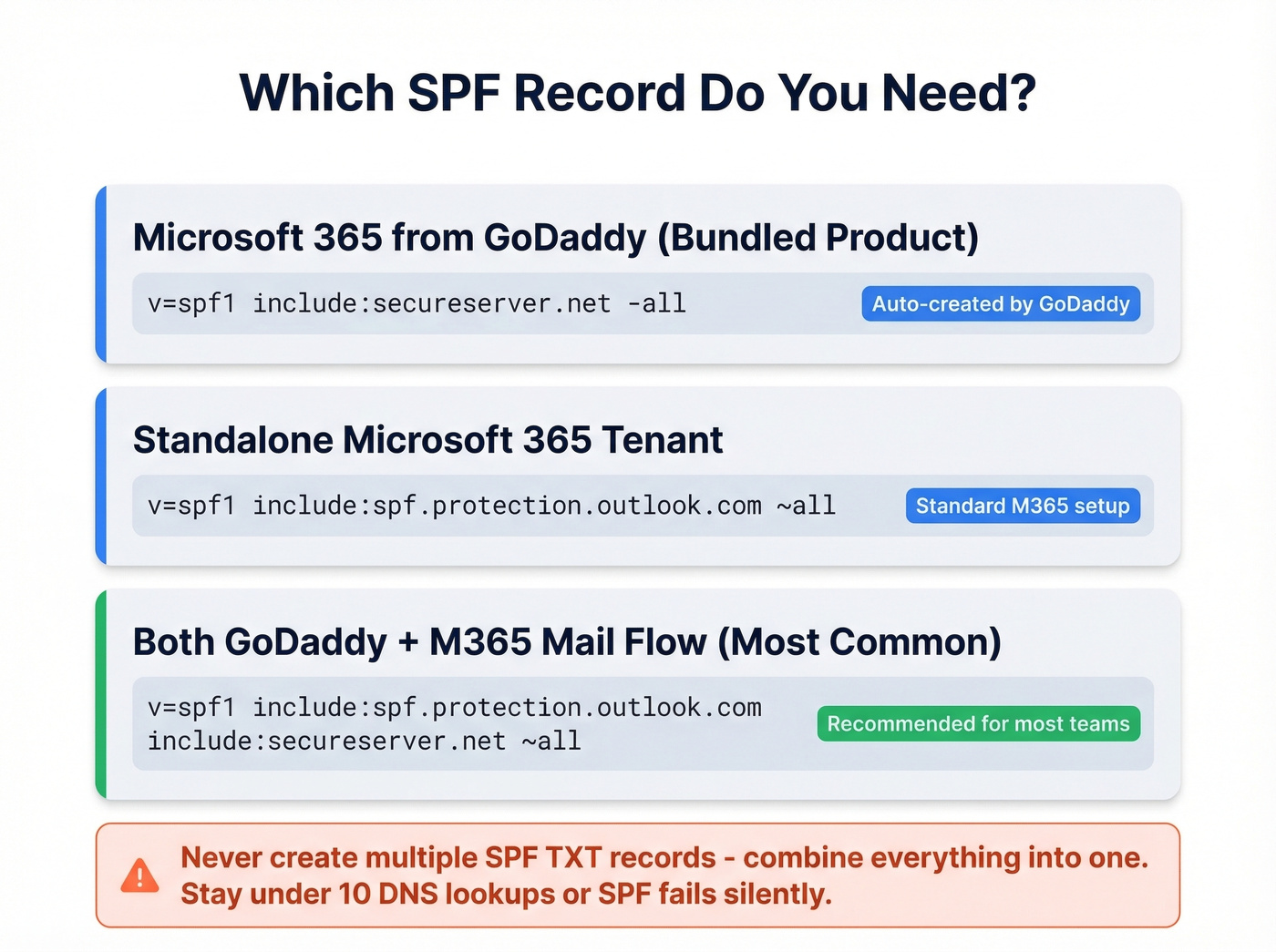
If you're using "Microsoft 365 from GoDaddy" (the bundled product), GoDaddy often auto-creates an SPF record like v=spf1 include:secureserver.net -all. A standalone Microsoft 365 tenant uses include:spf.protection.outlook.com instead.
If your mail flow uses both Microsoft 365 and GoDaddy-managed sending infrastructure, you need both includes in a single record:
v=spf1 include:spf.protection.outlook.com include:secureserver.net ~all
If you also send through a third-party tool like Instantly or Lemlist, add the SPF include from their documentation too.
Two critical rules: never create multiple SPF TXT records - combine everything into one. And watch the 10-DNS-lookup limit. Every include: costs at least one lookup. Go over 10 and SPF fails silently, which is maddening to debug because nothing in GoDaddy's UI warns you.
Enable DKIM in Microsoft 365
DKIM isn't automatically enabled for custom domains in M365. You have to flip this switch yourself.
- Go to the Microsoft 365 Defender portal DKIM page (Microsoft will prompt you for DKIM setup for your domain).
- Select your custom domain. Microsoft shows you two CNAME records to publish.
- In GoDaddy: My Products -> your domain -> DNS -> Add -> CNAME. Add both records exactly as shown.
- Back in Microsoft, click "Enable DKIM."
The error you'll probably hit: "CNAME record does not exist for this config." Don't panic. DNS propagation can take up to 72 hours, though it often resolves within a few hours. Verify your records are live using whatsmydns.net. If they show up globally but M365 still complains, remove and re-add the CNAMEs in GoDaddy. Double-check for trailing spaces and tabs from copy/paste - they're invisible killers that have wasted more hours than we'd like to admit.
If you want a quick sanity check after enabling it, follow a simple DKIM verification workflow before moving on.

You just spent hours configuring SPF, DKIM, and DMARC to protect your domain. Don't waste that effort by sending to bad email addresses. Prospeo's 5-step verification delivers 98% email accuracy - teams using it cut bounce rates from 35% to under 4%.
Your authentication is dialed in. Now make sure your list is too.
Add the DMARC Record in GoDaddy
Once SPF and DKIM are working, the DMARC record takes two minutes.
- In GoDaddy: My Products -> your domain -> DNS -> Add -> TXT
- Host/Name:
_dmarc - Value:
v=DMARC1; p=none; rua=mailto:dmarc-reports@yourdomain.com; aspf=r; adkim=r; pct=100
- TTL: 3600 (1 hour)
Start with p=none - it monitors without blocking anything. The rua tag sends you aggregate reports so you can see who's sending as your domain. Relaxed alignment (aspf=r; adkim=r) is the right starting point because strict alignment can break legitimate mail when subdomains or third-party senders are involved. GoDaddy also has their own walkthrough if you want a second reference.
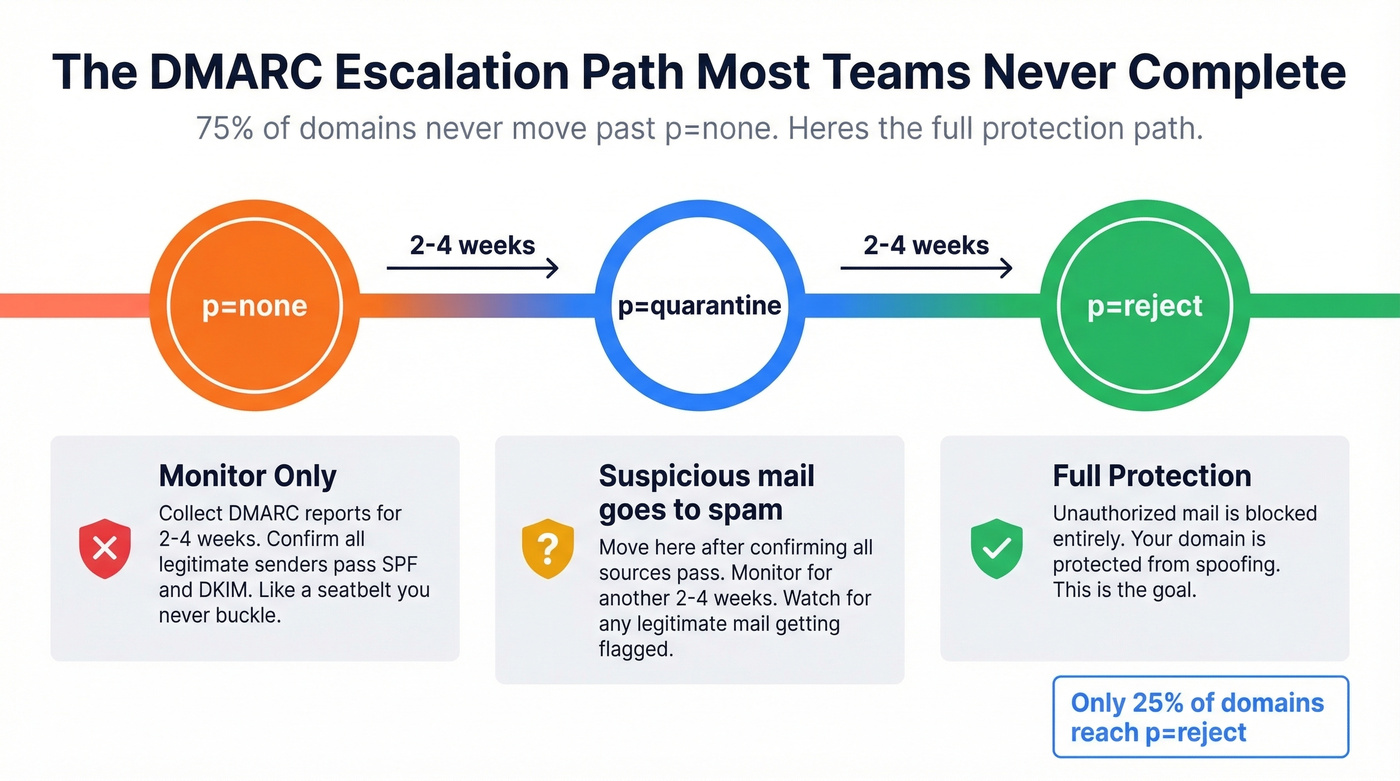
Let's be honest: most guides stop here and call it done. That's exactly why 75% of domains never move past p=none. A monitoring-only policy is a seatbelt you never buckle.
Troubleshooting Common Failures
SPF Tools Disagree on Pass/Fail
One Reddit user spent 3-4 hours troubleshooting an SPF failure that turned out to be a false alarm - unspam.email flagged it, but mail-tester and mailgenius both showed a pass. We've hit this exact scenario ourselves.
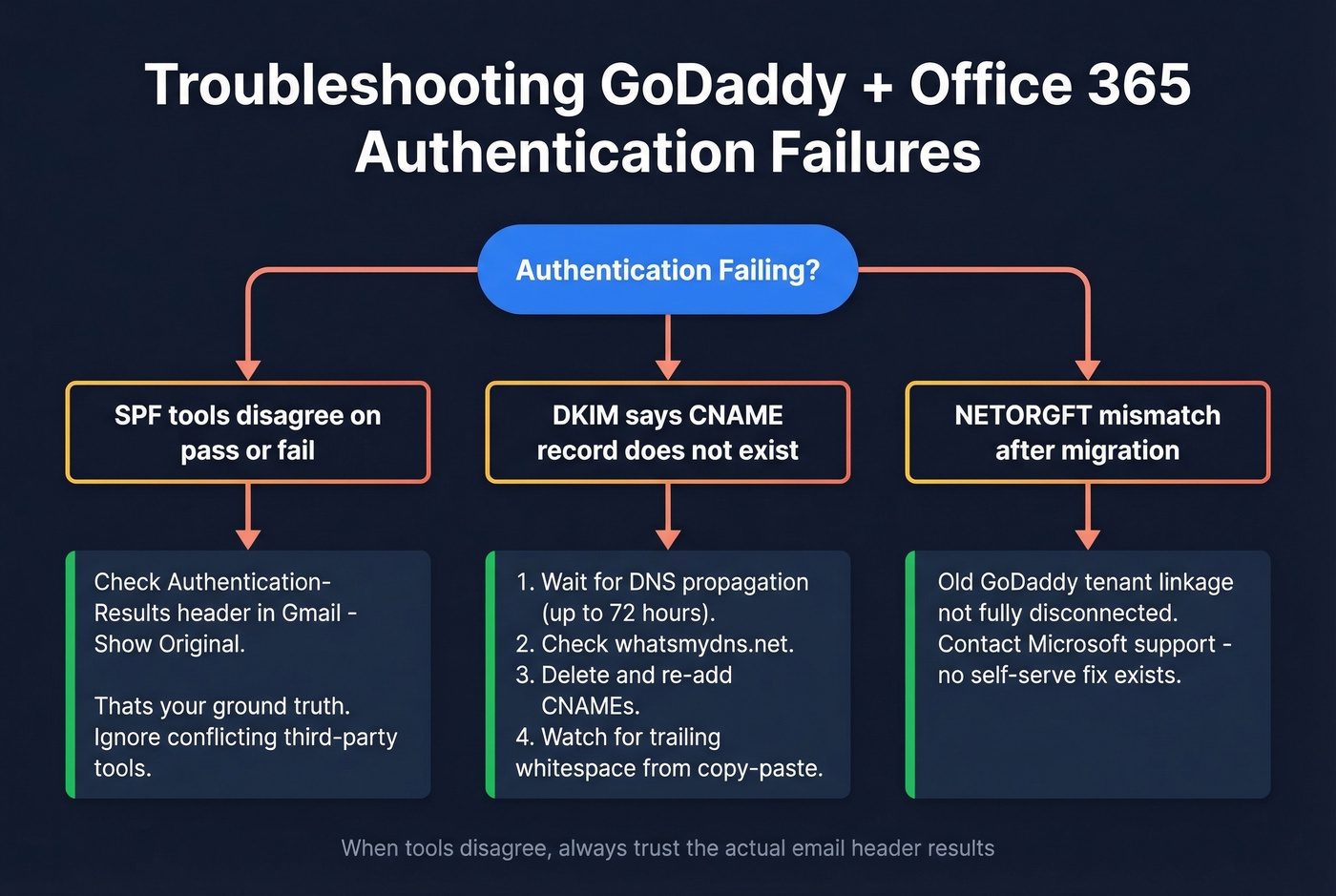
The most reliable place to check is the Authentication-Results header in an actual received email. Send a test message to Gmail, open it, click "Show original," and look for spf=pass. That's your ground truth. Everything else is secondary.
If you're still stuck, it helps to compare your syntax against a few known-good SPF record examples and confirm you’re not tripping the lookup limit.
GoDaddy Advanced Email Security (Proofpoint)
If you're using GoDaddy's Advanced Email Security add-on, your SPF records are different. This product runs through Proofpoint:
v=spf1 include:_spf-usg1.ppe-hosted.com include:secureserver.net ~all
Find the correct records at productivity.godaddy.com -> Users -> Manage -> Set Mail Destination. To save DNS lookups, swap include:_spf-usg1.ppe-hosted.com for a:dispatch-usg1.ppe-hosted.com, and swap include:secureserver.net for include:spf-0.secureserver.net.
Migrated Away from "Microsoft 365 from GoDaddy"?
For teams that defederated from GoDaddy's bundled M365 product and moved to a standalone tenant, watch for a NETORGFT mismatch. The M365 admin center can show DKIM targets pointing to yourdomain.onmicrosoft.com, but the Defender portal requests CNAMEs under NETORGFT####.onmicrosoft.com. This usually means the old GoDaddy tenant linkage isn't fully disconnected. You'll need to contact Microsoft support - there's no self-serve fix for this one.
Verify Your Setup
Don't trust a single tool. Check with at least two.
- EasyDMARC domain scanner - gives you an overall risk assessment with actionable next steps
- MXToolbox - best for individual record lookups and diagnosing specific failures
- dmarcly tools - useful for quick SPF/DKIM/DMARC validation
When tools disagree, trust the email header results from an actual sent message.
If you’re doing this to improve inbox placement for outbound, it’s worth reading a full email deliverability guide so you don’t miss the non-DNS factors.
Beyond p=none - Protecting Domain Reputation

About 75% of domains never move past p=none. Don't be one of them. Monitor your DMARC reports for 2-4 weeks, confirm all legitimate sending sources pass, then escalate to p=quarantine. After another monitoring period, move to p=reject. That's the full protection path.
But authentication is only one side of deliverability. You can have perfect SPF, DKIM, and DMARC and still tank your sender score by emailing invalid addresses. Prospeo's email finder runs at 98% accuracy with bounce rates under 4%, which means your authenticated emails actually land instead of generating bounces that erode the domain reputation you just worked to protect.
If you’re seeing bounces even after authentication is correct, use a benchmarked bounce rate checklist and a playbook to improve sender reputation.
Authentication keeps your domain off blocklists. Data quality keeps you out of spam folders. Prospeo refreshes 300M+ profiles every 7 days - not every 6 weeks - so you're never sending to stale contacts through your freshly configured Office 365 setup.
Stop burning your GoDaddy domain reputation on outdated data.
FAQ
What DMARC record should I use for GoDaddy and Office 365?
Add a TXT record in GoDaddy DNS with host _dmarc, TTL 3600, and value: v=DMARC1; p=none; rua=mailto:dmarc@yourdomain.com; aspf=r; adkim=r; pct=100. This monitors authentication without blocking mail. Relaxed alignment avoids breaking legitimate messages from third-party senders.
Why does DKIM say "CNAME record does not exist" after I added it in GoDaddy?
DNS propagation takes up to 72 hours, though most records resolve within a few hours. Verify your CNAMEs are live globally at whatsmydns.net. If they appear there but M365 still errors, delete both CNAMEs, wait five minutes, and re-add them. Trailing whitespace from copy/paste is the most common culprit.
Does DMARC alone fix email deliverability?
No. DMARC prevents domain spoofing, but deliverability also depends on list hygiene and bounce rates. Sending to invalid addresses damages sender reputation regardless of authentication - it's the fastest way to undo all the work you just put into your DNS records.