

GoldMine vs Salesforce: The Honest Comparison for 2026
You're a field sales rep. You need to log a call, check a contact's history, and fire off a follow-up - all from your phone between meetings. Except your company runs GoldMine, and you can't integrate it with your email, your dialer, or anything built after 2015. One frustrated rep on r/sales put it bluntly: they "really hate GoldMine's lack of integration" with the tools they actually use.
When you're weighing GoldMine vs Salesforce, this isn't a fair fight. But if you're still running GoldMine and considering the switch, here's what actually matters.
30-Second Verdict
Pick Salesforce if your team needs integrations, mobile access, or any plan to scale past 10 users. It's the default for a reason.
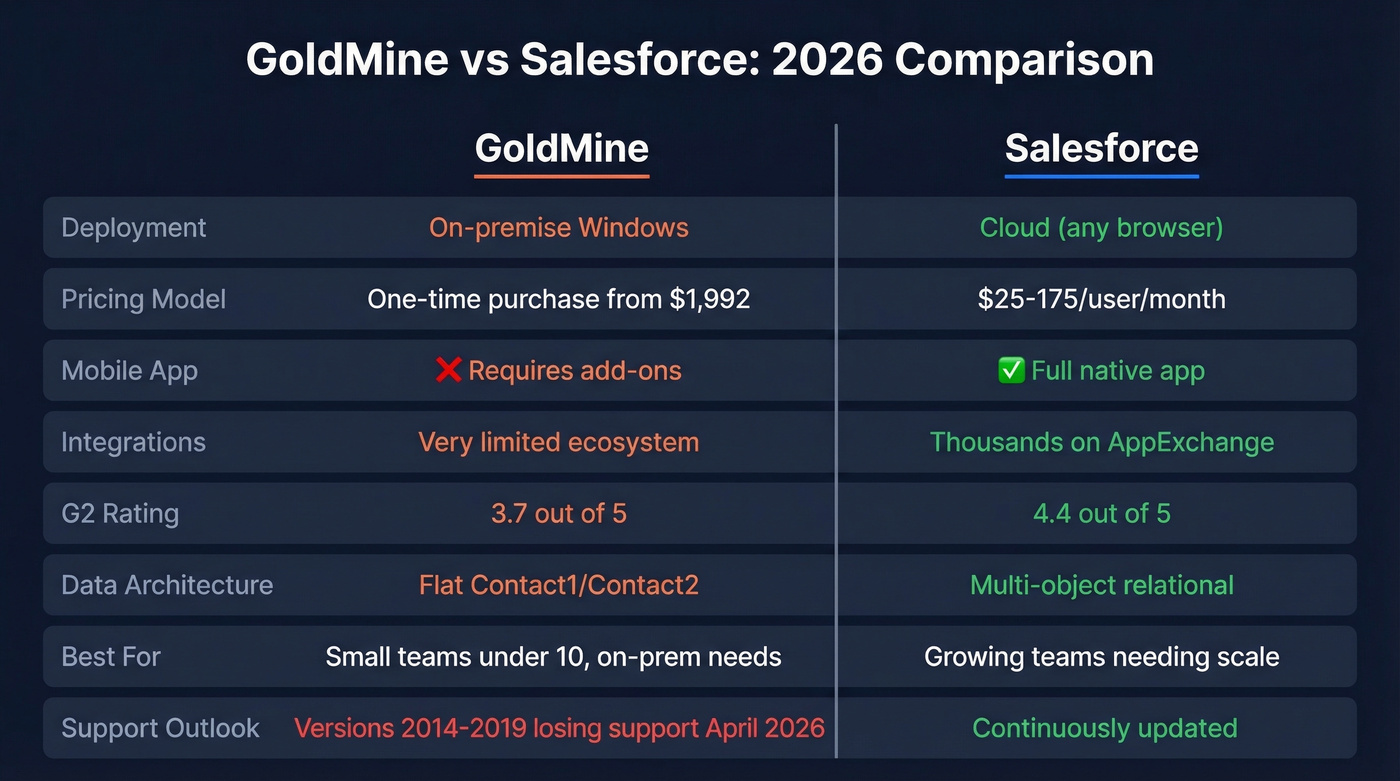
Pick GoldMine only if you're a small team under 10, you want on-premise data ownership, you don't need third-party integrations, and you've got in-house IT to babysit a Windows server.
If Salesforce feels like overkill, look at Pipedrive, Zoho CRM, or Less Annoying CRM as mid-ground options. If you want more context on what counts as a modern CRM, see examples of a CRM.
Skip both if your real problem is stale contact data. A shiny new Salesforce instance loaded with dead emails won't fix your pipeline - this is exactly where data enrichment services can make the migration worth it.
Is GoldMine Still Alive?
Technically, yes. A 2025 Edition is still sold as of early 2026, and GoldMine claims over 1 million users managing more than 1 billion relationships. But that installed base is aging fast. TrustRadius labels it "discontinued", and versions 2014-2019 lose all support on April 30, 2026 - meaning a huge chunk of the user base is about to go dark.
SelectHub's aggregate data across 370 reviews puts GoldMine at a 72% satisfaction rating. If you're evaluating GoldMine for a new deployment in 2026, we'd seriously question why - especially when there are stronger options in contact management software.
Pricing Compared
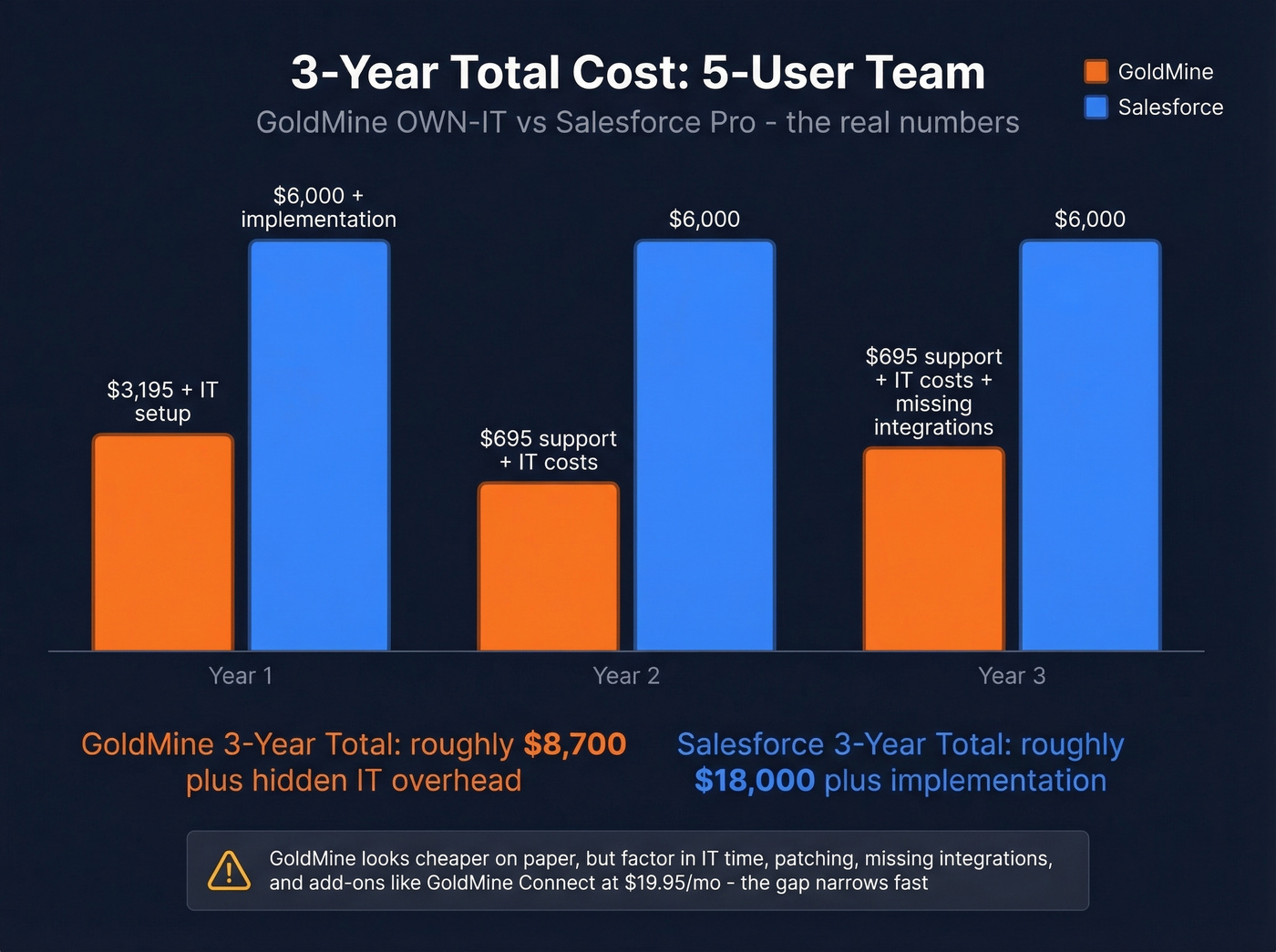
GoldMine's pitch is simple: buy once, own forever, and watch costs drop over 70% in year two versus subscription CRMs that stay flat. That sounds compelling until you factor in server maintenance, IT time, and the cost of not having modern integrations - including paid add-ons like GoldMine Connect ($19.95/mo + $25 setup) just for remote access.
GoldMine pricing:
| OWN-IT | Cloud | |
|---|---|---|
| Price | ~$1,992-$3,195 one-time | $55-$65/user/mo |
| Deployment | On-premise (Windows) | Cloud |
| Min. users | 3 | 3 |
GoldMine OWN-IT runs $1,992 for 3 shared users or about $3,195 for 5 concurrent users including one year of support. Each additional user costs ~$695 plus $139/year for support.
Salesforce pricing:
| Free Suite | Starter | Pro | Enterprise | |
|---|---|---|---|---|
| Price | $0 (2 users) | $25/user/mo | $100/user/mo | $175/user/mo |
Unlimited ($350/user/mo) and Agentforce ($550/user/mo) tiers exist but are irrelevant for teams comparing against GoldMine. Most teams land on Pro or Enterprise. A Reddit developer noted that "to use it seriously you need like $150 per user per month." Add $5k-$50k for implementation, and budget $100-175/user/month as the realistic all-in number. For a deeper breakdown, see Salesforce pricing and the official Salesforce pricing page.
The bottom line: For a 5-person team, GoldMine OWN-IT is genuinely cheaper in year one. By year three, the gap narrows fast once you account for IT overhead, patching, and the opportunity cost of missing integrations that your reps actually need.

Switching CRMs won't fix bad data. Whether you stick with GoldMine or move to Salesforce, stale contacts mean bounced emails and wasted rep time. Prospeo enriches your CRM records with 98% verified emails and 125M+ mobile numbers - with a native Salesforce integration that refreshes data every 7 days, not every 6 weeks.
Stop migrating garbage data. Enrich it at $0.01 per email.
Features & Architecture
Where Salesforce wins:
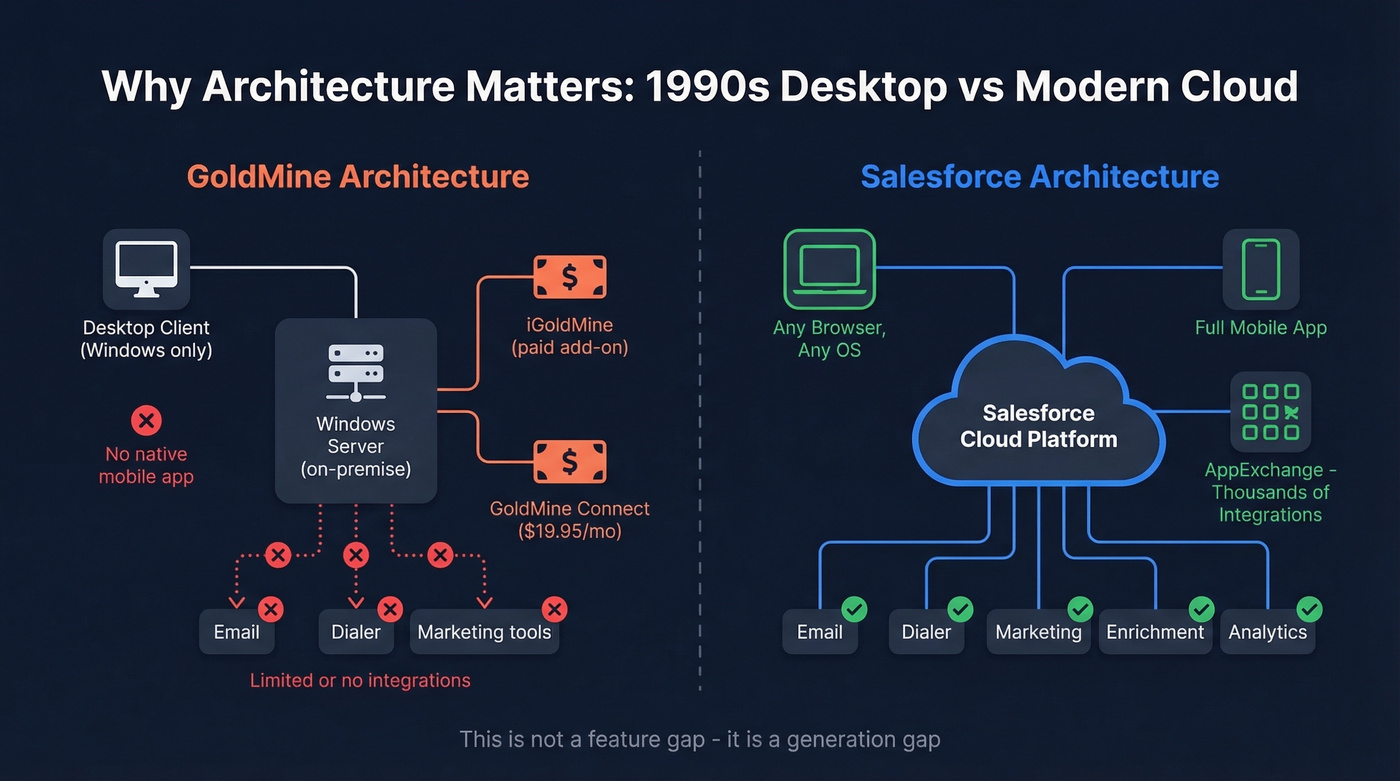
- Browser-based with no local install, works across major OSes, plus a full mobile app
- Multi-object data model with custom objects, fields, and relationships
- AppExchange ecosystem with thousands of integrations
- G2 rating: 4.4/5 - the industry benchmark
Where GoldMine wins:
- On-premise data ownership for compliance-sensitive teams
- Lower upfront cost for very small teams
- G2 rating: 3.7/5 across 196 reviews
Where GoldMine falls apart:
- Flat Contact1/Contact2-style structure vs. Salesforce's multi-object architecture
- Windows-based desktop core; web and mobile access require additional components like iGoldMine or Connect
- Tiny integration ecosystem
- Higher migration risk than any mainstream cloud CRM
Here's the thing: GoldMine can't close this gap with updates. The architecture was designed in the '90s for a Windows desktop. Salesforce was designed for the browser. That's not a feature difference - it's a generation difference.
What Real Users Say
The praise for GoldMine is consistent but narrow. Users love its contact organization and the simplicity of having everything in one place. Teams that've used it for 15+ years know every shortcut.
The complaints are louder. A G2 reviewer estimated ~30 minutes per day per rep lost to clunky navigation - 3-4 clicks to do what should take one. On Reddit, a sysadmin running GoldMine 5.7 called it "soooooooo old" and said it was "hindering everything on the network." TrustRadius reviewers flag performance issues once you're dealing with thousands of records. We've heard similar frustrations from our own users who migrated off GoldMine - the relief is palpable.
Migration: What to Expect
Simple migrations take 2-8 weeks. Complex orgs with decades of data can stretch to 3-6 months. Here's the checklist that matters:
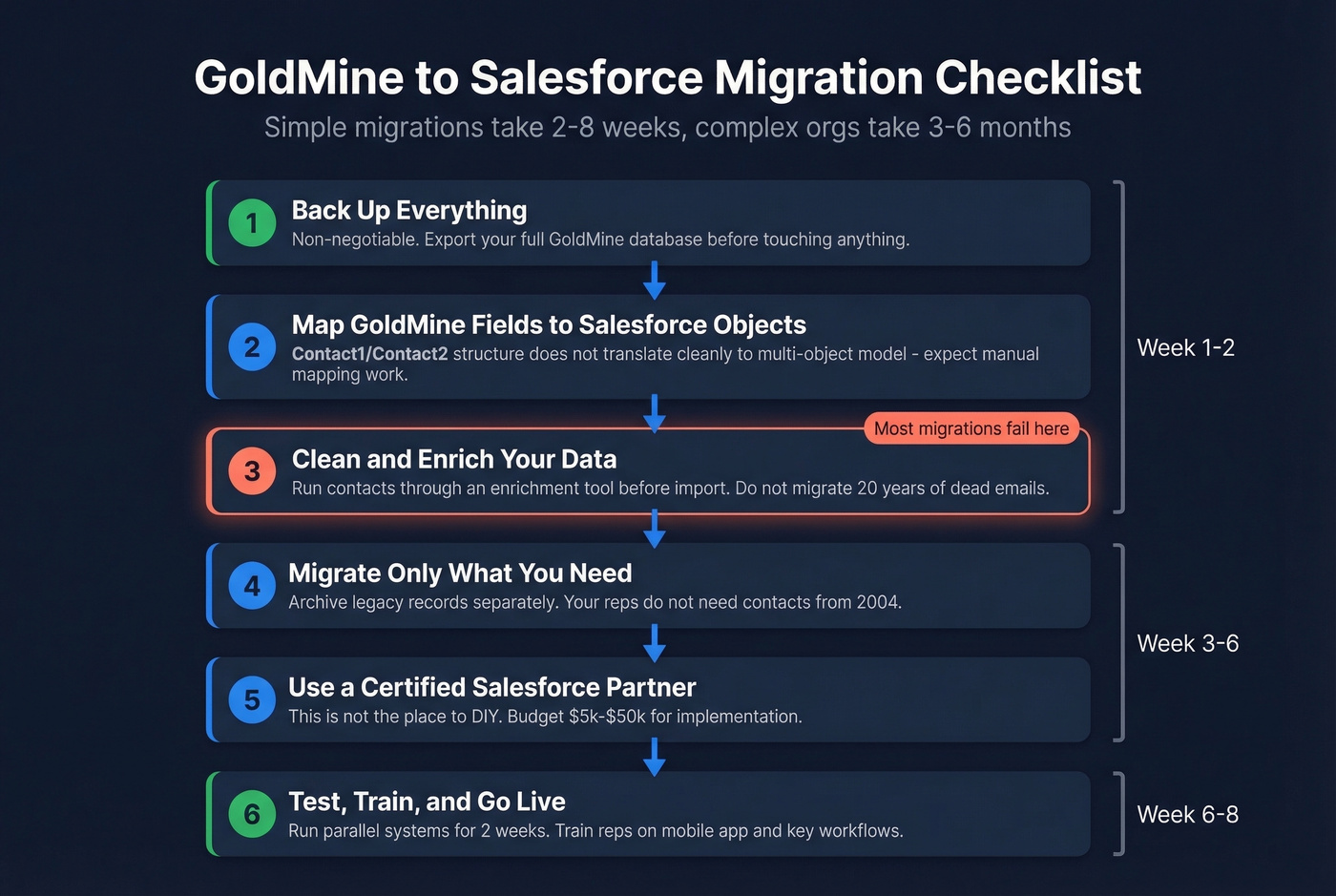
- Back up everything first. Non-negotiable.
- Map GoldMine fields to Salesforce objects. GoldMine's Contact1/Contact2-style structure doesn't translate cleanly to Salesforce's multi-object model, so expect manual mapping work.
- Migrate only what you need. Don't import 20 years of dead contacts. Archive legacy data separately.
- Use a certified Salesforce partner. This isn't the place to DIY.
- Clean your data before it hits Salesforce. This is where most migrations quietly fail.
Let's be honest about that last point. Your GoldMine database probably has thousands of contacts with outdated emails, disconnected phone numbers, and job titles from three roles ago. Importing that mess into Salesforce just gives you an expensive CRM full of garbage data. Before migrating, run your contacts through an enrichment tool like Prospeo - 83% of leads come back with verified contact data at 98% email accuracy, and the native Salesforce integration keeps records fresh on a 7-day refresh cycle. You can test it free with 75 emails/month against a sample of your GoldMine export before committing. If you're building a broader outbound motion post-migration, pair this with proven sales prospecting techniques and a tighter lead generation workflow.

That GoldMine database has contacts from three job changes ago. Before you import a single record into Salesforce, run it through Prospeo - 83% of leads come back with fresh contact data, and the 5-step verification catches catch-alls, spam traps, and dead addresses your old CRM never flagged.
Test it free with 75 emails against your GoldMine export today.
FAQ
Is GoldMine discontinued?
Not officially - a 2025 Edition is still sold as of early 2026. But TrustRadius labels it "discontinued," and versions 2014-2019 lose all support April 30, 2026. The trajectory points toward end-of-life, not a comeback.
How long does a GoldMine to Salesforce migration take?
Two to eight weeks for simple databases with clean records. Three to six months for complex orgs carrying decades of data. Use a certified Salesforce partner and enrich your contacts before import - migrating stale data is the most common reason CRM switches fail.
What does Salesforce actually cost?
Budget $100-175/user/month all-in for a real deployment. Starter is $25/user/month, but most teams need Pro ($100) or Enterprise ($175) plus $5k-$50k in implementation costs. The free Suite tier works for two users only.
Should I switch from GoldMine to Salesforce in 2026?
If your team exceeds five users, needs mobile access, or relies on integrations with modern sales tools - yes. GoldMine's aging Windows architecture and shrinking support window make it a liability for growing teams. The main reason to stay is on-premise data control with a very small, IT-supported team that doesn't need to work from the road.