

Google DMARC Requirements: What You Need to Do in 2026
Your CEO just forwarded you a bounce notification. The error code reads 5.7.26 - DMARC alignment failure. Half the outbound campaign never reached Gmail inboxes.
If you're not current on Google DMARC requirements, this is what non-compliance looks like. With Gmail commanding roughly 30.7% of global email client share, that's not a minor hiccup - it's a pipeline problem.
What You Need (Quick Version)
- Publish a DMARC record at
_dmarc.yourdomain.comwith at leastp=noneand aggregate reporting enabled. - Pass both SPF and DKIM, with at least one aligned to your visible From domain.
- Keep spam complaint rate below 0.3% in Google Postmaster Tools, include one-click unsubscribe (List-Unsubscribe header) for bulk sends, and maintain valid PTR records, TLS encryption, and RFC 5322 formatting.
Enforcement Timeline
Google didn't act alone. The major mailbox providers now enforce authentication requirements for high-volume senders, and PCI DSS v4.0 pushes organizations toward stronger anti-phishing controls where DMARC, SPF, and DKIM are common mechanisms teams use to meet that bar.
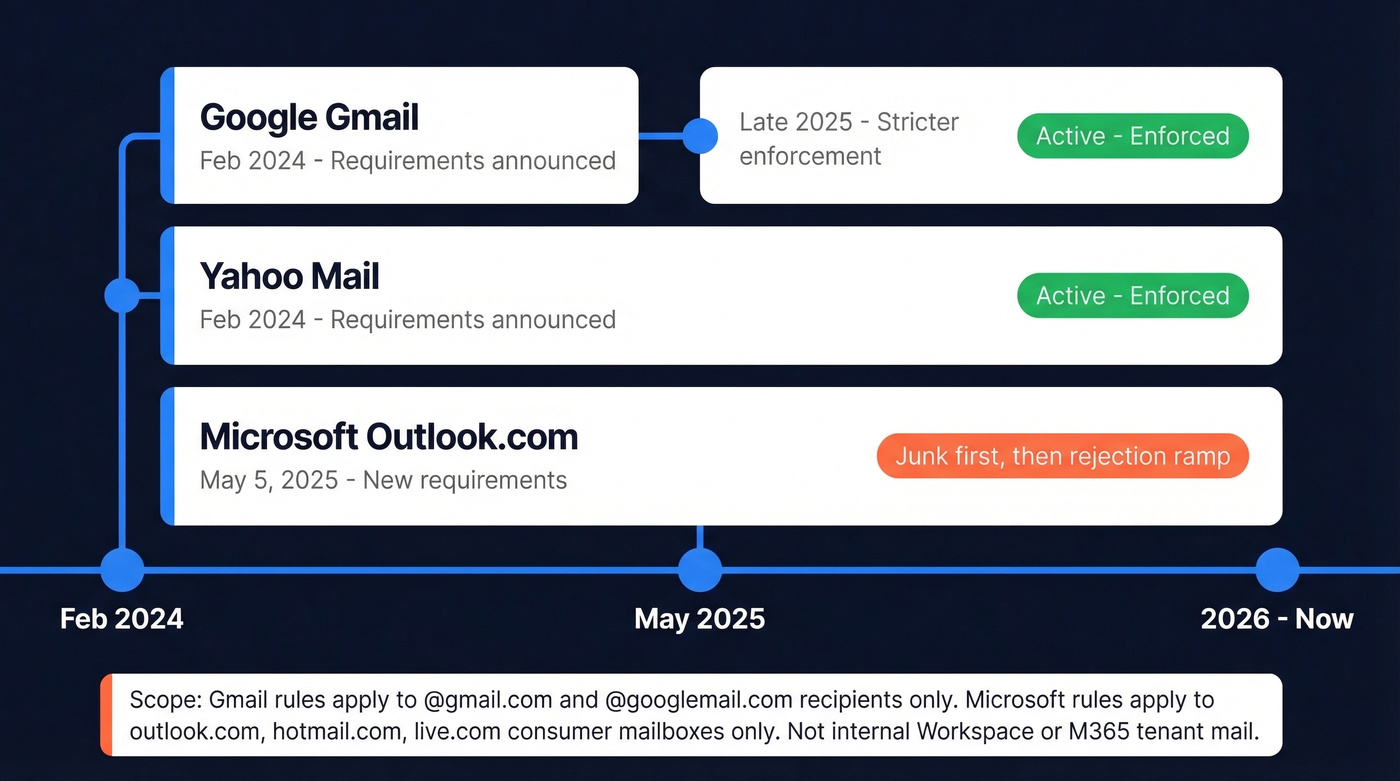
| Provider | Enforcement Start | Status (2026) |
|---|---|---|
| Google Gmail | Feb 2024 requirements; stricter enforcement by late 2025 | Active - enforced |
| Yahoo Mail | Feb 2024 | Active - enforced |
| Microsoft Outlook.com | May 5, 2025 | Junk, then rejection ramp |
Important scope detail: Gmail enforcement targets @gmail.com and @googlemail.com recipients, not internal Workspace mail. Microsoft's rules apply to consumer Outlook.com mailboxes (hotmail.com, live.com, outlook.com), not tenant-to-tenant M365 mail.
Here's the thing: the "5,000 emails per day" threshold gets too much attention. Google requires SPF and DKIM for all senders. The 5,000/day mark triggers additional requirements - DMARC records, one-click unsubscribe, spam rate monitoring - but broken authentication tanks deliverability at any volume. Yahoo counts spoofed messages from your domain toward that 5,000/day threshold too, which is another reason to move past p=none quickly.
If you're closing deals under $10k and sending fewer than 1,000 emails a day, you don't need a $50k/year deliverability consultant. You need 30 minutes with your DNS records and this guide.
One angle most guides skip: PCI DSS v4.0 introduced 47 new requirements mandatory since March 31, 2025. DMARC, SPF, and DKIM are widely used anti-phishing mechanisms for meeting PCI's phishing-defense expectations. If your organization handles credit card data, DMARC isn't just a deliverability play - it's part of a modern audit-ready security posture.
SPF, DKIM, and DMARC Setup
Publish a DNS TXT record at _dmarc.yourdomain.com. Here's a solid baseline:
v=DMARC1; p=none; rua=mailto:dmarc@yourdomain.com; adkim=r; aspf=r; pct=100; fo=1; ri=86400
Two tags are required: v=DMARC1 (must be first) and p= (your policy). The rua tag tells receivers where to send aggregate reports. The fo=1 flag requests more detailed failure reporting signals when receivers support it, which is useful for debugging.
Alignment and Authentication
The adkim and aspf tags control alignment mode. Relaxed lets subdomains align with the organizational domain - mail.example.com aligns with example.com. Strict demands an exact match. Relaxed is the right default for most teams, especially if you use third-party sending services. If you want a deeper breakdown of what “aligned” actually means, see DMARC alignment.
Your SPF record for Google Workspace: v=spf1 include:_spf.google.com ~all. For Microsoft 365: v=spf1 include:spf.protection.outlook.com ~all. The hard rule: SPF allows a maximum of 10 DNS lookups. We've seen teams stack five SaaS tools' SPF includes and blow past this limit without realizing it - instant PermError, instant SPF failure. (More examples: SPF record.)
For DKIM, publish your key at selector._domainkey.yourdomain.com using 2048-bit keys. If you’re troubleshooting, use this checklist to verify DKIM is working.
Rollout Path
Start at p=none with reporting. Analyze aggregate reports for 2-4 weeks to identify all legitimate sending sources. Then move to p=quarantine, then p=reject.
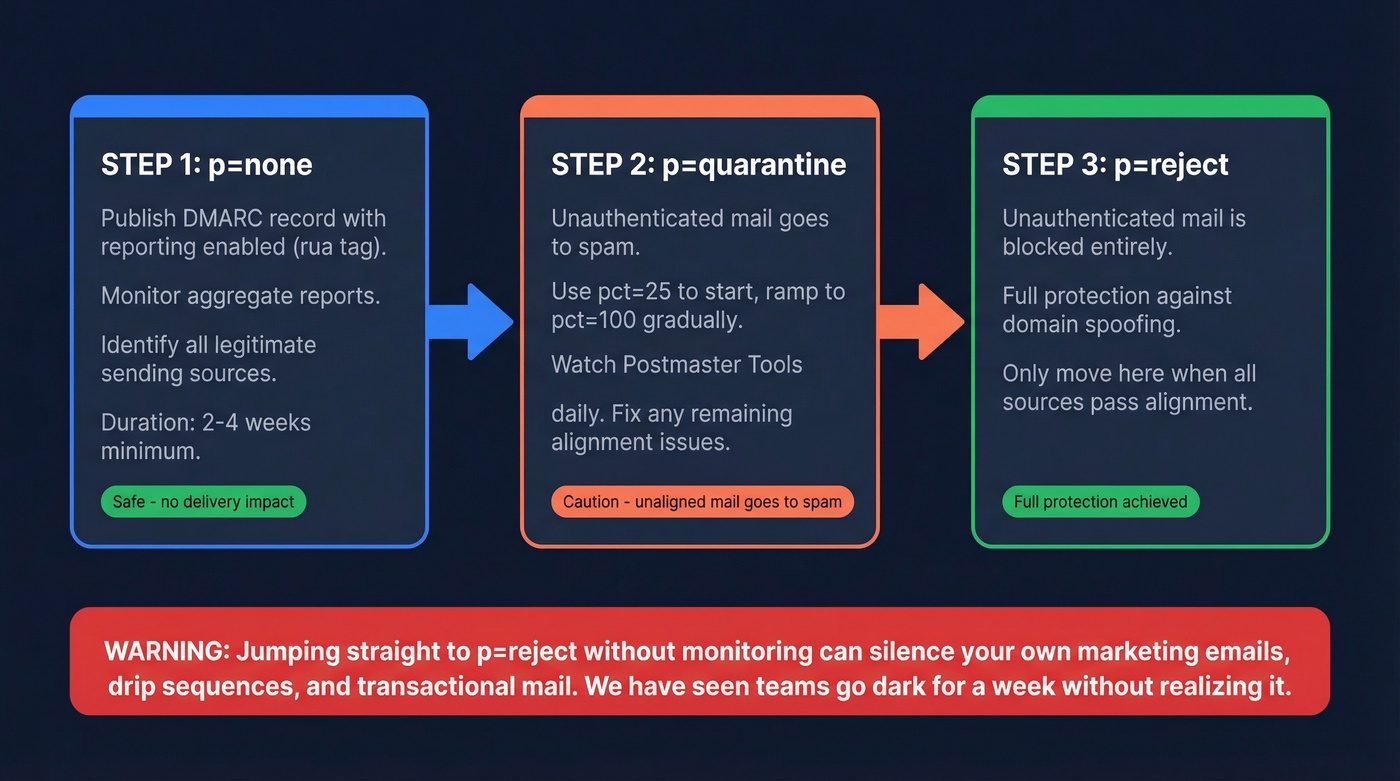
Jumping straight to reject is how you accidentally quarantine your own marketing emails. We've watched it happen to a team running three different outbound tools - they flipped to reject on day one and silenced their own drip sequences for a week before anyone noticed. Keep your DMARC record under ~450-500 bytes to avoid DNS fragmentation, and if you use a third-party reporting service, publish external reporting authorization per RFC 7489.

DMARC compliance keeps your domain safe, but it can't fix bad data. Sending to invalid addresses spikes bounce rates and tanks your sender reputation - the exact thing you're trying to protect. Prospeo's 98% email accuracy and 5-step verification mean every address you send to is real, verified, and deliverable.
Don't let bad contact data undo all your authentication work.
Mistakes That Break Compliance
Multiple DMARC records at the same hostname cause receivers to treat it as no policy at all. Policy discovery terminates silently. Merge into one record.
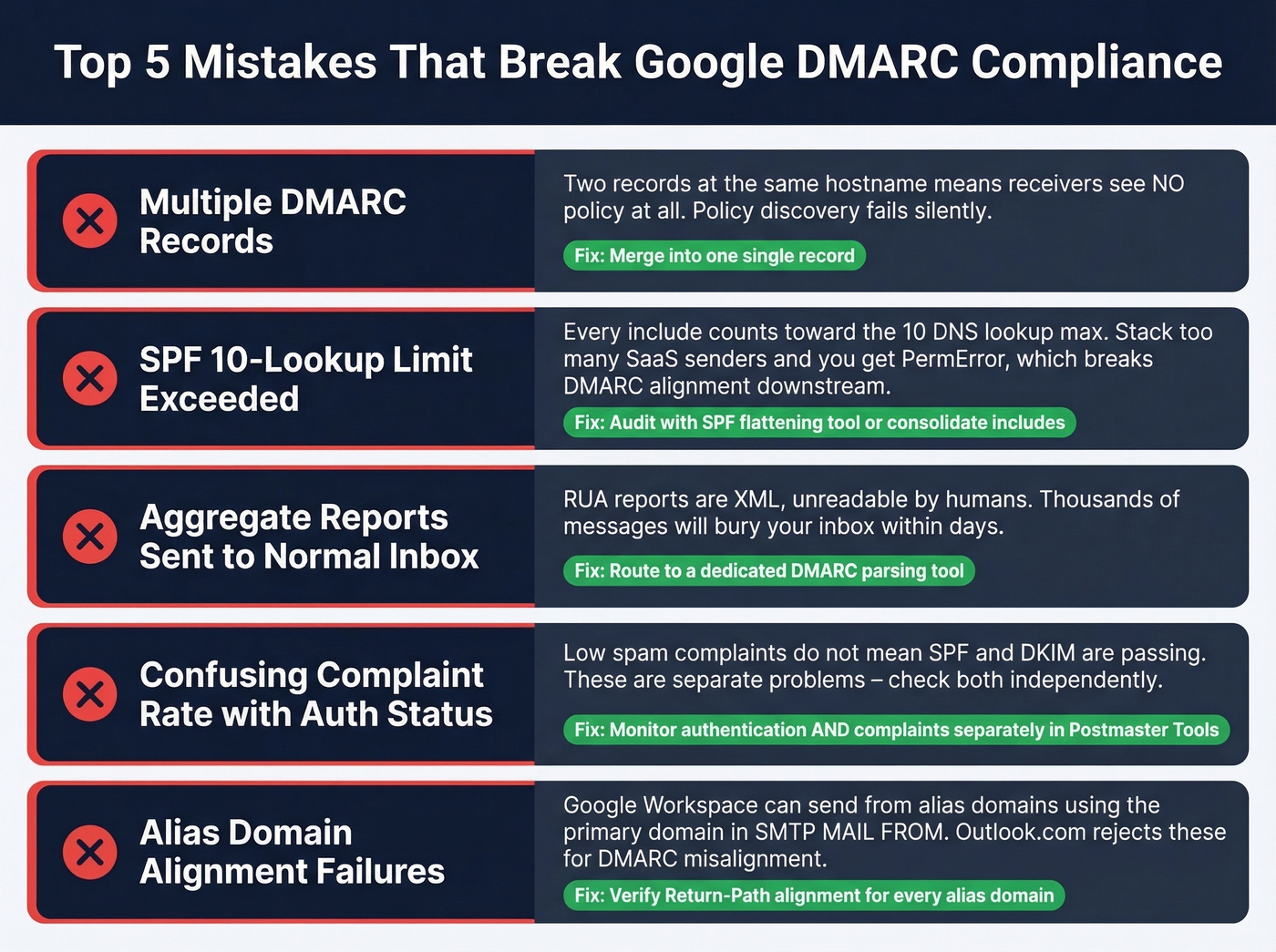
The SPF 10-lookup limit catches more teams than any other issue. Every include: counts. Stack enough SaaS senders and you'll hit PermError, which breaks DMARC alignment downstream. Audit with an SPF flattening tool or consolidate includes.
Sending aggregate reports to a normal inbox - don't do this. RUA reports are XML, unreadable by humans, and will bury your mailbox in thousands of messages within days. Route them to a dedicated parsing tool like Postmark's DMARC monitoring or a similar service.
We've seen marketing teams cite low spam complaint rates while every SPF header is failing on every message. Complaint rate and authentication are separate problems. One passing doesn't mean the other is fine.
Watch for alias domain alignment failures too. Google Workspace can send from alias domains while using the primary domain in the SMTP MAIL FROM, and Outlook.com can reject those messages for DMARC alignment even when DNS records look correct. Verify Return-Path alignment for every alias domain you operate.
SMTP Error Codes Reference
When Gmail or Microsoft rejects your mail, the error code is your fastest clue about what failed. Bookmark this.
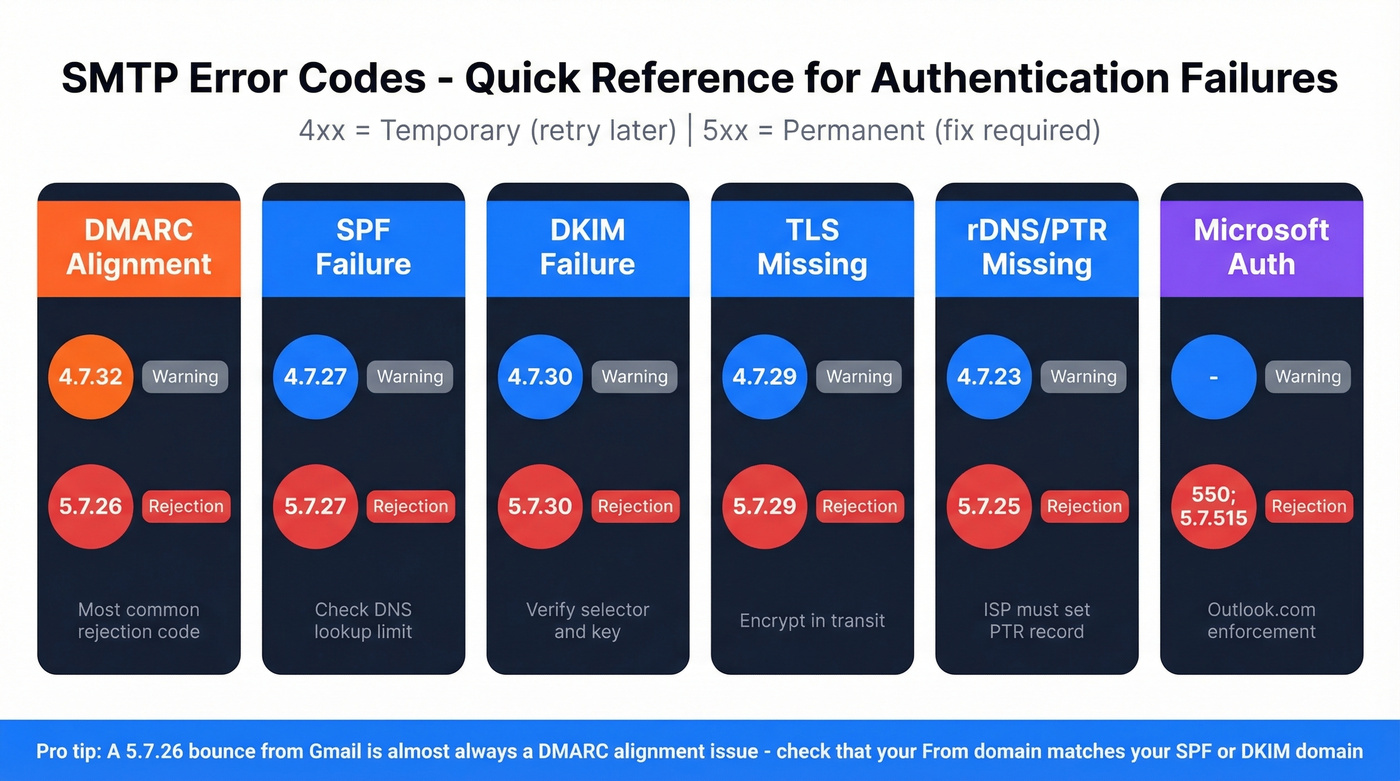
| Failure Type | Warning (4xx) | Rejection (5xx) | Notes |
|---|---|---|---|
| DMARC alignment | 4.7.32 | 5.7.26 | Most common rejection |
| SPF failure | 4.7.27 | 5.7.27 | Check lookup limit |
| DKIM failure | 4.7.30 | 5.7.30 | Verify selector + key |
| TLS missing | 4.7.29 | 5.7.29 | Encrypt in transit |
| rDNS/PTR missing | 4.7.23 | 5.7.25 | ISP must set PTR |
| Microsoft auth | - | 550; 5.7.515 | Outlook.com enforcement |
A 4xx code is a temporary failure - retry later. A 5xx code is permanent.
Monitoring and Staying Compliant
Google Postmaster Tools is non-negotiable. It shows authentication pass rates, spam complaint rates, IP reputation, and delivery errors. Data updates roughly every 24 hours, and low-volume days under ~200 emails show nothing useful. Compliance changes can take up to 7 days to reflect - don't panic-change DNS records based on a single day's data. For a broader playbook, use this email deliverability guide.
A note on ARC: an IETF draft has recommended obsoleting RFC 8617, marking the end of the ARC experiment. Treat ARC as a diagnostic tool for forwarding issues, not a fix.

Let's be honest about the other half of this equation. DMARC protects your domain from spoofing, but the other deliverability killer is bad contact data. Bounces from invalid addresses damage the sender reputation you just worked to protect. In our experience, teams that fix authentication but keep sending to stale lists end up right back where they started within a few weeks. Prospeo verifies emails in real time at 98% accuracy before they enter your outbound workflow, and teams like Stack Optimize maintain 94%+ deliverability with sub-3% bounce rates across all client campaigns using that verification process. If you’re tracking list health, compare against current email bounce rate benchmarks and remediation steps.
You just spent 30 minutes locking down SPF, DKIM, and DMARC. Now your domain reputation depends on what you send and who you send it to. Prospeo verifies every email against catch-all domains, spam traps, and honeypots - refreshed every 7 days, not every 6 weeks. Keep your bounce rate under 2% and your complaint rate well below Google's 0.3% threshold.
Protect the domain reputation you just invested in. Start with clean data.
Google DMARC Requirements FAQ
Does DMARC apply under 5,000 emails per day?
Yes. Google requires SPF and DKIM for all senders regardless of volume. The 5,000/day threshold triggers additional requirements like DMARC records and one-click unsubscribe, but broken authentication hurts deliverability even at 50 emails a day.
What's the minimum DMARC policy Google accepts?
p=none satisfies the requirement without affecting delivery. Start here with reporting enabled (rua=mailto:...), then move to p=quarantine and p=reject as you confirm all legitimate sources are aligned - typically a 2-4 week process.
How long do DMARC changes take to work?
DNS propagation takes 24-48 hours. Google Postmaster Tools can take up to 7 days to reflect changes. Test with online DMARC lookup tools immediately after publishing, but allow a full week before evaluating dashboard data.
Can I use a third-party DMARC reporting service?
Yes, but you need external reporting authorization per RFC 7489. Publish a DNS TXT record at yourdomain.com._report._dmarc.reportingservice.com to authorize the external domain to receive your aggregate reports.
How do I protect sender reputation after fixing DMARC?
Monitor spam complaint rates in Postmaster Tools and stay under 0.3%. Verify email addresses before sending - bounces from invalid contacts damage reputation just as fast as authentication failures. Skip this step if you're only sending to a small, hand-curated list of contacts you know personally, but for any outbound campaign at scale, real-time verification isn't optional.