

Google Email Search by Name: 5 Methods That Work
A Google email search by name sends people down two completely different paths. You're either digging through your own inbox for a message from someone named Sarah, or you're trying to find Sarah's email address when you don't have it at all. Gmail serves roughly 1.8 billion monthly users, but there's no public Google email directory. Never has been.
Here are five methods that actually work - ranked from the simplest inbox tricks to the tools we rely on when free methods hit a wall.
Search Your Gmail Inbox by Name
Gmail's built-in search is more powerful than most people realize. The key rule: no spaces around the colon. from:john works. from: john doesn't.
You can stack operators for precision. Every email from John with an attachment? from:john has:attachment. An exact phrase in the subject line? subject:"quarterly review". These combinations are where Gmail search gets genuinely useful - and where most guides stop short.
Gmail Search Operators Cheat Sheet
| Operator | What It Does | Example |
|---|---|---|
from: |
Emails from a person | from:sarah |
to: |
Emails you sent to someone | to:mike@company.com |
cc: |
Emails where someone was CC'd | cc:boss@company.com |
bcc: |
Emails where someone was BCC'd | bcc:partner@firm.com |
subject:"" |
Exact phrase in subject | subject:"project update" |
AROUND |
Two words near each other | budget AROUND 5 forecast |
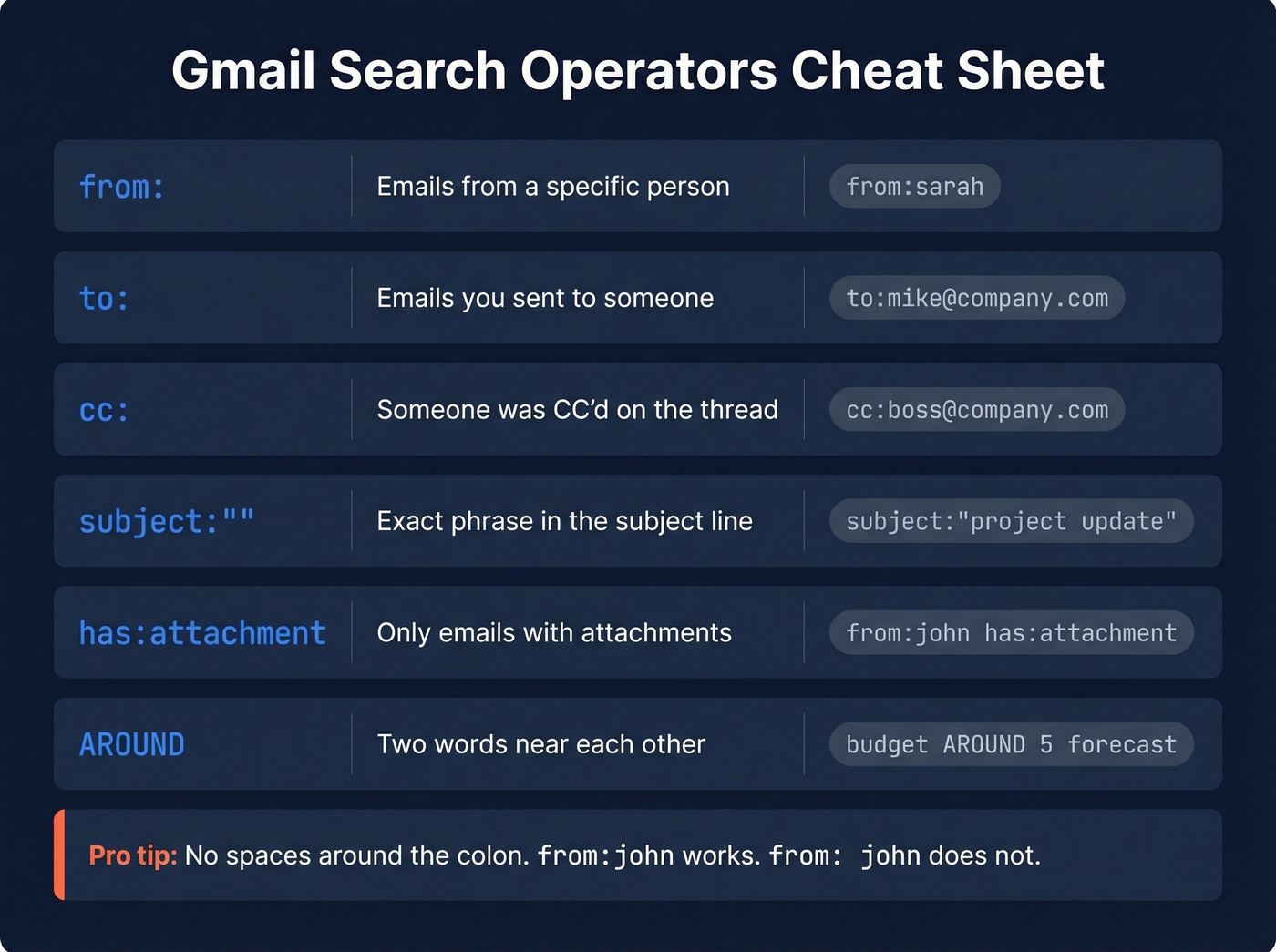
The core operators - from:, to:, cc:, and subject: - handle most name-based inbox searches. bcc: and AROUND are less commonly used, but they're incredibly handy for complex queries. For the full operator reference, Google's help page covers everything from in:anywhere to deliveredto:.
Check Google Contacts First
Before hunting externally, check whether you already have the person's email saved. Go directly to contacts.google.com, use the Contacts icon in Gmail's right sidebar, or click the Apps grid and select Contacts.
Google Contacts holds up to 25,000 entries and searches across names, emails, phone numbers, and notes. Even if you didn't explicitly save someone, Gmail often remembers people you've emailed before - so it's worth a quick look.
Find Someone's Unknown Email by Name
This is where things get interesting. You have a name, maybe a company, but no email address. Here's what works, ranked by effort.
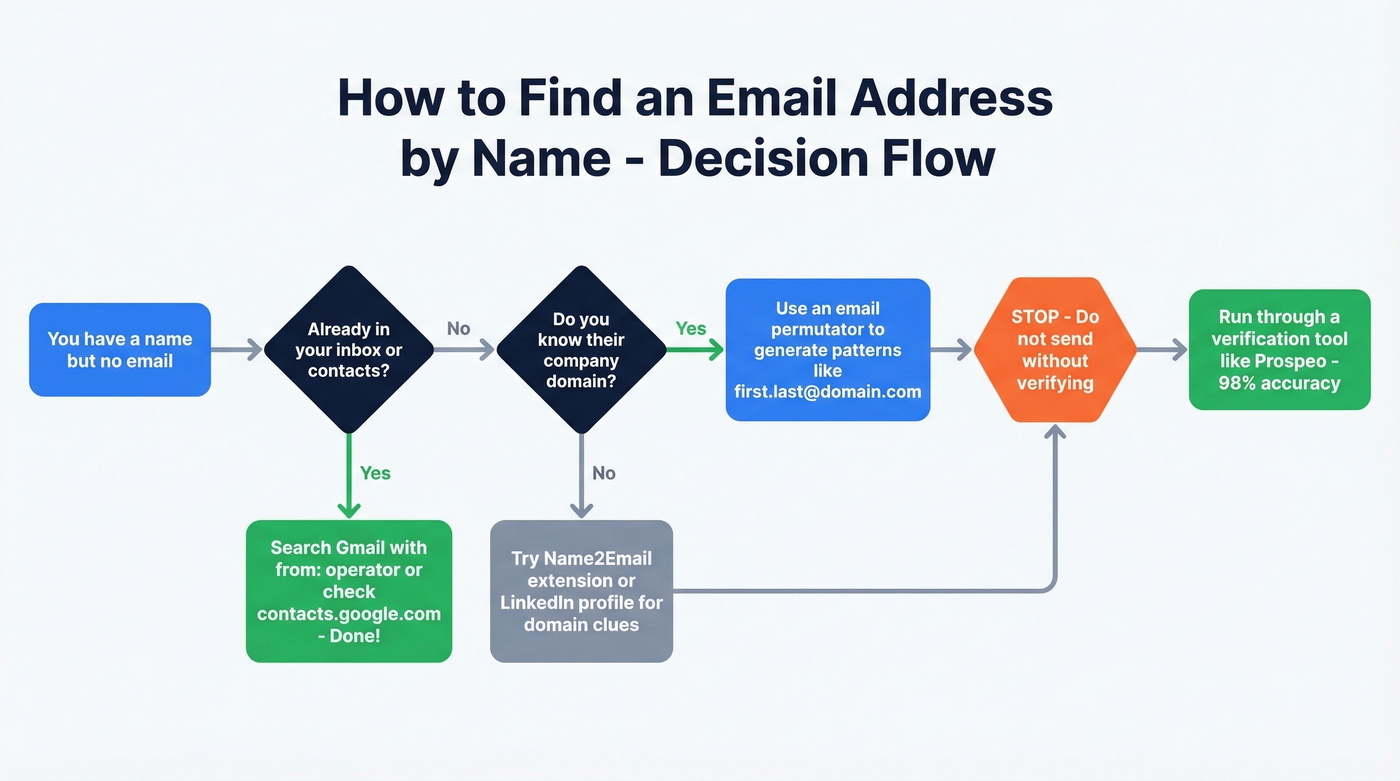
Gmail Tricks (Free, Limited)
Gmail ignores dots in addresses. john.smith@gmail.com and johnsmith@gmail.com deliver to the same inbox. That means fewer combinations to guess for personal Gmail addresses - no dashes, no underscores, just letters and dots.
There's a quick check too: type a candidate address into Gmail's "To" field and pause. Sometimes Gmail will show a profile photo or card for that address. It's not a guarantee, but it can be a fast hint before you move on to heavier methods.
Email Permutators
A permutator takes a first name, last name, and domain, then generates every plausible email format: firstname@, f.lastname@, firstname.lastname@, and so on. Metric Sparrow is free and generates up to 46 combinations per input. Alternatives like the Foxfire Google Sheet template produce 33.
Here's the thing: permutators guess. They don't verify. Sending cold emails to dozens of unverified addresses will wreck your deliverability and spike your bounce rate. Always run candidates through a verification tool before hitting send.

Name2Email Chrome Extension
Name2Email is a free Chrome extension by Reply. Open a new email in Gmail, type a first name, last name, and company domain in the "To" field, and the extension suggests matching email addresses. It works well for business emails at companies with predictable formats. Skip it for personal Gmail lookups or smaller companies with non-standard naming conventions - we've found it misses more than it hits in those cases.

Email permutators guess. Gmail tricks hope. Prospeo's 5-step verification across 300M+ profiles actually confirms the address is real - catching spam traps and honeypots that pattern-matching misses. At 98% accuracy with a 7-day refresh cycle, you skip the bounce-rate roulette entirely.
Find any professional email by name in seconds, not hours.
When Free Methods Fail
Free tricks hit a ceiling fast. They don't verify, they don't scale, and they waste time when you need more than a handful of addresses. Enterprise tools like Cognism and ZoomInfo charge custom pricing that starts in the five figures. For most teams, a self-serve email finder is the sweet spot.

Prospeo delivers 98% email accuracy across 300M+ profiles with a 7-day data refresh cycle, at roughly $0.01 per email on paid plans. Its 5-step verification process catches spam traps and honeypots that pattern-matching tools miss entirely. In our experience, that verification layer is the difference between a 3% bounce rate and a 35% one - and the latter can torch your sending domain in a week.
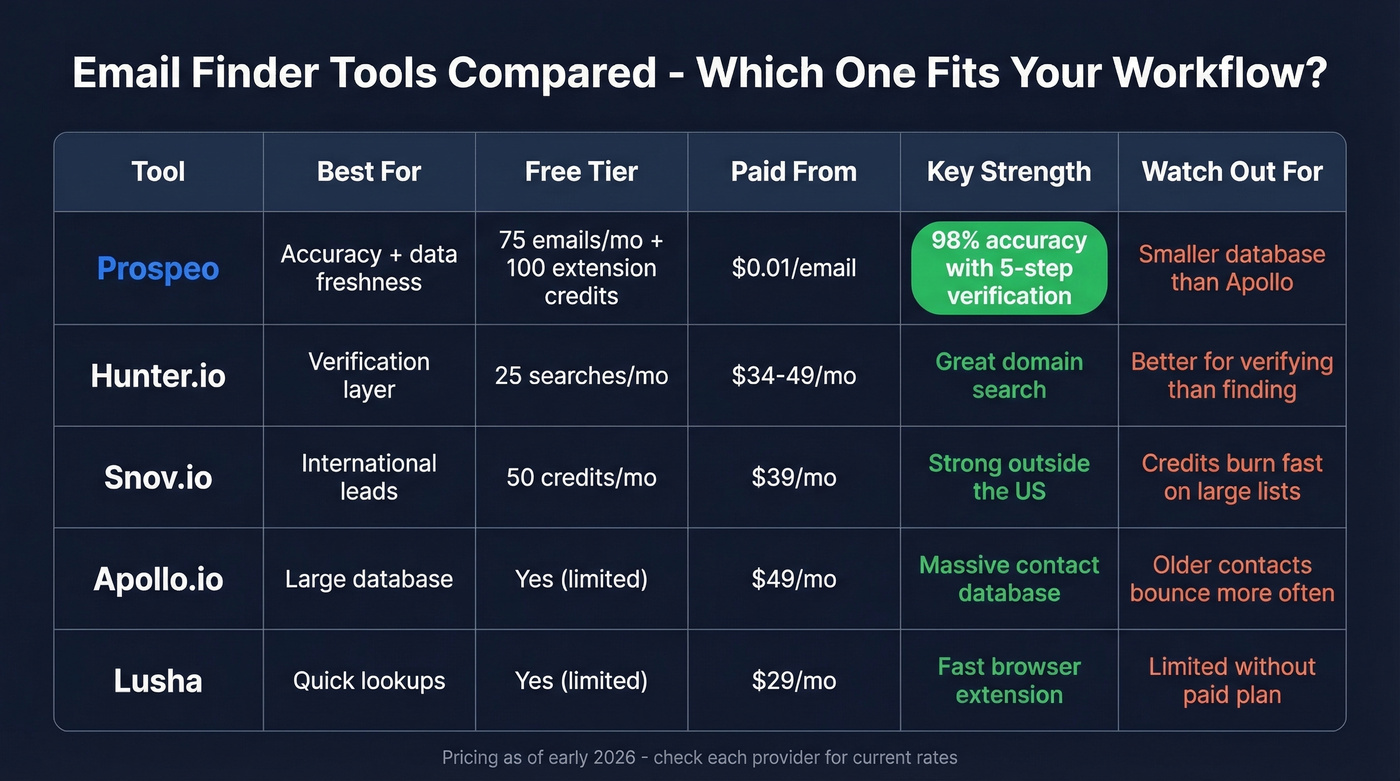
Real-world tool expectations are pretty consistent across the space: Apollo has a massive database but bounces on older contacts, Hunter works better as a verification layer than a primary source, and Snov.io punches above its weight for international leads.
Let's be honest - if your average deal size is under $5k, you don't need a $30k/year data platform. A self-serve tool with real verification will outperform an enterprise suite you only use at 10%.
| Tool | Best For | Free Tier | Paid From |
|---|---|---|---|
| Prospeo | Accuracy + freshness | 75 emails/mo + 100 extension credits/mo | ~$0.01/email |
| Hunter.io | Verification layer | 25 searches/mo | ~$34-$49/mo |
| Snov.io | International leads | 50 credits/mo | ~$39/mo |
| Apollo.io | Large database | Yes (limited) | ~$49/mo |
| Lusha | Quick lookups | Yes (limited) | ~$29/mo |
You searched Google for an email by name. That means you need a real address, not 46 unverified guesses from a permutator. Prospeo verifies every email before you see it - 98% accuracy, $0.01 per result, no contracts. Your sending domain stays clean.
Stop guessing emails and start verifying them.
Stay Legal and Stay Safe
A name-based email address is personal data under GDPR. Generating someone's email from public records and blasting them unsolicited marketing can trigger fines up to €20 million or 4% of annual global turnover. CAN-SPAM penalties run up to $46,517 per email. Under UK GDPR and PECR, generating name-based email addresses from public data for unsolicited marketing can be unlawful even if the data source is public.
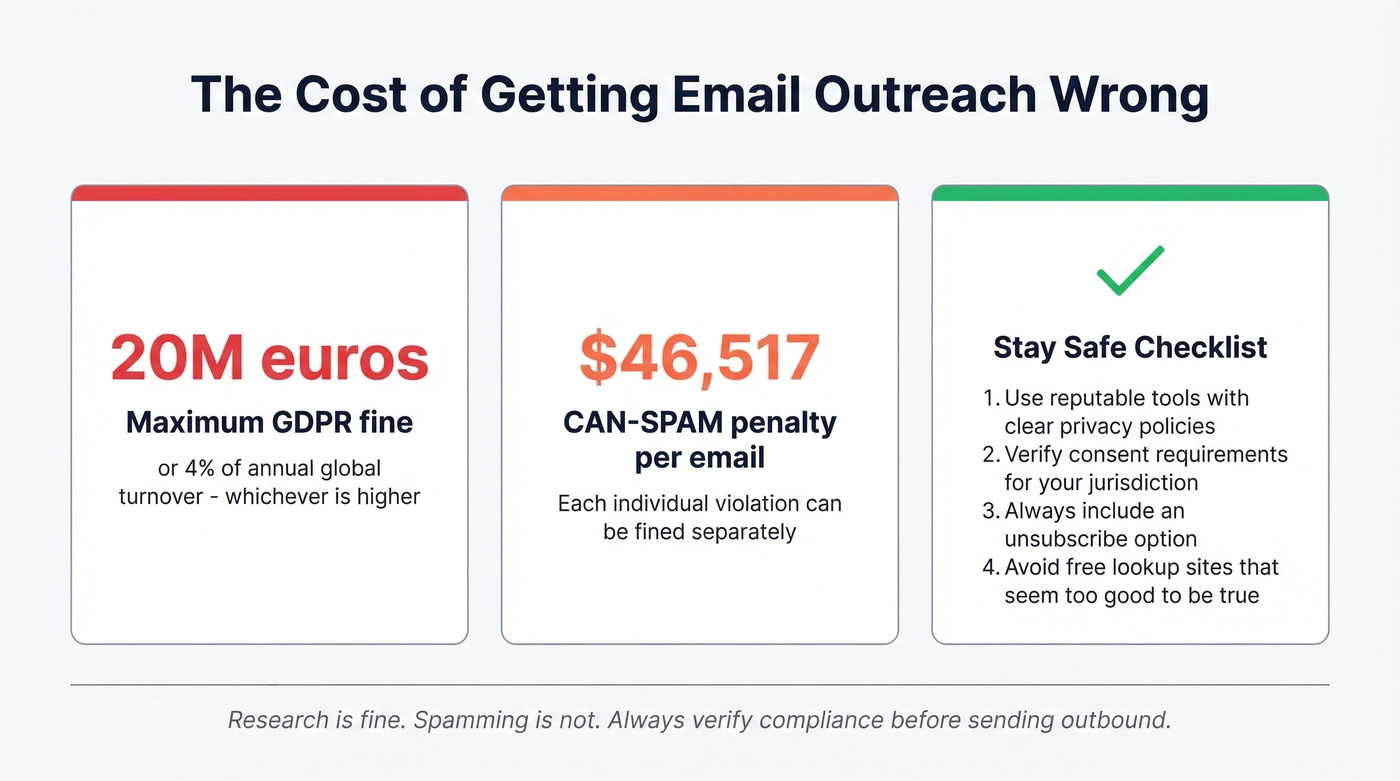
Avoid sketchy free lookup sites that promise "find anyone's email instantly." Many are phishing traps or sell your data. Stick to reputable tools with clear privacy policies and GDPR compliance, and always verify consent requirements for your jurisdiction before sending outbound.
If you're doing outbound at any scale, it's also worth tightening your email deliverability basics and monitoring sender reputation so one bad list doesn't tank your domain.
FAQ
How does Google email search by name work inside Gmail?
Gmail uses search operators like from: and to: to filter messages by sender or recipient name. There's no public directory - you can only search emails already in your inbox or contacts stored at contacts.google.com.
Is it legal to look up someone's email address?
Researching publicly available information is legal in most jurisdictions. Sending unsolicited marketing to a guessed address can violate GDPR and CAN-SPAM with serious fines. Research is fine; spamming isn't.
Can you find someone's Gmail address just from their name?
Not through Google directly - there's no public Gmail directory. Use a permutator to generate candidate addresses, then verify with an email finder like Prospeo or Hunter. Business emails at known domains are far easier to find than personal Gmail addresses.