

Google Postmaster Tools Domain Reputation: What Changed and What to Do Now
You logged into Google Postmaster Tools expecting your domain reputation tier - High, Medium, Low, or Bad - and instead got a checklist you don't recognize. Threads on r/Emailmarketing are full of senders asking the same thing: where did my domain reputation score go?
Short answer: it's gone. In Postmaster Tools v2, the domain and IP reputation dashboards aren't available anymore. Here's what that means and what to do about it.
The Quick Version
Domain reputation dashboards don't exist in Postmaster Tools v2. Spam rate is now your #1 signal - keep it below 0.1%, never above 0.3%. The new Compliance Status dashboard shows Pass or Needs Work, not the old four-tier system.
To monitor reputation now, use Sender Score, MXToolbox, and Talos Intelligence - all free. If your reputation's already damaged, clean your contact data first. Bounces from bad emails are the fastest, most controllable reputation killer.
What Was the Domain Reputation Dashboard?
Google Postmaster Tools used to classify your sending domain into one of four reputation tiers based on how Gmail users interacted with your email. This score was strongly correlated with whether your messages landed in the inbox or got filtered to spam.
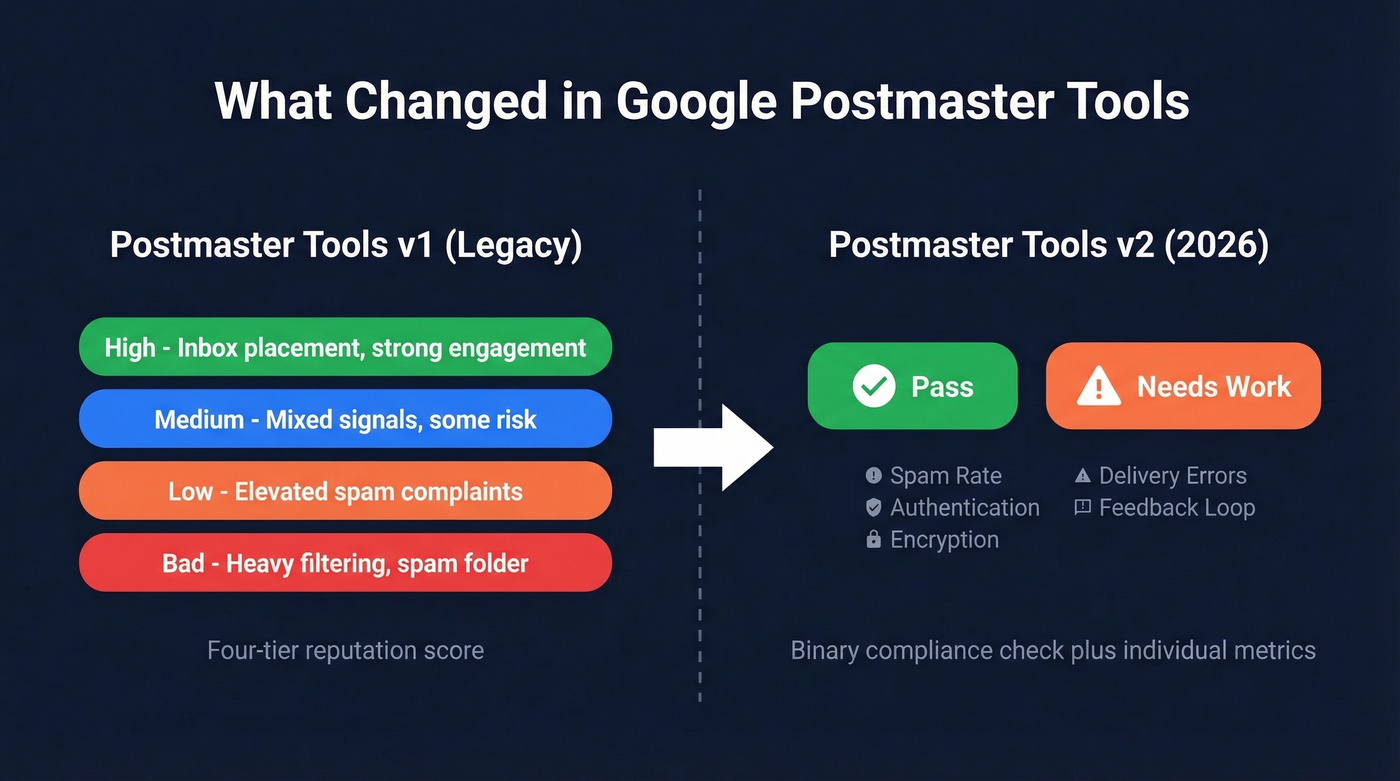
| Tier | What It Meant |
|---|---|
| High | Strong engagement, minimal spam complaints |
| Medium | Mixed signals, some deliverability risk |
| Low | Elevated spam complaints or poor engagement |
| Bad | Consistent spam behavior, heavy filtering |
The relationship was straightforward: High reputation meant inbox placement, Bad reputation meant Gmail was actively filtering you. The key metric underneath it all was spam rate - Google's guidance was to stay below 0.1%, with 0.3% as the ceiling where things start breaking. Those tiers gave senders a quick, intuitive read on where they stood with Gmail, and that simplicity is exactly what's gone now.
What Changed in 2026
The v1 to v2 Timeline
Google began redirecting Postmaster Tools v1 to v2 on September 30, 2025. At one point, Google communicated an October 31, 2025 target for retiring the legacy UI, then updated messaging to postpone the deprecation without committing to a fixed final date.
Here's the thing: Google communicated these changes through banner updates and support articles, not a clear migration guide. Senders were left piecing together timelines from vendor blogs and #emailgeeks Slack channels.
What didn't change is the outcome inside v2: domain reputation and IP reputation dashboards are gone. They weren't migrated, redesigned, or hidden behind a new menu. They're removed. That created a real gap - senders lost reputation tiers before any replacement dashboard was ready, and anyone who relied on IP reputation data to troubleshoot deliverability issues now needs external tools.
In place of the old tiers, v2 introduces a Compliance Status dashboard that shows Pass or Needs Work - a binary assessment tied to Gmail's bulk sender requirements. The compliance dashboard uses rolling averages over multiple days, so improvements don't show instantly. It's a different mental model: less "what's my score?" and more "am I meeting the requirements?"
Google has teased new dashboards with "more useful and actionable information" - possibly including engagement-type data - but hasn't delivered specifics. Don't hold your breath.
What About the API?
If you're pulling Postmaster Tools data programmatically, the v1 API continues to function for now, but it only returns v2 data - which means no reputation metrics. A v2 API is expected, and it'll be technically very different from v1, requiring a full integration rewrite. When the v2 API launches, the current v1 API is expected to stop working.
One Reddit thread claims you can "still access full Gmail reputation metrics via API." That's incorrect. Badsender and Postmastery both confirm reputation data isn't available through the current API endpoints.

Bounces from bad emails are the fastest reputation killer - and the one you can actually fix. Prospeo's 5-step email verification delivers 98% accuracy, keeping bounce rates under 4% for teams that switched from legacy providers.
Stop guessing about reputation. Start with data that doesn't bounce.
What's Left in Postmaster Tools v2
Postmaster Tools v2 isn't useless - it's just different. The remaining dashboards still give you actionable signals, especially if you know what to prioritize.
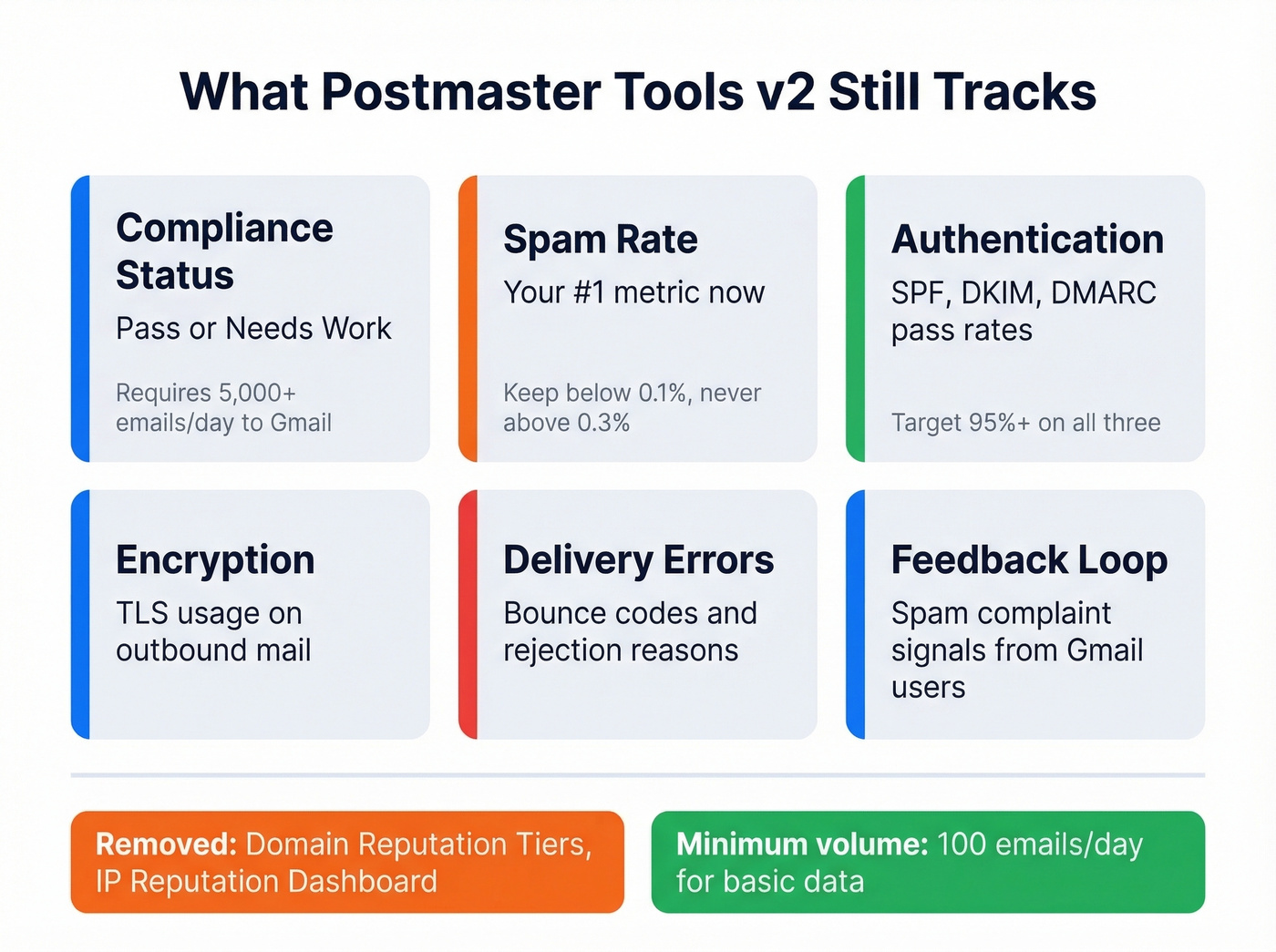
What v2 still tracks:
- Compliance Status - Pass or Needs Work, tied to bulk sender rules
- Spam Rate - your single most important metric now
- Authentication - SPF, DKIM, and DMARC pass rates
- Encryption - TLS usage on outbound mail
- Delivery Errors - bounce codes and rejection reasons
- Feedback Loop - spam complaint signals from Gmail users
The compliance dashboard requires your domain to have sent 5,000+ messages to Gmail in a single day since Jan 1, 2024. Below that threshold, you won't see compliance data at all.
Gmail's bulk sender requirements are the checklist behind that Pass/Needs Work status: SPF and DKIM authentication, DMARC with alignment, one-click unsubscribe via List-Unsubscribe header, honoring unsubscribes within two days, and spam rate below 0.1%. Miss any of these and you'll see Needs Work.
Why You See No Data
If your Postmaster Tools dashboards are blank, it's almost certainly one of these issues:
Volume too low. You need 100+ emails per day to unique Gmail users for basic data to populate. The compliance dashboard requires 5,000+/day. Daily consistency matters more than monthly totals - sending 10,000 emails once a month won't cut it.
DKIM not configured correctly. Gmail associates traffic to your domain via the DKIM d= domain specifically - not just whether DKIM passes, but which domain is in the d= tag of the signature. If your ESP signs with their own domain instead of yours, your sends won't register under your domain in Postmaster Tools at all. We've seen this trip up teams who assumed their ESP handled everything automatically. (If you need a quick checklist, see verify DKIM is working.)
You're looking at Workspace traffic. Postmaster Tools only tracks mail sent to personal @gmail.com accounts, not Google Workspace addresses. Your total volume might be high, but Gmail-specific volume could be too low.
Data lag. Postmaster Tools updates once daily, typically around 12 PM Pacific for the prior day's performance, and it commonly takes 24-48 hours for data to appear. The dashboards display a rolling window of roughly 120 days.
How to Check Domain Reputation Now
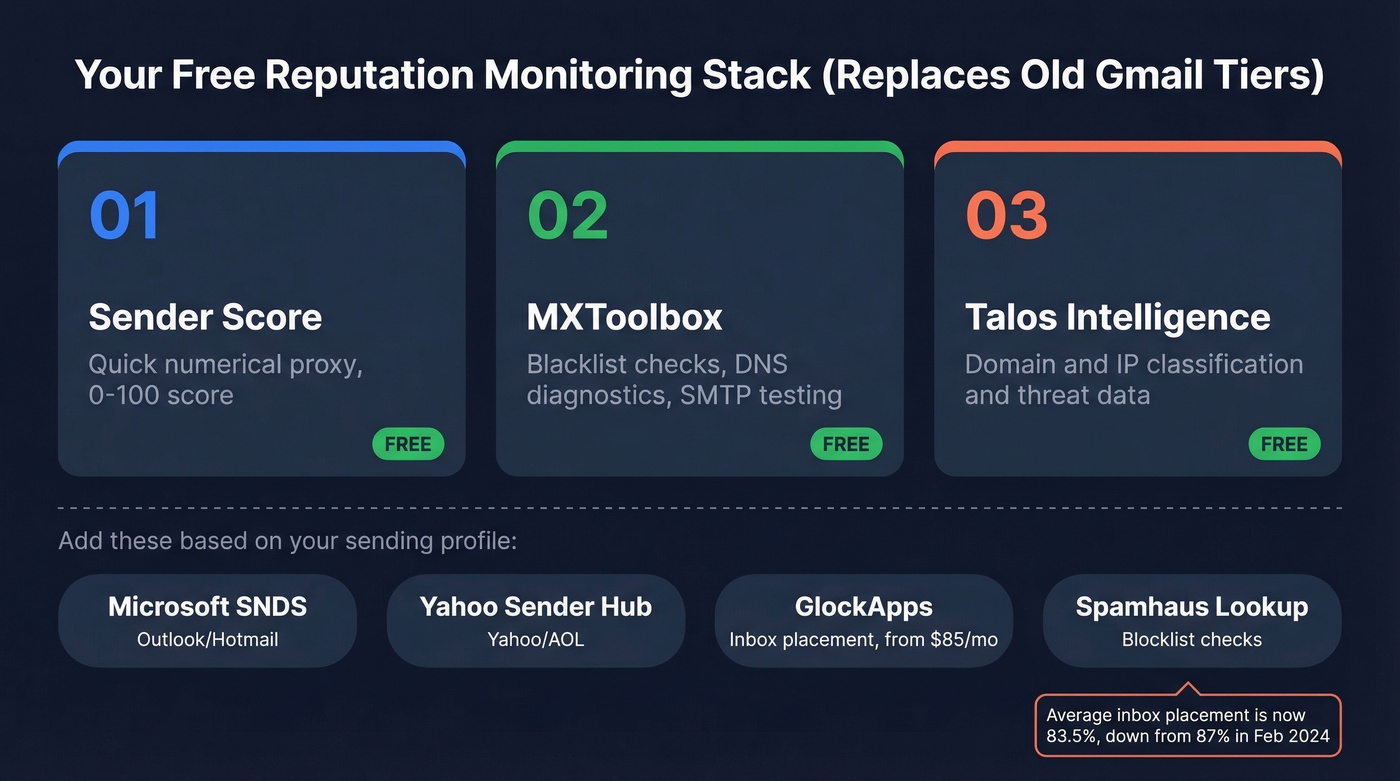
With the reputation tiers gone, you need to assemble your own monitoring stack. The good news: the best tools for this are free.
| Tool | What It Checks | Price |
|---|---|---|
| Sender Score | 0-100 reputation proxy | Free |
| MXToolbox | Blacklists, DNS, SMTP | Free; from $129/mo |
| Talos Intelligence | Domain/IP classification | Free |
| Spamhaus Lookup | Blocklist checks | Free |
| Barracuda Reputation | Barracuda-specific rep | Free |
| Microsoft SNDS | Outlook/Hotmail reputation | Free |
| Yahoo Sender Hub | Yahoo/AOL reputation | Free |
| GlockApps | Inbox placement testing | From $85/mo |
| Everest (Validity) | Deliverability analytics | From $29/mo |
Our recommended starting trio: Sender Score for a quick numerical proxy, MXToolbox for blacklist and DNS diagnostics, and Talos Intelligence for domain classification. All three are free and together they cover the signals the old reputation dashboard used to consolidate. (For more options, see our roundup of email reputation tools.)
If you also send to Outlook/Hotmail, add Microsoft SNDS - it's the Outlook equivalent of what Postmaster Tools used to be, and it's still fully functional. Yahoo Sender Hub covers Yahoo and AOL traffic.
For context on what "good" looks like right now: Validity's benchmark report shows average inbox placement at 83.5%, with 6.7% going to spam and 9.8% missing entirely. That's down from ~87% in Feb 2024. Deliverability is getting harder across the board, not just for senders with reputation problems.
How to Fix a Bad Gmail Reputation
Spam rate is now the single most important metric Google gives you. If yours is above 0.3%, you're in trouble. Between 0.1% and 0.3%, you're on thin ice. Here's the five-step playbook we've seen work consistently.
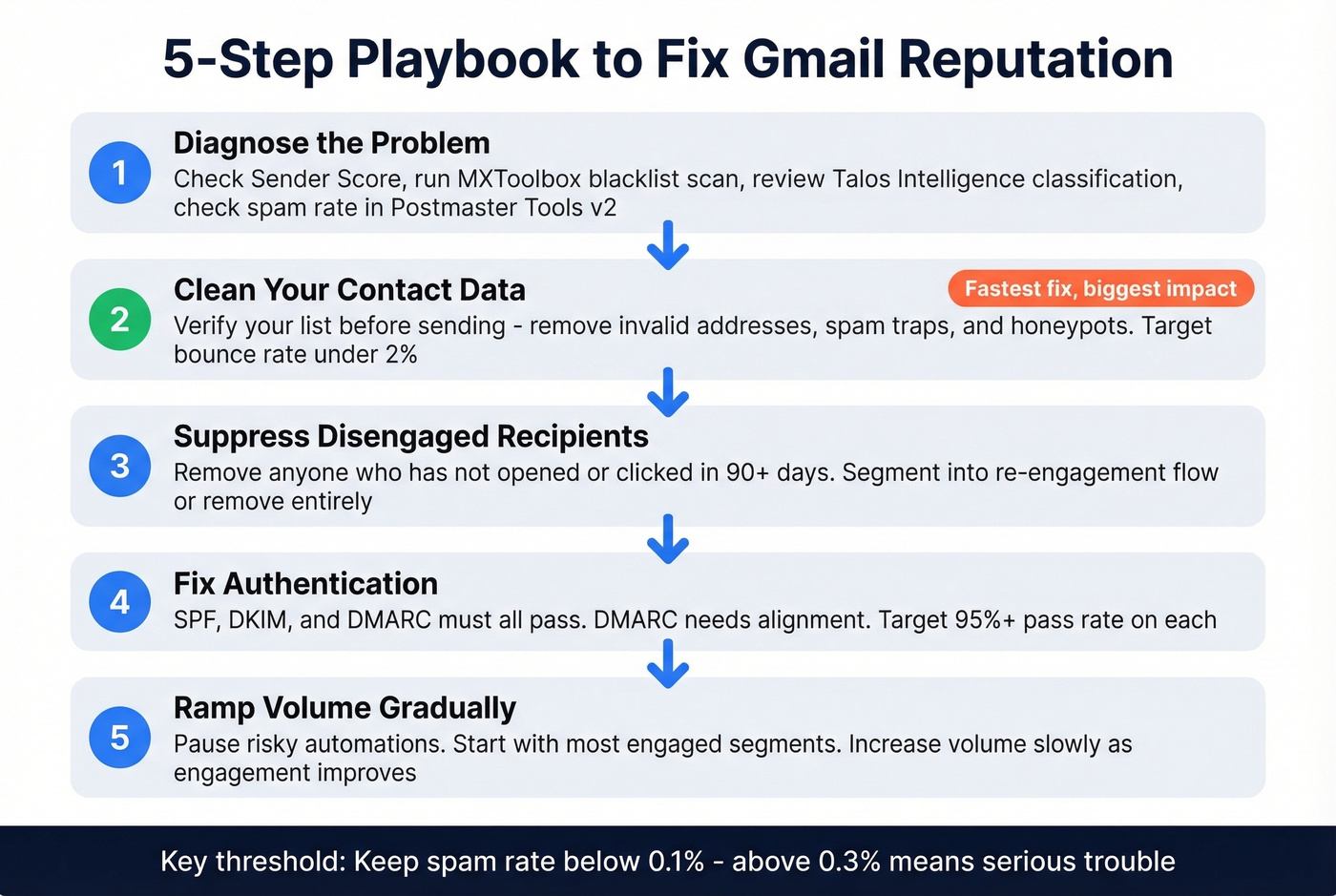
1. Diagnose the Problem
Start with the free tools from the previous section. Check Sender Score for a baseline number, run MXToolbox to see if you're on any blacklists, and look at Talos Intelligence for your domain classification. In Postmaster Tools v2, check your spam rate trend and compliance status. If compliance shows Needs Work, the dashboard tells you which requirements you're failing. (If you want a broader framework, use this guide on improve sender reputation.)
2. Clean Your Contact Data
High bounce rates signal to Gmail that you're sending to addresses that don't exist - a classic spam indicator. This is the #1 controllable cause of reputation damage, and it's the fastest to fix. (Benchmarks and fixes: email bounce rate.)

Before sending any campaign, verify your list. Prospeo's 5-step verification process catches invalid addresses, spam traps, and honeypots before they ever hit Gmail's servers. At 98% email accuracy with catch-all domain handling, it eliminates the bounces that destroy reputation. One customer, Meritt, went from a 35% bounce rate to under 4% - and their sending reputation recovered within weeks.
Skip this step if your bounce rate is already under 2% and you're confident in your list hygiene. But if you're pulling contacts from multiple sources or haven't cleaned your database in months, this is where to start.
3. Suppress Disengaged Recipients
This is separate from data cleaning because the emails are valid - the people just aren't interested. Anyone who hasn't opened or clicked in 90+ days should be suppressed from active campaigns. Continuing to send to disengaged contacts drives up spam complaints and drags down engagement metrics, both of which Gmail watches closely.
Segment these contacts into a re-engagement flow or remove them entirely. Let's be honest: most teams skip this because it shrinks their list size, and nobody wants to report a smaller number to leadership. But a list of 50,000 engaged contacts will outperform 200,000 disengaged ones every single time.
4. Fix Authentication
Check your SPF, DKIM, and DMARC records. All three need to pass, and DMARC needs alignment with either SPF or DKIM. This isn't optional anymore - it's a hard requirement for Gmail bulk senders. Postmaster Tools v2's authentication dashboard shows your pass rates. If you're below 95% on any of them, fix it before worrying about anything else. (Related: DMARC alignment and SPF record examples.)
5. Ramp Volume Gradually
If your reputation is damaged, don't try to send your way out of it. Pause risky automations. Then gradually ramp volume back up as engagement improves, starting with your most engaged segments first. (More on safe sending limits: email velocity.)
For teams on a dedicated IP, you need minimum 100,000 emails per month to keep it warm. Below that threshold, consider a shared IP through your ESP instead. Sudden volume spikes on a recovering domain are the fastest way to undo your progress.
Here's a hot take: Postmaster Tools was never as useful as the industry pretended. It only showed Gmail data, required high volume to populate, updated with a multi-day lag, and never explained its methodology. Smart senders always supplemented it with external tools. The v2 transition just forced everyone else to catch up. Reputation recovery isn't fast - rolling averages mean improvements take days to reflect - but the formula is simple: clean data, proper authentication, engaged recipients, consistent volume. There's no shortcut, and there never was.
Domain reputation damage starts with bad contact data. Prospeo refreshes 300M+ profiles every 7 days - not every 6 weeks - so you're never sending to stale, invalid addresses that spike your spam rate above Google's 0.3% ceiling.
Clean data every 7 days. Your spam rate will thank you.
FAQ
Is domain reputation still visible in Google Postmaster Tools?
No. Google removed the domain and IP reputation dashboards in Postmaster Tools v2. The four-tier system (High/Medium/Low/Bad) no longer exists. Use Sender Score, MXToolbox, or Talos Intelligence for free reputation monitoring instead.
What spam rate is too high in Postmaster Tools?
Keep it below 0.1%. Google flags senders who hit 0.3% or above, and once you cross that threshold, inbox placement drops fast. The spam rate dashboard in v2 is now your primary deliverability signal - treat it as the metric that replaced reputation tiers.
Why does Postmaster Tools show no data for my domain?
You likely aren't sending enough volume to Gmail. Postmaster Tools needs 100+ emails per day to unique Gmail users with proper DKIM authentication (your domain in the DKIM d= tag) to populate basic dashboards. The compliance dashboard requires 5,000+ per day. Data updates daily and commonly takes 24-48 hours to appear.
Can I still get domain reputation data via the Postmaster API?
No. The v1 API now only returns v2 data, which excludes reputation metrics entirely. A v2 API is expected and will require a full integration rewrite - it won't be a drop-in replacement for existing v1 API calls.
How do bounces from bad email data affect sending reputation?
High bounce rates tell Gmail you're sending to nonexistent addresses - a strong spam signal that tanks reputation faster than almost anything else. Verifying emails before sending is the fastest way to protect your domain from data-quality damage. Tools like Prospeo, which catches spam traps, honeypots, and invalid addresses at 98% accuracy, handle this before a single email goes out.