

Google Sheets Email Verification: 5 Methods Compared (2026)
Your "verified" list just bounced 23% on the first send. The sender reputation you spent months building? Damaged. Now you're in Google Sheets, staring at 5,000 rows, and you need a verification workflow that actually separates real inboxes from dead weight.
Here's the right method for every scale.
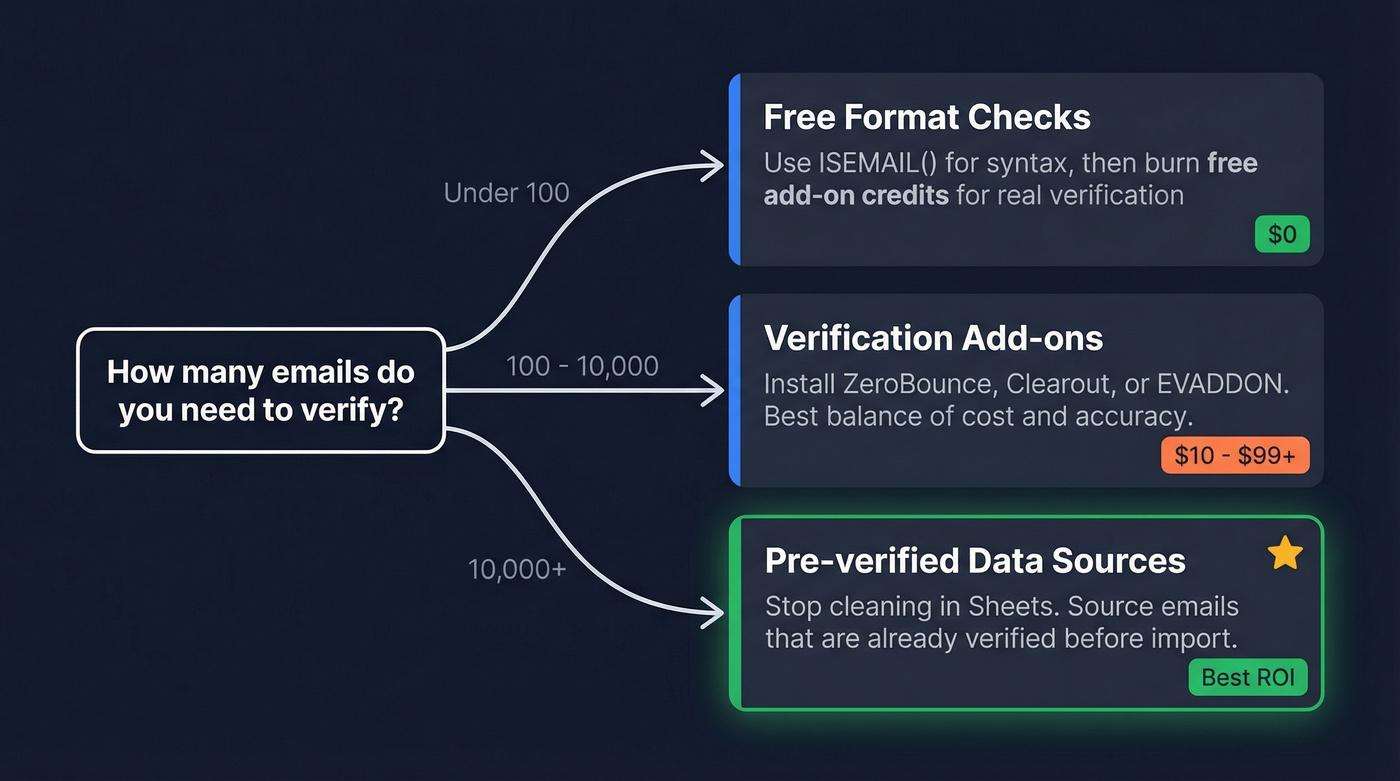
Quick Decision Framework
- Under 100 emails? Use
[ISEMAIL()](https://support.google.com/docs/answer/3256503?hl=en)for format checks, then burn free add-on credits for real verification. - 100-10,000 emails? Install an add-on like ZeroBounce or Clearout. Budget $10-$99+.
- 10,000+ or ongoing prospecting? Stop cleaning in Sheets. Source pre-verified emails instead.
Why Dirty Lists Cost More Than You Think
Email lists decay by roughly 25% per year. A list you built in January could have hundreds of dead addresses by April. The threshold that matters: keep your bounce rate under 5%. Go above that and ESPs start throttling you, and rebuilding domain reputation takes months - sometimes longer if you're on a shared IP.
The consensus on r/coldemail is that building free validators is tempting because verification tool pricing feels steep. We get it. But we've tested enough lists to know that skipping verification entirely is always more expensive than the tool. A 23% bounce rate on a 10K send doesn't just waste credits - it tanks your deliverability for every future campaign (and can even lead to blacklisting).
ISEMAIL() - Free, Built-In, Misleading
=ISEMAIL("john@company.com") returns TRUE or FALSE based on whether the string looks like a properly formatted email address. It's a format check, not deliverability verification - it can return FALSE even for real emails if the domain or TLD isn't in Google's recognition list.
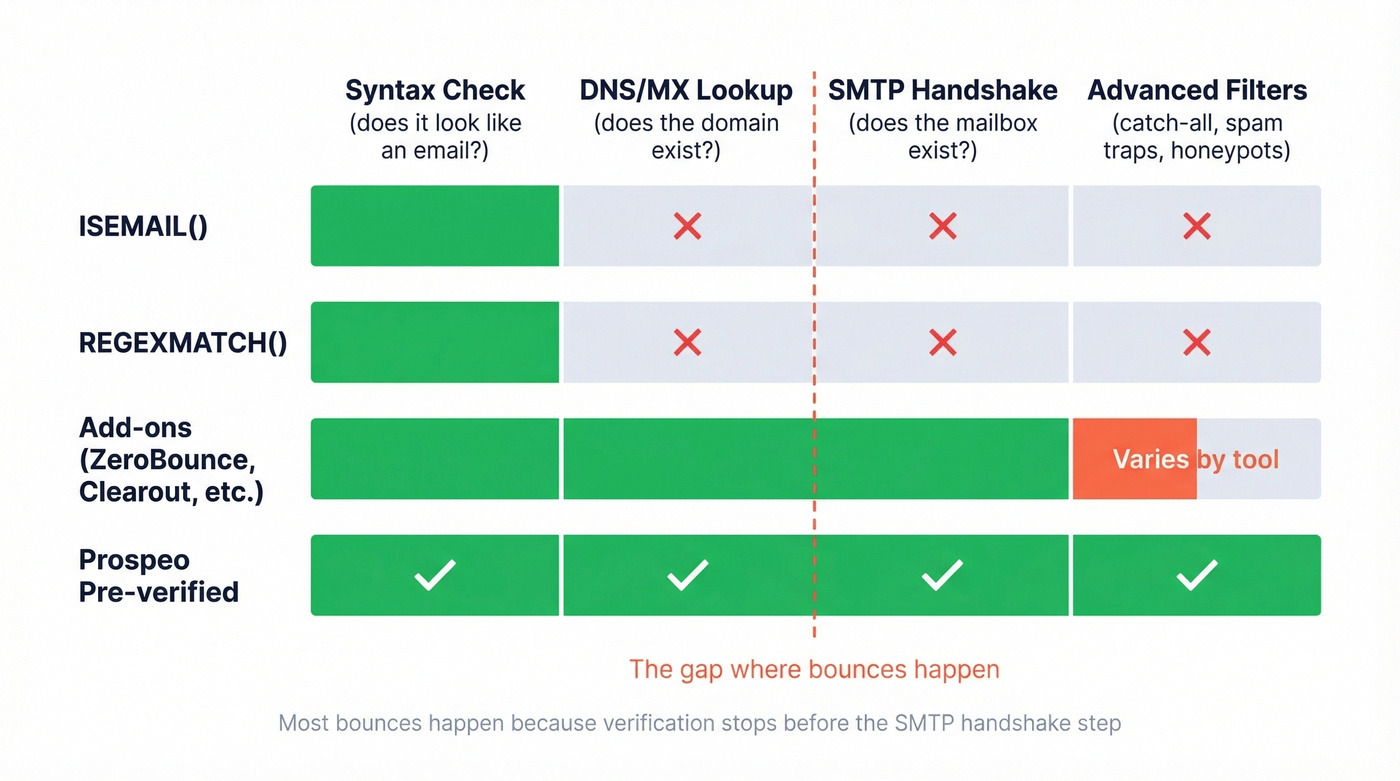
Google improved ISEMAIL() in August 2025 to better recognize valid domains and formatting patterns, but the fundamental limitation hasn't changed: it's syntax-only. Reddit users have called it "wildly inaccurate" for good reason. It'll happily return TRUE for an email at a domain that doesn't exist.
What about People chips? Google's Smart chips help with contact-style UI in Sheets, but they're not a deliverability check and won't tell you whether a cold-list mailbox actually exists.
REGEXMATCH for Custom Validation
For slightly more control, use a regex formula:
=REGEXMATCH(A2, "^[a-zA-Z0-9._%+-]+@[a-zA-Z0-9.-]+\.[a-zA-Z]{2,}$")
This lets you customize rules - reject disposable domains, flag role-based addresses like info@ or admin@. Note the {2,} at the end: older guides use {2,4}, which breaks on modern TLDs like .technology or .consulting.
Still syntax-only, though. A perfectly formatted address at a dead domain passes every regex test you throw at it.

Regex checks and add-ons catch bad formatting - but they can't tell you if a mailbox actually exists until after you've imported the data. Prospeo's 5-step verification (catch-all handling, spam-trap removal, honeypot filtering) runs before emails ever reach your spreadsheet. 98% accuracy across 143M+ verified emails, refreshed every 7 days.
Stop scrubbing lists in Sheets. Start with clean data at $0.01 per email.
Apps Script + Verification API
If you're comfortable with a bit of code, you can wire Google Sheets directly to a verification API using Apps Script. The basic flow: read emails from column A, call an API endpoint via [UrlFetchApp.fetch()](https://developers.google.com/apps-script/reference/url-fetch/url-fetch-app), parse the JSON response (valid, invalid, catch-all, unknown), and write the status back to column B. You can also set up triggers - on edit or on a time schedule - to validate new entries automatically as they're added.
Here's the thing: these APIs run a full verification chain. Syntax check, then DNS/MX lookup, then SMTP handshake. That SMTP step is what actually tells you if a mailbox exists. A popular Reddit thread showed a DIY script running against a cheap API for about $5/month. In our experience, you'll find 20-30% invalid addresses in a typical unverified list of 10K - which tells you exactly how much money you're wasting on bounces if you skip this step.
Verification Add-Ons Compared
For most people, an add-on is the sweet spot between free-but-useless format checks and building your own Apps Script integration. Here's how the main options stack up.
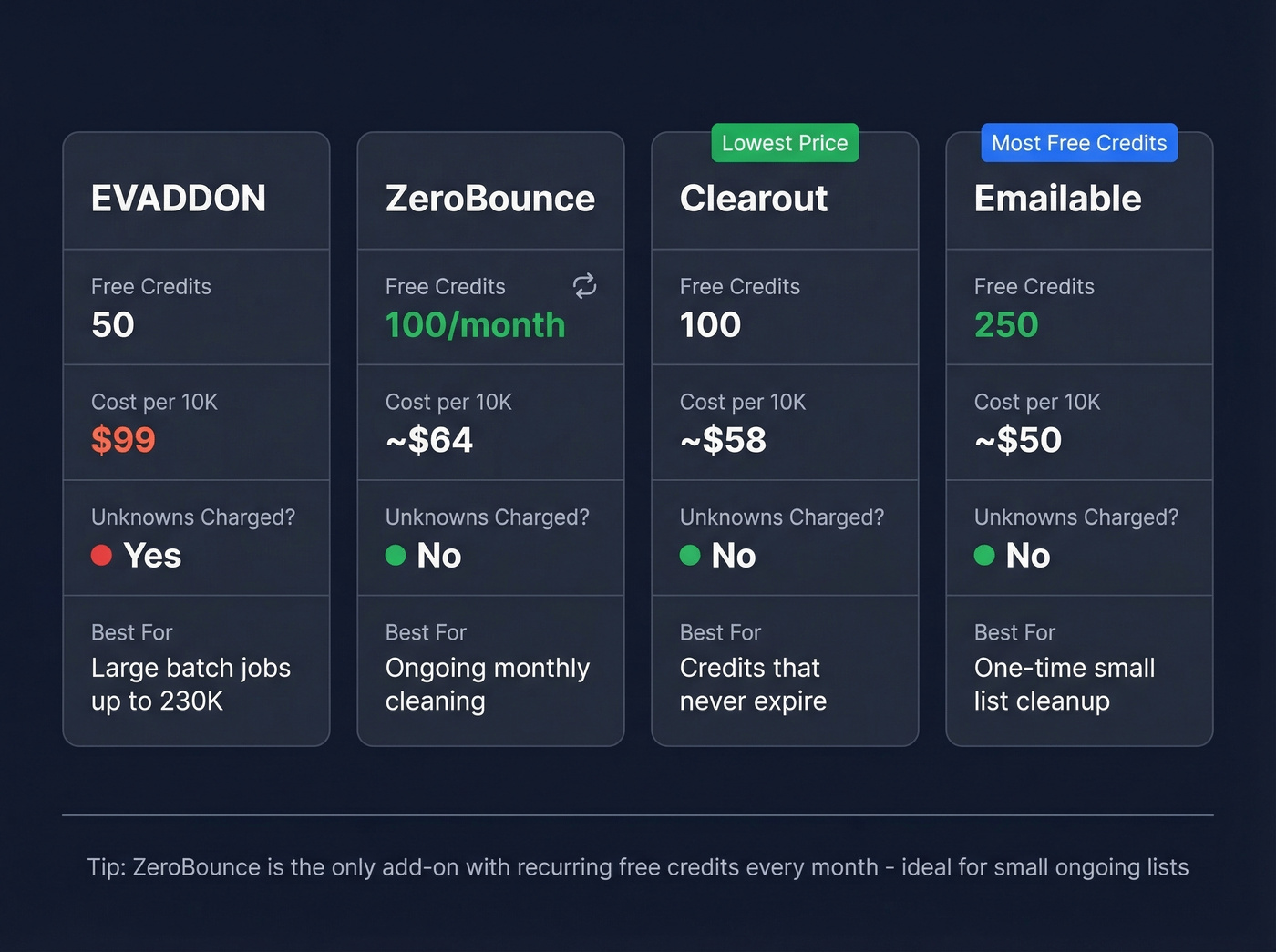
| Tool | Free Credits | ~10K Price | Unknowns Charged? | Key Differentiator |
|---|---|---|---|---|
| EVADDON | 50 | $99 | Yes | Batch up to 230K |
| ZeroBounce | 100/mo | ~$64 | No | Recurring free tier |
| Clearout | 100 | ~$58 | No | Credits never expire |
| Emailable | 250 | ~$50 | No | Largest free tier |
EVADDON is the workhorse. You get 50 free credits on install plus bonus credits for reviews and referrals. Pricing scales from $10/500 up to $1,799/500K. It returns four statuses - Deliverable, Deliverable (catch-all), Not Deliverable, and Server Not Responding - and batch mode handles up to 230K contacts in the background. The downside: unknowns still eat your credits, which adds up on large lists with lots of catch-all domains.
ZeroBounce gives you 100 free verifications every month - recurring, not one-time - as long as you sign up with a business domain. Unknown results don't cost credits. Expect around $0.006-$0.009 per email at low volume. The Sheets add-on auto-detects your email column, which saves a surprising amount of fiddling.
Clearout gives 100 free credits at signup, doesn't charge for unknowns, and credits never expire. They offer a refund if your bounce rate exceeds 10-20% on "Safe-to-Send" results. The catch: you must send within 24 hours to qualify.
Emailable has the most generous free tier at 250 credits. If you just need a one-time clean of a moderate list, those 250 free credits might be enough to skip paid plans entirely.
Skip Sheets - Verify Before You Import
Let's be honest: if your list is big enough to need verification, the real problem isn't your spreadsheet workflow. It's your data source. Cleaning emails in Sheets is reactive. You're importing garbage, then spending time and money filtering it.
One Reddit user described trying to enrich ~500 company websites into verified emails for under $15 - the kind of constraint that makes Sheets-based verification feel like a hamster wheel. The smarter move is sourcing contacts that are already verified before they ever touch your spreadsheet (especially if you're doing lead enrichment at scale).
Prospeo runs a 5-step verification process that includes catch-all handling, spam-trap removal, and honeypot filtering - delivering 98% email accuracy across 143M+ verified emails. Every record refreshes on a 7-day cycle, so you're not cleaning stale data from six weeks ago. The free tier gives you 75 verified emails per month, enough to test the difference yourself.

That 23% bounce rate destroying your sender reputation? It starts with unverified data sources, not missing add-ons. Prospeo delivers pre-verified contacts with 98% email accuracy - no formulas, no credit-burning unknowns, no catch-all guesswork. Free tier included, no credit card required.
Ditch the verification hamster wheel. Source emails that are already clean.
Which Method Should You Use?
Under 100 emails: ISEMAIL() for a quick format check, then burn free credits from ZeroBounce or Emailable. Don't overthink it.
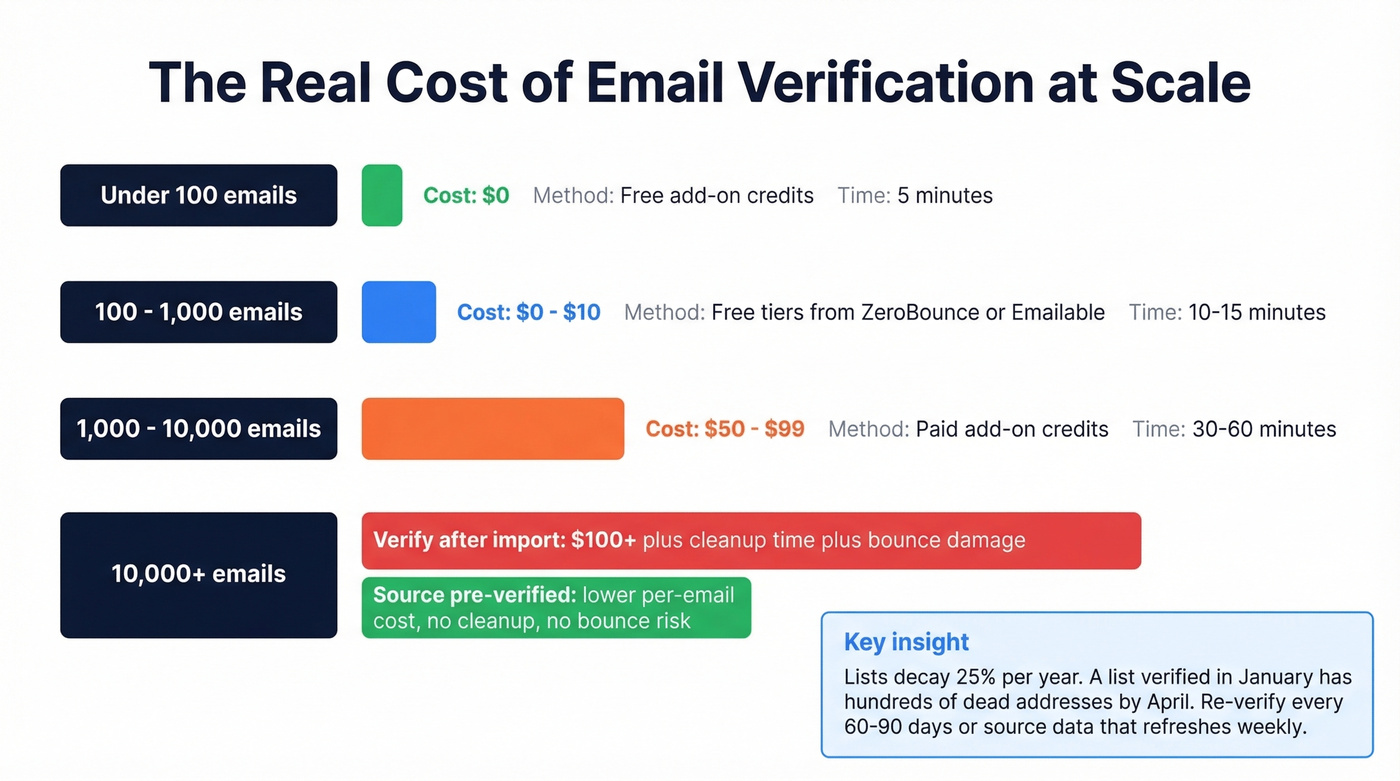
100-1,000 emails: Free add-on tiers cover this range. ZeroBounce's recurring 100/month is ideal for small ongoing lists.
1,000-10,000 emails: Paid add-on credits. EVADDON at $99/10K or Clearout at ~$58/10K, depending on whether you care about unknowns eating credits.
10,000+ or ongoing prospecting: Skip the Sheets verification loop. Source pre-verified data instead of running Google Sheets email verification after the fact - the per-email cost drops dramatically, and you eliminate the cleaning step entirely (see also: email deliverability and email bounce rate).
FAQ
Does ISEMAIL() check if an email actually exists?
No. It checks formatting and domain recognition only. Google improved it in August 2025, but it can't confirm whether a mailbox is real. Use an add-on or API for actual deliverability verification.
What's the cheapest way to verify emails in a spreadsheet?
Free add-on credits cover small lists. ZeroBounce gives 100 free verifications per month (recurring), Emailable offers 250 at signup, and EVADDON gives 50 plus referral bonuses. For larger lists, a DIY Apps Script connected to a cheap API runs about $5/month.
How often should I re-verify my email list?
Re-verify every 60-90 days. Lists decay by roughly 25% per year, meaning a list verified in January will have hundreds of invalid addresses by April. For ongoing prospecting, source from platforms that refresh data on a weekly cycle so records stay current without manual re-verification.