

The Only Google Sheets Sales Tracker Template You Actually Need
A founder on r/Entrepreneurs shared a story that still makes us wince: two reps followed up with the same prospect on the same day, with completely different messages. The prospect was confused, the team lost trust in their tracking sheet, and the whole system collapsed within a week. That's what happens when your sales tracker is just a glorified contact list with no structure.
CRMs fix this - but they cost $30-$100/user/month, and most early-stage teams don't need that overhead yet. What you need is a properly built Google Sheets sales tracker template. Here's the one we keep coming back to.
What You Need (Quick Version)
Your tracker needs five tabs and five non-negotiable columns. Everything else is optional.
-> Make a copy of the template here (free, no signup required)
The 5-tab system: Sales Entries (your core input sheet), Overall Sales (monthly totals + bar chart), Rep Performance (revenue by rep + charts), Dashboard (KPIs at a glance), and Settings/Dropdowns (stages, reps, products - keeps data clean).
The 5 essential columns: Deal Stage, Deal Value, Next Action Date, Owner, Close Date. If your tracker doesn't have these five, you're maintaining a fancy address book. This structure works for standard sales pipelines, but it adapts just as well for fundraising pipelines, biz dev tracking, or agency client management - just rename the stages.
The 5-Tab Architecture
The best sales trackers aren't one massive sheet with 40 columns. They're a system of linked tabs where data flows from entry to insight without manual copying.
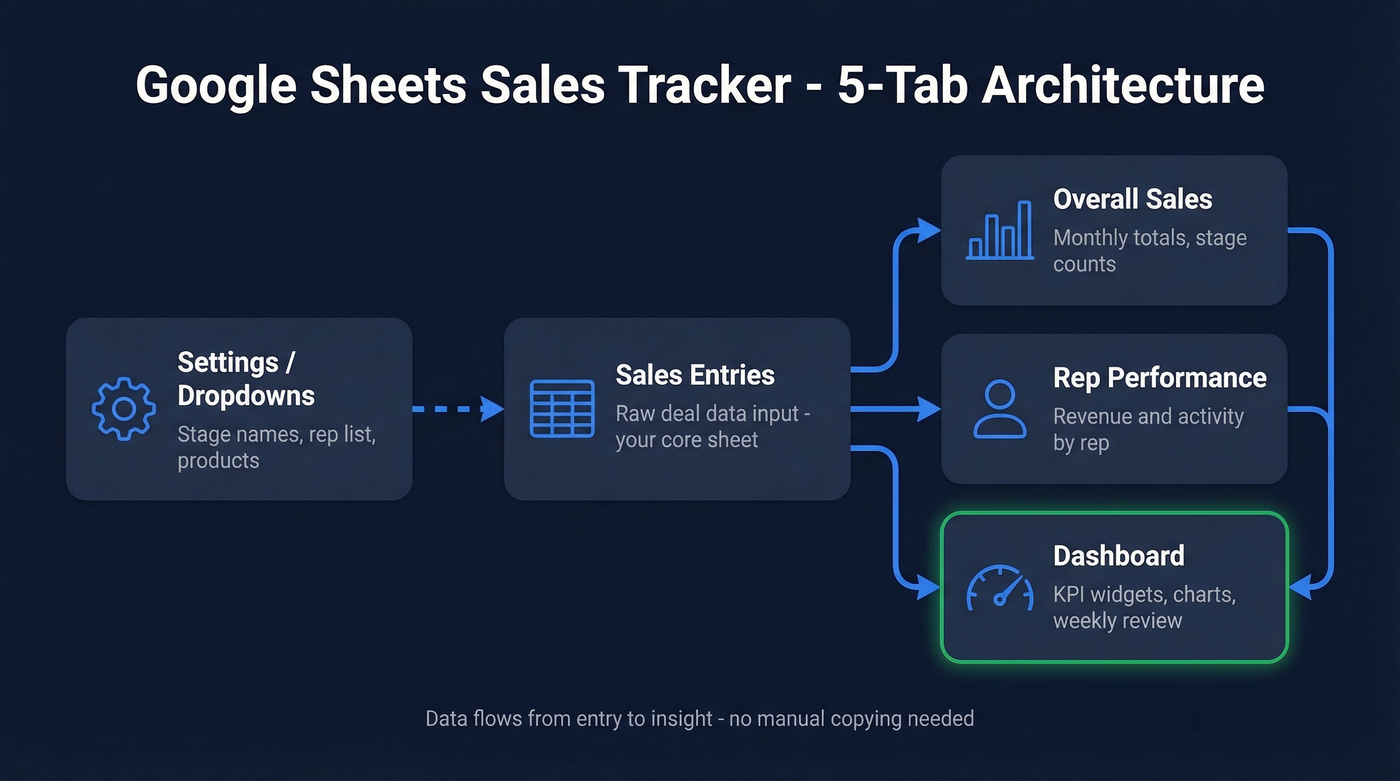
| Tab | Purpose | Feeds Into |
|---|---|---|
| Sales Entries | Raw deal data input | Everything else |
| Overall Sales | Monthly totals, stage counts | Dashboard |
| Rep Performance | Revenue + activity by rep | Dashboard |
| Dashboard | KPI widgets + charts | Your weekly review |
| Settings/Dropdowns | Stage names, rep list, products | Sales Entries (validation) |
The Settings tab is the one most people skip - and it's the reason your tracker turns into garbage. By defining your deal stages (Lead, Qualified, Demo, Proposal, Won, Lost) and rep names as dropdown lists, you eliminate the "John" vs "john" vs "J. Smith" problem that breaks every SUMIF formula downstream. We've seen teams lose weeks of reporting because one rep typed "Qualified" and another typed "Qual." Don't let that be you.
Add conditional formatting to your Sales Entries tab for instant visual signals. Green for paid, yellow for pending, red for overdue on payment status. For follow-up dates, use red for overdue, orange for due today, and grey for future - a color scheme borrowed from OnePageCRM's template approach that makes scanning a 200-row sheet take seconds instead of minutes.
Column-by-Column Breakdown
Here's the full column schema. You don't need all of these on day one, but you'll want most of them within a month.
| Column | What Goes In It | Why It Matters |
|---|---|---|
| Created Date | When the deal entered your pipeline | Tracks deal velocity |
| Owner | Rep name (dropdown) | Prevents duplicate outreach |
| Company | Account name | Groups multi-contact deals |
| Contact Name | First + last | Your primary person |
| Verified work email | Outreach channel | |
| Deal Name | Short descriptor | Quick scanning |
| Stage | Dropdown: Lead -> Won/Lost | Pipeline math depends on this |
| Amount | Expected deal value | Revenue forecasting |
| Close Date | Target close | Prioritization + aging |
| Source | Where the lead came from | ROI by channel |
| Payment Status | Paid/Pending/Overdue | Cash flow visibility |
| Notes | Free text | Context for handoffs |
The Source column is especially important if you're selling across multiple channels - web, referrals, events, ads. Without it, you'll never know which channel actually drives revenue.
For real estate teams tracking addresses and property details, or agencies tracking client campaigns, add those as custom columns after Notes. Don't shoehorn them into existing fields.
The Email column deserves a callout. Your tracker is only as good as the data in it. Before pasting 200 leads into that column, run them through Prospeo's email finder - 98% accuracy, a free tier of 75 verifications per month, and zero signup friction. One bad email batch can tank your email deliverability for weeks.
Use Data Validation (Data -> Data validation in Sheets) to create dropdowns for Stage, Owner, and Payment Status. This single step eliminates 80% of the data quality issues that kill spreadsheet trackers.
Essential Formulas
You don't need to be a spreadsheet wizard. These six formulas cover 90% of what a sales tracking spreadsheet needs to function as a real pipeline tool.
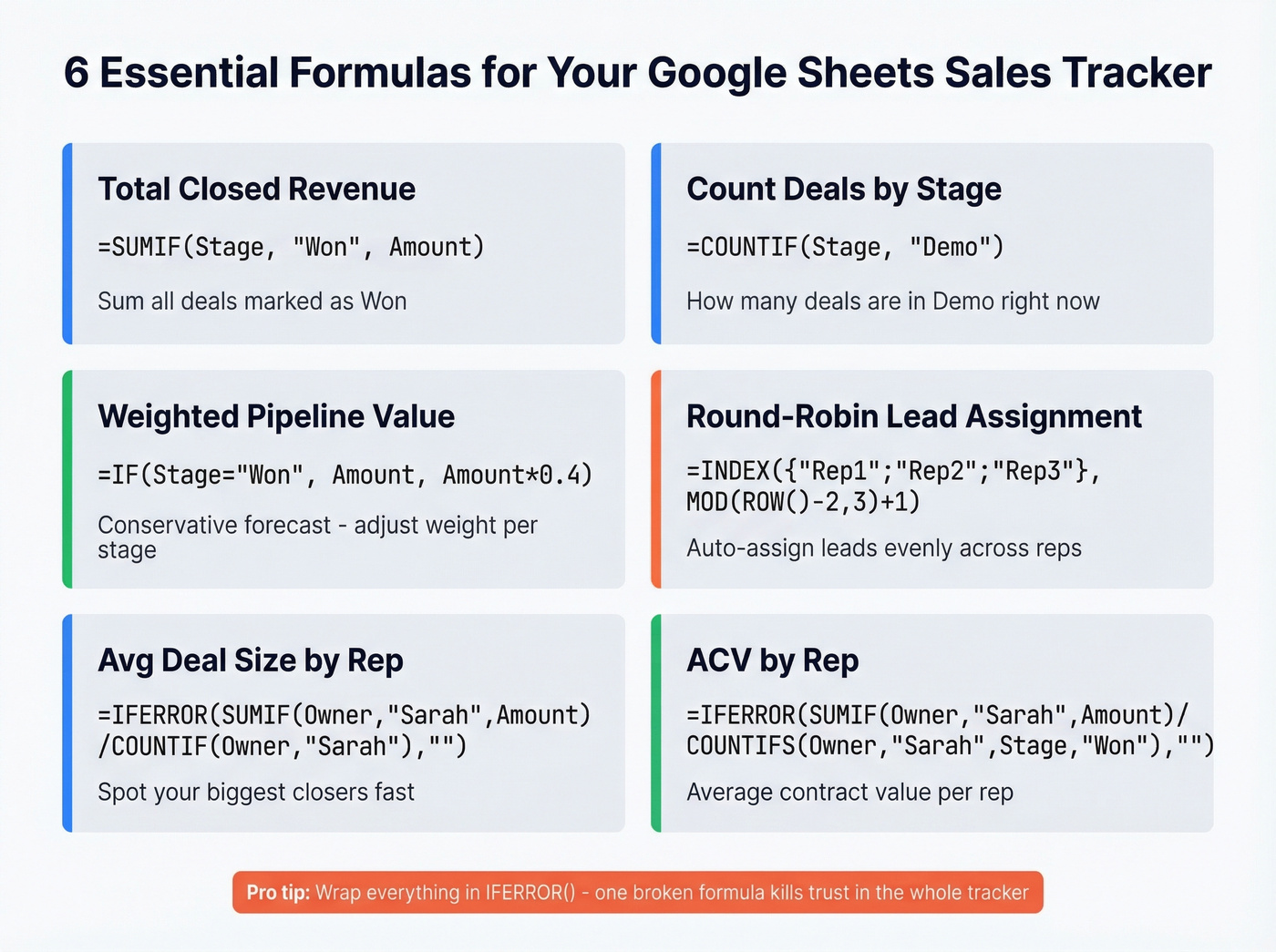
| Formula | What It Does |
|---|---|
=SUMIF(Stage,"Won",Amount) |
Total closed revenue |
=COUNTIF(Stage,"Demo") |
Deals in a specific stage |
=IF(Stage="Won",Amount,Amount*0.4) |
Weighted pipeline value |
=INDEX({"Rep1";"Rep2";"Rep3"},MOD(ROW()-2,3)+1) |
Round-robin lead assignment |
=IFERROR(SUMIF(Owner,"Sarah",Amount)/COUNTIF(Owner,"Sarah"),"") |
Avg deal size by rep |
=IFERROR(SUMIF(Owner,"Sarah",Amount)/COUNTIFS(Owner,"Sarah",Stage,"Won"),"") |
ACV by rep |
Here's the thing: the weighted pipeline formula is the most important one on this list. Counting every open deal at full value is fantasy math. The Amount*0.4 multiplier gives you a conservative forecast - adjust the weight per stage if you want more precision (0.1 for Lead, 0.3 for Qualified, 0.6 for Proposal, 1.0 for Won).
Wrap everything in IFERROR(). A single #DIV/0! error in your Dashboard tab makes the whole tracker look broken, and that's when reps stop updating it. We learned this the hard way after a Friday pipeline review where half the dashboard showed error codes - nobody took the numbers seriously for two weeks after that.

That Email column in your tracker? It's the difference between a pipeline that converts and one that bounces. Prospeo verifies emails at 98% accuracy with a 5-step process - so every row in your Google Sheet is a real person you can actually reach.
Fill your sales tracker with verified emails, not dead ends.
Building Your Dashboard
The Dashboard tab is where your tracker becomes genuinely useful. Without it, you're just logging data. With it, you're making decisions.
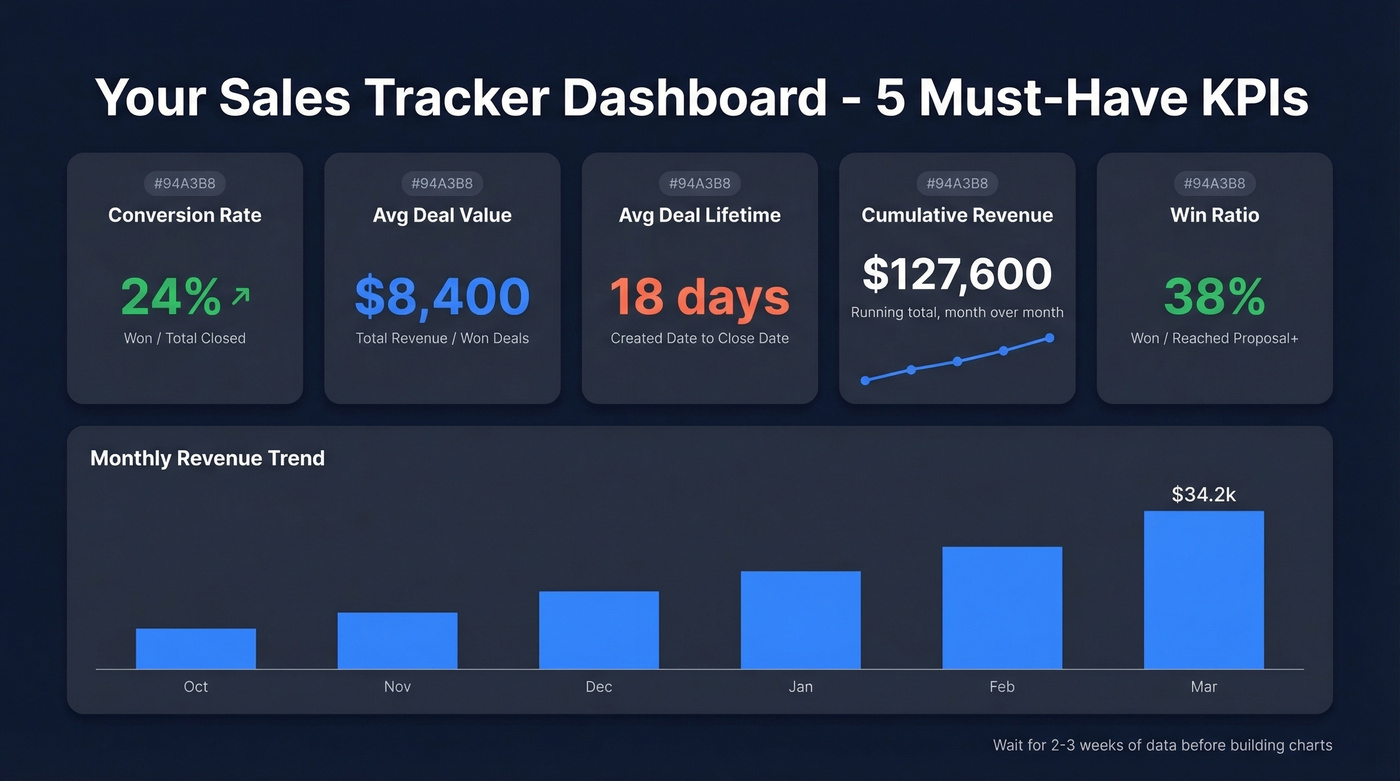
Your dashboard needs these five KPIs at minimum:
- Conversion rate - won deals divided by total closed deals
- Average deal value - total revenue divided by won deals
- Average deal lifetime - days from Created Date to Close Date
- Cumulative revenue - running total, month over month
- Win ratio - won deals as a percentage of all deals that reached Proposal stage or later
For charts, keep it simple. A bar chart for monthly revenue trends and a pie chart for stage distribution are enough to start. Add a top-selling products/services breakdown if you sell multiple SKUs.
Don't build the dashboard until you have at least 2-3 weeks of data in Sales Entries. Charts with five data points look silly and don't tell you anything useful.
Automating Your Tracker
Manual entry is where trackers go to die. The less typing your reps do, the more likely they'll actually use the thing.
Form submissions -> Sheets: Connect your website form to your Sales Entries tab via Zapier or Make. New lead comes in, row gets created automatically. Social lead ads -> Sheets: Ad platform captures the lead, Zapier pushes it to your master sheet. Google Forms for manual entry: For referrals and networking leads, a simple Google Form is faster than opening the spreadsheet and finding the right row. Status change triggers: When a deal moves to "Won" or "Lost," trigger a follow-up sequence or notification via Zapier.
To auto-fill missing emails and phone numbers, connect an enrichment API like Prospeo to your Sheets workflow via Zapier or Make - it returns 50+ data points per contact with a 92% match rate, so most rows come back complete. If you're comparing vendors, start with these data enrichment services.
Archive completed deals monthly and keep each rep's active sheet under ~1,000 rows - beyond that, formulas slow down and reps start dreading the Friday review. Block 30-60 minutes every Friday for a pipeline review using Version History to snapshot your numbers weekly.
Mistakes That Kill Your Tracker
Let's be honest - most Sheets trackers die within a month. Here's why.
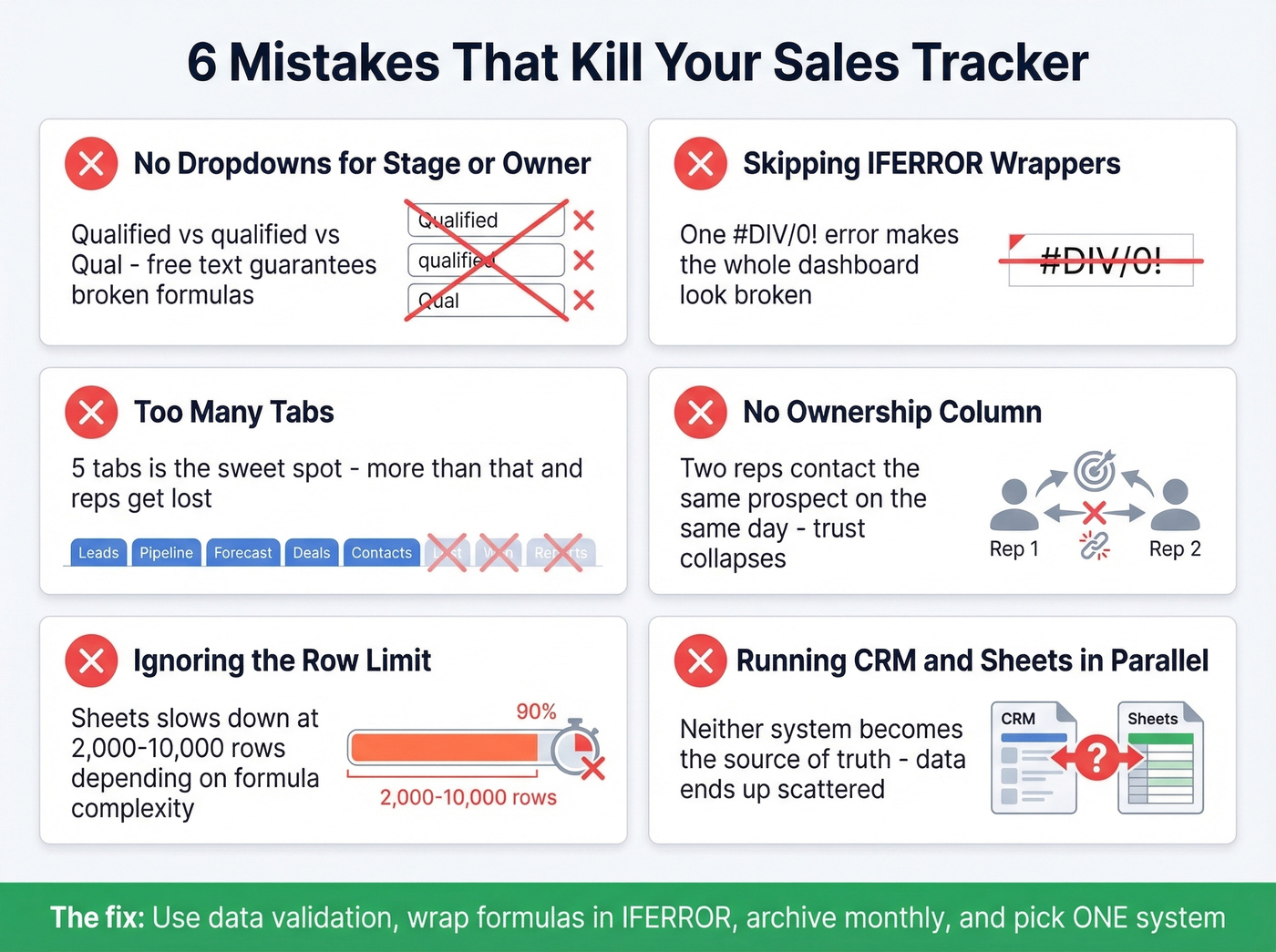
No dropdowns for Stage or Owner. Free-text fields guarantee inconsistent data. "Qualified" vs "qualified" vs "Qual" - pick one and enforce it with Data Validation.
Skipping IFERROR wrappers. One broken formula makes the whole Dashboard tab look unreliable. Reps stop trusting it, then stop updating it.
Too many tabs. Navigation slows down, people get lost, and nobody can find the data they need. Five tabs is the sweet spot. Skip this advice if you're building a tracker for a 20-person team - at that point, you need a CRM, not more tabs.
No ownership column. This is how you get two reps contacting the same prospect on the same day. Every row needs a clear owner.
Ignoring the row limit. Google Sheets degrades noticeably between 2,000-10,000 rows depending on formula complexity. If you're running IMPORTRANGE and array formulas, you'll hit slowdowns even sooner.
Running a CRM and a spreadsheet in parallel. Details end up scattered across both systems, and neither one is the source of truth. Pick one.
If your average deal size is under $15k and you have fewer than three sellers, a well-built Sheets tracker will outperform a CRM that nobody bothers to update. The best system is the one your team actually uses - especially if you pair it with solid sales activities and consistent follow-up.
When to Ditch Sheets for a CRM
Stick with Sheets when you have 1-2 people selling, your pipeline has fewer than 200 active deals, you don't need automated reminders or lead scoring, and you'd rather spend budget on outreach tools than infrastructure.
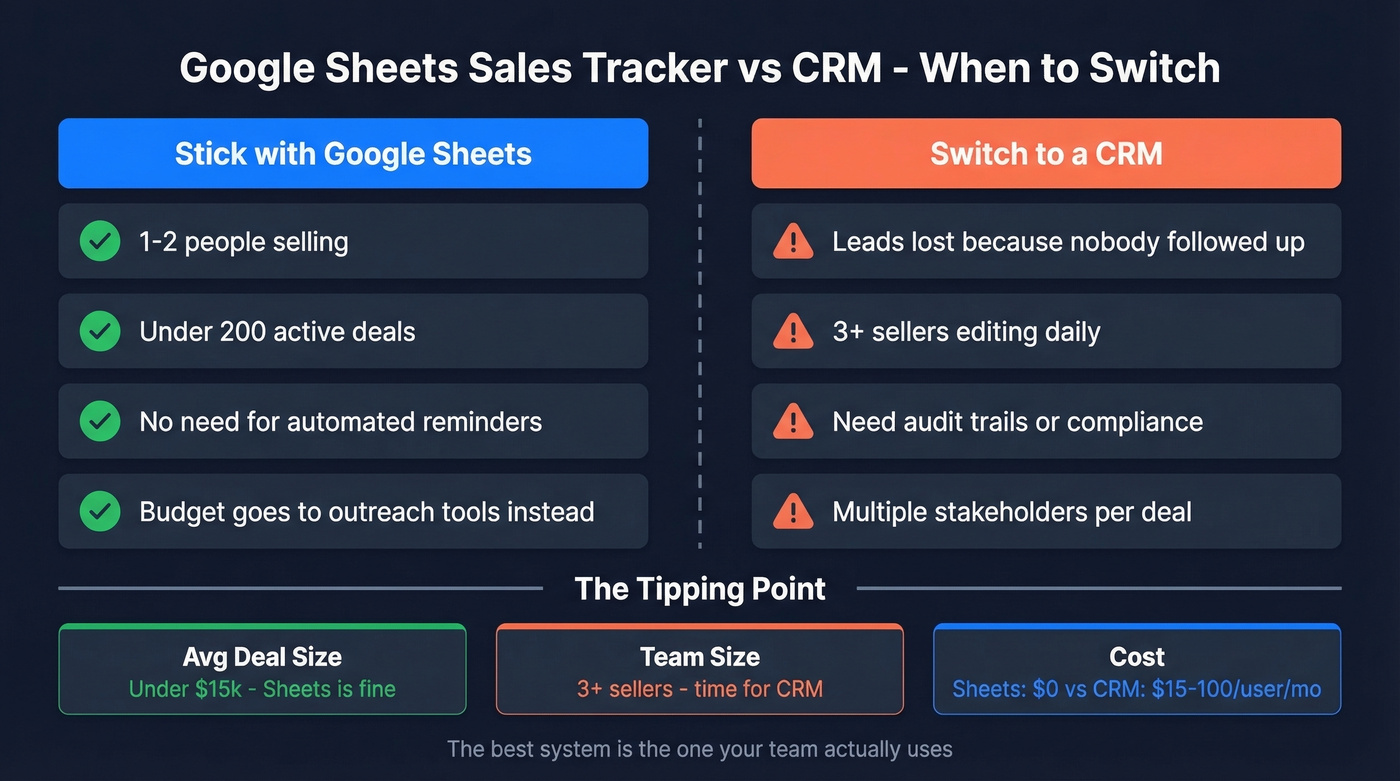
Switch to a CRM when you're losing leads because nobody followed up (Sheets doesn't remind you), more than two sellers are editing the tracker daily, you need audit trails or compliance controls, or deal complexity is growing with multiple stakeholders and long sales cycles.
The r/Entrepreneurs story is the classic tipping point: 4-5 people editing daily, duplicate outreach, trust collapse. Once you're there, no amount of conditional formatting saves you. For the switch, look at Pipedrive (around $15-$100/user/mo) or Zoho CRM (free tier available; paid plans from around $15/user/mo). Salesforce Starter is typically around $25/user/mo if you want the enterprise ecosystem. If you want a broader comparison first, see these examples of a CRM.
You just built a killer sales tracker. Now fill it with data that won't break your formulas or your deliverability. Prospeo gives you 300M+ verified contacts with 30+ filters - export directly to CSV and paste straight into your sheet.
Stop hand-collecting leads. Build your pipeline in minutes.
FAQ
How many rows can a Google Sheets sales tracker handle?
Google Sheets starts slowing down between 2,000 and 10,000 rows, depending on formula complexity. Basic SUMIF/COUNTIF setups stay usable into the low thousands; heavy array formulas and IMPORTRANGE calls hit friction much earlier. Archive completed deals monthly and keep active sheets under 1,000 rows per rep for the best performance.
What's the difference between a sales tracker and a CRM?
A sales tracker is a structured log of deals - who you're talking to, what stage they're in, and how much revenue is in play. A CRM automates the workflow around those deals: reminders, task assignments, email sequences, and reporting. Sheets handles the tracking; tools like Pipedrive or HubSpot handle the automation. Most teams start with a tracker and graduate to a CRM once they hit 3-5 reps.
Can I use Google Sheets as a CRM?
Yes, but only for teams of 1-3 people with simple pipelines and fewer than 200 active deals. You get full control over data structure, zero software costs, and easy sharing. It falls apart when you need automated follow-up reminders, task routing, or email sequences - that's when a dedicated CRM earns its cost.
How do I keep contact data accurate in my tracker?
Use dropdown validation for every field with a fixed set of options, and schedule a weekly cleanup pass during your Friday pipeline review. For email addresses, verify them before importing - catching invalid addresses before they hit your outreach tool protects your sender reputation and saves you from wasted follow-ups.