

Google Workspace Cold Email in 2026: What Actually Works After the Crackdown
You set up 30 Google Workspace cold email accounts last quarter. Warm-up looked clean, replies were flowing, deliverability was green. Then you woke up one morning and half your accounts were suspended. No warning, no appeal path, no explanation beyond a generic TOS violation notice.
That's not a hypothetical - it's the kind of wave operators started reporting in late 2025, and the fallout is still shaping how smart teams run outbound today.
Is Google Workspace Still Safe for Cold Outreach?
Yes, but the margin for error is gone.
Google started quietly cracking down on cold email Workspace accounts throughout late 2025. Operators reported entire tenants locked - not just individual inboxes, but every domain under one account. Triggers included high-volume sending patterns, shared tracking pixels, and connections to known cold email platforms like Instantly, Smartlead, and Zapmail.
Around the same time, deliverability tanked by close to 50% overnight for many senders. Those who recovered stripped open tracking, switched to plain text, kept copy short (50-70 words), re-verified DNS records, and cut volume hard. Recovery took 2-8 weeks.
Google Workspace still delivers when the basics are covered. It's cheap, reliable, and inbox placement is solid - but only if you respect the new reality. The days of treating G Suite as a set-and-forget channel are over.
What You Need (Quick Version)
- Secondary domains only - never send cold email from your primary domain
- DNS authentication - SPF, DKIM, and DMARC on every domain
- 14-day warm-up minimum before any cold sends
- Around 15-25 emails/day per inbox - the new safe ceiling
- Verified lists - every contact verified before sending
- Infrastructure diversification - don't run everything through one provider
Sending Limits That Matter
The biggest mistake new cold emailers make is confusing Google's system caps with deliverability-safe limits.
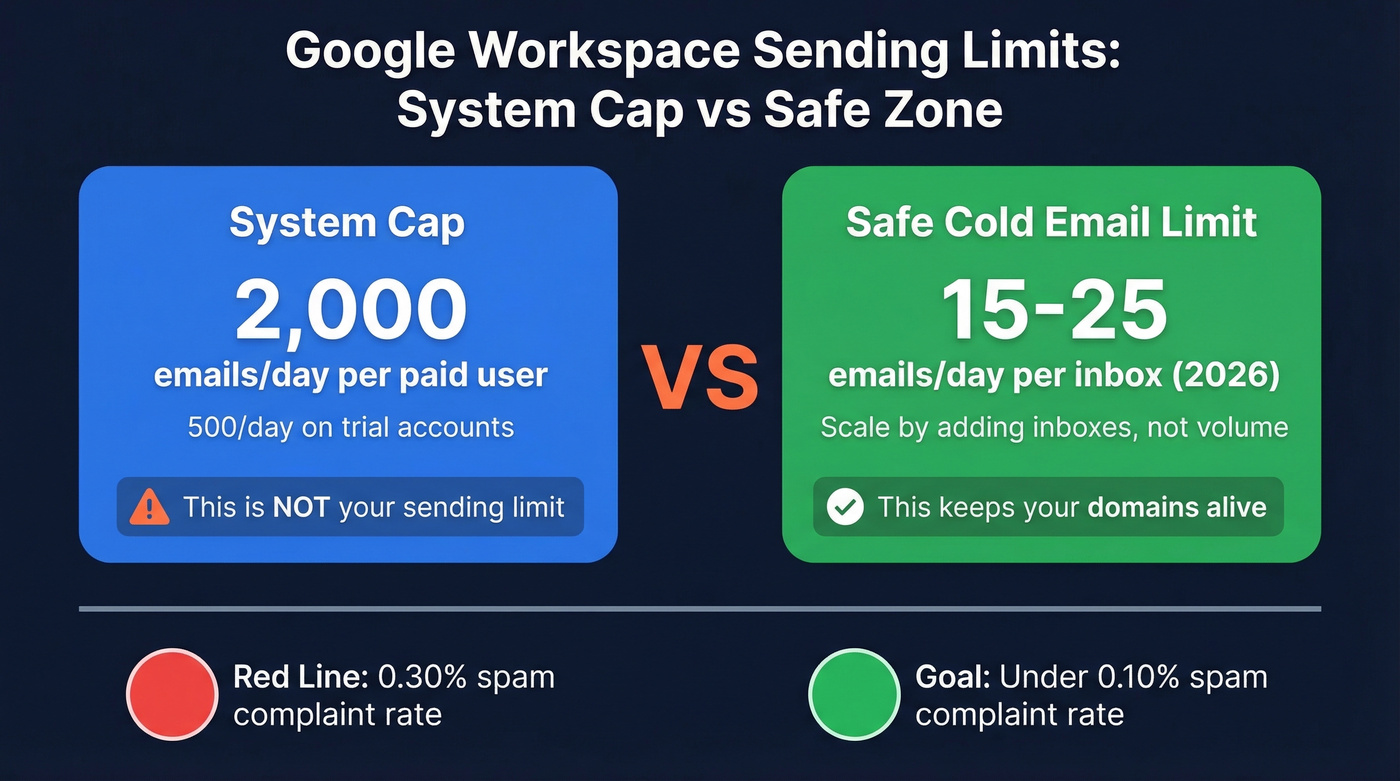
| Metric | System Cap | Safe Cold Email Limit |
|---|---|---|
| Messages/day (paid) | 2,000/user | 20-50/inbox |
| Trial account limit | 500/day | 5-10/inbox |
Google lets you send 2,000 messages per day per paid Workspace user. That's a capacity ceiling, not a permission slip. Experienced operators cap around 15-25/day per inbox after the late-2025 crackdown, and even that requires clean lists and proper authentication.
Keep your spam complaint rate below 0.10% as the goal, and treat 0.30% as the red line. The bulk sender requirements Google and Yahoo enforced since February 2024 - SPF, DKIM, DMARC, one-click unsubscribe - technically apply to senders pushing 5,000+ emails/day, but smart operators follow them at any volume. Trying to run bulk campaigns through Gmail without meeting these requirements is a fast track to suspension.
Set up Google Postmaster Tools on every sending domain. It's the clearest way to see your spam rate and domain reputation from Google's perspective.
Setup Playbook
Domains and Inboxes
Never send cold email from your primary domain. Full stop. If your company is acme.com, register secondary domains like getacme.com, tryacme.com, and acmehq.com.
A proven architecture is 10 domains with 3-5 inboxes each, giving you 30-50 sending accounts. At 25 emails/day per inbox, that's 750-1,250 cold emails daily - enough volume to generate real pipeline without tripping Google's filters.
Spread registrations across 2-3 registrars so a single registrar issue doesn't take down your operation. Let domains age at least 30 days before sending. Sixty is better.
Limit each Workspace tenant to 1-2 domains. If Google flags one tenant, it can take down every domain under it. We keep a master spreadsheet tracking every domain, inbox, registrar, DNS status, and warm-up stage - this gets unwieldy fast at 10+ domains, but it's non-negotiable.
DNS Authentication
Every domain needs three records. No exceptions.
SPF: Add a TXT record with v=spf1 include:_spf.google.com -all to your DNS. Use -all (hard fail), not ~all. Watch the 10 DNS lookup limit; if you're including multiple sending services, you'll need to flatten your SPF record. Never publish more than one SPF TXT record per domain - it breaks evaluation entirely. For syntax and provider-specific examples, see our SPF record examples.
DKIM: In Google Admin Console, go to Apps > Google Workspace > Gmail > Authenticate Email. Generate a 2048-bit key, publish the TXT record, then enable signing. Rotate your DKIM key annually. If you want to confirm everything is set up correctly, follow this guide on how to verify DKIM is working.
DMARC: Start with v=DMARC1; p=none; rua=mailto:dmarc@yourdomain.com for the first 2-4 weeks to monitor. Then move to p=quarantine, and finally p=reject once all legitimate mail is properly authenticated. Don't jump straight to reject - that can block your own emails if something's misconfigured. For deeper nuance, read our breakdown of DMARC alignment.

You just spent weeks setting up domains, DNS records, and warm-up sequences. One bad list wipes it all out. Prospeo's 5-step verification catches spam traps, honeypots, and catch-all domains before they ever hit your sending infrastructure - 98% email accuracy, refreshed every 7 days.
Protect your Workspace domains. Verify every contact before you send.
Warm-Up Protocol
Don't skip this. Don't shorten it.
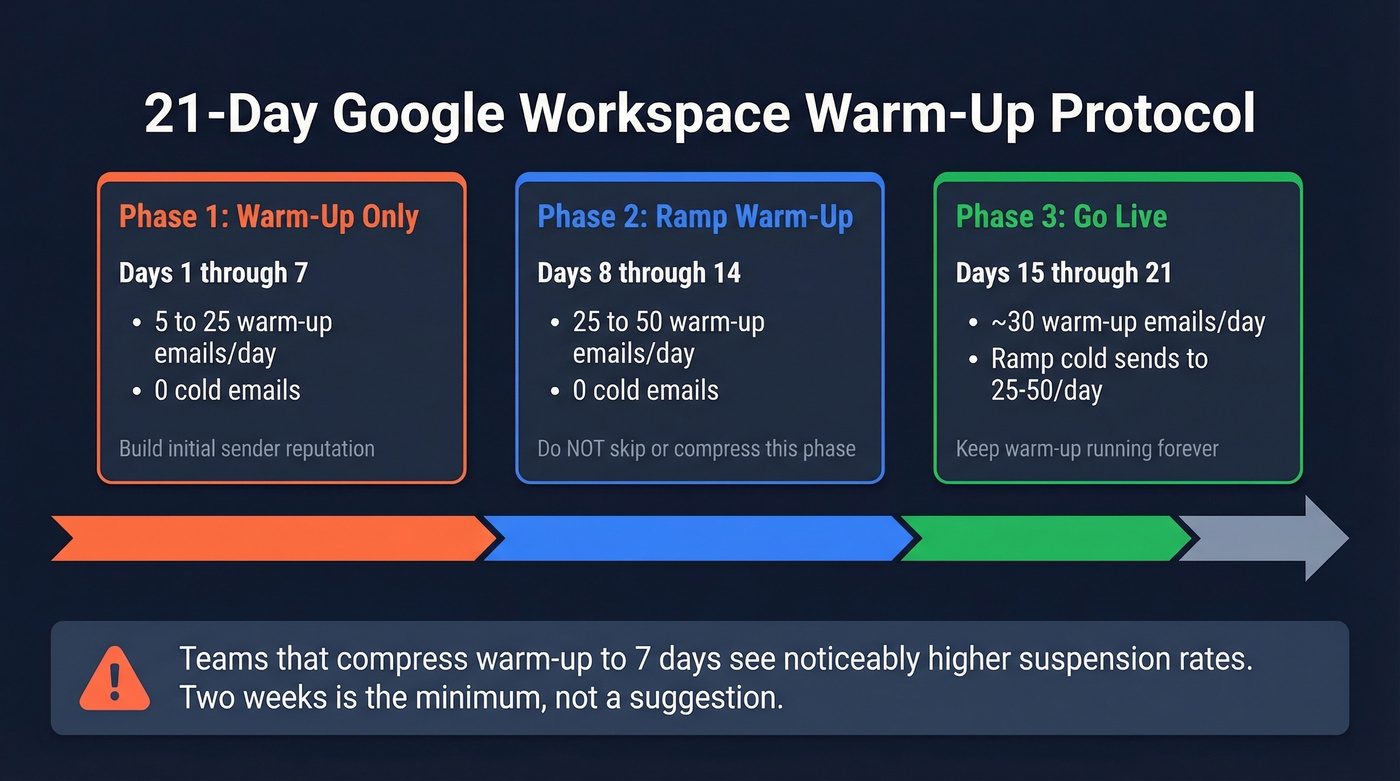
Every new inbox needs at least 14 days of warm-up before cold sends. Here's the thing: we've watched teams try to compress this to 7 days, and the suspension rate is noticeably higher. Two weeks isn't a suggestion. If you're comparing tools, start with these unlimited email warmup tools.
| Day | Warm-Up Emails | Cold Emails | Total |
|---|---|---|---|
| 1-7 | 5 to 25/day | 0 | 5-25 |
| 8-14 | 25 to 50/day | 0 | 25-50 |
| 15-21 | Maintain ~30 | Ramp to 25-50 | 55-80 |
Use a warm-up tool that generates real engagement signals from Gmail and M365 inboxes - opens, replies, moves out of spam. SMTP-only warm-up is invisible to Google's algorithm. Keep warm-up running as ongoing maintenance; it's not a one-time setup.
The Step Everyone Skips: List Quality
You set up 10 domains, warmed up for 14 days, nailed your DNS records - then uploaded a purchased list. Half the addresses bounced, three domains got flagged within a week, and two months of infrastructure work went up in smoke.
We've seen this pattern more times than we can count.
Bounce rate is the single fastest way to kill a Workspace domain. Not volume. Not content. Bounces. Most cold email "deliverability problems" are actually data problems wearing a deliverability mask, and the best DNS setup in the world can't save you from a dirty list. If you want the benchmarks and fixes, see our guide to email bounce rate.

Verify every address before it touches your sending infrastructure - catch-all domains, spam traps, honeypots, all of it. If you want a broader framework beyond verification, start with our email deliverability guide. Prospeo's 5-step verification handles this with 98% email accuracy and native integrations into Instantly and Smartlead, so verified contacts flow directly into campaigns. Stack Optimize built their agency to $1M ARR running client deliverability at 94%+, bounce rates under 3%, and zero domain flags on verified lists.
Running 30-50 inboxes at 25 emails/day means you need 750-1,250 verified contacts daily. Prospeo plugs directly into Instantly and Smartlead, so verified emails flow straight into your campaigns - no CSV exports, no manual uploads, no bounces torching your domains at $0.01/email.
Feed your cold email infrastructure with contacts that actually land.
Scaling Beyond One Provider
Running your entire outbound operation through Google Workspace is a single point of failure. If Google tightens filtering tomorrow - and they've shown they will - you need a second lane.
The smart play: pair Workspace with a shared SMTP provider like Mailforge or Mailscale at $3-15/inbox/month. Different IP pools, different filtering environments. If one lane gets hit, the other keeps running.
Inbox placement between Google Workspace and Microsoft 365 is nearly identical - 94.18% vs 95.38%. Many operators run both. The diversification isn't about finding a "better" provider; it's about not having all your outbound eggs in one basket. The consensus on r/coldemail is pretty clear: multi-provider setups survive crackdowns, single-provider setups don't. If you're building a more resilient outbound stack overall, compare options in our roundup of SDR tools.
What It Actually Costs
| Component | Monthly Cost |
|---|---|
| GW direct ($6/user) | $180 for 30 inboxes |
| GW via reseller | $75-135 for 30 inboxes |
| Microsoft 365 ($5-6/user) | $150-180 for 30 inboxes |
| Sending tool (Instantly) | ~$97-147 |
| Shared SMTP lane | $3-15/inbox |
| Email verification | Free tier; ~$0.01/email |
| Total (30 inboxes + tools) | $400-600/month |
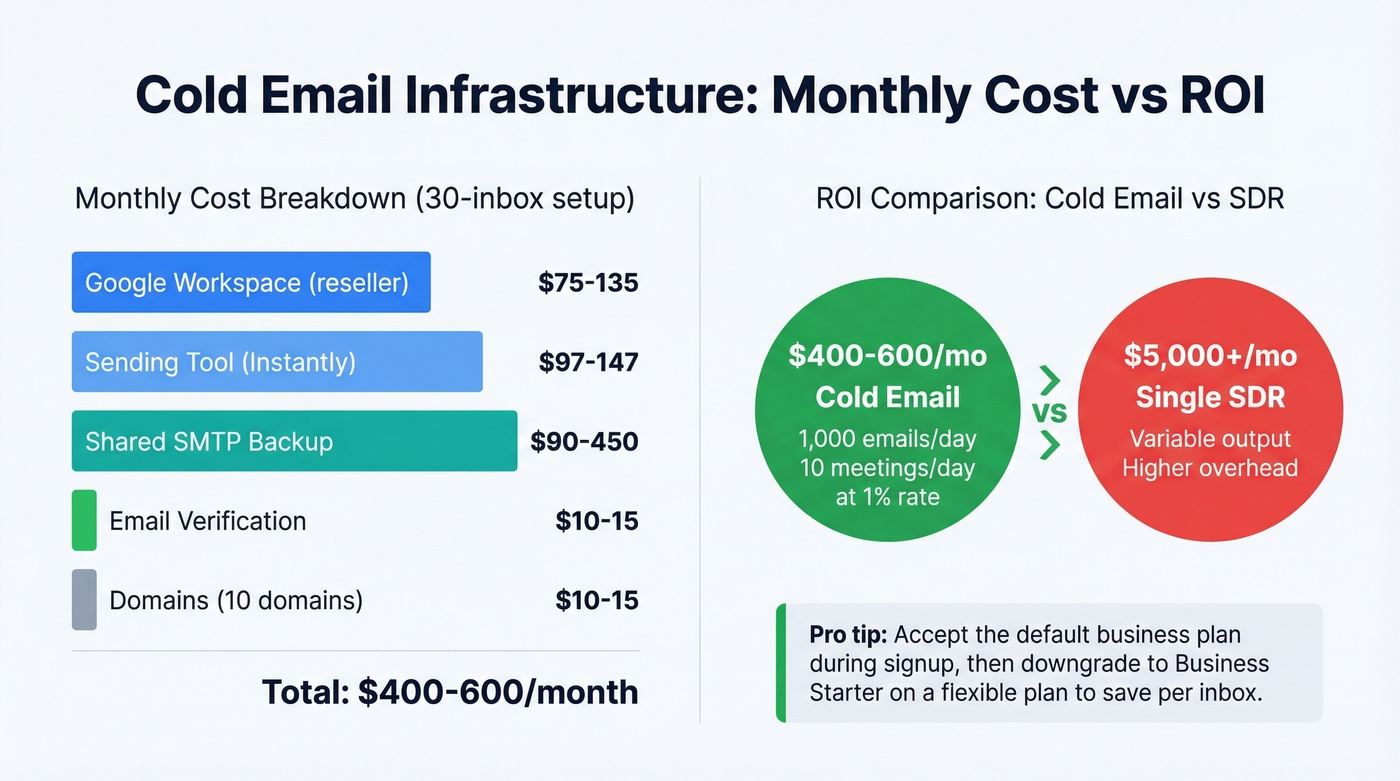
Google Workspace resellers charge $2.50-$4.50/user/month versus the direct price of around $6/user/month for Starter. That's meaningful at 30 inboxes. Pro tip: accept the default business plan during signup, then downgrade to Business Starter on a flexible plan.
Let's do the math. At 1,000 cold emails/day with a 1% meeting rate, that's 10 meetings/day for $400-600/month. Compare that to $5,000+/month for a single SDR. The unit economics of well-run cold email infrastructure are absurd - which is exactly why it's worth getting the setup right instead of cutting corners and burning domains. If you're tightening the rest of your outbound system, use these sales prospecting techniques to keep volume efficient.
Google Workspace Cold Email FAQ
How many cold emails can I send per day from Workspace?
20-50 per inbox per day, with many operators treating 15-25/day as the safer baseline in 2026. Google allows 2,000 messages/day per paid user, but that's a system cap - not a safe sending limit. Scale by adding inboxes, not pushing volume per account.
Will Google suspend my account for cold outreach?
Google suspended accounts used for cold email in late 2025. Use secondary domains, cap volume at 15-25/day per inbox, and verify every list before sending. That combination dramatically reduces suspension risk.
Google Workspace or Microsoft 365 - which is better?
Both deliver nearly identical inbox placement. Workspace powers roughly 57% of business email, giving it a slight edge for sending to other Gmail users. Run both if budget allows - diversification beats optimization here.
How do I prevent my domain from getting blacklisted?
Verify every list before sending. Cap at 15-25 emails/day per inbox, use secondary domains exclusively, and add a shared SMTP lane as backup. A bounce rate above 3% is the fastest path to a blacklist. Skip this step and you'll learn the hard way - we've watched teams rebuild their entire infrastructure from scratch because they treated list quality as optional.