

Gumloop Pricing, Reviews, Pros and Cons: What Other Reviews Get Wrong
Most breakdowns of Gumloop's pricing are wrong. They cite deprecated plan names like "Solo" and "Team," list credit amounts that don't match the current pricing page, and skip the part that actually matters - how credits get consumed per node. We ran test workflows, dug through the docs, and fixed the record.
30-Second Verdict
Gumloop is a powerful AI-native workflow builder with confusing credit-based pricing and a lot of stale information floating around. The free plan's 5K credits are generous enough to test real workflows. Pro at $37/mo is competitive for AI-heavy batch automations. But enrichment at 60 credits per contact gets expensive fast - if that's your primary use case, a dedicated tool like Prospeo delivers verified emails at roughly $0.01 each with 98% accuracy. Gumloop shines for teams building complex AI automations, not simple trigger-to-action flows.
What Is Gumloop?
Gumloop is a no-code, AI-native visual workflow builder. It's built around batch data operations - scrape a list of sites, run AI analysis across all of them, generate a report, push results somewhere. Think closer to Clay than to Zapier in philosophy, with 125+ integrations plus MCP (guMCP) and growing.
Shopify rolled it out company-wide across 110+ teams, roughly 6,000 workflows, and 17M+ actions executed with zero security incidents. When a company that builds its own internal tools chooses yours, that says something.
Current Plans and Costs
Here's what the [pricing page](https://www.gumloop.com/pricing) actually shows - not what third-party articles from six months ago say.
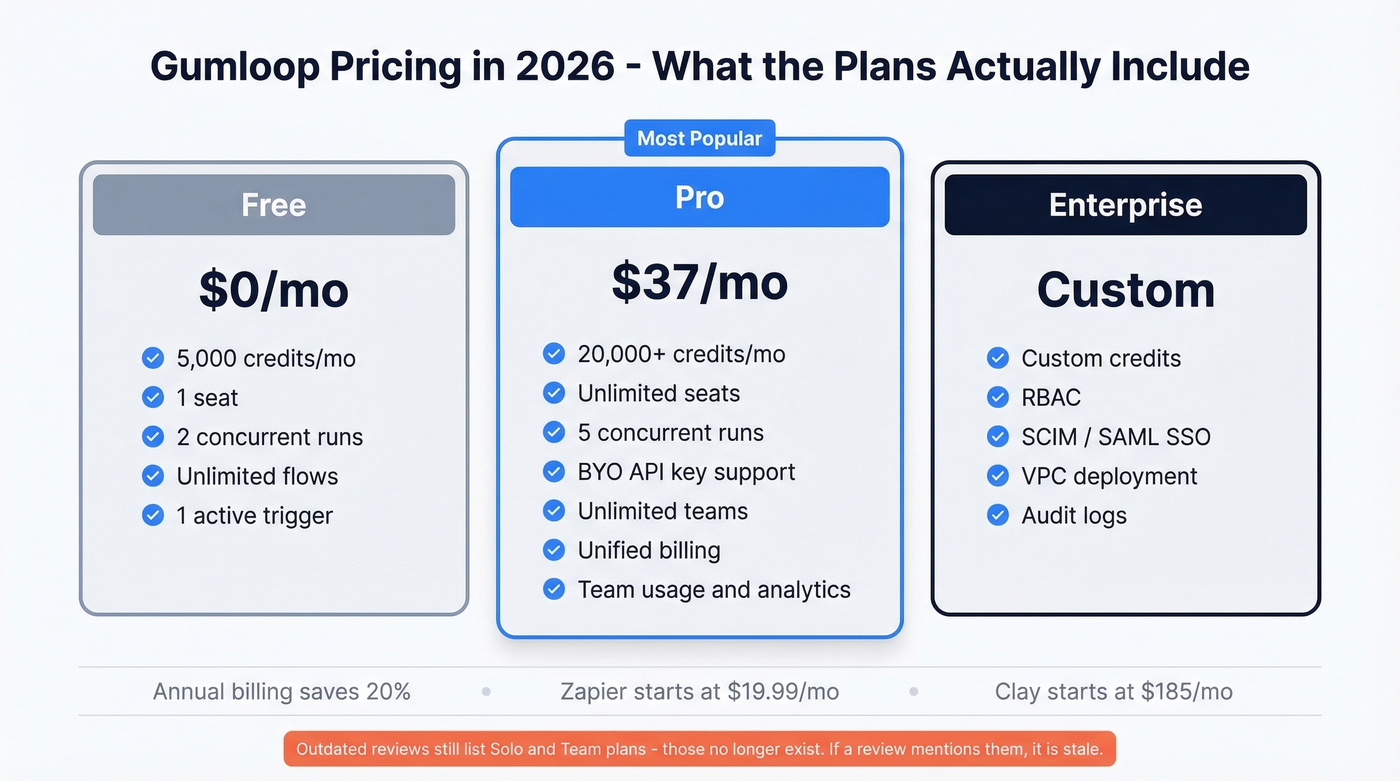
| Plan | Price | Credits/mo | Limits | Key Features |
|---|---|---|---|---|
| Free | $0 | 5,000 | 1 seat, 2 concurrent runs | Unlimited flows, 1 active trigger |
| Pro | $37/mo | 20,000+ | Unlimited seats, 5 concurrent runs | BYO API key, unlimited teams, unified billing, team usage & analytics |
| Enterprise | Custom | Custom | Custom | RBAC, SCIM/SAML, VPC, audit logs |
Annual billing knocks 20% off. A Lindy.ai writeup still lists Free/Solo/Team with Solo at 10K credits and Team at 60K - those plan names are outdated. The current structure is Free/Pro/Enterprise. If a review mentions "Solo" or "Team," it's stale.
You can buy additional credits, but Gumloop doesn't publish a simple $/credit table on the pricing page.
For context, Zapier runs roughly $19.99-$799/mo depending on volume, n8n starts around $20/mo for cloud, and Clay starts at $185/mo. Gumloop's Pro tier is aggressively priced - until you look at how credits actually get spent.

At 60 credits per contact, enriching 1,000 leads in Gumloop burns through 3+ months of Pro credits. Prospeo enriches the same list for ~$10 with 98% email accuracy and a 92% match rate - returning 50+ data points per contact.
Stop burning workflow credits on enrichment. Use the right tool for the job.
How Credits Actually Work
This is the section most reviews skip entirely, and it's the one that matters most.
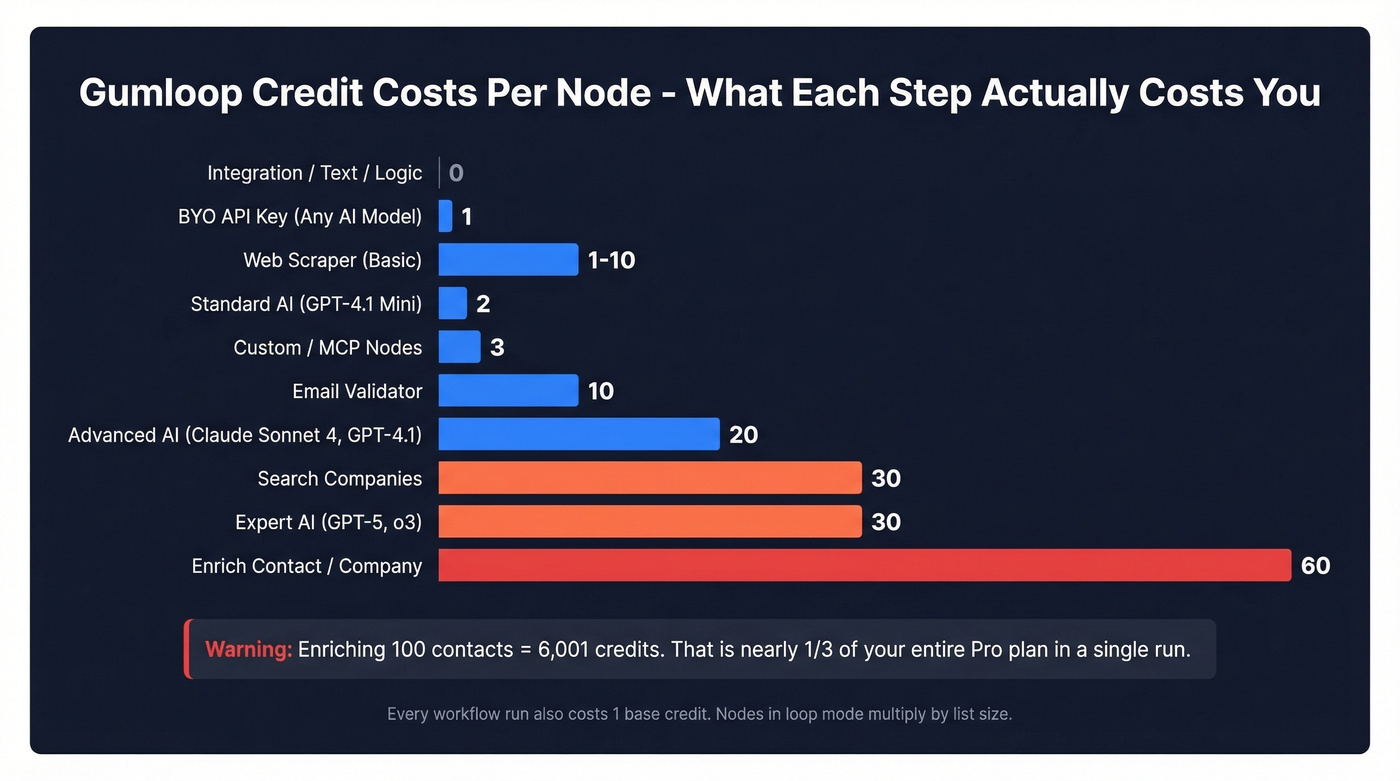
Gumloop workflows have deterministic credit costs - same workflow, same cost every time. Every run costs 1 credit as a base execution fee, then each node adds its own cost.
| Node Type | Credits |
|---|---|
| Integration / text / logic | 0 |
| Standard AI (GPT-4.1 Mini) | 2 |
| Advanced AI (Claude Sonnet 4, GPT-4.1) | 20 |
| Expert AI (GPT-5, o3) | 30 |
| BYO API key (any AI model) | 1 |
| Enrich Contact / Company | 60 |
| Search Companies | 30 |
| Email Validator | 10 |
| Web Scraper (basic to agent) | 1-10 |
| Custom / MCP nodes | 3 |
Gumloop's docs include three worked examples that make this concrete. Read Google Sheet, filter, send Slack: just 1 credit total because every node is free. Read emails, Standard AI categorize, update Airtable: 3 credits - one base plus two for the AI node. Combine text, GPT-4.1, custom node: 24 credits, since the Advanced AI node alone is 20 plus 3 for the custom node.
Now here's where it gets painful.
Enriching 100 contacts costs 6,001 credits - one base plus 60 per contact times 100. That's nearly a third of your entire Pro plan, gone in a single run. You shouldn't need to do math homework to figure out if you can afford a tool, but Gumloop buries enrichment costs in docs rather than surfacing them on the pricing page. And watch out for loop mode: a 60-credit node running across a 10-item list costs 600, not 60.
One fair policy: if a workflow fails mid-run, you're only charged for nodes that actually executed.

Here's the thing: Gumloop is one of the best AI workflow builders we've tested. But using it for high-volume enrichment is like using a sports car to haul furniture - technically possible, financially painful. Offload enrichment to a dedicated tool, feed clean data into Gumloop for the AI-heavy steps, and your Pro credits last dramatically longer.
If you're evaluating enrichment vendors, start with a quick comparison of data enrichment services and how they price per record.
Honest Pros and Cons
Pros:
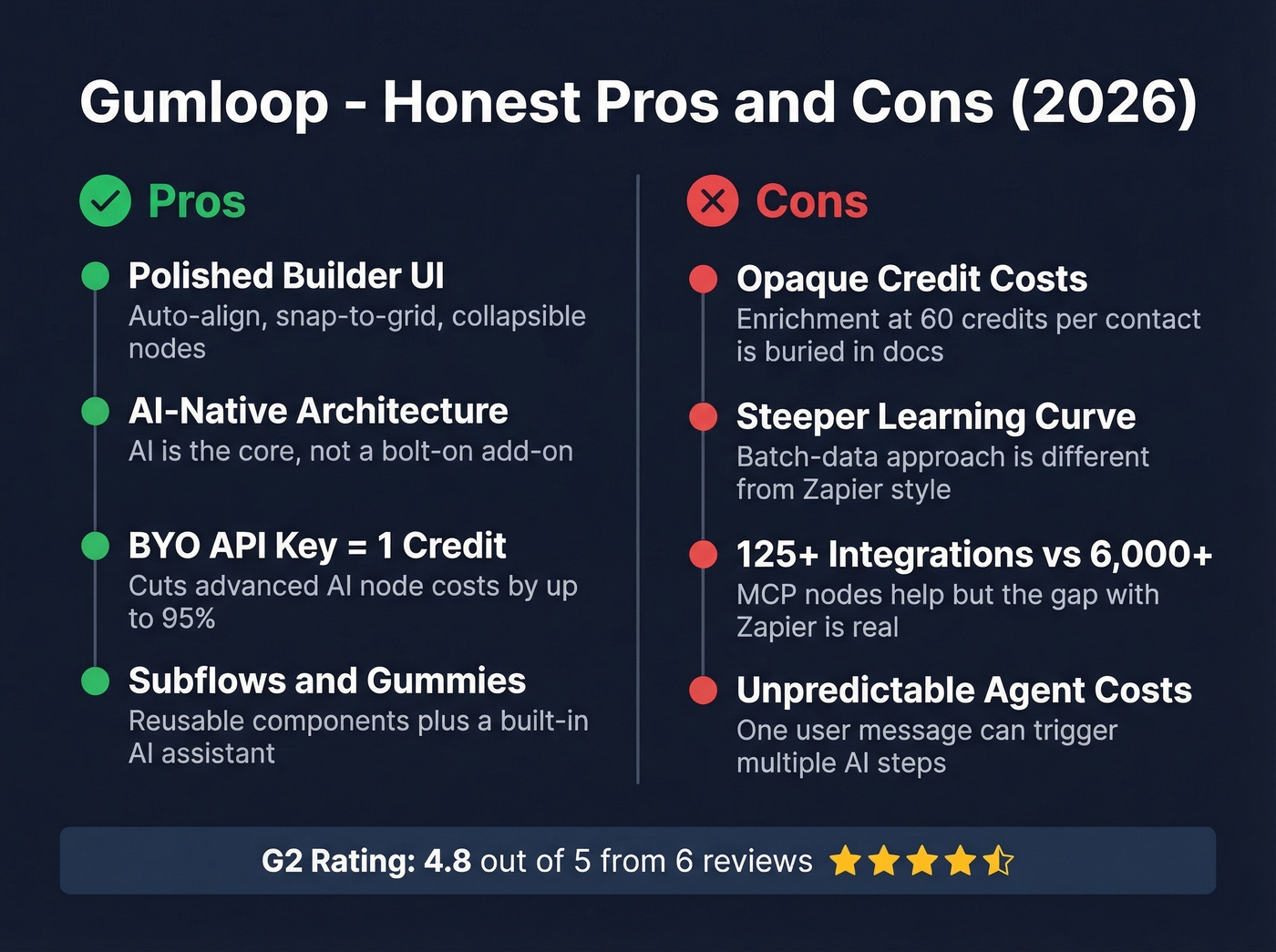
- Polished builder UI. Auto-align, snap-to-grid, collapsible nodes - Softailed's review highlights the canvas ergonomics specifically.
- AI-native architecture. AI isn't bolted on like Zapier's add-ons. It's the core of the platform, and validated G2 reviewers highlight this as a key differentiator.
- BYO API key drops AI costs to 1 credit. If you already pay for OpenAI or Anthropic API access, this is huge.
- Subflows and Gummies. Subflows let you build reusable workflow components - think functions in programming. The built-in assistant "Gummies" helps build and troubleshoot workflows, and G2 reviewers call it genuinely helpful.
Cons:
- Credit costs are opaque. Enrichment at 60 credits per contact is buried in documentation, not on the pricing page.
- Learning curve. If you're coming from Zapier's trigger-to-action model, Gumloop's batch-data approach takes adjustment. G2 reviewers mention "growing pains."
- 125+ integrations vs. Zapier's 6,000+. The gap is real, though MCP nodes help bridge it.
- Agent costs are unpredictable. A single user message can trigger multiple internal AI steps, each incurring token-based model credits. Budgeting for agent-heavy workflows is guesswork.
Gumloop holds a 4.8/5 on G2 from a small but consistently positive sample of 6 reviews.
Who Should (and Shouldn't) Use Gumloop
Use Gumloop if you're building AI-heavy batch workflows - scraping, analysis, output generation in one canvas. It's also a strong fit for teams that want to build mini-apps with AI logic without writing code, or GTM teams doing prospect research at moderate scale (hundreds, not tens of thousands) who already have OpenAI/Anthropic API keys to take advantage of BYO pricing.
If your workflows are primarily prospecting-related, pair this with proven sales prospecting techniques so the automation supports a real motion.
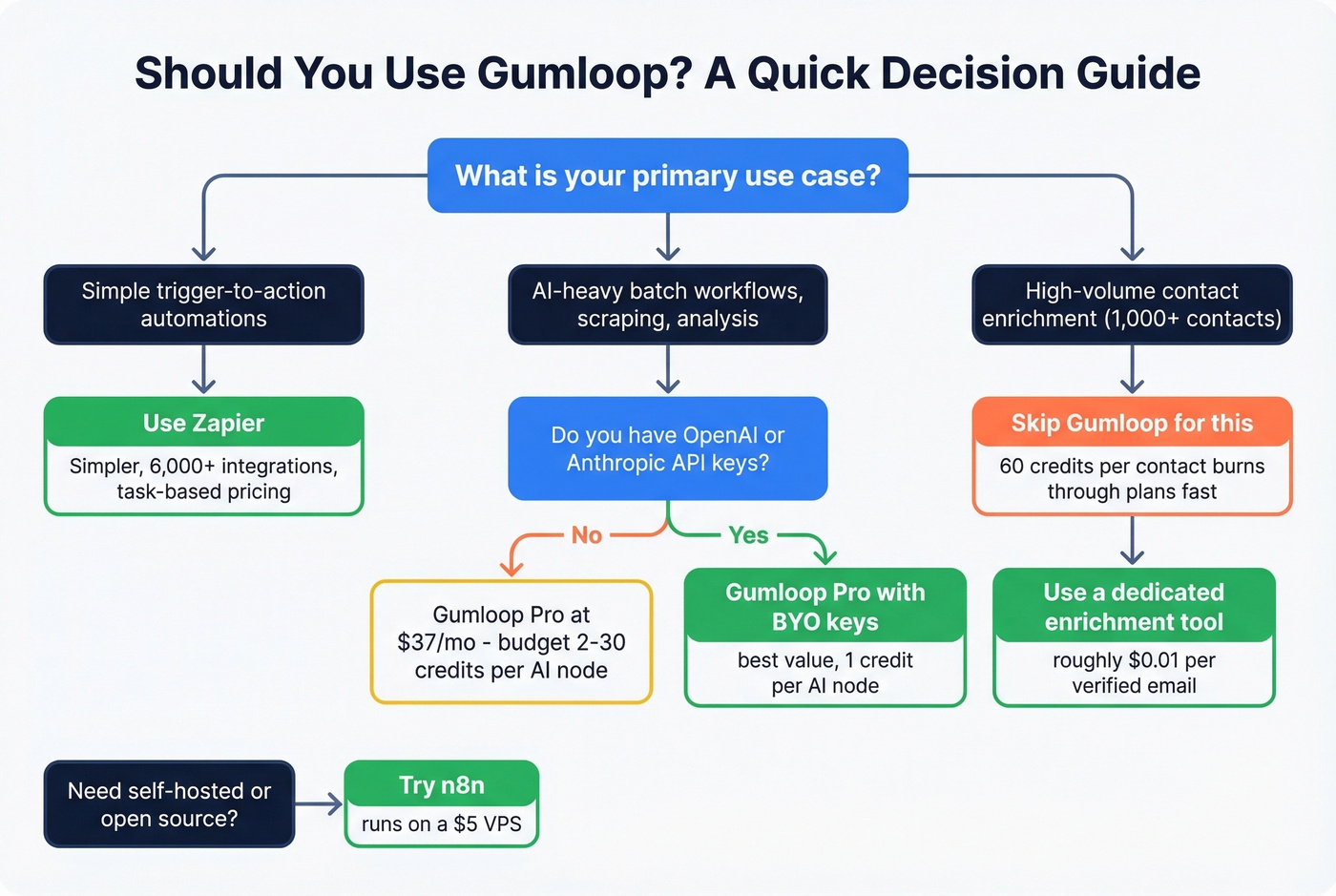
Skip Gumloop if you need simple trigger-to-action automations - just use Zapier. For teams that want self-hosted or open-source, n8n runs on a $5 VPS and gives you full control. And if your primary use case is high-volume contact enrichment, don't burn credits at 60 per contact. Use a dedicated data platform instead - in our experience, that single change can cut enrichment costs by 80% or more while improving data quality.
If you're building outbound lists, it also helps to understand lead enrichment and how match rates affect cost.
The Verdict
Let's be honest: comparing Gumloop head-to-head with Zapier misleads people. They're different tools for different jobs. Gumloop is genuinely innovative for AI-native automation, and the credit system rewards small-to-medium AI workflows while punishing high-volume enrichment. After reviewing Gumloop's pricing, features, and real user feedback, we think it's the best value at the Pro tier for teams building complex AI automations. Just know what each node costs before you hit "Run."
If you're choosing tools for outbound, it can be useful to map Gumloop alongside your SDR tools and your best contact management software so enrichment, sequencing, and CRM stay clean.
FAQ
How many credits does Gumloop's free plan include?
5,000 credits per month with 1 seat and 2 concurrent workflow runs. That's enough for roughly 50-100 AI-heavy workflow executions, depending on which model tiers you use. Enrichment-heavy workflows will burn through credits much faster - a single 100-contact enrichment run eats over 6,000 credits, which already exceeds the free tier.
Is Gumloop cheaper than Zapier?
At $37/mo for Pro, Gumloop undercuts Zapier's comparable tiers on sticker price. The catch is that Gumloop charges per-node credits for AI and enrichment steps, while Zapier charges per task. For simple automations, Zapier is often cheaper. For AI-native batch workflows, Gumloop wins on value.
Why is Gumloop enrichment so expensive?
Each contact enrichment node costs 60 credits - enriching 333 contacts would exhaust your entire 20,000-credit Pro allotment. For teams running enrichment at scale, Prospeo costs roughly $0.01 per verified email with 98% accuracy and a 7-day data refresh cycle, making it far more economical for that specific job.
Can I bring my own API keys to Gumloop?
Yes. BYO API keys reduce any AI node from 2-30 credits down to just 1 credit. If you already pay for OpenAI or Anthropic access, this is the single biggest cost lever available - it can cut AI workflow costs by 95% on advanced model nodes.
Gumloop is excellent for AI workflows - but feeding it bad contact data wastes credits and kills results. Prospeo's 7-day data refresh and 5-step verification give you clean inputs so every Gumloop automation starts with accurate data.
Clean data in, better workflows out. 75 free emails to prove it.