

How to Find Someone's Email Address in 2026 (7 Ways)
Your boss just asked you to reach the VP of Engineering at a Series B company by Friday. You've got a name, a company, and no email address. Now what?
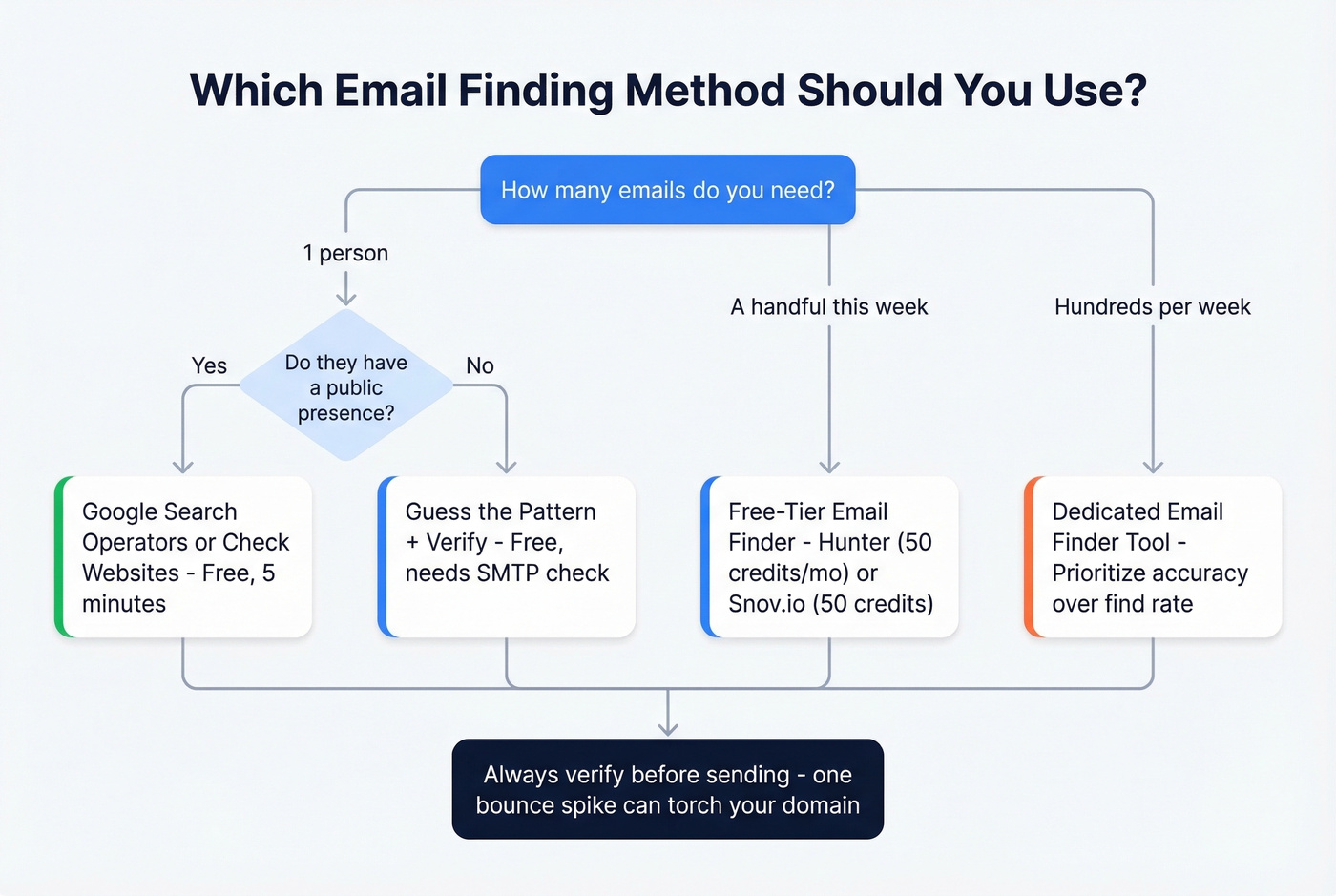
Here's the quick version based on your situation:
- One person, right now - Google search operators and email pattern guessing. Free, five minutes.
- A handful of prospects this week - A free-tier email finder like Hunter (50 credits/month) or Snov.io (50 credits). Fast, no commitment.
- Hundreds per week at scale - A dedicated email finder tool with real-time verification and fresh data.
Use an Email Finder Tool
Email finder tools cross-reference a person's name and company against massive databases of professional profiles, then verify the result in real time via SMTP handshakes and proprietary checks. You type in "Jane Doe, Acme Corp" and get back a verified email address - or nothing, if the tool can't confirm it. For anyone trying to find the email address of someone at a specific company, this is the most reliable starting point.
The gap between tools is enormous, though. Some optimize for find rate - returning as many results as possible from a cold list. Others optimize for accuracy - only returning emails they've confirmed are deliverable. These are fundamentally different goals, and confusing them is how teams end up with 15% bounce rates and a scorched sending domain.
Prospeo optimizes for accuracy. It refreshes its 300M+ profiles every 7 days and runs a 5-step verification process that includes catch-all handling, spam-trap removal, and honeypot filtering - resulting in 98% email accuracy at roughly $0.01 per email.

The consensus in a popular r/agency thread is that Apollo has a massive database but "lots of bounces on older contacts," while Hunter has solid verification but a smaller pool. Snov.io gets praise for international leads and affordable credits. For EU/UK-specific data, Cognism is strong but enterprise-priced - typically $15,000+/year.
| Tool | Free Tier | Paid From | Best For |
|---|---|---|---|
| Hunter | 50 credits/mo | $49/mo (Starter) | Verification layer |
| Snov.io | 50 credits | $39/mo (Starter) | International leads |
| Apollo | Free tier | ~$49/mo | Massive database |
| Anymail Finder | 100 credits | $14/mo | Pay-only-for-verified |
| Lusha | Free tier | $36/mo | Quick lookups |
Here's our take: The tool you pick matters more than the method you use. A 5% bounce rate from a cheaper tool will damage your sending domain in ways that take weeks to repair. We've watched teams burn through three or four "affordable" tools before landing on one with genuinely fresh data - and the real cost wasn't the subscriptions, it was the two weeks spent warming up a replacement domain after each bounce spike.
Try a Browser Extension
Use this if: You're prospecting one person at a time from company websites or professional profiles and want a single-click workflow.
Skip this if: You need to find emails in bulk. Extensions are built for one-off lookups, not list building.
Google Search Operators
Google indexes a huge number of pages where email addresses appear in plain text - conference speaker bios, PDF whitepapers, press releases, team pages. This free, no-tool method still works surprisingly well.
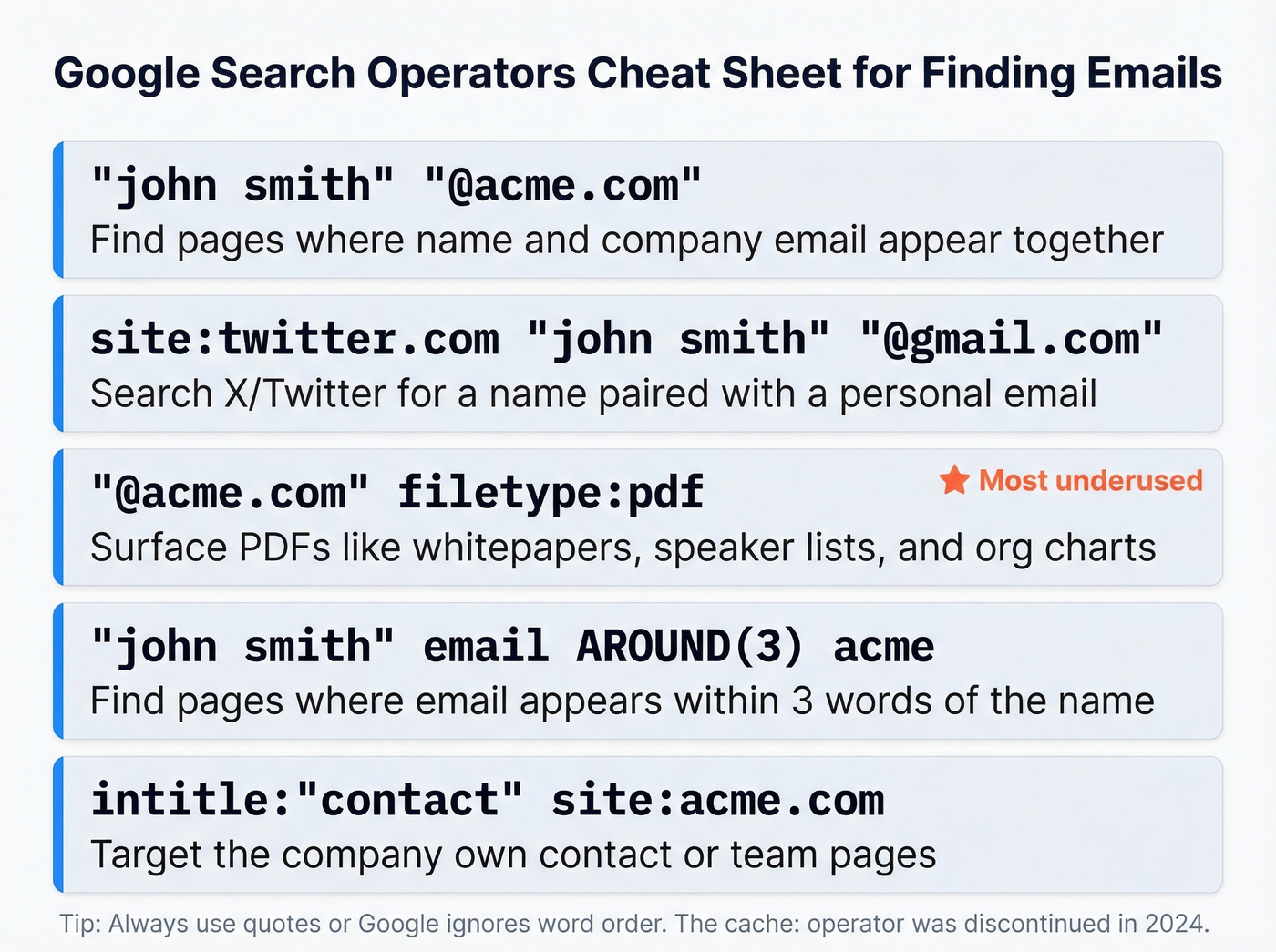
Five recipes you can copy and paste right now (swap in your target's name and company):
"john smith" "@acme.com" - Finds pages where the name and an @acme.com email appear together.
site:twitter.com "john smith" "@gmail.com" - Searches X (formerly Twitter) for a name paired with a personal email.
"@acme.com" filetype:pdf - Surfaces PDFs like whitepapers, speaker lists, and org charts that contain company emails.
"john smith" email AROUND(3) acme - Uses Google's proximity operator to find pages where "email" appears within three words of the name. Great for bios and contact pages.
intitle:"contact" site:acme.com" - Targets the company's own contact or team pages.
In our experience, the filetype:pdf operator is the most underused - it surfaces conference speaker lists and org charts that no email finder tool indexes. The Moz operator reference is the best cheat sheet for what still works. The cache: operator was discontinued in 2024, so skip that one. And quotes are essential - without them, Google ignores word order and you'll get noise.
This method works best for people with a public presence. If your target has spoken at a conference, published a paper, or been quoted in a press release, there's a good chance their email is sitting in a Google-indexed document right now.
Guess the Email Pattern + Verify
Most companies follow a predictable email format. If you know the pattern, you can generate the address yourself and verify it - a straightforward way to find someone's email when you already know their name and company domain.
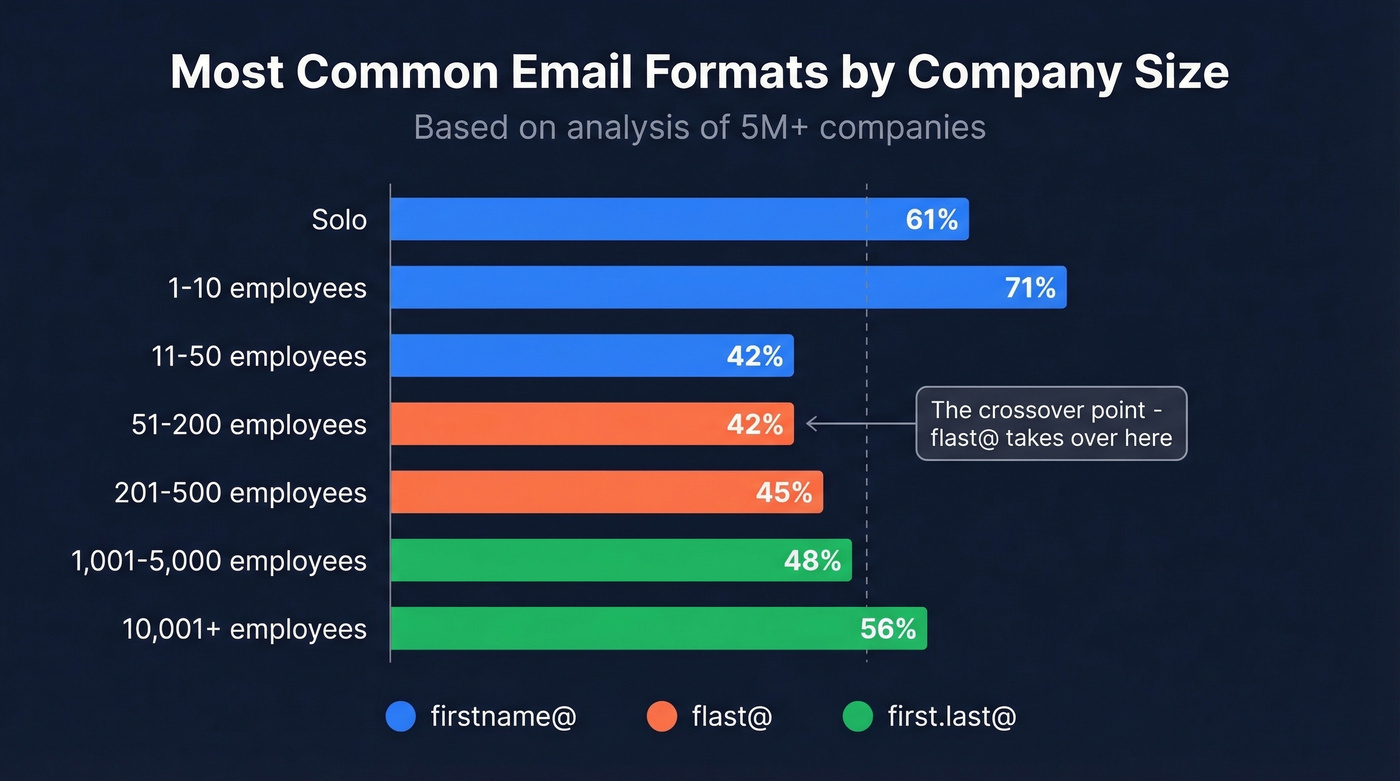
Data from an analysis of 5M+ companies shows how formats shift by company size:
| Company Size | Most Common Format | % |
|---|---|---|
| Solo | firstname@ | 61% |
| 1-10 employees | firstname@ | 71% |
| 11-50 | firstname@ | 42% |
| 51-200 | flast@ | 42% |
| 201-500 | flast@ | 45% |
| 1,001-5,000 | first.last@ | 48% |
| 10,001+ | first.last@ | 56% |
The crossover happens around 51-200 employees, where flast@ takes over. At enterprise scale, first.last@ dominates. Here's the three-step workflow:
- Identify the company size. A quick check on the company website or any business database tells you this.
- Generate the top three likely patterns. For a 500-person company, try
first.last@,flast@, andfirstname@in that order. - Verify before sending. GMass's verifier or any SMTP-check tool will confirm whether the address is live. Never send to an unverified guess - one hard bounce too many and your domain reputation takes the hit.
This works for business domains only. Personal Gmail or Outlook addresses don't follow predictable patterns, so you'll need a different method for those.
Check Websites and Social Profiles
Before you reach for any tool, do a 60-second manual sweep. The email is often sitting in plain sight.
Company websites - Check the Contact, About, and Team pages. Smaller companies often list individual emails directly. Professional profiles - Some people include their email in their bio or summary section. YouTube About sections - Creators and executives with channels frequently list a business email for inquiries. GitHub profiles - Developers and technical leaders often have their email public in their profile or commit history. Slack and Discord communities - Industry-specific communities sometimes have member directories. Personal blogs and portfolios - Especially common for marketers, designers, and consultants.
This won't work for everyone. But when it does, it's the fastest and most reliable method - you're getting the address the person chose to make public.

You just read 7 ways to find someone's email address. Prospeo combines the best of all of them - 300M+ profiles refreshed every 7 days, 98% verified accuracy, and catch-all handling that kills bounce rates. At $0.01 per email, one verified address costs less than the time you'd spend Googling it.
Skip the guesswork. Get verified emails in two clicks.
Ask an AI Assistant
ChatGPT, Claude, and Perplexity can help you guess email formats - but they can't reliably give you actual email addresses. Prompt something like: "What is the standard email format for employees at [Company]? Give me the top 3 most likely patterns."
The AI will usually return a reasonable guess based on patterns it's seen in training data. For well-known companies, it's often right. For smaller firms, it's a coin flip.
Here's the thing: AI assistants hallucinate email addresses. They'll confidently generate an address that looks plausible but doesn't exist. Never send to an AI-generated email without running it through a verification tool first. Use AI for format guessing, then verify with an SMTP checker.
OSINT Techniques (Advanced)
If you're trying to find a personal email - or pivot from one identifier to another - open-source intelligence tools go deeper than standard email finders. These methods help when conventional lookup tools come up empty.
Epieos (epieos.com) is the standout. Enter an email address and it generates a PDF listing accounts linked to that email across dozens of platforms. Per r/privacy threads, the results aren't exhaustive but are "more informative than any other site." It works in reverse too - if you have one email, you can discover what else that person is connected to.
idcrawl (idcrawl.com) lets you search by username across major platforms when you know someone's handle but not their email. For deleted or old content, the Wayback Machine and pullpush.io (Reddit archives) can surface email addresses that have since been removed from live pages.
A privacy caveat worth noting: someone can enter your email into Epieos and pull up a list of your linked accounts in seconds. That's exactly why consent matters in outreach.
How Accurate Are Email Finders?
This is the single most important thing most people don't understand about this space.
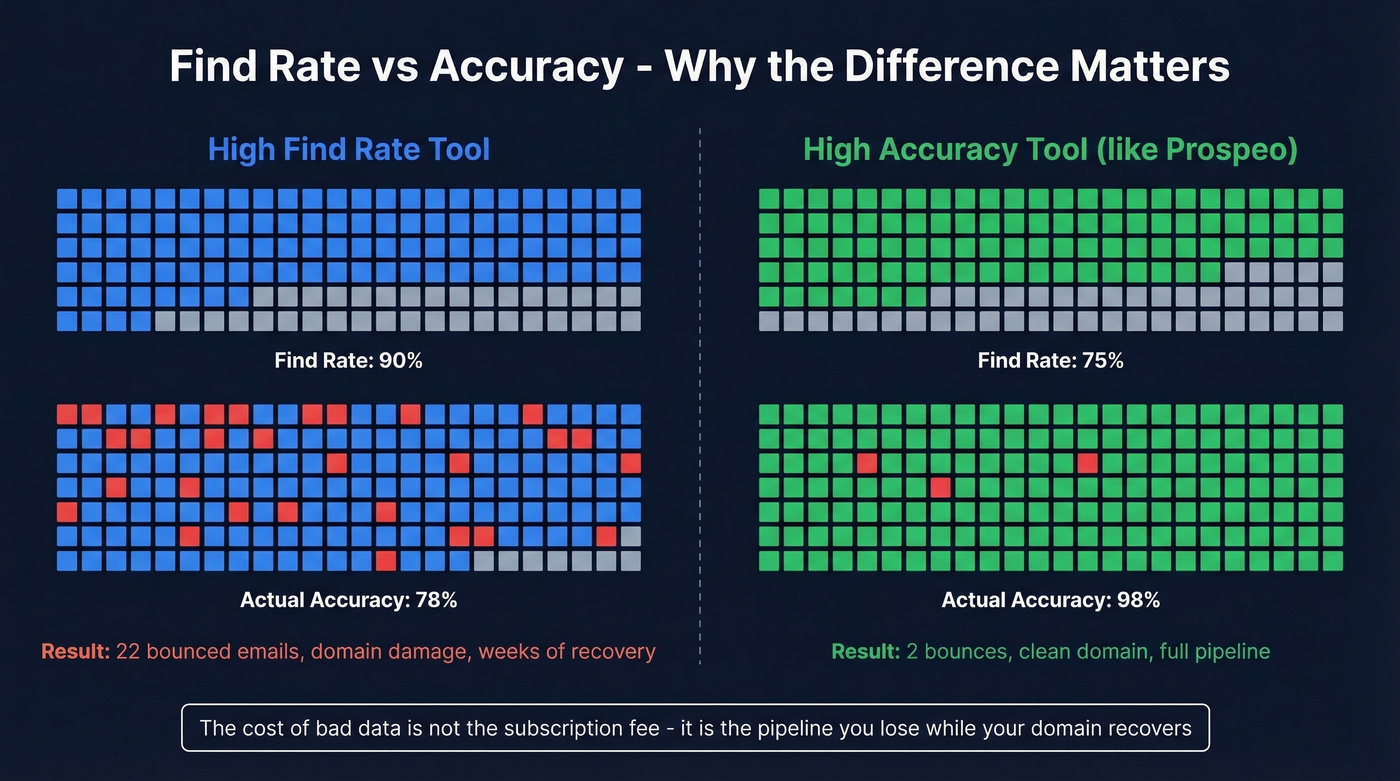
Most tools run an SMTP handshake - they ping the mail server and ask "does this mailbox exist?" without sending an actual email. The problem is catch-all domains, which accept mail to any address at that domain. A basic verifier can't tell whether jdoe@catchall-company.com is a real inbox or a black hole.
Find rate measures how many results a tool returns from a given list. Accuracy measures how many of those returned results are actually deliverable. A tool can have a high find rate by returning unverified guesses - and destroy your bounce rate in the process. We've tested tools that advertise 90%+ find rates but deliver sub-80% accuracy, which translates to bounced emails, spam folder placement, and weeks of domain recovery. The cost of bad data isn't the subscription fee. It's the pipeline you lose while your domain reputation recovers.
Bad email data doesn't just waste credits - it torches your sending domain. Prospeo's 5-step verification process removes spam traps, honeypots, and dead addresses before they ever hit your outbox. Teams using Prospeo cut bounce rates from 35% to under 4% and tripled their pipeline.
Protect your domain reputation with 98% accurate emails.
Verify Before You Send
Finding the email is half the job. The other half is making sure it won't bounce and torch your sender reputation.
The thresholds are clear: keep total bounces below 2% and hard bounces under 1%. Exceed those numbers consistently and inbox providers start routing your emails to spam - for everyone on your domain, not just the campaign that caused the problem.
Pre-send checklist:
- Set up SPF, DKIM, and DMARC on your sending domain. Table stakes in 2026. (If you need a deeper walkthrough, start with DMARC alignment.)
- Use a dedicated sending domain - never your primary company domain for cold outreach. Consider adding a tracking domain too.
- Warm up for 2-3 weeks before scaling volume. Start with 20-30 emails/day and ramp gradually. (More on safe email velocity.)
- Keep spam complaints below 0.3%. One-click unsubscribe in every email helps here.
- Verify your list with a tool like NeverBounce or ZeroBounce before hitting send. If you're troubleshooting, see email bounce rate benchmarks and fixes.
Let's be honest: most deliverability problems aren't caused by bad sequences or weak copy. They're caused by bad data. Verify first, send second.
Legal Rules You Can't Ignore
Most email-finding guides skip this entirely. That's irresponsible.
CAN-SPAM (US): Applies to all commercial email - including B2B. Penalties reach $53,088 per email in violation. Requirements include a valid physical postal address, honest subject lines, a clear opt-out mechanism, and honoring opt-outs within 10 business days.
GDPR (EU): Penalties up to EUR 20 million or 4% of global revenue, whichever is higher. You can use "legitimate interest" as a legal basis for B2B outreach, but consent is safer. If you're emailing anyone in the EU, you need a defensible reason and a clear data-processing record.
CCPA (California): Penalties up to $7,500 per violation. Regulators are increasingly scrutinizing AI-enriched and scraped contact lists.
The practical takeaway: finding someone's email is legal. Sending them a commercial email without following these rules is where the risk lives. Include an unsubscribe link, use your real address, and honor opt-outs immediately.
FAQ
Can you find someone's email address for free?
Yes - Google search operators, company website checks, and email pattern guessing cost nothing. Hunter (50 credits/month), Snov.io (50 credits), and Prospeo (75 emails/month) all offer free tiers. For one-off lookups, manual methods work well; for regular prospecting, a free-tier tool is faster and more reliable.
What's the most accurate email finder tool?
Prospeo delivers 98% email accuracy using a 5-step verification process and a 7-day data refresh cycle - roughly six times faster than the industry average. The key distinction is between "find rate" (volume returned) and "accuracy" (percentage actually deliverable). High find rate with low accuracy destroys your bounce rate.
Is it legal to look up someone's email address?
Finding a publicly available email is legal everywhere. Sending commercial email to it triggers CAN-SPAM (US, up to $53,088/email), GDPR (EU, up to EUR 20M), or CCPA (California, $7,500/violation). Always include an opt-out mechanism and a physical address in every outbound message.
How do I find an email when other tools return no results?
Combine methods: start with Google operators using filetype:pdf and the company domain, then check GitHub profiles and YouTube About sections. OSINT tools like Epieos can surface linked accounts from a username or alternate email. As a last resort, guess the pattern based on company size data and verify with an SMTP checker before sending.
Why do email finder tools return different results for the same person?
Each tool draws from different data sources, scrapes at different frequencies, and uses different verification methods. Stale databases return outdated addresses that bounce. Tools with faster refresh cycles - weekly versus the six-week industry average - return more current, deliverable emails. That's why accuracy claims vary so widely across vendors.