

How to Audit Your Sales Tech Stack in 2026: The Scoring Rubric Nobody Else Gives You
You're paying for 14 tools. Your reps use six. The other eight auto-renew in silence while your CFO wonders why the sales budget keeps climbing - and nobody has a good answer. Knowing how to audit your sales tech stack is the difference between a lean revenue engine and a $30k/year subscription graveyard, and it's not a spreadsheet exercise.
What You Need (Quick Version)
Three things make a sales technology assessment useful: a tool inventory with 12 data fields, a weighted scoring rubric that forces keep/replace/consolidate decisions, and a category checklist to find coverage gaps. The data and enrichment layer is where most waste lives - teams routinely run four to six overlapping subscriptions without realizing it. Budget two to three hours for the inventory, one hour for scoring, and a 30-60-90 day roadmap to act on results.
Your Stack Is Costing You Deals
Here's a scene we've watched play out a dozen times. A RevOps lead opens the annual renewal queue and finds a ZoomInfo contract north of $20k. Half the reps haven't logged in since Q2. Meanwhile, the SDR team tracks deals in Slack threads because Salesforce hygiene is so bad that managers pull their own spreadsheets to forecast. One RevOps lead on Reddit summed it up: "We found multiple tools that have now all evolved to essentially do the same thing."
Reps spend 70% of their time on non-selling tasks according to the Salesforce State of Sales report - admin, data entry, toggling between platforms. That's not a productivity problem. That's a stack problem. A proper sales process stack review is the only way to reclaim that lost selling time.
The Cost of Stack Sprawl
The numbers are worse than most leaders think. According to the Zylo 2025 SaaS Management Index, the average company spends $4,830 per employee on SaaS across 275 applications, with 7.6 new apps entering the environment every month. IT only controls 26.1% of that spend. The rest? Lines of business buying tools on corporate cards with zero oversight.

Gartner's Marketing Technology Survey pegs martech utilization at just 49%. Sales tools aren't measured as rigorously, but the pattern is identical - in our experience, active utilization lands in the 40-60% range. That translates to roughly $1k-$3k per rep per year in pure waste from unused seats and overlapping features.
AI tools are accelerating the problem. AI-native app spending jumped 75.2% year-over-year, and most of those purchases happen outside IT's approval workflow. Every ungoverned tool purchase is another line item your audit needs to catch.

Most stack audits reveal the same thing: 4-6 overlapping data and enrichment tools bleeding budget. Prospeo replaces them with one platform - 300M+ profiles, 125M+ verified mobiles, intent data, and CRM enrichment at $0.01/email. 98% accuracy means your bounce rate drops below 4%, not above 35%.
Consolidate your data layer before your next renewal hits.
When You Need a Sales Technology Assessment
Certain triggers should set off an audit immediately:
- Renewal sticker shock - a vendor quote comes in 20%+ higher and nobody can justify the spend
- Reps tracking deals in Slack or personal spreadsheets instead of the CRM
- Email bounce rates above 35% on outbound sequences, meaning your data tools are failing (see email bounce rate benchmarks)
- Shadow IT discovery - tools on expense reports that nobody in ops approved
- AI tool sprawl - three different teams bought three different AI writing tools in the same quarter
- Three or more new tools added in the past 90 days without a formal evaluation
If more than two of these describe your org right now, stop reading and block four hours on your calendar this week. Tools like RevOpsScore offer a 10-minute diagnostic if you want a quick severity check first.
The 7-Step Audit Process
Step 1: Map Your Actual Sales Process
Start with process, not inventory. This is the step most audit guides skip, and it's the reason most audits produce a spreadsheet that nobody acts on.
Sit with your reps - the actual humans, not the playbook - and map what they do from lead assignment to closed-won. Every handoff, every data entry point, every tool switch. Any tool that doesn't map to a process step is your first cut candidate.
Step 2: Build a Complete Inventory
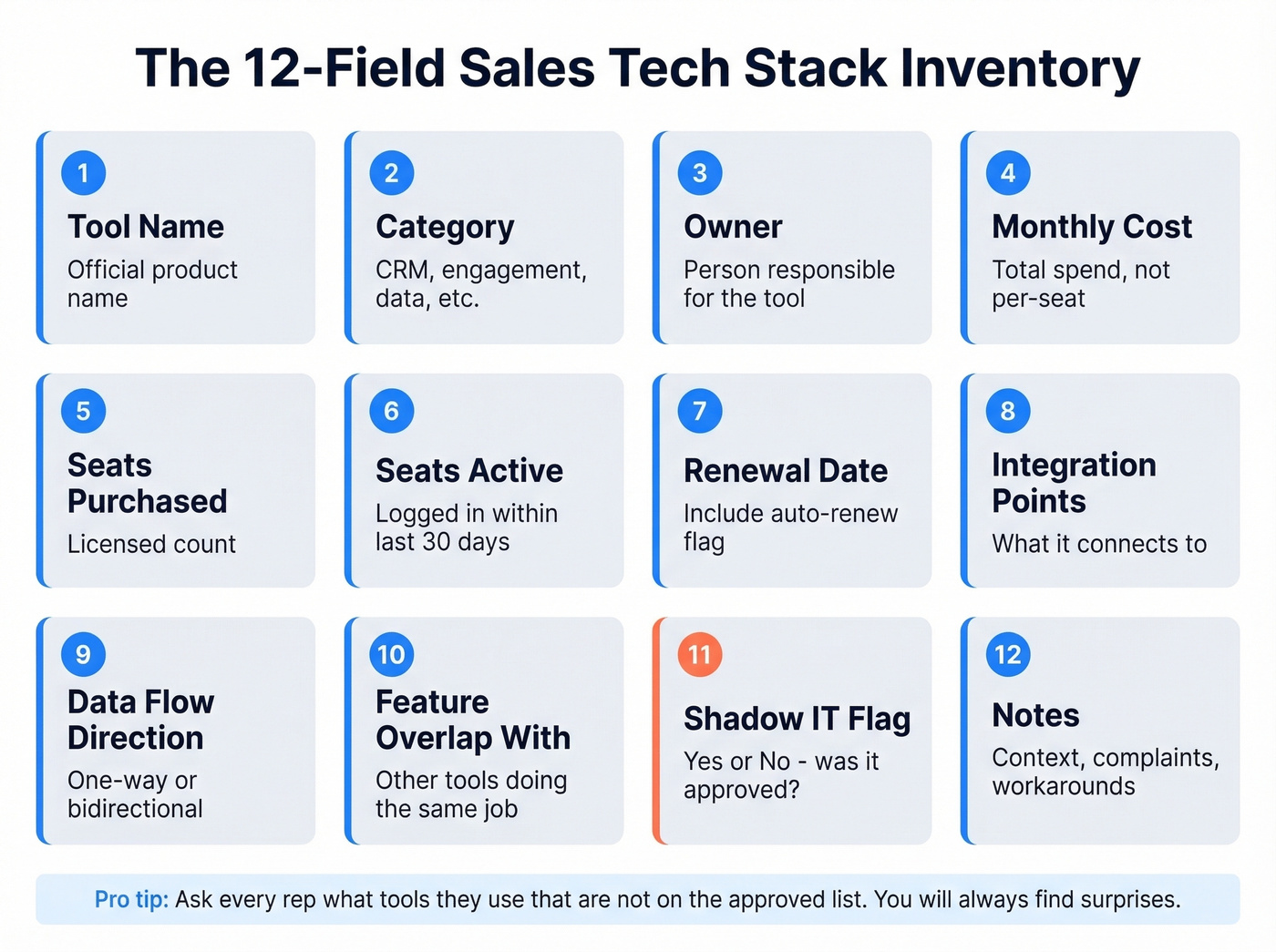
Create a spreadsheet with these 12 columns:
| Column | What to Capture |
|---|---|
| Tool Name | Official product name |
| Category | CRM, engagement, data, etc. |
| Owner | Person responsible |
| Monthly Cost | Total, not per-seat |
| Seats Purchased | Licensed count |
| Seats Active | Logged in last 30 days |
| Renewal Date | Auto-renew flag |
| Integration Points | What it connects to |
| Data Flow Direction | One-way or bidirectional |
| Feature Overlap With | Other tools doing the same job |
| Shadow IT Flag | Yes/No |
| Notes | Context, complaints, workarounds |
The shadow IT step is non-negotiable. Ask every rep: "What tools do you use that aren't on the approved list?" You'll find browser extensions, free-tier AI tools, and personal subscriptions to data providers that nobody in ops knows about. One SDR-as-a-Service analysis found teams commonly pay for three different email sequence tools without realizing it.
Step 3: Measure Real Adoption
Utilization isn't binary. "We have it" doesn't mean "we use it."
Track three metrics per tool: DAU/MAU ratio (daily active users divided by monthly active), feature adoption percentage, and login frequency. If fewer than 60% of licensed users log in weekly, the tool is shelfware. If the team uses one feature out of twelve, you're paying for a platform and getting a point solution. Both are consolidation signals.
Step 4: Score Every Tool With a Rubric
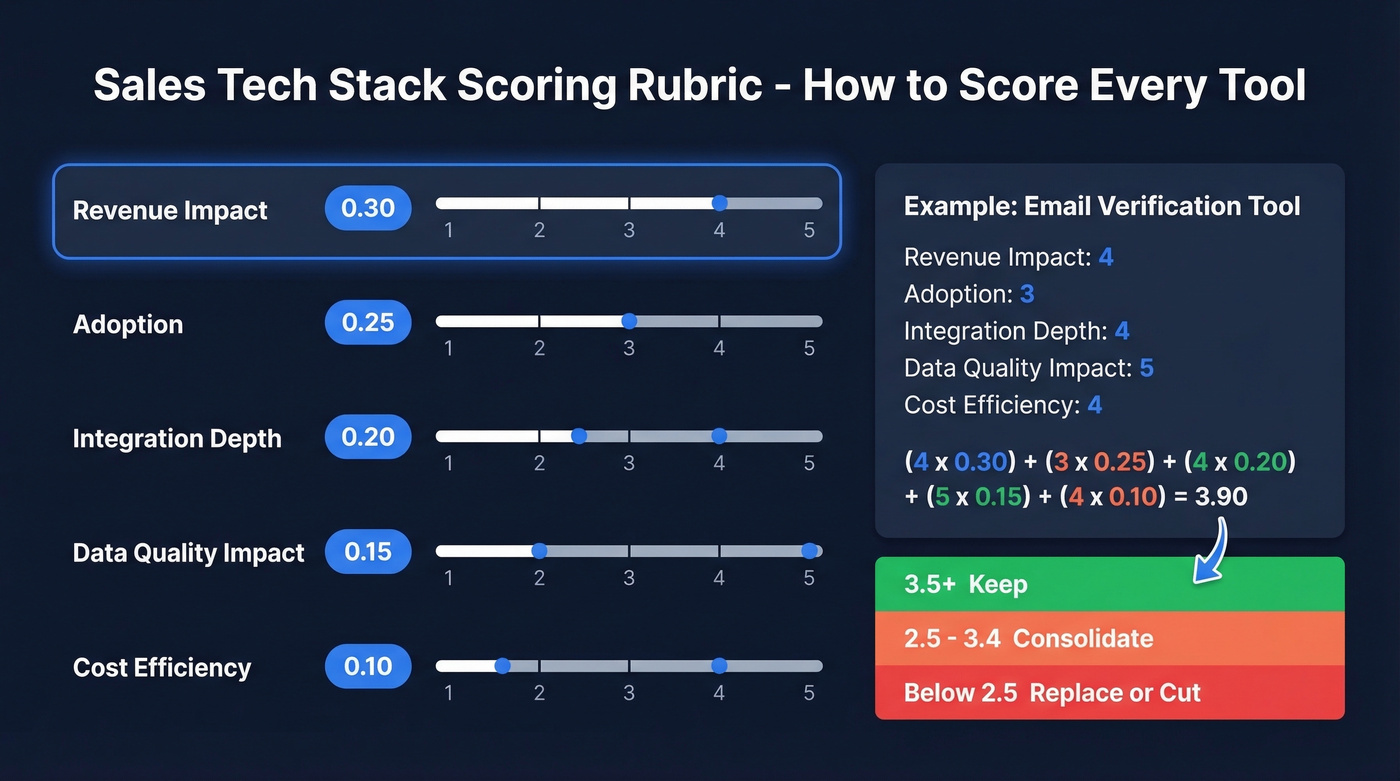
This is the piece every other audit guide is missing. Don't just list tools - score them.
| Dimension | Weight | Score 1-5 |
|---|---|---|
| Adoption | 0.25 | How many reps use it regularly? |
| Revenue Impact | 0.30 | Does it measurably move pipeline or close rate? |
| Integration Depth | 0.20 | How well does it connect to your CRM and sequencer? |
| Data Quality Impact | 0.15 | Does it improve or degrade your data? |
| Cost Efficiency | 0.10 | Value relative to spend? |
Multiply each score by its weight, then sum: (Adoption x 0.25) + (Revenue Impact x 0.30) + (Integration Depth x 0.20) + (Data Quality Impact x 0.15) + (Cost Efficiency x 0.10).
Thresholds: 3.5 or above = keep. 2.5-3.4 = consolidation candidate. Below 2.5 = replace or cut. Revenue Impact gets the heaviest weight deliberately - a tool that reps love but doesn't move deals is still a bad investment. This weighted approach turns a subjective evaluation into a repeatable, data-driven process that you can defend to your CFO.
Step 5: Evaluate Integration Health
Broken integrations are silent killers. Check for these specifically:
- API rate limits - monitor via Salesforce's System Overview; hitting limits causes sync failures that nobody notices for weeks
- One-way syncs creating data drift - if data flows from Tool A to CRM but never back, records diverge within days
- Duplicate records from parallel imports - two tools writing the same contact into Salesforce creates a deduplication nightmare
- Opt-out visibility gaps - if your email tool and CRM don't share suppression lists, you're one campaign away from a compliance incident
Be ruthless about what actually needs to sync versus what can live in one system. Too much customization compounds every one of these problems.
Step 6: Check Coverage by Category
Once you've scored individual tools, zoom out. Does your stack cover the essential categories? Here's the 10-category taxonomy every sales org should map against:
| Category | Purpose | Example Tools | Red Flag If Missing |
|---|---|---|---|
| CRM | System of record | Salesforce, HubSpot | No single source of truth |
| Sales Engagement | Sequences + cadences | Outreach, Salesloft | Manual follow-up only |
| Lead Intelligence | Data enrichment | Prospeo, ZoomInfo, Cognism | Bad contact data |
| Conversation Intel | Call analysis | Gong, Chorus | No coaching data |
| CPQ / Proposals | Quoting + contracts | PandaDoc, DealHub | Slow deal cycles |
| Enablement | Training + content | Highspot, Mindtickle | Inconsistent messaging |
| Forecasting | Pipeline prediction | Clari, Aviso | Gut-feel forecasts |
| Analytics / BI | Reporting | Tableau, Looker | No visibility |
| Workflow / Automation | Automations + handoffs | Zapier, Make | Manual data entry |
| Interactive Demo | Product demos | Reprise, Loom | Static slide decks |
Gaps matter as much as overlaps. If you don't have conversation intelligence and your team runs 30+ demos a week, that's a coverage gap costing you coaching insights. If you have three tools in the data enrichment row, that's overlap costing you money.
Step 7: Build Your Optimization Roadmap
Don't try to fix everything at once. Use a 30-60-90 framework:
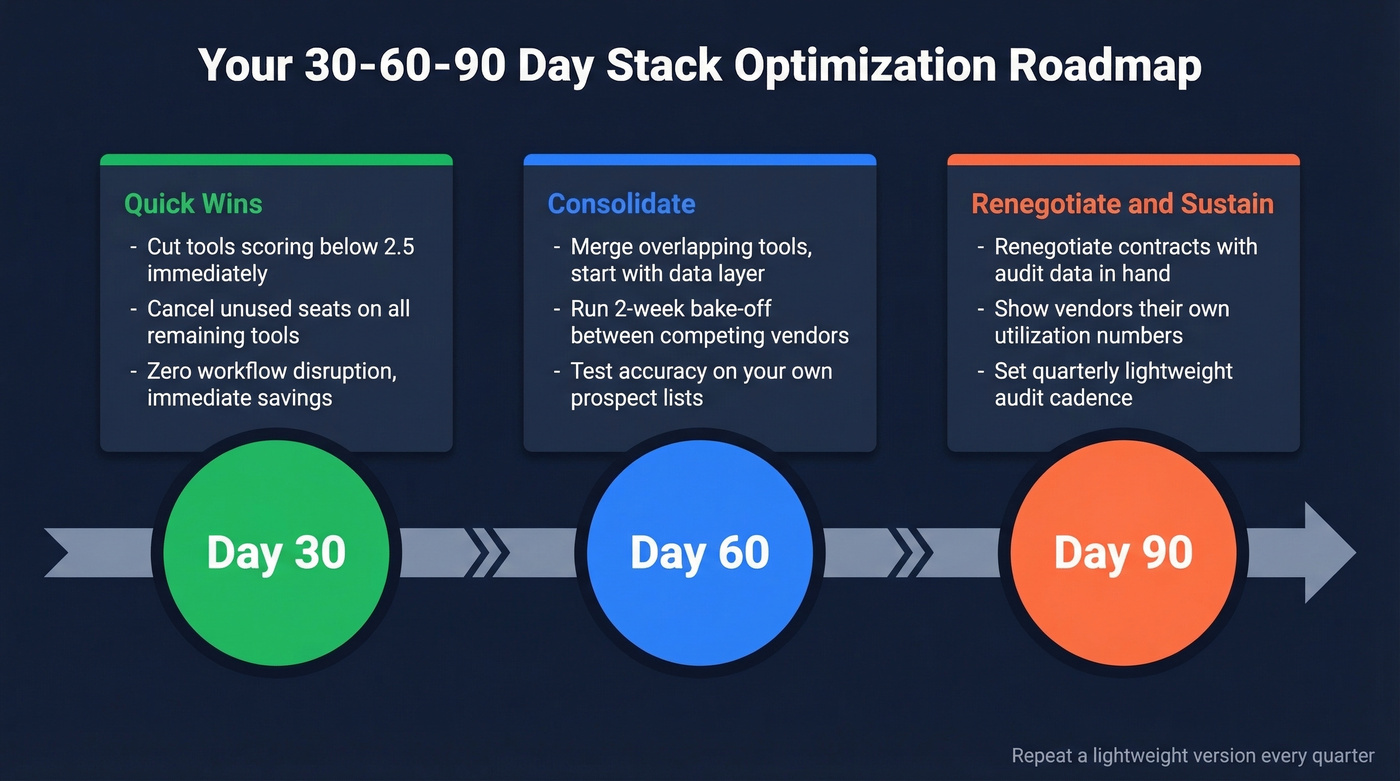
30 days: Cut tools scoring below 2.5 and cancel unused seats on everything else. No workflow disruption, immediate savings.
60 days: Consolidate overlapping tools, starting with the data layer. Run a two-week bake-off if you're choosing between providers in the same category. We've found that head-to-head accuracy tests on your own prospect lists reveal more than any vendor demo ever will.
90 days: Renegotiate remaining vendor contracts armed with your audit data. Showing a vendor their utilization numbers and your scoring rubric gives you real negotiating power. Set a quarterly lightweight audit cadence going forward.
Where the Most Waste Lives
Let's be honest - the consolidation opportunity is biggest in the data layer, and it's not close. A typical enterprise sales stack runs four to six overlapping subscriptions for contact data, email verification, enrichment APIs, and mobile numbers. We've seen teams paying for ZoomInfo at $15-40k/year, a separate email verification tool at $50-500/month, an enrichment API, and a mobile data provider - all doing versions of the same job. That's easily $25k+ before you've bought a single additional mobile number credit.

A consolidated platform eliminates most of that redundancy. Prospeo handles verified emails, mobile numbers, and CRM enrichment in one place at roughly $0.01 per email - with 98% email accuracy, 125M+ verified mobiles, a 92% API match rate, and a 7-day data refresh cycle versus the 6-week industry average. Waterfall enrichment models are gaining traction for teams that need multiple data sources, but if one platform covers your needs at that accuracy level, consolidation is the smarter play (compare options in data enrichment).
Here's the thing: most teams with deal sizes under $15k don't need a $30k data platform. They need one accurate, affordable data tool and the discipline to keep their CRM clean. The scoring rubric will prove this out - let the scores decide, not the vendor's sales pitch.
After the Audit
The audit spreadsheet is worthless if it lives in a shared drive. Four things make results stick.
Negotiate with data. Walk into vendor renewals with utilization numbers and your scoring rubric. "40% of our seats are inactive and your tool scored 2.8 on our rubric" is a very different conversation than "can we get a discount?" (If you want a framework, use an anchor before you talk price.)
Communicate cuts with rationale. Don't just kill tools - explain why. Reps who lose a tool they liked without understanding the reasoning will buy a shadow replacement within a week. The consensus on r/SalesOperations is that this happens constantly, and it's the number-one reason audits fail to stick.
Set a recurring cadence. Quarterly lightweight checks on utilization and spend. One deep annual audit with full scoring. This prevents the sprawl from rebuilding itself. Treat the process as a living discipline, not a one-time project.
Assign governance. Every new tool purchase needs an owner and an approval workflow. If anyone with a corporate card can buy software, you'll be back here in six months doing this all over again (this is exactly what a RevOps manager should own).
If your scoring rubric flagged data tools for low adoption and poor cost efficiency, you already know the fix. Prospeo gives your reps 30+ search filters, a Chrome extension with 40K+ users, and native integrations with Salesforce, HubSpot, and every major sequencer - no shadow IT required.
One platform. Zero overlap. Start free with 75 emails today.
FAQ
How often should you audit your sales tech stack?
Run quarterly lightweight checks covering utilization and spend, plus one deep annual audit with full scoring. Trigger an ad-hoc review whenever you add three or more new tools, face a major renewal, or notice CRM data quality declining sharply.
What's the biggest mistake in a tech stack audit?
Treating it as an inventory instead of a scored evaluation. Listing tools without a keep/replace/consolidate rubric produces a spreadsheet that sits in a shared drive forever. Score every tool against adoption, revenue impact, and integration depth - then act on the scores within 30 days.
How many tools should a sales team have?
SMBs typically run 8-12 tools; enterprise sales orgs run 12-18. The number matters less than coverage and overlap - 10 well-integrated tools outperform 18 with redundant features and broken data flows every time.
Where does the most SaaS waste happen in sales?
The data and enrichment layer. Teams typically run four to six overlapping subscriptions for contact data, email verification, enrichment, and mobile numbers. Consolidating to one platform that covers verified emails, mobiles, and CRM enrichment eliminates the most waste fastest, often saving $10k-$25k annually.
Can you run this audit without a dedicated RevOps team?
Yes. A sales manager or ops generalist can complete the full process using the inventory template and scoring rubric above. Budget four to six hours total. The key is having one person own the process and the spreadsheet - shared ownership means no ownership.