

How to Capture More Leads on Your Website (With Real Benchmarks)
You're getting 5,000 visitors a month and 12 leads. That's not a traffic problem - it's a conversion problem. And the fix isn't more ad spend. It's rethinking how you ask for information, when you ask, and what happens after someone hands it over.
We've tested dozens of lead capture setups, and the pattern is always the same. If you only implement three things from this article, make them: a dedicated landing page with a real lead magnet, a timed popup at 6-10 seconds instead of immediately, and a multi-step form instead of a single long one. Those three changes alone can double your capture rate.
What "Good" Actually Looks Like
Before you optimize anything, you need a baseline.
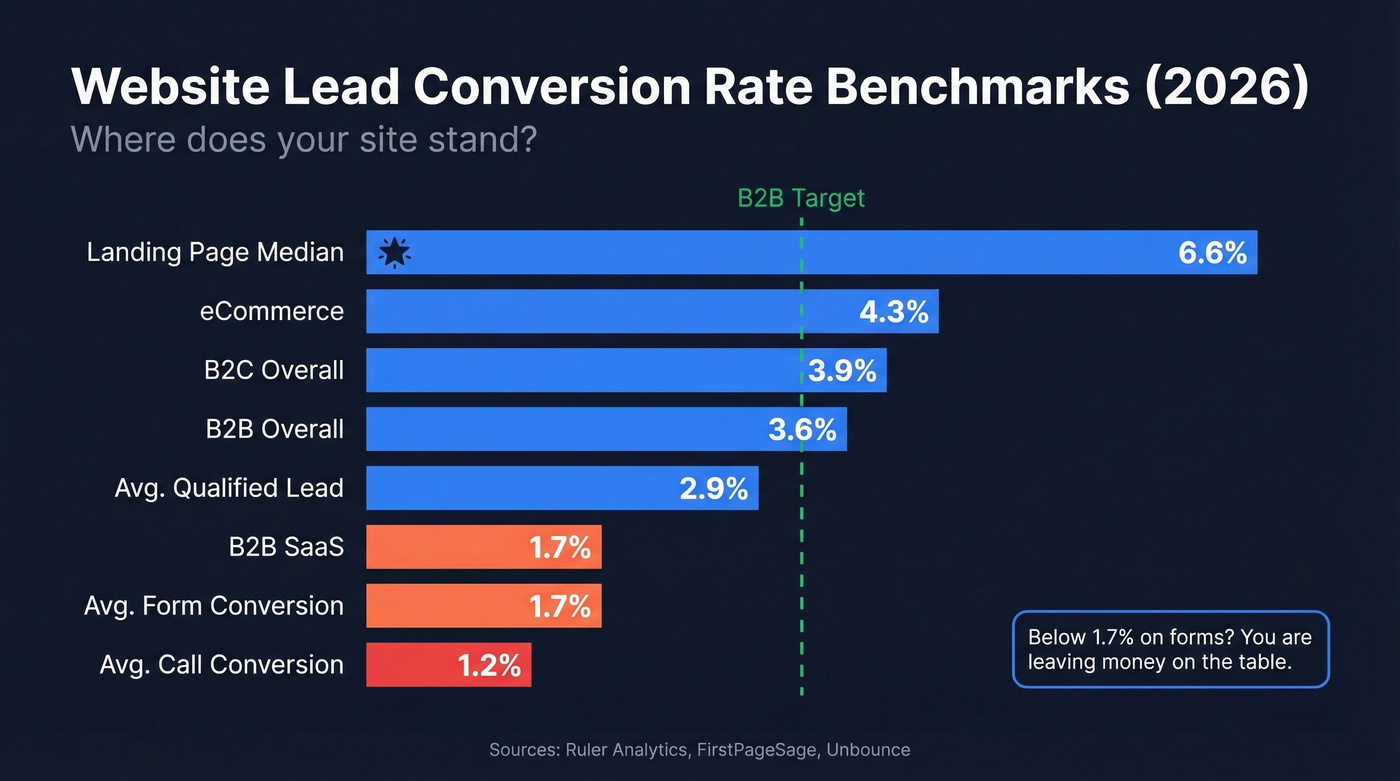
| Metric | Rate | Source |
|---|---|---|
| Avg. qualified lead conversion | 2.9% | Ruler Analytics, 100M+ data points |
| Avg. form conversion | 1.7% | Ruler Analytics |
| Avg. call conversion | 1.2% | Ruler Analytics |
| B2B overall | 3.6% | FirstPageSage |
| B2C overall | 3.9% | FirstPageSage |
| B2B SaaS | 1.7% | FirstPageSage |
| eCommerce | 4.3% | FirstPageSage |
| Landing page median | 6.6% | Unbounce, 57M+ conversions |
If you're below 1.7% on forms, you're leaving money on the table. Above 3.6% in B2B? You're doing something right. That Landing page median - 6.6% - deserves your attention, because it shows what happens when a page has a single purpose and zero distractions.
Here's the thing: if your average deal size is under $5K, you don't need a 15-field qualification form. You need a fast path to conversation. Over-qualifying cheap deals is how you end up with a 0.4% conversion rate and a sales team blaming marketing for "bad leads."

Your website captures 2-4% of visitors. The other 96% leave without a trace. Prospeo's 300M+ profile database lets you find verified emails for the companies visiting your site - at 98% accuracy and $0.01 per email. Stop waiting for form fills.
Turn anonymous website traffic into a pipeline you actually control.
Seven Tactics That Actually Work
1. Fix Your Form Structure, Not Just Field Count
Stop obsessing over field count. Start obsessing over form structure.
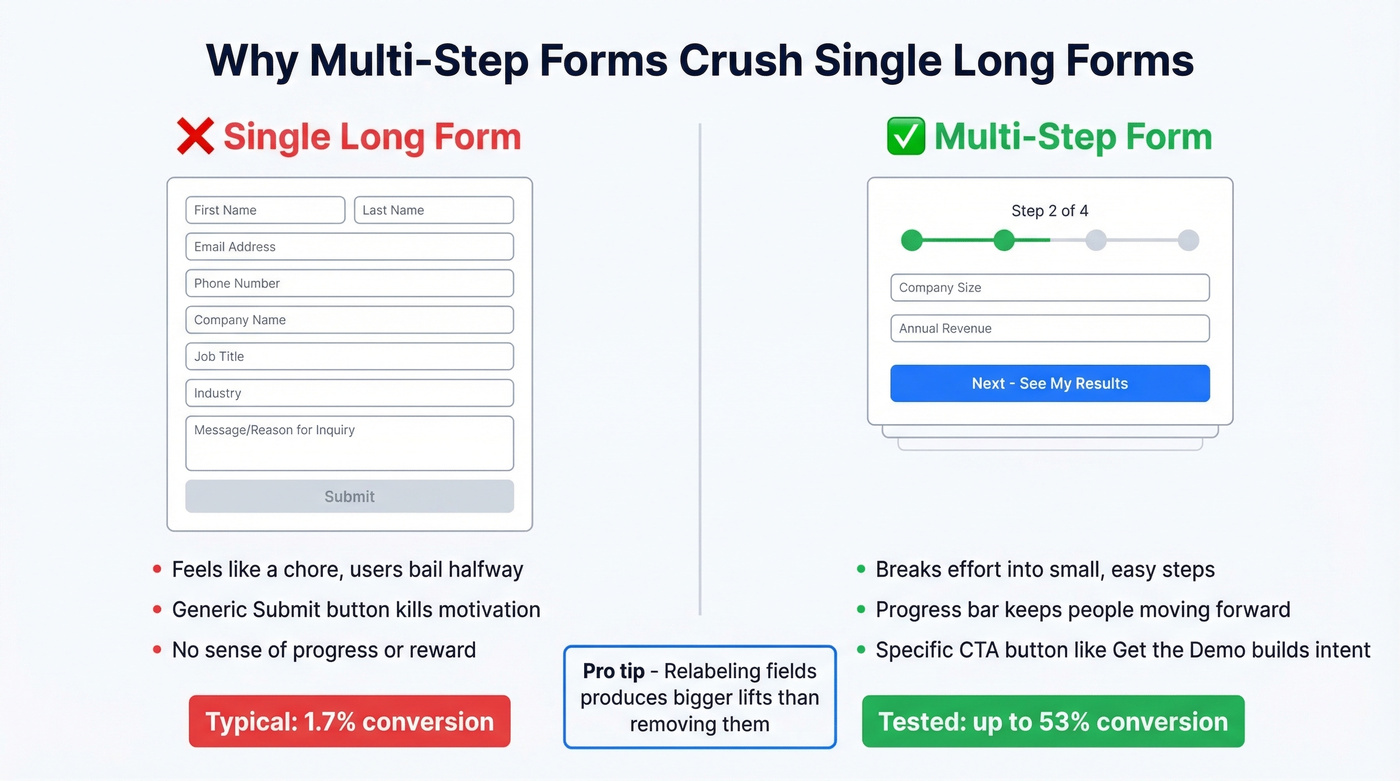
Every article about website lead capture tells you to reduce form fields. The data tells a different story. In a widely cited A/B test, removing fields caused a 14% drop in conversions. Re-adding those fields with better labels and clearer context produced a 19.21% lift. The issue wasn't the number of fields - it was the copy and layout surrounding them. One r/localseo poster put it bluntly: "Our form is too long and we are wasting web traffic." But the real problem wasn't length. It was that every field felt like a chore because the form had no visual structure, no progress indicators, and no reason to keep going.
Multi-step forms are where the real gains live. A 30+ question form formatted into four steps hit a 53% conversion rate in one case study - because breaking a long form into digestible steps reduces perceived effort dramatically. Replace "Submit" with something specific like "Get the Demo," "Download the Report," or "See My Results." Generic submit buttons are conversion killers. In our experience, relabeling fields produces bigger lifts than removing them. And drop CAPTCHA if you can tolerate slightly more spam - it's a known friction point that quietly tanks conversion rates.
2. Build Dedicated Landing Pages
Landing pages convert at a 6.6% median across 41K+ pages. That's nearly 4x the average form conversion rate. Here's the checklist for a high-converting lead capture page:
- One goal per page - no navigation distractions
- A compelling reward (not "subscribe to our newsletter")
- Message-match headline that mirrors the ad or link that brought them
- Social proof adjacent to the form, not buried in a footer
- Action-specific CTA ("Get the Free Template" beats "Submit")
- A post-conversion experience - thank-you page, next step, immediate delivery
Don't overlook your FAQ pages, either. They attract high-intent visitors who already have specific questions, and adding a contextual CTA or short form there captures people closer to a buying decision than most blog posts ever will.
3. Use Timed and Exit-Intent Popups
Omnisend analyzed 1.24B popup displays and found a 2.1% average conversion rate across 26.4M emails collected. Below 1.5% means your popup needs work. Between 3-5% is good. Above 5% is excellent.
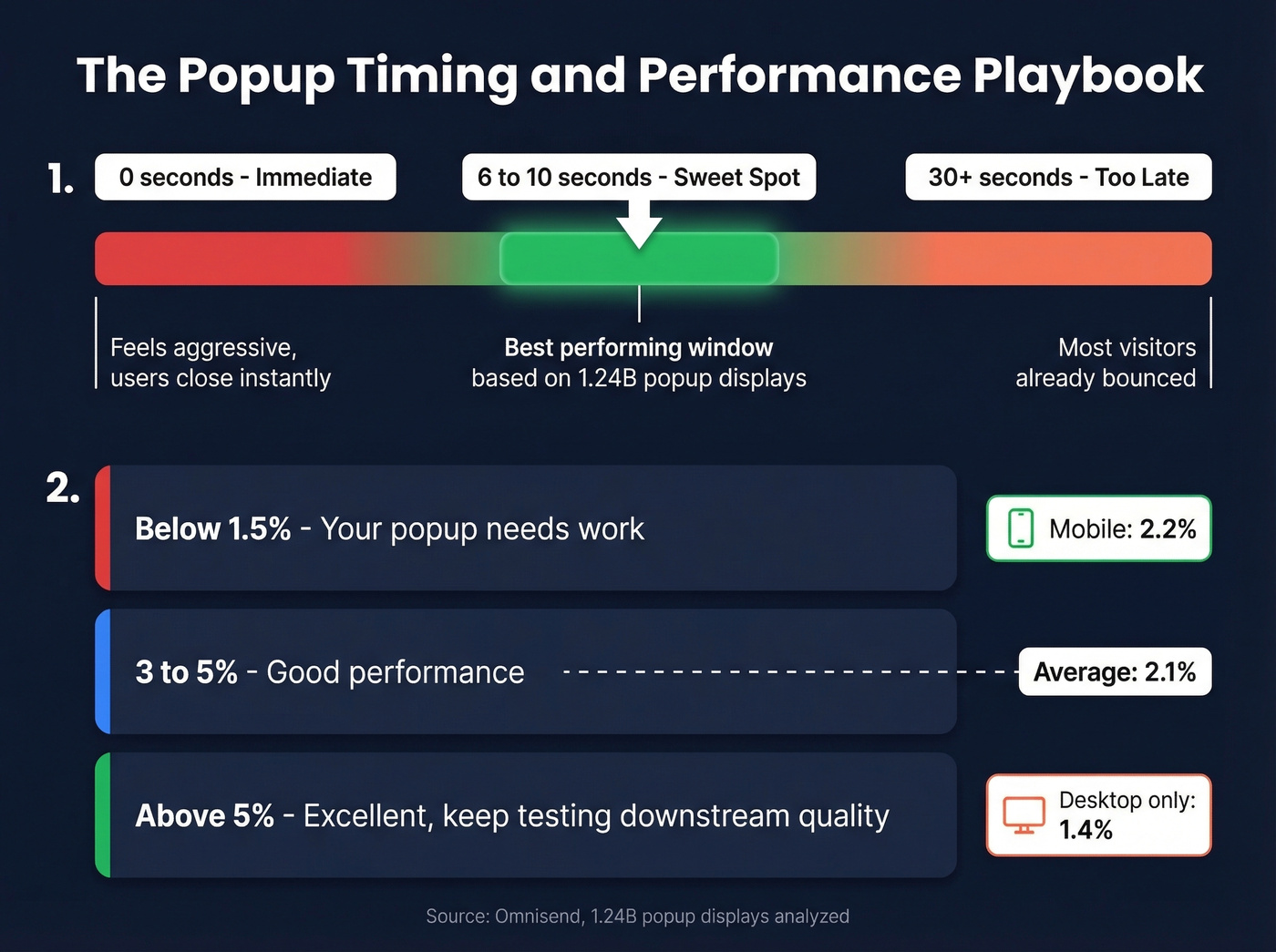
One of the biggest levers? Timing. Popups that fire at 6-10 seconds outperform immediate displays consistently. If you want a tighter testing plan, track it like funnel metrics (not just opt-ins).
Mobile-optimized popups convert at 2.2% versus 1.4% for desktop-only designs. If you aren't testing mobile, you're ignoring half your traffic. Gamified popups like spin-the-wheel or scratch cards can push past 3.5%, though they tend to attract lower-quality leads - so test downstream metrics, not just opt-in rates.
Exit-intent popups are worth running, but set realistic expectations. A targeted exit popup delivers a 5-10% lift over your baseline. Not the 300% some vendors claim. Think of exit popups as a safety net, not a strategy.
4. Add Live Chat or an AI Chatbot
67% of customers prefer self-service over speaking to a rep, which explains why chat-based capture feels less intrusive than a static form. One small business owner on r/smallbusiness described adding an AI chatbot trained on their website content, connected to their CRM through Zapier. The key mechanic: deliver value first, then ask for an email mid-conversation with framing like "so we don't lose this thread."
A Databox survey found roughly 50% of entrepreneurs say chat yields their highest on-site conversion rates, while about 33% still rely on forms. We've seen the best results from using both - forms on high-intent pages like pricing and demo requests, chat on mid-funnel content pages where visitors are still exploring. Skip the chatbot entirely if you don't have someone monitoring it at least a few hours a day; an unresponsive bot is worse than no bot.
5. Create Lead Magnets Worth an Email
Templates, calculators, industry benchmarks, email courses, checklists - these work because they deliver immediate, tangible value. The test is simple: would someone pay $10 for this? If not, it's not a lead magnet. It's a PDF nobody reads.
A "comprehensive guide to our industry" isn't compelling. A "2026 salary benchmark spreadsheet for your exact role" is. The specificity is what makes people trade their email.
An alternative worth testing: publish the content ungated and offer a downloadable PDF version via form. You get SEO value from the content and leads from the download. Let's be honest - most gated content isn't good enough to justify the gate anyway, so this hybrid approach often outperforms pure gating. If you need more top-of-funnel ideas, start with these lead generation trends.
6. Place Social Proof at the Conversion Point
Social proof needs to sit adjacent to your form or CTA, not buried three scrolls below it. Customer logos, review counts, and testimonial quotes with real names and titles all work. A Trustpilot widget at the bottom of your page does almost nothing.
Put the proof where the decision happens. A single testimonial from a recognizable company name next to your form will outperform a dedicated testimonials page that nobody visits.
7. Verify Captured Data Immediately
Bad data destroys sender reputation, wastes sales time, and pollutes your CRM. A lead that looks good on paper but bounces on first contact is worse than no lead at all - and it actively damages your ability to reach real prospects.
Run every new lead through verification before it enters your pipeline. Tools like Prospeo verify emails at 98% accuracy and enrich contacts with 50+ data points including job title, company size, and technographics. The free tier gives you 75 email verifications per month, and paid plans run about $0.01 per email. Records refresh every 7 days, so your outreach runs on current data instead of contacts that changed jobs two months ago. If you're comparing vendors, see our breakdown of data enrichment services and lead enrichment.

Compliance You Can't Afford to Skip
GDPR penalties run up to EUR 20M or 4% of global annual revenue. CCPA penalties hit $7,500 per violation. Knowing how to capture leads on your website is only half the equation - you also need to collect that data lawfully.
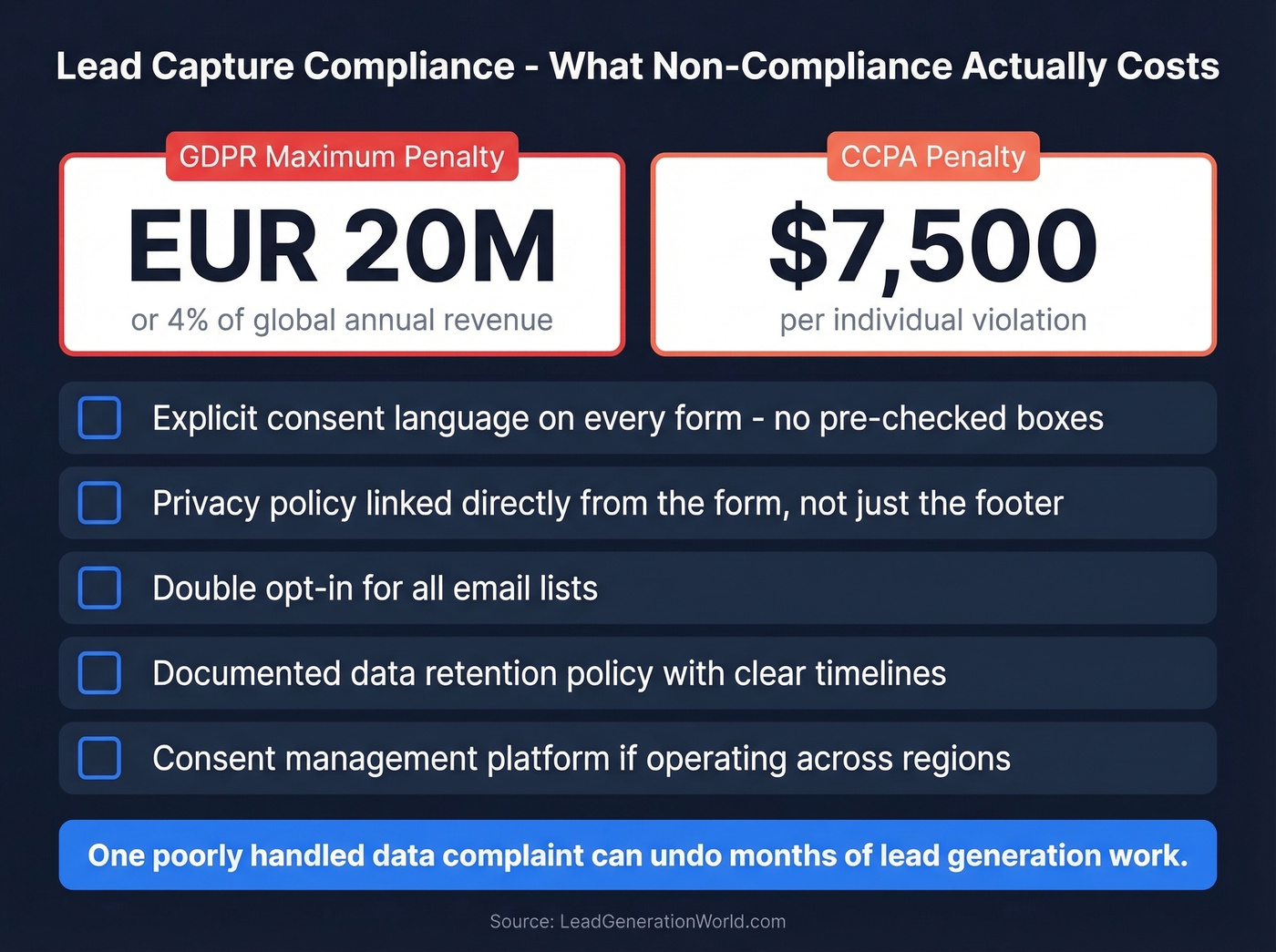
Your compliance checklist:
- Explicit consent language on every form (no pre-checked boxes)
- Privacy policy linked directly from the form, not just the footer
- Double opt-in for email lists
- A documented data retention policy
- A consent management platform if you're operating across regions
Getting this wrong isn't just a legal risk. It's a trust risk. One poorly handled data complaint can undo months of lead generation workflow work.
Multi-step forms and exit popups only work on visitors willing to convert. For everyone else, Prospeo's Chrome extension and enrichment API let you identify decision-makers at companies browsing your site - returning 50+ data points per contact with a 92% match rate. No form required.
Capture the leads your website never will - with verified contact data.