

How to Check Someone's Email: Find It, Verify It, Use It
You're staring at a conference attendee list - 200 names, company titles, zero email addresses. You've got 48 hours before the event to line up meetings, and "I'll find you on the floor" isn't a strategy.
Whether you need to track down someone's work email or confirm that the address you already have won't bounce, checking someone's email is really two problems disguised as one. Most workflows split finding and verifying into separate steps. You need both. An unverified email is worse than no email - it burns your sender reputation and wastes your sequence slot. Here's the complete workflow, from discovery to deliverability, with the tools and tactics that actually work in 2026.
The Quick Version
Three steps. That's the whole framework:
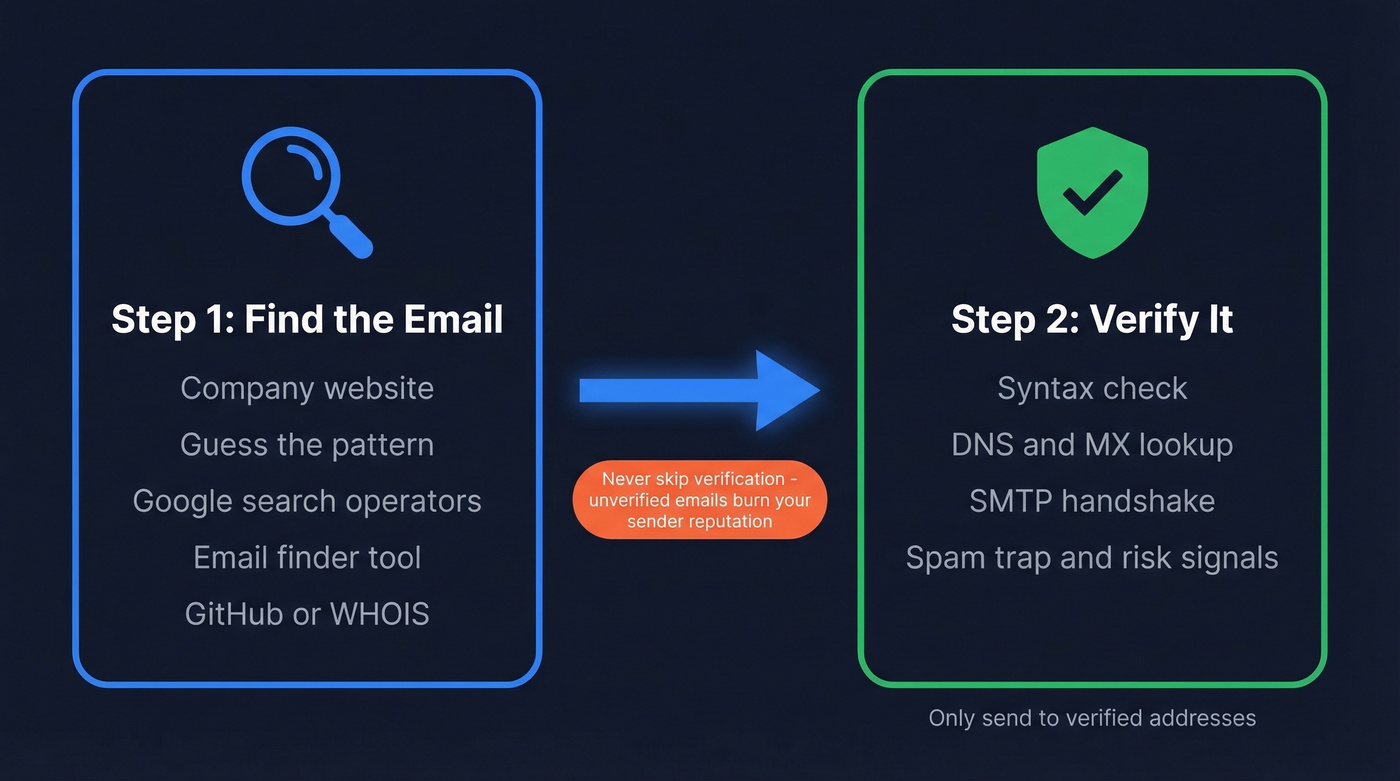
- Find the email. Use an email finder tool, Google operators, or the company website. Manual methods work for one-offs; tools scale.
- Verify it's real. Run every address through a verification tool before sending. Never trust a single validator - they disagree more than you'd expect.
How to Find Someone's Email Address
The right approach depends on whether you need one email or a thousand. Here are six methods, from manual to automated.
Check the Company Website
Start with the obvious. Across roughly 905,000 company websites analyzed, 18.7% mentioned at least one email address publicly. That's one in five - not great odds, but it's free and takes 30 seconds.
Check these pages first: About, Contact, Team, and blog author bios. Author bylines are underrated. Companies that gate their contact page often leave writer emails exposed on blog posts. If you find even one address at the domain, you've got the email format, which unlocks the next method.
Guess the Email Pattern
This sounds crude, but it works. Nearly half of all companies - 49.9%, based on an analysis of 12M+ email addresses - use the {first}@domain pattern. Here are the most common formats:
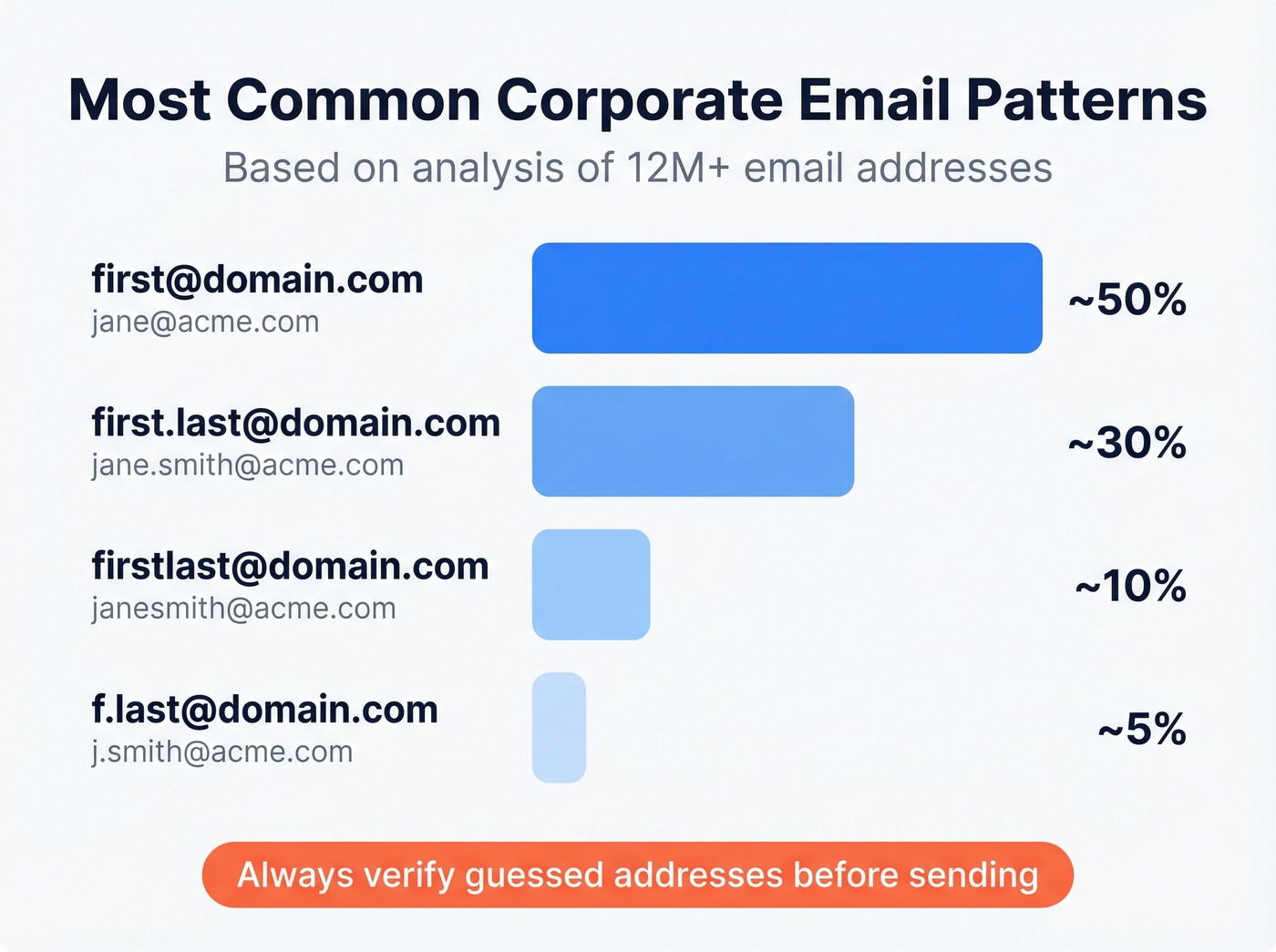
| Pattern | Example | Prevalence |
|---|---|---|
| first@ | jane@acme.com | ~50% |
| first.last@ | jane.smith@acme.com | ~30% |
| firstlast@ | janesmith@acme.com | ~10% |
| f.last@ | j.smith@acme.com | ~5% |
If you know the company's format from one confirmed address, you can construct the rest with high confidence. But don't send to a guessed address without verifying it first - that's how you end up with a 25% bounce rate.
Google Advanced Search Operators
Google is a surprisingly powerful email finder if you know the syntax. Two operators that work consistently:
"@company.com" "Jane Smith"- searches for the exact domain and name togethersite:company.com "email" OR "contact"- restricts results to the company's own site
These operators surface emails buried in PDFs, press releases, and old conference speaker pages that the company forgot to scrub. For social platforms, try X's advanced search with from:username "email" OR "@" to catch addresses people shared in older posts.
Use an Email Finder Tool
For anything beyond a handful of lookups, you need a tool. Prospeo's email finder lets you enter a name and company domain, then returns a verified result - the 5-step verification runs automatically on every lookup, so you're not paying for addresses that'll bounce. The Chrome extension pulls verified emails directly from company websites and professional profiles without leaving the page.

Hunter and Snov.io are solid alternatives. Hunter's free account includes up to 50 searches per month plus a free monthly verification allowance. Snov.io is a strong budget option with built-in automation and international coverage.
For most prospecting workflows, though, you want finding and verification in one step - running them separately doubles your work and your tool spend.
GitHub and WHOIS
Two methods the standard guides skip. If your target is a developer, their email is probably sitting in public Git commits. Run git log - format='%ae' | sort -u` on any public repository they've contributed to, and you'll see every committer email associated with that project.
For company founders and domain owners, a WHOIS lookup occasionally reveals the registrant's contact email. Privacy protection services have made this less reliable, but it still works for smaller companies that haven't enabled domain privacy.
Try AI Assistants
ChatGPT and Perplexity can surface publicly available emails, especially for executives and public figures. Try a prompt like:
"What is the work email address for [Name], [Title] at [Company]? Check their company website, press releases, and conference speaker pages."
Here's the catch: AI assistants hallucinate email addresses regularly. They'll confidently generate a plausible-looking address that doesn't exist. Always verify anything an AI returns. This is a research shortcut, not a source of truth.
How to Verify an Email Without Sending One
Finding an email is half the battle. The other half is confirming it won't bounce, flag your domain, or land in a spam trap.
The 4-Layer Verification Process
Every serious verification tool runs some version of these checks:
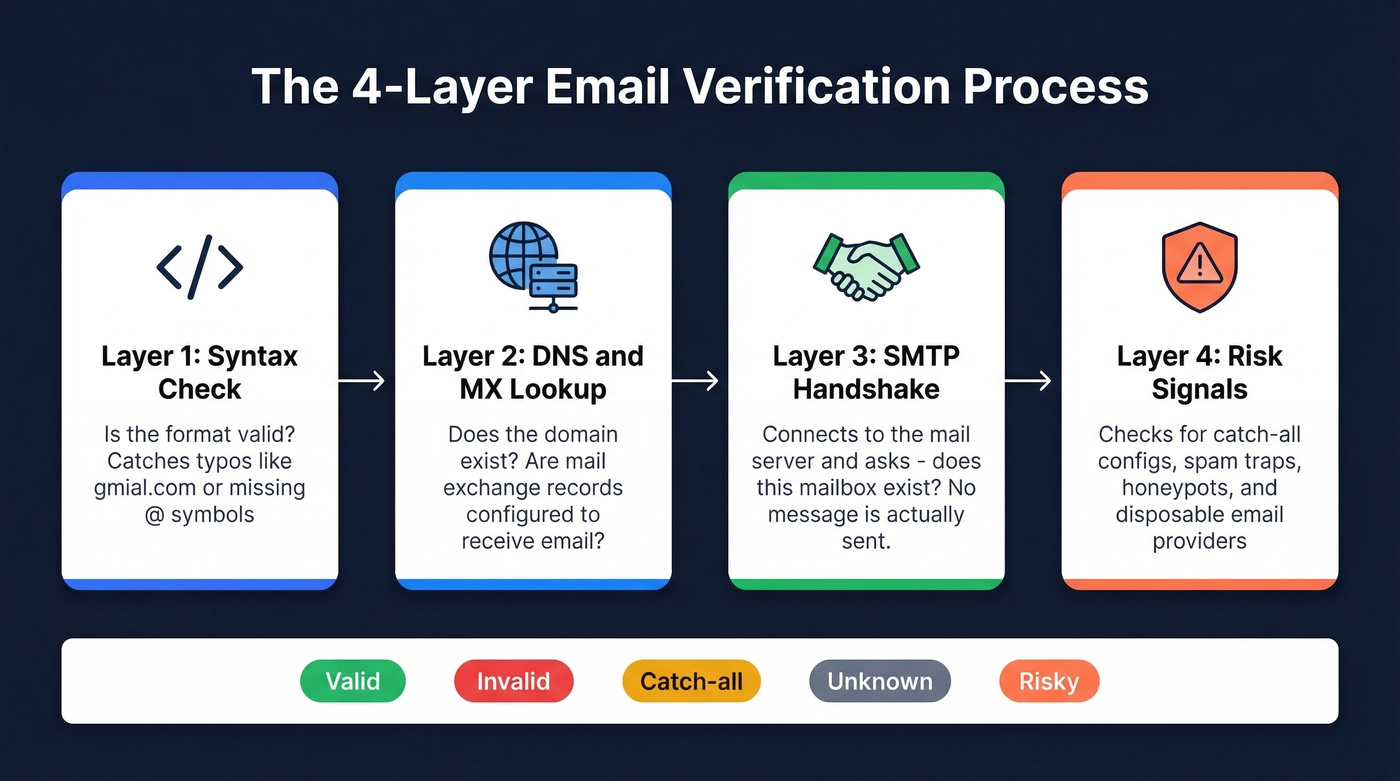
- Syntax check. Does the address follow valid email formatting? Catches typos like gmial.com or missing @ symbols.
- DNS/MX lookup. Does the domain exist, and does it have mail exchange records configured to receive email?
- SMTP handshake. The tool connects to the recipient's mail server and asks "does this mailbox exist?" - without actually sending a message. The server's response determines the result.
- Activity/risk signals. Advanced tools check for catch-all configurations, spam traps, honeypots, and disposable email providers.
If you ever see bounce codes in your ESP logs, here's the cheat sheet: 550-554 are hard bounces (mailbox doesn't exist) - remove those immediately. 421-452 are soft bounces like a full inbox - retry later.
What Verification Results Mean
| Status | What It Means | Safe to Send? |
|---|---|---|
| Valid | Mailbox confirmed | Yes |
| Invalid | Mailbox doesn't exist | No - remove it |
| Catch-all | Domain accepts everything | Risky - proceed carefully |
| Unknown | Server didn't respond | Risky - re-check later |
| Risky | Spam trap or disposable | No - remove it |
Let's be honest: 500 verified emails will outperform 1,000 unverified ones every time. Fewer bounces mean better sender reputation, which means higher inbox placement across your entire sending domain.
Why Validators Disagree
This is the part nobody talks about. A Reddit user tested a known-working email across multiple verifiers and got conflicting results. Hunter and site24x7 marked it invalid. Verifalia and Clearout marked it valid. The company responded to a test email - the address was real.
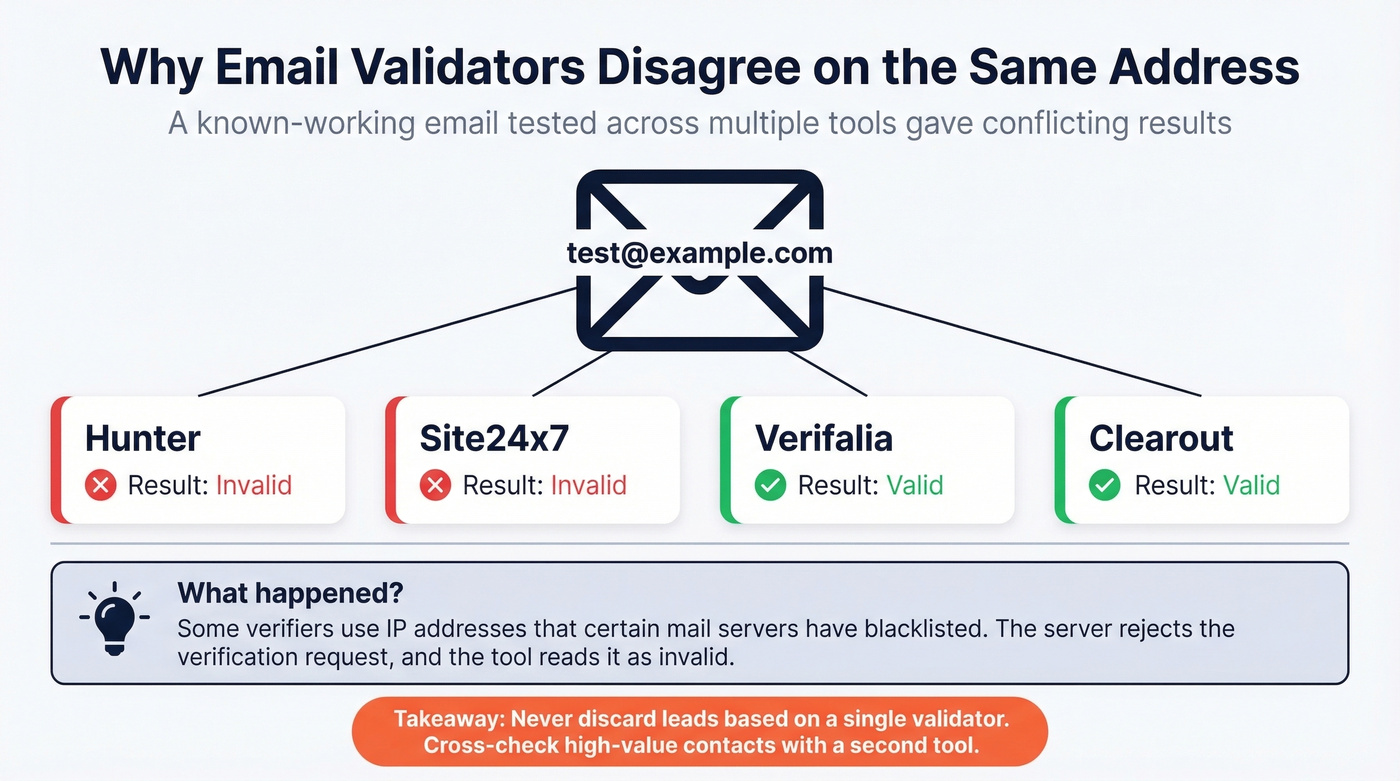
The explanation: some verifiers use IP addresses that certain mail servers have blacklisted. The server rejects the verification request, and the tool interprets that rejection as "invalid mailbox." Even large-scale benchmarks disagree - different test methodologies can swing a tool's accuracy score by 50+ percentage points.
The practical takeaway: never discard a large chunk of your list based on a single validator's output. For high-value contacts, cross-check with a second tool. We've seen teams throw away perfectly good leads because one verifier had a dirty IP that day.

Why split finding and verifying into two steps? Prospeo's email finder runs 5-step verification automatically on every lookup - syntax, DNS, SMTP, catch-all handling, and spam-trap removal. You pay only for valid addresses at ~$0.01 each, with 98% accuracy.
Find and verify emails in one click - no double work, no bounced sends.
Best Tools for the Job
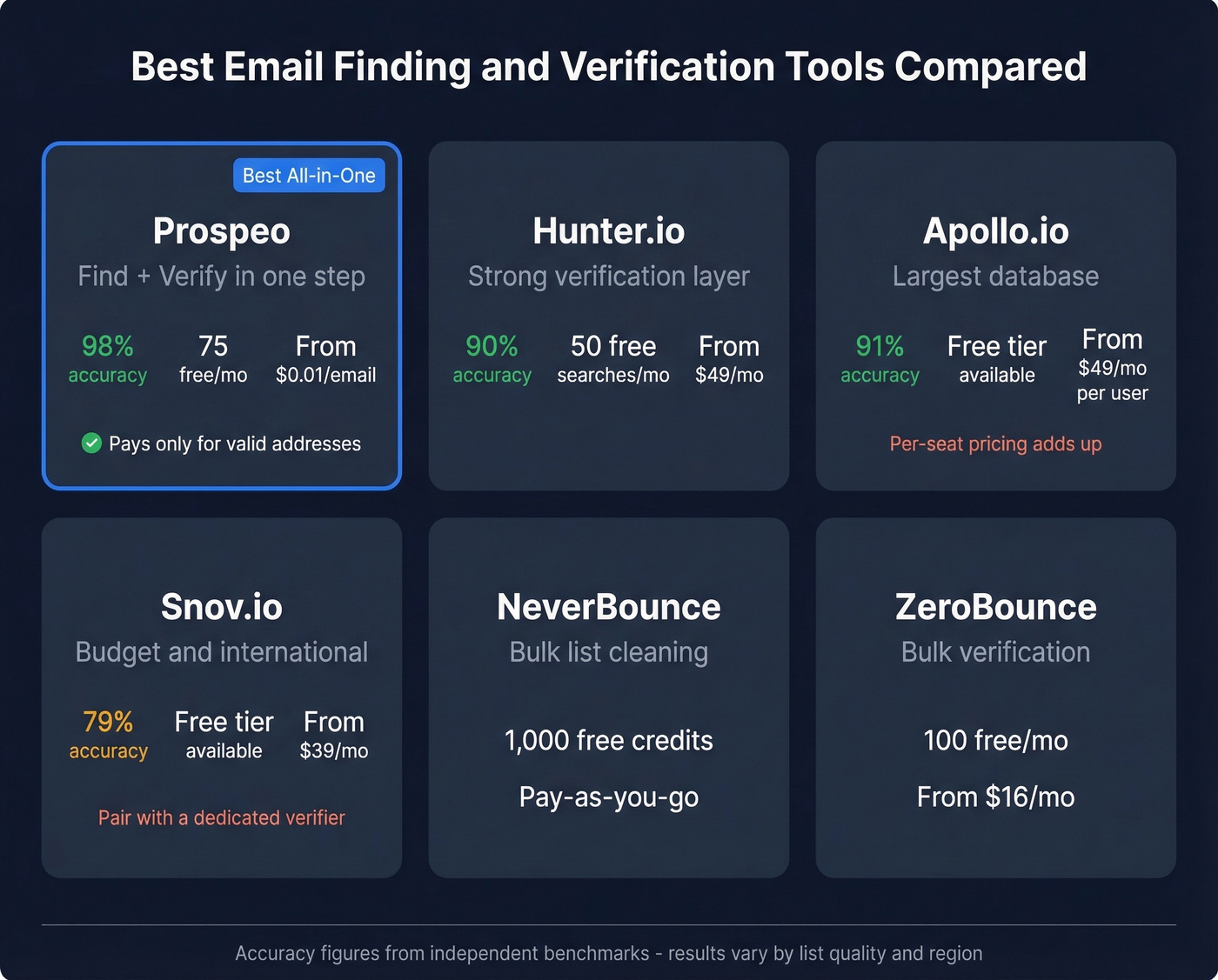
| Tool | Best For | Accuracy | Free Tier | Paid From |
|---|---|---|---|---|
| Prospeo | Find + verify in one | 98% | 75 emails/mo | ~$0.01/email |
| Hunter.io | Verification layer | 90% | Up to 50 searches/mo | ~$49/mo |
| Apollo.io | Large database | 91% | Available | ~$49/mo/user |
| Snov.io | International + budget | 79% | Available | ~$39/mo |
| NeverBounce | Bulk verification only | N/A | 1,000 credits on signup | Pay-as-you-go |
| ZeroBounce | Bulk verification only | N/A | 100/mo | ~$16/mo |
Prospeo
Prospeo combines email finding and verification into a single lookup - you pay only for valid addresses, and every result goes through a 5-step verification process that includes catch-all handling, spam-trap removal, and honeypot filtering. The database covers 143M+ verified emails across 300M+ professional profiles, refreshed on a 7-day cycle. That matters because the industry average refresh is six weeks, which is an eternity in B2B data where people change jobs constantly.
The numbers hold up in practice. Meritt, an outbound agency, saw their bounce rate drop from 35% to under 4% after switching. At ~$0.01 per email, the unit economics are hard to argue with - especially when you're not wasting credits on unverified addresses.

Hunter.io
Hunter is the name most people know, and for good reason - the verification layer is genuinely solid. The free account gives you up to 50 searches per month, enough for light prospecting. Paid plans start at ~$49/month.
The tradeoff: Hunter's database is smaller than Apollo's. It's better as a verification complement than a primary source for large-scale prospecting. If you already have emails and just need to clean them, Hunter is a safe bet.
Apollo.io
Apollo's database runs 220-275M contacts - one of the largest in the space. The free tier is functional, and paid plans start around $49-99/month per user.
Use this if you need volume and already have a verification layer in place. Skip this if you're running lean and can't afford to waste credits on bounced addresses. The consensus on r/agency matches what we've seen: the database is massive, but data quality gets inconsistent on older contacts. Per-seat pricing also adds up fast for teams beyond 3-4 reps.
Snov.io
Snov.io is the budget pick for teams doing international outreach. At ~$39/month, it's one of the cheapest entry points with built-in drip sequences and automation. Reddit practitioners consistently flag it as strong for non-US leads. The 79% accuracy in the Saleshandy benchmark is lower than competitors, so pair it with a dedicated verifier for critical sends.
Dedicated Verifiers
NeverBounce, ZeroBounce, and Email Hippo do one thing well: clean lists you already have. NeverBounce offers 1,000 free credits on signup with pay-as-you-go pricing after that. ZeroBounce gives you 100 free verifications per month, paid plans from ~$16/month. Email Hippo runs 100 free daily verifications - solid for spot-checking individual addresses. None of these find emails; they only verify what you bring them.
Validators disagree because their infrastructure varies. Prospeo's proprietary verification system doesn't rely on third-party email providers - it runs a 5-step process including catch-all detection, honeypot filtering, and spam-trap removal. Data refreshes every 7 days, not every 6 weeks.
Get email results you can actually trust - 98% accuracy across 143M+ verified addresses.
5 Mistakes That Kill Deliverability
Getting the email right is only useful if your messages actually land. These five mistakes trip up even experienced outbound teams.
1. Verify-and-forget. Email lists decay faster than you think. After just 4 weeks, roughly 2% of a verified list becomes invalid - people change jobs, companies restructure, domains expire. Re-verify before every major send, not just when you first build the list.
2. Treating catch-all as valid. A catch-all domain accepts emails sent to any address - even nonexistent ones. Your verifier will return "catch-all" instead of "valid," and that distinction matters. Sending blindly to catch-all results is how you accumulate silent bounces that ESPs track against you.
3. Trusting a single validator. Remember the Reddit case where one tool marked a working email as invalid while another confirmed it? This happens more often than vendors admit. For high-value prospects, run the address through two tools. The extra $0.01 is cheap insurance.
4. Ignoring the 2% bounce threshold. Most ESPs start throttling or suspending accounts when your bounce rate exceeds 2%. The ideal target is 0-1%. If you're consistently above 2%, your data source is the problem - not your copy, not your subject lines. (If you need a deeper breakdown of bounce codes and benchmarks, see our bounce rate guide.)
5. Skipping verification for "small" sends. Look: 50 bounces from 200 emails is a 25% bounce rate. Small lists don't get a pass. They're actually more dangerous because each bounce has a proportionally larger impact on your domain reputation.
Is It Legal to Look Up Someone's Email?
Finding and verifying a business email address is generally legal if done ethically. Sending unsolicited email to that address is where the rules kick in.
Under GDPR, you need a legitimate interest basis for B2B outreach - and fines for violations run up to EUR 20M or 4% of global annual turnover. CAN-SPAM is more permissive (you can email without prior consent) but carries penalties up to $46,517 per non-compliant email. Neither law prohibits looking up or verifying an email. Both regulate what you do after that.
Quick compliance checklist before you hit send:
- Have a legitimate business reason for the outreach
- Include your physical address in every email
- Provide a clear unsubscribe mechanism
- Honor opt-outs within 10 business days
- Never use deceptive subject lines or sender info
Follow these five rules and you're covered for the vast majority of B2B cold outreach. If you're targeting EU consumers rather than businesses, the rules tighten considerably - get legal advice before scaling.
FAQ
Can you check if an email exists without emailing them?
Yes. Email verification tools perform an SMTP handshake with the recipient's mail server to confirm the mailbox exists - without delivering a message. This checks syntax, DNS records, and server response in seconds, leaving no trace in the recipient's inbox.
What's the most accurate email finder in 2026?
Prospeo leads at 98% verified-delivery accuracy across 143M+ emails, followed by Apollo.io at 91% and Hunter.io at 90% in the Saleshandy 100-contact benchmark. Test each tool against your specific ICP - accuracy varies by industry and geography.
How often should you re-verify your email list?
Re-verify before every major send, or at minimum every 4 weeks. Roughly 2% of a verified list becomes invalid after one month due to job changes and domain expirations. Lists older than 90 days can see bounce rates triple without a fresh verification pass.
What does "catch-all" mean in verification results?
A catch-all domain accepts emails sent to any address - even nonexistent ones. Verification tools can't confirm individual mailboxes on these domains, so results carry higher bounce risk. Segment catch-all addresses into a separate sending pool and monitor bounce rates closely.
What free tools let you check someone's email?
Prospeo offers 75 free email lookups plus 100 Chrome extension credits monthly - each result includes full verification. Hunter gives up to 50 free searches per month, and ZeroBounce provides 100 free verifications. For occasional lookups, these free tiers cover most needs without a paid plan.
Hot take: If your average deal size is under $10K, you probably don't need a $15K/year data platform. A free-tier email finder, a $16/month verifier, and 30 minutes of Google operators will get you 80% of the way there. The tools in this guide scale up or down - start with the free tiers and upgrade only when your pipeline demands it. (If you want more tactics beyond email, see our sales prospecting techniques and free lead generation tools.)