

How to Improve Cold Email Campaigns in 2026: The Infrastructure-First Playbook
A RevOps lead we work with ran a 10,000-email campaign last quarter. Clean copy, solid offer, decent list. 470 bounced. Twelve hit spam traps. Two domains got flagged within a week. The messaging wasn't the problem - the infrastructure was rotten before a single email left the outbox.
Cold email reply rates dropped from 6.8% to 5.8% year-over-year across 16.5 million emails tracked by Belkins. That's a 15% decline. Most guides on how to improve cold email campaigns point you to subject lines and personalization tricks. They're optimizing the wrong layer. Eighty percent of cold email failure happens before you write a word - bad data, no authentication, weak infrastructure.
The Priority Stack
Fix the foundation first, then optimize the message. These best practices follow a strict order of operations:
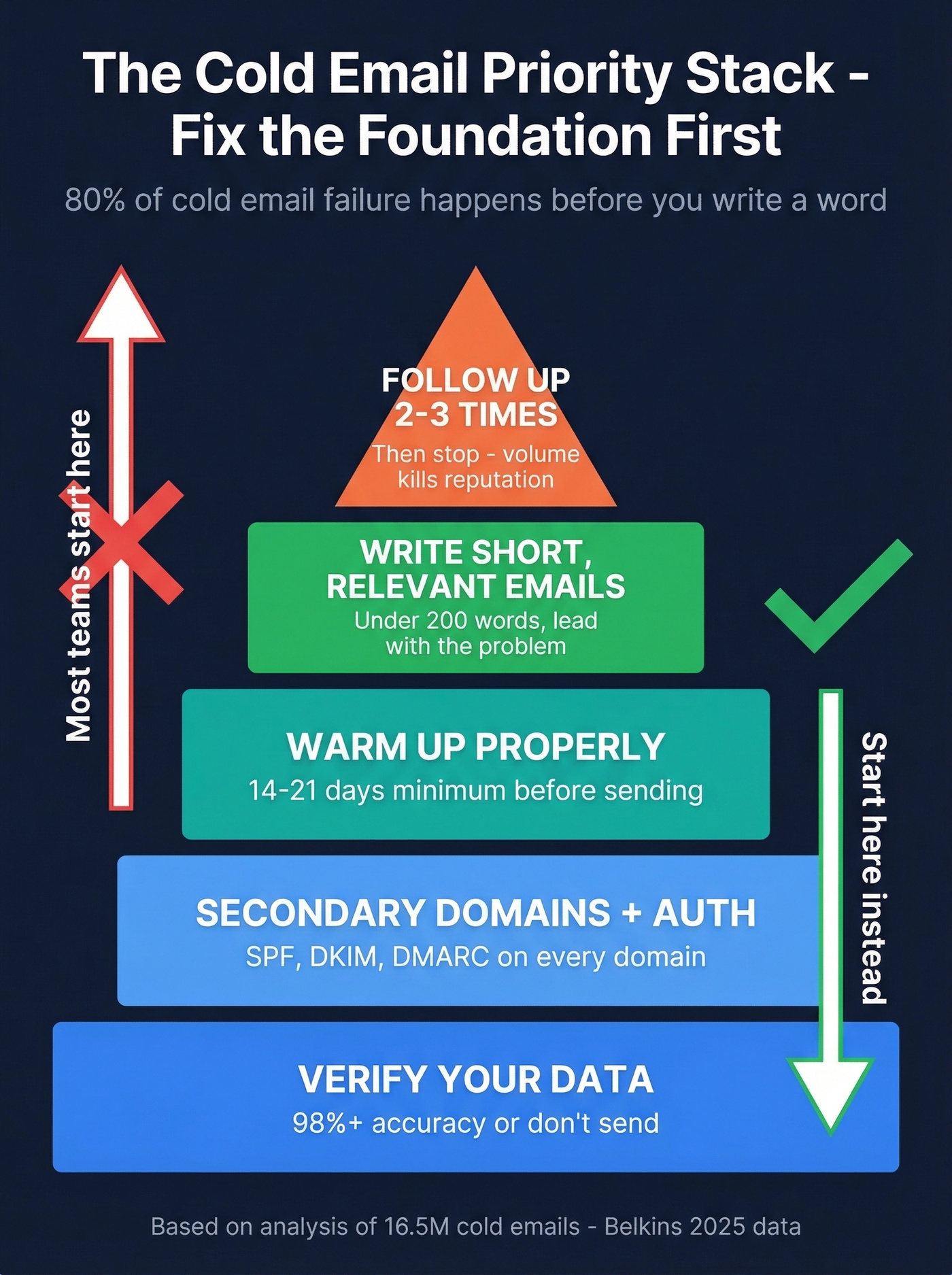
- Verify your data - 98%+ accuracy or don't send
- Set up secondary domains + full authentication
- Warm up properly - 14-21 days minimum
- Write short, relevant emails - under 200 words
- Follow up 2-3 times max - then stop
Rules That Changed Everything
Gmail and Yahoo announced new bulk sender requirements in February 2024. By November 2025, enforcement hit full effect - no new rules, just stricter penalties for breaking the existing ones.
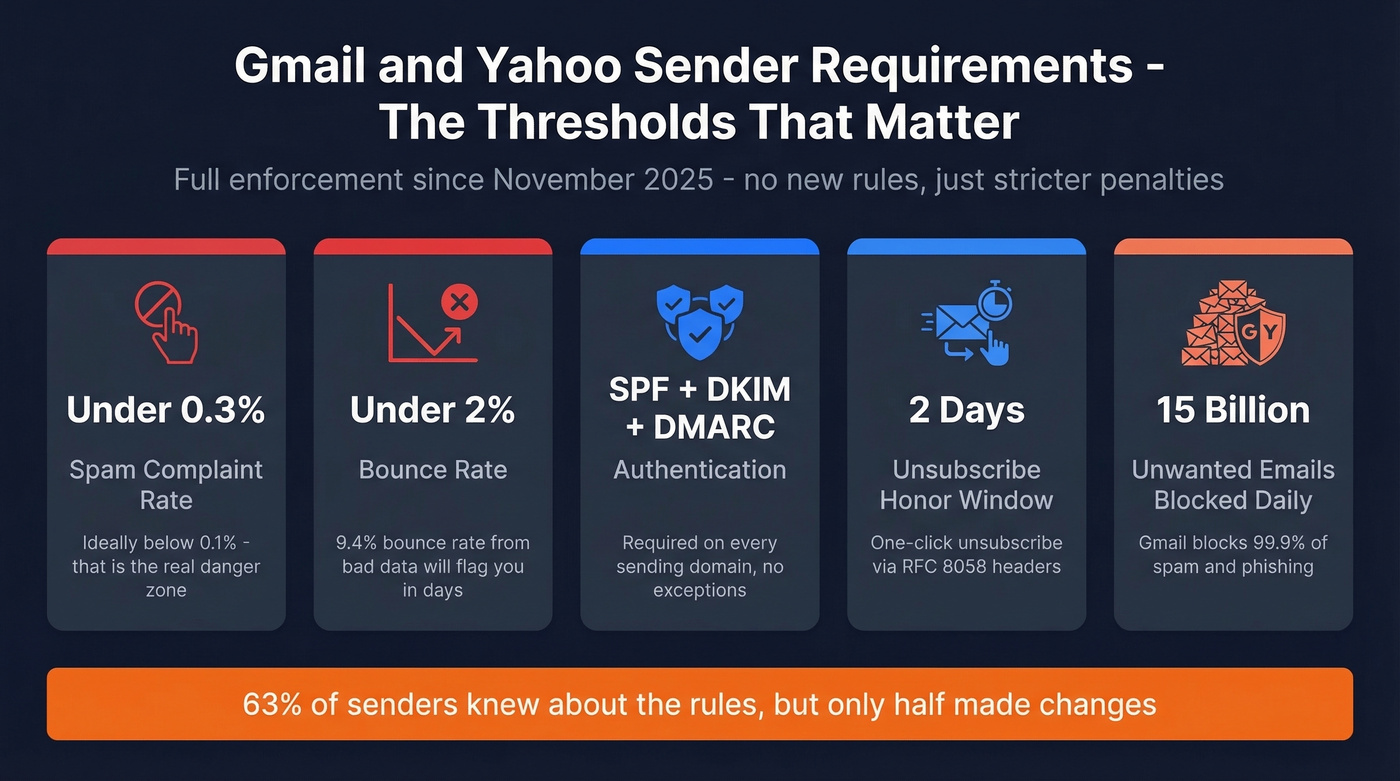
What you're now held to:
- SPF, DKIM, and DMARC authentication on every sending domain - non-negotiable
- Spam complaints under 0.3% - ideally below 0.1%, which Mailgun's research calls the real danger zone
- One-click unsubscribe via RFC 8058 headers, honored within 2 days
- Bounce rates under 2%
- Domain alignment between your sending address and authentication records
Gmail now blocks nearly 15 billion unwanted emails daily and stops 99.9% of spam and phishing. The filters are smarter, the thresholds are lower, and the consequences are faster. Microsoft has tightened authentication expectations too, with SPF/DKIM/DMARC now treated as table stakes for Outlook and Hotmail deliverability.
Here's the thing: 63% of senders were aware of the new rules, but only half made changes - and of those, 79% focused on authentication. If you haven't updated yet, you're competing against people who have, and inbox providers are actively punishing you for it.
Build Your Cold Email Infrastructure
Secondary Domains and Inbox Math
Never send cold outreach from your primary business domain. One bad campaign can tank deliverability for your entire company - marketing emails, transactional receipts, everything.
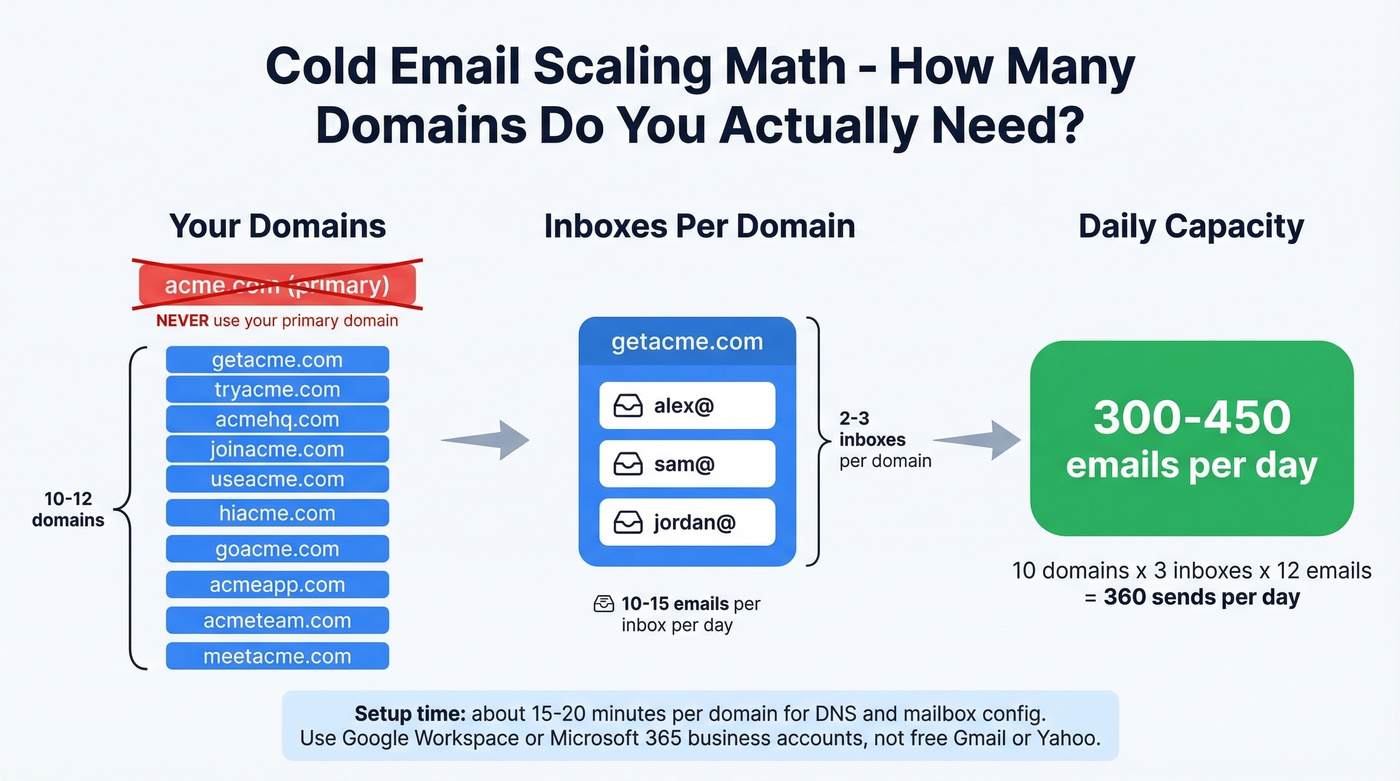
Use secondary "lookalike" domains instead. If your company is acme.com, register getacme.com, tryacme.com, acmehq.com. Here's the scaling math: each inbox should send 10-15 emails per day, and you'll want 2-3 inboxes per domain, giving you roughly 30-45 sends per domain daily. To hit ~400 emails per day, you need 10-12 domains. That sounds like a lot, but each domain takes about 15-20 minutes for DNS + mailbox setup with Google Workspace or Microsoft 365 business accounts. Don't use free Gmail or Yahoo accounts - business accounts carry more sender reputation weight and give you proper authentication controls.
Authentication Setup
SPF, DKIM, and DMARC aren't optional anymore. But technical details trip people up.
SPF has a 10-DNS-lookup limit. Exceed it and validation fails silently - no error, no warning, just broken authentication. If you're using multiple sending tools, consolidate your SPF includes or use a flattening service.
DKIM should use 2048-bit keys. Rotate them every 6-12 months with an overlap period so you don't break authentication mid-campaign.
DMARC rollout should be gradual: start with p=none, which monitors without blocking. Watch your reports for 2-4 weeks, then move to quarantine, then reject. Jumping straight to reject without monitoring is how you accidentally block your own legitimate email.
Set up custom tracking domains for every sending platform you use. Shared tracking pixels can get blacklisted by association. Custom tracking domains improve deliverability by 15-20% versus generic ones.
Warmup That Never Stops
New domains and inboxes need a warmup period before you send production emails. The minimum is 14 days. Twenty-one is safer. Cap each inbox at 50 sends per day - and closer to 20 during the warmup phase.
Start at 5-10 emails per day and ramp gradually. Most warmup tools simulate real conversations - opens, replies, thread engagement - to build positive sender signals. Some practitioners argue against third-party warmup tools, citing Google's crackdown on artificial engagement. The risk is real if you use low-quality warmup networks. Stick to reputable services that use real inboxes and genuine engagement patterns.
The critical mistake is stopping warmup once campaigns launch. Keep it running between campaigns and during slow periods. Sender reputation decays without consistent positive engagement.
Set hard pause triggers:
- Bounce rate exceeds 2% - pause immediately
- Spam complaints approaching 0.3% - pause and investigate
- Inbox placement drops below 80% on seed tests - pause and audit
The consensus on r/coldemail is clear: if your complaint rate hits 0.1%, you're already playing with fire. Don't wait for 0.3%.
Fix Your Data First
Let's be honest - the top complaint on Reddit about cold email in 2026 isn't messaging or timing. It's data quality. One highly upvoted thread on r/coldemail put it bluntly: "the bottleneck isn't messaging anymore, it's data quality." Contacts who've changed roles, emails that were valid six months ago but aren't now, catch-all domains that accept everything but deliver nothing.
You send 500 emails. Forty-seven bounce. Twelve hit spam traps. Your bounce rate is already at 9.4% - nearly five times the 2% threshold. Your domain reputation takes a hit that takes weeks to recover from. And those 12 spam traps? They signal to inbox providers that you're scraping lists indiscriminately. That's not a copy problem. That's a data problem.
The fix is verification before every send. Not batch verification from last month's list - real-time verification that catches addresses that went invalid this week. Prospeo's 5-step verification process handles the edge cases most tools miss: catch-all domain verification, spam-trap removal, and honeypot filtering. The 98% email accuracy rate matters because the gap between 95% and 98% on a 10,000-email campaign is the difference between 500 bounces and 200 bounces - and that difference determines whether your domain stays healthy or gets flagged.
A 7-day data refresh cycle is what separates good verification from tools that update every 6 weeks. People change jobs constantly - the average B2B contact database decays 2-3% per month. A six-week refresh means you're always sending to some percentage of dead addresses. Stack Optimize, an outbound agency using Prospeo, maintains 94%+ deliverability, bounce rates under 3%, and zero domain flags across all their clients. That's what clean data looks like in production.

The gap between 95% and 98% accuracy on a 10,000-email campaign is 300 fewer bounces - and your domain staying alive. Prospeo's 5-step verification catches catch-alls, spam traps, and honeypots before they wreck your sender reputation. Data refreshed every 7 days, not 6 weeks.
Stop fixing copy when your data is the problem.
Earn Replies With Relevance
Relevance Over Personalization
There's a persistent myth that personalization means dropping {FirstName} and {CompanyName} into a template. That's not personalization - that's mail merge.
Real personalization is relevance: writing about a problem the recipient actually has, in language that reflects their world. A Copyhackers case study demonstrated this perfectly - 328 cold emails produced a 56% open rate and a 9% positive reply rate. One email generated roughly $20K in revenue. The emails weren't personalized with dynamic fields. They were relevant to the recipient's specific situation.
Before writing, spend 5 minutes per prospect: check their recent posts, company news, and job changes. The research is the work - the email writes itself once you know what matters to them. Fifty relevant emails at a 9% reply rate produce more pipeline than 5,000 generic emails at 1%.
Length, Subject Lines, and Structure
The 16.5-million-email dataset gives us clear guidelines. Emails of 6-8 sentences - roughly under 200 words - hit a 6.9% reply rate. Longer emails performed worse across the board.
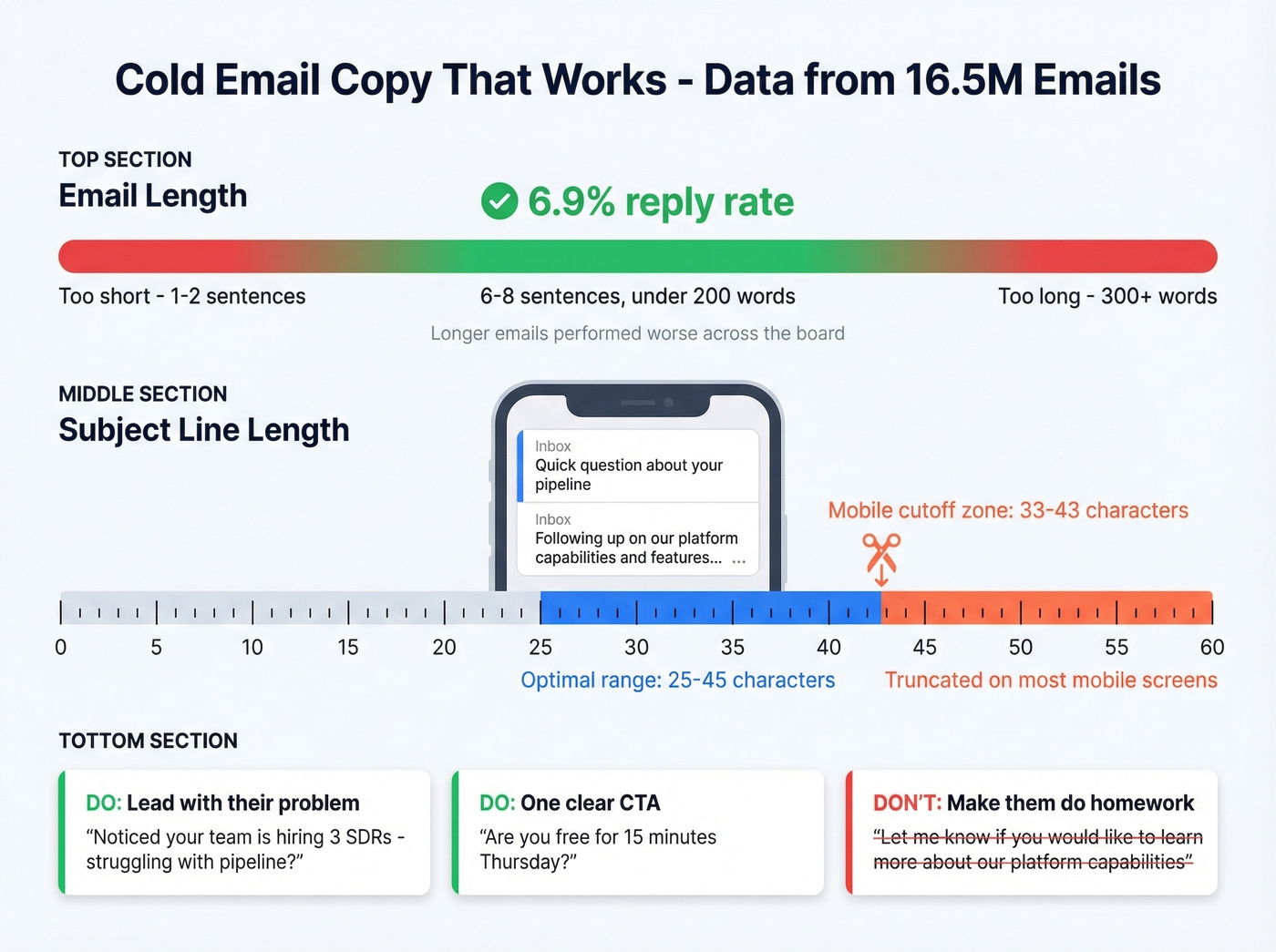
Subject lines should land between 25-45 characters. Mobile email clients truncate aggressively - most cut off around 33-43 characters on smaller screens. If your subject line's key information lives past character 40, half your audience never sees it.
Lead with the problem, not your product. One clear CTA per email. "Are you free for 15 minutes Thursday?" beats "Let me know if you'd like to learn more about our platform's capabilities." The first is a decision. The second is homework.
Follow-Up Without Burning Your Domain
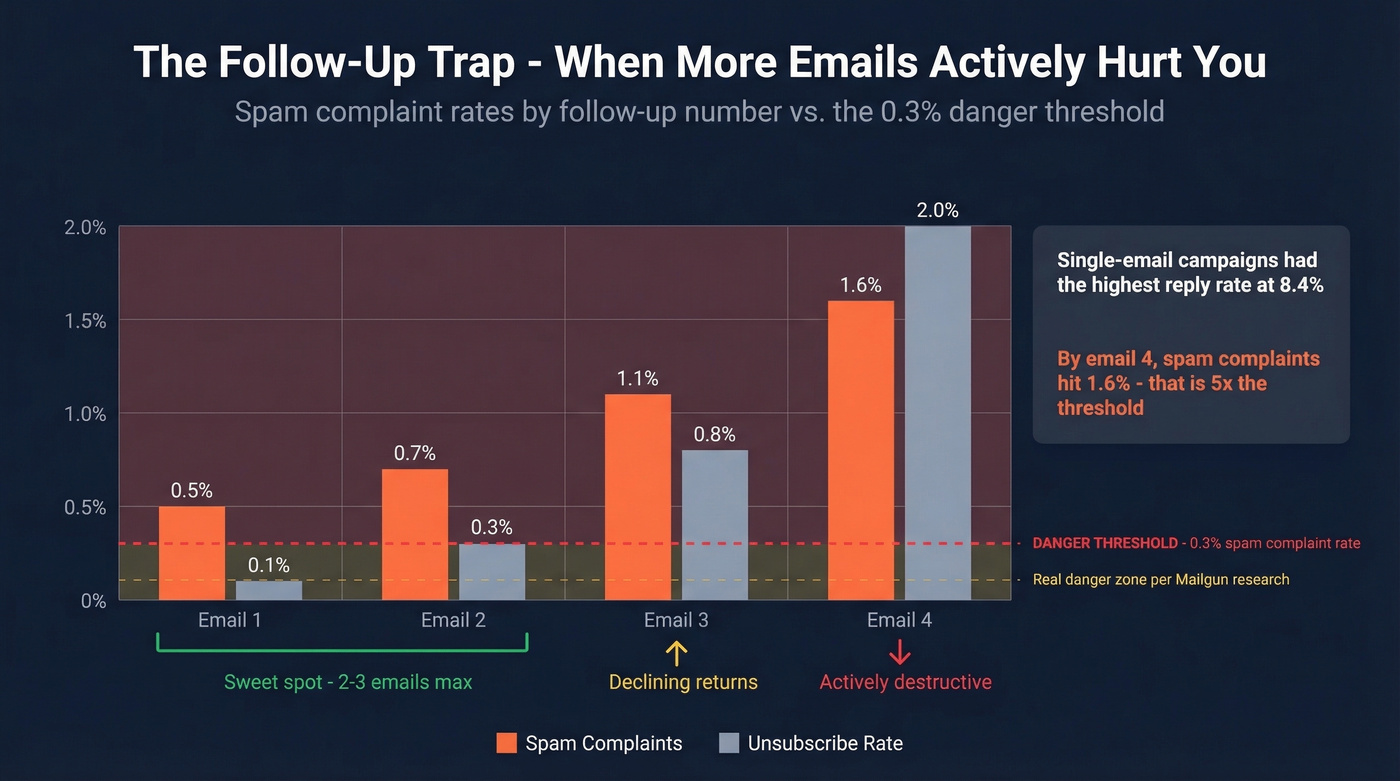
Sixty percent of replies come after the second follow-up. That stat gets cited everywhere, and it's directionally correct. But it hides a dangerous tradeoff: the more you follow up, the more you damage your sender reputation.
We've seen this firsthand - most teams would generate more pipeline by cutting their sequence from 5 emails to 3 and investing the saved time in better targeting. Volume is the enemy of reputation in 2026.
Single-email campaigns in the 16.5M-email dataset actually had the highest reply rate at 8.4%. Follow-ups still generate incremental responses, but the cost escalates fast:
| Follow-Up # | Spam Complaint Rate | Unsubscribe Rate | Net Impact |
|---|---|---|---|
| Email 1 | 0.5% | 0.1% | Baseline |
| Email 2 | ~0.7% | ~0.3% | Peak incremental replies |
| Email 3 | ~1.1% | ~0.8% | Declining returns |
| Email 4 | 1.6% | 2.0% | Actively destructive |
Look at that spam complaint column. By the 4th email, you're at 1.6% - more than five times the 0.3% threshold that gets you flagged. The ROI of follow-ups 4 and beyond isn't just low. It's actively destructive.
The sweet spot is 2-3 follow-ups, spaced 3-5 days apart. Use reply-thread format so the conversation looks natural to inbox providers. After your third follow-up, stop. Move the contact to a nurture list or a different channel entirely.
A/B Testing Your Campaigns
Most cold email "A/B tests" aren't tests at all. They're someone sending two variants to 50 people each and declaring a winner based on vibes.
Sample size matters. You need at least 250 contacts per variant - push toward 500+ for higher confidence. Use the Evan Miller sample-size calculator with a baseline reply rate of 4-5%, 95% confidence, and 80% power.
Isolate one variable. Subject line OR opening line OR CTA. Never test two changes simultaneously - you won't know which one moved the needle.
Measure positive reply rate, not opens. Open tracking has been unreliable since iOS 15's Mail Privacy Protection launched. Apple devices report false opens constantly. Positive replies - actual interested responses, not "please remove me" - are the only metric that matters.
For subject line tests, keep both variants under 43 characters so mobile truncation doesn't become a confounding variable.
Timing and Targeting
The 16.5M-email dataset reveals clear patterns:
| Day | Reply Rate |
|---|---|
| Thursday | 6.87% |
| Tuesday | 6.31% |
| Wednesday | 6.12% |
| Friday | 5.74% |
| Monday | 5.29% |
Evenings between 8-11 PM hit a 6.52% reply rate - likely because recipients have more bandwidth to respond thoughtfully outside work hours.
Targeting depth matters even more than timing. Emailing 1-2 contacts per company yields a 7.8% reply rate. Carpet-bombing 10+ people at the same company drops that to 3.8%. The sniper approach wins - find the right person, not every person. That requires knowing exactly who to contact and having verified data for that specific individual, which is where a sales prospecting database with buyer intent signals and job-change tracking pays for itself many times over.

Tools That Actually Work
Your sending platform handles the last 20% of the cold email equation. The first 80% is data quality and infrastructure.
| Tool | Best For | Starting Price | Key Strength |
|---|---|---|---|
| Prospeo | Data quality + verification | Free / ~$39/mo | 98% accuracy, 7-day refresh |
| Instantly | Sending at scale | $47/mo | Built-in warmup + rotation |
| GMass | Gmail-native sending | $25/mo | Simple, affordable |
| Lemlist | Deliverability focus | ~$59/mo | Image personalization |
| Smartreach | Multichannel sequences | ~$29/mo | Time-zone sending |
The verification layer sits upstream of everything else - it determines whether your emails reach real inboxes or bounce into the void. If you need a deeper breakdown of bounce thresholds and remediation, see email bounce rate.
Instantly is the go-to for teams sending at volume. The Growth plan at $47/month includes built-in warmup, inbox rotation, and A/B testing. Skip it if you're sending under 100 emails/day - it's overkill for small volumes.
GMass is the right tool if your team lives in Gmail and doesn't want to learn a new platform. At $25/month for the basic plan, it's the most affordable sending option. The Spam Solver feature tests deliverability before you send. The limitation is scale - it's built for individuals and small teams, not agencies managing 20 client accounts.
Lemlist gets recommended constantly on r/coldemail for its deliverability features and image personalization. Starts around $59/mo.
Smartreach handles multichannel sequences with time-zone-aware sending. Solid for teams that pair email with phone and social touches. Plans start around $29/mo.
Other tools worth watching: ReachInbox for inbox rotation, Kickbox for standalone verification, and ManyReach for email+social sequences. These get mentioned frequently on r/salesdevelopment as underrated picks.
Stack Optimize built a $1M agency on Prospeo data: 94%+ deliverability, under 3% bounce rate, zero domain flags across every client campaign. When your infrastructure starts with verified contacts at $0.01/email, scaling to 400 sends/day doesn't mean scaling your risk.
Clean data is the infrastructure layer most teams skip first.
FAQ
Is cold email dead in 2026?
No - but lazy cold email is. Reply rates dropped 15% year-over-year, and Gmail/Yahoo enforcement is stricter than ever. Teams with clean data, proper authentication, and relevant messaging still see 5-8% reply rates consistently. The bar is higher, but the channel works for those who clear it.
How many follow-ups should I send?
Two to three, spaced 3-5 days apart. Data from 16.5M emails shows spam complaints triple by the 4th email and unsubscribes jump from 0.1% to 2%. The ROI of additional follow-ups turns negative fast - you're burning domain reputation for diminishing returns.
What's a good cold email reply rate in 2026?
The average across 16.5M emails was 5.8%. Anything above 5% at scale is solid. Practitioners report 2-4% as realistic for high-volume campaigns. Double-digit rates usually come from small, hyper-targeted sends under 500 contacts - don't benchmark against those.
Do I need separate domains for cold email?
Yes. Always. Sending cold outreach from your primary domain risks your entire company's email reputation. Use secondary lookalike domains with their own SPF, DKIM, and DMARC authentication, and warm each one for at least 14 days before sending.
What's the cheapest way to verify emails before sending?
Prospeo offers 75 free verified emails per month with its 5-step verification process - including catch-all handling and spam-trap removal. Paid plans start at ~$0.01/lead. Kickbox and NeverBounce are alternatives, but neither includes a 7-day refresh cycle that keeps data current between campaigns.