

How to Improve Email Reputation: A Recovery Guide That Actually Works
Your email reputation can collapse in 48 hours and take months to rebuild. That's not dramatic - Stripo's email team watched delivery drop from 99.8% to 80% and open rates crater from 25% to 11% after just two oversized campaigns. The global average inbox placement rate is 83.5%, meaning 1 in 6 legitimate emails never reaches a human.
If your numbers are worse, here's how to fix it before the damage compounds.
The short version:
- Diagnose: Set up Google Postmaster Tools + Microsoft SNDS today.
- Recover: Send only to recent clickers for 2 weeks, then gradually expand.
- Prevent: Verify every email before sending - bad data is the #1 reputation killer in outbound.
What Email Reputation Actually Is
Mailbox providers assign your sending domain a trust score based on how recipients interact with your messages. They track negative signals - spam complaints, bounces, spam trap hits - and positive ones like opens, clicks, replies, and "not spam" rescues.
Domain reputation matters most because it follows you even if you switch IPs. The old trick of rotating to a fresh IP is dead; each mailbox provider maintains its own reputation for your domain independently. And here's the part that stings: reputation can tank fast, but recovery is slow. Protecting your sender reputation will always be cheaper than repairing it.
Metrics That Get You Filtered
| Metric | Target | Danger Zone |
|---|---|---|
| Spam complaint rate | <0.1% | ≥0.3% |
| Bounce rate | <2% | ≥2% |
| Inbox placement (Gmail) | 87.2% | Below 80% |
| Inbox placement (Microsoft) | 75.6% | - |
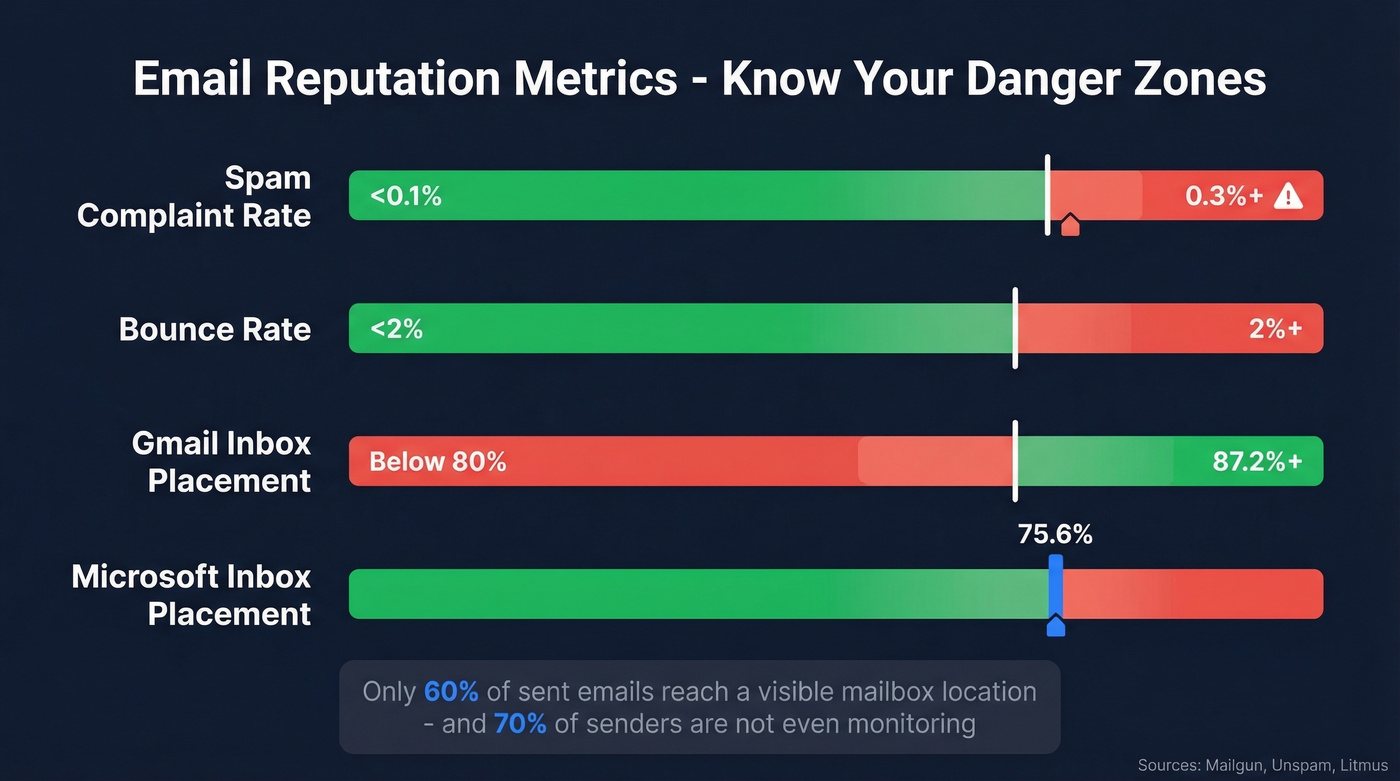
A Mailgun survey of 1,100+ senders found 70% aren't using free monitoring tools like Google Postmaster Tools, and DMARC adoption sits at just 54%. Unspam's testing found only 60% of sent emails reached a visible mailbox location - worse than most senders assume. If you're not monitoring and not authenticated, you're flying blind.
How to Diagnose Your Domain Reputation
You need three free tools running before starting any recovery work.
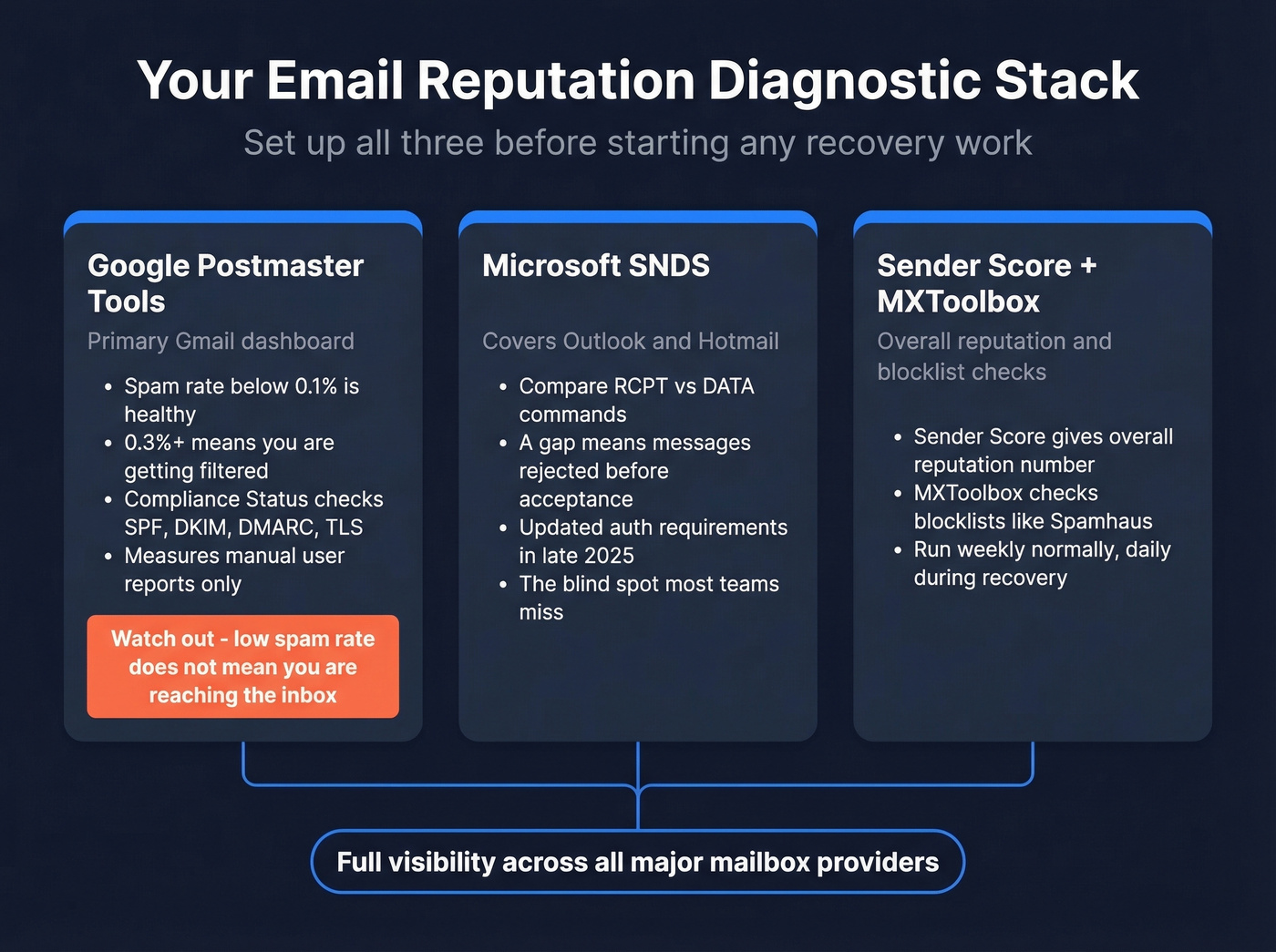
Google Postmaster Tools is your primary Gmail dashboard. Healthy spam rate is below 0.1%; anything above 0.3% means you're getting filtered. Google's Postmaster tooling now puts heavy emphasis on Compliance Status (pass/fail) alongside spam rate, checking SPF/DKIM authentication, DMARC alignment, TLS, and one-click unsubscribe. A "Fail" can trigger SMTP-level rejection.
One thing most guides miss: GPT's spam rate measures manual user reports, not automatic spam-folder placement. You can show a low spam rate while most mail gets silently filtered. We've seen teams celebrate a 0.05% complaint rate while 40% of their volume was landing in promotions or spam - the two metrics tell different stories.
Microsoft SNDS covers Outlook and Hotmail - a blind spot if you're only watching Gmail. The diagnostic move most people miss: compare RCPT commands versus DATA commands. A gap between them means messages are being rejected before acceptance. Microsoft tightened SNDS authentication requirements in late 2025, so make sure your access is current.
Sender Score and MXToolbox round out the picture. Sender Score gives you an overall reputation number; MXToolbox checks blocklists. Landing on a major blocklist like Spamhaus will tank deliverability across providers almost instantly. Run these weekly during normal operations, daily during recovery.
For a broader stack beyond the basics, see our guide to email reputation tools.

Most reputation problems start with bad data, not bad strategy. Prospeo's 5-step verification removes spam traps, honeypots, and catch-all risks before you hit send - delivering 98% email accuracy across 143M+ verified addresses refreshed every 7 days.
Stop diagnosing reputation damage you could have prevented entirely.
The Reputation Recovery Playbook
Engagement-Based Ramp (Weeks 1-6)
HubSpot's repair plan lays out the clearest recovery sequence we've found. Each step takes about two weeks - don't rush it.
If you're rebuilding from cold outreach issues specifically, pair this with a tighter B2B cold email sequence so engagement stays high.
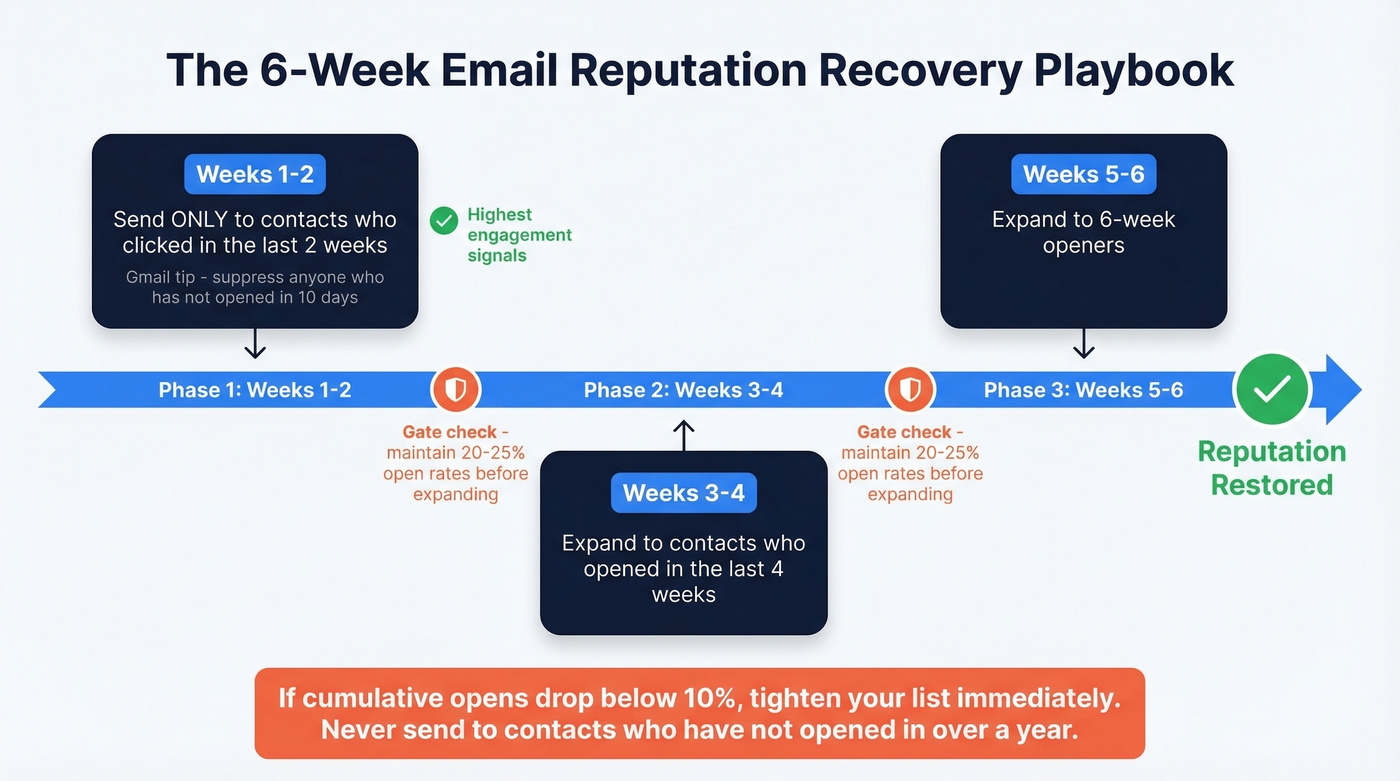
Weeks 1-2: Send only to contacts who clicked in the last 2 weeks. Their positive signals retrain mailbox providers to trust your domain. For Gmail specifically, Litmus' recovery example suppressed Gmail subscribers who hadn't opened in the last 10 days, then ramped volume week by week.
Weeks 3-4: Expand to contacts who opened in the last 4 weeks.
Weeks 5-6: Expand to 6-week openers.
Maintain 20-25% open rates before broadening each step. If cumulative opens drop below 10%, tighten your list immediately. Never send to contacts who haven't opened in over a year. The goal is rebuilding trust one engaged cohort at a time, and it requires patience that most teams underestimate.
Warm-Up for New or Burned Domains
For domains needing a full warm-up, Instantly's 30-day plan provides a concrete ramp: start at 2 emails on Day 1 and reach 30-40/day by Day 30. After Day 14, maintain a 1:1 warmup-to-campaign ratio. If bounce rates exceed 2% or complaints spike above 0.1%, pull back immediately and hold for 3-5 days before resuming.
To avoid over-sending while you ramp, use an email velocity cap that matches your domain age and list quality.
The Root Cause Most Guides Ignore
Every recovery guide focuses on what to do after your reputation tanks. Almost none address why it tanked.
For outbound teams, the answer is almost always bad prospect data. Invalid emails, spam traps, and stale contacts generate hard bounces and spam complaints that destroy domain reputation faster than anything else. Here's the thing: if your bounce rate is above 5%, your sequencing tool isn't the problem and your warm-up isn't the problem - your data provider is the problem. We've watched teams spend months tweaking send schedules and subject lines when a simple list audit would've fixed everything in a week.
If you want the deeper mechanics behind filtering and placement, our email deliverability guide breaks down the signals providers actually use.
The consensus on r/sales and r/coldemail threads backs this up - the most common "I fixed my deliverability" stories involve switching to verified data, not changing ESPs or warm-up tools.
Stack Optimize built from $0 to $1M ARR running outbound for clients, maintaining 94%+ deliverability, bounce rates under 3%, and zero domain flags across all client domains. Their edge wasn't a special warm-up trick - it was running every list through Prospeo's 5-step verification from the start, which removes spam traps, filters honeypots, and handles catch-all domains before a single email goes out.
If bounces are your main symptom, start with the basics in our email bounce rate benchmarks and fix list hygiene before you touch copy.
Stack Optimize maintained 94%+ deliverability and zero domain flags across every client by running lists through Prospeo first. At $0.01 per verified email, protecting your sender reputation costs less than a single lost deal.
Fix the root cause - swap bad data for verified contacts today.
2026 Compliance Checklist
Enforcement isn't theoretical anymore. Google ended its soft enforcement period in November 2025 - non-compliant bulk senders now face SMTP-level rejection. Microsoft's mandate took effect May 5, 2025. Fully authenticated senders are 2.7x more likely to reach the inbox - a 38.6 percentage-point improvement in placement.
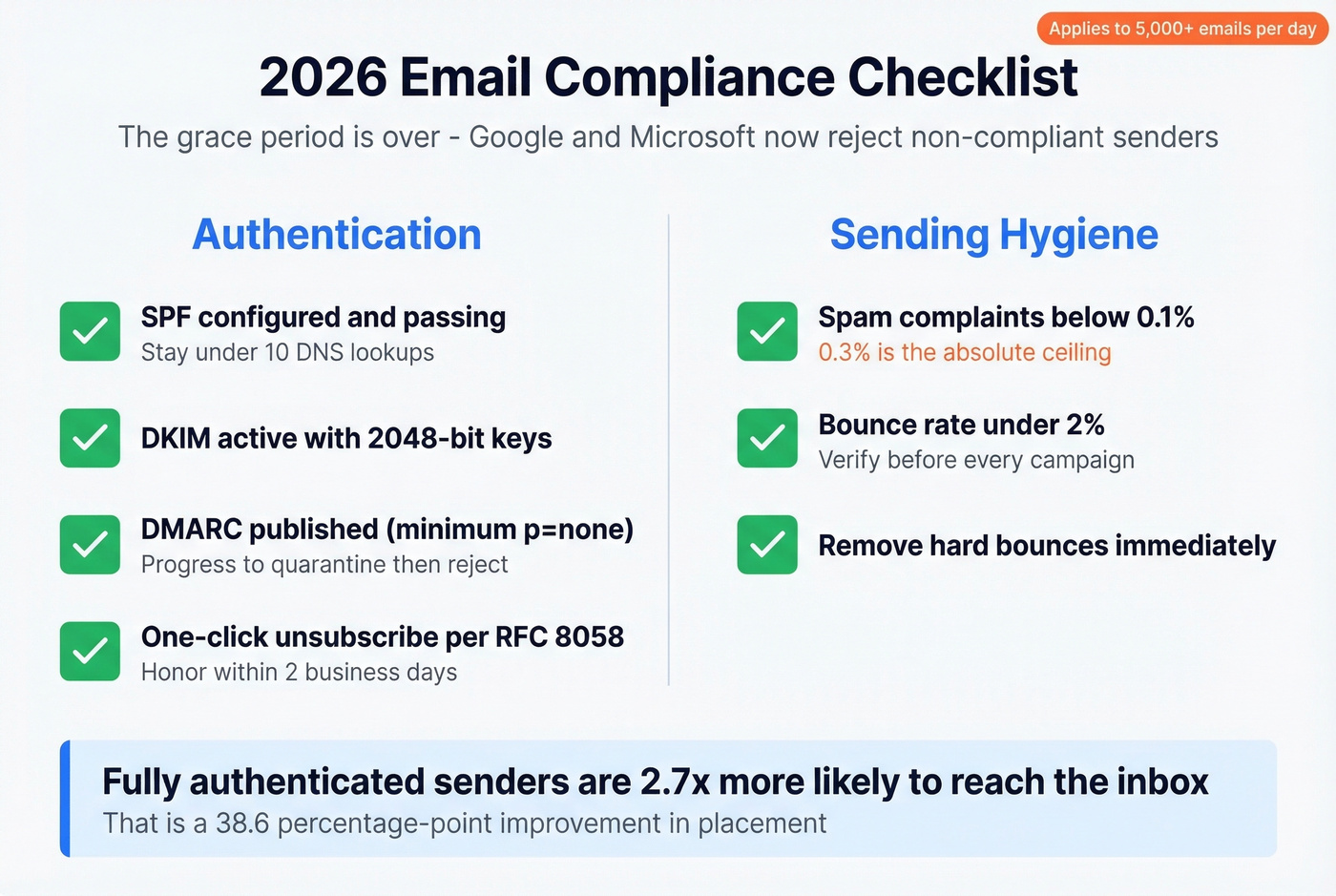
Here's what you need:
- SPF configured and passing (stay under 10 DNS lookups)
- DKIM active with 2048-bit keys
- DMARC progressing from p=none to quarantine to reject - at minimum, p=none must be published
- One-click unsubscribe per RFC 8058, honored within 2 business days
- Spam complaints below 0.1% (0.3% is the absolute ceiling)
- Bounce rate under 2% - verify before every campaign, remove hard bounces immediately
If you're unsure whether your auth is actually passing, follow a quick how to verify DKIM is working check before you ramp volume.
If you're sending 5,000+ emails per day without all of these in place, you risk SMTP-level rejection and heavier filtering. The grace period is over. Skip this checklist if you're sending fewer than 500 emails a month to a well-maintained list - but for anyone running outbound at scale, treating this as an ongoing discipline rather than a one-time setup is what separates teams with strong deliverability from those stuck in an endless recovery cycle.
FAQ
How long does it take to recover email reputation?
Mild filtering recovers in 2-4 weeks with disciplined, engagement-focused sending. Severe damage - a "Bad" rating in Google Postmaster Tools - typically takes 6-12 weeks of gradual ramp-up targeting only your most engaged contacts first.
Can I fix reputation by changing my IP address?
No. Domain reputation persists across IP changes. Switching IPs without fixing bad data and missing authentication just burns a new IP on top of a burned domain. Fix the root cause first.
How do I prevent reputation damage from outbound prospecting?
Verify every email before sending with a provider that includes spam-trap removal and catch-all handling. Keep bounce rates under 2%, warm up new domains gradually, and never send to unverified lists. Let's be honest - most deliverability problems in outbound are data quality problems wearing a different hat.
What's the single fastest way to improve email reputation?
Suppress your full list and send exclusively to contacts who clicked within the last 14 days. This concentrated positive engagement - opens, clicks, replies - retrains mailbox providers fastest. Combine this with list verification to eliminate bounces, and most senders see measurable improvement within 2-3 weeks.