

How to Send Thousands of Emails at Once Without Killing Your Domain
A Reddit user bought a 10,000-contact CSV, loaded it into their ESP, and hit send. Within 48 hours, even their one-to-one replies to colleagues were landing in spam. That's not a freak accident - it's what happens when you skip the fundamentals of high-volume email sending.
The global average inbox placement rate sits at 83.5%. Roughly 1 in 6 emails never reaches the inbox. Skip the groundwork and your numbers will be far worse. If you want to send thousands of emails at once, preparation isn't optional - it's the whole game.
Quick Decision Guide
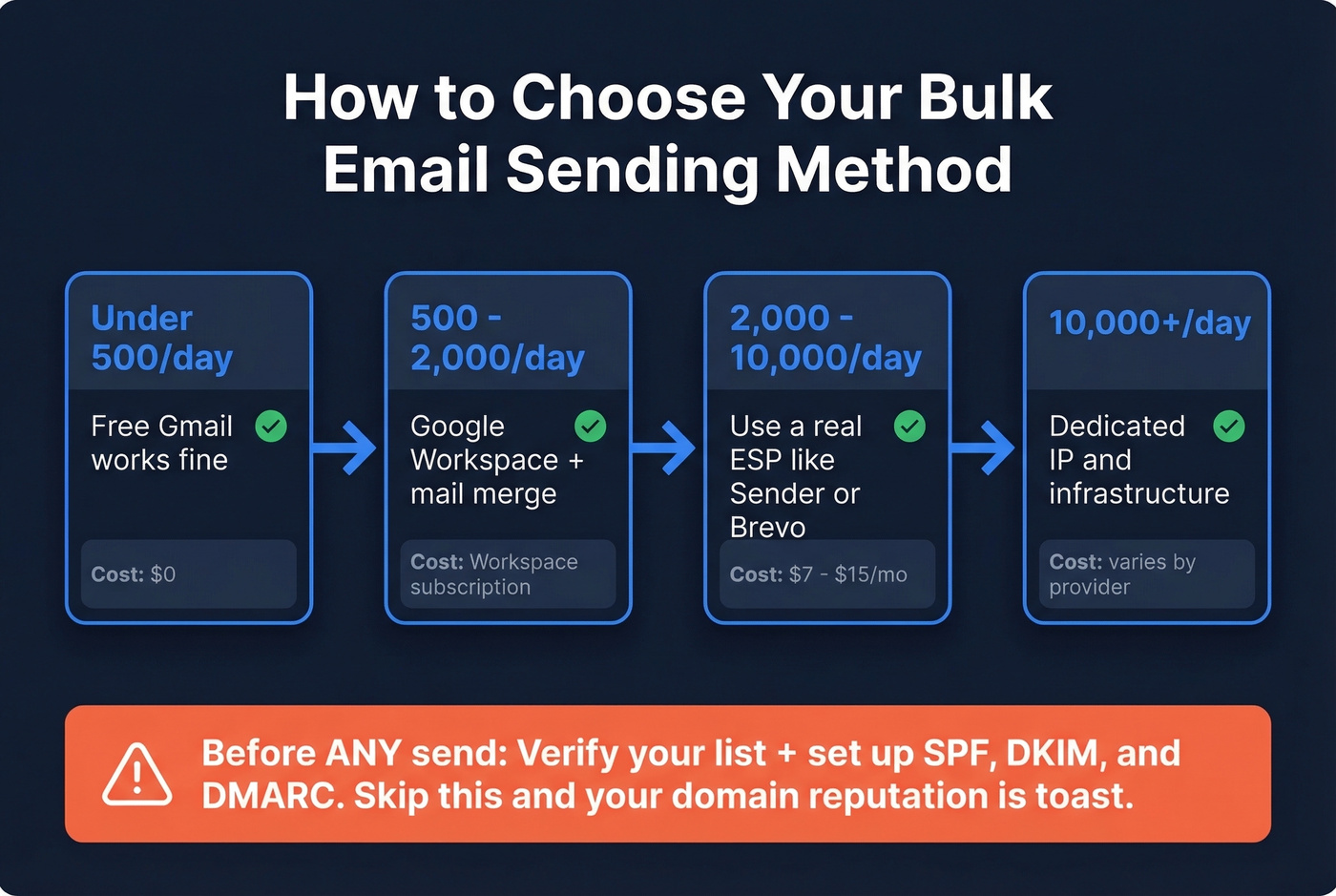
- Under 500 emails/day? Free Gmail handles it (system cap: 500/day).
- Up to ~2,000 emails/day? Google Workspace works (system cap: 2,000/day; mail merge limited to 1,500/day).
- 2,000+ emails/day? You need a real ESP with throttling, list management, and compliance tooling.
- Before you send anything: Verify your list and set up SPF/DKIM/DMARC. Skip this and your sender reputation is toast.
Pick Your Sending Method
Gmail and Outlook are sedans - great for daily driving, terrible for hauling freight.
| Volume | Method | Daily Cap |
|---|---|---|
| Under 500/day | BCC or small batch | 500/day (free Gmail) |
| 500-2,000/day | Google Workspace + mail merge | 2,000/day (Workspace); 1,500/day (mail merge) |
| 2,000-10,000/day | ESP (Sender, Brevo, etc.) | Varies by plan |
| 10,000+/day | Dedicated IP/infra | No hard cap (provider-dependent) |
Google Workspace caps you at 2,000 messages per day, with mail merge limited to 1,500. Those are system ceilings, not safe-sending limits - filtering can kick in well below those numbers based on reputation, bounces, and engagement. If you're pushing toward the cap or you need to dispatch thousands per day consistently, you need a proper ESP or you're gambling with your domain.
Best Tools for Mass Email Sending
| Tool | Free Tier | Paid From | Best For |
|---|---|---|---|
| Sender | 15K/mo (2,500 subs) | $7/mo | Best free tier for volume |
| Brevo | 9K/mo (300/day cap) | $15/mo | Marketing automation |
| MailerLite | 12K/mo (500 subs) | $10/mo | Clean UI, landing pages |
| Amazon SES | - | $0.10/1K emails | Cheapest at scale |
| SendGrid | 100/day | Custom pricing | API-first infrastructure |
| GMass | 50/day (trial) | Paid plans available | Staying inside Gmail |
| Mailchimp | 500/mo (250 subs) | Paid plans available | Brand name (weak free tier) |
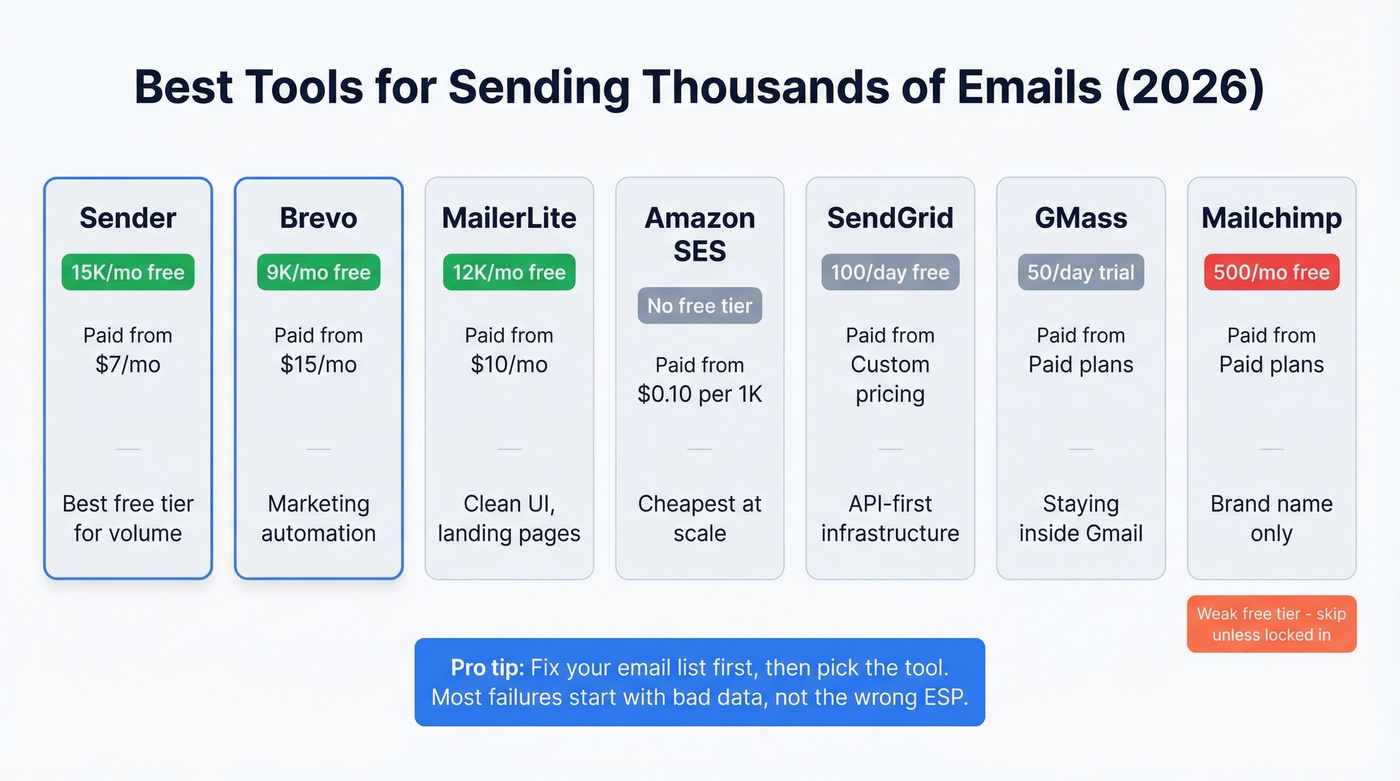
Sender and Brevo are the clear winners for anyone starting out. Mailchimp's free tier at 500 emails/month with a 250-subscriber cap is nearly useless if you're trying to reach thousands of contacts - skip it unless you're already locked into their ecosystem. Amazon SES is unbeatable at scale if you're comfortable with technical setup, running just $0.10 per 1,000 emails.
Here's the thing most people get wrong: they agonize over Sender vs. Brevo vs. SES when the real issue is that a chunk of their addresses are dead. We've seen this pattern dozens of times. Fix the list first, then pick the tool.

Most mass email failures start with the list, not the tool. Prospeo's 5-step verification catches dead mailboxes, spam traps, and honeypots before they torch your domain - delivering 98% email accuracy at ~$0.01 per email.
Clean your list before your next bulk send destroys your reputation.
2026 Compliance Rules
Mailbox providers aren't messing around anymore.
- Feb 2024: Gmail and Yahoo began enforcing bulk sender rules for 5,000+ messages/day.
- May 2025: Microsoft joined with similar requirements for Outlook.com, Hotmail, and Live.
- Nov 2025: Gmail escalated to permanent rejections - 550 errors for non-compliant mail.
Your authentication setup needs SPF records under 10 DNS lookups, DKIM with 2048-bit RSA keys, and DMARC published at minimum p=none (work toward p=reject). Confirm your sending IPs have valid PTR records (FCrDNS) and use TLS encryption. Keep your spam complaint rate below 0.1% - 0.3% is the ceiling before providers start rejecting your mail outright. Include one-click unsubscribe per RFC 8058 and process opt-outs within 2 days.
Even technically compliant mail can tank your reputation if it's irrelevant. Graymail - bulk email that isn't spam but nobody wants - still drags down engagement metrics and sender scores over time.
Warm Up Before You Blast
New domains and fresh IPs need a ramp-up period. Skip this and your first big send lands in spam, whether you're targeting 1,000 recipients or ten times that.
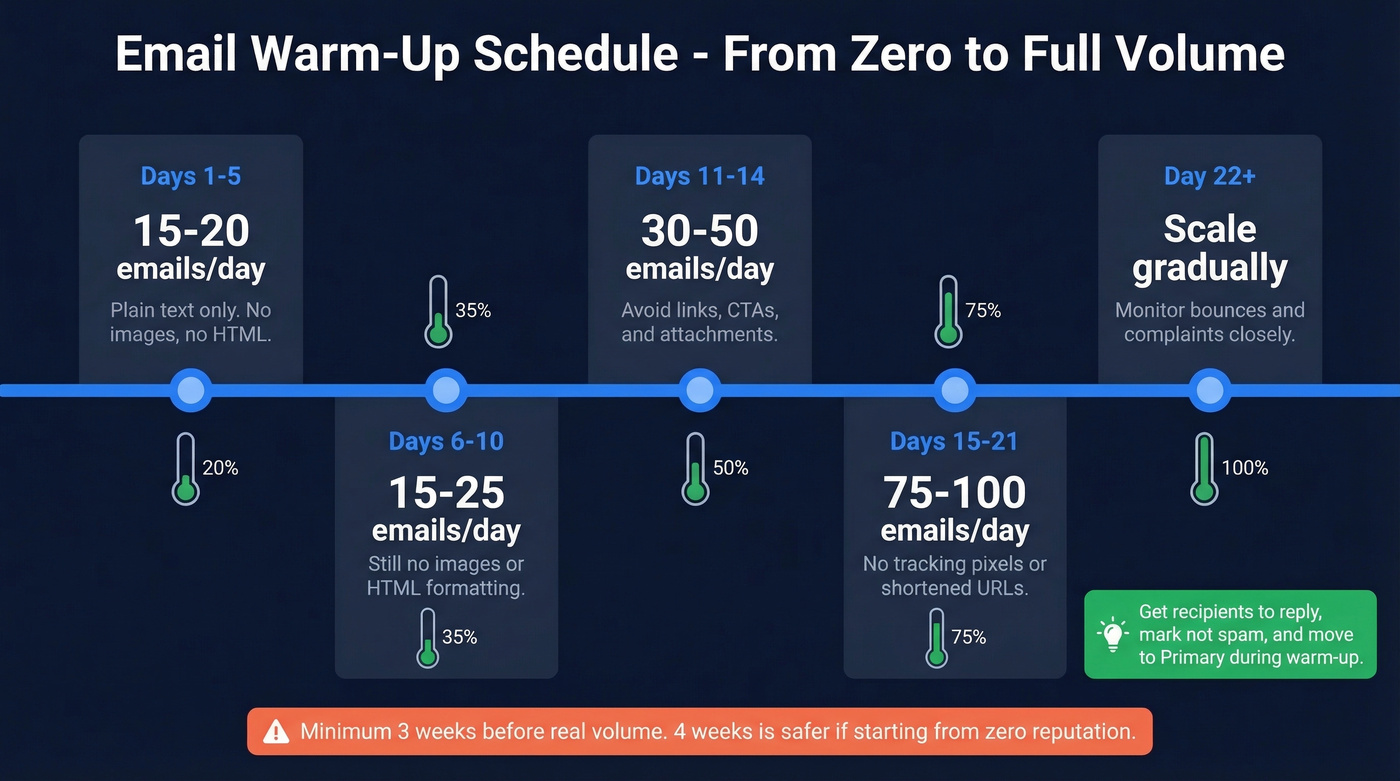
| Days | Volume/Day | Rules |
|---|---|---|
| 1-5 | 15-20 | Plain text only |
| 6-10 | 15-25 | No images or HTML |
| 11-14 | 30-50 | Avoid links, CTAs, attachments |
| 15-21 | 75-100 | No tracking pixels or shortened URLs |
| 22+ | Scale gradually | Increase while monitoring bounces and complaints |
During warm-up, get recipients to reply, mark messages "not spam," and move them to Primary. These engagement signals tell mailbox providers your domain is legitimate. The consensus on r/coldoutreach is that warm-up takes a minimum of three weeks before you should attempt any real volume - and in our experience, four weeks is safer if you're starting from zero reputation.
If you want a deeper breakdown of safe ramp-up speeds, see our guide on email velocity.
Verify Your List First
If your bounce rate is above 5%, stop sending immediately. Remember that Reddit user whose normal emails started landing in spam? The root cause wasn't their ESP or their content - it was the list. Dead mailboxes, spam traps, and honeypots mixed into your send will poison your reputation for weeks.
This is where most bulk senders fail, and it's the easiest problem to solve. Prospeo's email verification runs a 5-step process that handles catch-all domains, removes spam traps and honeypots, and delivers 98% email accuracy. Upload a CSV, get flagged invalid addresses before you hit send, and protect your domain from damage that takes weeks to unwind.
If you're building lists from scratch, it also helps to understand the risks of buying data and how to source it properly - see email list providers and Is It Illegal to Buy Email Lists?.
You're about to send thousands of emails. If even 5% bounce, your domain reputation tanks for weeks. Prospeo verifies catch-all domains, strips honeypots, and refreshes data every 7 days - so your list is accurate when you hit send, not six weeks ago.
Upload your CSV and flag every invalid address in minutes.
Send, Monitor, Adjust
Once you've sent, watch three numbers: bounce rate (stay under 2%), spam complaint rate (under 0.1%), and open rates. Google Postmaster Tools is free and shows you exactly how Gmail views your domain reputation. If your bounce rate climbs above 5%, stop sending and clean your list before pushing more volume.
If you need more ways to diagnose deliverability issues, use an email deliverability guide and keep an eye on email reputation tools.
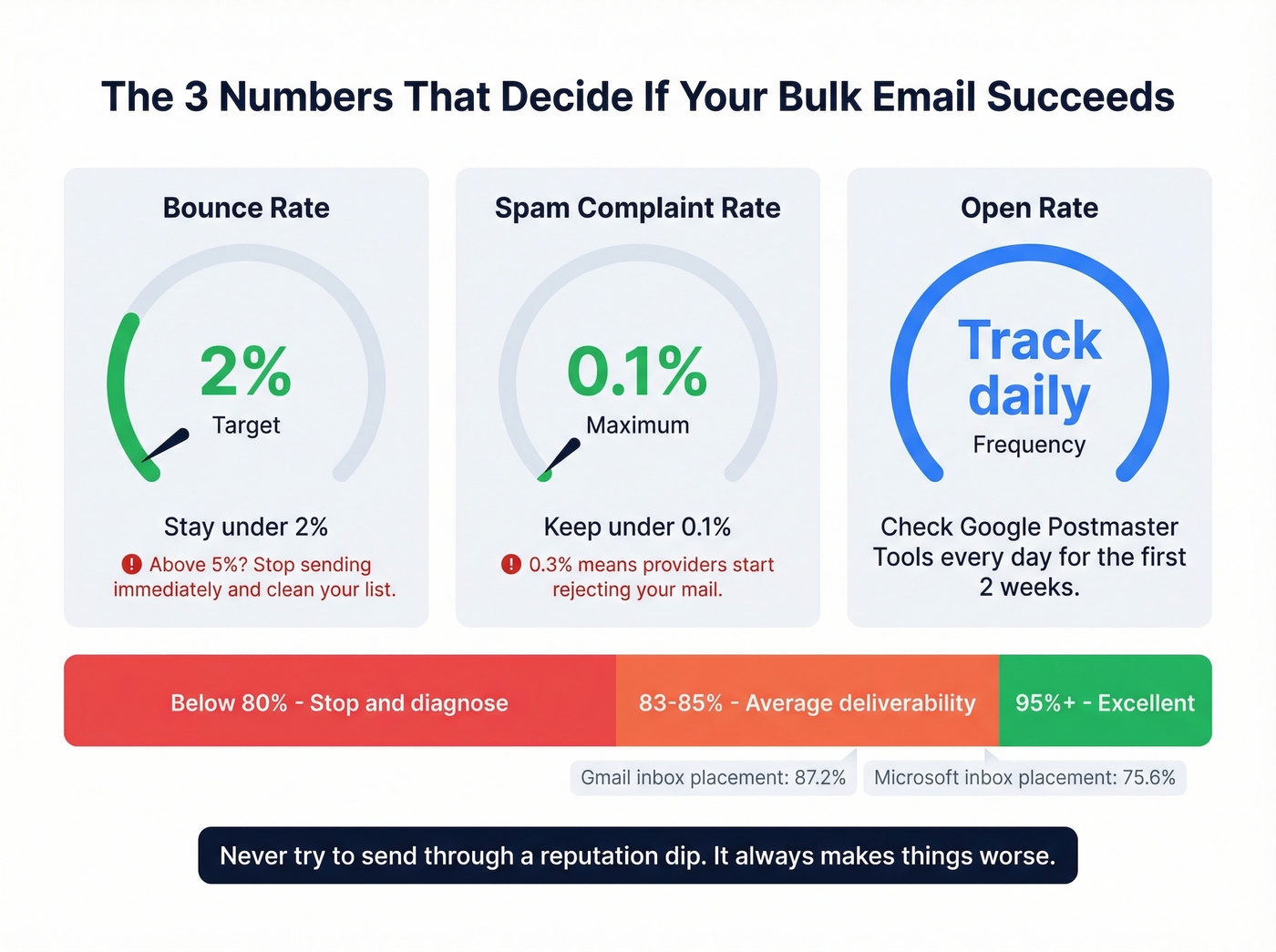
For benchmarks: excellent deliverability is 95%+, good is 85-94%, and average hovers around 83-85%. Gmail inbox placement runs about 87.2%, while Microsoft sits lower at 75.6%. If your numbers drop below 80%, stop and diagnose - don't push more volume into a damaged reputation. We've seen teams try to "send through" a reputation dip. It always makes things worse.
Let's be honest about what "monitoring" actually means in practice. It's not a set-it-and-forget-it dashboard check once a week. For the first two weeks of any high-volume campaign, you should be checking Postmaster Tools daily, watching for sudden drops in domain reputation, and being ready to pause sends within hours if something looks off. The teams that treat monitoring as a real operational task are the ones that maintain 95%+ deliverability long-term.
FAQ
Can I send 10,000 emails from Gmail?
Not directly. Gmail caps free accounts at 500/day and Google Workspace at 2,000/day (mail merge limited to 1,500/day). For 10,000 emails, use a dedicated ESP like Sender, Brevo, or Amazon SES. Forcing volume through Gmail risks account suspension.
What's the cheapest way to send bulk email?
Amazon SES at $0.10 per 1,000 emails is the cheapest paid option. For free tiers, Sender offers 15,000/month and Brevo offers 9,000/month - both strong starting points for teams scaling up.
How do I stop bulk emails from going to spam?
Authenticate your domain (SPF, DKIM, DMARC), warm up your sending volume over 3-4 weeks, and verify your list before sending. A high bounce rate is the fastest path to the spam folder - cleaning your list with a tool like Prospeo before you send is the single highest-ROI step you can take.
Can I send thousands of emails at once for free?
Yes, within limits. Sender's free tier allows 15,000 emails/month (2,500 subscribers), and Brevo offers 9,000/month (300/day cap). Both include basic deliverability features. You'll outgrow free tiers quickly at high volume, but they're viable for initial campaigns.