

slug: how-to-tell-if-someone-read-your-email-on-gmail
How to Tell If Someone Read Your Email on Gmail
You sent a proposal three days ago. No reply. Did they even open it?
If you're wondering how to tell if someone read your email on Gmail, here's the honest answer: no method gives you a definitive one. Gmail doesn't have a "seen" indicator like iMessage or WhatsApp. Google Workspace read receipts exist but are limited. Chrome extension trackers help but are increasingly unreliable. Here's every option, what actually works, and what's giving you bad data.
The Short Answer
Gmail personal accounts have zero native read tracking. Google Workspace supports read receipts, but recipients can decline and the prompt doesn't always appear on mobile. Third-party tracking extensions use invisible pixels to detect opens, but Gmail's image caching, bot scanners, and Apple Mail Privacy Protection generate enough false signals that any single "opened" notification is unreliable.
Opens are useful as a trend across many emails. For confirming one person read one email, the most reliable method is still asking for a reply.
Gmail Read Receipts (Workspace Only)
How to Enable Them
Read receipts are a Google Workspace feature - they don't exist on personal @gmail.com accounts. Your Workspace admin enables them under Admin Console > Apps > Google Workspace > Gmail > User Settings > Email read receipts. After saving, changes can apply quickly but sometimes take up to 24 hours.
Once enabled, compose your email, click the three dots in the bottom-right corner of the compose window, and check "Request read receipt." The recipient sees a prompt when they open your email. If they approve it, you get a confirmation.
Why Read Receipts Rarely Work
Even with everything configured correctly, read receipts fail more often than they succeed:
- Recipients can decline. They see the prompt and choose not to send a receipt. You'll never know they opened it.
- Workspace-only. Emailing someone on personal Gmail, Outlook, or any non-Workspace account? The feature is irrelevant.
- Limited mobile behavior. The read receipt prompt doesn't always appear when the recipient opens the email in a mobile app.
- No bulk support. Doesn't work for group mailing lists or mass emails.
- Manual every time. You have to request a receipt per email.
- Admin propagation is flaky. A sysadmin thread on Reddit describes read receipts behaving inconsistently across organizational units with identical settings. The fix? Toggle the setting off, wait 30 minutes, toggle it back on. Classic.
For most people, read receipts are a dead end.
Email Tracking Extensions
How Tracking Pixels Work
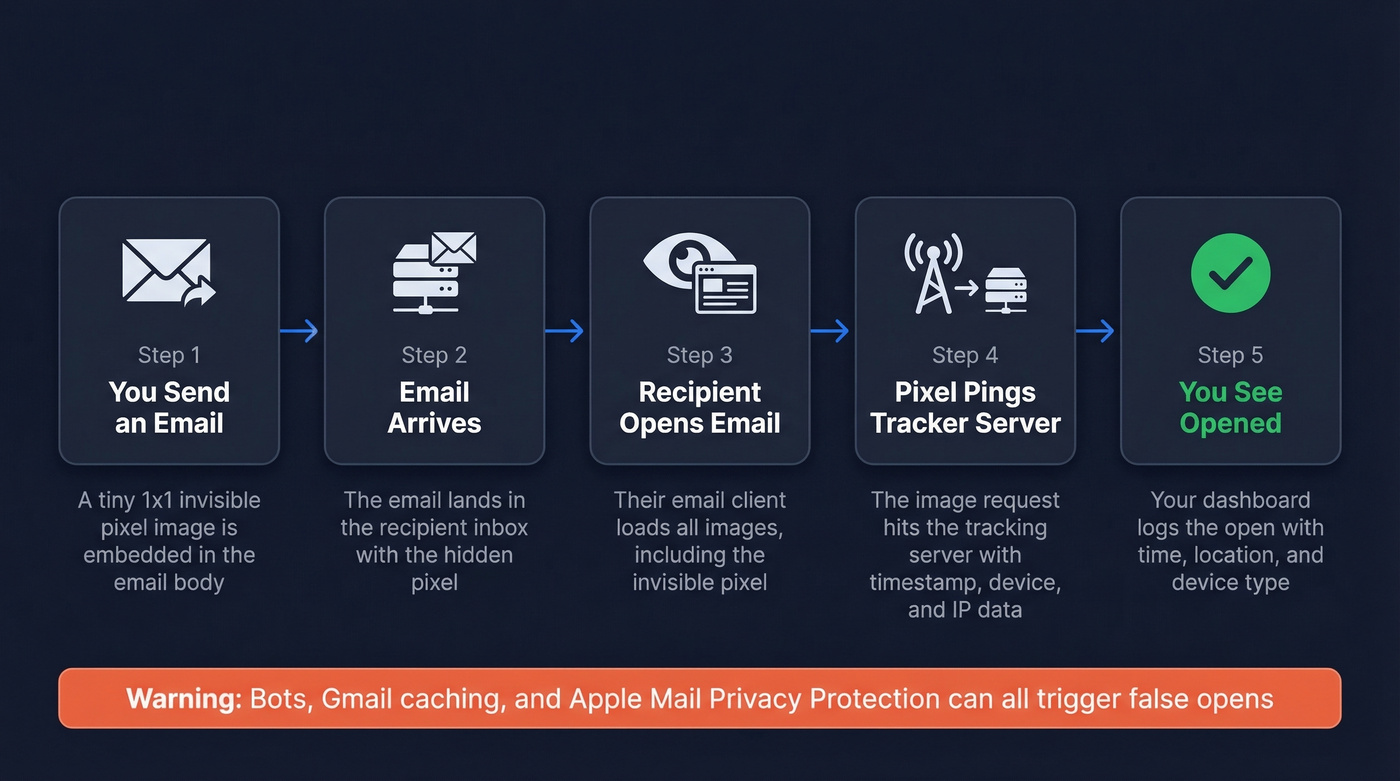
Every email tracking extension uses the same trick: a tiny, invisible 1x1 pixel image embedded in your email. When the recipient's email client loads that image, it pings the tracker's server, logging the open with a timestamp, device type, and approximate location. Simple, decades old, and increasingly broken. If you want the technical details, see our guide to email tracking pixels.
Best Gmail Tracking Tools
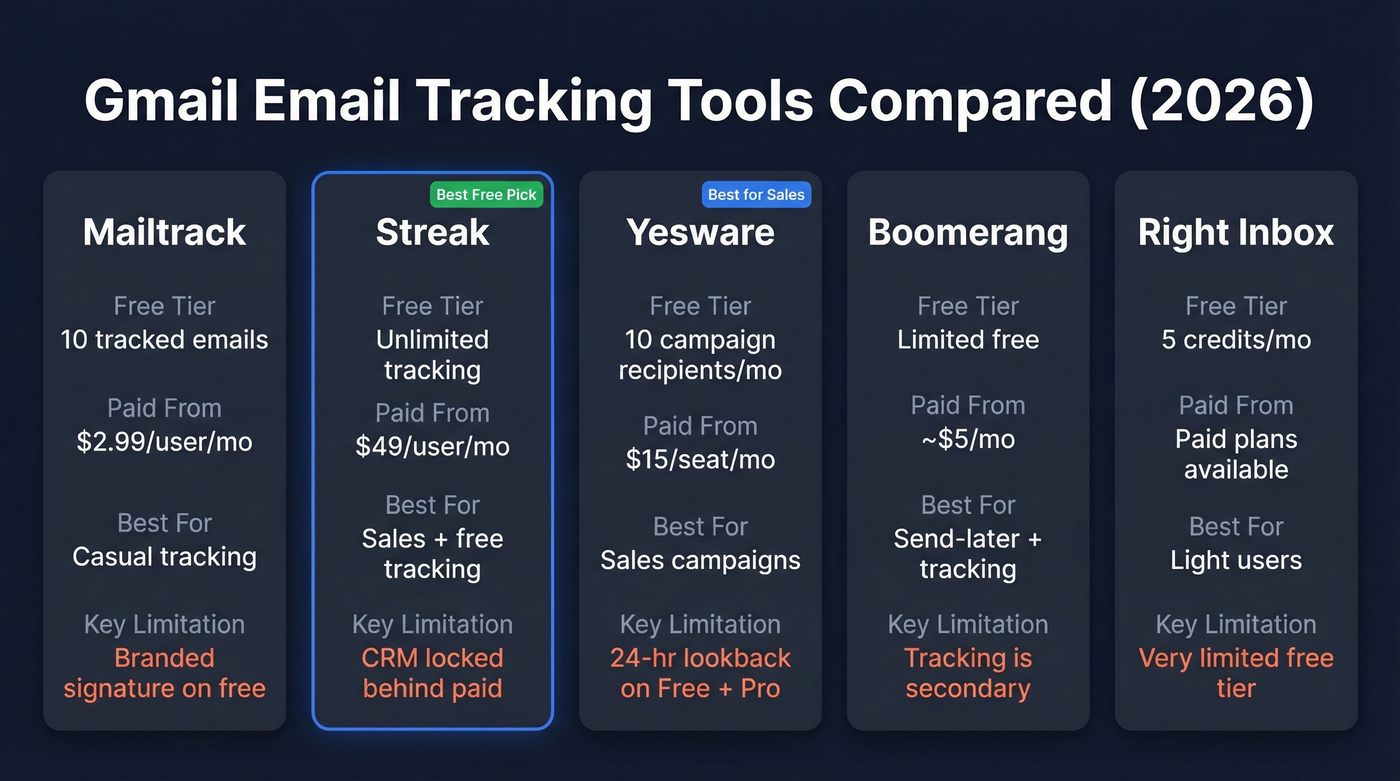
| Tool | Free Tier | Paid From | Best For | Key Limitation |
|---|---|---|---|---|
| Mailtrack | 10 tracked emails | $2.99/user/mo | Casual tracking | Branded signature on free |
| Streak | Unlimited tracking | $49/user/mo (annual) | Sales + free tracking | CRM locked behind paid |
| Yesware | 10 campaign recipients/mo | $15/seat/mo (annual) | Sales campaigns | 24-hr lookback on Free + Pro |
| Boomerang | Limited free | ~$5/mo | Send-later + tracking | Tracking is secondary |
| Right Inbox | 5 credits/mo | Paid plans available | Light users | Very limited free tier |
Which One to Pick
Skip the research rabbit hole. For casual use, Streak wins - unlimited free tracking, no signature branding. Mailtrack works too, but the "Sent with Mailtrack" signature on the free plan announces to recipients that you're tracking them, which defeats the purpose. For sales teams running campaigns, Yesware at $15/seat/mo delivers the most useful feature set with unlimited lookback on Premium.
The real question isn't which tool to pick. It's whether the data these tools give you means anything. If you're sending follow-ups, use a proven framework like these sales follow-up templates.

Obsessing over whether one person opened one email is a losing game. The real problem isn't tracking - it's targeting. Prospeo gives you 98% accurate emails so your outreach lands in real inboxes, not spam folders. Teams using Prospeo book 35% more meetings than Apollo users.
Skip the pixel guessing. Send emails that actually get replies.
Why Open Tracking Isn't Reliable in 2026
Here's the thing: most "how to track emails" articles skip this part entirely. The tracking pixel was designed in an era when email clients blocked images by default. In 2026, the opposite problem exists - too many things load the pixel that aren't humans.
Gmail's Image Cache
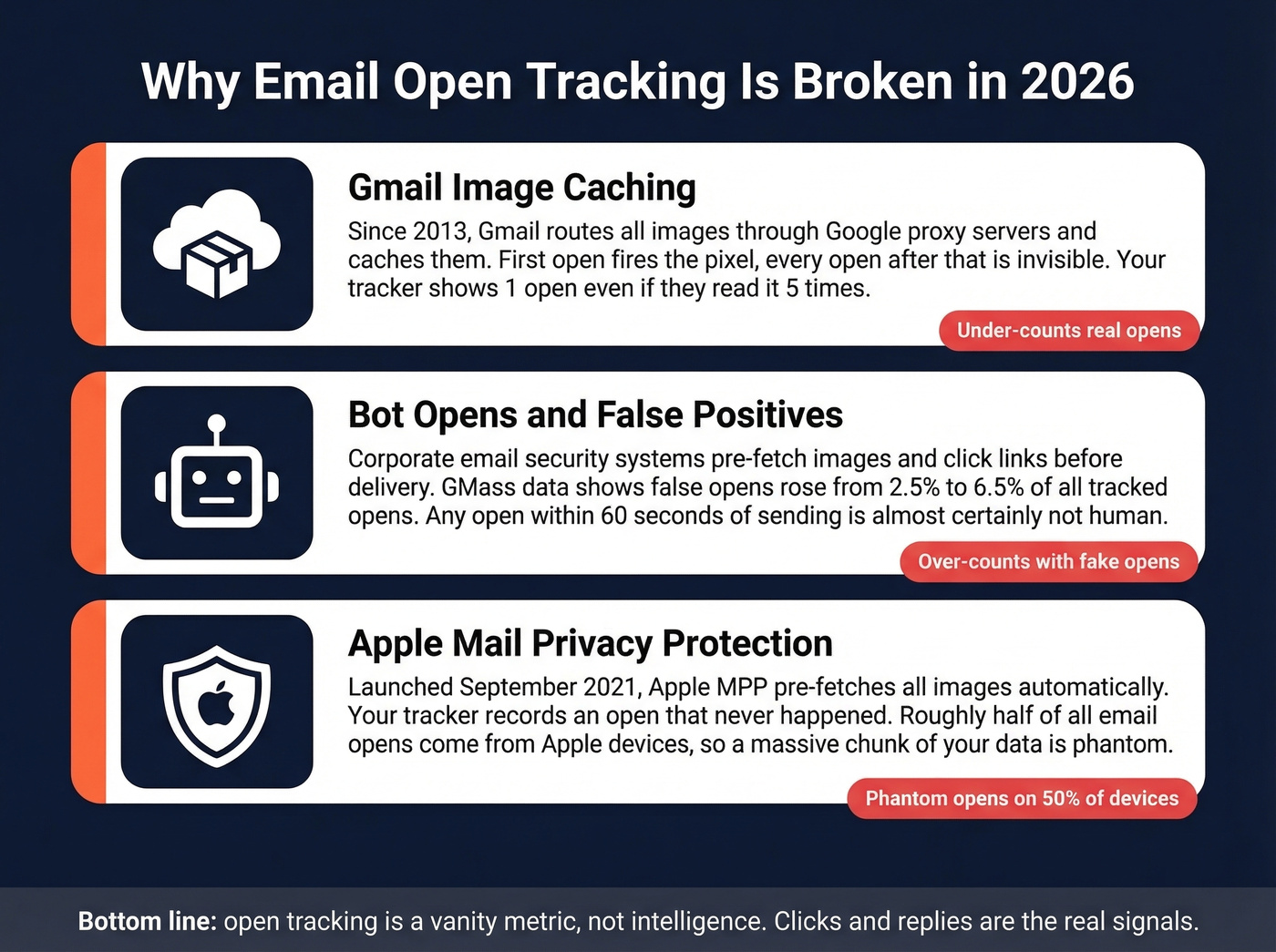
Since 2013, Gmail has routed all images through Google's proxy servers and cached them. The first open fires the pixel, and your tracker records it. Every subsequent open gets served from cache, invisible to the tracker. Your dashboard shows "opened 1 time" even if the recipient read your email five times.
Bot Opens and False Positives
Corporate email security systems routinely pre-fetch images and click links before delivering an email to the inbox. Your tracker records an "open" that was actually a bot. GMass analyzed their logs and found false opens from automated activity rose from 2.5% to 6.5% of all tracked opens. Their rule of thumb: any open within 60 seconds of sending is almost certainly not human.
We've watched tracking dashboards light up with "opens" three seconds after hitting send - that's a spam filter, not a prospect. If your tracker exposes raw open data, look for bot-like User-Agent patterns and for opens happening within seconds of delivery. You'll also see Gmail Image Proxy activity (often showing up as GoogleImageProxy/ggpht.com), which is common in Gmail open tracking and doesn't automatically indicate a bot open by itself.
Apple Mail Privacy Protection
Apple Mail Privacy Protection, launched in September 2021, pre-fetches images so your tracker records an "open" that never happened. Twilio's analysis confirms open tracking remains unreliable because of MPP's machine opens and IP masking. Roughly half of all email opens happen on Apple devices, which means a massive chunk of your "opens" are phantom data.
Let's be honest: if you're making decisions based on whether one specific person opened one specific email, you're building on sand. Open tracking was a useful hack in 2015. In 2026, it's a vanity metric dressed up as intelligence.
Privacy and Legal Risks
Beyond reliability, there's a growing legal question around whether you should be tracking individual opens at all. France's CNIL released draft guidance in 2025 treating email tracking pixels under the same legal framework as cookies - meaning explicit, informed consent is required for individual-level open tracking.
Under GDPR, tracking pixels collect timestamps, IP-derived location, device data, open counts, and screen resolution - all personal data. Aggregate, anonymized measurement may be exempt, but tracking whether a specific person opened a specific email sits squarely in consent-required territory. The direction is clear: individual email tracking is getting harder to justify legally, especially in the EU.
What Actually Works Better
Opens are a trend signal, not proof of reading. A sudden drop in open rates across a campaign tells you something's wrong with deliverability. A single "opened" notification tells you almost nothing. If you want to benchmark performance, start with what a good email open rate looks like in 2026.
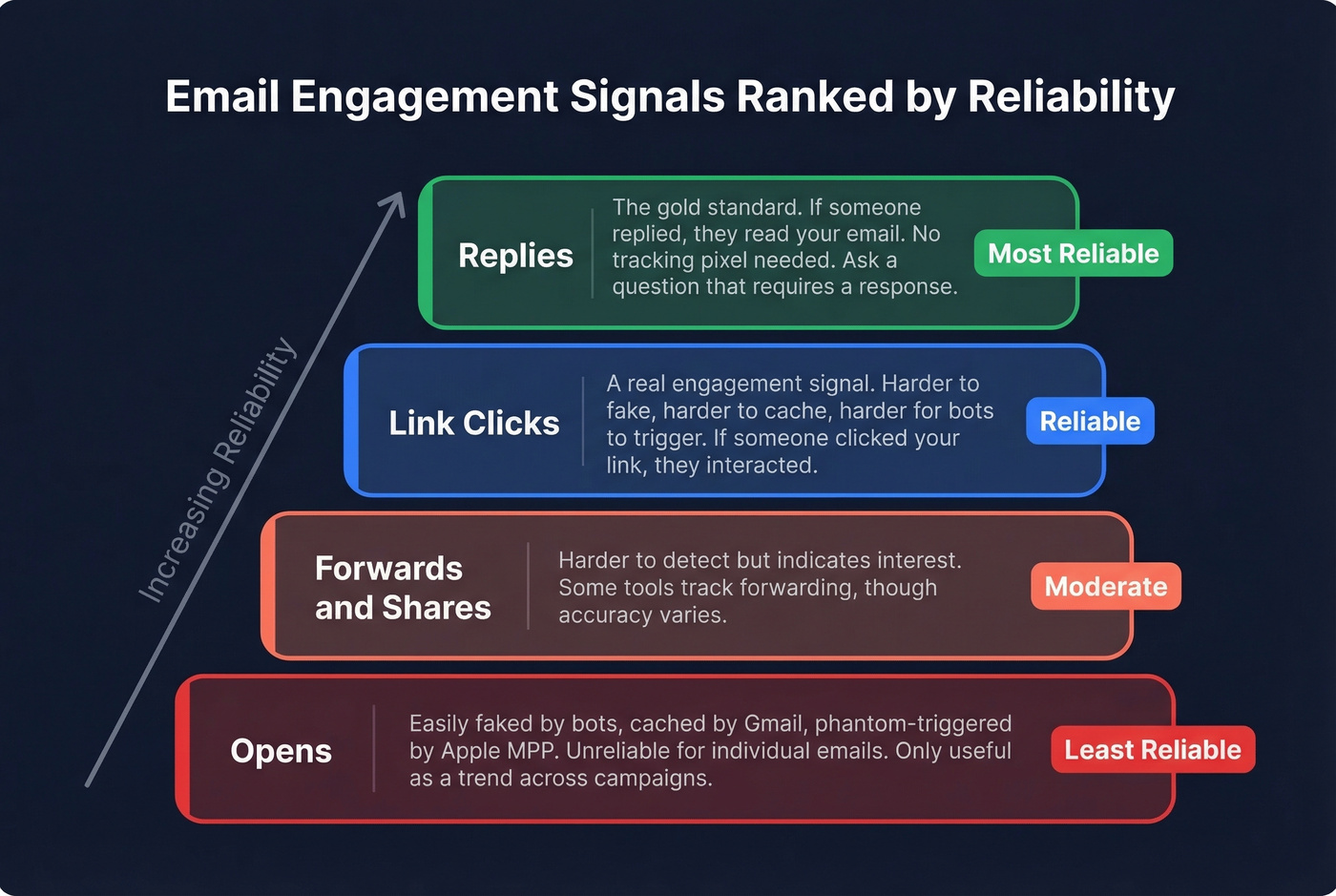
Clicks beat opens. If someone clicks a link in your email, that's a real engagement signal - harder to fake, harder to cache, harder for bots to trigger. Replies beat everything. If you need to confirm someone read your proposal, ask a question that requires a response.
For outbound at scale, the problem earlier in the chain matters more than tracking. A bounced email generates zero opens, zero clicks, zero replies. Gmail and Yahoo now enforce SPF/DKIM/DMARC authentication for bulk senders - another reason to focus on deliverability fundamentals over open tracking. Before you worry about whether someone opened your email, make sure you're emailing a valid address. Prospeo's 5-step email verification catches bad addresses, spam traps, and catch-all domains before they tank your sender reputation, with 98% accuracy across 143M+ verified emails. For the fundamentals, use this email deliverability guide and keep an eye on your email bounce rate.
Open tracking is broken by bots, caching, and Apple MPP. You know what isn't broken? Reaching the right person at a verified email address. Prospeo's 5-step verification and 7-day data refresh mean sub-4% bounce rates - so you spend zero time wondering if your email even arrived.
Bounce rates under 4% beat open tracking every time.
FAQ
Can I get read receipts on a personal Gmail account?
No. Read receipts require Google Workspace with admin enablement. Personal @gmail.com accounts have no native option - you'll need a third-party extension like Streak (free, unlimited tracking) or Mailtrack to get any open visibility.
Can someone tell I'm tracking their email?
Yes. Recipients can inspect the email's HTML source and spot the tracking pixel. Mailtrack's free plan adds a visible "Sent with Mailtrack" signature. Paid plans remove branding, but the embedded pixel remains detectable to anyone who looks.
Does email tracking work on iPhones?
Barely. Apple Mail Privacy Protection triggers false "opens" via machine image pre-fetching. You can't distinguish real opens from machine opens on Apple devices, and roughly half of all email opens come from Apple clients.
Why does my tracker show "opened" seconds after sending?
That's a bot or spam filter pre-fetching images, not a human reading your message. GMass data shows these false opens account for up to 6.5% of all tracked opens. Treat any open under 60 seconds as noise.
What if my emails aren't getting opened at all?
The problem is likely upstream - wrong address, spam folder, or poor sender reputation. Verify your contact list before investing in tracking. Bad data kills deliverability before tracking even enters the picture.