

How to Verify an Email Address in 2026 (5 Methods)
Your last campaign bounced 8%. The sender reputation you spent months building just took a hit, and recovery takes 15-45 days - if it recovers at all. One in six emails never reaches the inbox, with global inbox placement hovering around 84%. That gap between "sent" and "delivered" is where deals die.
Knowing how to verify an email address before you hit send is the single most effective way to protect your domain. It's also one of the most misunderstood steps in outbound - so let's clear it up.
"Verify an email address" means two things. First, confirming a mailbox exists and can receive mail - that's deliverability verification, and it's what most people need. Second, checking whether a suspicious email you received is legit - that's sender identity verification. We'll cover both here, with deliverability as the focus.
What You Need (Quick Version)
Verify one email right now? Use the manual SMTP method below, or a free single-check tool like Hunter or Verifalia.
Clean a list before a campaign? Bulk verification tools are what you want - ZeroBounce, NeverBounce, or Bouncer. There's a comparison table with pricing further down.
How Verification Works Under the Hood
Every email verification - manual or automated - follows the same layered pipeline. Understanding each layer helps you interpret results and spot tools that cut corners.
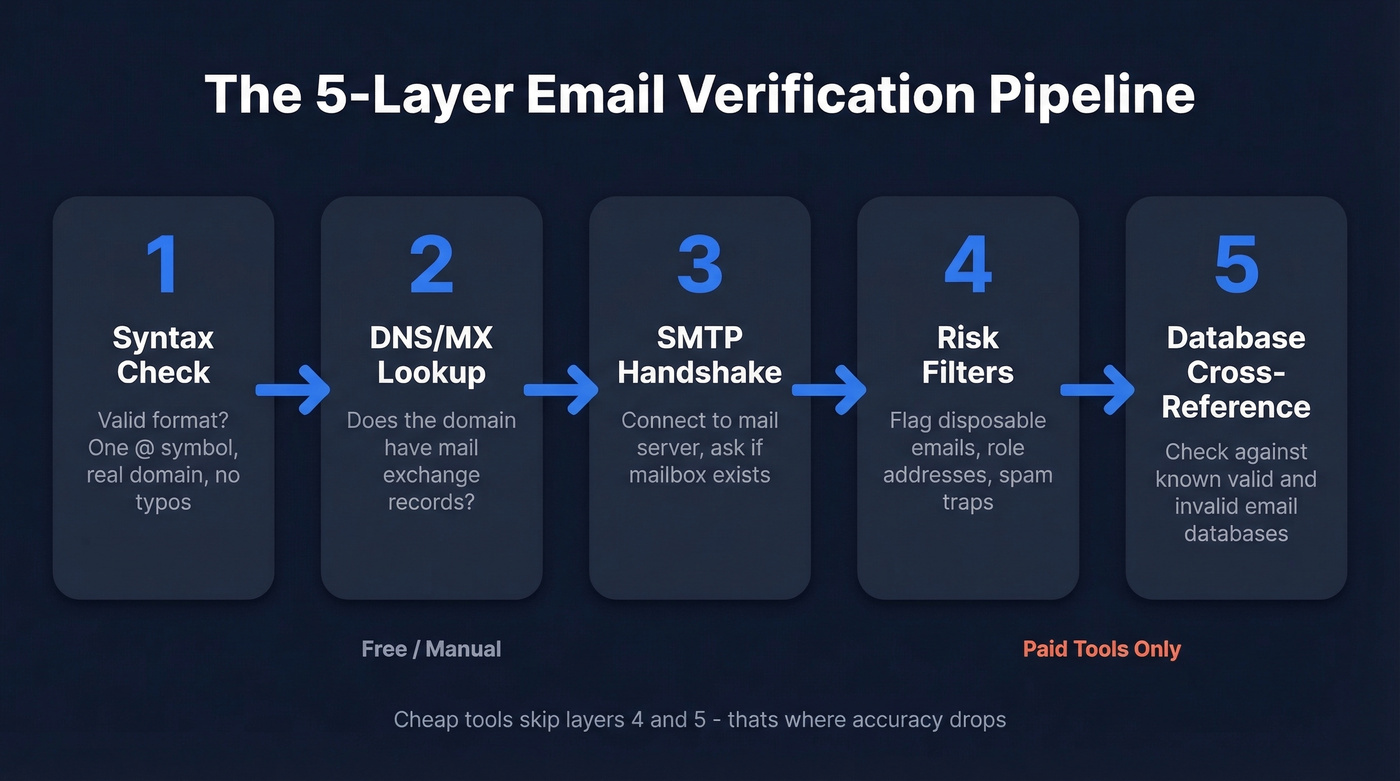
Layer 1: Syntax Check
Does the address follow RFC format? One @ symbol, a valid domain, no illegal characters? This catches typos like gmial.com or outllook.com. Roughly 15% of emails collected via signup forms contain typos, so this step alone filters real garbage.
Layer 2: DNS/MX Lookup
Does the domain have mail exchange records? No MX record means the domain can't receive email. Checking A/AAAA records isn't enough - a domain can host a website without accepting mail.
Layer 3: SMTP Handshake
This is the core. You connect to the mail server and simulate sending an email without actually sending one:
- Connect to the MX server on port 25
EHLO- introduce yourselfMAIL FROM:<test@yourdomain.com>- declare a senderRCPT TO:<target@theirdomain.com>- ask if the recipient existsQUIT- disconnect before sending any content
The server's response to RCPT TO tells you whether the mailbox exists.
Layer 4: Risk Filters
Flag disposable email providers, role-based addresses (info@, support@), and known spam traps.
Layer 5: Database Cross-Reference
Better tools check the address against their own database of known-valid and known-invalid emails for additional confidence. Cheap tools skip this step entirely.
SMTP Response Codes
| Code | Meaning | Action |
|---|---|---|
| 250 | OK / mailbox exists | Likely valid |
| 421 | Service unavailable | Retry later |
| 450 | Mailbox busy / greylisting | Retry in 15-30 min |
| 550 | Mailbox doesn't exist | Invalid - remove |
| 551 | User not local | Invalid or forwarded |
| 553 | Mailbox name not allowed | Invalid - remove |
One pitfall worth knowing: greylisting. Some servers intentionally return 450 on the first connection attempt to filter bots. Wait 15-30 minutes and retry. Legitimate verifiers handle this automatically. Manual checks require patience.
How to Verify an Email Manually
This is educational and useful for spot-checking a handful of addresses. It doesn't scale, but it teaches you what every verification tool does behind the scenes.
Check the Syntax
Look for the basics: one @ symbol, a valid domain after it, no spaces or illegal characters. Common typos to watch for: gmial.com, outllook.com, yahooo.com. If the syntax is wrong, you're done.
Look Up MX Records
Open a terminal and query the domain's mail exchange records.
Windows:
nslookup -type=MX domain.com
macOS/Linux:
dig MX domain.com
A valid response returns one or more MX records with priority values and server hostnames like aspmx.l.google.com. If you get "no answer" or an empty result, the domain doesn't accept email.
Run an SMTP Handshake
Connect to the highest-priority MX server on port 25:
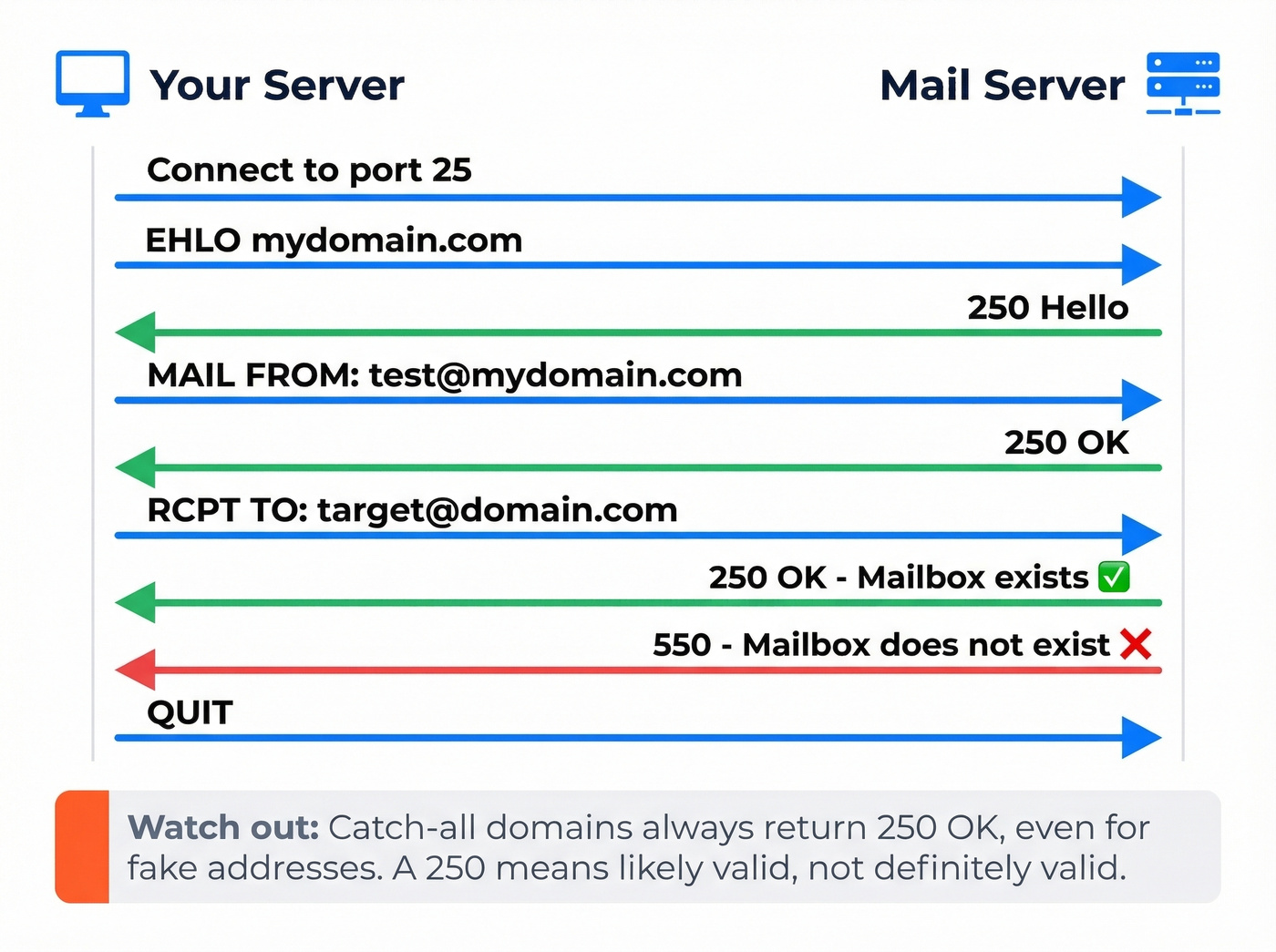
telnet mx-server.domain.com 25
Then walk through the conversation:
EHLO mydomain.com
MAIL FROM:<test@mydomain.com>
RCPT TO:<target@domain.com>
QUIT
If RCPT TO returns 250 OK, the mailbox likely exists. A 550 means it doesn't. Here's the thing - "likely" is doing real work in that sentence.
Know the Limits
Catch-all domains accept mail for any address, so RCPT TO always returns 250 - even for completely made-up mailboxes. Privacy-conscious servers deliberately obscure results. Some providers rate-limit or block SMTP probes entirely.
Manual verification is probabilistic, not definitive. Great for understanding the process and checking a few addresses. For anything beyond a handful, you need a tool.
How to Verify Emails with a Tool
Tools automate the same pipeline described above, but add proprietary layers - database lookups, catch-all detection algorithms, spam-trap databases - that manual methods can't replicate.
Single-Email Checks
Paste an email, get a result. Hunter and Verifalia both offer free single-email checking - perfect for spot-checking a contact before adding them to a sequence.
Bulk List Verification
Upload a CSV, get results in minutes. This is the pre-campaign workflow every outbound team should run. A cost-saving tip we've learned the hard way: filter out contacts who haven't engaged in 6+ months before uploading. No point burning verification credits on addresses you're about to sunset anyway.
API and Real-Time Verification
Verify at the point of capture - signup forms, CRM imports, Zapier workflows. This is the cleanest approach because bad data never enters your system. If your tool verifies emails before export, verification isn't a separate step. It's already done.
If you're building this into your outbound stack, pair verification with an email deliverability checklist so you don't fix bounces but miss inboxing.

Prospeo runs a 5-step verification pipeline - syntax, MX, SMTP, catch-all handling, and spam-trap removal - on every email before it ever reaches your list. With 143M+ pre-verified emails refreshed every 7 days, you skip the entire verification workflow this article describes. 98% accuracy. Under 2% bounce rate. $0.01 per email.
Stop cleaning lists. Start with clean data.
Email Verification Tools Compared
We've run lists through most of these tools over the past year. The pricing table below reflects what you'll actually pay, not what the marketing page implies.
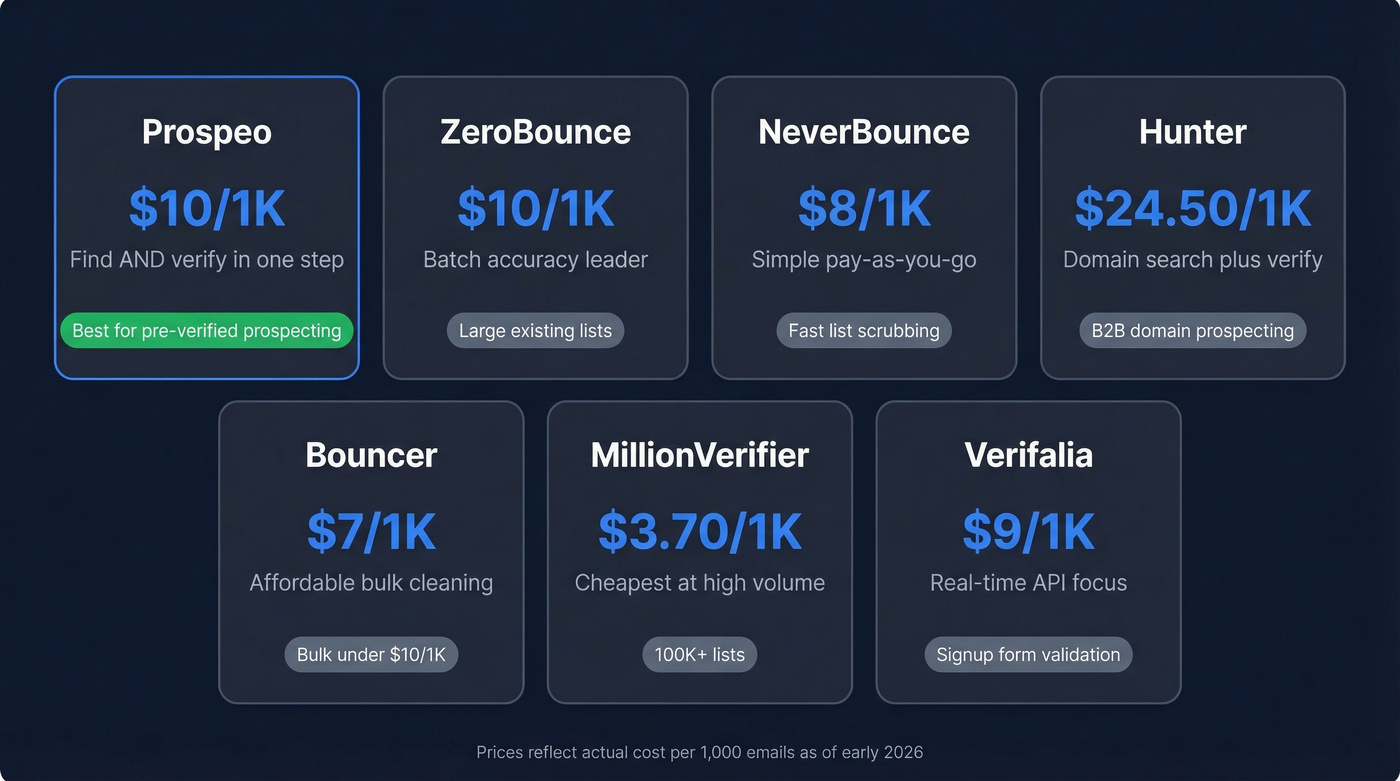
| Tool | Free Tier | Cost per 1K | Key Strength | Best For |
|---|---|---|---|---|
| ZeroBounce | 100/mo | $10/1K | Batch accuracy | Cleaning large existing lists |
| NeverBounce | Free trial available | $8/1K | Simple pay-as-you-go | Fast list scrubbing |
| Hunter | 100 verifications/mo | ~$24.50/1K | B2B domain search + verify | Domain-based B2B prospecting |
| Bouncer | Pay-as-you-go | $7/1K | Affordable bulk | Bulk cleaning under $10/1K |
| MillionVerifier | No meaningful free tier | ~$3.70/1K | Cheapest at scale | High-volume lists (100K+) |
| Verifalia | Free single-email checker | ~$9/1K | Real-time API | Signup form validation |
For teams that need to find AND verify emails, Prospeo is the clear winner - its 143M+ pre-verified email database with a 7-day refresh cycle means you skip the verification step entirely. The 5-step verification process includes catch-all handling, spam-trap removal, and honeypot filtering, delivering 98% email accuracy.
Got a 50K-row CSV that needs cleaning before tomorrow's campaign? ZeroBounce handles it well. Accuracy in the 95-99%+ range, solid reporting, and 100 free verifications per month with a business domain.
NeverBounce keeps things simple: no credit systems, no complicated tiers. Pay-as-you-go at $8/1K with clean/dirty/catch-all verdicts. For teams that just need a list scrubbed before hitting send, it's hard to beat on simplicity. Bouncer is the budget pick for bulk work at $7/1K with solid accuracy, while MillionVerifier undercuts everyone at $3.70/1K - the right choice if you're cleaning six-figure lists regularly and can tolerate slightly less granular reporting.
If you're evaluating alternatives, start with our breakdown of Bouncer alternatives and Hunter alternatives before you commit.
Skip the "free" email verifiers that only exist to capture your email address. Most give you 3-100 free checks, then gate everything useful behind a paywall. Check the free tier limits above before committing time to any tool.
The Catch-All Problem
You pay to verify a list and the tool shrugs and labels 30% of your addresses "unknown." That's not verification - that's a refund request.
Here's what's happening. Catch-all domains are configured to accept mail for any address at that domain. Send to completely-fake-name@theirdomain.com and the server returns 250 OK. The standard SMTP handshake can't distinguish real mailboxes from nonexistent ones on these domains, and in our testing, catch-all domains account for 20-30% of B2B lists. Most tools just punt on them.
To detect catch-all domains manually, test a random invalid address. If RCPT TO:<randomgarbage123@domain.com> returns 250, the domain is catch-all. Most basic verifiers stop here and label the result "unknown."
The operational fix is risk-based sending. Send to catch-all addresses in smaller test batches, monitor bounces closely, and re-verify frequently. Catch-all verification is one of the biggest gaps in the space - most teams want go/no-go verdicts, not "unknown" labels.
If more than 25% of your verified list comes back "unknown," your verifier is the problem, not the data. Switch to a tool with dedicated catch-all handling or accept that you're paying for incomplete answers.
If you keep seeing "unknown" and bounces, it helps to audit your email bounce rate patterns and the underlying causes.
Best Practices for Ongoing Verification
Email verification isn't a one-time event. After four weeks, roughly 2% of a previously verified list will be invalid. People change jobs, domains expire, mailboxes get deactivated. If you're not re-verifying, you're slowly poisoning your sender reputation.
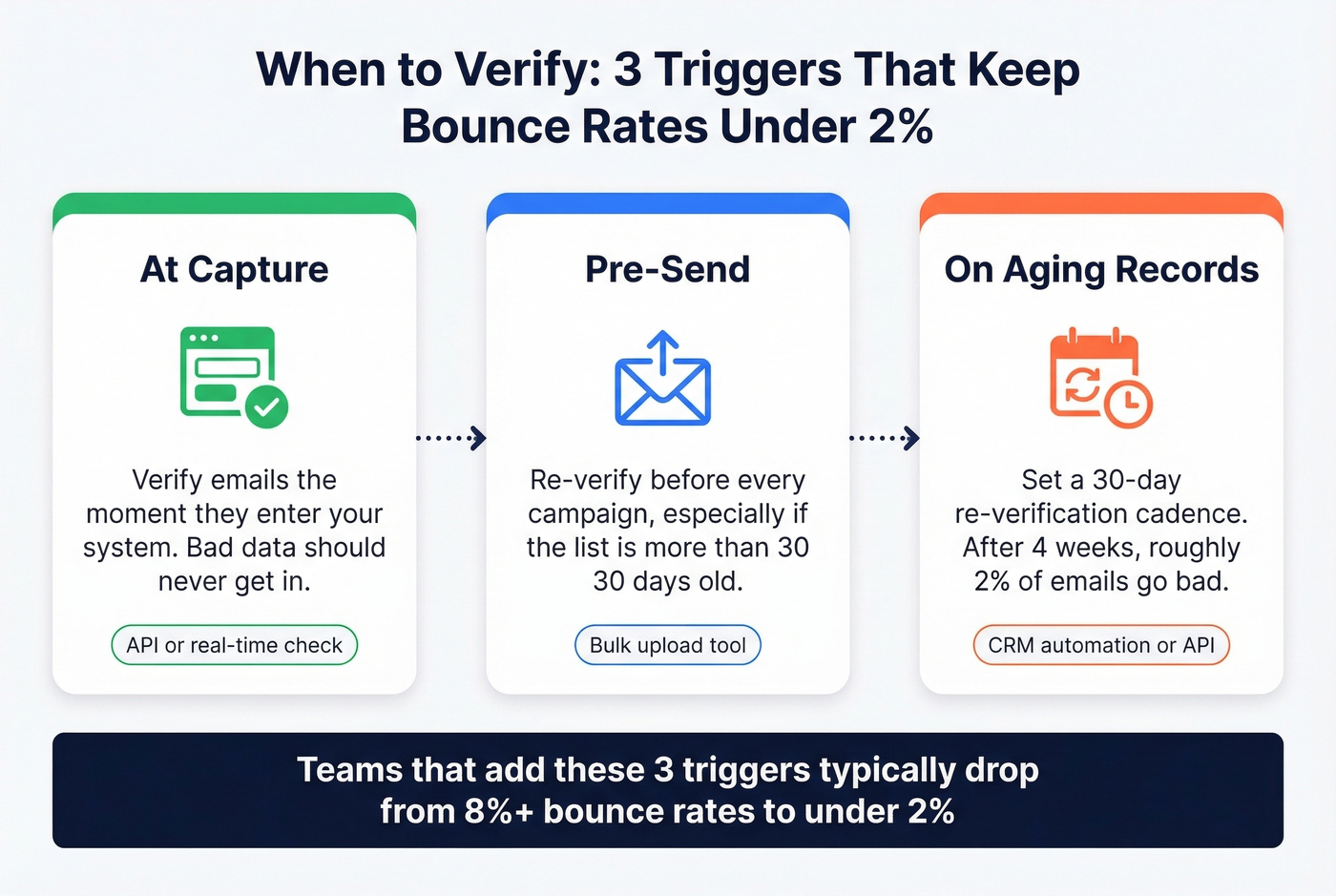
We've seen teams with 8%+ bounce rates recover to under 2% just by adding a pre-send verification step. Three triggers to build into your workflow:
- At capture - verify emails at the point of entry. Bad data should never enter your system.
- Pre-send - always re-verify before large campaigns, especially if the list is more than 30 days old.
- On aging records - set a 30-day re-verification cadence for active lists. Automate this through your CRM or verification tool's API.
If you're trying to recover after a rough send, follow a step-by-step plan to improve sender reputation before scaling volume again.
Bounce-Rate Targets
| Threshold | Status | Action |
|---|---|---|
| < 2% | Healthy | Maintain cadence |
| 2-5% | Warning | Re-verify immediately |
| > 5% | Red flag | Pause sends, audit data |
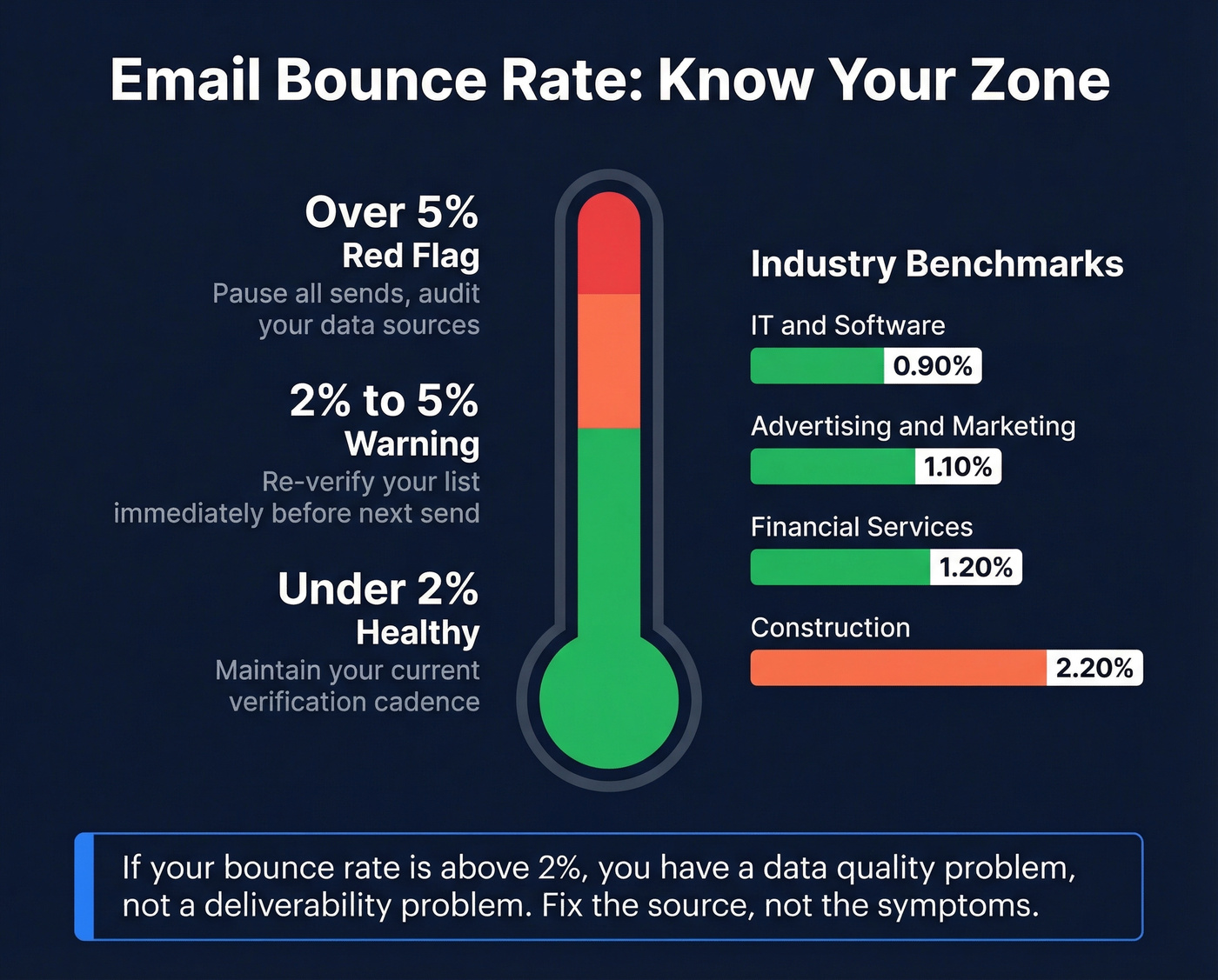
For context, here are industry benchmarks compiled across major ESPs:
| Industry | Avg Bounce Rate |
|---|---|
| IT / Software | 0.90% |
| Financial Services | 1.20% |
| Advertising / Marketing | 1.10% |
| Construction | 2.20% |
Look, if your bounce rate is above 2%, you have a data quality problem, not a deliverability problem. Fix the source, not the symptoms.
Email Authentication Setup
Verification confirms the address exists. Authentication confirms you're allowed to send from your domain. You need both.
SPF publishes a DNS record listing which servers can send email on your domain's behalf. DKIM adds a cryptographic signature to outgoing messages, proving they haven't been tampered with. DMARC ties SPF and DKIM together with a policy that tells receiving servers what to do when checks fail.
Gmail, Yahoo, and Microsoft all require SPF + DKIM + DMARC for bulk senders. Yet adoption remains surprisingly low: only 55.4% of senders have SPF configured, 58.5% have DKIM, and just 42.5% have DMARC. Use MXToolbox or Google Postmaster Tools to check your own setup and get fix recommendations. Dmarcian's domain checker is another solid free option.
If you want to validate your setup end-to-end, follow our guide on how to verify DKIM is working and use a clean SPF record example to sanity-check syntax.
Spotting Suspicious Sender Emails
If you're here because you received something that looks off, here's the quick checklist:
- Hover over the display name - the "From" field can say anything. The actual email address underneath is what matters.
- Check for character substitution - attackers swap
rnform,1forl, or.cofor.com. Look closely. - Inspect headers - view the full message headers and check the
Return-PathandReply-Tofields. If they don't match the sender's domain, it's suspicious. - WHOIS the domain - a domain created last week sending you an "invoice" is a red flag.
- When in doubt, call - use a known phone number, not one from the email, to verify directly.
FAQ
Can you verify an email address without sending a message?
Yes. The SMTP handshake checks whether a mailbox exists by issuing a RCPT TO command without delivering any content. Verification tools automate this at scale, adding database lookups and risk scoring. No email is sent during the process.
How accurate are email verification tools?
Top tools claim 95-99% accuracy, but catch-all domains remain the real limitation - most tools label them "unknown." Prospeo's 5-step verification with dedicated catch-all handling pushes accuracy to 98%, outperforming standard SMTP-only checkers.
How often should you re-verify your email list?
Every 30 days minimum. Email lists decay at roughly 2% per month as people change jobs and mailboxes get deactivated. Always re-verify before large sends, even if the list was clean a few weeks ago.
What's the difference between verification and validation?
Validation checks format and syntax - does the address follow RFC rules? Verification goes further, confirming the mailbox actually exists via server-level SMTP checks. Most people mean the full server-level check when they ask about verifying an address.
Is there a free way to verify email addresses?
Yes, but with limits. Hunter, Verifalia, and ZeroBounce offer 25-100 free checks per month. Prospeo's free tier includes 75 emails with full verification built in. For a single address, the manual SMTP method costs nothing. Bulk verification requires a paid plan.
Manual SMTP checks don't catch catch-all domains. Cheap tools skip database cross-referencing. Prospeo's proprietary infrastructure handles both - plus honeypot filtering and spam-trap removal - across 300M+ profiles. Teams using Prospeo consistently see bounce rates drop below 4%, with many under 2%.
Get emails that are already verified before you hit export.