

How to Verify Email Authenticity in 2026 (Fast)
Your CEO just emailed asking you to wire $50,000 to a new vendor. The email looks right - correct signature, correct tone, even the right thread. But something feels off. An Illinois agency didn't trust that instinct and lost $6.85M in fraudulent wire transfers over two months. With 91% of phishing attacks hiding behind fake sender identities, knowing how to verify email authenticity isn't a nice-to-have. It's a core professional skill.
What You Need (Quick Version)
- To check if a message is legitimate - open email headers, look for SPF/DKIM/DMARC = PASS.
- To check if an email address is real - use a verification tool like Prospeo, Hunter, or ZeroBounce.
- If in doubt - verify the sender through a separate channel. Call them, Slack them, text them. Never trust the email alone.
Two Problems, One Phrase
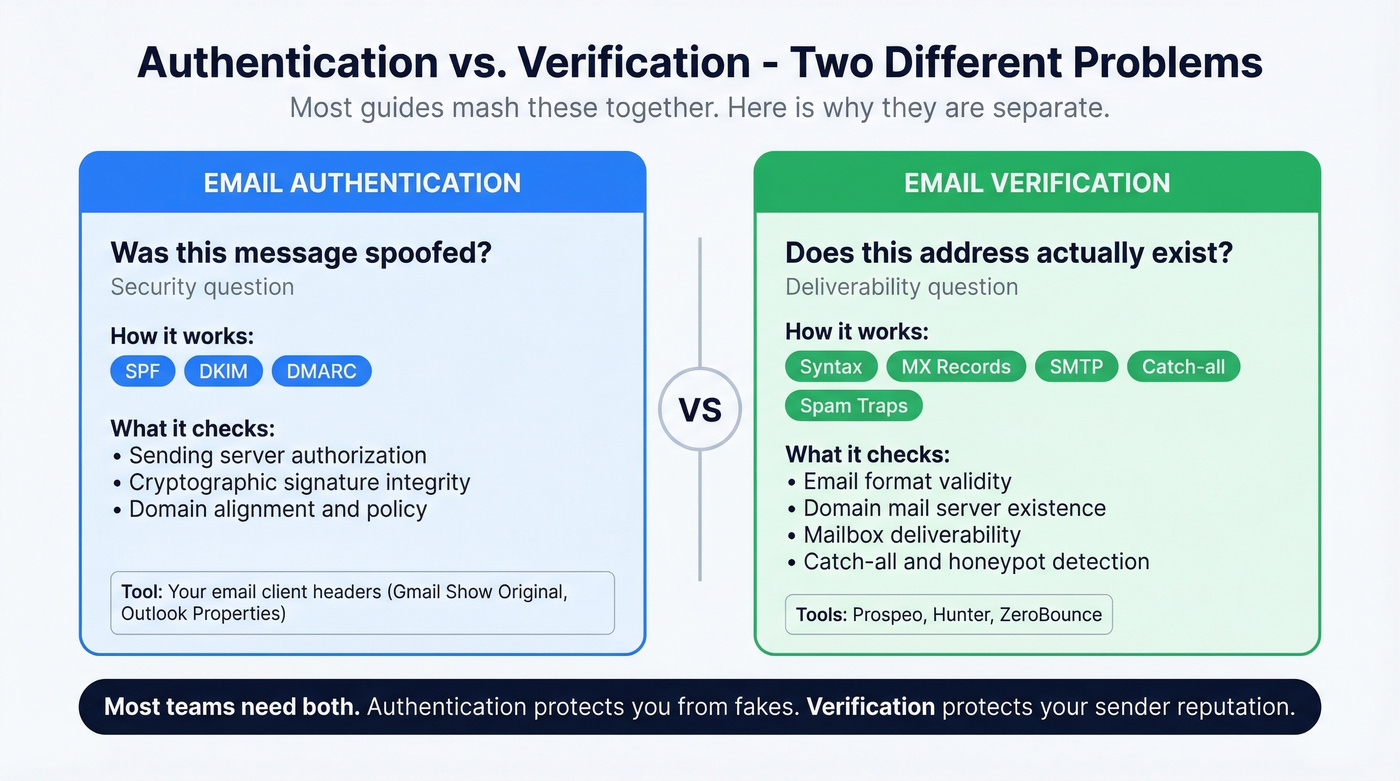
"Email authenticity" means two completely different things depending on who's asking. Is this message spoofed? is a security question - answered by reading headers and checking authentication protocols. Does this address actually exist and accept mail? is a deliverability question - answered by verification tools.
Most guides mash these together. We won't.
Quick Triage for Suspicious Emails
You don't need to be technical to catch most fakes. Follow this Verify / Inspect / Search framework:
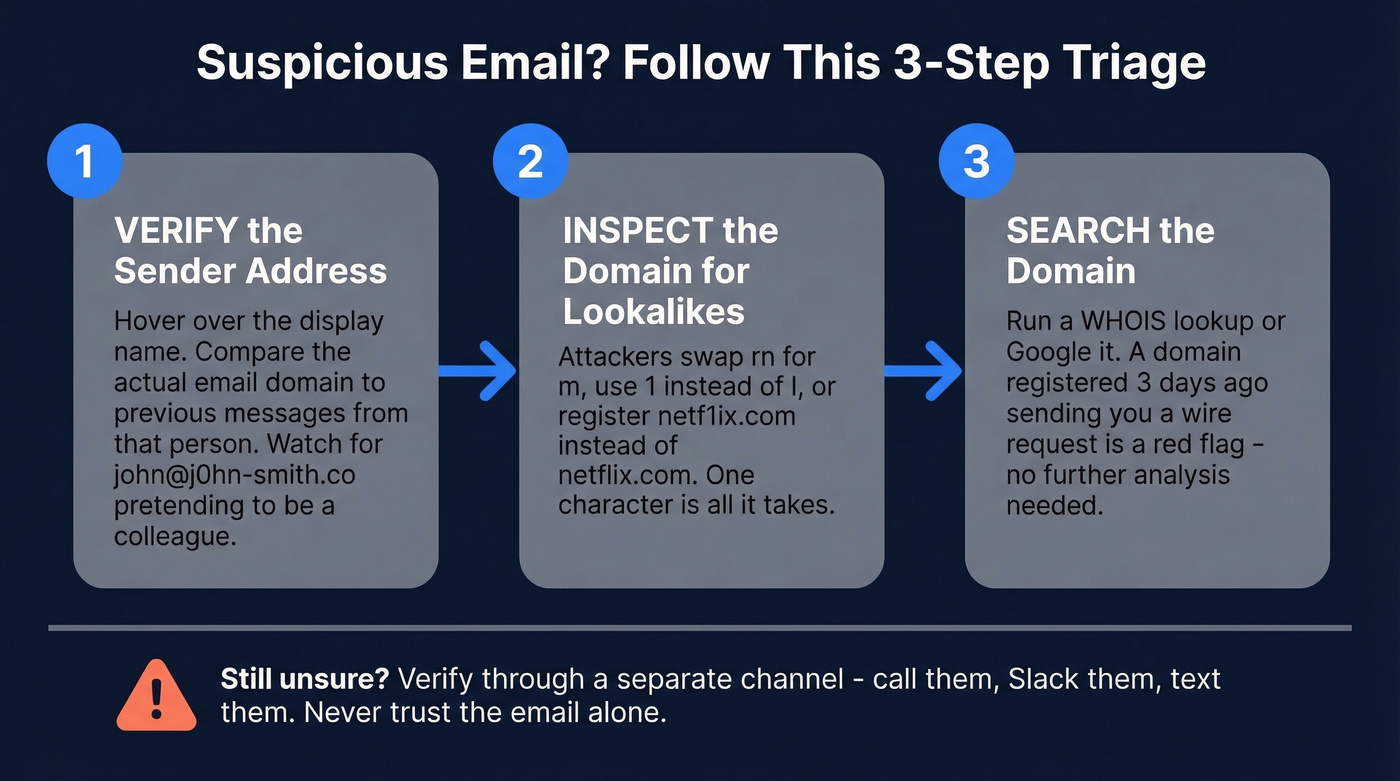
- Verify the sender address. Hover over the display name. "John Smith" might actually be
john@j0hn-smith.co- not your colleague's real domain. Compare it to previous emails from that person. - Inspect the domain for lookalikes. Attackers swap
rnform, use1instead ofl, or registernetf1ix.cominstead ofnetflix.com. One character is all it takes. - Search the domain. Run a WHOIS lookup or just Google it. A domain registered three days ago sending you a wire request doesn't need further analysis.
How to Check Email Headers
Here's the thing: stop Googling "is this email real" and learn to read one header field. It takes less time than writing the search query.
How to open headers:
- Gmail: Open the email, click the three dots, then "Show original." You'll see the full header and authentication summary.
- Outlook: File, then Properties - look in the "Internet headers" box at the bottom.
- Yahoo Mail: Three dots, then "View raw message."
What to look for: Scroll to the Authentication-Results field. That's the single most important line. You want to see spf=pass, dkim=pass, and dmarc=pass. If any say fail or none, treat the email with suspicion.
In our experience, the Authentication-Results field catches 90% of what you need to know. One r/APStudents user put it well: if SPF and DKIM show PASS and the email came from the correct domain, you can be "pretty confidently sure" it's authentic - though it doesn't rule out a compromised account.
One caveat: if you see dkim=none in an intermediate header, don't panic immediately. Per Microsoft's documentation, an internal gateway or spam filter can generate that result even when DKIM is properly configured. Check the final destination header - that's the one that matters.

Reading headers catches spoofed messages. But verifying the address itself - before you hit send - is what saves your domain reputation. Prospeo's 5-step verification checks syntax, MX records, SMTP response, catch-all status, and spam traps in one pass. 98% accuracy, 7-day data refresh, $0.01 per email.
Don't send another campaign until every address is verified.
Legit vs. Phishing - Side-by-Side
A legitimate email:
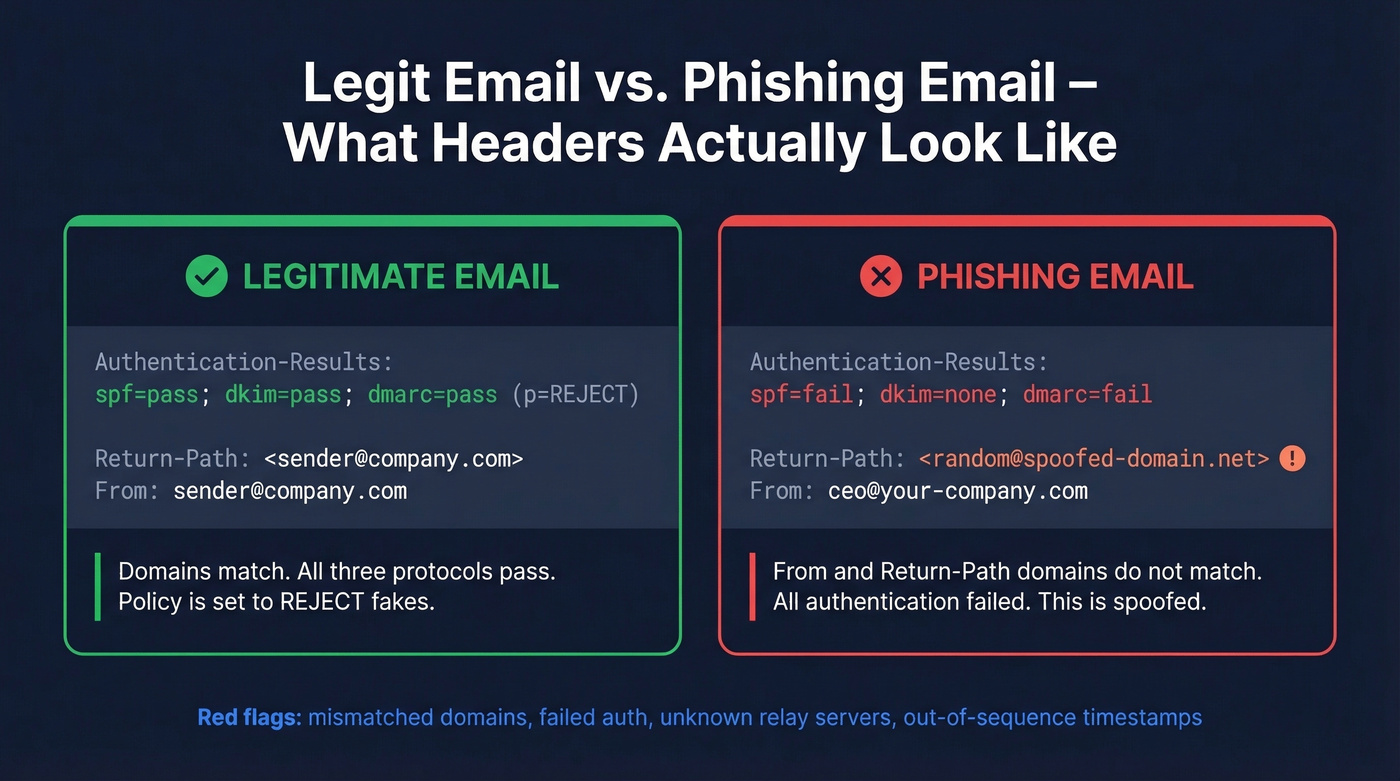
Authentication-Results: spf=pass; dkim=pass; dmarc=pass (p=REJECT)

Return-Path: <sender@company.com>

From: sender@company.com
A phishing email:
Authentication-Results: spf=fail; dkim=none; dmarc=fail action=reject

Return-Path: <random@spoofed-domain.net>

From: ceo@your-company.com
The red flags jump out once you know where to look: mismatched From and Return-Path domains, failed authentication across the board, and an unknown relay server in the Received chain. Out-of-sequence timestamps are another giveaway - if the email supposedly traveled backward in time through servers, something's wrong.
What SPF, DKIM, DMARC, and BIMI Mean
| Protocol | What It Does | Adoption Rate |
|---|---|---|
| SPF | Lists approved sending servers | 55.4% |
| DKIM | Cryptographic signature verification | 58.5% |
| DMARC | Alignment policy + failure handling | 42.5% |
| BIMI | Brand logo display when DMARC is enforced | 4.57% (valid records) |
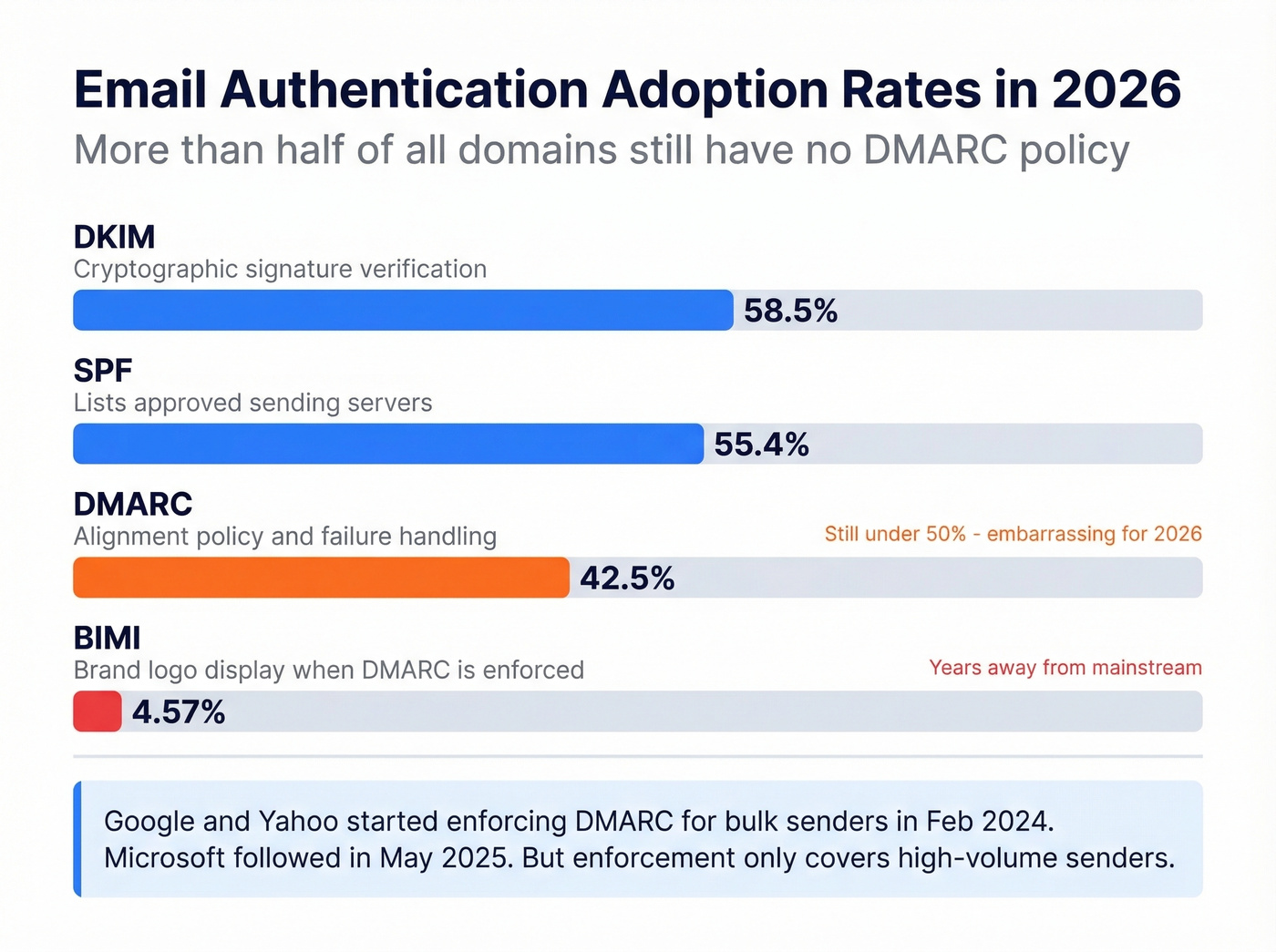
DMARC at 42.5% is embarrassing for the industry in 2026. More than half of all domains still don't tell receiving servers what to do when authentication fails. Google and Yahoo started enforcing bulk sender requirements in February 2024, and Microsoft followed in May 2025 - but enforcement only covers high-volume senders.
One operational pitfall worth knowing: SPF has a 10-DNS-lookup limit. Exceed it and your SPF record breaks silently - a common issue for companies using multiple SaaS tools that each require their own SPF include. We've watched teams debug deliverability problems for weeks before discovering a bloated SPF record was the culprit. (If you're troubleshooting this, start with a clean SPF record and work outward.)
BIMI is the future of visual trust. If you see a brand logo next to an email in your inbox, that sender has DMARC enforcement at p=reject or p=quarantine and a valid BIMI record in place. But with 90.85% of domains still lacking any BIMI record, we're years away from widespread adoption.
SPF/DKIM/DMARC passing proves the domain is verified. It doesn't prove the person behind the account is trustworthy. A compromised account sends emails that pass all three checks perfectly. If the request involves money, credentials, or contracts, pick up the phone. No protocol replaces a 30-second call.
Verifying the Address Itself
Now that you know how to confirm a message wasn't spoofed, what about verifying the address itself? This is a different problem entirely, and it matters most for B2B outreach teams, sign-up form validation, and list hygiene.
We've seen teams build a list of 10,000 leads, launch a campaign, and watch 3,500 emails bounce. That's a 35% bounce rate - enough to tank your domain reputation for months. Verification tools prevent this by checking syntax, MX records, SMTP response, catch-all status, and spam-trap presence before you send a single email. (If you're measuring impact, track your email bounce rate before and after verification.)
Prospeo's 5-step verification process covers all of those checks, including catch-all handling and spam-trap removal, at 98% email accuracy with a 7-day data refresh cycle. The free tier gives you 75 email verifications per month, and paid plans run about $0.01 per email - enough to verify a serious outbound list without a serious budget. If you're doing this at scale, pair verification with an email deliverability guide so you don't fix one issue and miss the next.
Hunter offers up to 100 free verifications per month and works well for quick one-off checks. ZeroBounce runs about $80 per 10,000 emails and provides detailed result breakdowns for teams that want granular reporting. Skip ZeroBounce if you're just checking a handful of addresses - it's built for bulk. (If you're comparing tools, see our breakdown of Hunter alternatives and Bouncer alternatives.)
Teams using unverified lists see 35%+ bounce rates and wrecked sender reputations. Prospeo's verification catches invalid addresses, spam traps, and honeypots before they damage your domain. 75 free verifications per month, no contracts, no sales calls required.
Protect your domain - verify every email before it leaves your outbox.
Phishing and Spoofing Trends in 2026
The phishing playbook has evolved far beyond misspelled Nigerian prince emails. Barracuda predicts that by the end of 2026, 90%+ of credential compromise attacks will be enabled by phishing kits - pre-built toolkits that doubled in number during 2025. These kits now account for 60%+ of all phishing incidents, and each one can launch millions of attacks.
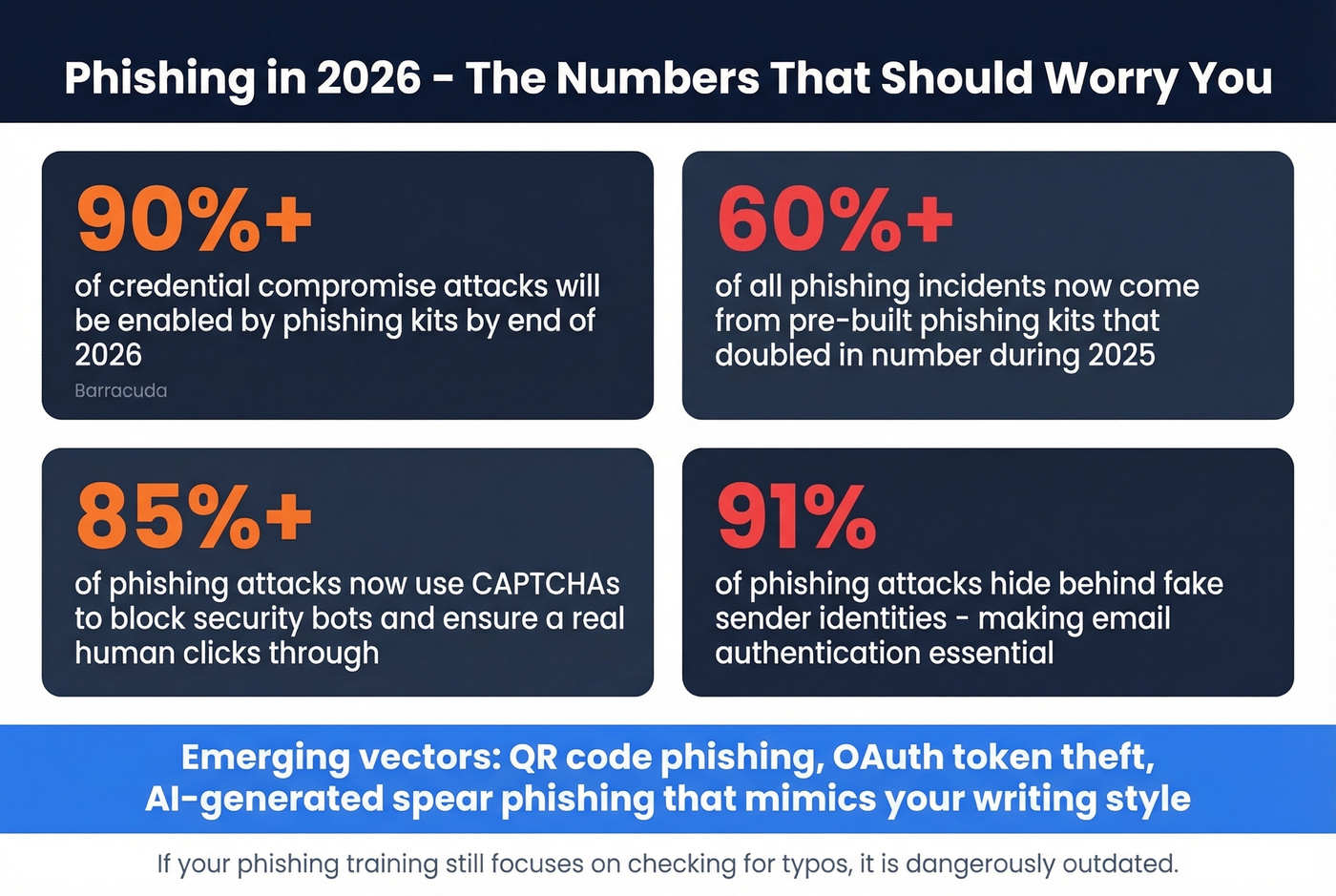
Look, the newer vectors are genuinely harder to spot. QR code phishing embeds malicious URLs in images your email scanner can't parse. OAuth abuse steals access tokens without ever needing your password. AI-generated spear phishing produces emails that match your writing style and reference real conversations. And 85%+ of phishing attacks now use CAPTCHAs to ensure a human - not a security bot - clicks through.
If your phishing awareness training still focuses on checking for typos, it's dangerously outdated. For outbound teams, this is also why you should lock down your sending setup (including tracking domain hygiene) before you scale volume.
FAQ
Can I verify authenticity from a PDF or screenshot?
No. Without original headers, you can't confirm SPF/DKIM/DMARC results. A PDF only shows rendered content - anyone can fake that in minutes. If you need forensic proof, request the original .eml file from the sender or their IT team. This question comes up constantly in forums like r/cybersecurity_help, and the answer is always the same: you need the raw headers.
Does SPF PASS mean the email is safe?
SPF PASS means the sending server is authorized by the domain - not that the person behind the account is trustworthy. A compromised account sends emails that pass SPF, DKIM, and DMARC perfectly. Always verify high-stakes requests through a second channel like a phone call or Slack message.
What's the difference between verification and authentication?
Authentication confirms a message wasn't spoofed in transit via SPF, DKIM, and DMARC. Verification confirms an email address is real and deliverable by checking syntax, MX records, SMTP response, catch-all status, and spam traps. They solve different problems, and most teams need both.
How do I verify a sender when headers look clean?
Even when authentication headers all show PASS, the account itself may be compromised. Contact the sender through an independent channel - a phone call, a Slack message, or an in-person conversation. This is especially critical for any request involving financial transactions, credential sharing, or contract changes. Let's be honest: a 30-second phone call is cheaper than a $6.85M wire fraud.