

How to Warm Up an IP Address Without Burning It
You just migrated to a dedicated IP. Day 3, your bounce rate hits 12% and Gmail is deferring everything. We've seen this play out dozens of times, and the root cause is almost always the same: the warmup got skipped, rushed, or the first sends went to a dirty list on an IP with zero reputation to absorb the damage.
Getting IP warmup right is the difference between inbox placement and the spam folder. Here's how to do it without torching your sender reputation in the process.
What You Need (Quick Version)
- Under 100K emails/month and staying on a shared IP? You probably don't need IP warmup at all.
- Before warmup: SPF, DKIM, DMARC, rDNS, verified list.
- During warmup: follow the conservative schedule below. Keep hard bounces under ~3% and complaints as close to zero as possible.
- If things break: cut volume 50%, check blocklists, review bounce codes.
Do You Actually Need a Dedicated IP Warmup?
Most senders don't. Shared IPs are pre-warmed by your ESP - you inherit pooled reputation and can send immediately. A dedicated IP only makes sense once you're consistently pushing 100,000+ emails per month, with optimal results at 300K+.
Roughly 90% of senders fall into the shared-IP bucket. The rest of this guide is for the 10% who genuinely need a dedicated IP and need to build its reputation from scratch. If that's not you, skip this and save yourself the headache.
What IP Warmup Actually Does
A new IP is like a credit score with no history. ISPs don't trust it and don't distrust it - they just don't know it yet. The warmup process builds that history by sending small, gradually increasing volumes to engaged recipients who open, click, and don't complain.
Most ISPs store reputation data for about 30 days. Stop sending for a month and you're essentially starting over.
IP Reputation vs Domain Reputation
These are two separate tracks that work in parallel. Your IP reputation resets when you switch IPs. Your domain reputation persists across IP changes, ESP migrations, and infrastructure swaps - it follows you everywhere. If you want a deeper breakdown, see IP Reputation vs Domain Reputation.
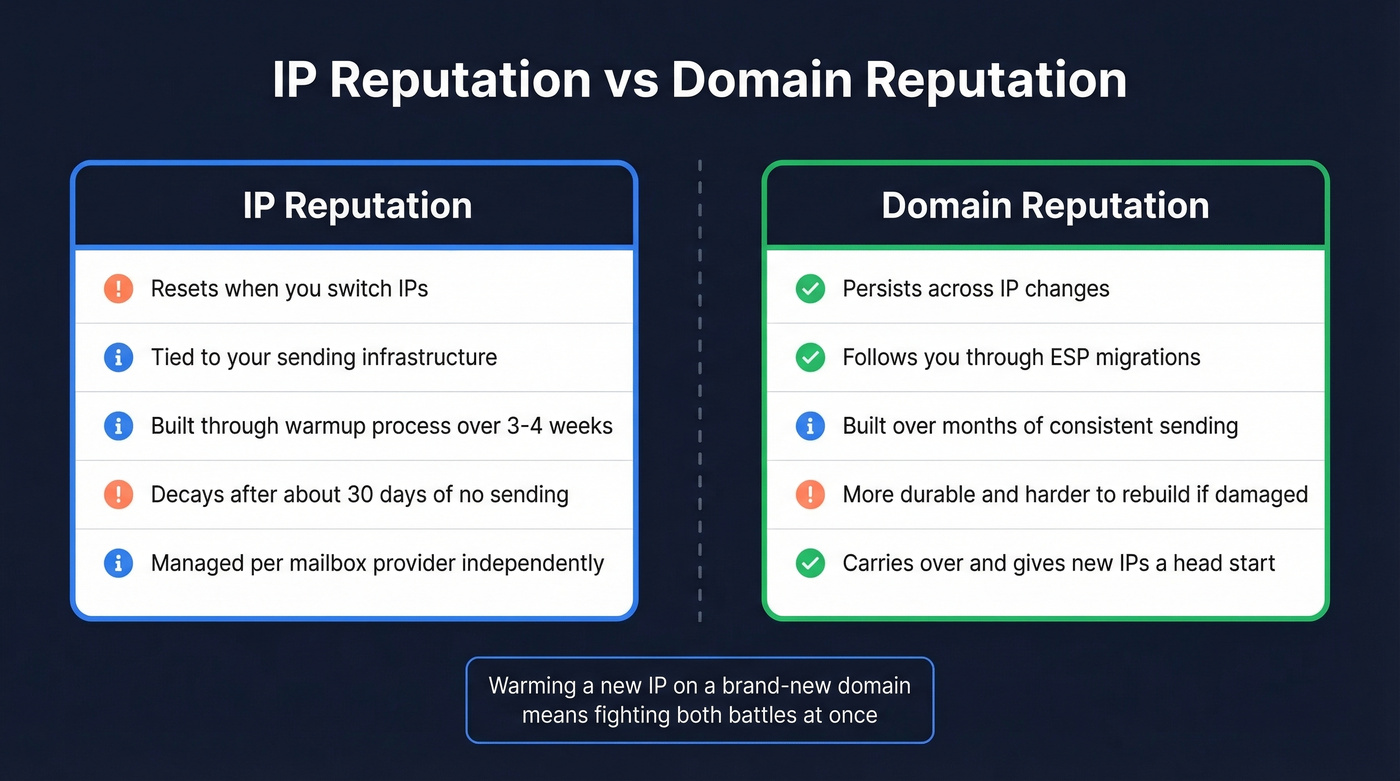
Warming a new IP on a brand-new domain means fighting two battles at once. If you're migrating ESPs, your existing domain reputation carries over and gives the new IP a head start, which is a real advantage. If you're launching a fresh domain for outbound, warm it with transactional emails first - receipts, account confirmations, password resets - before ramping cold outreach. These high-engagement messages build positive signals fast. And avoid recently purchased or expired domains; they can come with baggage that quietly kills email deliverability before you even notice.

The #1 warmup killer is sending to unverified addresses on a cold IP. One bounce spike above 3% and ISPs throttle you for weeks. Prospeo's 5-step verification - with catch-all handling, spam-trap removal, and honeypot filtering - ensures your first sends land clean. At ~$0.01/email with 98% accuracy, it's cheaper than rebuilding a burned IP.
Clean your list before you send a single warmup email.
Pre-Warmup Checklist
Don't touch the send button until every item here is locked down:
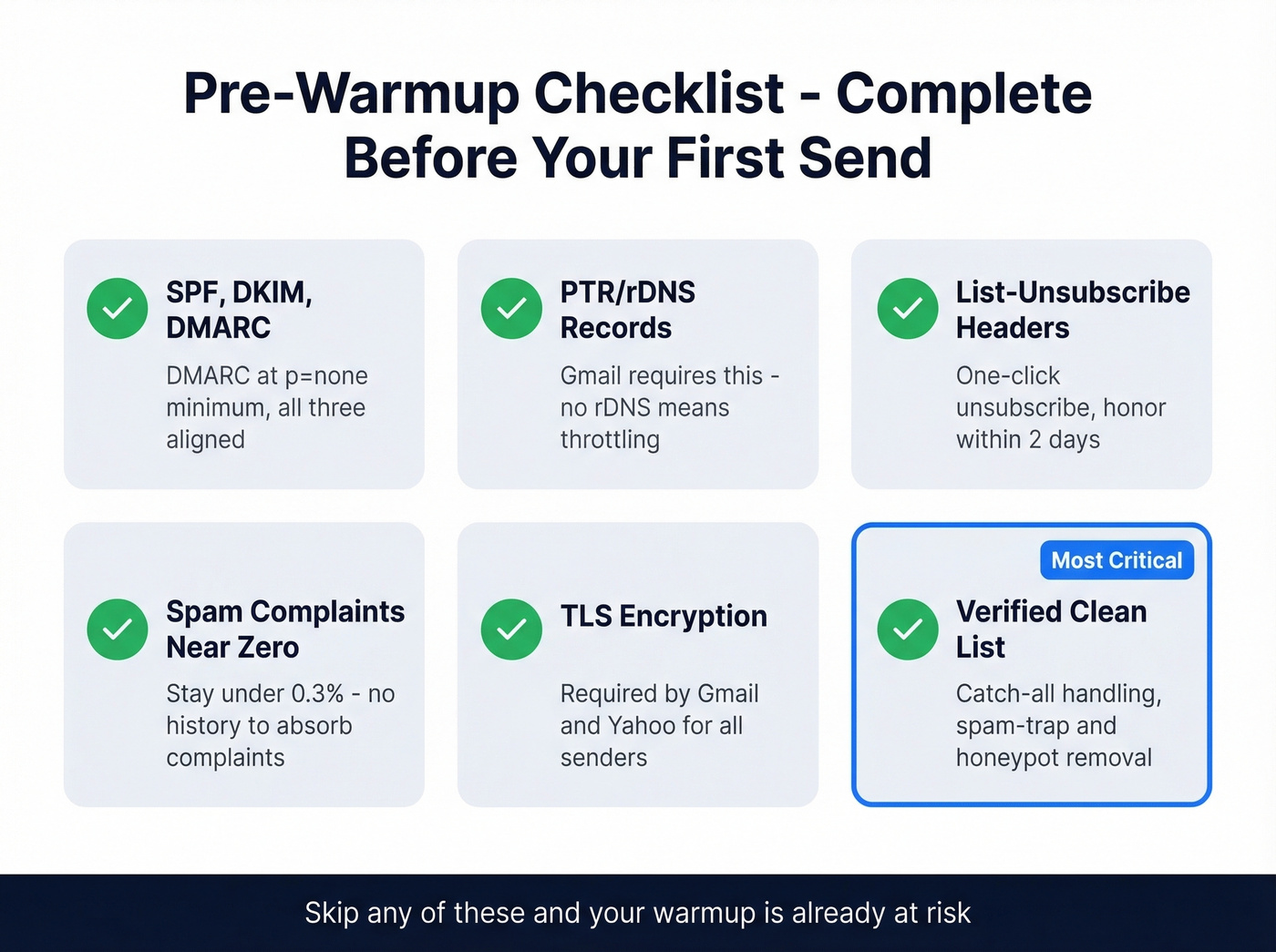
- SPF, DKIM, and DMARC configured - DMARC at
p=noneminimum, all three aligned. (If you need the nuance, start with DMARC alignment.) - PTR/rDNS set for your sending IP - Gmail expects this. No PTR/rDNS means throttling or outright blocking.
- List-Unsubscribe and one-click unsubscribe headers - mandatory under current Google/Yahoo bulk sender mandates. Honor unsubscribes within 2 days.
- Spam complaint rate under control - stay under 0.3% (the hard ceiling). During warmup, keep complaints as close to zero as possible. No positive history exists to offset complaints on a cold IP.
- TLS encryption enabled - required by Gmail and Yahoo.
- Clean, verified email list - this is the one that kills most warmups. Run your list through a verification tool with catch-all handling and spam-trap removal before the first send. Prospeo's 5-step verification catches the stuff that spikes bounce rates on cold IPs - honeypots, invalid addresses, and catch-all domains that silently eat your reputation.
You're spending 3-4 weeks carefully warming an IP - don't waste it on contacts that bounce. Prospeo refreshes 300M+ profiles every 7 days (not the 6-week industry average), so the emails you pull today are still valid when your warmup hits full volume next month. 15,000+ companies trust this data to protect their sender reputation.
Fresh data protects the IP reputation you just spent a month building.
Day-by-Day IP Warmup Schedule
Conservative Schedule (Recommended)
Adapted from Braze's documented warmup schedules, this is the one we recommend for most teams. Start at 50 emails/day, double every 3 days, and monitor metrics at each step. Some practitioners start at 100/day, but 50 is safer for a truly cold IP with no sending history whatsoever.
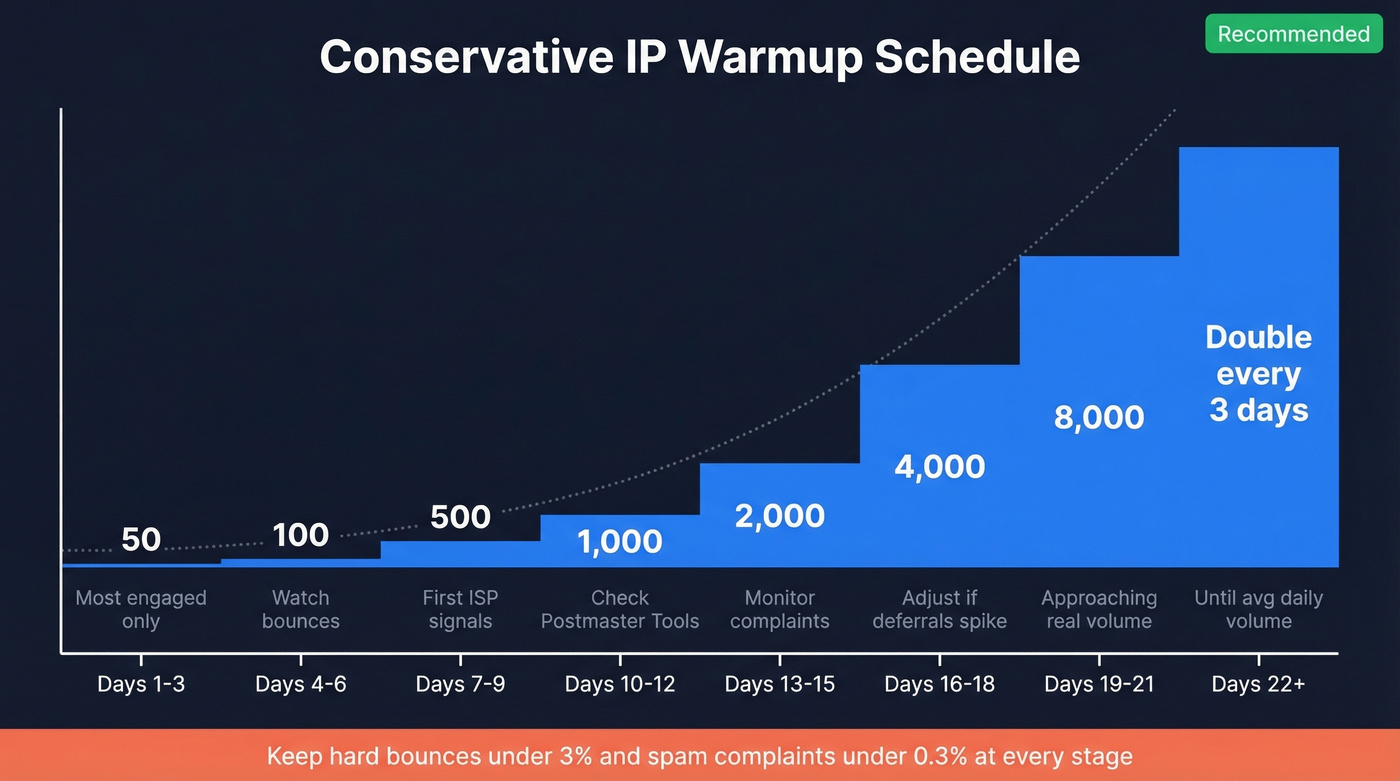
| Days | Daily Volume | Notes |
|---|---|---|
| 1-3 | 50 | Most engaged recipients only |
| 4-6 | 100 | Watch bounce rate closely |
| 7-9 | 500 | First real ISP signal window |
| 10-12 | 1,000 | Check Postmaster Tools |
| 13-15 | 2,000 | Monitor complaint rate |
| 16-18 | 4,000 | Adjust if deferrals spike |
| 19-21 | 8,000 | Approaching meaningful volume |
| 22+ | Double every 3 days | Until you hit average daily volume |
Warm to your average daily volume, not your peak. Don't skip days or batch everything into a weekly blast - ISPs want consistent sending patterns. Start with transactional emails in the first few days if possible; their naturally high engagement rates build positive signals faster than marketing sends.
Moderate or Aggressive Schedules
For teams with stable metrics past the first week, a moderate schedule doubles every 2 days instead of every 3. Aggressive schedules can reach 1M+ per day within about 3 weeks, but they're for high-volume senders with established domains and dedicated deliverability teams watching dashboards in real time. If you're reading a warmup guide, stick with conservative.
How Major Providers Handle IP Warming
Gmail defines bulk senders as anyone sending 5,000+ messages/day to Gmail addresses. PTR/rDNS is non-negotiable. Gmail throttles aggressively on volume spikes from cold IPs and weighs engagement signals heavily during warmup - open rates and click rates matter here more than anywhere else.
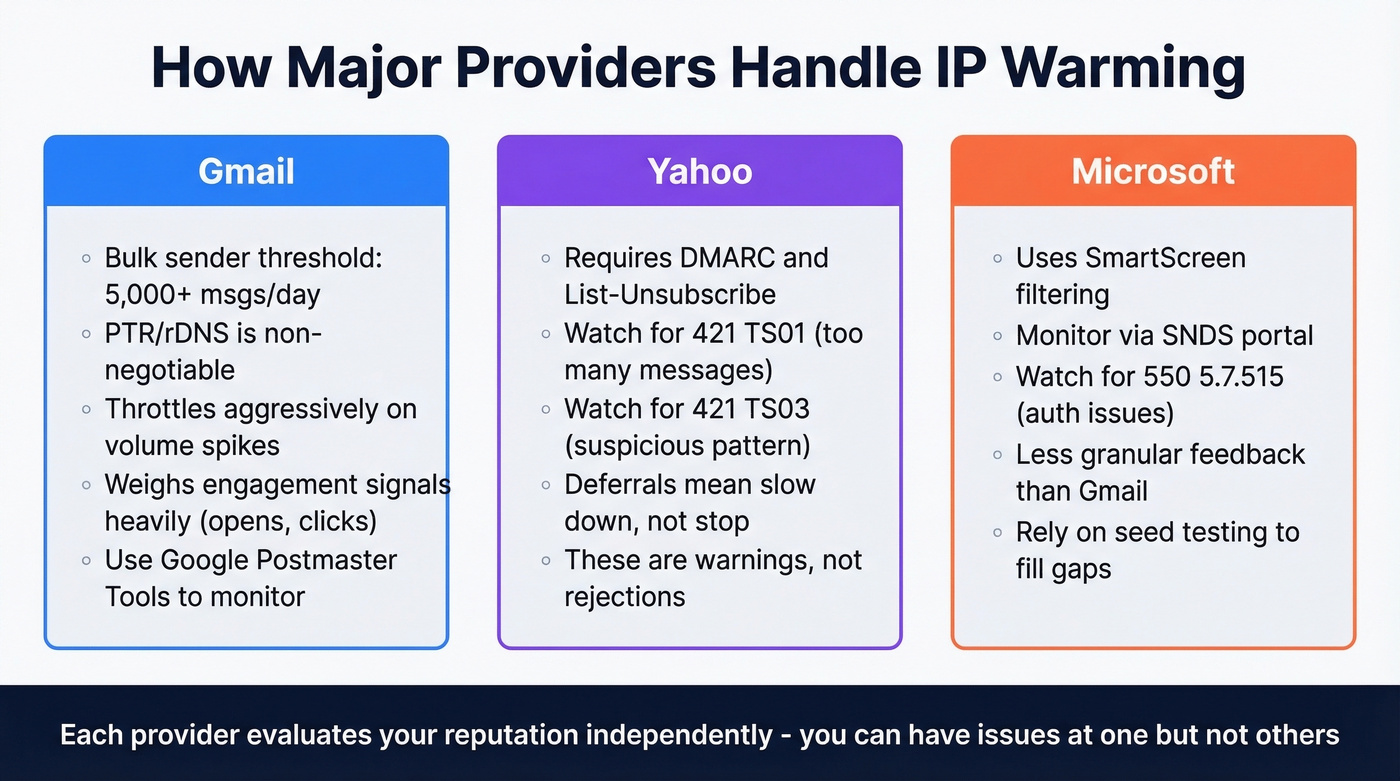
Yahoo requires DMARC and List-Unsubscribe headers for bulk senders. Watch for deferral codes 421 TS01 (too many messages) and 421 TS03 (suspicious pattern). These aren't rejections. Yahoo is telling you to slow down.
Microsoft uses SmartScreen filtering and their SNDS portal for reputation monitoring. Watch for 550 5.7.515, which signals authentication issues. Microsoft gives less granular feedback than Gmail, so you'll need to monitor inbox placement rates more closely and rely on seed testing to fill the gaps.
Monitoring During Warmup
Track three numbers daily: hard bounce rate, spam complaint rate, and inbox placement. Keep hard bounces under 3% - if they spike during warmup, pause and clean your list before sending another message. Keep spam complaints under 0.3%, and during warmup, treat anything above 0.1% as a warning sign worth investigating.
Here's the thing most people miss: delivery isn't deliverability. The server accepting your email doesn't mean it hit the inbox. Marketers who describe their programs as successful are 22% more likely to monitor actual deliverability, not just delivery rates. Use Google Postmaster Tools for Gmail reputation, MXToolbox for blocklist checks, and your ESP dashboard for aggregate metrics. If you need a stack, start with email reputation tools and a basic email spam checker.
After warmup, maintain consistent daily volume to keep your reputation active. A sudden drop from 10,000/day to zero for two weeks will erode what you've built.
Troubleshooting a Reputation Drop
If metrics go sideways mid-warmup, don't restart from zero - that wastes the reputation you've already built. Cut volume by 50% immediately and hold for 2-3 days while you diagnose.
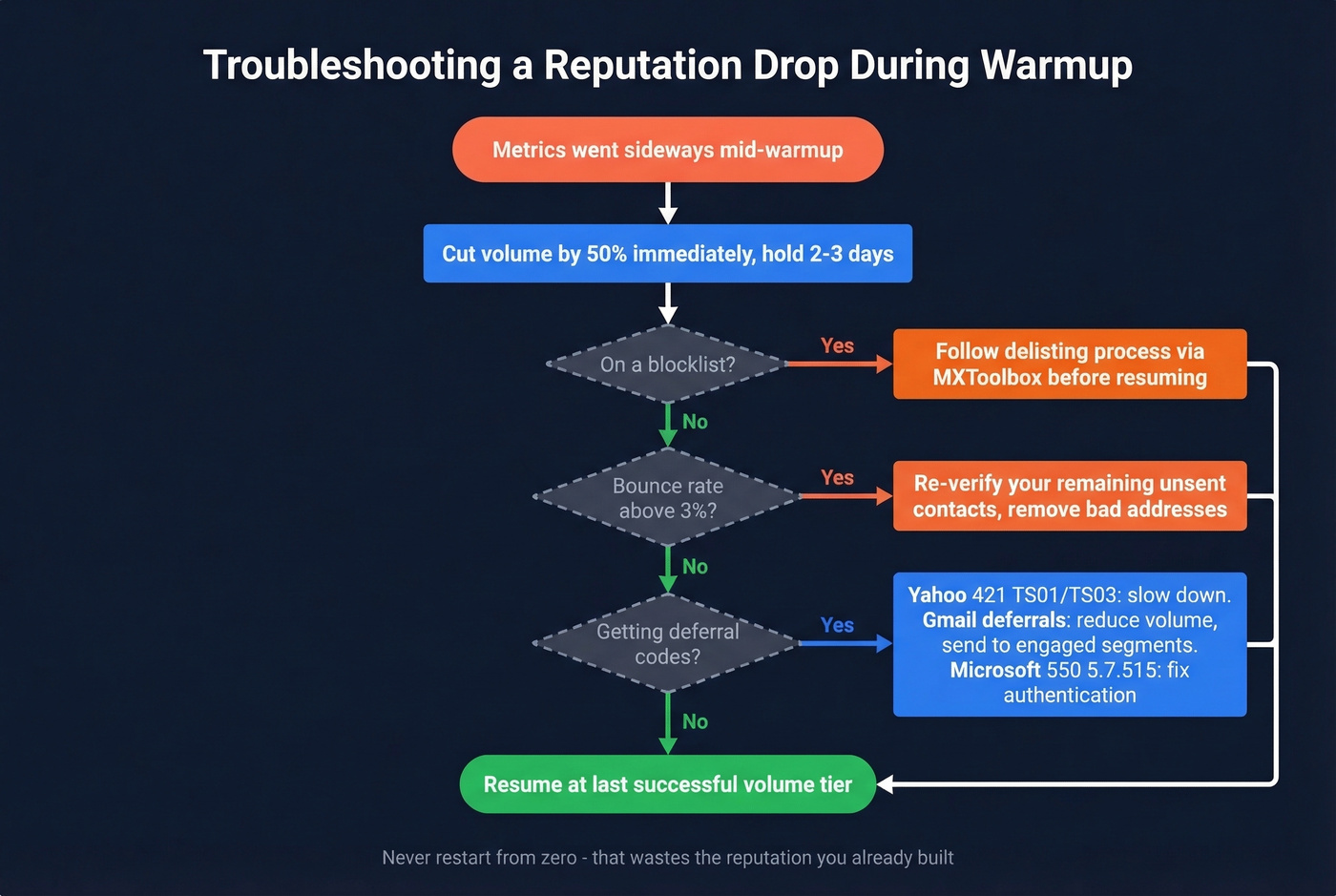
Check blocklists via MXToolbox and follow delisting processes before resuming. Review SMTP bounce codes: Yahoo's 421 TS01/TS03 means slow down, Microsoft's 550 5.7.515 means fix authentication, and Gmail deferrals mean reduce volume and send to more engaged segments first. Re-verify your remaining unsent contacts if bounce rates spiked, then resume at the last successful volume tier. If you're seeing persistent spikes, dig into email bounce rate patterns before you scale again.
Let's be honest - the single biggest warmup killer isn't your schedule or your authentication setup. It's your list. Fix the data first. Everything else is secondary.
FAQ
Do I Need to Split Volume Per ISP?
Mailbox providers evaluate reputation independently, so you can have issues at Gmail but not Yahoo, or vice versa. Your sending naturally distributes across providers based on your list composition. Focus on provider-specific dashboards like Postmaster Tools or SNDS when issues surface at a single provider rather than trying to manually split sends.
Does Google Forbid Automated Warmup?
No. ESP-level automated warmup from SendGrid, Amazon SES, and Braze is standard practice and totally fine. What you should avoid are tools that simulate fake engagement - artificial opens and clicks designed to game reputation signals. That's a different category entirely from volume ramping, and ISPs are getting better at detecting synthetic engagement patterns every year.
How Do You Warm Up an IP Address with a Clean List?
Run your list through a verification service with catch-all handling and spam-trap removal before every warmup send. During the ramp, send to your most engaged contacts first and expand to colder segments only after reputation stabilizes. In our experience, teams using properly verified lists keep bounce rates under 3% throughout the entire warmup - the schedule almost runs itself when the data is clean.
What Happens If I Stop Sending for 30 Days?
Most ISPs retain reputation data for roughly 30 days. Pause sending for a month or longer and your IP reputation effectively resets to neutral, meaning you'll need to repeat the warmup process from the beginning. Even a small, consistent trickle of transactional sends can preserve the reputation you've worked to build.