

If an Email Address Doesn't Exist, Will It Bounce Back?
You sent a cold email last week. No bounce notification. No reply. Did it land, or did it vanish into nothing?
If an email address doesn't exist, you'd expect a bounce. The reality is far less predictable - a non-existent address can bounce, get silently dropped, or be swallowed by a catch-all server, and you'll never know which happened. The average hard bounce rate sits around 0.21%, which means the vast majority of bad addresses don't announce themselves. The only reliable way to know is to verify the address before you send.
Four Things That Actually Happen
Most people assume it's binary: the email arrives or it bounces. There are actually four possible outcomes.
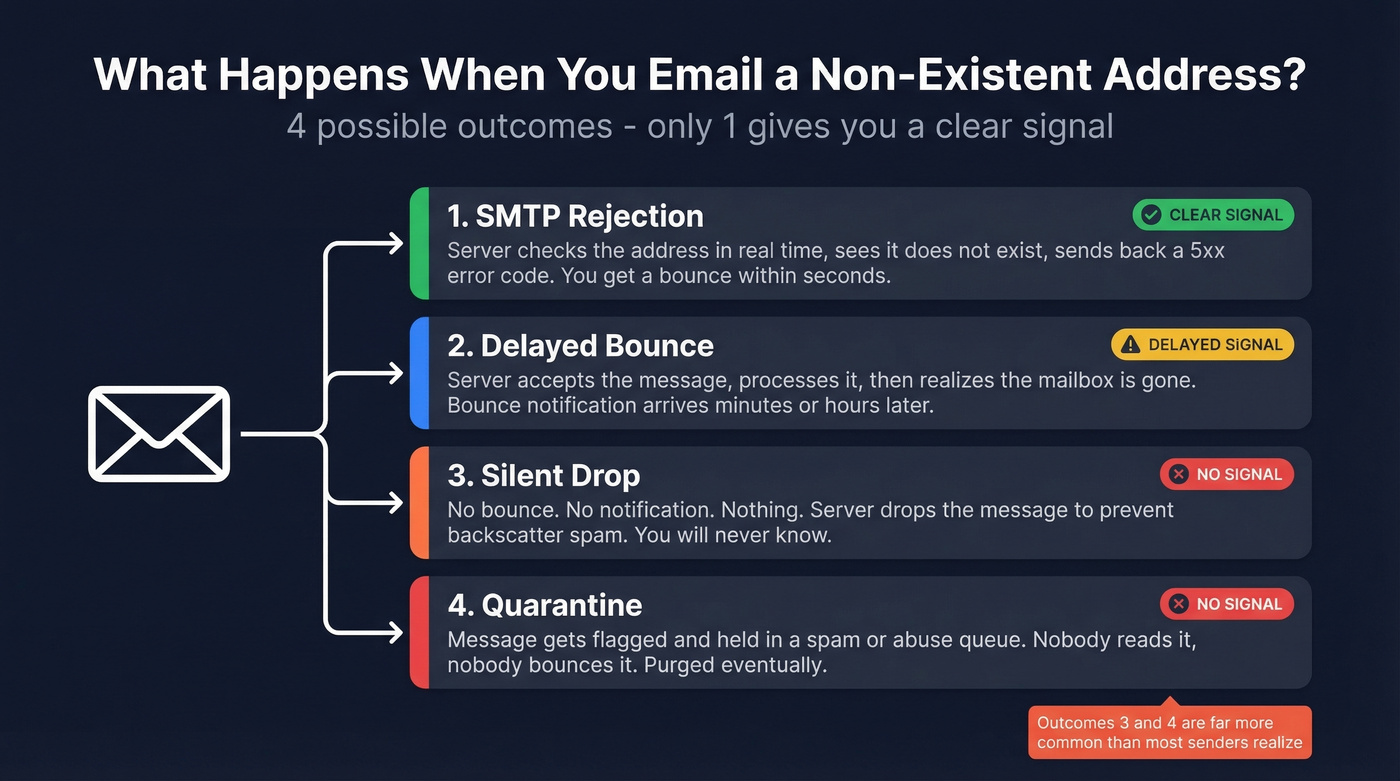
1. The server rejects it during the SMTP handshake. This is the cleanest outcome. The recipient's mail server checks the address in real time, sees it doesn't exist, and fires back a 5xx error code. You get a bounce notification within seconds.
2. The server accepts it, then sends a bounce later. The server takes the message, processes it, and only then realizes the mailbox doesn't exist. It generates a Delivery Status Notification and sends it back - sometimes minutes later, sometimes hours.
3. The message silently disappears. No bounce. No notification. Nothing. Servers do this increasingly often to combat backscatter) - the flood of misdirected bounce messages caused by spam with forged sender addresses.
4. The server quarantines it. The message gets flagged and held in a spam or abuse queue. Nobody reads it, nobody bounces it. It just sits there until it's purged.
In our testing, options 3 and 4 are far more common than most senders realize. Only 7.7% of top email domains enforce DMARC with a p=reject policy, so most domains remain vulnerable to spoofing - and most servers know it. The safer move for them is to reject during the handshake or drop silently.
Hard Bounces vs. Soft Bounces
When you do get a bounce, it falls into one of two categories.
| Hard Bounce | Soft Bounce | |
|---|---|---|
| Code | 5xx (permanent) | 4xx (temporary) |
| Cause | Non-existent mailbox, invalid domain | Mailbox full, server down |
| ESP behavior | Suppression list - won't retry | Retried up to 72 hours |
| Common code | 550 5.1.1 (user unknown) |
450 (mailbox unavailable) |
550 5.1.1 is the code you'll see most often for an invalid email address - the server is telling you the mailbox simply doesn't exist. Watch for 550 5.7.1 though. That's often a policy or spam rejection, meaning the address might exist but the server is blocking you.
Soft bounces matter too: a full inbox, a temporarily downed server, or a message that exceeds size limits can all trigger a 4xx code. Your ESP will retry these, but if the underlying issue persists, a soft bounce can eventually behave like a hard one.

Silent drops, catch-all traps, and delayed bounces mean you can't trust post-send signals. Prospeo's 5-step verification - syntax, DNS, SMTP, catch-all handling, and spam-trap filtering - catches bad addresses before they damage your domain. 143M+ emails verified at 98% accuracy.
Find out which addresses are real before your ESP finds out for you.
Why a Non-Existent Email Doesn't Always Bounce
Catch-All Domains
A catch-all domain accepts mail sent to any address, whether the specific mailbox exists or not. Send to totally.made.up@company.com and the server says "sure, I'll take it." No bounce. No indication anything went wrong.
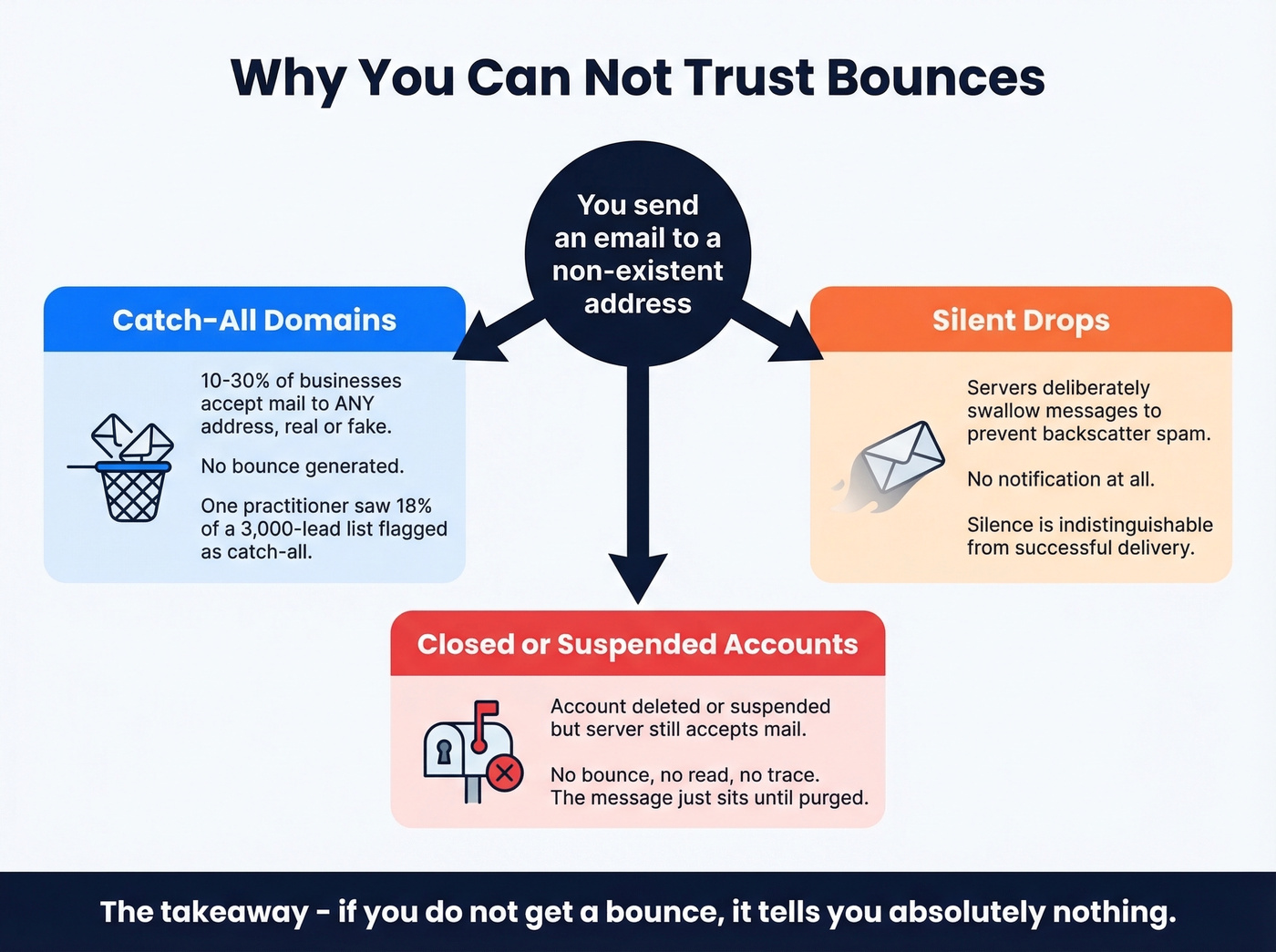
Roughly 10-30% of businesses use catch-all configurations. One cold email practitioner on r/coldemail reported that 18% of a 3,000-lead batch was flagged as catch-all, and their bounce rate drifted from 1.2% to 2.4% over several weeks as those addresses degraded. That's a real problem if you're running volume.
Silent Drops and Closed Accounts
An email account can be closed or suspended without being fully deleted. In many cases, the server still accepts mail without generating a bounce. As Ask Leo puts it: "If you don't get a bounce, it tells you nothing."
Servers that suspect spam deliberately avoid generating a bounce to prevent backscatter. From your perspective, the result is silence - and silence is the worst possible signal because it's indistinguishable from delivery.
Verify Before You Send
Here's the thing: since bounces can't be trusted as a signal that an address doesn't exist, the practical solution is to verify addresses before you hit send.
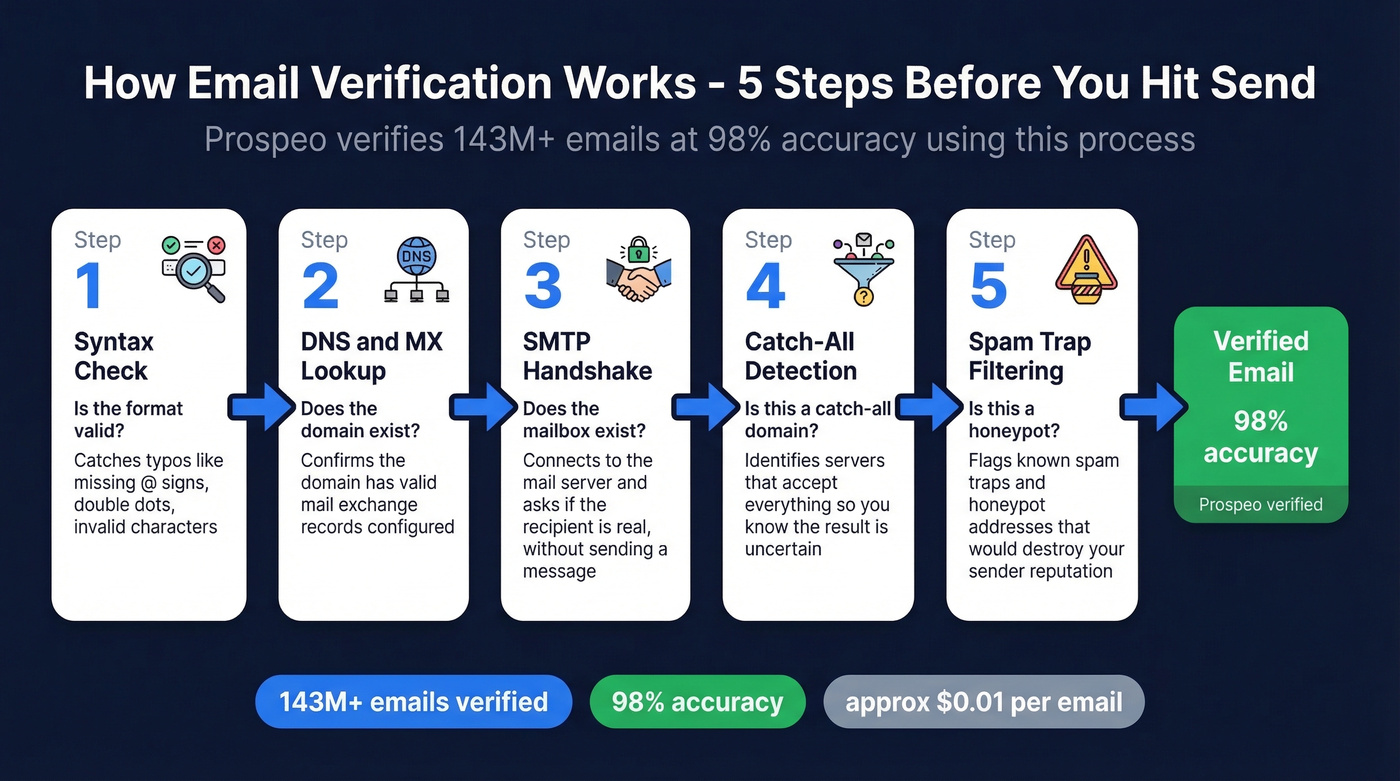
Email verification tools check whether a mailbox exists without delivering a message. They run syntax validation, DNS/MX record lookup, and an SMTP handshake to confirm the mailbox is real. No actual email gets sent - the tool only shakes hands with the server. No verification tool is perfect, since some misconfigured servers will confirm a mailbox that doesn't actually exist, but verification is dramatically better than relying on bounces after the fact.
Most verification services charge $7-15 per 1,000 emails.
Prospeo runs a 5-step process - syntax check, DNS lookup, SMTP handshake, catch-all domain handling, and spam-trap/honeypot filtering - delivering 98% verified email accuracy across 143M+ verified emails. Snyk's team went from 35-40% bounce rates to under 5% across 50 AEs simply by adding verification to their workflow.

Let's be honest: if your deal sizes are modest - say under $10k - you probably don't need a full-stack sales intelligence platform. But you absolutely need verified emails. A few bad batches can push your domain onto blocklists, and recovering from that takes weeks. Verification is the cheapest insurance in outbound.
If you're building lists at scale, pair verification with a solid lead generation workflow and keep an eye on email deliverability and sender reputation as you ramp.
Snyk's 50 AEs went from 35-40% bounce rates to under 5% by verifying with Prospeo. At ~$0.01 per email, verification costs less than a single bounced message costs your sender reputation. No contracts, no sales calls - start with 75 free verifications.
Stop guessing which emails exist. Verify all of them for a penny each.
FAQ
Does Gmail bounce emails to non-existent addresses?
Usually yes. Gmail typically rejects invalid recipients during the SMTP handshake with a 550 5.1.1 error. But recently deleted or suspended accounts behave unpredictably - don't assume silence means delivery.
What does a bounced email notification look like?
You'll receive a Delivery Status Notification with a subject like "Undelivered Mail Returned to Sender," containing the SMTP error code - typically 550 5.1.1 - and an explanation like "Recipient address rejected: User unknown."
How can I check if an email address exists without sending a message?
Use an email verification tool that runs an SMTP handshake against the recipient's mail server. This confirms the mailbox exists without delivering a message, catches invalid addresses, and flags catch-all domains. Most tools offer a free tier so you can test before committing.