


5 ImportFromWeb Alternatives That Actually Replace It
You're halfway through a scraping project when the credit counter hits zero. That Amazon search you ran? Ten credits per page. Google Maps? Another ten. ImportFromWeb has 300,000+ users and a credit model that punishes the most active ones hardest.
Here's the thing: most "alternatives" lists recommend jQuery libraries, CSS frameworks, or enterprise content management software. That's like recommending a bicycle when someone asks about cars. We tested actual replacements across three categories - visual scrapers, developer platforms, and tools that skip scraping entirely.
Our Picks at a Glance
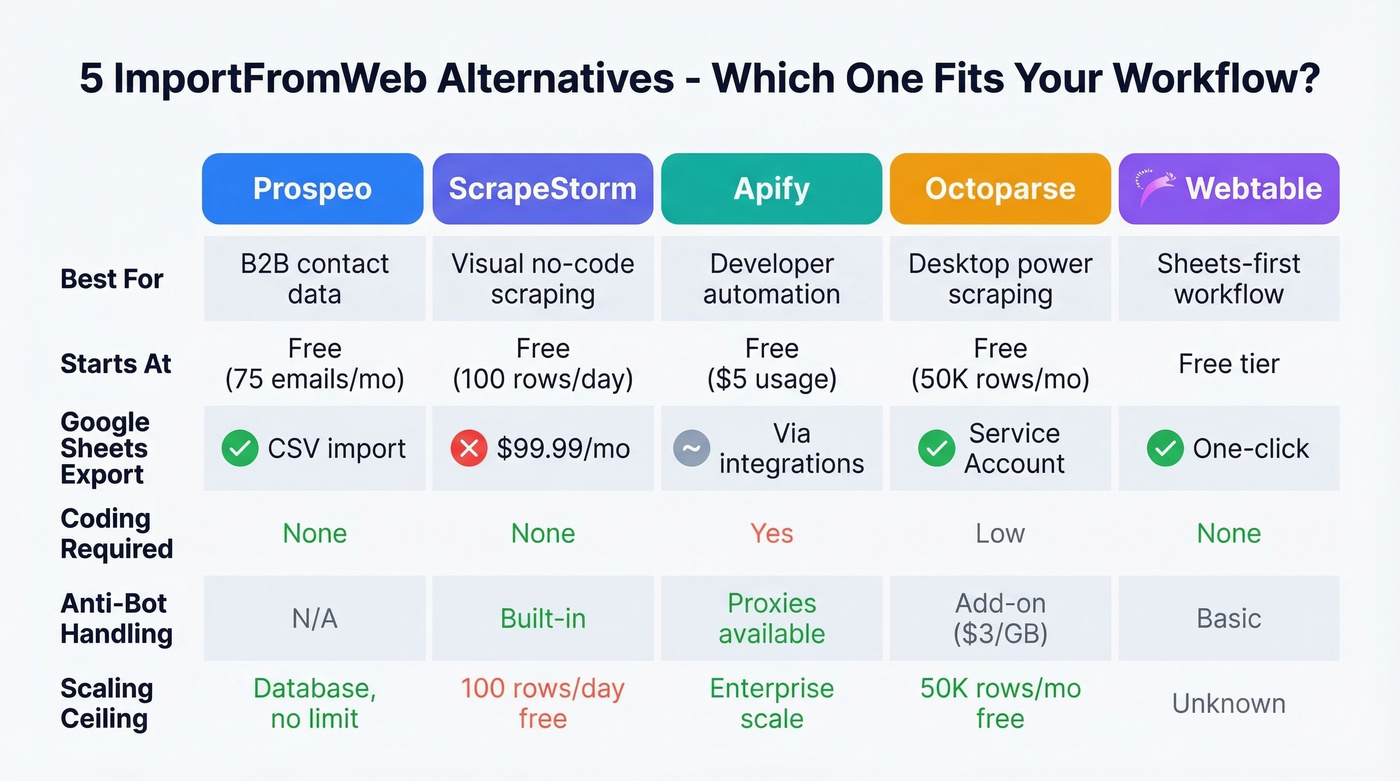
| Tool | Best For | Starts At | Google Sheets Export |
|---|---|---|---|
| Prospeo | B2B contact data without scraping | Free (75 emails/mo) | CSV (import into Sheets) |
| ScrapeStorm | Visual no-code scraping | Free (100 rows/day) | Premium plan ($99.99/mo) |
| Apify | Developer-scale automation | Free ($5 usage) | Via integrations |
| Octoparse | Desktop scraping + scheduling | Free (50K rows/mo) | Yes (Service Account) |
| Webtable | Closest to ImportFromWeb | Free tier available | Yes (one-click) |
Why People Switch
The credit math gets ugly fast. Scraping 500 Amazon pages at 10 credits each burns through 5,000 credits in a single day. Google Maps pages cost the same. And while the Business plan runs around $69/mo, you're still watching credits drain in real time.
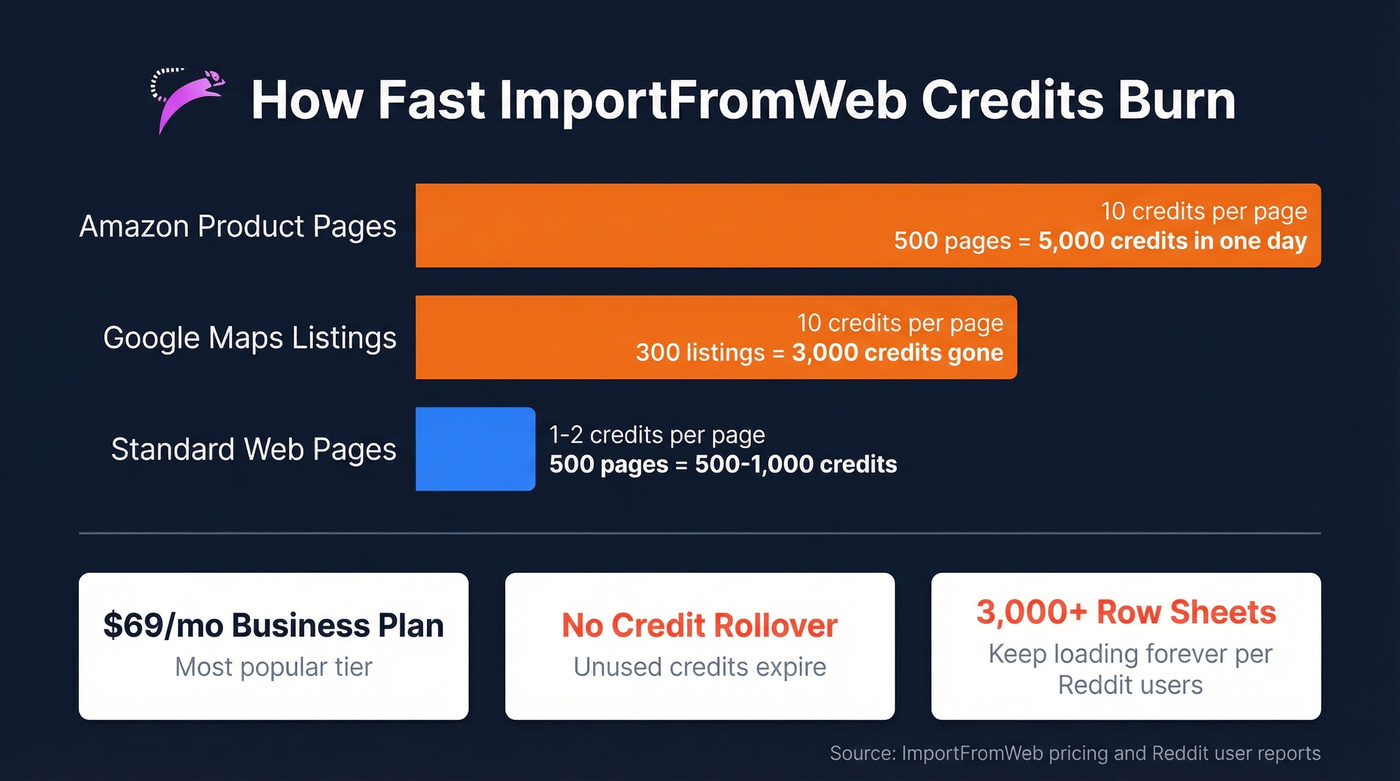
ImportFromWeb does cache results for up to four weeks, and failed requests don't deduct credits. But on high-volume projects, the math still doesn't work.
Then there's the scaling ceiling. Users on Reddit report that sheets with roughly 3,000 rows and 17 columns "keep loading forever." ImportFromWeb inherits Google Sheets' computational limits, and at scale, those limits bite hard. JavaScript-heavy sites and anti-bot protections break formulas silently, leaving ERR! values scattered across your sheet. Opening or editing a sheet can trigger an avalanche of HTTP calls - uncontrolled refresh storms that eat credits and return garbage. No "scrape now" button, no retry logic, no control over which geographic IP makes the request. These aren't ImportFromWeb-specific flaws - they're limitations of the Sheets-as-scraper workflow in general.

ImportFromWeb charges 10 credits per Google Maps page to get business contacts. Prospeo gives you 143M+ verified emails and 125M+ mobile numbers from a single search - 98% email accuracy, no CSS selectors, no broken formulas. Meritt dropped their bounce rate from 35% to under 4%.
Stop scraping for data that already exists in a verified database.
Best Tools to Replace ImportFromWeb
Prospeo - Skip Scraping Entirely
If you're scraping business directories to build prospect lists, you're solving the wrong problem. ImportFromWeb charges 10 credits per Google Maps page to get phone numbers and addresses. Prospeo gives you verified contact data directly from a database of 300M+ professional profiles - 143M+ verified emails and 125M+ mobile numbers - no CSS selectors, no credit multipliers, no ERR! values.

Use this if: Your actual goal is building B2B prospect lists with verified contact data. With 98% email accuracy, a 7-day data refresh cycle (the industry average is six weeks), and a Chrome extension used by 40K+ people, it's a fundamentally different approach than scraping. One customer, Meritt, saw bounce rates drop from 35% to under 4% after switching - that tells you everything about the data quality gap between scraping and a purpose-built database. If you're comparing data providers, start with our breakdown of data enrichment services and sales prospecting databases.
Skip this if: You need to scrape product pricing, inventory data, or non-contact information from websites. Keep reading for those use cases.
Pricing starts free (75 emails/month + 100 Chrome extension credits/month), with paid plans from ~$39/mo. No contracts.
ScrapeStorm - Best Visual Scraper
ScrapeStorm earns a 4.8/5 on Capterra from 81 reviews, and the praise centers on its AI auto-detection - point at a page, and it figures out the data structure for you. In our testing, the auto-detection worked on roughly 80% of pages without manual adjustment. That's impressive for a visual scraper.
Pros:
- AI-powered auto-detection means zero CSS/XPath knowledge needed
- Built-in IP rotation for anti-bot handling
- Clean visual interface that non-technical users genuinely enjoy
Cons:
- Google Sheets export lives behind the Premium plan at $99.99/mo - a dealbreaker if Sheets integration is why you're switching
- Free tier caps at 100 rows/day, fine for testing but useless for production
- Occasional crashes can cause data loss mid-scrape, a known issue in Capterra reviews

For teams that need a visual scraper and can stomach the Premium price for Sheets export, ScrapeStorm is the strongest option in this category. If you're still using Sheets formulas for scraping, it's worth revisiting IMPORTXML limitations before you commit.
Apify - For Developers Who Need Scale
Apify is a developer platform with a marketplace of pre-built scrapers (called Actors) for everything from Amazon to Zillow. You don't write scrapers from scratch - you configure existing ones. The free tier includes $5 of usage, Starter runs $29/mo, and Scale hits $199/mo. Compute units cost $0.20-$0.30 each depending on your plan, and residential proxies add $7-$8/GB on top.
Let's be honest: Apify is overkill for "I need 200 rows from a webpage." It shines when you're running scheduled crawls across thousands of pages with proxy rotation, retries, and webhook integrations. We've seen teams use it to monitor competitor pricing across 50,000+ product pages daily - that's where it earns its keep. If you just want data in a spreadsheet, look elsewhere. For a deeper head-to-head, see Apify vs Octoparse.
Octoparse - Desktop Power Scraper
Octoparse gives you a desktop app with visual workflow building, scheduling, and a genuinely useful free tier: 10 tasks, 50K rows/month, and Google Sheets export via Service Account. That free tier alone makes it worth testing before you commit to anything.
The tradeoff is complexity. Octoparse has a steeper learning curve than ImportFromWeb, and the add-on costs creep up fast - residential proxies run $3/GB, CAPTCHA solving is $1-$1.5 per thousand, and if you need their team to set up a crawler, that starts at $399. Paid plans likely fall in the $75-$100/mo range based on comparable tools and community discussions.
Skip Octoparse if you want something as simple as typing a formula. This is a power tool, and it acts like one.
Webtable - Closest Workflow Match
Webtable is browser-based with one-click Google Sheets export, Smart Selection (highlight examples and it learns the pattern), and auto-scroll for pagination. It's the closest thing to ImportFromWeb's "just get the data into Sheets" philosophy.
If ImportFromWeb's workflow worked for you but the credits didn't, start here. Free tier available; paid plans for higher volume aren't publicly listed, so expect $20-$50/mo based on comparable tools in this space.
Pricing Compared
Every tool here uses a different pricing model - credits, rows, compute units, or flat monthly fees. Here's what you'll actually pay.
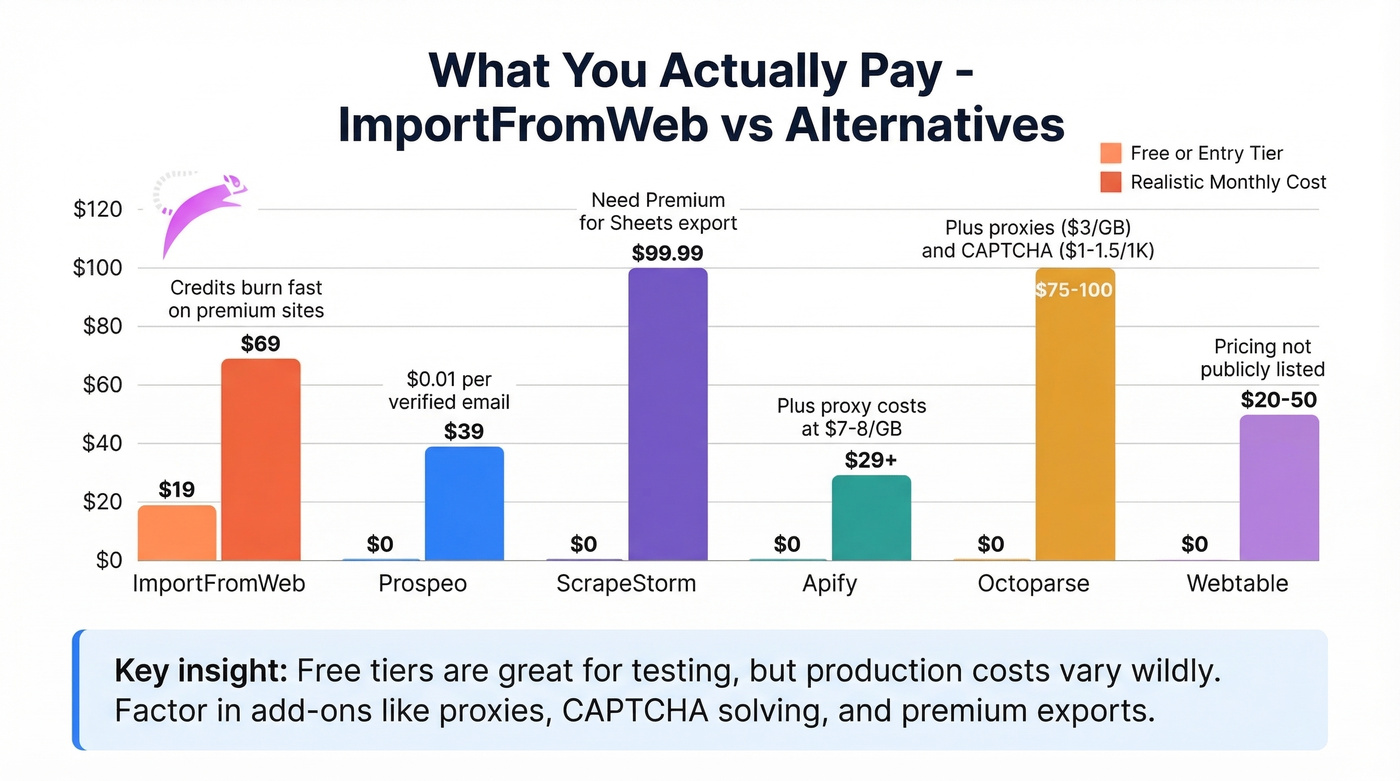
| Tool | Free Tier | Paid From | Key Nuance |
|---|---|---|---|
| ImportFromWeb | 200 credits (30 days) | ~$19/mo | Premium sites cost 2-10 credits/page; no rollover |
| Prospeo | 75 emails/mo | ~$39/mo | ~$0.01/email; no contracts |
| ScrapeStorm | 100 rows/day | $49.99/mo | Sheets export at $99.99/mo Premium |
| Apify | $5 usage included | $29/mo | Compute-unit based; proxies extra |
| Octoparse | 50K rows/mo | ~$75-100/mo (est.) | Add-ons: proxies, CAPTCHA solving |
| Webtable | Yes | ~$20-50/mo (est.) | Not publicly listed |
How to Choose
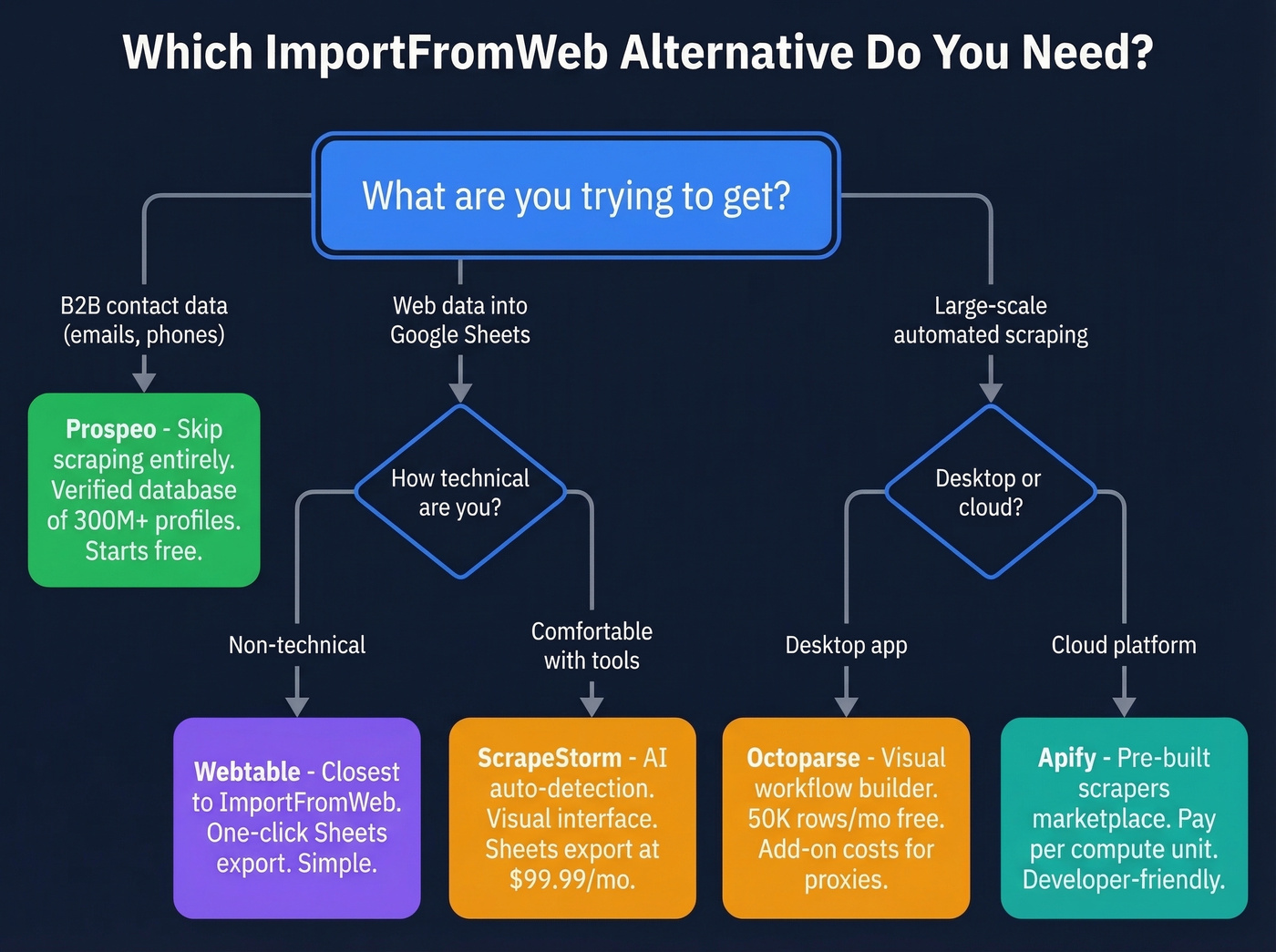
The decision comes down to what you're actually trying to get. And here's our hot take: most people scraping Google Maps or business directories for contact info don't need a scraper at all. They need a database. The scraper is just the painful workaround they settled on.
Want a cheaper Sheets scraper? ScrapeStorm or Webtable. Both offer visual, no-code workflows. Webtable is simpler; ScrapeStorm is more powerful but gates Google Sheets export behind its Premium tier.
Need developer-grade automation? Apify or Octoparse. Apify's marketplace of pre-built scrapers saves setup time; Octoparse gives you more control with its desktop workflow builder. Power users on Reddit also recommend pairing Make.com with a scraping API like ScrapeNinja - treating Sheets as storage, not the scraper. If you're doing this for lead gen, read our guide to web scraping lead generation.
Actually need B2B contact data? A dedicated data platform with verified emails eliminates the scraping step entirely. No CSS selectors, no credit multipliers, no broken formulas at 3 AM. To build a full outbound workflow, pair your data source with free lead generation tools and proven sales prospecting techniques.
Every scraping tool on this list charges you to extract contact data that goes stale in weeks. Prospeo refreshes its 300M+ profiles every 7 days - not the 6-week industry average. Starting at $0.01 per email, you'll spend less than one ImportFromWeb scraping session costs.
Replace your entire scraping workflow with one search filter.
FAQ
Is ImportFromWeb free?
ImportFromWeb offers a 30-day free trial with 200 credits, no credit card required. Paid plans start around $19/mo after that. Credits don't roll over, and premium websites like Amazon and Google Maps cost 2-10 credits per page - so the free trial burns faster than expected on high-value sites.
What's the best free alternative?
For scraping, Octoparse's free plan (50K rows/month with Google Sheets export) offers the most capacity. ScrapeStorm gives 100 rows/day, and Apify includes $5 of free usage. For B2B contact data specifically, Prospeo's free tier (75 verified emails/month) eliminates the scraping step entirely - a better fit if you're building prospect lists rather than extracting arbitrary web data.
Can I get business contact data without scraping?
Yes. Purpose-built B2B databases provide verified emails and mobile numbers with 30+ search filters, no CSS selectors or credit multipliers needed. If your goal is building prospect lists rather than extracting arbitrary web data, you'll get better results faster and with far fewer headaches.