

=== CURRENT ARTICLE (slug: inbox-placement-testing) ===
Inbox Placement Testing: What It Is, Why It Lies, and How to Do It Right
A cold email practitioner on r/coldemail ran an inbox placement test last month. 100% inbox rate. Green across the board. Then they sent real emails from their Instantly accounts - and nothing landed. Not in spam. Not in Promotions. Nowhere. SPF, DKIM, DMARC all passing. Volume under 30/day. Plain text, no links. The test said everything was perfect. The mailbox providers disagreed.
That gap between what placement tests show and what actually happens is the core problem we're solving here. Deliverability in 2026 is a different game - Google stripped reputation dashboards from Postmaster Tools, engagement signals drive more filtering decisions than ever, and seed lists haven't kept up.
The Short Version
- Placement tests are directional smoke alarms, not diagnoses. They tell you something might be wrong. They can't tell you exactly what, and a clean result doesn't mean you're safe.
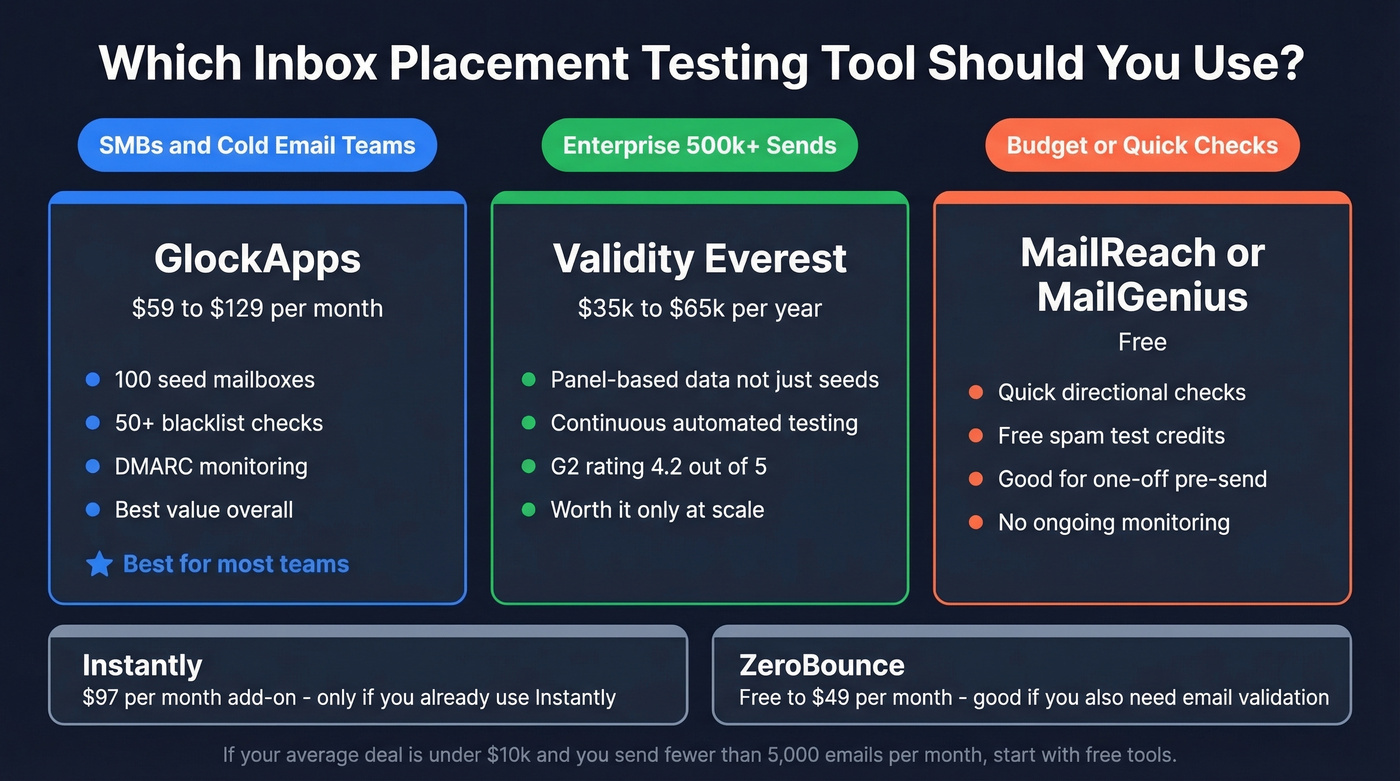
- Best tool for most teams: GlockApps (free plan available; paid plans $59-$129/mo). Enterprise with 500k+ monthly sends: Validity Everest. Budget or quick checks: MailReach free spam tests.
- Before testing placement, verify your list. Bad data causes the bounces that tank sender reputation in the first place. Run your list through an email verification tool before spending a dollar on deliverability testing - it's the upstream fix most teams skip.
What Is Inbox Placement Testing?
Most people confuse delivery rate with inbox placement rate. They're not the same thing, and the difference costs real money.
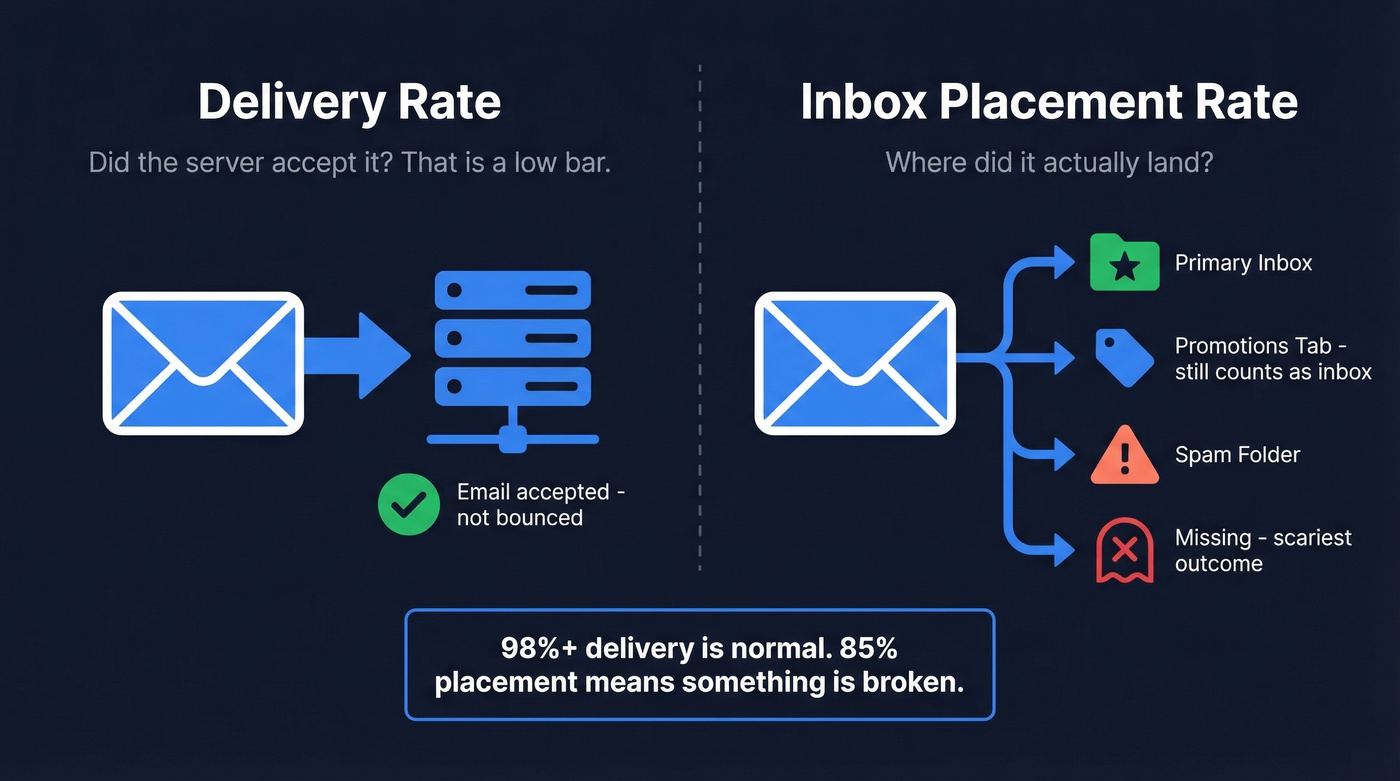
Delivery rate measures whether the receiving server accepted your email - it didn't bounce. That's a low bar. An email can be "delivered" and still land in spam, get silently filtered, or vanish entirely.
Inbox placement rate measures where the email actually ended up after acceptance: primary inbox, Promotions tab, spam folder, or missing altogether. Three outcomes matter: inbox, spam, and missing. Missing is the scariest - it means the email never reached any folder, which often indicates a hard block or severe filtering at the provider level. One clarification that trips people up: Gmail's Promotions tab counts as inbox placement, not spam. Emails there are visible and accessible.
The business impact is straightforward. Take 1,000,000 sends. Improving placement from 90% to 95% means 50,000 more emails actually seen. With a 20% open rate, 2% conversion rate, and $100 average order value, that's $20,000 in additional revenue from a single campaign. Healthy programs target delivery rates of 98%+ and inbox placement in the mid-90s or higher. Below 85%, something's broken.
Here's the thing: if your average deal size is under $10k and you're sending fewer than 5,000 emails a month, you probably don't need a paid placement tool at all. Fix your authentication, verify your list, and use free tests from GlockApps or MailReach. The money is better spent on data quality.
How Seed-List Tests Work
The methodology is simpler than most vendors make it sound.
You send your exact production email to test mailboxes maintained by the testing provider. These seed addresses span major providers - Gmail, Outlook, Yahoo, Apple Mail. GlockApps maintains around 100 seed mailboxes and checks against 50+ blacklists. After sending, the platform logs into every seed address and records where your email landed. Results come back as percentages: X% inbox, Y% spam, Z% missing, sometimes with Gmail-specific splits between Primary and Promotions.
Two approaches exist: pre-campaign testing, where you send to seeds before your real campaign, and in-line testing, where seed addresses are mixed into your actual send list. In-line is more accurate because it mirrors real conditions, but it's harder to set up.
One thing to watch: some tools report raw placement rates while others weight results by provider market share. A weighted rate that accounts for your audience's actual provider mix is far more useful than a raw average.
Why Test Results Don't Match Reality
Seed-list testing has a fundamental flaw that no amount of tooling can fully fix.
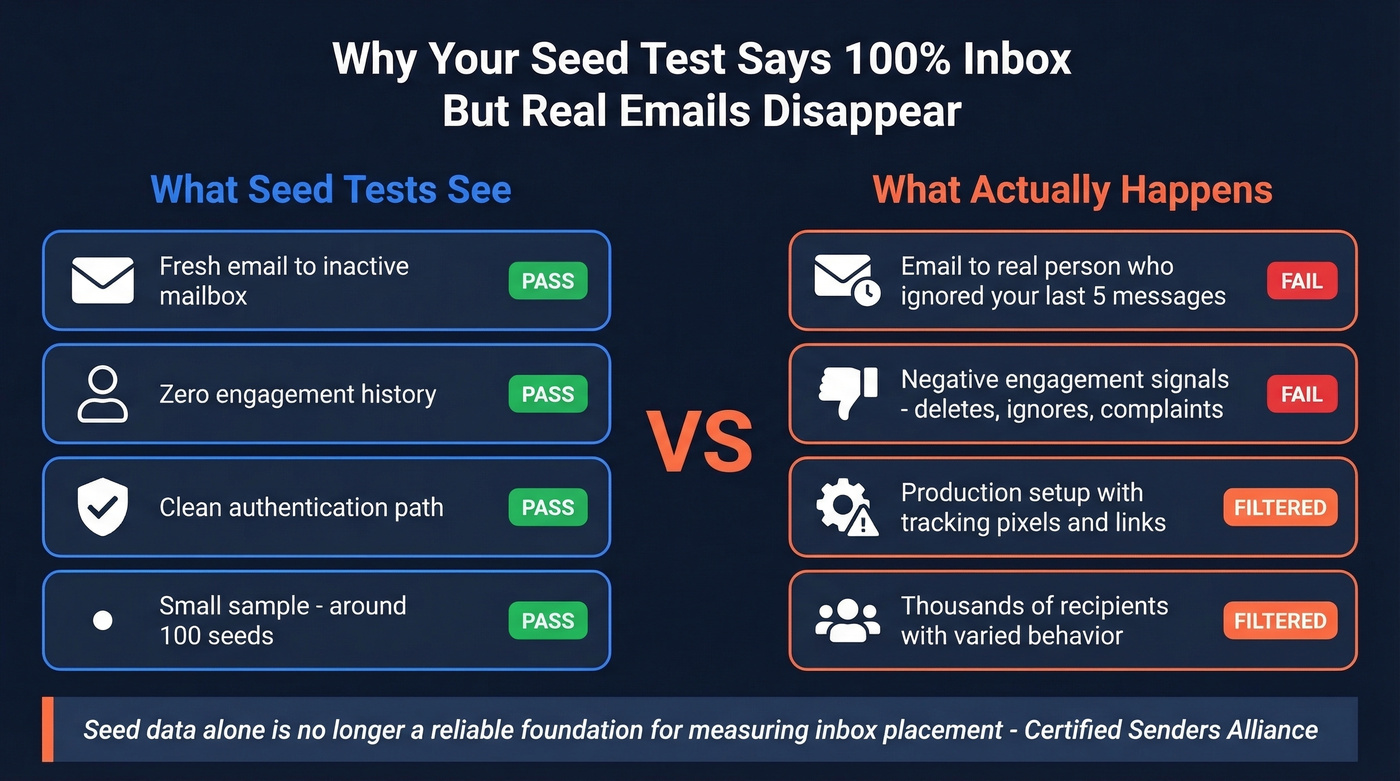
The Certified Senders Alliance - an industry body, not a vendor - put it bluntly: seed data alone is "no longer a reliable foundation" for measuring inbox placement. The reason is engagement signals. Modern mailbox providers use recipient behavior to decide placement: opens, clicks, replies, forwards, deletes, complaints, even reading time. Seed addresses don't do any of that. They're inactive mailboxes that just sit there collecting emails.
This creates a structural gap. Your test email hits a seed list with zero engagement history, and the provider treats it differently than it would treat the same email sent to a real person who's ignored your last five messages. The result is that seed-based testing often paints a rosier picture than what your actual recipients experience.
The problems go deeper. Sample size matters - calling "90% inbox" statistically meaningful from 100 seed mailboxes is a stretch. Provider mix can be unrepresentative if your seeds skew Gmail-heavy but your audience is mostly on Outlook. Testing a "clean path" that doesn't match your production setup produces results that don't transfer. Repeated testing can actually train filters to expect the pattern.
That Reddit user with the 100% inbox score and zero real deliverability? Not an edge case. It's the predictable outcome of a system that tests the wrong things.
2026 Google Postmaster Tools Changes
On September 30, 2025, Google removed the Domain Reputation and IP Reputation dashboards from Postmaster Tools. The new version focuses on five metrics: spam rate, feedback loop, authentication, encryption, and compliance status. It's a compliance monitor now, not a deliverability diagnostic.
The practical implication: seed-based placement tests matter more because you've lost one of your best free signals for Gmail reputation. Combine them with Microsoft SNDS for Outlook reputation and Yahoo Sender Hub, and you can piece together a more complete picture.
Gmail complaint thresholds haven't changed. Keep spam complaints below 0.10%. Exceed 0.30% and Gmail starts throttling or blocking outright.

The article says it clearly: fix your list before spending a dollar on placement testing. Bounces destroy sender reputation, and no seed test catches that upstream. Prospeo's 5-step email verification delivers 98% accuracy - with catch-all handling, spam-trap removal, and honeypot filtering - so bad addresses never reach your ESP.
Stop debugging deliverability when the real problem is your data.
How to Run an Accurate Test
Most misleading results come from sloppy setup, not bad tools.
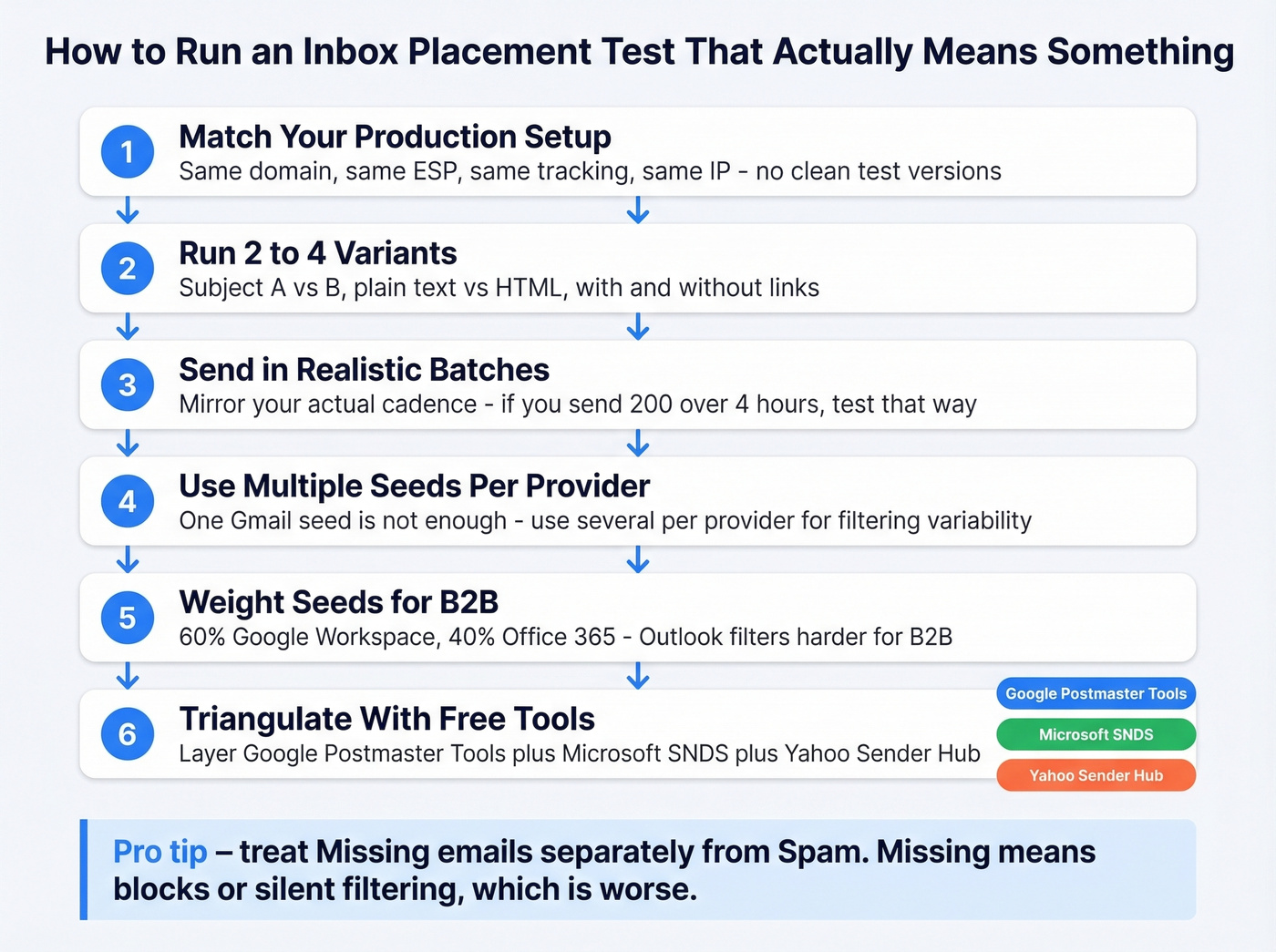
Match your exact production setup. Same sending domain, same ESP, same tracking pixels, same authentication, same IP. A "clean test version" that doesn't match production is useless.
Run 2-4 variants. Test subject line A vs B, plain text vs HTML, with and without links. Single-variant tests hide problems. (If you need ideas, start with proven email subject line examples.)
Send in realistic batches and cadence. Don't blast all seeds at once. Mirror your actual sending pattern - if you send 200 emails over 4 hours, test that way.
Use multiple seeds per provider. One Gmail seed isn't enough. You need several per provider to account for filtering variability.
Treat "missing" separately from spam. Missing emails indicate blocks or silent filtering - a different and usually worse problem than spam placement.
Weight your seed list for B2B: roughly 60% Google Workspace and 40% Office 365. Outlook environments filter more aggressively than Gmail for B2B senders, so under-representing Outlook gives you a false sense of security. Run tests concurrently with real campaigns for the closest approximation to real conditions. Layer in Google Postmaster Tools for spam rate and compliance data, Microsoft SNDS for Outlook reputation, and Yahoo Sender Hub. The combination gives you triangulated data no single source provides.
Common Placement Myths
"Avoid spam trigger words and you'll land in the inbox." Modern spam filters use machine learning that weighs engagement history, sender reputation, and authentication far more heavily than individual words. You can write "FREE DISCOUNT BUY NOW" and land in the inbox if your reputation is strong.
"Your sender name guarantees inbox placement." Sender name affects whether someone opens your email. It has zero impact on whether the mailbox provider routes it to inbox vs spam. Different systems, different decisions.
"Sending more frequently improves deliverability." Higher frequency without corresponding engagement increases unsubscribes and complaints, which directly damages sender reputation. More sends with declining engagement is a recipe for the spam folder.
Best Tools for Email Placement Testing
| Tool | Starting Price | Best For |
|---|---|---|
| GlockApps | Free / $59/mo | SMBs, cold email teams |
| Validity Everest | ~$35k-$65k/yr | Enterprise, 500k+ sends |
| Instantly | $97/mo add-on | Instantly users only |
| ZeroBounce | Free / $49/mo | Budget, validation combo |
| MxToolbox | $129/mo | IT/ops teams |
| MailReach | Free spam tests | Quick directional checks |
| MailGenius | Free, 3 tests | One-off pre-send checks |
GlockApps
GlockApps is the best value in this category for most teams, and it's not particularly close. The free plan gives you 2 spam test credits. Essential at $59/mo gets you 360 credits and one sending account. Growth at $99/mo bumps to 1,080 credits and 10 sending accounts - the sweet spot for agencies running multiple client domains. Enterprise at $129/mo covers 1,800 credits and 20 sending accounts.
Beyond placement testing, you get DMARC monitoring, uptime monitors, and IP reputation monitoring, plus Postmaster Tool user access on paid tiers. The seed list runs around 100 mailboxes across major providers with 50+ blacklist checks. A hundred seeds is a small sample, but for the price, nothing else comes close. We've used GlockApps across multiple client domains and it consistently catches issues that free tools miss.
Validity Everest
The enterprise gold standard. Expect $35k-$65k/year depending on volume and negotiation. If you have to ask, you probably don't need it - and I mean that genuinely. Everest makes sense when you're sending 500k+ emails monthly and need panel-based data, not just seed tests. Rated 4.2/5 on G2 with 189 reviews. For teams at this scale, automated tests that run continuously alongside production sends are worth the investment.
Instantly
Use this if you're already on Instantly and want placement testing without adding another tool. Skip this if you're not an Instantly user, or you care about value for money.
The inbox placement add-on runs $97/mo on top of your base Instantly plan, which starts at $37/mo. It auto-tests deliverability, shows inbox vs spam splits, checks blacklists, and can auto-pause campaigns if inbox rate drops below a threshold. The auto-pause feature is genuinely useful. But $97/mo for what's essentially a seed-list test bolted onto a cold email tool is overpriced. Users on r/coldemail actively seek alternatives to this add-on, citing the price relative to standalone tools like GlockApps.
ZeroBounce
One free test per month plus 100 email validation credits. Paid plans from $49/mo. Decent if you want placement testing and email validation in one platform, though neither capability is best-in-class on its own.
MxToolbox, MailReach, and MailGenius
MxToolbox Delivery Center starts at $129/mo - best for IT and ops teams already in the MxToolbox ecosystem for DNS and blacklist monitoring. Not built for marketers or sales teams.
MailReach offers free spam tests that give you a quick directional read. We've used MailReach as a lightweight complement alongside GlockApps - run a free test for a fast gut check, then dig deeper with GlockApps when something looks off. MailGenius gives three free tests for new users, good for a one-off pre-send check before a major campaign but not a monitoring solution.
Bad Data Kills Inbox Placement
Let's be honest about the causal chain most teams ignore: bad email addresses lead to bounces, bounces damage reputation, damaged reputation lands you in spam. You can run all the placement tests you want, but if your bounce rate is 8%, no amount of testing will save your sender reputation.
The target is keeping bounce rates under 2%. If your finance team asks why you're paying $97/mo for a placement add-on while your bounce rate is 8%, they're asking the right question. Prospeo verifies emails in real-time with 98% accuracy across 143M+ verified addresses, catching invalid emails, spam traps, and honeypots through a 5-step verification process before they hit a mailbox provider's radar. At ~$0.01/email with a free tier, it costs less than a single month of most placement testing tools.
If you're trying to diagnose the bounce side of the problem, start with bounce rate benchmarks and fixes, then work backward into sender reputation and email reputation tools.
For teams warming up a new domain or recovering a damaged one, the ramp matters:
| Days | Volume/Day | Notes |
|---|---|---|
| 1-5 | 5-10 | Establish baseline |
| 6-10 | 15-25 | Gradual increase |
| 11-14 | 30-50 | Monitor bounce/complaints |
| 15-21 | 75-100 | Google Workspace/Outlook |
| 21+ | Maintain | Custom SMTP: stay under 50/day |
Damaged domains need 4-8+ weeks of careful warmup. New inboxes can ramp in about two weeks if your data is clean. If you want a safer ramp plan, align it to email velocity limits and consider unlimited email warmup tools only after your list is verified.
Inbox placement tests are smoke alarms. Clean data is fire prevention. Teams using Prospeo's verified emails see bounce rates drop below 4% - the same threshold this article targets for healthy deliverability. At $0.01 per email, list verification costs less than a single wasted placement test.
Verify your list in minutes and skip the deliverability spiral entirely.
Inbox Placement Testing FAQ
What's a good inbox placement rate?
Mid-90s or higher, with delivery rates at 98%+. Below 85%, investigate authentication, sender reputation, and list quality immediately. Most mature programs hover between 93-97% across providers.
Is the Promotions tab the same as spam?
No. Gmail's Promotions tab counts as inbox placement - emails there are visible and accessible. Only the spam folder signals a deliverability problem. Focus optimization efforts on avoiding spam, not escaping Promotions.
How often should I test placement?
Before major campaigns, after any infrastructure change (new IP, ESP migration, domain swap), and monthly as a baseline. After the September 2025 Postmaster Tools changes, regular testing matters more because you've lost free Gmail reputation signals.
Can I test inbox placement for free?
Yes. GlockApps offers 2 free credits, ZeroBounce gives 1 free test monthly, MailGenius provides 3 free tests, and MailReach offers free spam tests. These are enough for directional checks, though not a substitute for ongoing monitoring with a paid tool if you send at volume.
How does email verification improve placement?
Invalid addresses generate bounces, which damage sender reputation, which causes spam placement. Verifying emails before sending keeps bounce rates under 2% and protects your reputation - it's the single highest-leverage fix for most deliverability problems.