


InboxKit Review 2026: Real Pricing, Pros, Cons & Alternatives
You're staring at InboxKit's pricing page and the $31/month headline looks great - until you do the math on warmup, extra mailbox slots, and the sequencer you'll still need separately. That gap between sticker price and actual spend is where most cold email infrastructure decisions go sideways.
We've broken down InboxKit's real costs, pulled from current plan pages and user feedback across G2 and Reddit, so you can see what you're actually signing up for.
Quick Verdict
InboxKit is a solid pick for experienced cold emailers scaling 30-100 Google Workspace or Microsoft 365 mailboxes with automated DNS. It handles SPF/DKIM/DMARC setup, domain isolation, and monitoring well. It's not plug-and-play - expect a DIY feel during initial configuration. The $31/month headline price is misleading once you factor in warmup add-ons.
Best for teams that already know cold email infrastructure. If you want managed and hands-off, look elsewhere.
InboxKit Pricing Breakdown
Many review sites still cite $39/month for InboxKit's base plan. That's outdated. Here's what the current pricing actually looks like:
| Plan | Monthly Price | Mailbox Slots | Extra Mailbox | Warmup Add-on (all slots) |
|---|---|---|---|---|
| Professional | $31 | 10 | $3.10/each | +$30/mo |
| Agency | $81 | 30 | $2.70/each | +$90/mo |
| Enterprise | $250 | 100 | $2.50/each | +$300/mo |
There's also an Azure enterprise option at $30/domain for up to 100 mailboxes - useful if you're diversifying beyond Google Workspace. One Reddit poster mentioned signing up with InboxKit for about 100 Google Workspace mailboxes and a few Azure tenants, so the scale is clearly in play for real setups.
The base plan price tells you almost nothing about your real spend. Let's work through two scenarios.
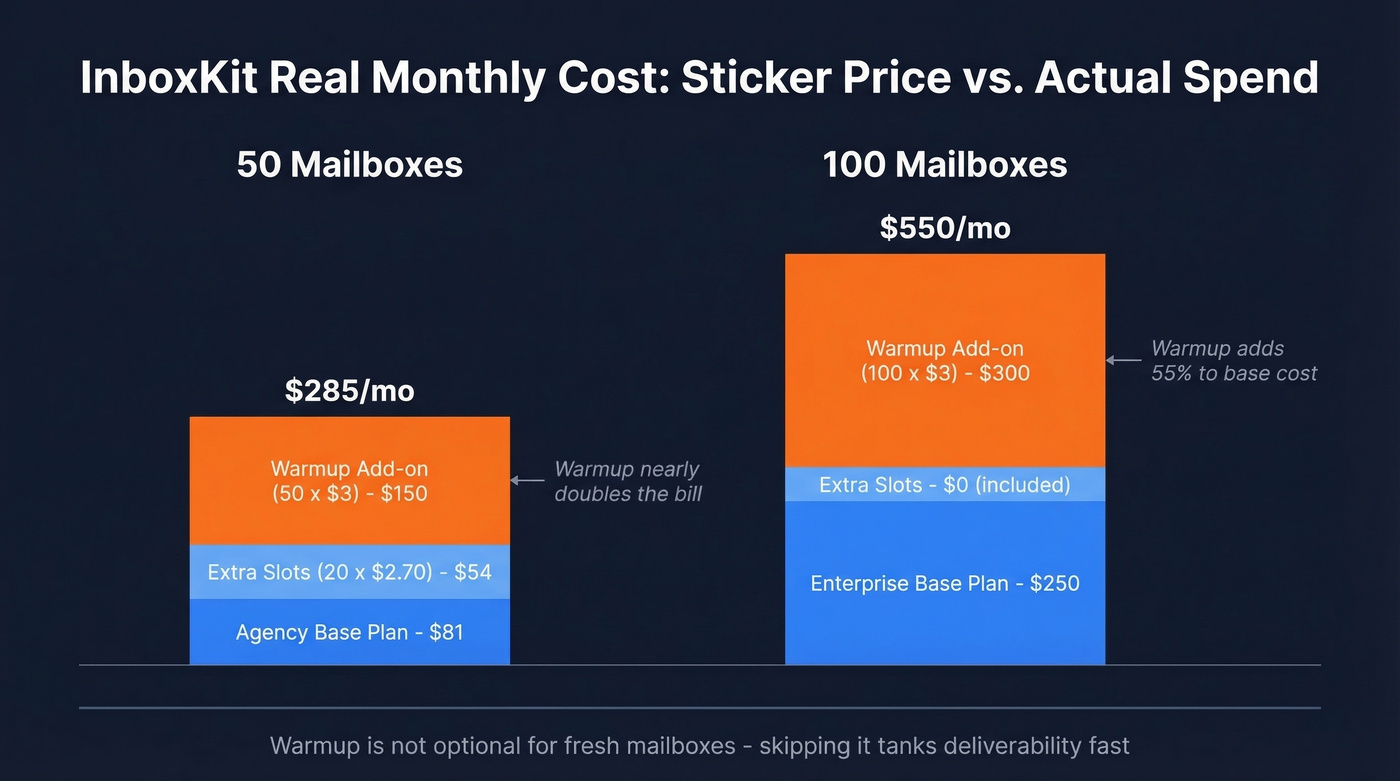
50 mailboxes: $81 (Agency base) + $54 (20 extra slots x $2.70) + $150 (50 x $3 warmup) = $285/month. Without warmup: $135/month.
100 mailboxes: $250 (Enterprise base) + $0 (slots included) + $300 (100 x $3 warmup) = $550/month. Without warmup: $250/month.
That warmup add-on at $3/mailbox/month is the main multiplier. On 50 mailboxes, it nearly doubles your bill. And skipping warmup on fresh mailboxes is a fast way to tank deliverability, so it's not really optional.
Real User Reviews: Pros and Cons
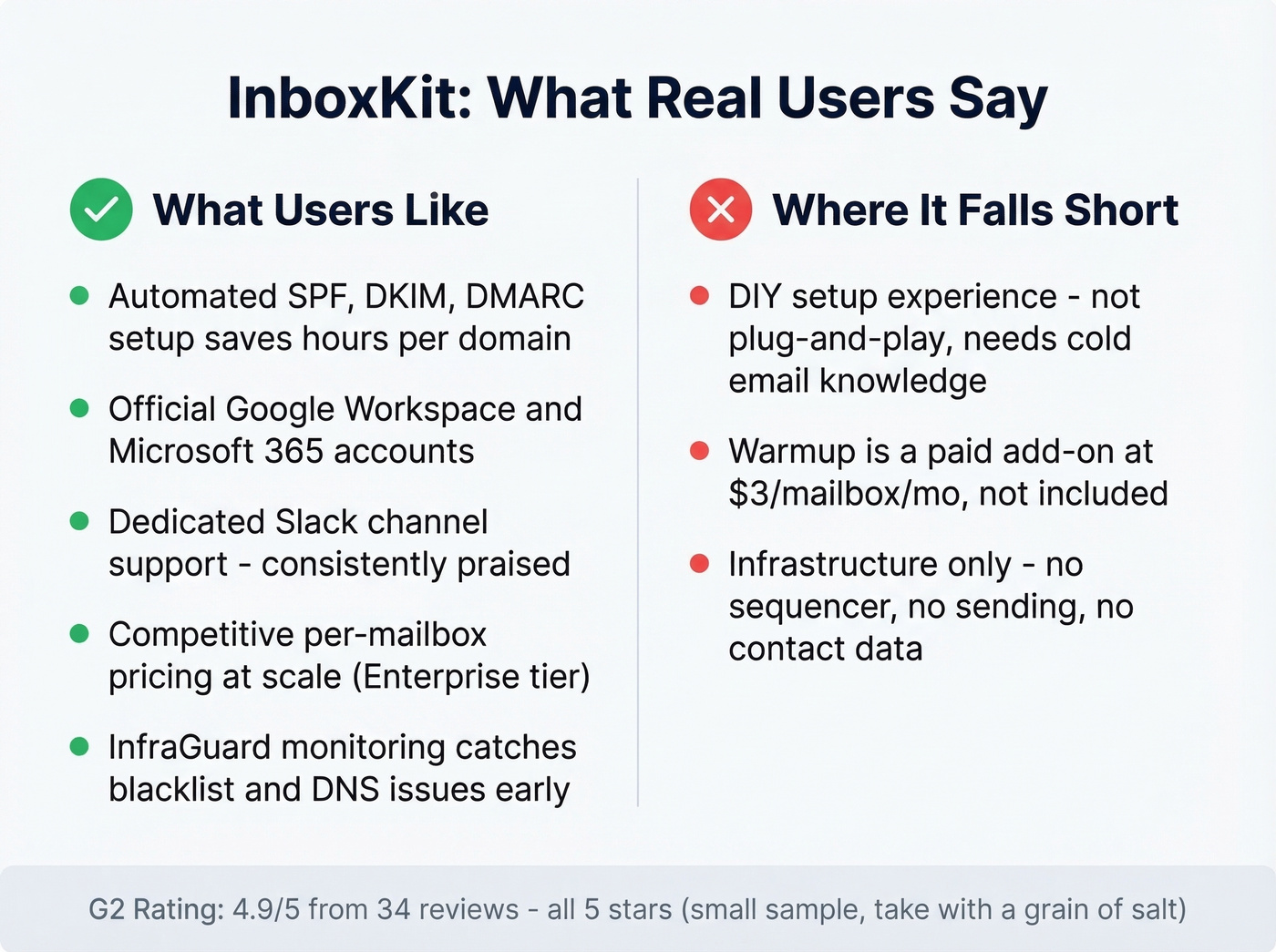
InboxKit carries a 4.9/5 on G2 from 34 reviews - and every single one is 5 stars. That's either a very happy user base or a very small sample. Probably both.
What Users Like
- Automated SPF/DKIM/DMARC setup that genuinely saves hours per domain. One reviewer titled their review "Seamless Setup, Exceptional Support" - and in our experience, DNS automation at this level does save real time when you're managing dozens of domains.
- Official Google Workspace and Microsoft 365 accounts, not shared IP infrastructure.
- Responsive support via a dedicated Slack channel, which reviewers consistently call out as a standout.
- Competitive per-mailbox pricing at scale, especially on the Enterprise tier.
- InfraGuard monitoring for blacklists, DNS health, and bounce patterns - useful for catching issues before they snowball. (If you’re troubleshooting blacklist hits, see our guide on DNSBL.)
Where It Falls Short
- The setup experience is DIY. A Reddit user testing multiple providers described InboxKit as "cheaper, but more DIY" with a "not amazing UX but usable if you know what you're doing."
- Warmup isn't included. It's a paid add-on. At least one G2 reviewer expected warmup bundled and flagged it as a missing piece.
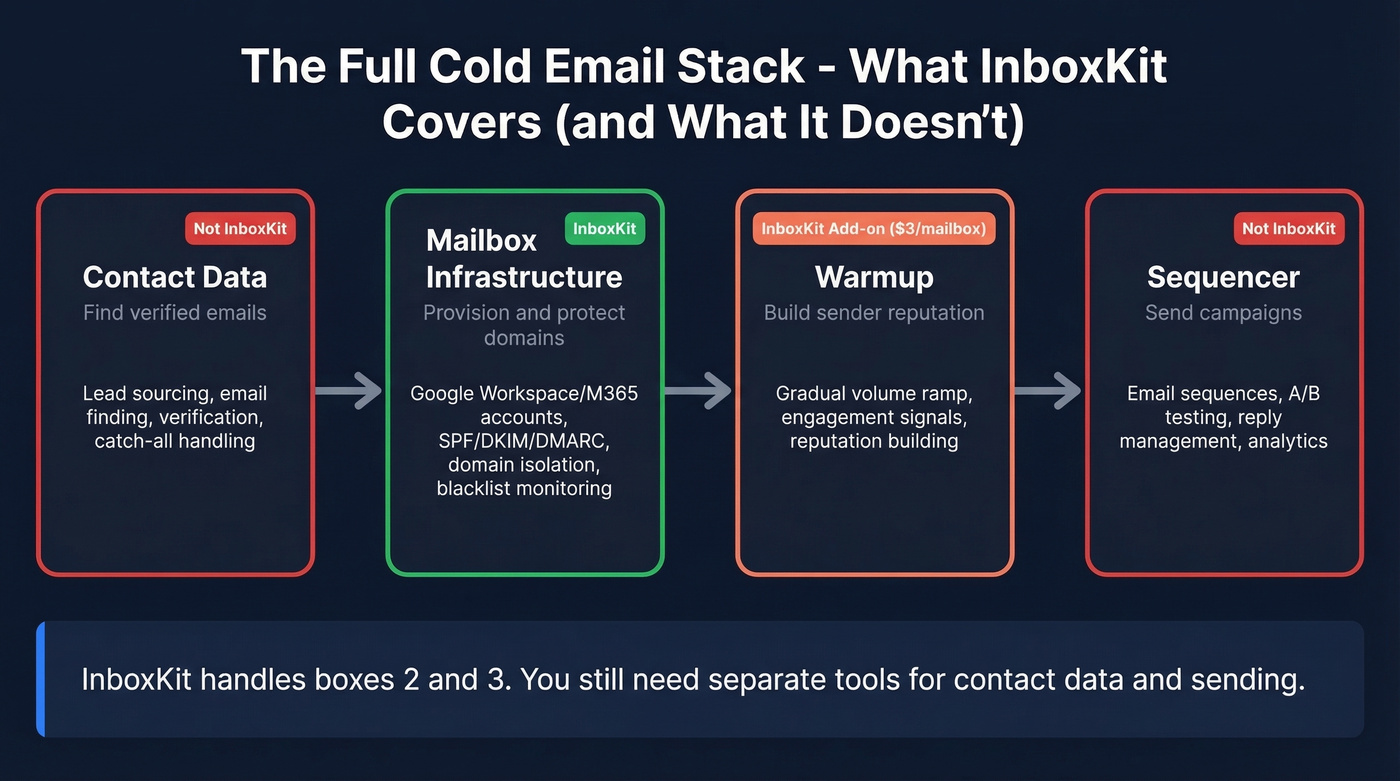
- Infrastructure only. No email sending, no sequencer, no contact data. You still need Instantly, Smartlead, or Lemlist to actually run campaigns. (If you’re evaluating sequencing options, compare approaches in AI Email Sequencing.)

You're spending $285-$550/month on InboxKit infrastructure and warmup. One bounced email batch over 2% undoes all of it. Prospeo's 5-step verification - with catch-all handling, spam-trap removal, and honeypot filtering - keeps bounce rates under control at $0.01/email.
Stop burning domains you just paid to warm up.
Is 95% Inbox Placement Real?
InboxKit advertises 95% inbox delivery. Global average inbox placement sits around 83.1%, and one large-scale deliverability dataset puts Instantly at 94% and Smartlead at 89%. So 95% would place InboxKit at the top of the pack.
Here's the thing: the provider provisioning your mailboxes matters far less than your sending behavior. New domains should start at 20-30 emails/day and ramp over 4-6 weeks - skip this and no provider will save your deliverability. (For a deeper breakdown of provider caps and ramping, see SMTP sending limits.) With Microsoft completing Basic Auth deprecation in April 2026, proper authentication is table stakes, not a differentiator. The 95% number is achievable with disciplined warmup and clean lists. It's not a default you get just by signing up.
What InboxKit Doesn't Do
InboxKit focuses on mailbox provisioning, DNS automation, and deliverability monitoring - not running outbound campaigns end-to-end. It won't replace your sequencer, your lead source, or your list hygiene. (If you’re building the rest of the stack, start with a sales prospecting platform and layer outreach on top.)
Perfect mailboxes sending to dead addresses still tank your reputation. Once you're over ~2% bounces, deliverability usually slides fast. We've seen this firsthand with teams who invest heavily in infrastructure but neglect verification - they burn domains within weeks. (If you want the mechanics behind this, read hard bouncing and how it impacts sender health.) Pair your infrastructure with a verification platform like Prospeo (98% email accuracy on a 7-day data refresh cycle, free tier to test) and you've covered both sides of deliverability. The 5-step verification includes catch-all handling, spam-trap removal, and honeypot filtering, which means fewer bounces eroding the domain reputation you just paid to build. (More on list hygiene in our email validation guide.)

Alternatives Worth Considering
| Provider | Per-Mailbox Cost | Model | Best For |
|---|---|---|---|
| InboxKit | $2.50-$3.10 (add-on rate, plan-dependent) | Official GWS/M365 | Scaling 30-100 mailboxes |
| Mailforge | ~$3 | Shared IP pool | High-volume, non-Google |
| Inframail | $129/mo flat | Unlimited, dedicated IPs | 50+ mailboxes |
| Zapmail | ~$3.50 | Mailbox provider | Higher-touch teams |
| Puzzle Inbox | ~$0.35 | Budget Microsoft 365 | Ultra-budget setups |
| Scaled Mail | ~$0.70 | Mid-tier Microsoft 365 | Price/stability balance |
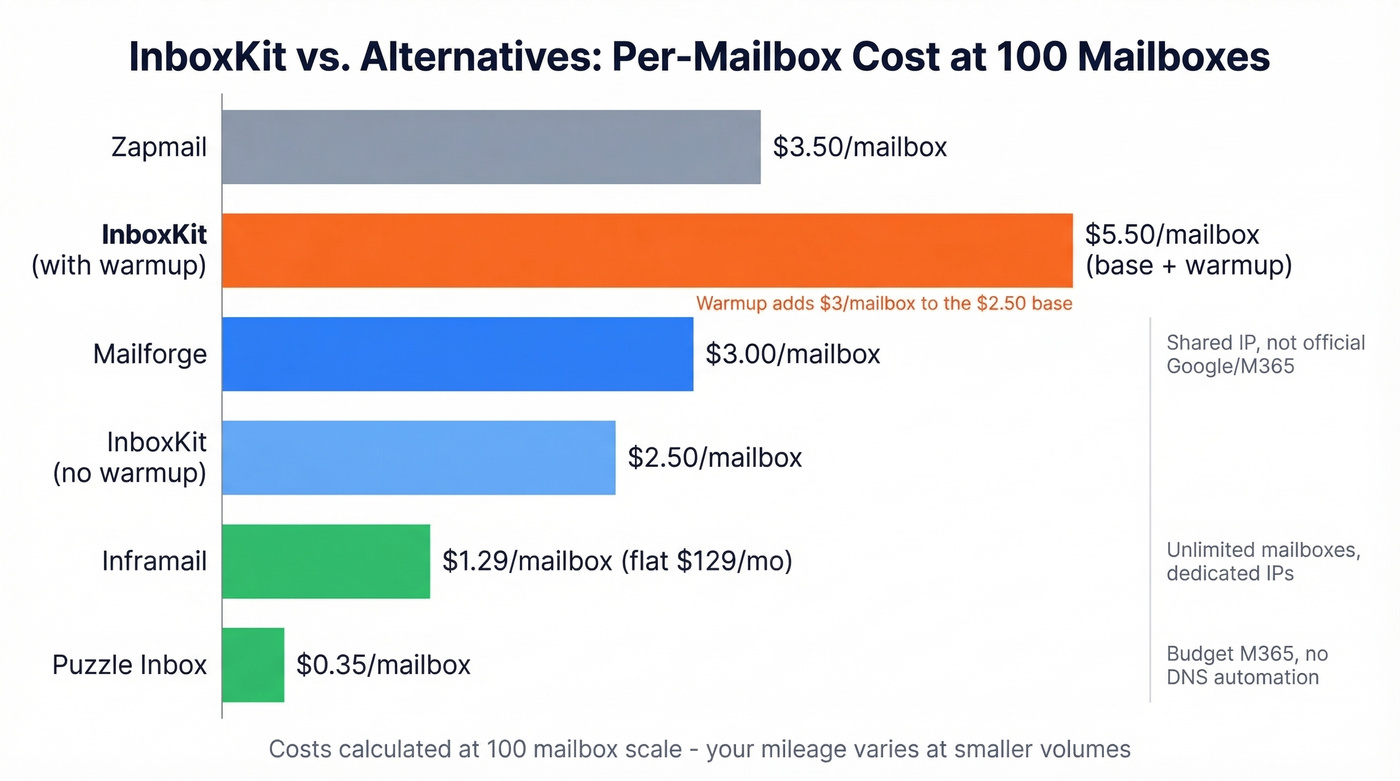
Mailforge runs on its own shared IP infrastructure - not official Google or Microsoft accounts. If Google Workspace deliverability reputation matters to your campaigns, that's a fundamental difference. Price-competitive at ~$3/mailbox, but you're trading official accounts for Mailforge's own infra.
Inframail flips the model entirely: $129/month for unlimited mailboxes on dedicated IPs. Once you cross ~50 mailboxes, per-seat math at InboxKit breaks down badly. We've seen teams running 100+ mailboxes save significantly by switching to flat-rate models like this.
Puzzle Inbox and Scaled Mail sit at the budget end. At $0.35-$0.70 per mailbox, they're dramatically cheaper, but you're getting Microsoft 365 accounts without the DNS automation and monitoring InboxKit bundles in. For teams comfortable managing their own setup, the savings are hard to ignore. (If you’re also trying to protect domain reputation, budget infra can be a false economy.)
Skip Zapmail if budget is tight - it's priced higher than InboxKit without a clear feature advantage for most use cases.
Verdict
InboxKit is a competent infrastructure provider for people who already know what they're doing. It lands as a solid middle ground between DIY Google Workspace setup and premium managed services - not the cheapest, not the most polished, not the most hands-off.
Use it if you're scaling Google Workspace mailboxes and want automated DNS plus domain isolation without paying premium-provider prices. Skip it if you want plug-and-play, you're running fewer than 20 mailboxes (just set up Google Workspace yourself), or you need an all-in-one platform that handles sending and data too.
InboxKit handles mailboxes. Your sequencer handles sending. But neither solves the contact data problem. Prospeo delivers 98% email accuracy on a 7-day refresh cycle across 300M+ profiles - so the infrastructure you're investing in actually reaches real inboxes.
Pair verified data with your cold email stack and watch bounce rates disappear.
FAQ
How much does InboxKit actually cost in 2026?
Base plans range from $31/month (10 mailboxes) to $250/month (100 mailboxes). Add warmup at $3/mailbox/month and extra slots, and real costs hit $285/month for 50 mailboxes or $550/month for 100. Always calculate total cost with warmup before comparing providers.
Does InboxKit include email warmup?
No - warmup is a paid add-on at $3 per mailbox per month. On 50 mailboxes, that's an extra $150/month. Factor this into your total cost before comparing headline prices against flat-rate alternatives like Inframail.
Can I send emails directly from InboxKit?
No. InboxKit is infrastructure only - it provisions mailboxes and handles DNS. You'll need a separate sequencer like Instantly, Smartlead, or Lemlist to send campaigns, plus a data provider like Prospeo to source verified contacts.
How does InboxKit compare to buying Google Workspace directly?
InboxKit automates DNS setup, domain health checks, and mailbox management across dozens of domains. Doing this manually is possible but painful at scale - imagine configuring SPF, DKIM, and DMARC records for 30+ domains by hand. The value is the automation layer and monitoring, not the mailboxes themselves. Below 20 mailboxes, self-managing Google Workspace is usually more cost-effective.