

Hard Bouncing: What It Is, Why It Happens, and How to Stop It
Your SDR loads 2,000 contacts into a sequence on Monday morning. By Tuesday, 400 have bounced. By Wednesday, Gmail is throttling your entire domain. That's not a hypothetical - it's what happens when hard bouncing goes unchecked, and it takes weeks to recover.
Quick version: A hard bounce is a permanent email delivery failure - the address doesn't exist, and it never will. The fix isn't cleaning your list after the damage. It's verifying every email before it enters your CRM or sequence. Keep your bounce rate under 2% for marketing email, under 5% for cold outbound. If you're above 5%, treat it like an emergency.
What Is Hard Bouncing?
A hard bounce means the recipient's mail server has permanently rejected your email. It's the SMTP 5xx error class - the server isn't saying "try again later," it's saying "this address doesn't exist and never will." The mailbox was deleted, the domain is dead, or the address was never real in the first place.
Unlike a soft bounce - a temporary issue like a full inbox - a hard bounce won't resolve on its own. Every permanent rejection is a small mark against your domain's reputation. Stack enough of them and you've got a real problem.
Hard Bounce vs. Soft Bounce
| Attribute | Hard Bounce | Soft Bounce |
|---|---|---|
| Duration | Permanent | Temporary |
| SMTP Code | 5xx | 4xx |
| Common Causes | Invalid address, dead domain | Full inbox, server down |
| Action | Remove immediately | Retry 2-3 times, then remove |
| Reputation Risk | High | Low (unless chronic) |
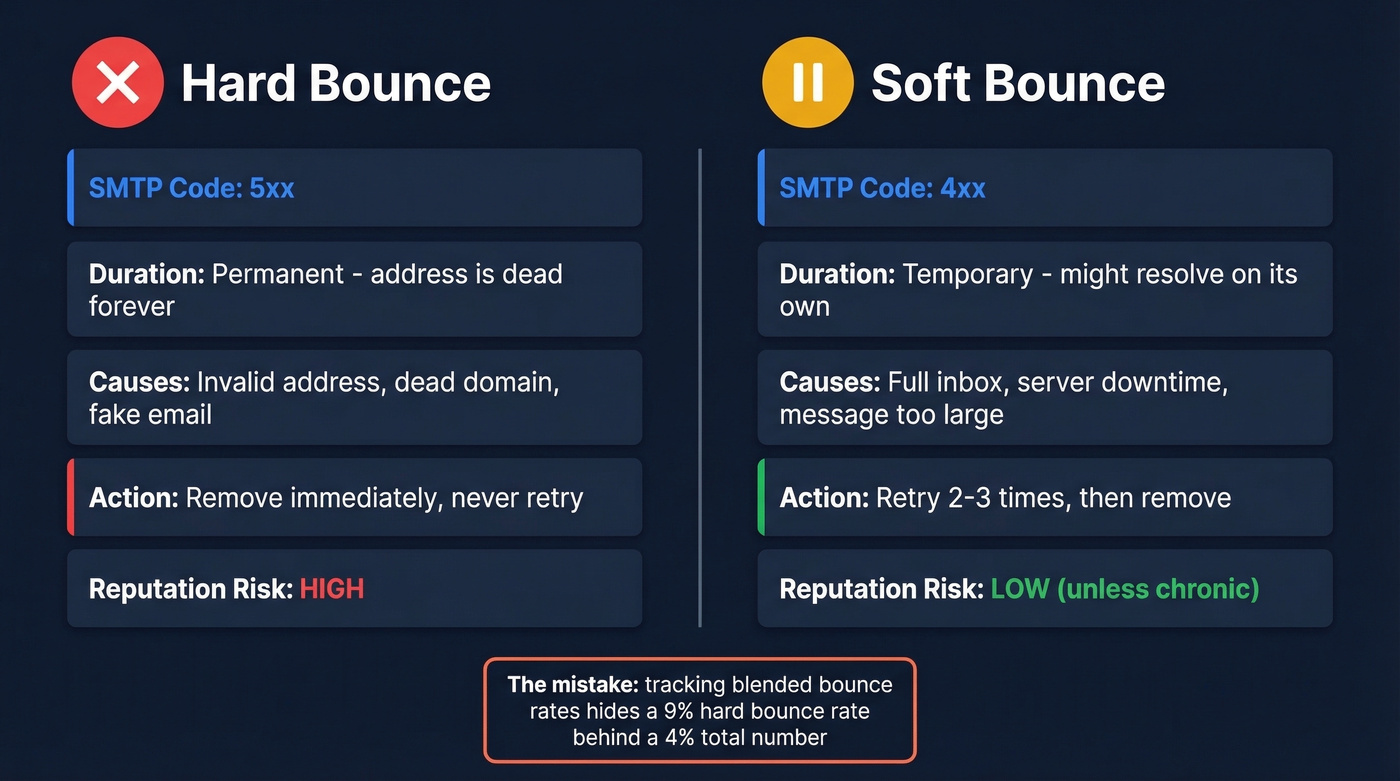
The distinction matters because your ESP treats them differently. Soft bounces get retried automatically. Hard bounces don't - and shouldn't.
The mistake most teams make is lumping them together in reporting and missing the signal that their data quality is degrading. We've seen dashboards where "total bounces" was the only metric tracked, which meant a 9% hard bounce rate hid behind a 4% blended number for months.

What Causes Permanent Bounces?
Most hard bounces trace back to one root cause: bad data entering your system in the first place.
- Invalid or non-existent email address. Typos, fake addresses from form fills, or contacts who left the company. This is the #1 cause by volume.
- Dead domain. The company shut down, rebranded, or let their domain expire. Your email has nowhere to go.
- Server permanently blocking delivery. Some mail servers reject all external email or block specific senders at the infrastructure level.
- Data decay. Around 30% of B2B data goes stale annually. A list that was 95% accurate six months ago could be 70% accurate today.
- Catch-all domains masking bad addresses. Some domains accept all email regardless of whether the mailbox exists. When those domains change configuration, previously "delivered" emails start bouncing hard.
- Spam traps and honeypots. These addresses are designed to catch senders using unverified lists. Hitting one doesn't just bounce - it can seriously damage your deliverability and domain reputation.

Every hard bounce is a data quality problem in disguise. Prospeo's 5-step verification - syntax, domain, MX record, catch-all detection, and spam-trap filtering - delivers 98% email accuracy. Meritt cut their bounce rate from 35% to under 4% and tripled their pipeline. At $0.01 per email, fixing your bounce rate costs less than one throttled domain.
Stop importing bad data. Verify every email before it touches your sequence.
SMTP Bounce Codes
When an email hard bounces, the server returns a code. Here are the ones you'll actually see:
| Code | Meaning | What to Do |
|---|---|---|
| 550 | Mailbox doesn't exist | Remove immediately |
| 551 | User not local | Remove (wrong address/domain) |
| 552 | Storage exceeded | Retry, then remove if persistent |
| 553 | Mailbox name invalid | Remove - bad format |
| 554 | Transaction failed | Investigate; remove if persistent |
The 550 is what you'll encounter most often. If your ESP or sequencer shows a 550, that contact is dead. Don't retry it. Don't move it to a "re-verify later" list. Delete it.
How Hard Bouncing Wrecks Sender Reputation
ISPs like Gmail, Outlook, and Yahoo track bounce rates per sending domain. They don't care about your intentions - they care about patterns. Once your bounce rate climbs past 5%, throttling becomes a real risk, and sustained rates above 10% can land you on a blacklist.
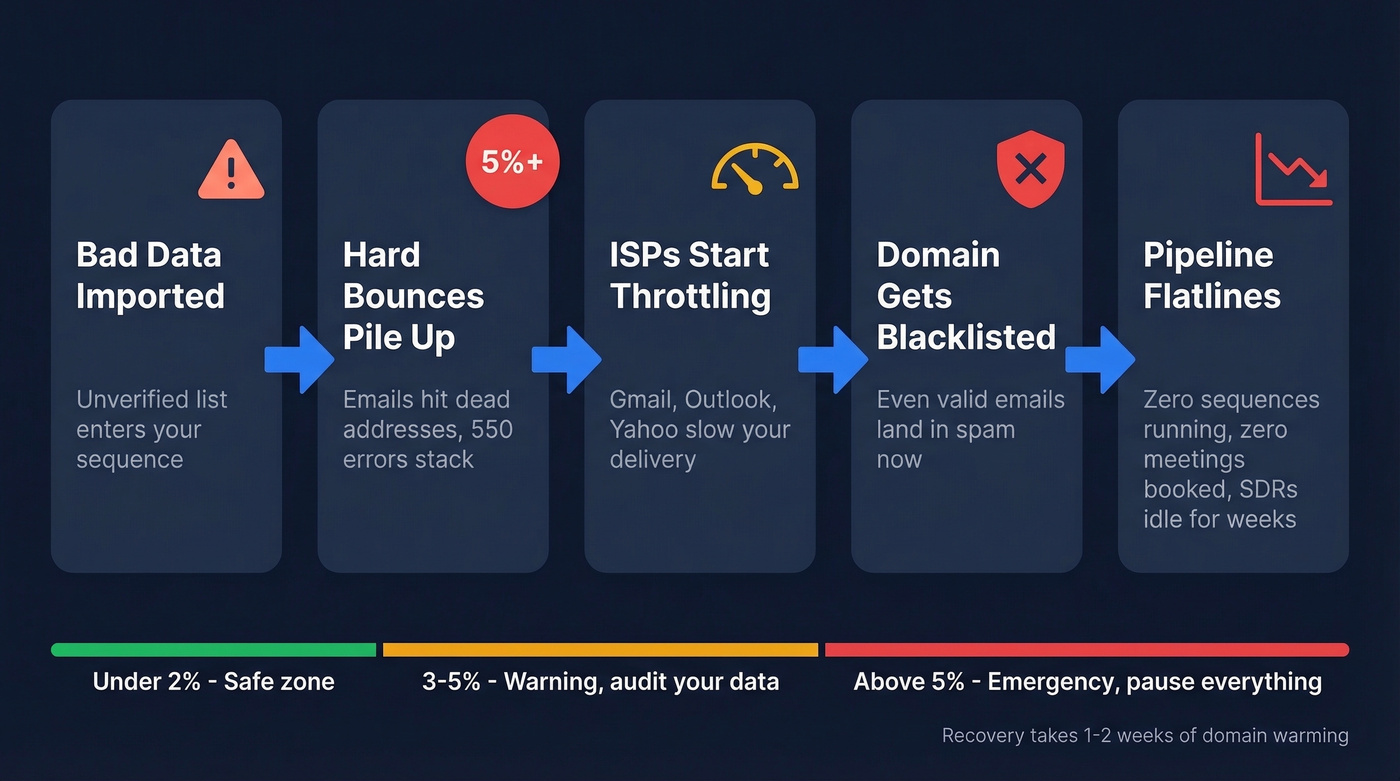
Here's the thing most teams don't expect: the damage compounds. Once your domain reputation drops below a certain threshold, ISPs start routing even your emails to valid addresses into spam. Recovery isn't instant - it often means warming a replacement domain over one to two weeks, during which your outbound pipeline flatlines completely. Zero sequences running, zero meetings booked, your SDRs staring at a wall.
Browse r/sales or r/coldemail and you'll find the same story repeated weekly: someone imported a purchased list, bounced 15%, and spent weeks clawing back their sender score. Entirely preventable.
What's an Acceptable Bounce Rate?
For marketing email - newsletters, nurture campaigns - keep your bounce rate under 2%. For cold outbound, under 5% is the standard threshold, but if you're consistently above 3%, something's wrong with your data source. In our experience, teams sitting at 3-4% are almost always pulling from a provider with stale refresh cycles.
If you want a deeper benchmark breakdown (and how to interpret bounce types), see our guide on bounce rate.
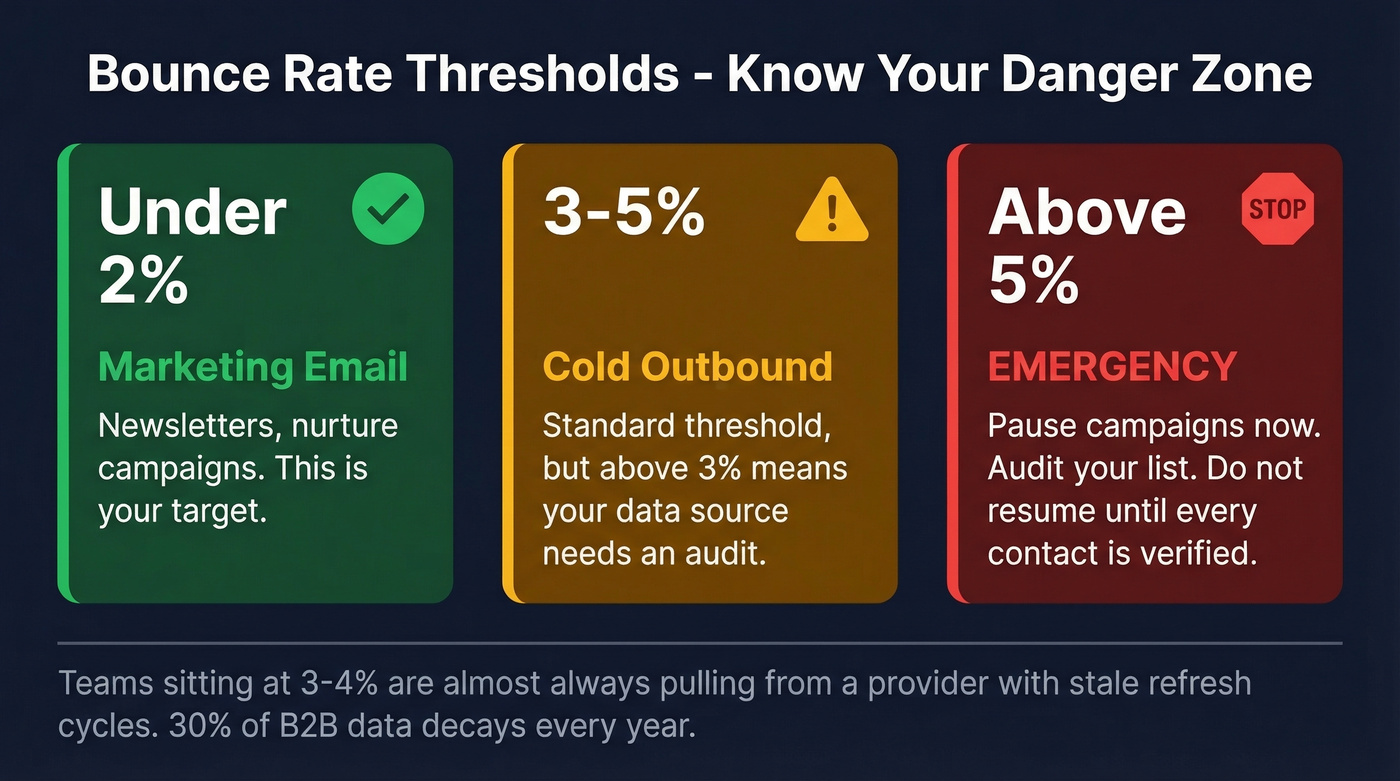
Above 5% is an emergency. Pause your campaigns, audit your list, and don't resume until you've verified every remaining contact.
How to Prevent Hard Bounces
Let's be honest: most guides tell you to "clean your list regularly." That's backwards. The fix is never adding unverified emails in the first place.
If you're building lists from multiple sources, it helps to standardize your lead generation workflow so verification happens before enrichment and sequencing.
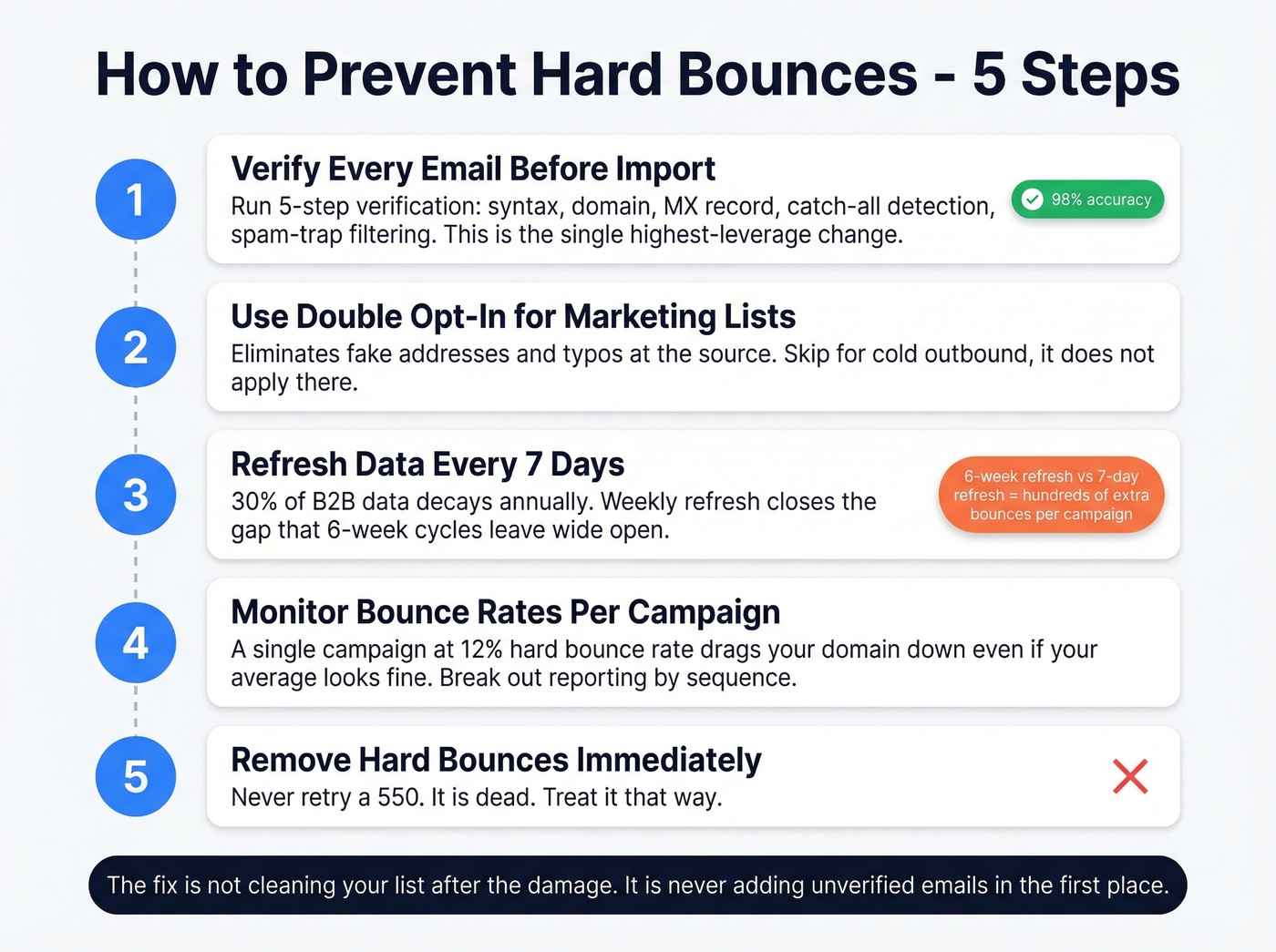
1. Verify every email before it enters your CRM or sequence. This is the single highest-leverage change you can make. Prospeo runs a 5-step verification - syntax, domain, MX record, catch-all detection, spam-trap filtering - delivering 98% accuracy. One sales team we worked with, Meritt, dropped their bounce rate from 35% to under 4% by verifying before sending, and their pipeline tripled in the process.
If you need a practical checklist, use this guide on how to check if an email exists (and what signals actually matter).
2. Use double opt-in for marketing lists. It adds friction, but it eliminates fake addresses and typos at the source. Skip this if you're running cold outbound - it doesn't apply there.
3. Refresh your data frequently. Most data providers refresh on a 6-week cycle. When 30% of B2B data decays annually, the difference between weekly and monthly refreshes is hundreds of bounced emails per campaign. A 7-day refresh cycle closes most of that gap.
If you're evaluating vendors, compare options in our roundup of email list providers and how they handle refresh cycles.
4. Monitor bounce rates per campaign and per domain. A single campaign with a 12% hard bounce rate will drag your domain reputation down even if your overall average looks fine. Break your reporting out by sequence or campaign - blended averages hide problems.
To keep deliverability stable long-term, track it alongside email velocity and your domain's health signals.
5. Remove hard bounces immediately. Never retry a 550. It's dead. Treat it that way.
If you're already seeing throttling, follow a step-by-step plan to improve sender reputation before you scale again.
Stale data is the silent cause behind most hard bounces. While other providers refresh every 6 weeks, Prospeo refreshes all 300M+ profiles every 7 days. That's the difference between a 2% bounce rate and a domain blacklist. Stack Optimize built a $1M agency on Prospeo data with bounce rates consistently under 3% and zero domain flags.
Weekly-refreshed data means your lists don't decay into bounce traps.
FAQ
Can a hard bounce fix itself?
No. A hard bounce is permanent - the address is invalid or the domain no longer exists. Remove it immediately and never retry. Each additional attempt adds another negative signal to your sender reputation with ISPs.
What bounce rate gets your domain blacklisted?
Most ISPs begin throttling delivery at 5% and blacklist sending domains above 10%. For cold outbound, treat anything consistently over 3% as a warning sign that your data source needs an audit or replacement.
Does email verification actually prevent hard bouncing?
Yes - pre-send verification catches invalid addresses through syntax, domain, MX record, catch-all, and spam-trap checks before they ever reach a mail server. It's the most reliable way to keep bounce rates near zero, and it's far cheaper than recovering a burned domain.
How often should I re-verify my contact list?
Re-verify at least monthly. B2B data decays at roughly 30% per year, so a list verified 90 days ago could have 7-8% invalid addresses. Tools with a weekly refresh cycle minimize this risk by keeping records current automatically.