

SMTP Sending Limits in 2026: Every Provider's Cap in One Place
Your WordPress site just stopped sending order confirmations. Transactional emails are queuing, customers are complaining, and you're staring at a "Policy Rejection- Quota Exceeded" error. You hit an SMTP sending limit you didn't know existed.
With 361 billion emails sent daily worldwide, every provider enforces caps. Most people discover them at the worst possible moment.
Quick Version
- Personal email? Gmail's 500/day covers you.
- Running a business? Google Workspace (2,000/day) or Microsoft 365 (10,000 recipients/day) handles most needs.
- Scaling past 2,000 emails/day? Switch to a dedicated SMTP service - Amazon SES (roughly $0.10 per 1,000 emails), SendGrid ($19.95/mo), or Postmark ($15/mo).
- Sending cold outreach? Warm up over 4 weeks, verify your list first, and keep bounces under 3% (see email velocity for safe pacing).
Consumer and Business Email Limits
One important 2026 update: Microsoft canceled the Mailbox External Recipient Rate Limit indefinitely in January 2026. The standard Recipient Rate Limit and Tenant-level External Recipient Rate Limit remain unchanged.
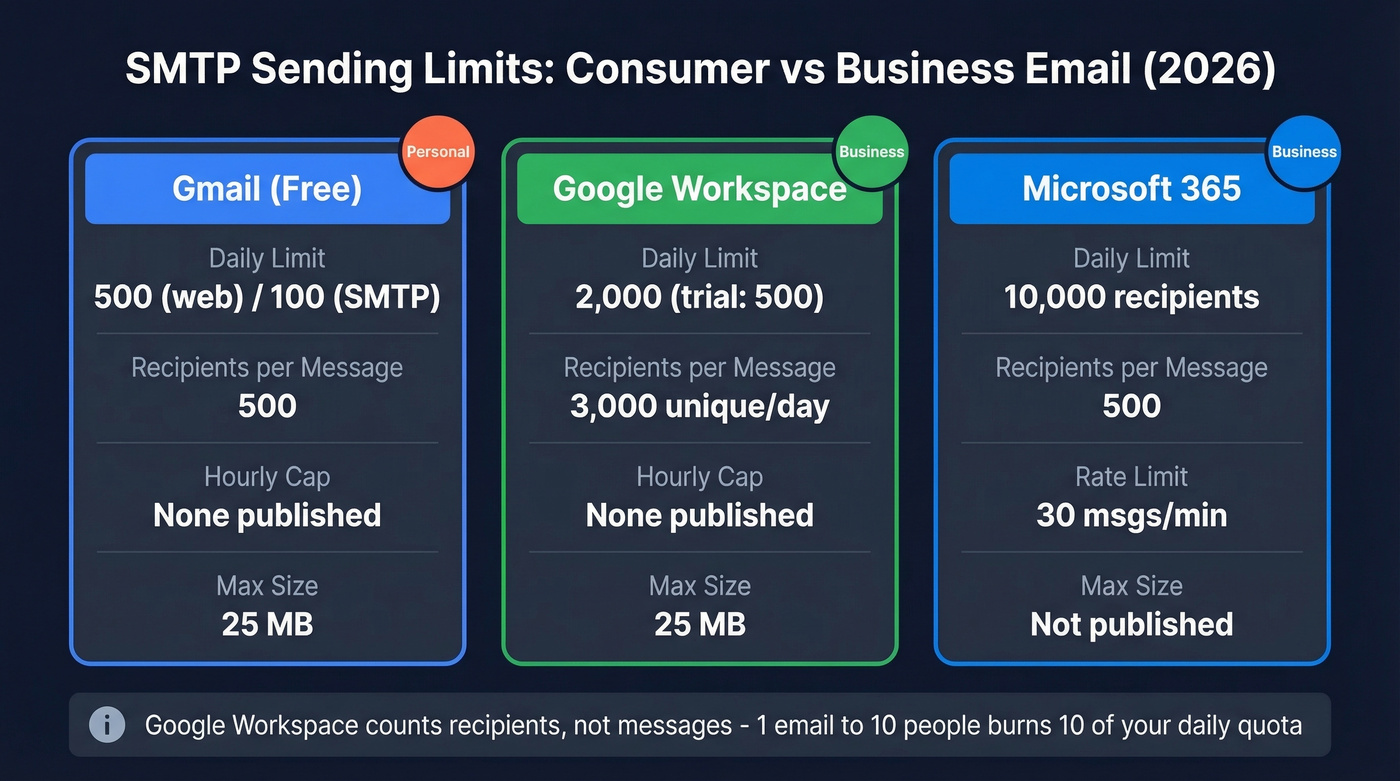
| Provider | Daily Limit | Recipients/Msg | Hourly Cap | Max Size |
|---|---|---|---|---|
| Gmail (free) | 500 (web) / 100 (SMTP) | 500 | None published | 25 MB |
| Google Workspace | 2,000 (trial: 500) | - | None published | 25 MB |
| Microsoft 365 | 10,000 recipients/day | 500 | 30 msgs/min | - |
Google Workspace counts recipients, not messages - one email to 10 people burns 10 of your daily quota. Workspace also allows up to 3,000 unique recipients per day and 2,000 external recipients, a distinction that matters for mixed internal/external workflows. Microsoft 365's 30 messages/minute rate limit catches people off guard, especially with automated workflows that fire bursts of notifications in quick succession.
Other Inbox Providers
Outlook.com, Yahoo Mail, iCloud Mail, ProtonMail, and Zoho Mail all enforce their own daily caps and per-message recipient limits. If you're trying to push more than a few hundred emails per day from a consumer inbox, you'll hit throttling fast. Move to a business suite or a dedicated SMTP service (and follow an email deliverability guide so you don’t get throttled for reputation reasons).
Web Hosting SMTP Caps
Here's the thing: most web hosting SMTP is garbage for anything beyond basic transactional emails. We've seen WordPress sites queue hundreds of order confirmations behind a low hourly cap, with customers wondering why their receipts never arrived. These limits exist because shared servers can't handle volume, and hosts would rather throttle you than risk their IP reputation.
WordPress comment notifications, subscriber alerts, and plugin emails all count toward the same limits.
| Host | Limit | Per | Enforcement |
|---|---|---|---|
| DreamHost | 100 recipients per hour | Per hour/address | Immediate block; cooldown requires 1 hour of zero send attempts |
| Bluehost | 150 emails | Per hour | Queued/delayed |
| GoDaddy Email | 250-500 emails | Per day | Varies by plan |
DreamHost's enforcement is particularly aggressive. Exceed 100 recipients per hour and that email address gets blocked immediately - the block lasts until a full hour passes with zero send attempts from that address.

Bad data is why you're hitting SMTP limits early. Every bounce burns quota AND tanks sender reputation. Prospeo's 5-step email verification catches invalid addresses, spam traps, and catch-all domains before they waste a single send.
Stop burning daily quota on emails that don't exist.
Dedicated SMTP Services
Once you outgrow inbox providers, dedicated SMTP services are the move. Pricing is surprisingly cheap, but deliverability varies wildly between them.
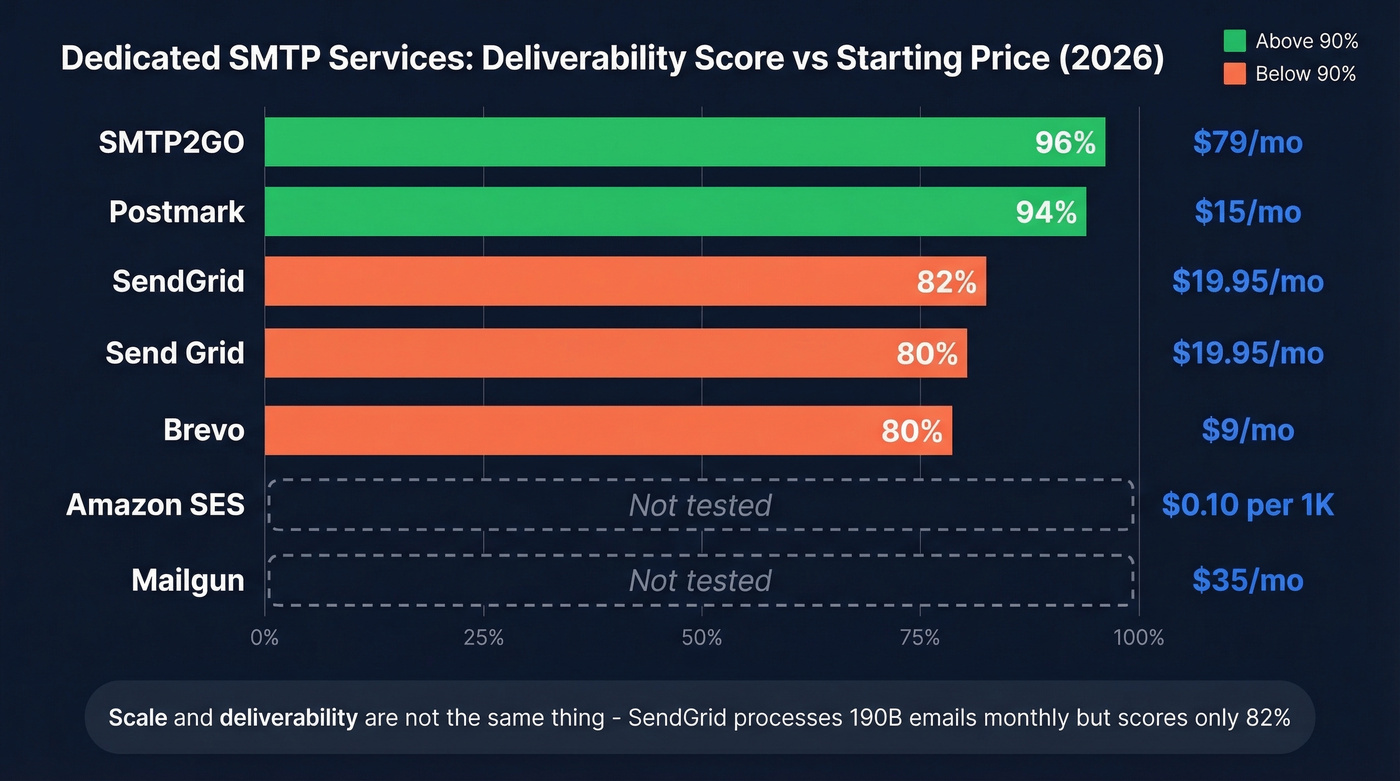
| Service | Free Tier | Paid From | Cap | EmailToolTester Avg Score |
|---|---|---|---|---|
| Amazon SES | Sandbox: 200/24hr | ~$0.10/1K emails | Adjustable | - |
| SendGrid | Free plan removed May 2025 | $19.95/mo (Essentials 50K) | 10K req/sec (API) | 82% |
| Mailgun | None (verification workflow) | ~$35/mo | 100 msg/hr (when limited) | - |
| Postmark | 100 emails/month | $15/mo (10K) | Plan-based | 94% |
| Brevo | 300/day | ~$9/mo | Plan-based | 80% |
| SMTP2GO | 1,000 emails/month | $79/mo | Plan-based | 96% |
Deliverability scores come from EmailToolTester's multi-round testing. SMTP2GO at 96% and Postmark at 94% are standouts. SendGrid at 82% is surprisingly mediocre for a service that processes 190 billion emails monthly - a reminder that scale and deliverability aren't the same thing.
Amazon SES sandbox mode caps you at 200 emails per rolling 24 hours and 1 email/second, with quotas tracked per AWS Region. SES also caps recipients at 50 per message and limits message size to 10 MB via the v1 API or 40 MB via v2/SMTP. Production limits are adjustable based on sending reputation, which makes SES the cheapest option for raw volume - but it requires real setup work. Postmark and SMTP2GO deliver better out-of-the-box results if you don't want to babysit infrastructure.
A common question on r/selfhosted is whether you can run your own mail server to avoid limits entirely. You can. But you'll spend more time managing IP reputation, blocklists, and PTR records than you save on provider fees. For 99% of teams, a $15-$35/month dedicated service wins (and you’ll still want email reputation tools to monitor issues early).
SMTP Error Codes Quick Reference
| Code | Meaning | Action |
|---|---|---|
| 421 | Too many connections / server busy | Retry after delay; slow down |
| 450 | Mailbox unavailable | Retry in 24-72 hrs |
| 451 | Server overload / local processing error | Retry after delay; slow down |
| 550/553 | Hard bounce - invalid address | Suppress immediately |
| 554 | Marked as spam / transaction failed | Investigate, suppress |
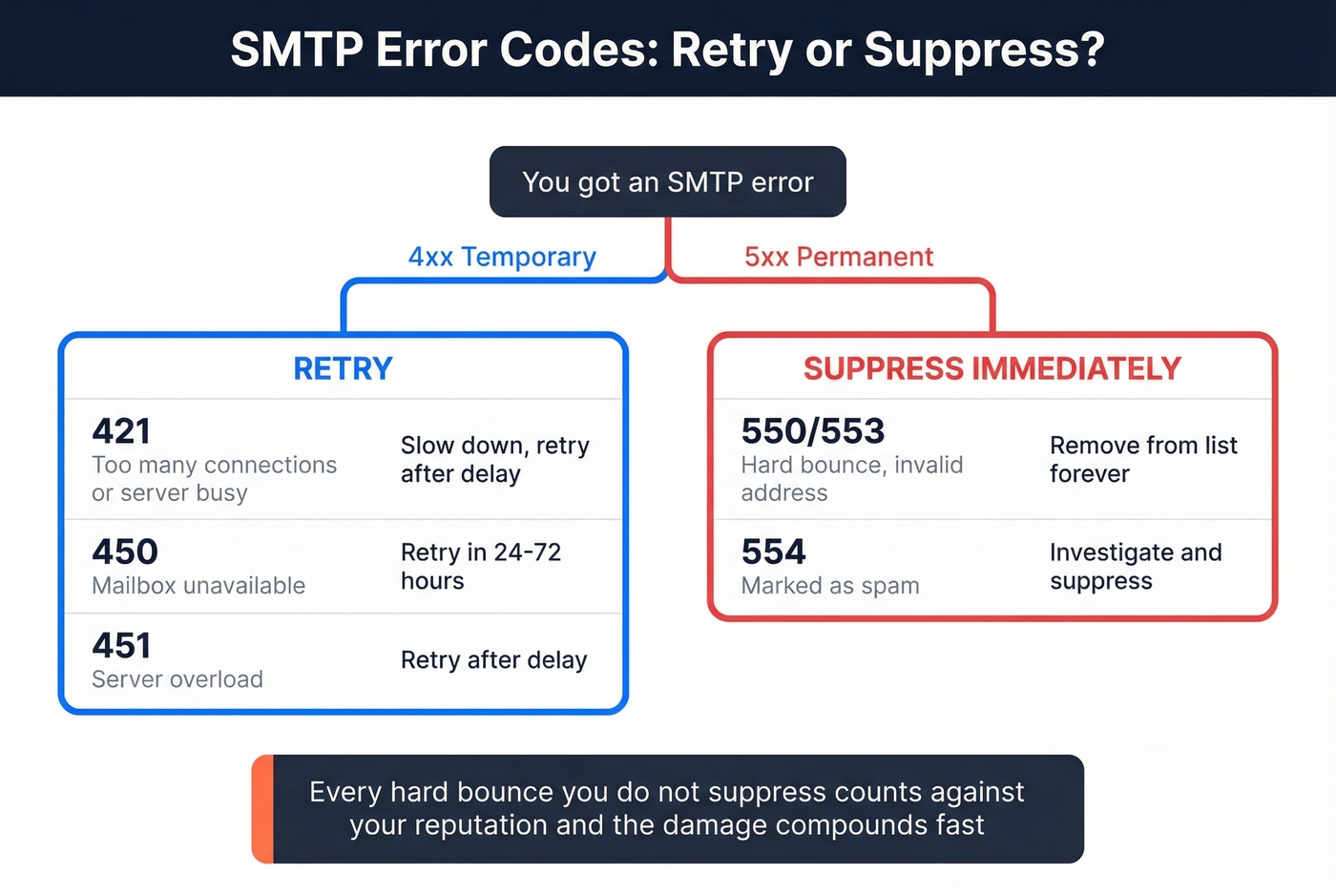
4xx codes are temporary - retry. 5xx codes are permanent - suppress that address and never send to it again. SendGrid returns HTTP 429 when you hit API rate limits, with rate-limit headers in the response telling you exactly when to retry. Every hard bounce you don't suppress counts against your reputation, and that damage compounds fast (see email bounce rate benchmarks and fixes).
How to Scale Past Your Limits
Scaling email volume is a patience game. Rush it and you'll burn your domain for months. In our experience, the warm-up ramp below works for most cold outreach setups.
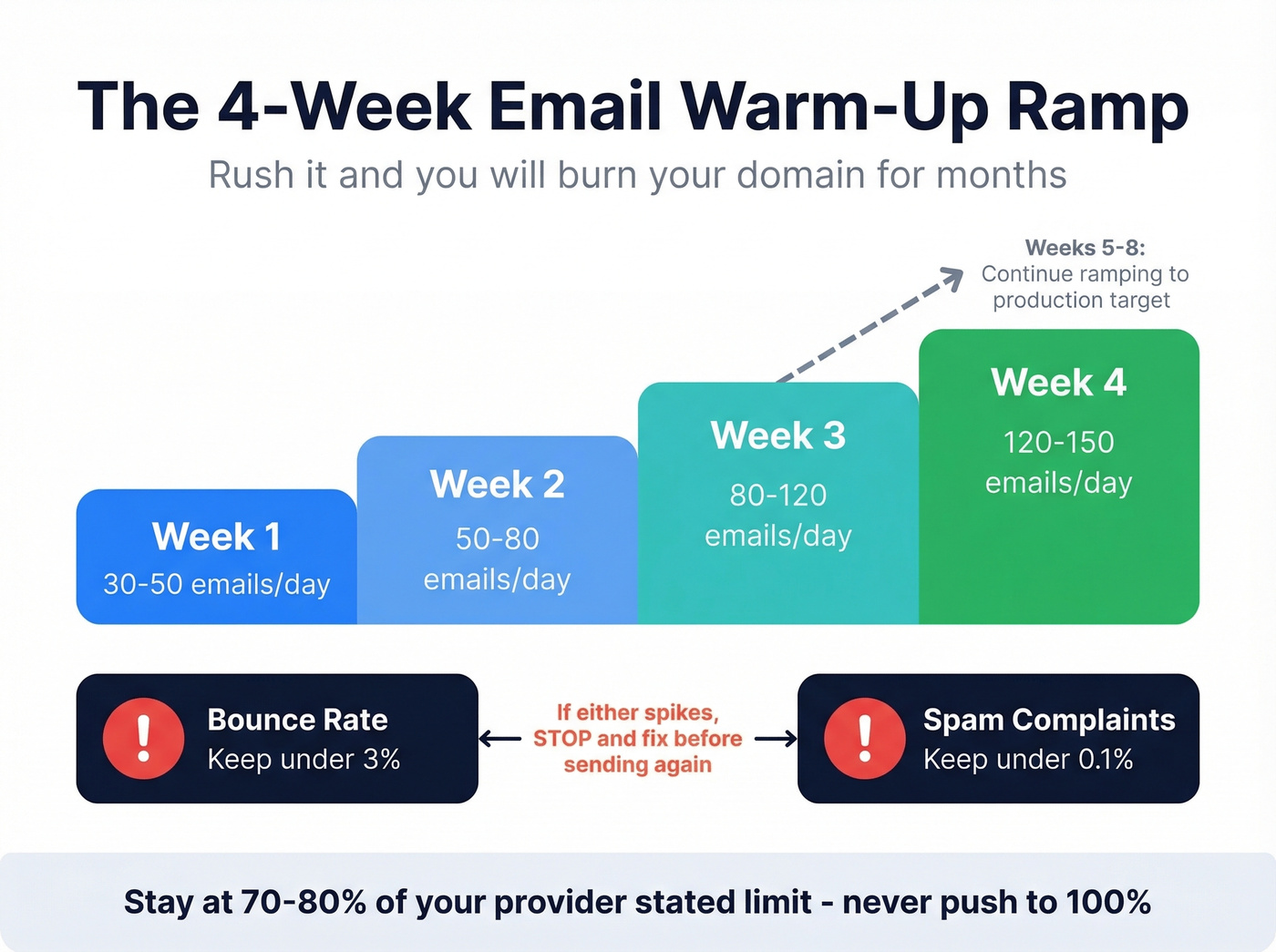
Warm up gradually. Week 1: 30-50 emails/day. Week 2: 50-80. Week 3: 80-120. Week 4: 120-150. For dedicated IP warming on services like SES or SendGrid, continue ramping through weeks 5-8 toward your production target - but only if bounce rates and complaints stay healthy (use unlimited email warmup tools if you need automation).
Hold the line on metrics. Bounce rate under 3%. Spam complaints under 0.1%. If either spikes, stop sending and fix the problem before you touch another campaign. Stay at 70-80% of your provider's stated limit. Never push to 100%.
Stagger your sends. 20-40 emails every 10-15 minutes beats blasting 500 at once. Burst patterns trigger rate limiting at virtually every provider, and Google's Bulk Sender Guidelines specifically call out sudden volume spikes as a red flag (more tactics in best way to send bulk email without getting blacklisted).
Authenticate everything. SPF, DKIM, and DMARC aren't optional anymore. Start DMARC at p=none to monitor before enforcing (see DMARC alignment and SPF record examples).
Verify your list before every campaign. Bad data is the number one reason senders hit limits prematurely. Every bounced email counts toward your quota AND damages sender reputation. We've watched teams burn through half their daily quota on addresses that don't exist. Prospeo's real-time email verification catches invalid addresses before they consume quota, with 98% accuracy and a 5-step verification process that includes catch-all handling and spam-trap removal (see spam trap removal). The free tier covers 75 verifications per month - enough to validate a test batch before you scale.

Let's be honest: if you're sending cold outreach without verifying your list first, you're gambling with your domain reputation every single day.
You just spent weeks warming up your domain. One campaign with dirty data can undo all of it. Prospeo verifies emails at 98% accuracy with spam-trap removal and honeypot filtering - keeping your bounce rate under 3% where it belongs.
Protect your sender reputation before you hit send.
FAQ
Do SMTP limits count recipients or messages?
Gmail, Google Workspace, and Amazon SES count recipients - one email to 10 people equals 10 toward your limit. Most web hosts count messages. Check your provider's docs, because getting this wrong can halve your effective capacity overnight.
What's the difference between rolling and calendar-day limits?
Calendar-day limits reset at midnight. Rolling 24-hour limits - used by Amazon SES - reset continuously. Send 200 emails at 3 PM, and you regain that capacity at 3 PM tomorrow, not midnight. This distinction matters when you're planning send schedules around peak hours.
How do I send 10,000+ emails without getting blocked?
Use a dedicated SMTP service, warm up over 4 weeks, authenticate with SPF/DKIM/DMARC, and verify your list before every send to keep bounces under 3%. Skip this approach if you're on shared hosting - you'll hit caps long before 10,000 and risk getting your account suspended. Move to SES, Postmark, or SendGrid first, then ramp gradually.
Should I use multiple SMTP providers?
For teams sending 50,000+ emails per day, splitting volume across two providers adds redundancy and helps manage reputation risk. For most businesses under that threshold, one well-configured provider is simpler and easier to monitor. Don't add complexity you don't need yet.