

Email Validation: What It Is, How It Works, and Why Most Tools Lie About Accuracy
You cleaned your list last quarter. Ran it through a well-known validator, got a 96% "deliverable" score, and launched your campaign feeling confident. Then the bounce report came back at 4.8%. Your ESP flagged the domain. Deliverability tanked for three weeks.
That gap between what validators promise and what actually happens in production is the entire problem with email validation in 2026. Only 23.6% of B2B marketers verify email lists before campaigns - and even among those who do, most are using tools that miss the hardest cases.
The Short Version
- Validation isn't verification. Validation checks whether an address could exist (format + rules); verification checks whether it actually exists and can receive mail (DNS/MX + SMTP). Most tools bundle them, but not all do both well. (If you want the full workflow, see Email Verification.)
- Validate at six triggers: before campaigns, quarterly maintenance, after imports/merges, before reactivating dormant contacts, when engagement drops, and when switching ESPs.
- Catch-all domains are the #1 blind spot. They accept everything at the SMTP level, so your validator says "deliverable" when the address doesn't actually exist.
- Your bounce rate ceiling is 2%. Above that, ESPs start throttling. Above 5%, you're in emergency territory.
- The real fix is upstream. Source verified data from the start and you'll spend far less time cleaning lists after the fact. (More on that in Data Quality.)
What Is Email Validation?
Email validation is the process of checking whether an email address is properly formatted and follows basic rules that make it plausible - syntax, domain validity, structural checks. Email verification goes deeper: confirming whether the mailbox actually exists and can receive mail using DNS/MX and SMTP-level checks.
At its simplest, validation catches the obvious stuff. Typos, missing @ symbols, domains that don't exist. At its most sophisticated, verification pings SMTP servers, detects spam traps, and deals with catch-all domains. The gap between those two levels of sophistication is where most deliverability problems live.
Validation vs. Verification
These terms get used interchangeably, but they're technically different stages of the same process. The distinction breaks down cleanly:
| Validation | Verification | |
|---|---|---|
| What it checks | Could this address exist? | Does this mailbox actually exist? |
| Method | Syntax, format, basic rules | MX/DNS lookup, SMTP checks |
| Catches | Typos, formatting errors | Invalid mailboxes, dead domains |
| Limitation | Doesn't prevent hard bounces | Can be blocked by catch-all servers |
Most modern tools combine both steps into one pipeline. But if your tool only does syntax checking, you're catching maybe 20% of bad addresses. (For a deeper breakdown, see Email Syntax Check.)
How the 5-Layer Process Works
A solid validation pipeline runs five distinct checks, each catching problems the previous layer missed. Here's what happens when you submit an address:
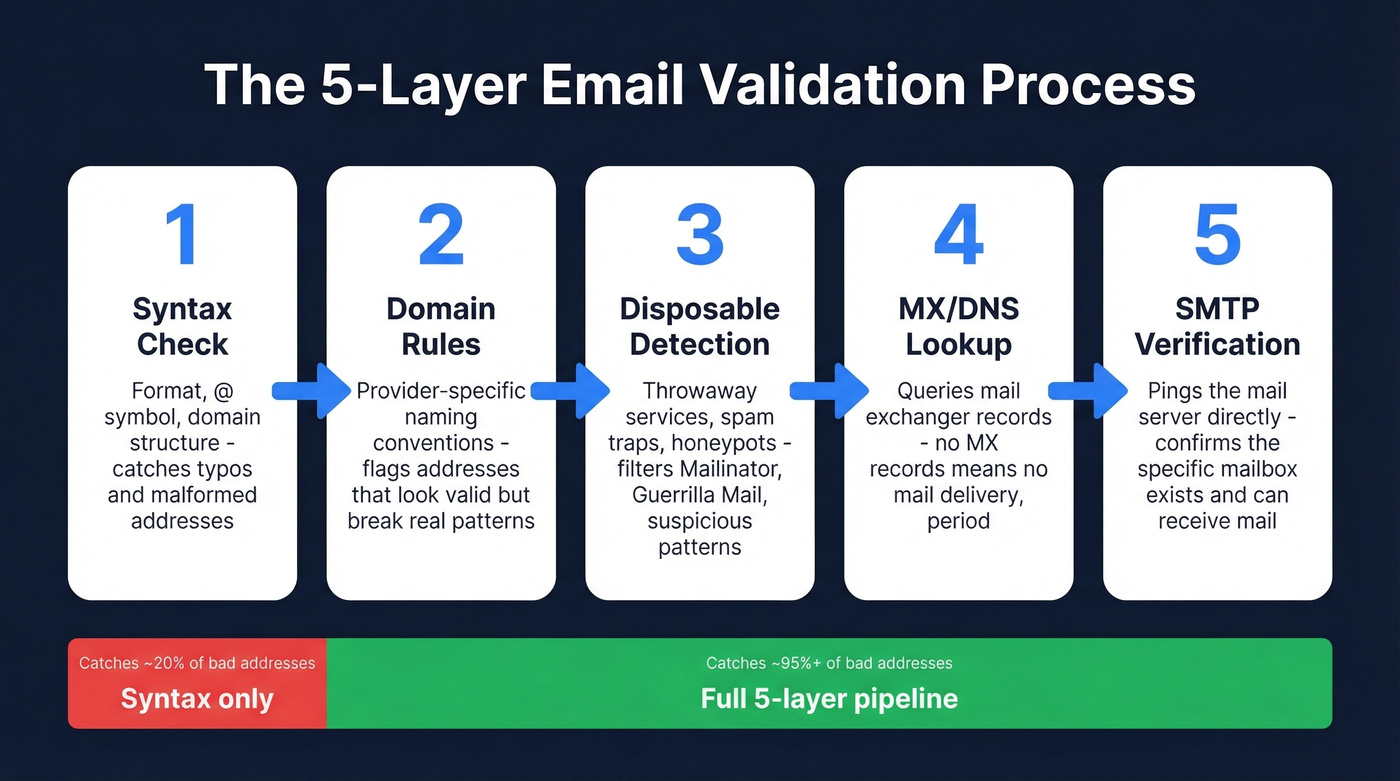
1. Syntax check. The validator confirms the address follows proper formatting rules - mailbox name, @ symbol, valid domain structure. This catches obvious typos and malformed addresses, but it's the bare minimum. Regex-only validation is notoriously unreliable because IETF standards allow edge cases like quoted strings and non-ASCII domains that simple patterns miss.
2. Domain-specific rules. Different email providers and corporate mail systems have different mailbox naming conventions. A good validator checks provider-specific rules to flag addresses that look valid syntactically but violate real-world mailbox patterns. (Related: Corporate Email Structure.)
3. Disposable and improbable address detection. This layer flags addresses from throwaway email services (Guerrilla Mail, Mailinator), plus those with vulgar terms, famous names, or suspicious keystroke sequences like "asdfgh@." It's the spam-trap and honeypot filter. (More detail: Disposable Email Detection.)
4. MX/DNS lookup. The validator queries the domain's DNS records to confirm it has valid MX (mail exchanger) records and is actively configured to receive email. No MX records means no mail delivery. Period. (If you’re troubleshooting domains, see Domain Email Verification.)
5. SMTP mailbox verification. The critical layer. The validator initiates a connection to the mail server and sends a "micro-message" - essentially knocking on the door without actually delivering mail. The server's response (accept, reject, or temporary error) reveals whether the specific mailbox exists, and advanced systems can run over 35 different tests at this stage. (Related: SMTP Verification.)
When to Validate (6 Triggers)
Don't treat this as a one-time event. Email addresses decay at roughly 2-3% per month as people change jobs, companies rebrand, and mailboxes get deactivated.
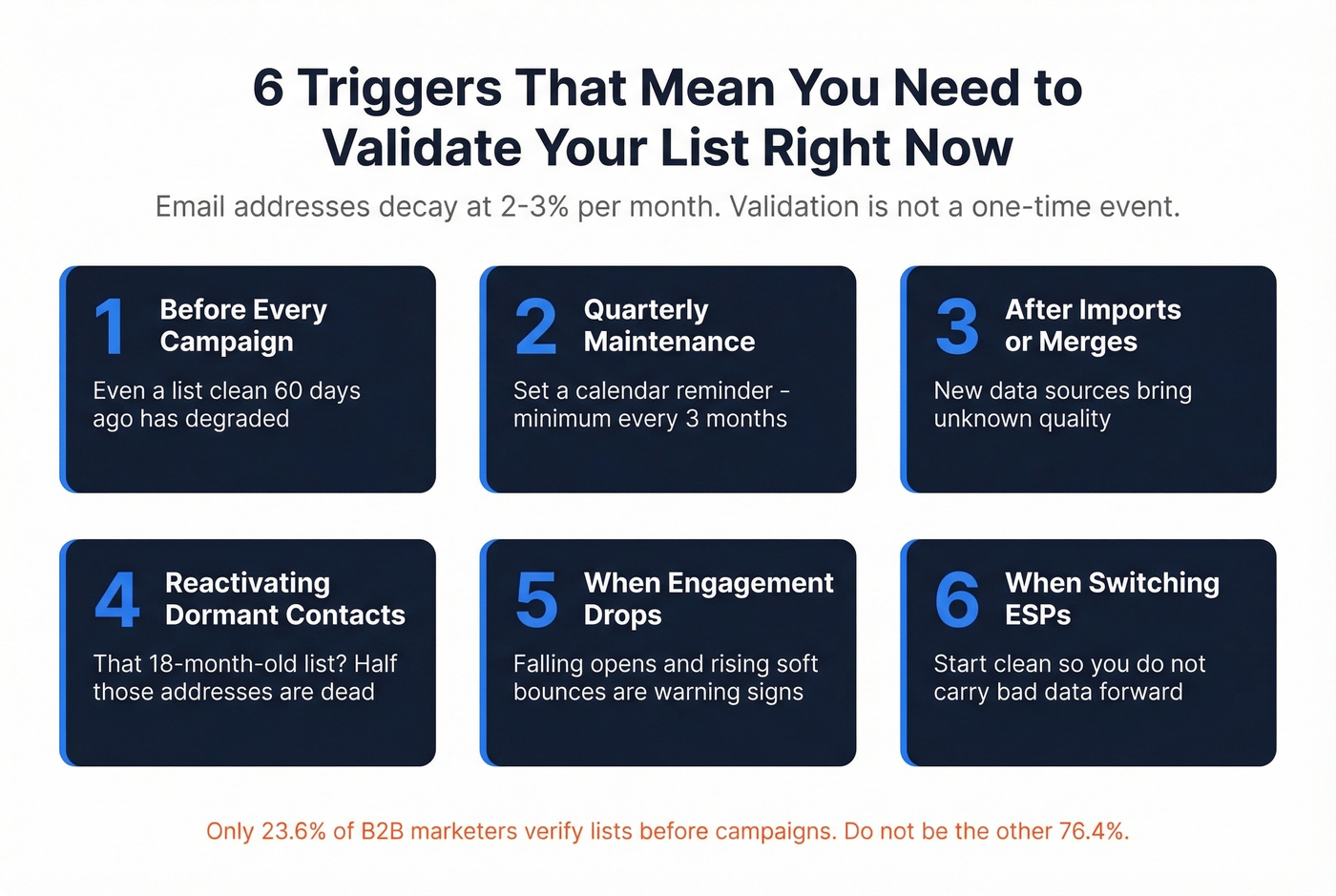
- Before every campaign. Even a list that was clean 60 days ago has degraded.
- Quarterly maintenance. Set a calendar reminder. Industry guidance recommends quarterly or bi-annually at minimum.
- After importing or merging lists. New data sources introduce unknown quality. Validate before it touches your sequences.
- Before reactivating dormant contacts. That list of leads from 18 months ago? Half those addresses are dead.
- When engagement drops. Falling open rates and rising soft bounces are early warning signs of list decay.
- When switching ESPs. Changing providers is a great time to start clean so you don't carry bad addresses into a new sending setup. (If you’re doing a full cleanup pass, follow a Email List Hygiene checklist.)
Bounce Rate Benchmarks
Let's put numbers on what "acceptable" actually means. The industry consensus lands on two thresholds: under 2% is safe, above 5% is an emergency.
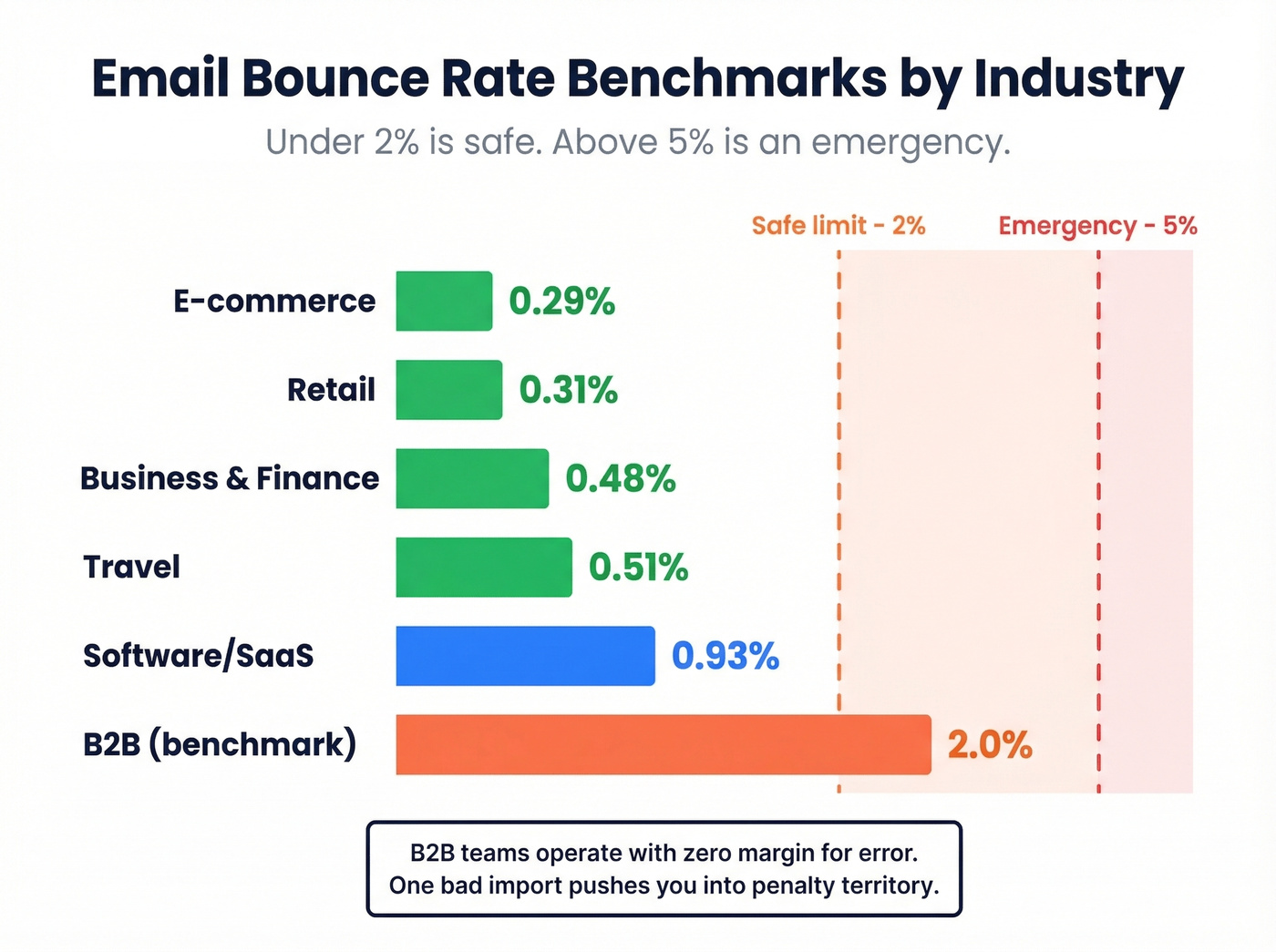
| Industry | Avg. Bounce Rate |
|---|---|
| E-commerce | 0.29% |
| Retail | 0.31% |
| Business & Finance | 0.48% |
| Travel | 0.51% |
| Software/SaaS | 0.93% |
| B2B benchmark | 2.0% |
B2B sits right at the danger line, which is why address verification matters most for outbound sales teams rather than e-commerce newsletters. Your contacts change jobs more often, use corporate domains with stricter server configurations, and work at companies that deactivate mailboxes the day someone leaves.
The environment is getting harsher, too. Office 365 inbox placement dropped 26.73 percentage points year-over-year, and only 7.6% of domains enforce DMARC - meaning most senders have no safety net beyond list hygiene. Hard bounces (permanent failures like "550 mailbox not found") hurt your sender reputation directly, while soft bounces are less damaging but still worth monitoring. Gmail's guidance is straightforward: when bounce rates spike, reduce sending volume and clean your list before resuming. Full authentication plus warmup restores 85-95% inbox placement - but only if you fix the underlying list quality first. (If you’re ramping a new sender, use an IP warm-up plan.)
The B2B benchmark of 2.0% means most teams are operating with zero margin for error. One bad import pushes you into penalty territory.

Prospeo's proprietary 5-step verification - syntax, domain rules, disposable detection, MX/DNS, and SMTP - runs on every email before you ever see it. 98% accuracy. Bounce rates under 2%. No third-party email providers in the chain.
Skip the post-campaign cleanup. Start with emails that actually land.
The Catch-All Problem
Here's the thing most guides skip entirely: catch-all domains break SMTP verification.
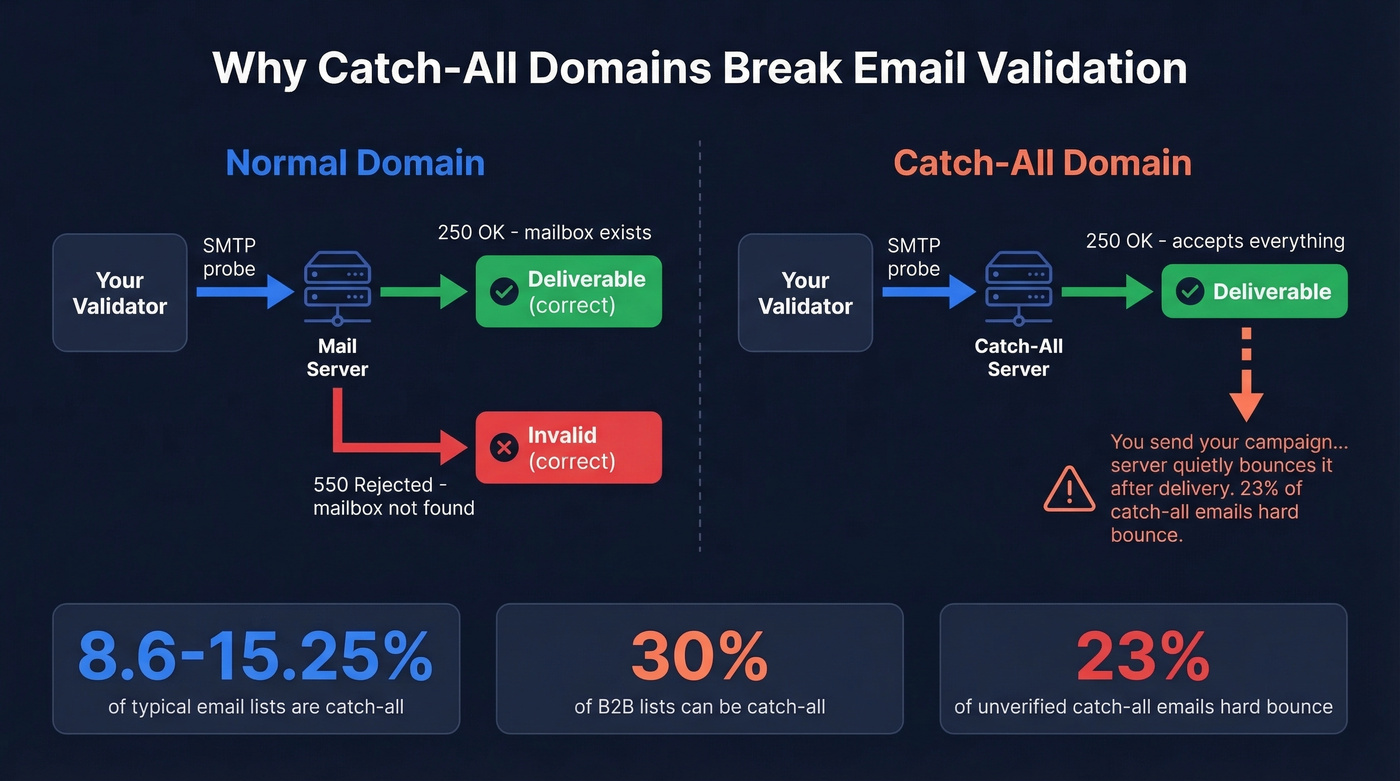
A catch-all domain is configured to accept email sent to any address at that domain - even addresses that don't exist. When your validator sends its SMTP probe, the server returns a 250 (success) code regardless. The validator marks the address as "deliverable." Then you send your campaign, and the server quietly bounces it after the fact.
This isn't a niche problem. Catch-all domains represent 8.6-15.25% of typical email lists, and in B2B - where corporate IT teams love catch-all configurations - that number can hit 30%. Worse, 23% of unverified catch-all emails hard bounce when you actually send to them. That's enough to blow past the 2% threshold on a single campaign.
The operational playbook for catch-all addresses:
- Segment them. Don't mix catch-all addresses into your main sends. Treat them as a separate, higher-risk cohort.
- Batch-test in small sends. Send to 50-100 catch-all addresses first and monitor bounces before scaling.
- Use naming-pattern analysis. If firstname.lastname@company.com works for three known employees, the same pattern for a fourth is probably safe.
- Score by engagement. Catch-all addresses that have opened or clicked in the past are far safer than cold ones.
- Flag at capture. Real-time validation at the point of collection lets you warn users or request an alternative address. (See Real-Time Email Verification.)
How Accurate Are Validators, Really?
Most tools advertise 99%+ accuracy on their marketing page. Benchmarks tell a very different story.
The 70% Reality
A benchmark of 15 verification tools tested against 3,000 real business emails segmented by company size, plus 300 known invalid addresses. The top performer hit 70% accuracy. Not 99%. Not 95%. Seventy percent.
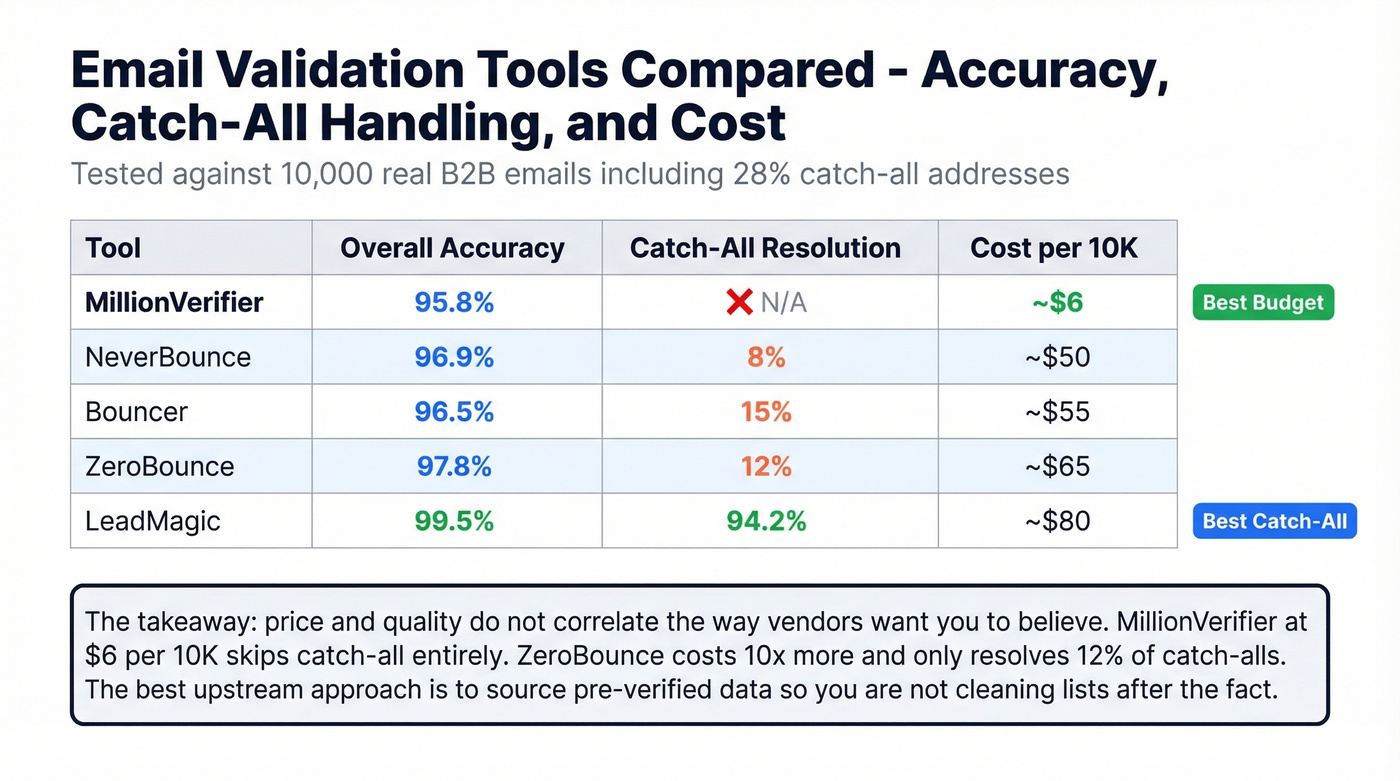
The dataset was derived from email activity recorded in a single platform, so there's potential bias - but even accounting for that, the gap between marketing claims and measured performance is enormous. A separate test using 10,000 real B2B emails from outbound campaigns - including 28% catch-all addresses and 15% known invalids - produced more granular results because it tracked catch-all resolution separately from overall accuracy.
Cost Per 10,000 Checks
| Tool | Accuracy | Catch-All Resolution | Cost per 10K |
|---|---|---|---|
| MillionVerifier | 95.8% | N/A | ~$6 |
| NeverBounce | 96.9% | 8% | ~$50 |
| Bouncer | 96.5% | 15% | ~$55 |
| ZeroBounce | 97.8% | 12% | ~$65 |
| LeadMagic | 99.5% | 94.2% | ~$80 |
Most validators charge $0.003-$0.008 per email on pay-as-you-go plans. (If you’re comparing vendors, start with Email Validation Tools.)
Best budget option: MillionVerifier. Best catch-all handling: LeadMagic. Best upstream approach: source pre-verified data so you're not cleaning lists after the fact.
Price and quality don't correlate the way vendors want you to believe. MillionVerifier at $6 per 10K is absurdly cheap but doesn't resolve catch-all addresses at all. ZeroBounce costs 10x more and only resolves 12% of catch-alls. LeadMagic's 94.2% catch-all resolution rate is in a different league, but you're paying for it.
The consensus on r/coldemail mirrors what we've seen in practice - practitioners want "waterfall-type" setups combining multiple tools because no single validator handles every edge case perfectly. That's a reasonable approach for high-volume outbound, but it adds complexity most teams don't need.
Mistakes That Kill Deliverability
These are the patterns we see repeatedly in teams that can't figure out why their deliverability keeps tanking:
Relying on syntax checks alone. If your form validation is just a regex pattern, you're catching formatting errors and nothing else. The mailbox could be dead, a spam trap, or a catch-all ghost.
Not validating at signup. Every bad address that enters your database costs more to clean later. Real-time checks at the point of capture are the single best investment you'll make in list quality.
Ignoring catch-all results. Your validator flags an address as "accept-all" and you send to it anyway because it's not technically "invalid." Then it bounces.
Skipping role-based addresses. Addresses like info@, sales@, and support@ route to shared inboxes with lower engagement and higher spam-complaint rates. Most validators flag these - don't override the flag.
Not re-validating before campaigns. A list that was clean three months ago isn't clean today. People leave companies. Domains expire. Mailboxes fill up. Ongoing hygiene isn't optional. (If you need the step-by-step, see How to Clean Your Email List.)
GDPR and Data Accuracy
Under GDPR Article 5(1)(d), personal data must be "accurate and, where necessary, kept up to date." Email addresses are personal data. Cumulative GDPR fines have reached ~EUR5.88B across 2,245 enforcement actions, with penalties up to EUR20M or 4% of global annual revenue. For teams sending to EU contacts, regular list verification isn't just good hygiene - it's how you demonstrate the accuracy principle in practice.
Choosing the Right Tool
When evaluating validators, three things matter more than the accuracy number on the marketing page.
Catch-all handling. If the tool can't resolve accept-all domains, it's leaving your biggest risk factor untouched. Ask specifically what percentage of catch-all addresses the tool resolves - and get a number, not a vague "we handle it."
Real accuracy, not marketing accuracy. Every tool says 99%. Benchmarks range from ~70% to the high-90s depending on dataset, domain mix, and how "unknown" results are treated. If a vendor can't explain how they measured accuracy, the number is meaningless. (More detail: Email List Validation.)
Data freshness. An email that was valid 45 days ago might not be valid today. Fresher data beats stale data, especially in B2B where job changes are constant.
Look, here's our honest take: if your average deal size is under five figures, you probably don't need a dedicated validation tool at all. The real fix is sourcing verified data upstream so you're not cleaning garbage after the fact. Prospeo runs a 5-step verification process with catch-all handling before you ever see an email - 98% accuracy, data refreshed every 7 days, 143M+ verified emails in the database. When Snyk's 50-person AE team switched, their bounce rate dropped from 35-40% to under 5% and AE-sourced pipeline jumped 180%.
Catch-all domains fool most validators. Prospeo's infrastructure handles catch-all verification, spam-trap removal, and honeypot filtering - refreshed every 7 days, not every 6 weeks. That's why teams using Prospeo see bounce rates drop from 35%+ to under 4%.
143M+ verified emails at $0.01 each. Zero margin for error, zero need for it.
FAQ
What's the difference between email validation and verification?
Validation checks format and syntax - whether the address could exist. Verification confirms the mailbox exists via DNS/MX and SMTP checks. Most modern tools combine both into a single pipeline, but tools that only do syntax checking catch roughly 20% of bad addresses.
How often should I clean my email list?
Quarterly at minimum, since addresses decay at 2-3% per month. Also validate before every campaign, after importing new contacts, and whenever your bounce rate spikes above 2%. Consistent list hygiene prevents decay from compounding into a deliverability crisis.
What is a catch-all domain?
A domain configured to accept email to any address - even nonexistent ones. Standard SMTP checks can't distinguish real from fake mailboxes on these domains, which is why 23% of unverified catch-all emails hard bounce. Segment these addresses and batch-test before full sends.
What bounce rate is too high?
Under 2% is safe for most ESPs. Above 2%, clean your list immediately. Above 5%, stop sending and run a full verification pass before resuming - your sender reputation is already taking damage.
Is there a reliable free option for verifying emails?
Several tools offer free tiers with limited volume. Hunter gives 25 searches per month, and Prospeo's free plan includes 75 verified emails plus 100 Chrome extension credits with full 5-step verification. For larger volumes, most validators charge $0.003-$0.008 per address on pay-as-you-go plans.