

Email List Hygiene: The Only Playbook You Actually Need
Your email list lost roughly a quarter of its value in the last twelve months. People changed jobs, abandoned inboxes, let domains expire. The difference between teams with 95%+ deliverability and teams getting flagged by Mailchimp's Omnivore system comes down to one thing: whether they treat email list hygiene as a recurring operation or a once-a-year chore.
What Is List Hygiene?
It isn't a single cleanup. It's the ongoing system you build to keep your list accurate, engaged, and safe to send to.
Most people conflate "cleaning" with "hygiene." Cleaning is a one-time action - you run your list through a verification tool, remove the bad addresses, and move on. Hygiene is the maintenance layer on top: sunset policies, bounce suppression rules, engagement segmentation, and re-engagement sequences running in the background. Cleaning is the deep scrub. Hygiene is brushing your teeth every day. You need both, but the daily habit keeps you out of trouble.
What You Need (Quick Version)
You don't need a 15-step strategy. You need three things:
- Verify your full list with a dedicated tool - not your ESP's built-in bounce handler.
- Build a sunset policy using the industry-specific timelines below.
- Automate bounce suppression in your ESP. Hard bounces removed immediately. Soft bounces flagged for suppression after three consecutive failures.
That's the whole system. The rest of this article explains how to execute each piece well.
Why It Matters More in 2026
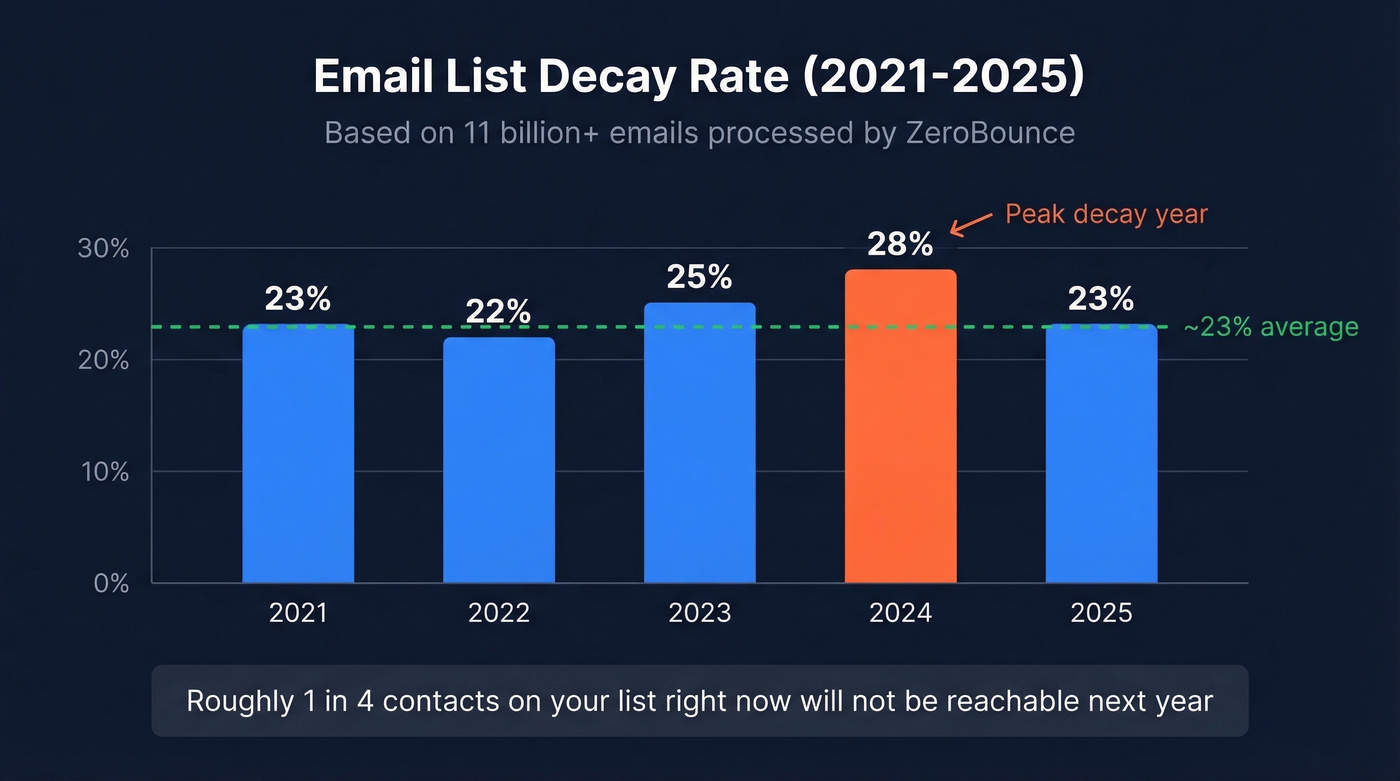
ZeroBounce's 2026 Email List Decay Report, based on 11 billion+ emails processed, puts the decay rate at 23%. The five-year trend has been remarkably consistent: 23% in 2021, 22% in 2022, 25% in 2023, 28% in 2024, and 23% again in 2025. Roughly one in four contacts on your list right now won't be reachable next year.
The compliance landscape has tightened too. Gmail and Yahoo's bulk sender requirements, enforced since February 2024, apply to anyone sending more than 5,000 daily emails to their addresses. Keep spam complaints under 0.3% - three complaints per thousand messages. SPF, DKIM, and DMARC authentication are mandatory. One-click unsubscribe honored within two days. Mailchimp's Omnivore system will suspend your account if you exceed bounce thresholds, and most major ESPs have similar automated enforcement now.
Here's where the math gets uncomfortable. Bounce rates between 3-5% start hurting deliverability, and top performers target total bounces under 2%. If 23% of your list decays annually, a list that was clean in January is already about 7-8% degraded by April - enough to cross the danger threshold. Poor data hygiene at this scale doesn't just hurt open rates. It can get your sending domain blacklisted.
There's also the cost angle nobody talks about. Every dead contact is one you're paying your ESP to store and attempt delivery to. A 50,000-contact list with 23% decay means you're paying for roughly 11,500 addresses that will never convert.
Step-by-Step Cleaning Workflow
Do these in order - each step builds on the last.
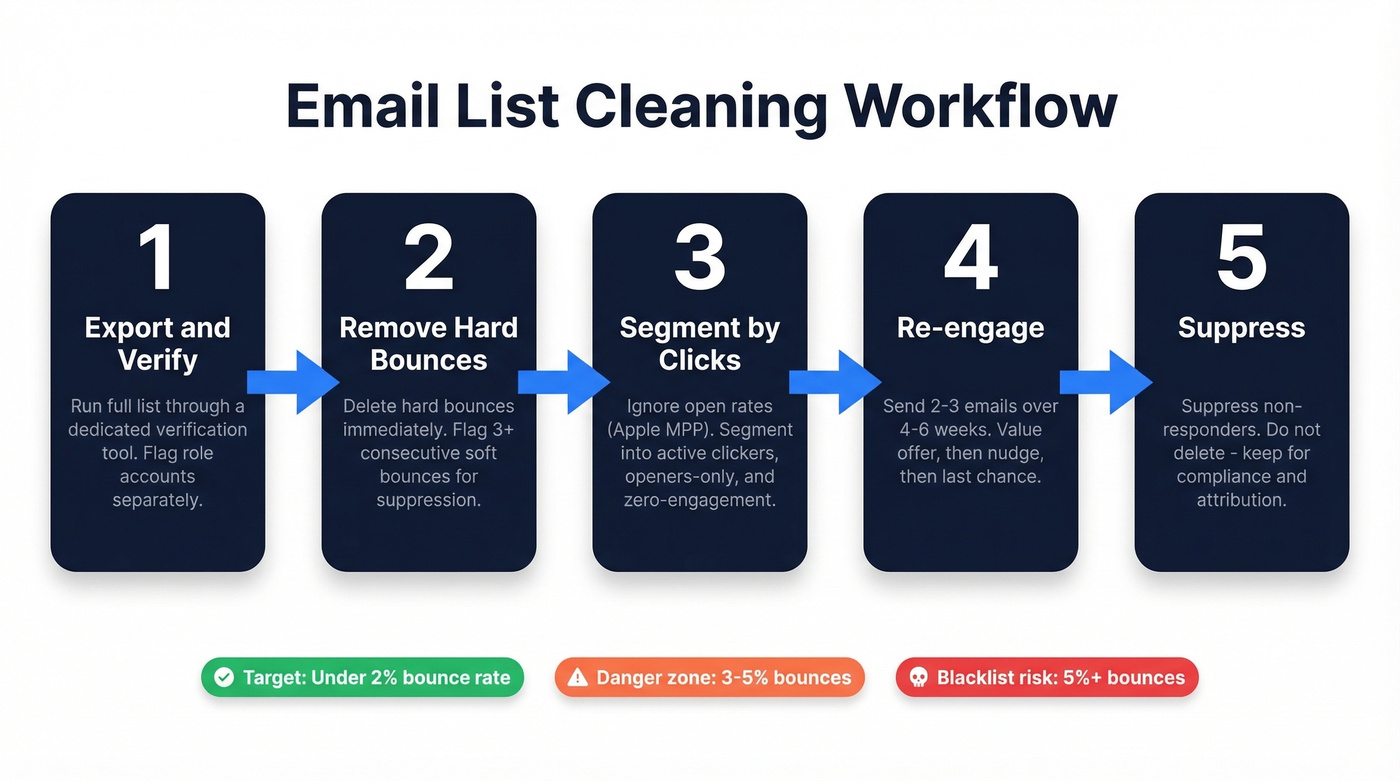
Step 1: Export and verify your full list. Run every contact through a dedicated verification tool before anything else. Upload a CSV, get results in minutes. Flag role accounts (info@, sales@, support@) separately - they inflate your list without representing real engagement. Also do this before any ESP migration or after importing co-marketing leads.

Step 2: Remove hard bounces and flag soft bounces. Hard bounces mean the mailbox doesn't exist - remove immediately. A single soft bounce could be a full inbox or temporary server issue, but three or more consecutive soft bounces across different sends means that address is abandoned. Flag it for suppression. (If you want deeper benchmarks and bounce-code context, see bounce rates.)
Step 3: Segment by engagement - clicks, not opens. Apple Mail Privacy Protection pre-loads tracking pixels, making open rates unreliable. Clicks are the engagement signal you can trust. Segment into active clickers, openers-only, and zero-engagement contacts. If you need a consistent way to track this, use a standard click rate formula.
Step 4: Run a re-engagement sequence. For your zero-engagement segment, send 2-3 emails over 4-6 weeks. First email offers genuine value. Second is the "we miss you" nudge. Third is the explicit last chance before suppression. We've found that a strong subject line on that third email - something like "Removing you in 48 hours" - pulls back 5-10% of contacts who were just ignoring everything else. (For more options, pull from these email subject line examples.)
Step 5: Suppress non-responders - don't delete. Suppressed contacts stop receiving emails but stay in your database for historical reporting and compliance records. Klaviyo recommends suppressing inactive contacts instead of scrapping your list, and we agree. You'll want that data for attribution analysis later.
Monitor your sender reputation with free tools like Google Postmaster Tools or Microsoft SNDS to track how these changes affect your standing. If you're actively trying to raise inbox placement, follow a dedicated sender reputation workflow.

If 23% of your list decays every year, the smartest hygiene move is building on verified data from day one. Prospeo's 5-step verification delivers 98% email accuracy - with catch-all handling, spam-trap removal, and honeypot filtering built in. Every record refreshes every 7 days, not every 6 weeks.
Stop paying your ESP to store dead contacts. Start with data that stays clean.
Build a Sunset Policy
A sunset policy determines when an unengaged contact stops receiving emails. Without one, your list accumulates dead weight indefinitely.
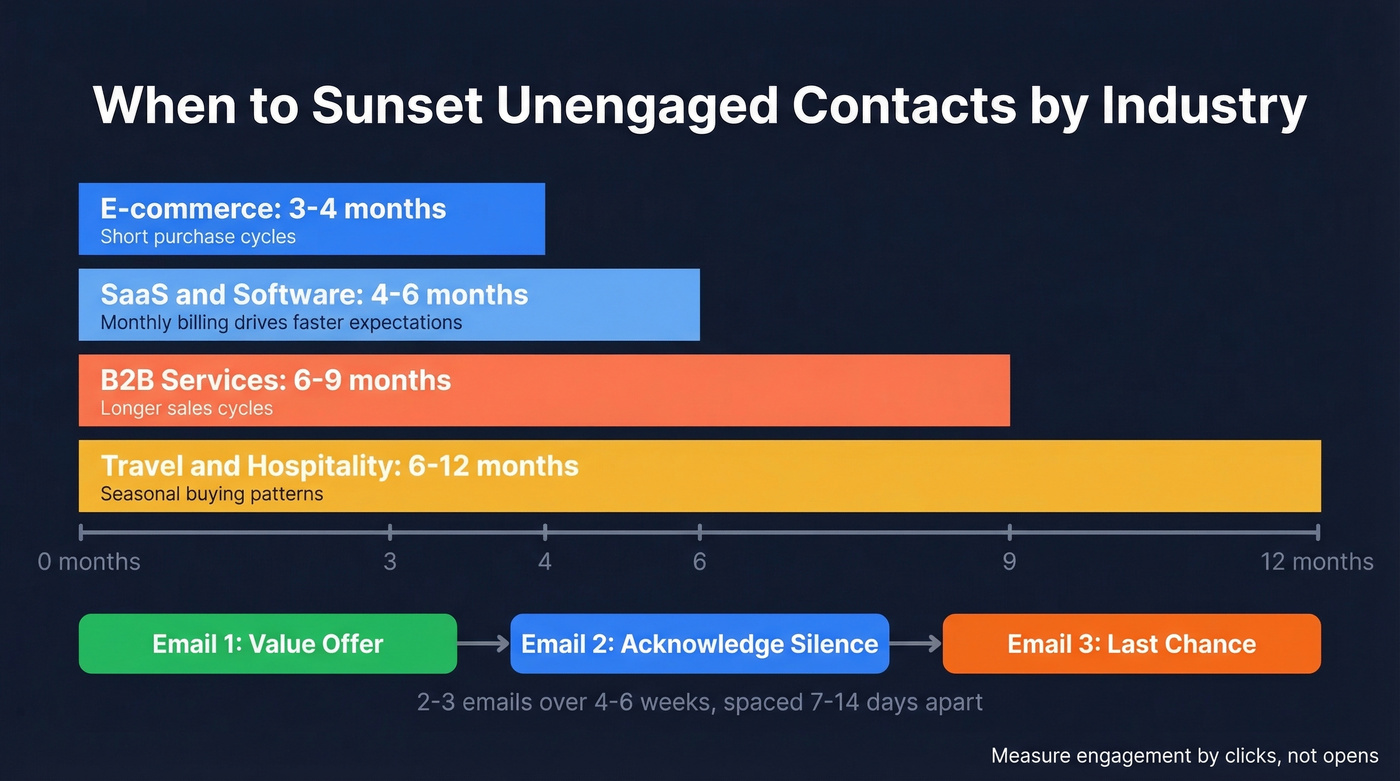
The right sunset window depends on your sending frequency and industry:
| Industry | Sunset Window | Why |
|---|---|---|
| E-commerce | 3-4 months | Short purchase cycles |
| SaaS / Software | 4-6 months | Monthly billing drives faster engagement expectations |
| B2B Services | 6-9 months | Longer sales cycles |
| Travel / Hospitality | 6-12 months | Seasonal buying |
These windows represent the point at which a zero-engagement contact should enter your re-engagement sequence. If they don't respond, they get suppressed. For B2B specifically, lean toward the longer end - enterprise buying cycles can stretch beyond six months, and suppressing a prospect mid-evaluation is a costly mistake.
The re-engagement sequence follows a progressive structure: 2-3 emails over 4-6 weeks, spaced 7-14 days apart. First email leads with a value offer. Second acknowledges the silence directly. Third is the clear "last chance."
Measure engagement by clicks, not opens. A contact who "opens" every email but never clicks for six months isn't engaged. They're a phantom.
Spam Traps Explained
Spam traps are email addresses designed to catch senders with poor data hygiene. Hitting even a few can tank your sender reputation overnight. The 2025 dataset found spam traps accounted for just 0.01% of emails - a tiny percentage with outsized consequences.
There are three types, each requiring a different defense.
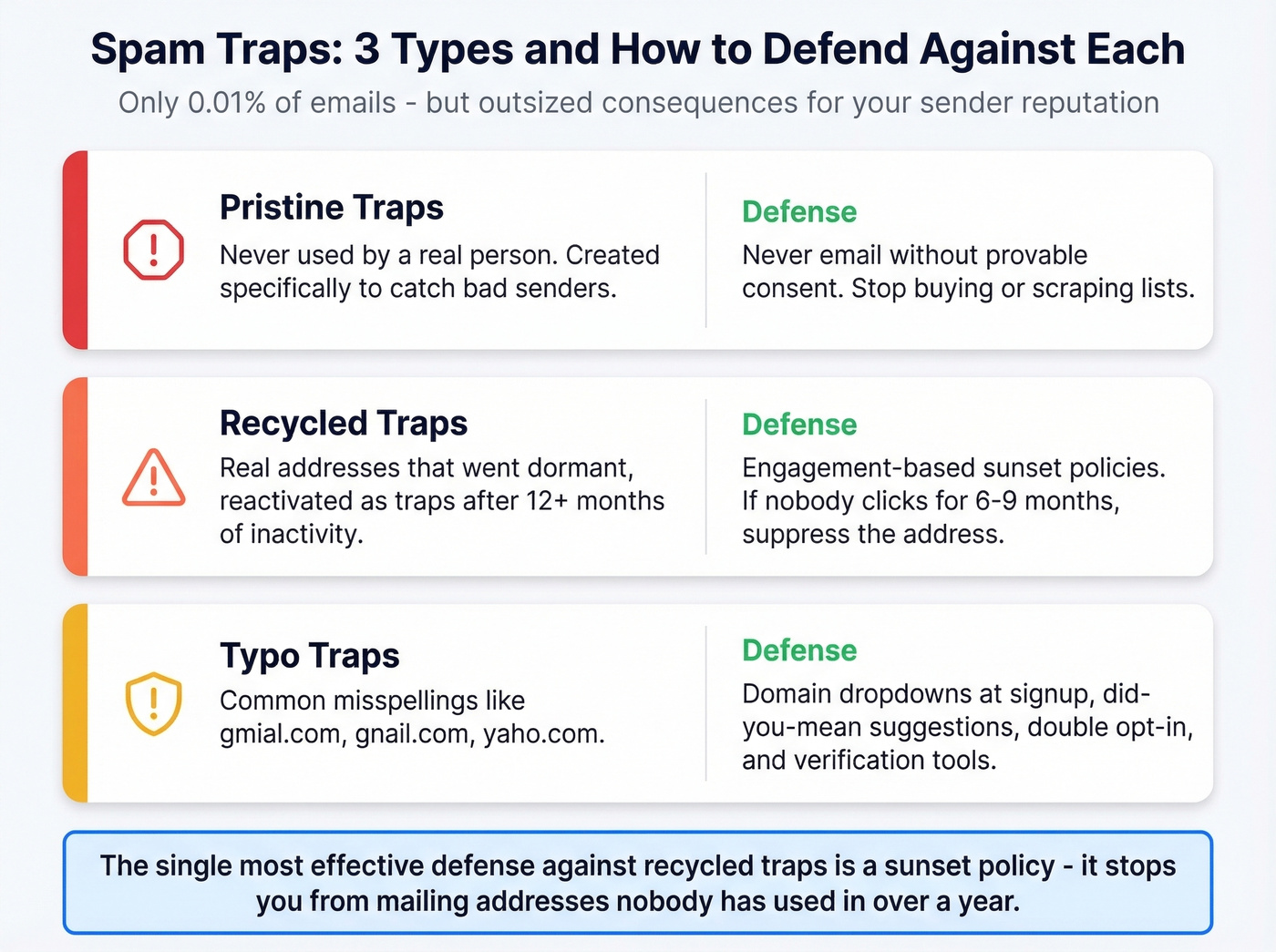
Pristine traps have never been used by a real person. The only defense is never emailing an address without provable consent. If you're buying or scraping lists, you're almost certainly hitting pristine traps. Full stop. (If you need the compliance angle, see Is It Illegal to Buy Email Lists?.)
Recycled traps are real addresses that went dormant and were reactivated as traps after 12+ months of inactivity. This is why sunset policies exist. Engagement-based sunsetting is your primary defense here, and it's the single most effective thing you can do to avoid recycled traps because the trap only catches you if you're still mailing an address nobody's used in over a year.
Typo traps exploit common misspellings - gmial.com, gnail.com, yaho.com. Catch them at the form level with domain dropdowns, "did you mean..." suggestions, and double opt-in. Verification tools that screen for spam-trap risk catch the rest before they enter your sending pipeline.
Five Mistakes That Kill Deliverability
Let's be honest: most deliverability problems are self-inflicted. Here are the ones we see over and over.
Purchasing or renting lists. We've seen purchased lists produce 25% bounce rates and 2% spam complaint rates - nearly 7x above Gmail and Yahoo's 0.3% threshold. One bad list can get your domain blacklisted. Don't do it.
Ignoring soft bounces. Three consecutive soft bounces across different campaigns means that address is abandoned and on its way to becoming a recycled spam trap.
Using single opt-in. Double opt-in is non-negotiable. The slight friction of confirmation is worth the massive improvement in list quality.
Cleaning only once a year. If 23% of your list decays annually, waiting twelve months means a quarter of your contacts are dead before you act. Quarterly is the minimum. Monthly is better for high-volume senders.
Ignoring catch-all domains. With 9%+ of emails sitting behind catch-all domains, you can't just verify and forget. Monitor engagement from catch-all addresses separately and sunset them aggressively if they show zero activity. (More on the operational side in our email deliverability guide.)
Verification Tools Compared
Verification tools differ on three axes: accuracy, catch-all handling, and cost. Vendors measure accuracy differently, so the most useful test is how a tool performs on your own list.
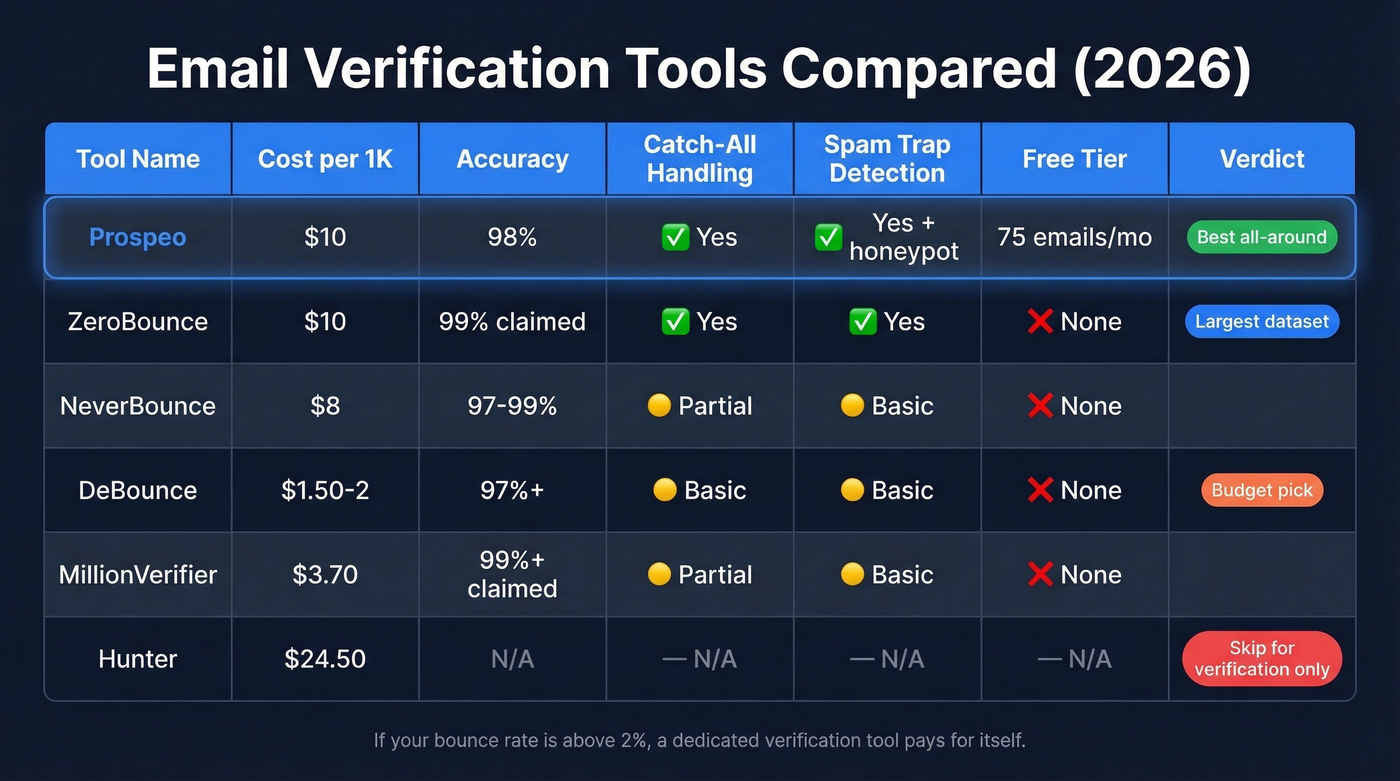
| Tool | Cost/1K | Accuracy | Catch-All | Spam Traps | Free Tier |
|---|---|---|---|---|---|
| Prospeo | ~$10 | 98% | Yes | Yes + honeypot | 75 emails/mo |
| ZeroBounce | $10 | 99% claimed | Yes | Yes | - |
| NeverBounce | $8 | 97-99% | Partial | Basic | - |
| DeBounce | $1.50-2 | 97%+ | Basic | Basic | - |
| MillionVerifier | ~$3.70 | 99%+ claimed | Partial | Basic | - |
| Hunter | ~$24.50 | - | - | - | - |
Largest dataset behind the verification: ZeroBounce is the established name and the source of the decay data cited throughout this article. Same price as Prospeo at $10 per 1K.
Budget pick for massive lists: DeBounce at $1.50-2 per 1K is the cheapest option if you're verifying 500K+ contacts and cost is the primary constraint. You're trading depth of spam-trap detection for volume. MillionVerifier at ~$3.70/1K splits the difference.
Skip Hunter for verification-only use cases - at $24.50 per 1K, you're paying for their email-finding features whether you need them or not. (If you're evaluating alternatives, start with these Hunter alternatives.)
Here's the thing: most teams under-invest in verification and over-invest in ESP features. Your ESP catches hard bounces and not much else. A dedicated verification tool catches catch-all domains, spam traps, and honeypots that your ESP misses - usually at a lower per-contact cost than ESP add-ons charge. If your bounce rate is above 2%, the tool pays for itself on the first run.
One more distinction worth knowing: batch verification via CSV upload is for periodic list cleaning, while real-time verification through an API at the form level prevents bad addresses from entering your list in the first place. The best setups use both. (If you're sending at scale, also watch email velocity so hygiene improvements actually stick.)
Your bounce rate problem isn't a cleaning problem - it's a sourcing problem. Teams using Prospeo's proprietary email infrastructure cut bounce rates below 4% and book 26% more meetings than ZoomInfo users. Verified emails at $0.01 each, with zero annual contracts.
Replace your quarterly list scrub with emails verified at the source.
FAQ
How often should I clean my email list?
Quarterly at minimum. High-volume senders running daily or weekly campaigns should verify monthly. With 23% annual decay, waiting longer than 90 days means roughly 6% of your contacts are dead - enough to push bounce rates past the 2% danger threshold most ESPs enforce.
What's the difference between verification and list cleaning?
Verification checks whether an address is technically deliverable - valid mailbox, active domain, spam-trap risk. List cleaning is broader: it includes removing unengaged subscribers, deduplication, role-account suppression, and engagement segmentation. Verification is one critical step within the larger cleaning process.
Can I just use my ESP's built-in tools?
No. Most ESPs catch hard bounces but miss catch-all domains, spam traps, and honeypots. A dedicated tool catches what ESPs don't - typically at a lower per-contact cost than ESP add-on features. Layer a standalone verification service on top of your ESP for real protection.
Should I delete or suppress inactive contacts?
Suppress, don't delete. Suppressed contacts stop receiving emails but remain in your database for historical reporting, attribution analysis, and compliance records. Delete only when legally required or when a contact has zero engagement history. Suppression protects deliverability without destroying data you'll need later.