Email Verification: Cleaner Lists, Better Deliverability, and Tools That Work
You just imported 50,000 leads from a trade show. The campaign launches tomorrow. You hit send and 8% bounce. Your domain gets flagged, your sender reputation tanks, and the 200 real prospects who would've replied never see the message. Recovery takes 15-45 days. That's not a hypothetical. It's a Tuesday for teams that skip email verification.
Roughly one in six emails never reaches the inbox, per Validity's latest large-scale benchmark. Global inbox placement sits around 84%. The gap between "sent" and "delivered" is where pipeline goes to die, and verifying your list is the single cheapest insurance policy against it.
We've spent a lot of time testing these tools against real B2B lists, and the gap between what verification vendors promise on their marketing pages and what they deliver in production is wider than most teams expect. This guide covers how the process actually works, what the benchmarks say, and which tools earn your money.
Quick Picks
- Verified data at the source (no separate verifier needed): Prospeo - 98% email accuracy, ~$0.01/email, verification built into the data platform
- Most granular standalone checks: Clearout - 20+ validation checks, $40-58 per 10k emails
- Highest-rated standalone verifier: Bouncer - G2 4.8, Capterra 4.9, $45-49 per 10k
- Tightest budget: EmailListVerify - $24 per 10k, no frills
What Is Email Verification?
The terminology is a mess. "Email verification," "email validation," and "double opt-in" get used interchangeably, but they're three different things.
In practice, email verification is the process of confirming that a specific mailbox exists and can receive messages - without actually sending one.
| Term | What It Means | When You Need It |
|---|---|---|
| Verification | SMTP-level check confirming a mailbox exists | Before sending to any list |
| Validation | Syntax/format checks at point of capture | On signup forms, lead-gen pages |
| Double opt-in | Confirmation link sent to prove ownership | Subscription-based email lists |
Verification is the heavy lift - it pings a mail server to ask "does this inbox actually exist?" without sending a real email. Validation is lighter, catching typos, malformed addresses, and disposable domains before they enter your database. Double opt-in is a consent mechanism, not a data quality tool.
Google and Yahoo's bulk sender requirements now mandate SPF, DKIM, and DMARC authentication, one-click unsubscribe, and spam complaint rates below 0.3%. Verifying addresses doesn't replace authentication, but it keeps your bounce rate low enough that ISPs don't flag you before authentication even matters. For a deeper setup walkthrough, see our guide to SPF, DKIM, and DMARC.
How Email Verification Works
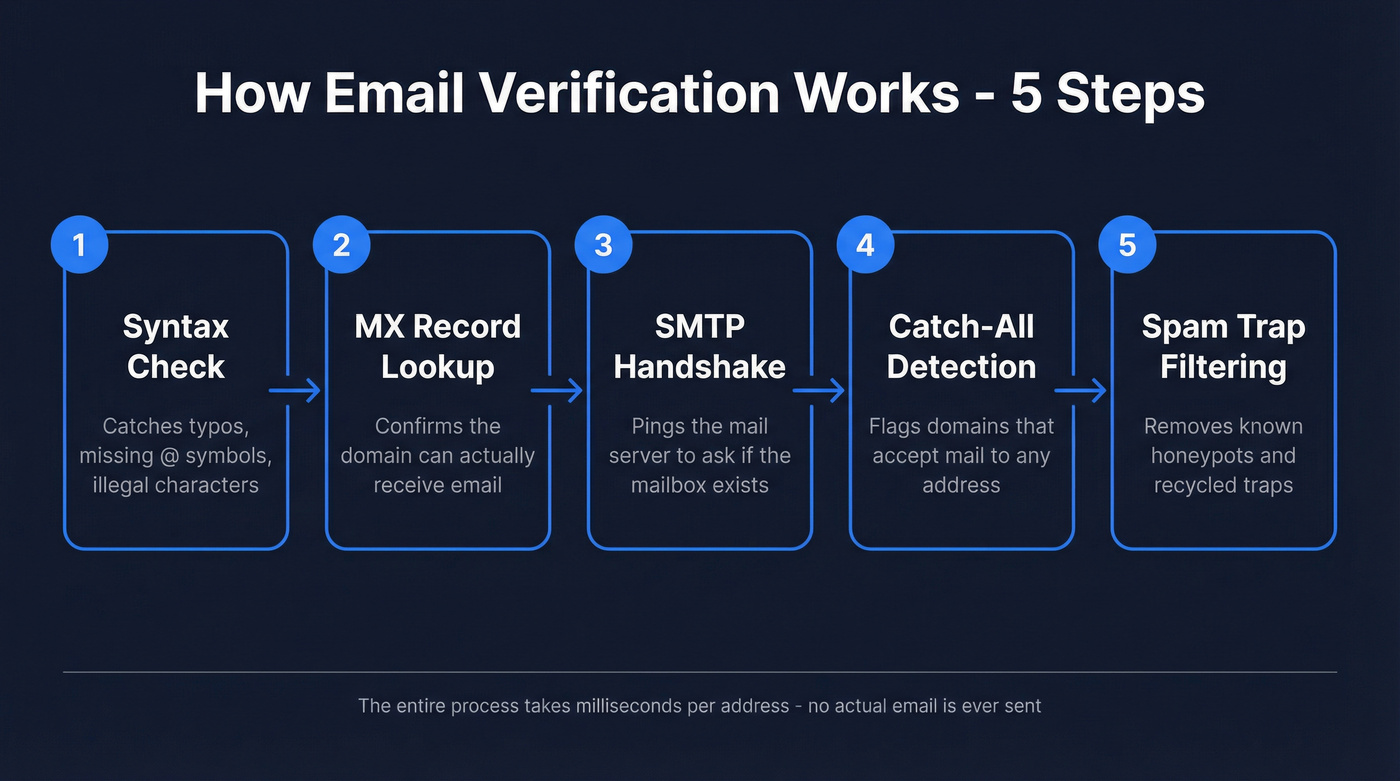
Every verification tool - whether it costs $24 or $189 per 10k - runs some version of the same pipeline. Here's what happens to an address before it ever touches your outreach sequence.
Step 1: Syntax Check
The simplest filter. Does the address follow the local@domain.tld format? Are there illegal characters, missing @ symbols, or double dots? About 15% of emails collected via forms contain typos, so this step alone catches a surprising amount of garbage. If you want a broader tool roundup, compare options in our list of email ID validators.
Step 2: MX Record Lookup
The tool queries DNS to confirm the domain has active mail exchange records. No MX record means the domain can't receive email. Period. You can check this manually:
- Windows:
nslookup -type=MX domain.com - macOS/Linux:
dig MX domain.com
If nothing comes back, the address is dead regardless of what the local part says.
Step 3: SMTP Handshake
This is where real verification happens. The tool opens a connection to the mail server, introduces itself, and asks "would you accept mail for this address?" The server responds with an accept or reject code. The connection closes before any email is actually sent. The whole exchange takes milliseconds. If you’re troubleshooting bounces, it helps to understand what a hard bounce is vs. a soft bounce.
Step 4: Catch-All and Greylisting Detection
Catch-all domains accept mail to any address - real or fake - at the server level. That makes individual mailbox confirmation impossible. Good verifiers flag these as "catch-all" or "risky" rather than marking them valid.
Greylisting is a related headache: some servers temporarily reject the first connection attempt as a spam filter, which can fool basic verifiers into marking valid addresses as invalid.
Step 5: Spam Trap and Honeypot Filtering
The final layer checks addresses against known spam-trap databases and honeypot patterns. Recycled spam traps - real addresses repurposed by ISPs to catch senders with stale lists - are nearly impossible to detect. But known honeypots and blacklisted patterns get caught here.

What Does a Verifier Actually Check?
Not all verifiers run the same depth of checks. Clearout enumerates 20+ distinct validations, which gives a useful framework for what a thorough tool should cover.
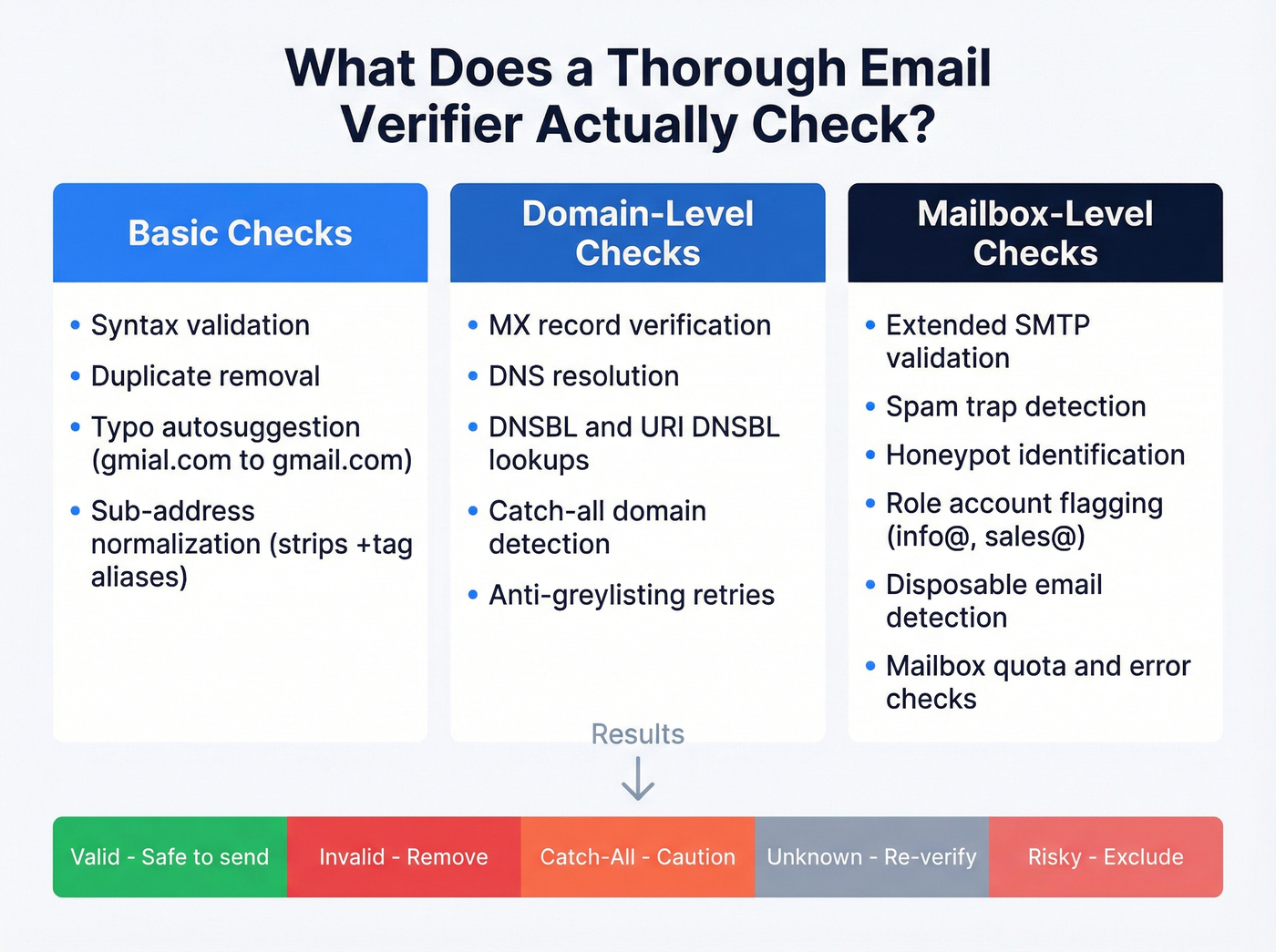
Basic checks include syntax validation, duplicate removal, and typo autosuggestion that catches things like gmial.com and suggests gmail.com. Sub-address normalization strips +tag aliases so you're not counting the same person twice.
Domain-level checks cover MX record verification, DNS resolution, DNSBL and URI DNSBL lookups to identify blacklisted domains, catch-all domain detection, and anti-greylisting that retries after temporary rejections.
Mailbox-level checks go deeper: extended SMTP validation, spam trap detection, honeypot identification, role account flagging for addresses like info@ and sales@, disposable/temporary email detection, and mailbox quota and error checks.
After all checks run, results fall into a handful of categories:
| Result | What It Means | Action |
|---|---|---|
| Valid | Mailbox confirmed | Safe to send |
| Invalid | Doesn't exist | Remove immediately |
| Catch-All | Domain accepts everything | Proceed with caution |
| Unknown | Couldn't determine | Re-verify or exclude |
| Risky | Role/disposable/other flags | Exclude from cold outreach |
The "Unknown" bucket is where most frustration lives. Accept-all/catch-all behavior is the single biggest variable in accuracy benchmarks, because many domains won't give a definitive yes/no answer at the mailbox level.
One important caveat: verification confirms a mailbox exists at a point in time. It can't guarantee long-term deliverability. A valid address today might bounce three months from now when someone changes jobs. Verification is a snapshot, not a warranty - which is why re-verification cadence matters as much as the initial check. (If you want the numbers behind list decay, see our benchmarks on B2B contact data decay.)
Beyond deliverability, verification also plays a role in fraud prevention. Fake signups, bot-generated accounts, and disposable email abuse are growing problems for SaaS platforms and e-commerce, and running real-time checks on signup forms catches these before they pollute your database or inflate your user metrics. This is a core part of modern data quality ops.

Prospeo's 5-step verification runs before you ever see an address - syntax, MX, SMTP, catch-all handling, and spam-trap removal built into every search. 98% email accuracy at ~$0.01/email. No separate verifier. No extra cost.
Stop paying twice - once for data, once to clean it.
Why Verification Matters in 2026
Picture this: your SDR sends a 2,500-email sequence. The list hasn't been verified in four months. Eight percent bounce. That's 200 hard bounces hitting your domain in a single day. Your ESP flags the sending domain, deliverability drops, and the prospects who would've opened, clicked, and replied never see the message. If you’re building a deliverability-first motion, pair verification with an email deliverability checklist.
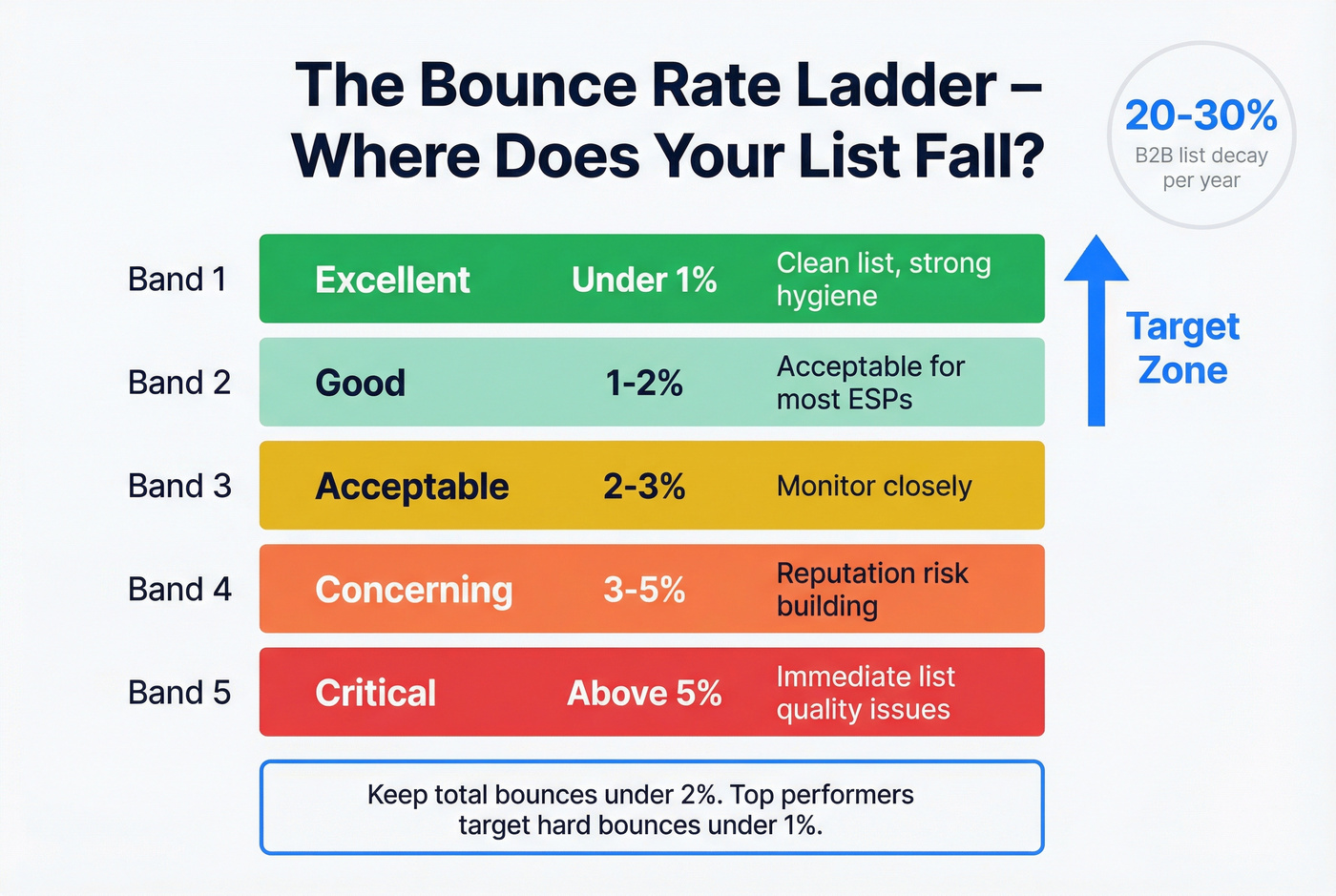
Here's the bounce rate ladder every ops team should have pinned:
| Rating | Bounce Rate | What It Means |
|---|---|---|
| Excellent | Under 1% | Clean list, strong hygiene |
| Good | 1-2% | Acceptable for most ESPs |
| Acceptable | 2-3% | Monitor closely |
| Concerning | 3-5% | Reputation risk building |
| Critical | Above 5% | Immediate list quality issues |
Keep total bounces under 2%. Top performers target hard bounces under 1%.
ISP-specific inbox placement varies wildly - Gmail sits at 87.2%, Yahoo/AOL at 86%, Apple Mail at 76.3%, and Microsoft at just 75.6%. If your prospects are heavy Outlook users, you're already fighting an uphill deliverability battle. Bad data makes it worse.
B2B email lists decay around 20-30% per year. People change jobs, companies get acquired, domains expire. If you verified six months ago and haven't touched the list since, assume a chunk of it is dead.
Accuracy Benchmarks
Most verification tools claim 99% accuracy on their marketing pages. Benchmarks tell a different story.
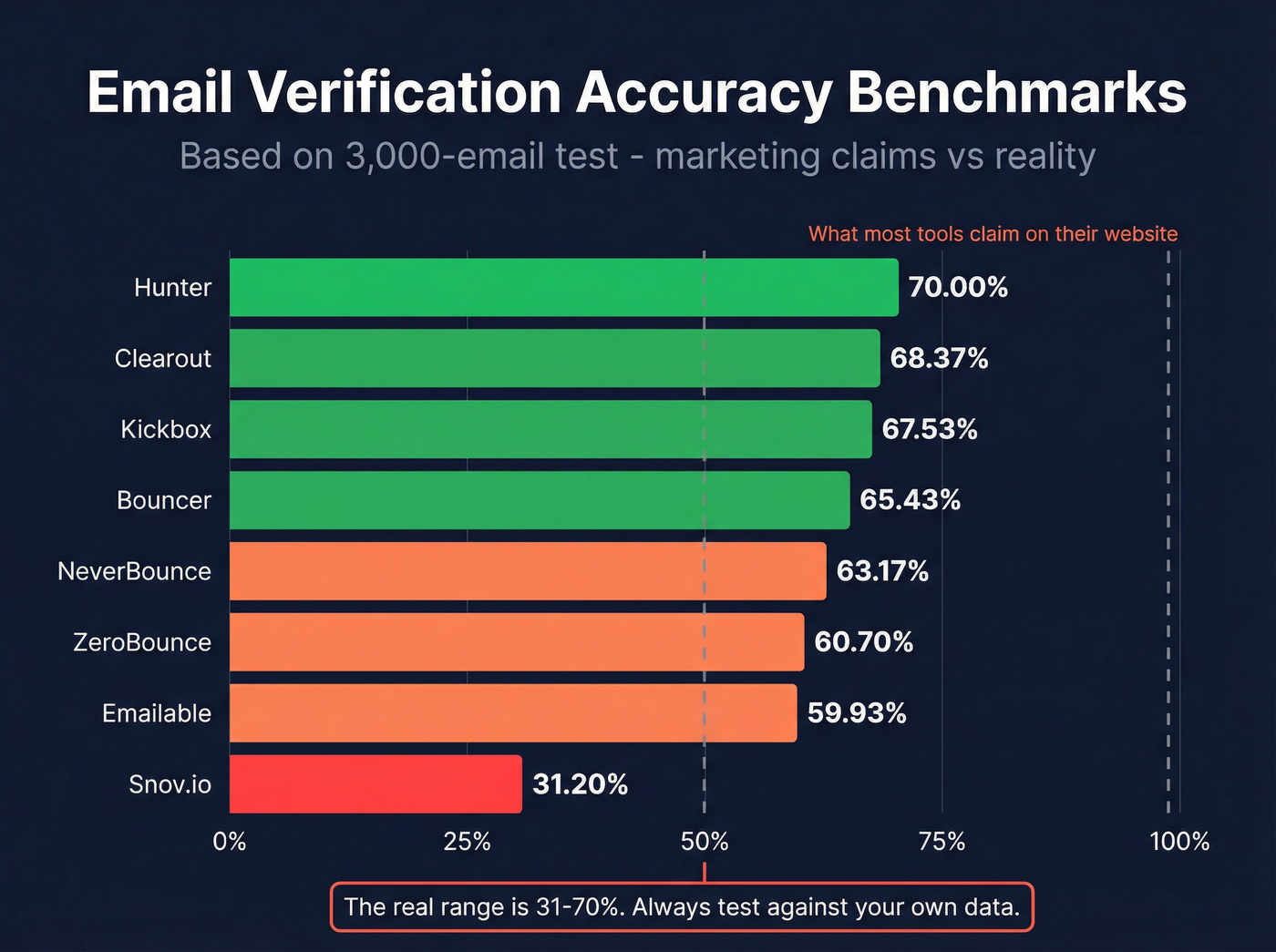
Hunter ran a benchmark across 15 verifiers using 3,000 emails (2,700 real, 300 known invalid), tested through Clay integrations with default settings:
| Tool | Overall Accuracy |
|---|---|
| Hunter | 70.00% |
| Clearout | 68.37% |
| Kickbox | 67.53% |
| Bouncer | 65.43% |
| NeverBounce | 63.17% |
| ZeroBounce | 60.70% |
| Emailable | 59.93% |
| Snov.io | 31.20% |
The real range is 31-70%. Stop trusting marketing pages and start testing against your own data. In our testing, the gap between marketing claims and real-world accuracy is even wider than these benchmarks suggest when you factor in catch-all-heavy B2B lists.
Hunter's own tool scored highest, and the dataset came from Hunter's outreach activity - factor in potential bias. A separate La Growth Machine test over 90 days and 47,000 emails corroborates the general ranking, with NeverBounce claiming 94% catch-all detection accuracy in that test.
Best Tools for Email Verification
| Tool | Per 10k | Free Credits | Best For |
|---|---|---|---|
| Prospeo | ~$100 (data + verification) | 75 emails/mo | Teams wanting verified data without a separate cleaning tool |
| EmailListVerify | $24 | 100 | Budget-conscious quarterly list hygiene |
| Clearout | $40-58 | 100 | Technical teams needing granular validation control |
| Bouncer | $45-49 | 100-1,000 | Best UX and highest user satisfaction |
| NeverBounce | $50-80 | 10 | Lists heavy on accept-all/catch-all domains |
| Emailable | $50-69 | 250 | Reliable mid-range without overthinking |
| ZeroBounce | $64-80 | 100 | Complex stacks needing native integrations |
| Kickbox | $70-80 | 100 | Enterprise procurement with SLA requirements |
| Hunter | $149 | 50 | Existing Hunter users adding verification |
| Snov.io | $189 | 50 | Full-suite users who get verification as a bonus |
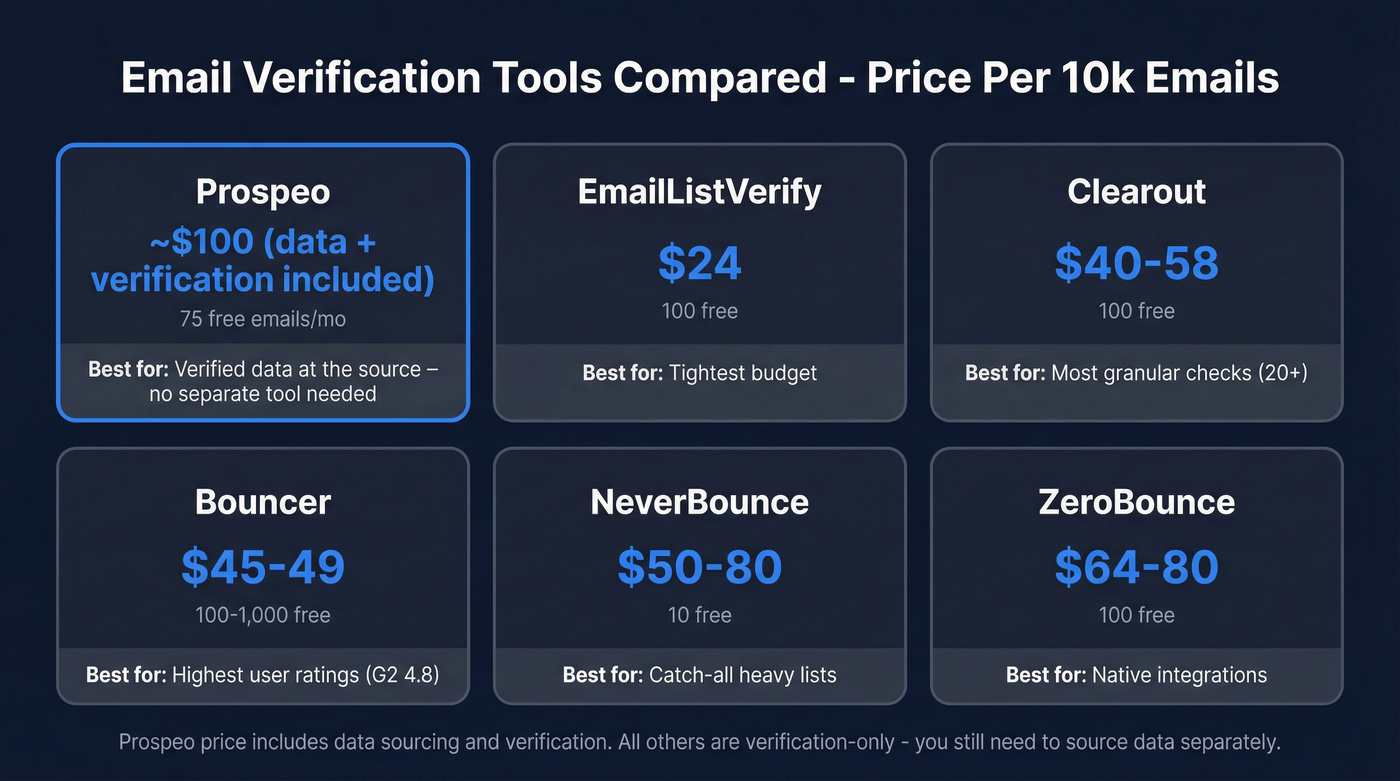
Prospeo's per-10k cost includes data sourcing and verification. All other tools are verification-only - you still need to source or purchase the data separately. If you’re comparing more options, see our roundup of email checker tools.
Prospeo
Prospeo isn't a standalone verifier - it's a B2B data platform where verification is baked into the pipeline. Every email runs through a 5-step process including syntax, MX, SMTP, catch-all handling, and spam-trap/honeypot filtering before it ever reaches you. The database covers 143M+ verified emails with 98% accuracy and refreshes every 7 days, compared to the 6-week industry average.
The proof is in the customer numbers. Meritt went from a 35% bounce rate to under 4%. Snyk - with 50 AEs prospecting daily - dropped from 35-40% bounces to under 5% and added 200+ new opportunities per month. Stack Optimize built to $1M ARR with client deliverability above 94% and zero domain flags.
Here's the thing: if your data provider ships you garbage and you pay a second tool to clean it, you're paying twice. At ~$0.01 per email with a free tier of 75 emails/month, that double-payment problem disappears.
Bouncer
G2 4.8 across 232 reviews. Capterra 4.9 across 233 reviews. Those scores aren't a fluke - Bouncer is genuinely the best-designed standalone verifier in the category, and the support team is responsive enough that users actually mention it in reviews.
In Hunter's benchmark, Bouncer scored 65.43% - solid but not top. Where it shines is the user experience and reliability of results. Pricing lands at $45-49 per 10k with volume discounts, and you get 100-1,000 free credits to test. If you already have a data source like CRM exports, purchased lists, or trade-show imports and just need a dedicated cleaning tool, Bouncer is the safest bet. Skip it if you're looking for a data platform; Bouncer only verifies, it doesn't find emails.
Clearout
The tool for technical teams. Clearout's 20+ checks include anti-greylisting, DNSBL lookups, sub-address normalization, and role account detection - more depth than most competitors. It scored 68.37% in Hunter's benchmark, second only to Hunter itself.
Webhook support for async verification is what sets Clearout apart for engineering teams building custom workflows. You fire off a batch, and results come back via webhook when they're ready rather than holding a synchronous connection open. Pricing ranges from $40-58 per 10k depending on volume, with 100 free credits. The tradeoff: the interface isn't as polished as Bouncer's, and the configuration options can overwhelm smaller teams that just want to upload a CSV and move on.
EmailListVerify
Budget champion. $24 per 10k - less than half of most competitors. Upload a list, clean it, download results. No fancy integrations, no real-time API worth writing home about. For teams running quarterly list hygiene on a tight budget, it does the job without pretending to do more.
NeverBounce
NeverBounce's standout claim is 94% catch-all detection accuracy, which matters enormously for B2B lists heavy on accept-all domains. Pricing runs $50-80 per 10k. The free tier is stingy at just 10 credits. We've seen teams choose NeverBounce specifically for its catch-all handling and pair it with a cheaper tool for everything else - a reasonable strategy if your domain mix skews heavily toward catch-all servers.
ZeroBounce
Differentiates on integrations - 45 direct connections to ESPs, CRMs, and marketing platforms. At $64-80 per 10k it's not cheap, but if your stack is complex and you need verification plugged directly into multiple tools, the native integrations save engineering time. For simpler setups, you're paying a premium you don't need.
Hunter
Known for email finding, not verification. Hunter scored highest in their own benchmark at 70%, but at $149 per 10k for verification alone, the pricing is steep. If you're already paying for Hunter's email finder, the verification is a natural add-on. As a standalone verifier, there are better options at a third of the price.
Emailable
Solid mid-range at $50-69 per 10k with 250 free credits. No standout differentiator - it does everything competently without excelling at anything specific. Fine for teams that want a reliable verifier without overthinking the decision.
Kickbox
Enterprise-oriented at $70-80 per 10k. Reliable and well-documented, but not price-competitive for SMBs. If your procurement team requires enterprise-grade SLAs and SOC 2 compliance, Kickbox checks those boxes.
Snov.io
Bundles email finding, verification, and outreach into one platform. The problem: $189 per 10k for verification alone is the most expensive option here, and it scored just 31.20% in Hunter's benchmark. If you're using Snov.io for the full suite, the verification is a bonus. Don't buy it for verification alone.
Let's be honest: if you're paying more than $60 per 10,000 verifications in 2026, you're overpaying - unless you're getting data sourcing bundled in. The standalone verification market has commoditized. The real value has shifted to platforms that verify at the source so you never need a separate cleaning step.
Real-Time vs. Bulk vs. API
| Method | Best For | Typical Speed |
|---|---|---|
| Real-time API | Signup forms, lead capture | 300-1,500ms per check |
| Bulk upload | Cleaning existing lists | Minutes to hours |
| CRM/API integration | Ongoing enrichment | Automated, continuous |
Real-time API verification catches bad addresses at the point of entry - a user types john@gmial.com into your form and gets a correction prompt before submitting. Latency runs 300-1,500ms depending on DNS and SMTP timeouts, fast enough for most form UX. This is also your first line of defense against fake signups and bot abuse. If you’re implementing this in your funnel, align it with your broader B2B lead capture workflow.
Bulk upload is the workhorse for list hygiene. Upload a CSV, wait for the batch to process, download cleaned results. For lists over 10k, expect processing times measured in minutes to hours depending on the tool and server response rates.
CRM and API integrations handle ongoing verification automatically - new contacts get checked as they enter your system. Clearout's webhook support works well here for teams building custom pipelines, and tools like Bouncer and ZeroBounce offer direct CRM connectors for less technical setups. If you’re cleaning inside your CRM, see CRM verify.
How Often to Re-Verify
B2B lists decay 20-30% annually. That's not a suggestion to verify once a year - it's a reason to build re-verification into your operational cadence.
Large lists over 10k should be re-verified every two weeks. Smaller lists can go monthly. Always re-verify before campaigns, after imports, and after 90 days of contact inactivity. If the same address soft-bounces 3-5 times consecutively, treat it as a hard bounce and remove it. The consensus on r/sales and r/coldemail is that most teams wait too long between cleanings, and the ones who verify on a regular cadence consistently report better deliverability and fewer domain headaches. For the operational side, this fits naturally into a CRM hygiene routine.
Stale data is the #1 reason verified emails bounce weeks later. Prospeo refreshes all 300M+ profiles every 7 days - not the 6-week industry average. Your list stays clean without re-verification workflows.
Fresh data every week means bounce rates stay under 2%.
FAQ
How does email verification differ from validation?
Email verification confirms - via an SMTP handshake - that a specific mailbox exists on a mail server and can receive messages. Validation is a lighter syntax and format check typically run at the point of capture. Verification goes deeper by actually communicating with the recipient's server.
Does verifying an email send an actual message?
No. The process uses an SMTP handshake to check if a mailbox exists without delivering a message. The connection opens, the recipient address is queried, and the connection closes before anything is sent. It's a knock on the door, not a letter through the slot.
What's a catch-all domain and why does it matter?
A catch-all domain accepts mail to any address at the server level, making individual mailbox confirmation impossible. Verifiers can't distinguish real from fake addresses on these domains, which inflates "unknown" or "accept-all" results. NeverBounce claims 94% catch-all detection accuracy - the highest in the category.
What bounce rate should I target?
Under 2% total bounces. Top performers keep hard bounces under 1%. Above 5% means serious list quality issues and active reputation damage. Check DeBounce's industry benchmarks for sector-specific context.
Do I need a standalone verifier if my data provider already verifies?
Not if your provider runs thorough verification before delivering data. Prospeo, for example, runs a 5-step check on every email before it reaches you - eliminating the need for a separate tool. You'd only need a standalone verifier for lists from other sources like trade shows, form submissions, or purchased lists.