

How to Clean Your Email List in 2026 (Step-by-Step)
Your last campaign bounced at 4.7% and your ESP just sent a warning. Or maybe it's the quieter version: your Mailchimp bill jumped a tier, but only 1,200 of your 10,000 subscribers opened anything last quarter. You're paying to store dead weight.
Either way, you need to clean your email list - and you need a process that actually sticks.
The Quick Version
If your bounce rate is above 2%, stop what you're doing and clean now:
- Export your full list and remove duplicates
- Fix syntax errors and flag role-based addresses
- Remove all hard bounces immediately
- Run bulk verification on everything that's left
- Send a re-engagement sequence to inactives
- Sunset non-responders and enforce double opt-in going forward
Full step-by-step below.
Why List Hygiene Matters in 2026
Studies peg annual email list decay at 22-23%. People change jobs, companies rebrand domains, inboxes get abandoned. On a 50,000-subscriber list, that's roughly 11,500 addresses going stale in twelve months - and you're paying your ESP for every single one of them.
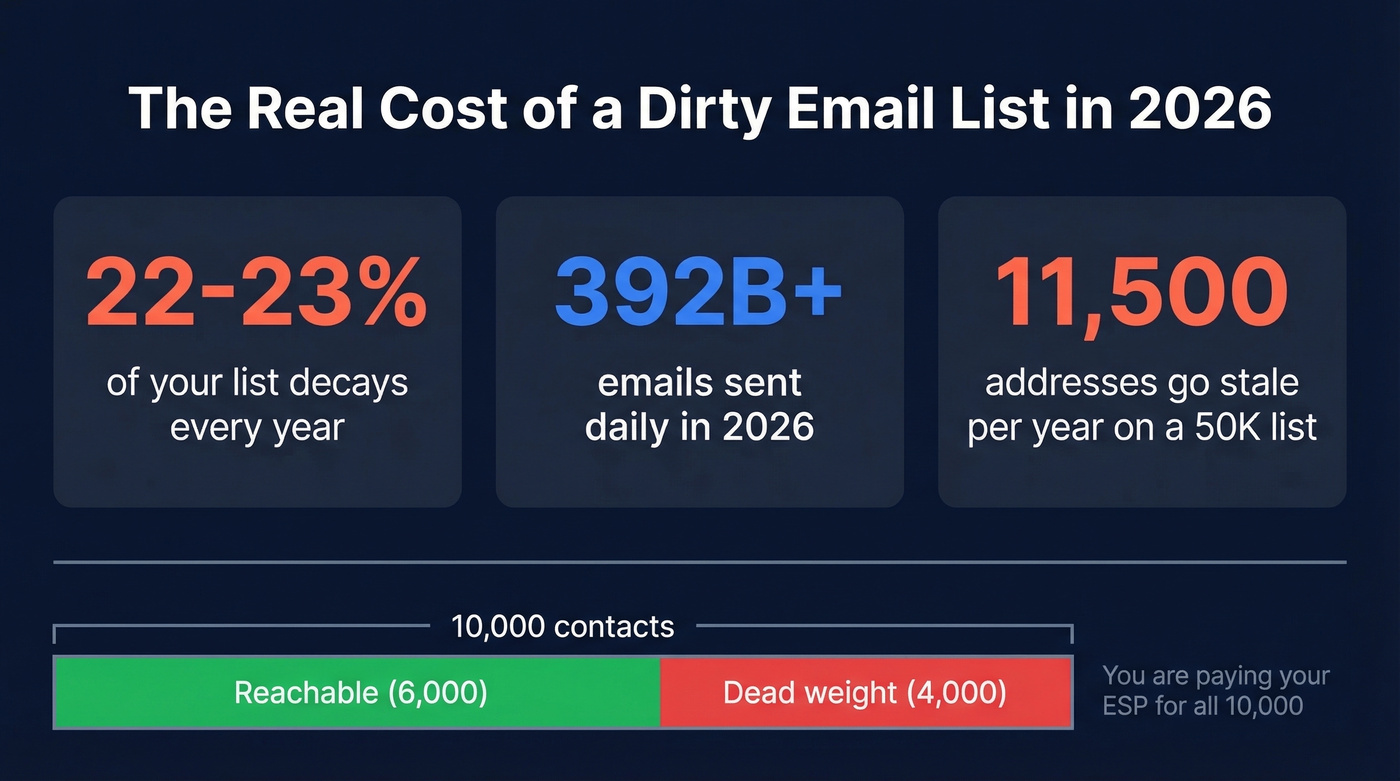
With 392B+ emails sent daily in 2026, inbox providers are more aggressive than ever about filtering senders with poor list hygiene. Gmail and Yahoo's 2024-2025 sender requirement changes made bounce rate a frontline deliverability metric. Google's own guidance tells senders to reduce volume when bounce and deferral errors rise.

Most ESPs price by subscriber count. If you're sitting on 10,000 contacts but only 6,000 are reachable, you're subsidizing dead contacts at the next pricing tier. Scrubbing your list doesn't just protect deliverability - it literally saves you money every month.
Bounce Rate Benchmarks
Not all bounce rates are created equal. Here's what "normal" looks like across industries, based on compiled benchmark data:
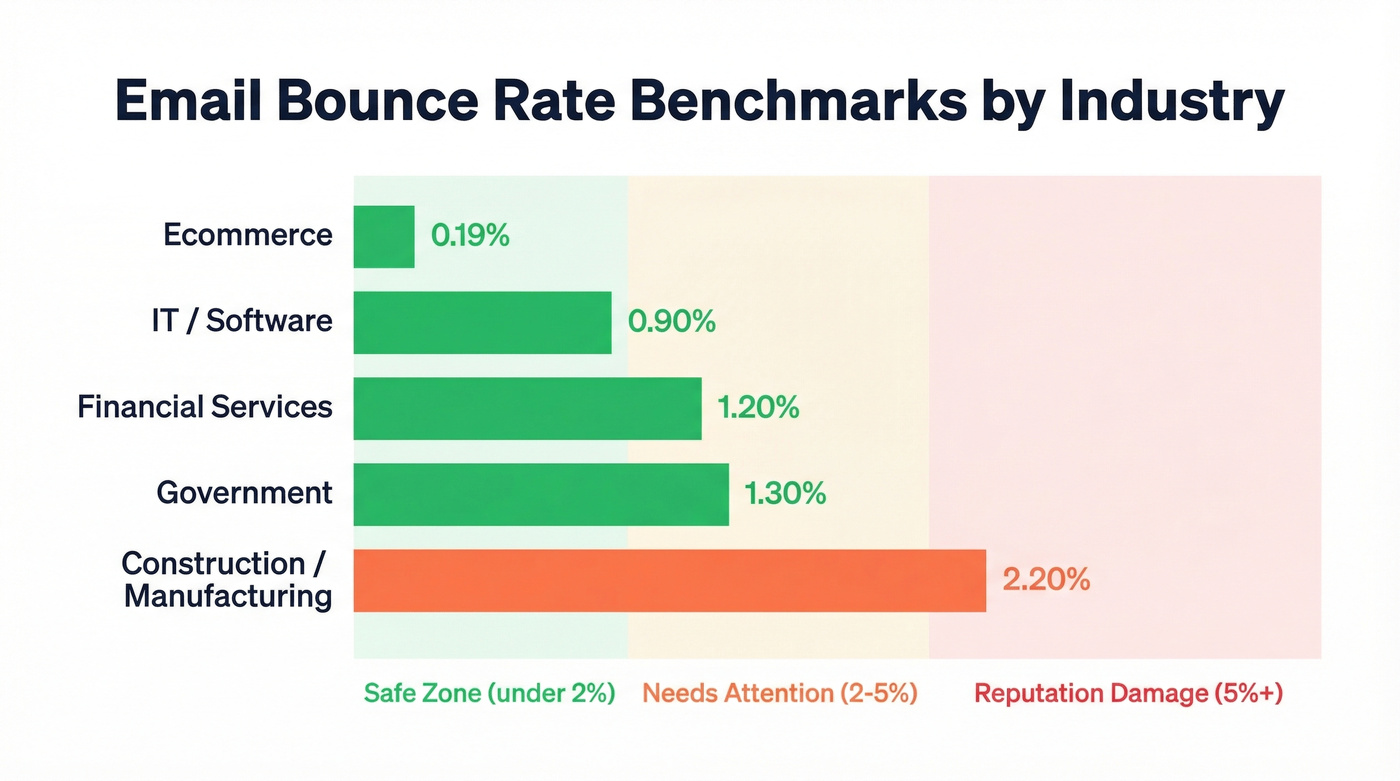
| Industry | Avg Bounce Rate |
|---|---|
| Ecommerce | 0.19% |
| IT / Software | 0.90% |
| Financial Services | 1.20% |
| Government | 1.30% |
| Construction / Mfg | 2.20% |
Under 2% is safe. Between 2-5% means your list needs attention. Above 5% risks real sender reputation damage.
Benchmark studies disagree with each other constantly because "clean ESP" datasets - permission-based, double opt-in lists - typically show 1-2% averages, while datasets that include cold outreach, old CRMs, and purchased lists can show double-digit bounce rates. If your numbers look high compared to these benchmarks, the first question is whether your list was built on opt-in or scraped from somewhere questionable. The fix is the same either way, but the starting point matters for expectations.
If you're troubleshooting deliverability beyond bounces, see our email deliverability breakdown.

You're reading this because bad data already cost you. Prospeo's 5-step email verification - with catch-all handling, spam-trap removal, and honeypot filtering - delivers 98% accuracy so you spend less time scrubbing and more time selling.
Skip the cleanup. Start with emails that actually work.
Step-by-Step Email List Cleaning
Export and Audit Your List
Pull your full subscriber list into a CSV. Before you touch any verification tool, handle the basics:
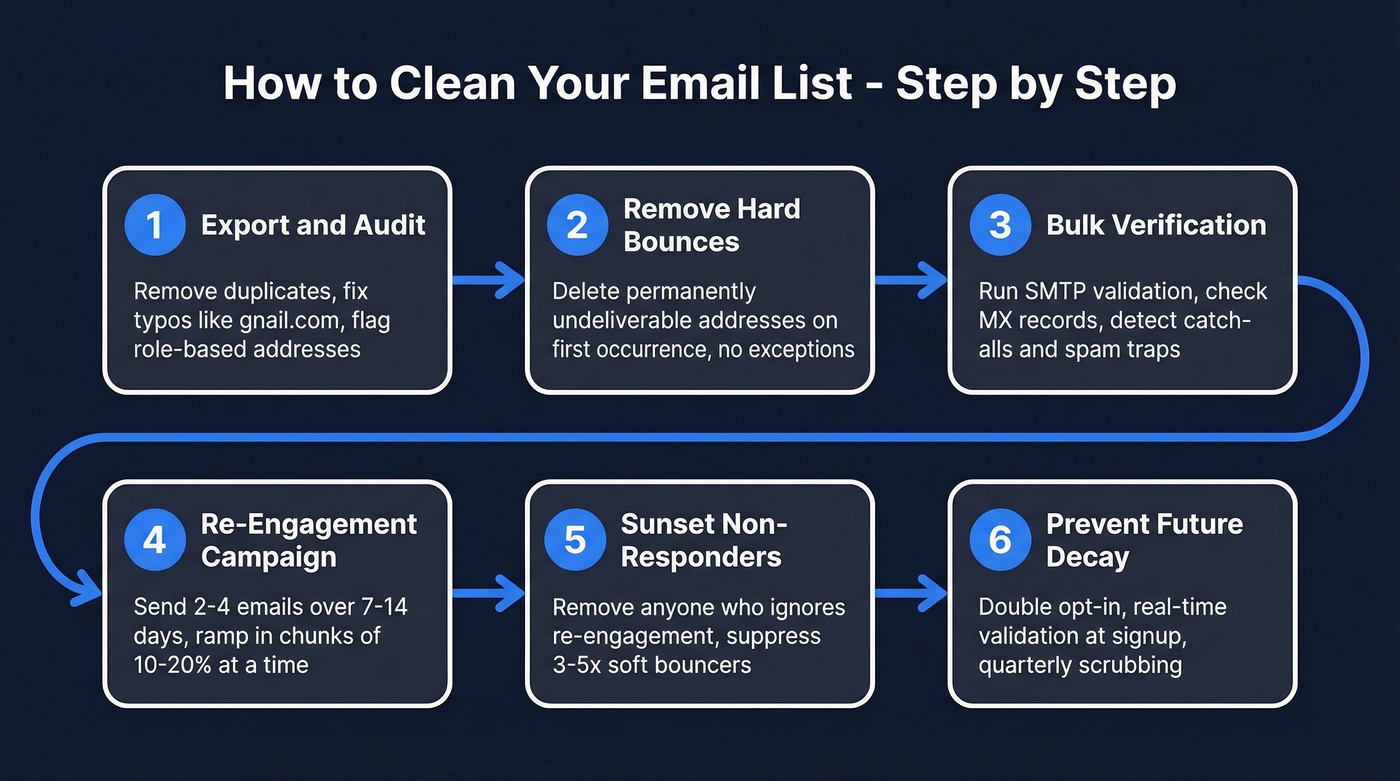
- Remove exact duplicates (sort by email, dedupe)
- Fix obvious syntax errors - "gnail.com" and "gamil.com" are more common than you'd think
- Flag role-based addresses like info@, admin@, and support@, which rarely belong to a real person and tank engagement metrics
- Identify catch-all domains, which accept any address whether the mailbox exists or not
This manual pass is quick and catches problems that verification tools sometimes miss. If you're wondering how to clean email addresses without spending money, this first step is entirely free.
Remove Hard Bounces Immediately
A hard bounce is a permanent delivery failure - the address doesn't exist, the domain is dead, or the server has explicitly rejected your mail. Remove these on first occurrence. There's no "wait and see" with hard bounces.
One thing most guides skip: ESPs can reclassify repeated soft bounces as hard bounces over time. If an address soft-bounces across 3-5 consecutive campaigns, your ESP is probably already treating it as permanently undeliverable. Check your suppression logs - the cleanup might already be partially done. (If you want to go deeper on bounce codes and thresholds, use this email bounce rate guide.)
Run Bulk Verification
This is where the real cleaning happens. A good verification tool checks MX records, runs SMTP validation, detects catch-all domains, and flags spam traps and honeypots. Skip this step and you're guessing. If you're evaluating options, our AI email checker guide covers what modern tools can (and can't) do.
A word on accuracy: every verifier says "99% accurate" on their marketing page. In a benchmark test of 15 tools published by Hunter using 3,000 real business emails, the top performer hit 70% real-world accuracy. That gap between claimed and tested accuracy is why tool selection matters - we cover the best options in the comparison section below.
If you're sending cold outreach, also watch your email velocity so you don’t spike bounces overnight.
Run a Re-Engagement Campaign
Before you delete inactive subscribers, give them a chance to come back. A solid re-engagement sequence runs 2-4 emails over 7-14 days: start with a warm "we miss you" nudge, follow with an incentive or exclusive content (though be careful about training discount-seeking behavior), then show them what they've been missing, and close with a last-chance "we're cleaning our list - click to stay."
Don't blast your entire inactive segment at once. Ramp in chunks - send to 10-20% of inactives first, monitor engagement and bounces, then expand. Hitting a huge cold segment all at once is a fast way to trigger spam filters. For copy ideas, pull from these email subject line examples.
Sunset Non-Responders
Anyone who doesn't engage with your re-engagement sequence gets removed. This is your sunset policy, and it's non-negotiable if you care about deliverability.
For soft bounces specifically, suppress addresses that fail across 3-5 consecutive campaigns. Inbox providers don't just care about the absence of spam complaints - they actively reward positive engagement signals. A smaller list of people who actually open and click will outperform a bloated one every time. Clean lists see up to 50% higher open rates and 75% better click-through rates compared to neglected ones. If you suspect traps are part of the problem, follow a dedicated spam trap removal process.
Prevent Future Decay
The best mailing list cleaning is the kind you don't have to do. Three habits that prevent most decay:
Double opt-in is non-negotiable. Yes, it reduces signup volume. It also eliminates typos, bots, and fake addresses at the source. Mailchimp's own guidance backs this up.
Real-time validation at signup. Catch bad addresses before they ever enter your database. This lets you verify contacts at the point of entry rather than retroactively. Some ESPs offer built-in verification or integrate directly with standalone tools - check your ESP's marketplace before buying separately.
Quarterly scrubbing for lists over 10K. The generic advice says "every 6 months." That's too slow. With 22-23% annual decay, a quarterly cadence catches problems before they compound.
One more thing: clean lists also keep you on the right side of CAN-SPAM's 10-day removal requirement and GDPR's data minimization principle. If you're holding thousands of undeliverable addresses for subscribers who never opted in properly, you're carrying compliance risk alongside deliverability risk. If you’re actively repairing domain health, this improve sender reputation guide helps.
The Open-Rate Trap
Here's the thing: most list cleaning guides tell you to remove subscribers who haven't opened in 90 days. That advice is actively harmful in 2026.
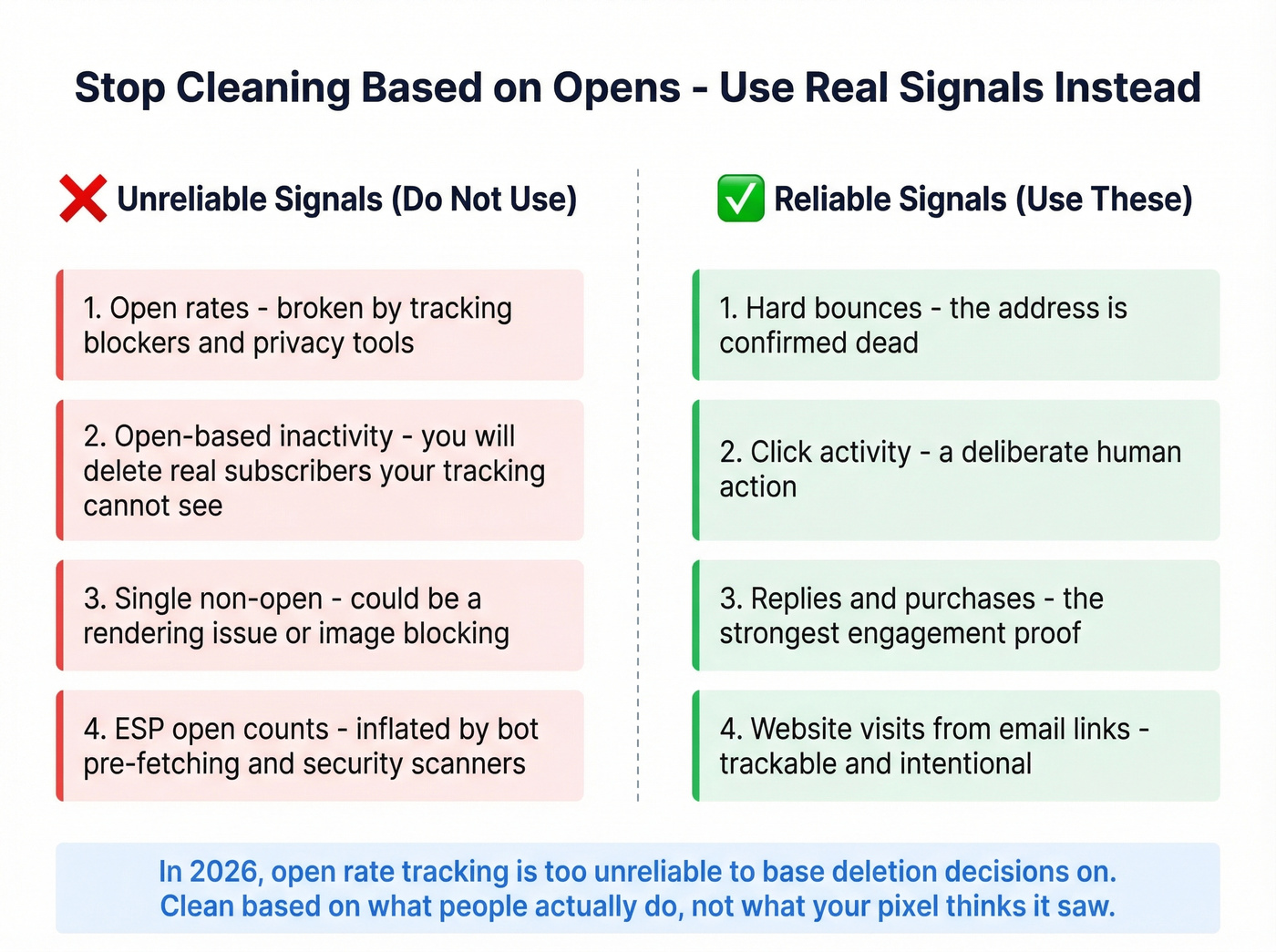
Open rates are a broken metric. Tracking blockers and privacy tools make it nearly impossible to know who actually engaged. Deleting subscribers based on opens means you're almost certainly removing real, engaged people who your tracking can't see.
Clean based on bounces and explicit signals - clicks, replies, purchases, site visits. Not opens. If you've ever tried to purge inactives by opens alone, you know the anxiety: you're one bad filter away from nuking real subscribers because tracking failed them. (Related: what to do when email tracking pixels get blocked.)
Best Verification Tools
Not all verifiers are equal. We've tested several of these, and the differences come down to accuracy, strictness, and cost at volume. Choosing the right tool is the most important decision when you clean a mailing list at scale.
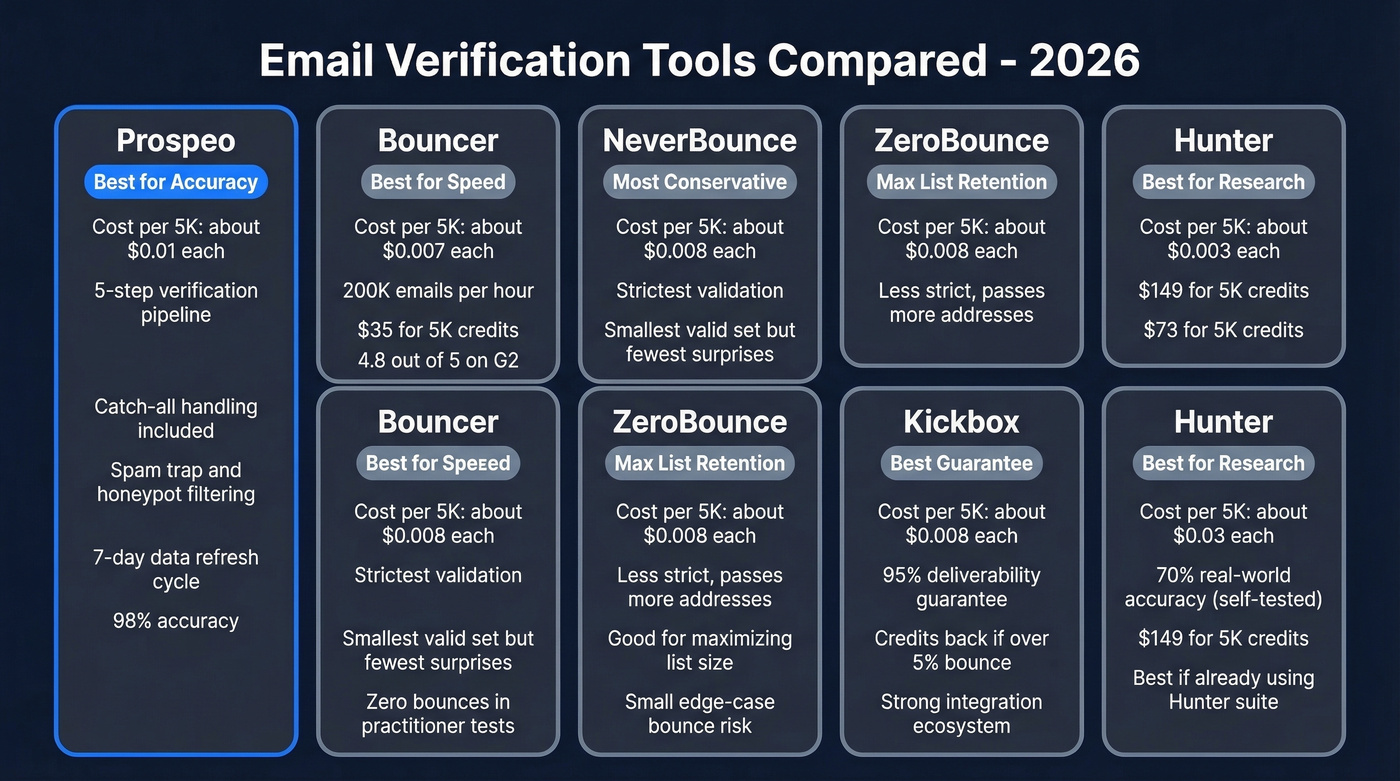
Prospeo runs a 5-step verification pipeline with catch-all handling, spam-trap removal, and honeypot filtering. The 7-day data refresh cycle means you're verifying against current data, not a months-old snapshot. Snyk's team used it to drop their bounce rate from 35-40% to under 5%.
Bouncer is the speed champion - it processes up to 200,000 emails per hour, making it a great option for large-volume runs on a tight deadline. At $35 for 5,000 credits, it's one of the cheapest entry points on this list. Carries a 4.8/5 on G2. If you’re comparing similar tools, see Bouncer alternatives.
NeverBounce is the most conservative verifier we've seen. In a practitioner test of 563 emails, sending to 453 emails ZeroBounce marked valid produced 2 bounces; NeverBounce flagged those same 2 addresses as invalid, resulting in 0 bounces on the set it marked valid. If you'd rather have a slightly smaller "valid" set with fewer surprises, NeverBounce is the pick.
ZeroBounce takes the opposite approach - less strict, passes more addresses through. Good for teams that want to maximize list size and can tolerate a small number of edge-case bounces.
Kickbox offers a 95% deliverability guarantee: if more than 5% of emails it marks "Deliverable" bounce, you get credits back. Solid plug-and-play option with a strong integration ecosystem.
Hunter scored highest in a benchmark it published (70% accuracy on 3,000 real emails), which is honest but also highlights how far "real-world" accuracy falls from marketing claims. At $149 for 5K credits, it's around 4x more expensive than the $35-$50 options - best suited for teams already paying for Hunter's other tools. If you’re shopping around, compare Hunter alternatives.
| Tool | 5K Emails | 50K Emails | Per Email (5K) | Best For |
|---|---|---|---|---|
| Prospeo | ~$50 | ~$500 | ~$0.01 | Accuracy + data freshness |
| Bouncer | $35 | $250 | $0.007 | Speed at volume |
| NeverBounce | $40 | $250 | $0.008 | Zero-risk verification |
| ZeroBounce | $39 | $325 | $0.008 | Max list retention |
| Kickbox | $40 | $400 | $0.008 | ESP integration |
| Hunter | $149 | $499 | $0.03 | Research teams |
With 22% annual list decay, quarterly scrubbing isn't optional. Prospeo refreshes its 143M+ verified emails every 7 days - not the 6-week industry average - so the contacts you pull are current before they ever touch your list.
Build lists that stay clean because the data was fresh to begin with.
Email List Cleaning FAQ
How often should I clean my email list?
Every quarter for lists over 10,000 subscribers, and before every major campaign regardless of size. With 22-23% of addresses decaying annually, quarterly cleaning catches problems before they snowball into deliverability damage.
How do I start if I've never cleaned my list?
Export your full list, remove duplicates and syntax errors, then purge hard bounces. Run remaining addresses through a bulk verification tool, and send a re-engagement campaign to anyone who hasn't interacted in 90+ days. The step-by-step section above walks through each stage in detail.
What's the difference between email cleaning and scrubbing?
They're used interchangeably. "Cleaning" usually means removing bounces and inactives from your list. "Scrubbing" sometimes implies running addresses through a verification tool specifically. The underlying process is identical - export, verify, remove, prevent.
Will cleaning my list hurt subscriber count?
Yes - and that's the point. A smaller, verified list outperforms a bloated one on every metric that matters. Expect up to 50% higher open rates and 75% better click-through rates. Your ESP bill drops too, since most platforms price by subscriber count.
What's a safe email bounce rate?
Under 2% is safe for most industries. Between 2-5% means your list needs immediate attention. Above 5% risks sender reputation damage and inbox placement problems, especially under Gmail and Yahoo's stricter 2026 sender policies.