

The Complete IP Warm-Up Guide for 2026
You just migrated to a dedicated IP, fired off your first 10,000-email campaign, and watched your inbox placement crater to 12%. Gmail doesn't know you yet - and it doesn't trust strangers. IP warm-up is how you earn that trust. Skip it, and you'll torch a brand-new sending infrastructure before it ever gets a chance.
What You Need (Quick Version)
First question: do you even need this? If you're on a shared IP, your ESP manages the pool's reputation - you don't need to warm the IP yourself. But if you've moved to a dedicated IP, or your dedicated IP has been dormant for 30+ days, you need a structured ramp.
The single most important rule: start with your most engaged subscribers only. People who opened or clicked in the last 30 days. Nobody else touches your new IP in weeks one and two. The full warmup process takes 4-6 weeks, and list verification is step zero. If your bounce rate climbs above ~2% in week one, pause and fix your data before you scale.
What Is IP Warming?
IP warm-up is the process of gradually increasing email volume on a new or dormant IP address so mailbox providers - Gmail, Yahoo, Outlook - can evaluate your sending behavior and assign reputation. It's the most important step when transitioning to dedicated sending infrastructure.
There's no single global reputation database. Each provider builds its own view of your sending behavior. Most reputation systems only store data for 30 days, which means if you stop sending on a dedicated IP for a month, you're effectively starting from scratch.
Does warming actually work, or is it just deliverability theater? It works for a simple reason: a new IP with no history looks identical to a spammer's freshly provisioned infrastructure. Your job during the ramp-up phase is to build clean sending history and prove you're not that.
Do You Actually Need It?
Not everyone does. Here's the decision framework:
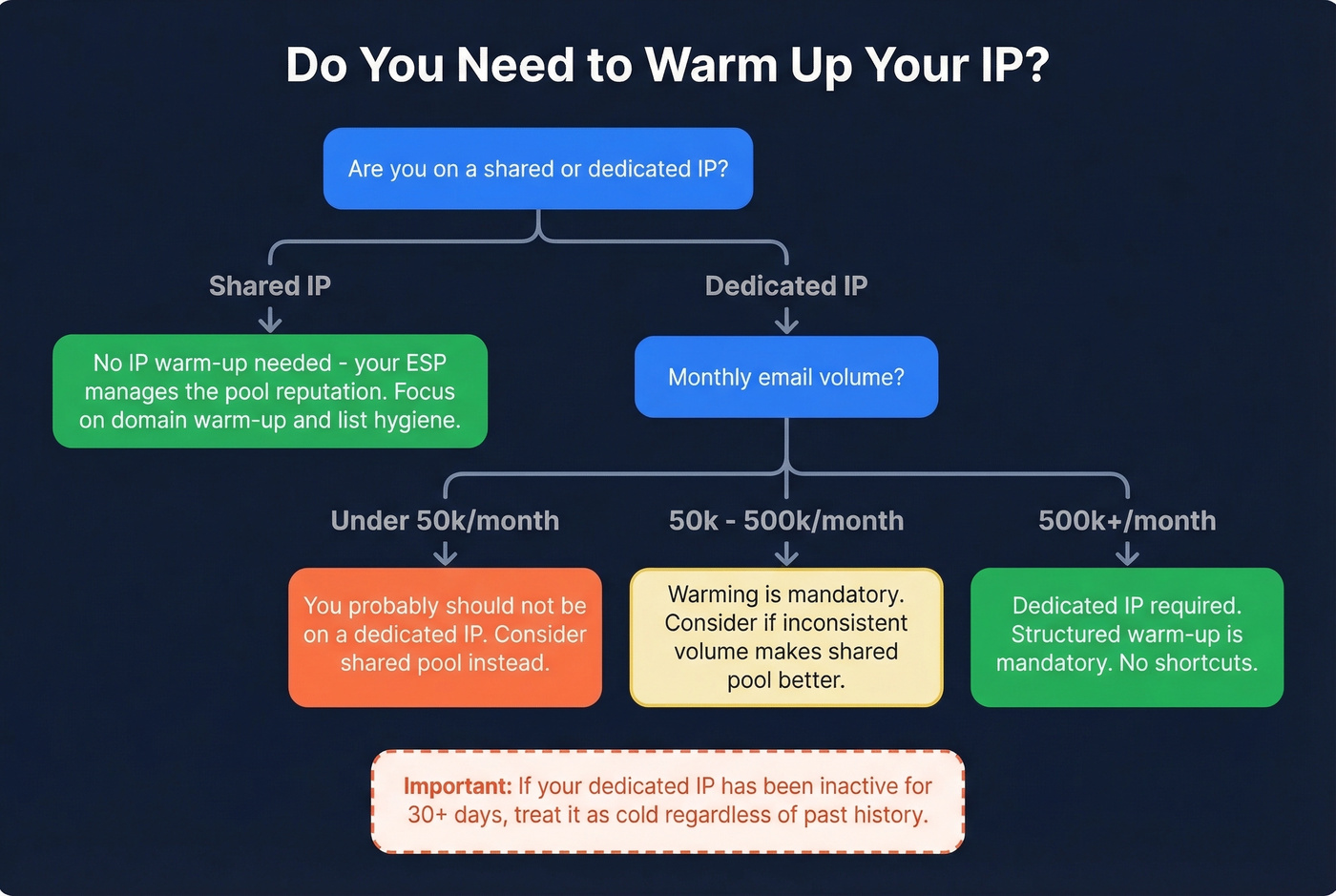
- Shared IP: No individual IP ramping required. Your ESP manages the pool's reputation across all senders. You still need to warm your sending domain and maintain list hygiene, but the IP itself is already in active use.
- Dedicated IP, under 50k/month: You probably shouldn't be on a dedicated IP at all. Twilio recommends dedicated IPs only above 50,000 emails per month. Acoustic puts the threshold even higher at 100,000 per month, arguing that lower volumes don't generate enough signal for ISPs to build a reliable reputation profile.
- Dedicated IP, 50k-500k/month: SparkPost's guidance is that senders under 500k/month with inconsistent volume may do better on a shared pool. If you've committed to dedicated, warming is mandatory.
- Dedicated IP, 500k+/month: You need a dedicated IP, and you need a structured warm-up. No shortcuts.
If your IP has been inactive for 30+ days, treat it as cold regardless of its history.
IP vs. Domain Warm-Up
These are parallel tracks, not the same thing. Confusing them is one of the most common mistakes we see in email deliverability.
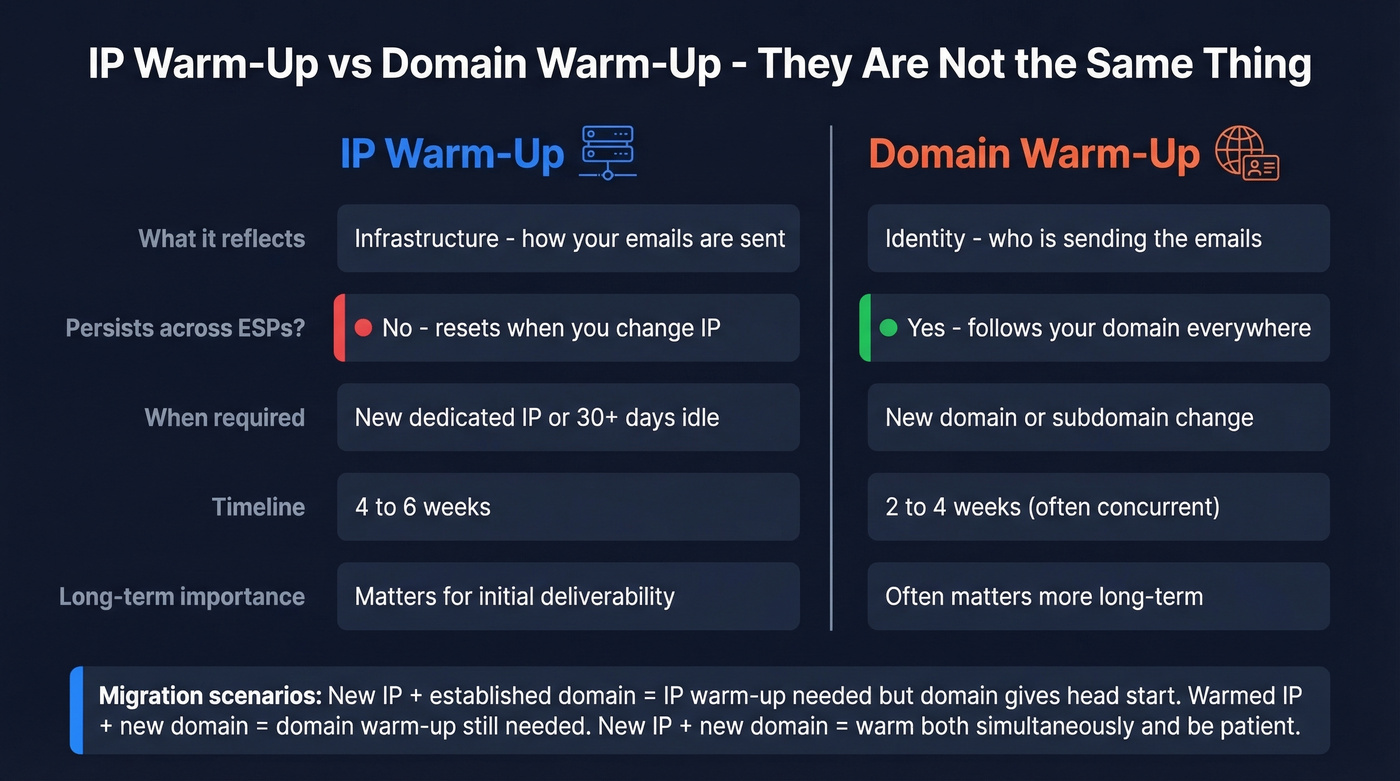
| Dimension | IP Warm-Up | Domain Warm-Up |
|---|---|---|
| What it reflects | Infrastructure | Identity |
| Persists across ESPs? | No - resets with new IP | Yes - follows your domain |
| When required | New dedicated IP or 30+ days idle | New domain or subdomain change |
| Timeline | 4-6 weeks | 2-4 weeks (often concurrent) |
IP reputation is about how your emails are sent - the infrastructure layer. Domain reputation is about who is sending - your brand identity. Domain reputation persists across IPs and ESPs, which is why it often matters more long-term.
AWS SES lays out the migration scenarios clearly: if you're on a warmed IP but switching to a new domain, you still need domain warm-up. New IP with an established domain? You still need to ramp the IP, but your domain reputation gives you a head start. New IP and new domain? Warm both simultaneously and be patient.
For domain migrations, don't flip the switch overnight. Start by routing ~5% of traffic through the new domain, then incrementally increase to 100% over a few weeks. This percentage-shift approach lets ISPs evaluate the new domain without a sudden change that triggers filters.
Pre-Warm-Up Checklist
Before you send a single warm-up email, get these in order:
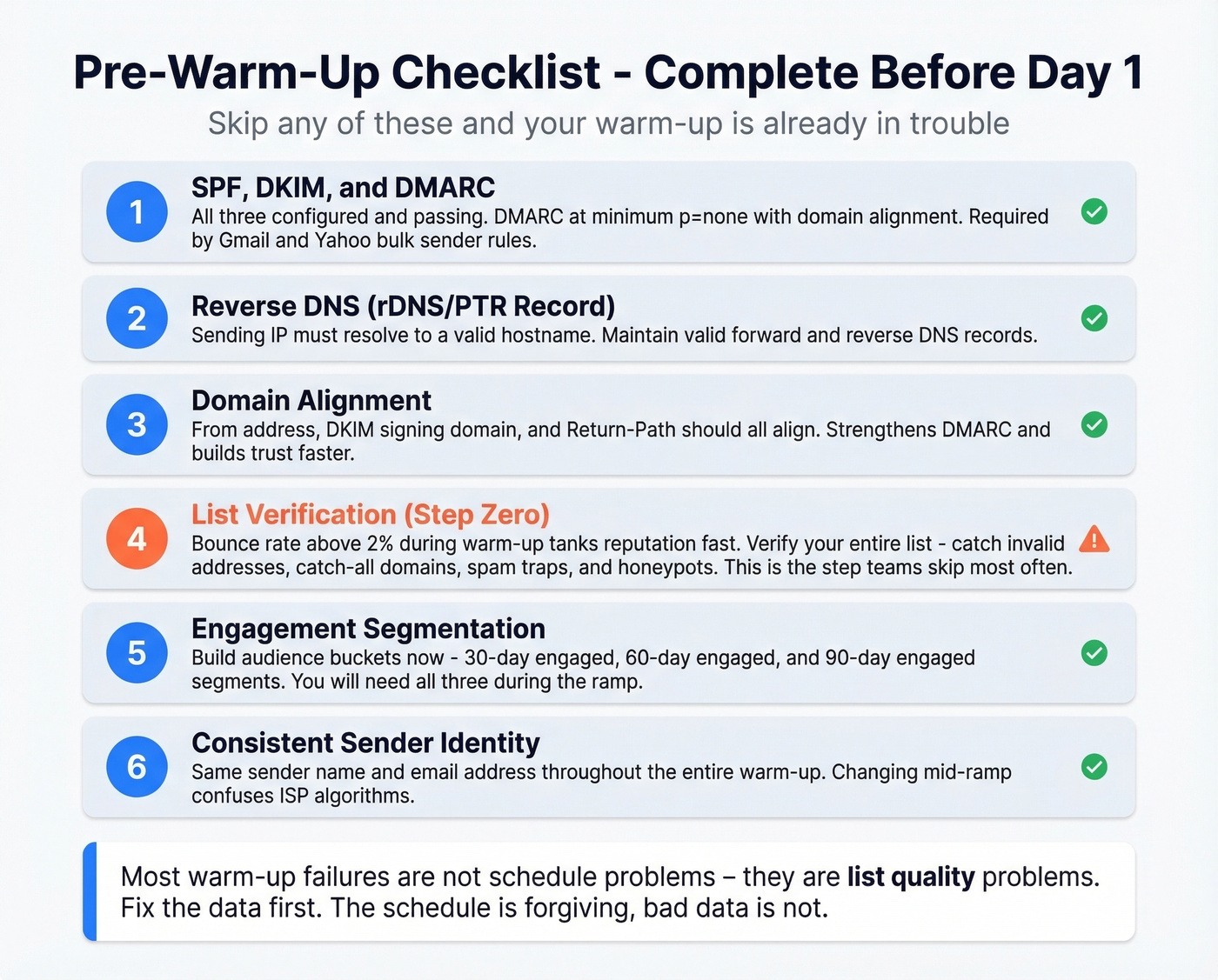
SPF, DKIM, and DMARC: All three must be configured and passing. Yahoo's requirements and Google's parallel bulk-sender requirements make this non-negotiable. DMARC at minimum
p=nonewith domain alignment.Reverse DNS (rDNS/PTR record): Your sending IP must resolve to a valid hostname, and you should maintain valid forward and reverse DNS.
Domain alignment: Your From address, DKIM signing domain, and Return-Path should align. This strengthens DMARC and builds trust faster.
List verification: This is step zero, and it's the one teams skip most often. A bounce rate above ~2% during warm-up signals dirty data, and that tanks reputation fast. Prospeo's 5-step verification catches invalid addresses, catch-all domains, spam traps, and honeypots before they wreck your sender score. Stack Optimize built from $0 to $1M ARR using Prospeo for client campaigns - bounce rates under 3%, zero domain flags across clients.
Engagement segmentation prep: Build your audience buckets now. You'll need 30-day engaged, 60-day engaged, and 90-day engaged segments. SparkPost's warm-up playbook uses these windows to control risk at each stage.
Consistent sender identity: Same sender name and email address throughout the entire warm-up. Changing mid-ramp confuses ISP algorithms.

A bounce rate above 2% during IP warm-up tanks your reputation before you even start. Prospeo's 5-step email verification catches invalid addresses, spam traps, and honeypots - delivering 98% email accuracy. Stack Optimize ran client campaigns at under 3% bounce with zero domain flags.
Clean your list before you warm your IP - not after it's too late.
The 30-Day Warmup Schedule
Here's a practical ramp based on Inboxroad's published schedule (based on two dedicated IPs - halve volumes if you're running a single IP). The percentages matter more than the absolute numbers.
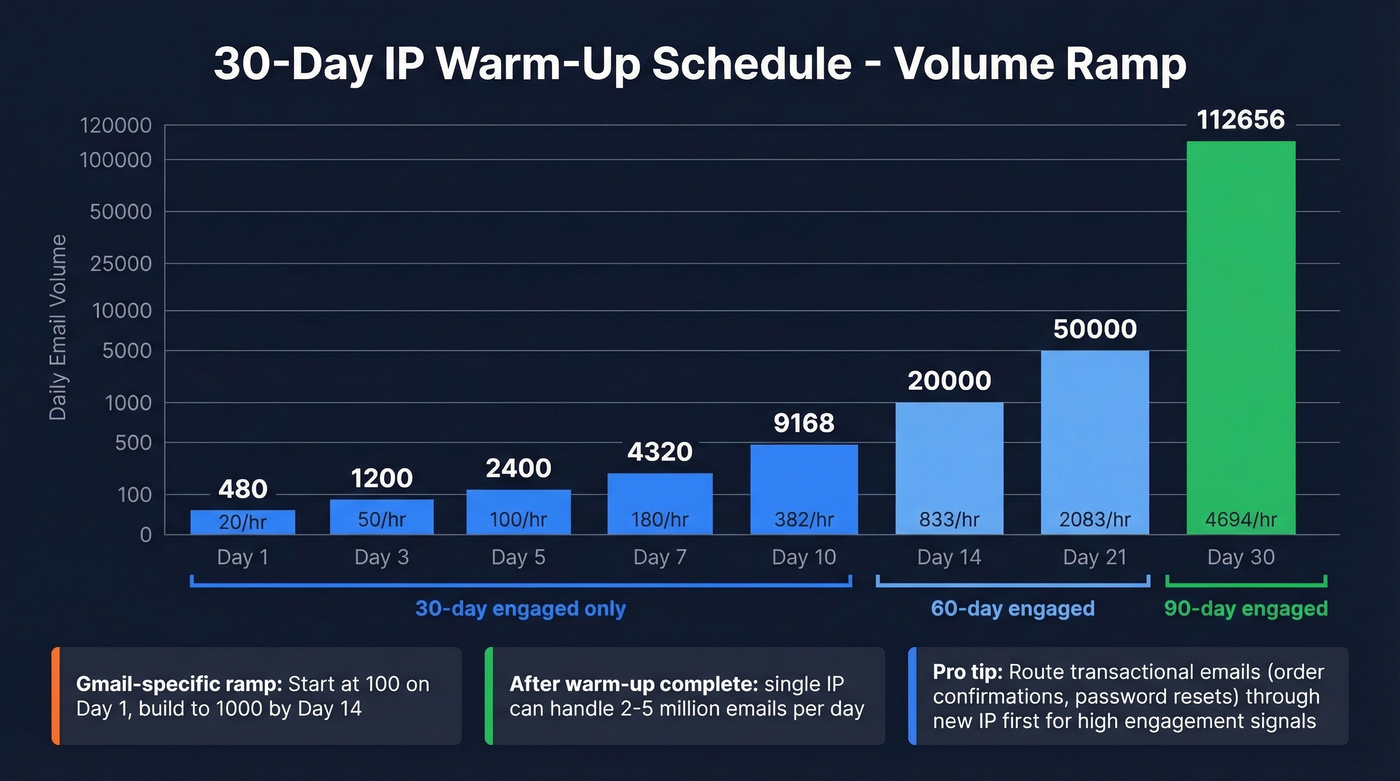
| Day | Daily Volume | Hourly Cap | Audience Segment |
|---|---|---|---|
| 1 | 480 | 20/hr | 30-day engaged |
| 3 | 1,200 | 50/hr | 30-day engaged |
| 5 | 2,400 | 100/hr | 30-day engaged |
| 7 | 4,320 | 180/hr | 30-day engaged |
| 10 | 9,168 | 382/hr | 30-day engaged |
| 14 | 20,000 | 833/hr | 60-day engaged |
| 21 | 50,000 | 2,083/hr | 60-day engaged |
| 30 | 112,656 | 4,694/hr | 90-day engaged |
Once warm-up is complete, a single dedicated IP can typically handle 2-5 million emails per day.
If you send transactional emails like order confirmations and password resets, route those through your new IP first. They generate high opens and engagement - ideal early signals for ISPs.
Gmail is the most conservative major ISP. Inboxroad recommends a separate, slower ramp for Gmail-only traffic: start at 100 emails on Day 1, build to 1,000 by Day 14. If Gmail represents a large share of your list, split your warm-up traffic by ISP and keep each provider's ramp consistent.
The critical rule for the first six weeks: never send to subscribers who haven't engaged in the last 90 days. Weeks 1-2 are 30-day engaged only. Weeks 3-4 expand to 60-day engaged. Older segments come later, after your reputation is established.
Here's the thing: most warm-up failures aren't schedule problems - they're list quality problems. We've seen teams obsess over whether to send 200 or 500 on Day 1 while sitting on a list with 8% invalid addresses. Fix the data first. The schedule is forgiving; bad data isn't. (If you need a deeper breakdown of bounce types and fixes, see bounce rate.)
The warm-up period also doubles as an A/B testing window. You're sending to your most engaged subscribers anyway - use it to test subject lines and content before scaling to your full list. (If you want a bank of test ideas, pull from these subject lines.)
Gmail & Yahoo Bulk Sender Rules
The February 2024 bulk sender requirements didn't invent new best practices - they made existing ones mandatory and enforceable. If you're warming up an IP in 2026, these aren't optional.
The common bulk-sender threshold is 5,000+ emails per day to Gmail addresses (transactional and triggered emails count toward that volume). If you're unsure how providers define "bulk," see bulk sender thresholds.
Key requirements:
- SPF and DKIM: Both required for bulk senders.
- DMARC: Published at minimum
p=none, and DMARC must pass. - Domain alignment: From domain must align with either SPF or DKIM domain.
- One-click unsubscribe: List-Unsubscribe header supporting RFC 8058 one-click POST method. Visible unsubscribe link in the email body. Honor unsubscribes within 2 days.
- Spam complaint rate: Keep it below 0.3%. Operationally, aim for <0.1% during warm-up and never let it approach 0.3%.
These requirements make IP warming both easier and harder. Easier because the authentication baseline is clear. Harder because a single spike toward 0.3% complaint rate during warm-up can set you back weeks.
Monitoring Your Warm-Up
Set up monitoring before Day 1, not after something breaks.
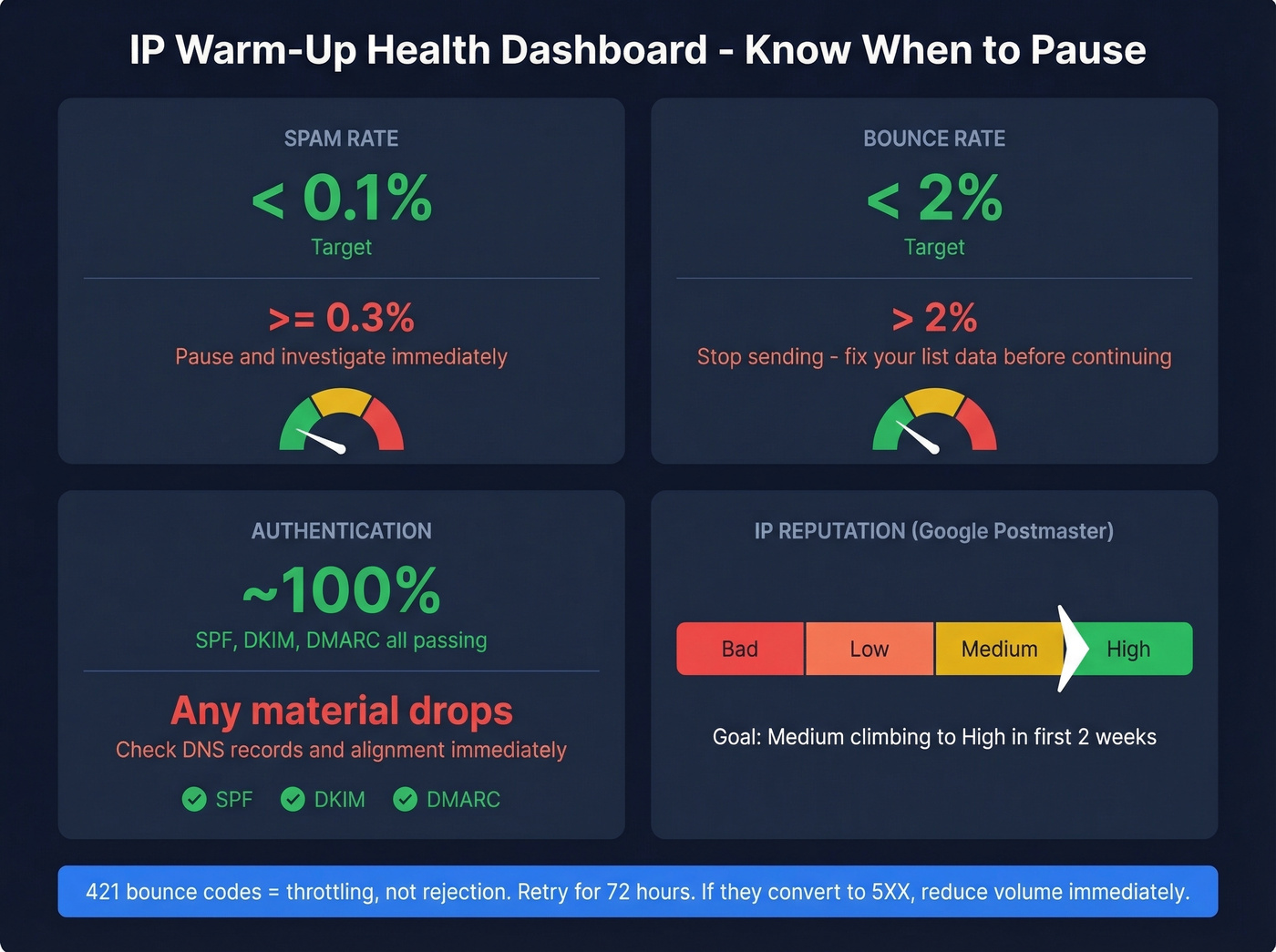
Google Postmaster Tools is non-negotiable. Add your domain, verify via DNS TXT record, and you'll get dashboards for spam rate, IP reputation, domain reputation, authentication pass rates, and delivery errors. Data takes roughly 24 hours to populate, and you need ~100+ daily emails to Gmail addresses before metrics appear. It only tracks consumer Gmail (@gmail.com), not Google Workspace.
Postmaster Tools uses four reputation categories - High, Medium, Low, and Bad. During warm-up, you want to see "Medium" climbing toward "High" over the first couple of weeks. (For more ways to move those signals, see improve sender reputation.)
Healthy benchmarks during warm-up:
| Metric | Target | Pause Threshold |
|---|---|---|
| Spam rate | < 0.1% | >= 0.3% |
| Bounce rate | < 2% | > 2% |
| Authentication | ~100% | Any material drops |
| IP reputation | Medium -> High | Low or Bad |
When AOL, Microsoft, or Comcast return 421 bounce codes, that's throttling - not rejection. Your sending infrastructure should retry for 72 hours. If 421s convert to permanent 5XX bounces, reduce volume immediately.
Run weekly blacklist checks via MXToolbox. Getting listed on a major blacklist during warm-up is recoverable, but only if you catch it fast. (If you do get listed, follow a structured blacklist removal process.)
Common Warm-Up Mistakes
Sending too much too fast. The most common mistake by far. Doubling volume overnight instead of following a gradual ramp triggers ISP filters immediately. Stick to your schedule.
Skipping authentication. No SPF, DKIM, or DMARC means your warm-up emails are fighting with one hand tied behind their back. Fix this before Day 1. (If you need to validate setup, use this guide on verify DKIM.)
Sending to unverified lists. A 5%+ bounce rate in week one is brutal for IP reputation. Verify your entire list before the first warm-up email goes out - catch-all domains, spam traps, and dead addresses need to be flagged and removed.
You're spending 4-6 weeks carefully warming an IP - don't waste it sending to dead addresses. Prospeo verifies catch-all domains, removes spam traps, and refreshes data every 7 days so your engaged segments actually contain real, reachable people.
Start your warm-up with the cleanest list in the industry.
Inconsistent volume. Sending 50,000 on Monday and zero for the rest of the week confuses ISPs. Maintain consistent daily volume throughout the ramp. And remember: 30 days of inactivity means you're re-warming from scratch.
Ignoring 421 bounces. These aren't failures - they're ISP throttling signals. Your MTA should retry automatically. If you're seeing mass 421s, reduce volume for 24-48 hours and let the retries clear.
Not segmenting by engagement. Sending to your full list on Day 3 is the fastest way to generate spam complaints. Engagement-window segmentation isn't optional - it's the core mechanic that makes warm-up work.
Should You Use a Warm-Up Tool?
Warm-up tools simulate engagement - opens, replies, clicks - to build positive signals with ISPs. They have a legitimate use case for cold outreach mailboxes at low volume. For bulk marketing IPs, the risk is higher.
Validity's analysis of warm-up services nails the core problem: manufactured engagement lacks normal negative signals like deletes and spam marks, creating patterns that mailbox providers can detect. When your simulated behavior doesn't match your actual sending cadence and content, ISPs notice. The consensus on r/coldemail is similar - warm-up tools help get you started, but they can't substitute for real engagement from real people.
For cold outreach teams warming up individual mailboxes (not high-volume marketing IPs), tools like MailReach and Instantly provide genuine value as a supplement to organic warm-up. Never a replacement. (If you're doing outbound, pair warm-up with a real cold email sequence strategy.)
| Tool | Starting Price | Best For | Key Limitation |
|---|---|---|---|
| MailReach | $19.50/mailbox/mo | Cold outreach warm-up | Risky for marketing IPs |
| Instantly | ~$30/mo | Budget cold outreach | Warm-up is one feature of many |
| Lemwarm | $29/email/mo | Lemlist users | Pricier per mailbox |
| WarmUp Inbox | $19/inbox/mo | Solo senders | Limited reporting |
| Folderly | $120/mailbox/mo | Agencies with many domains | Hard to justify for one domain |
Our recommendation: MailReach or Instantly for value. Folderly at $120/mailbox/month is hard to justify unless you're an agency managing dozens of domains. Skip warm-up tools entirely if you're doing high-volume marketing sends - the risk-reward ratio doesn't make sense. For any warm-up tool, use it alongside real engagement, never as a standalone strategy.
FAQ
How long does IP warm-up take?
Most warm-ups take 4-6 weeks to reach full sending volume with stable reputation. Highly engaged lists can stabilize in 3 weeks; high-volume senders scaling to millions per day need 6-8 weeks. Monitor reputation signals in Google Postmaster Tools rather than blindly following a calendar.
Do I need to warm up a shared IP?
No. Shared IPs are already in active use and don't require individual ramping. You still need to warm your sending domain and maintain list hygiene. If you're under 50k-100k emails per month, a shared IP is usually the better choice.
Can bad email data ruin a warm-up?
Absolutely - and in our experience, it's the number one cause of failed warm-ups. A bounce rate above ~2% early in warm-up signals dirty data and tanks IP reputation fast. Run your list through a verification tool before sending a single email. Prospeo's 5-step verification with catch-all handling and spam-trap removal catches the issues that matter most during a ramp, and you can start with 75 free credits.