

Domain Email Verification: What It Means, How It Works, and Why It Matters
Your "verified" list just bounced 12% on the first send. The domain's flagged, reply rates crater, and you're scrambling to figure out what went wrong. We've seen teams lose entire sending domains over this - and the root cause is almost always the same: domain email verification was either skipped or done badly.
What It Actually Means
The phrase covers two distinct things, and conflating them causes problems.
The first is address-level verification - confirming that a specific email address (say, jane@acme.com) exists, is active, and can receive mail. This goes beyond simple validation (checking syntax and format) to actually pinging the recipient's mail server and asking whether the mailbox is real. (If you need the practical methods, see check if an email exists.)
The second is domain authentication - configuring your sending domain with SPF, DKIM, and DMARC records so mailbox providers trust your outbound email. One protects you from sending to dead addresses. The other keeps you out of spam. You need both. (For the deliverability side, use an email deliverability guide.)
What You Need (Quick Version)
- For standalone bulk verification: NeverBounce is the workhorse. Pay-as-you-go at $8 per 1K emails, with strong catch-all detection.
- For domain authentication diagnostics: MxToolbox offers a free Email Health Check (limited to one check per 24 hours) that surfaces SPF, DKIM, DMARC, and other domain health issues.
Keep bounce rates under 2%. Ideally under 1%. (Benchmarks and fixes: email bounce rate.)
How Email Verification Works
Every serious verification tool runs a multi-step chain. Some advertise 15 to 30+ individual checks, but they all follow this fundamental sequence:
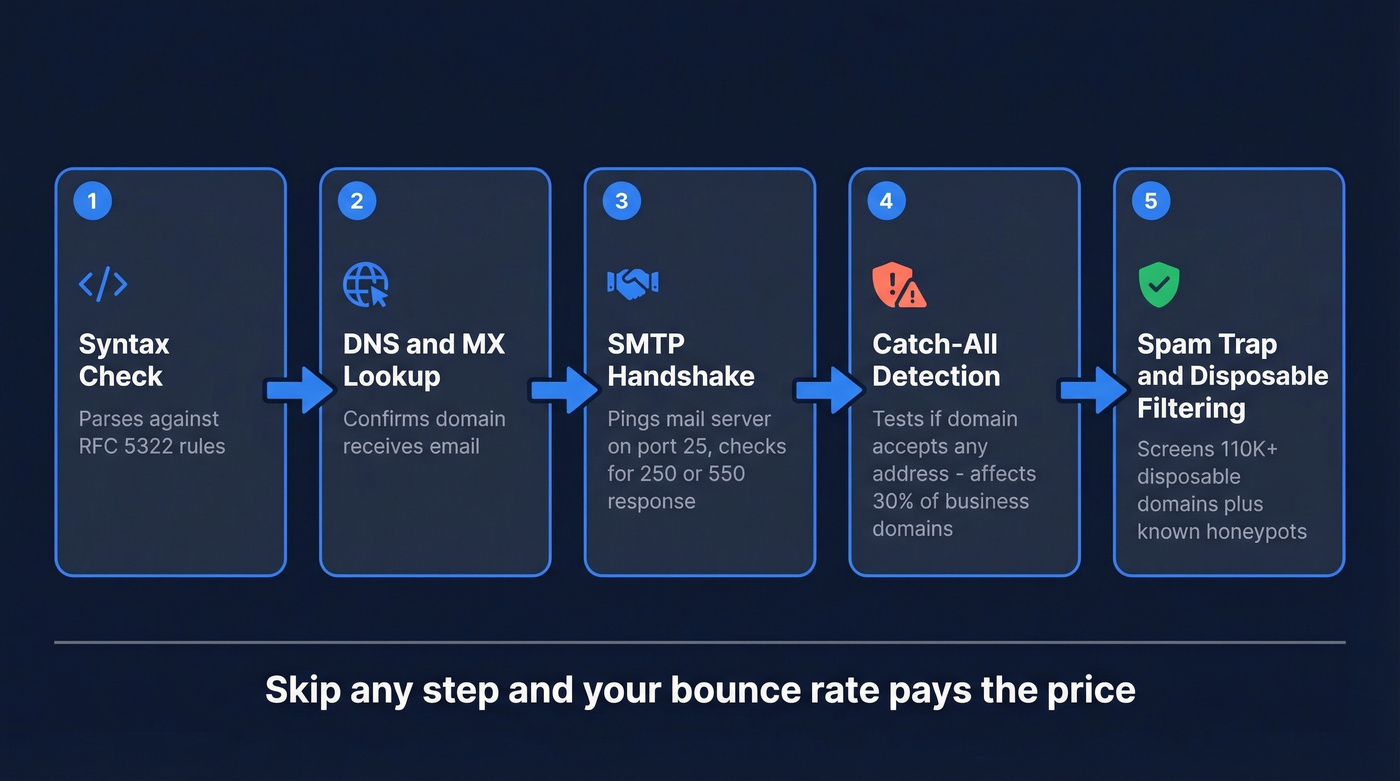
Step 1 - Syntax check. The address gets parsed against RFC 5322 rules. Malformed addresses - missing @, illegal characters, double dots - get flagged immediately.
Step 2 - DNS and MX lookup. The tool queries the domain's DNS records to find its MX servers. A domain can have valid MX records without hosting a website; this step confirms it actually receives email.
Step 3 - SMTP handshake. The tool opens a connection to the recipient's mail server on port 25 and runs a partial SMTP conversation: EHLO then MAIL FROM then RCPT TO. It never sends an actual message. A 250 response means the server accepted the recipient address. A 550 means the mailbox doesn't exist.
Step 4 - Catch-all detection. Around 30% of business domains are configured as catch-all, meaning they accept mail to any address - even fabricated ones. Without dedicated catch-all handling, "accept-all" gets marked as "valid" when it might be a dead mailbox. This single gap causes more bounces than any other verification failure we've seen.
Step 5 - Spam trap and disposable filtering. Over 110K disposable email domains exist, and many look legitimate. Good tools also screen for known spam traps and honeypots that can destroy your sender reputation in a single send. (If you suspect you’ve been hit, start with spam trap removal.)


Prospeo runs the exact 5-step verification chain described above - syntax, DNS, SMTP handshake, catch-all handling, and spam-trap filtering - before you ever export a contact. 98% email accuracy, 7-day data refresh, and you pay just $0.01 per verified email. No separate verification tool needed.
Prospect and verify in one step. Keep bounces under 1%.
SPF, DKIM, and DMARC Explained
Verification checks whether the recipient address is real. Authentication proves that you are who you say you are when sending. Different jobs, both critical.
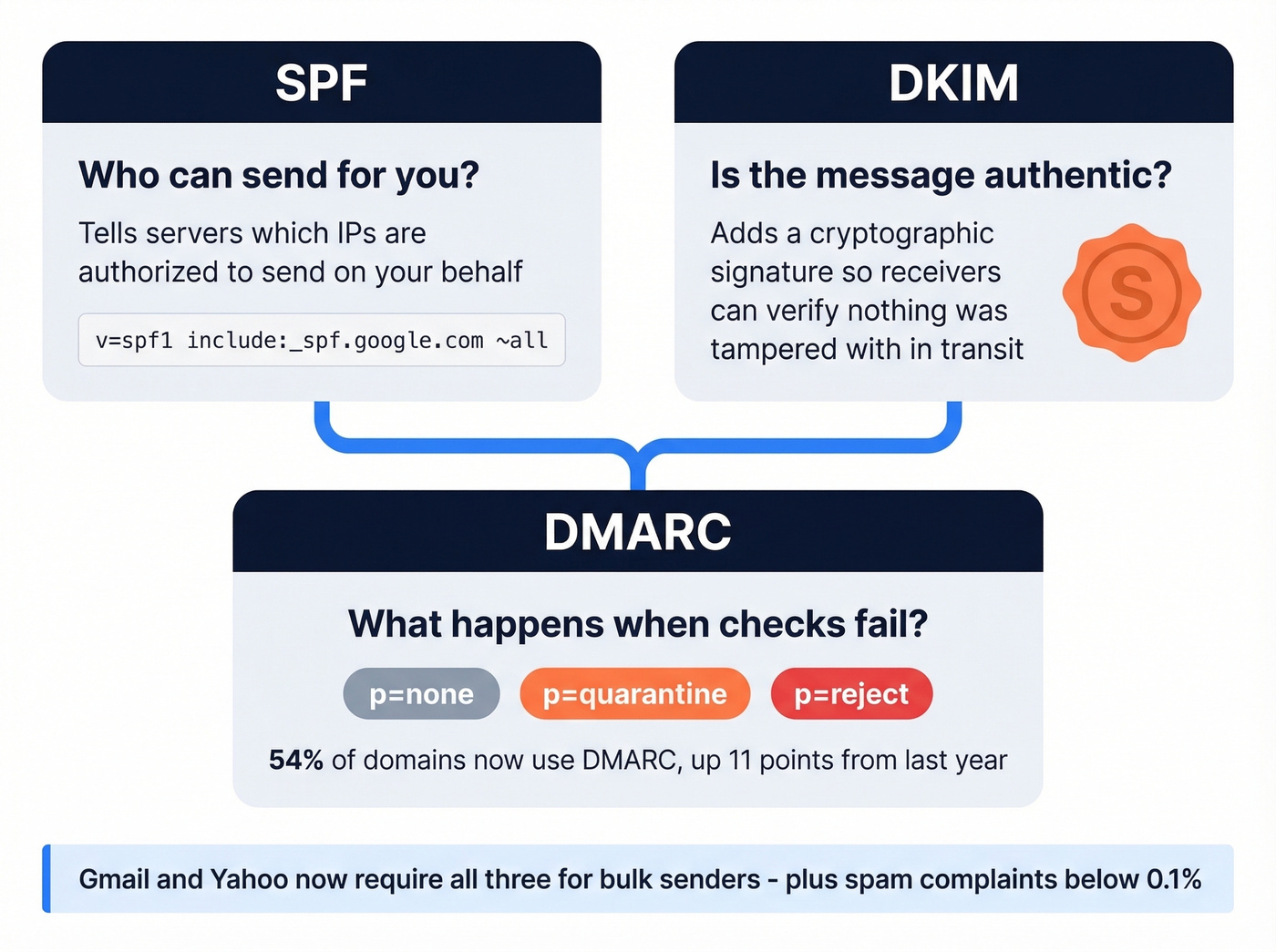
SPF tells receiving servers which IP addresses are authorized to send on behalf of your domain. A Google Workspace SPF record looks like this:
v=spf1 include:_spf.google.com ~all
DKIM adds a cryptographic signature to every outgoing message so the receiver can verify the email wasn't tampered with in transit. Think of it as a wax seal on a letter - if the seal's broken, the recipient knows something's off. (If you want to confirm setup, see how to verify DKIM is working.)
DMARC ties SPF and DKIM together with an enforcement policy. It tells receiving servers what to do when authentication fails: monitor (p=none), quarantine, or reject outright. (Deep dive: DMARC alignment.)
By late 2025, DMARC adoption had climbed to roughly 54%, up 11 percentage points from the prior year. That jump was driven largely by Gmail and Yahoo's bulk sender requirements, which mandate SPF, DKIM, and DMARC at minimum p=none, plus keeping spam complaints below 0.1%. Start with p=none to monitor, review your DMARC reports for a few weeks, then move to stricter enforcement.
Deliverability Benchmarks That Matter
Global inbox placement averages roughly 84% - one in six emails never reaches the inbox. That's the baseline before your content or offer even matters.
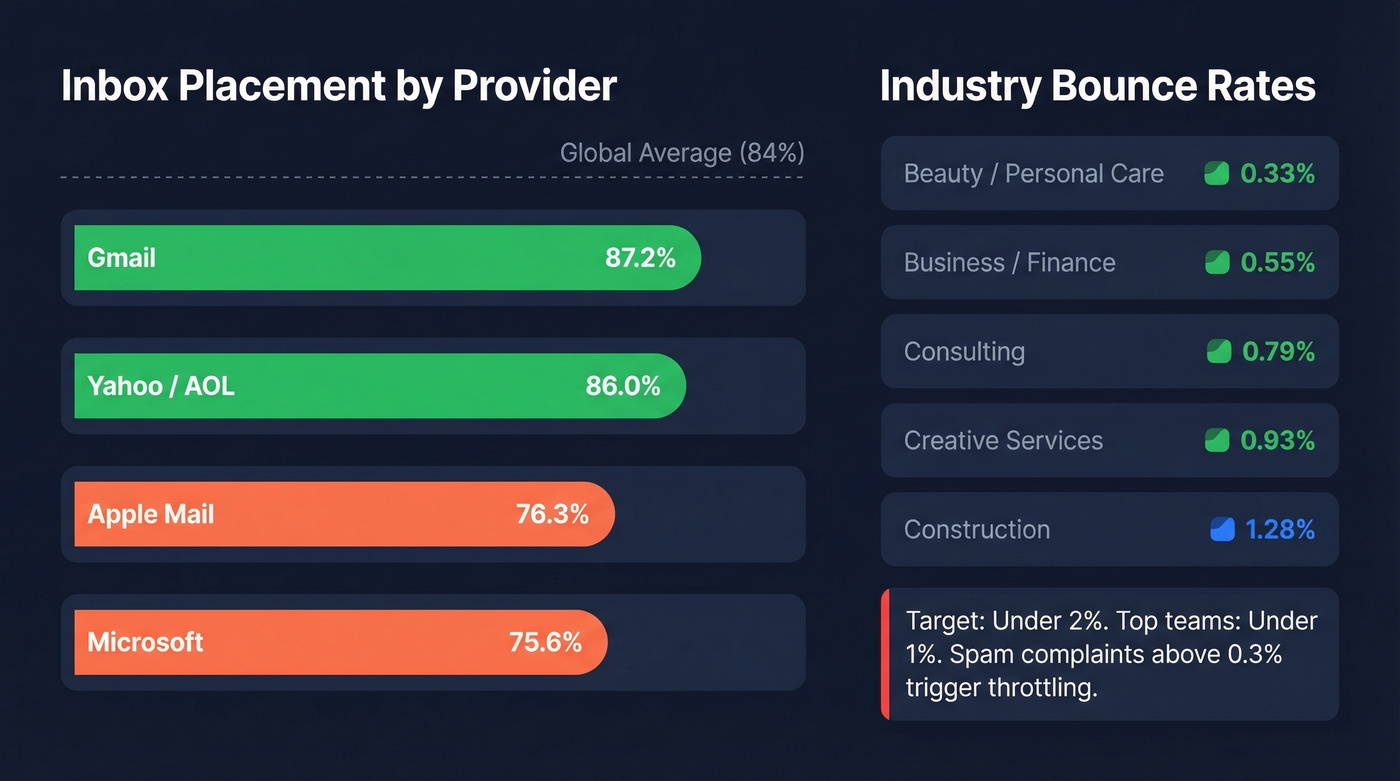
| Mailbox Provider | Inbox Placement |
|---|---|
| Gmail | 87.2% |
| Yahoo / AOL | 86.0% |
| Apple Mail | 76.3% |
| Microsoft | 75.6% |
If your audience skews toward Microsoft or Apple Mail users, you're fighting a steeper battle, which makes clean lists and proper authentication non-negotiable.
And here's the industry bounce rate picture:
| Industry | Avg. Bounce Rate |
|---|---|
| Beauty / Personal Care | 0.33% |
| Business / Finance | 0.55% |
| Consulting | 0.79% |
| Creative Services | 0.93% |
| Construction | 1.28% |
A "good" bounce rate is under 2%. Top-performing teams stay under 1%. Cross the 0.3% spam complaint threshold and mailbox providers start throttling you fast.
Here's the thing: every percentage point of bounces compounds. High bounces damage your domain reputation, which lowers inbox placement on all your sends - not just the ones that bounced. And roughly 70% of senders don't even use free monitoring tools like Google Postmaster Tools, which means most teams are flying blind on deliverability until something breaks. (To tighten the loop, track email velocity alongside bounces and complaints.)
If your deal sizes are above $5K and you aren't monitoring Postmaster Tools weekly, you're gambling with your pipeline. It's free. Set it up today.
Known Limitations
No verification tool is perfect. Let's be honest about where they all struggle:
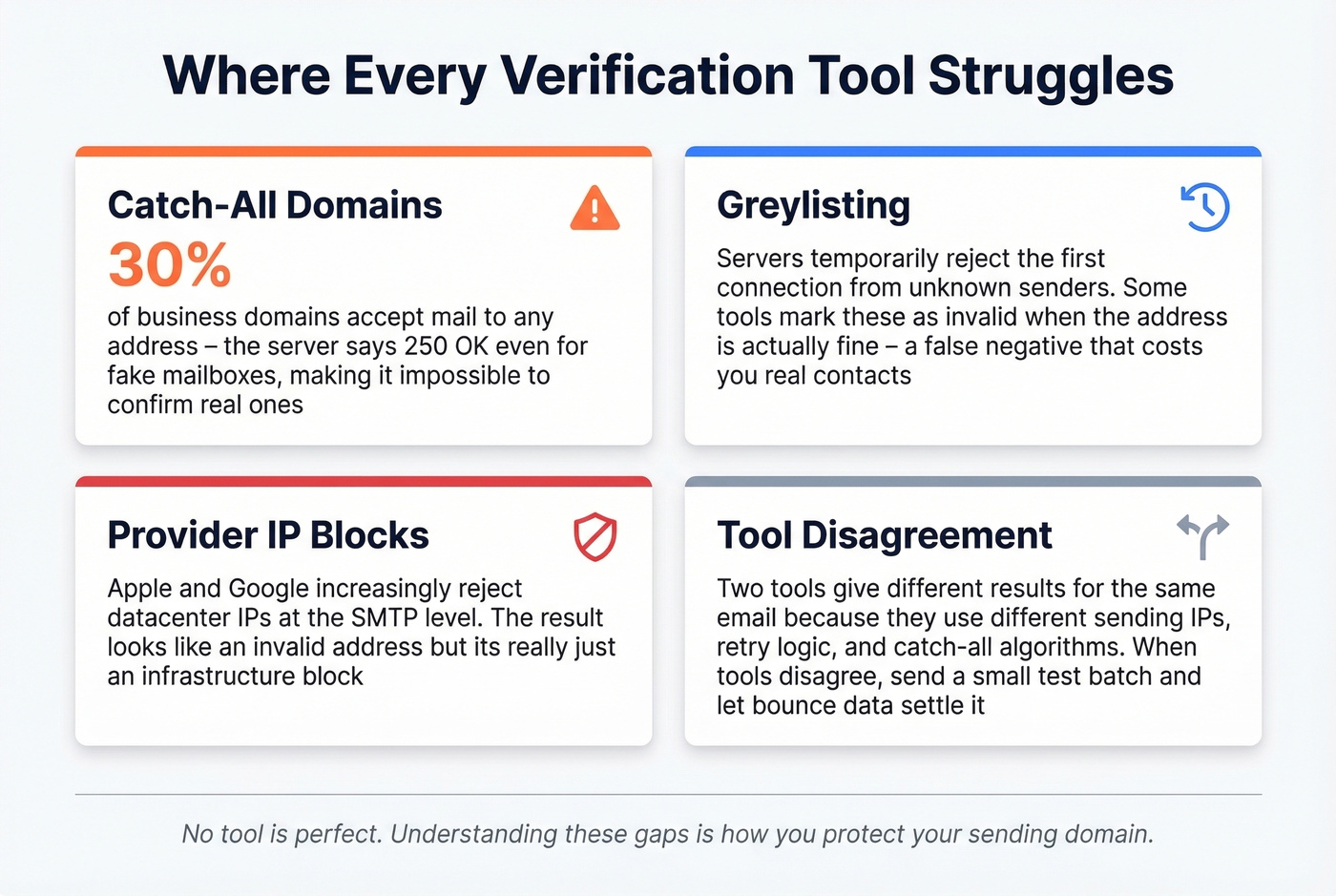
Catch-all domains accept every address at the SMTP level. The server returns 250 for anything@domain.com, so the tool can't distinguish real mailboxes from dead ones. This affects around 30% of business domains and is the single biggest source of false positives.
Greylisting temporarily rejects the first connection attempt from unknown senders. Some tools interpret this as "invalid" when the address is actually fine - a frustrating false negative that can cost you real contacts.
Provider IP blocks from Apple and Google increasingly reject datacenter IPs at the SMTP level, returning "unverifiable" results that are really just infrastructure blocks, not bad addresses.
Tool disagreement is normal. Two tools give different results for the same email because they use different sending IPs, retry logic, and catch-all algorithms. The consensus on r/coldemail is that this is one of the most maddening parts of the whole process - and honestly, we agree. Our advice: when two tools disagree, send a small test batch and let the bounce data settle the argument.
Best Tools for Domain Email Verification
| Tool | Price / 10K | Key Strength | Best For |
|---|---|---|---|
| Prospeo | ~$100 ($0.01/email) | 98% accuracy; 5-step chain; 7-day refresh | Prospect + verify in one step |
| NeverBounce | $49/mo (up to 10K) or $80 PAYG | Bulk standard; strong catch-all detection | Standalone bulk verification |
| ZeroBounce | ~$80 | High accuracy; detailed reports | Detailed reporting needs |
| Clearout | ~$40 | Budget-friendly bulk | High-volume, cost-sensitive teams |
| Bouncer | ~$49 | Solid mid-range; good API | Dev teams needing API access |
| MxToolbox | Free | SPF/DKIM/DMARC diagnostics | Domain auth checks |
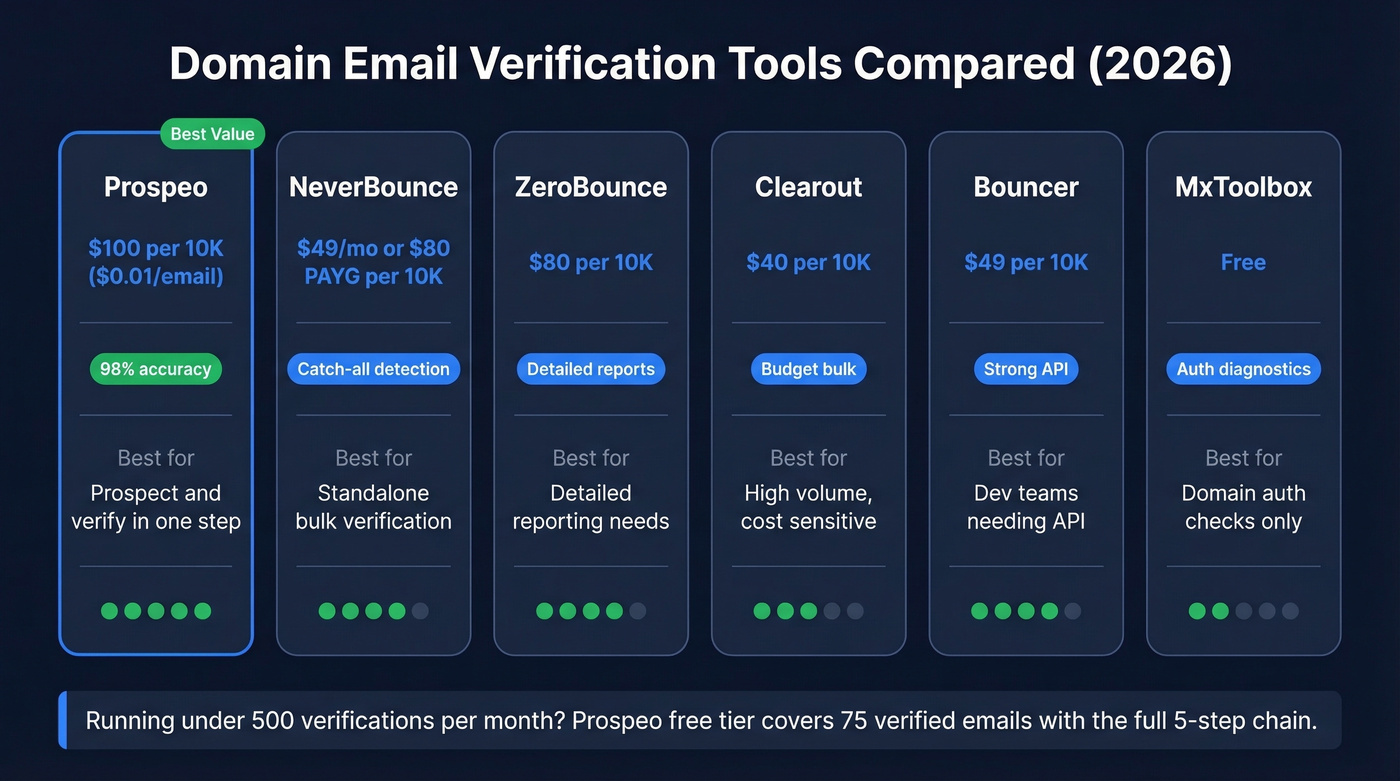
What buyers actually want is real-world accuracy - not just what a company claims on its marketing page. In our testing, tools that skip catch-all detection consistently produce higher bounce rates, and the cheapest option isn't the best if it misses spam traps. (If you’re comparing vendors, start with Bouncer alternatives.)
Verification costs also add up fast at scale, which is another reason to prefer a data source that verifies before export rather than bolting on a separate tool and shuttling CSVs between platforms. If you're running fewer than 500 verifications a month, skip the paid tools entirely - Prospeo's free tier covers 75 verified emails with the full 5-step chain, which is enough for light prospecting without cutting corners.

Catch-all domains cause 30% of verification failures. Prospeo's proprietary catch-all detection and triple spam-trap filtering are built into every lookup - so you're not gambling your sending domain on data from tools that skip step 4. Teams using Prospeo keep bounce rates under 4%, down from 35%+.
Stop losing domains to bad data. Get 98% accuracy at $0.01 per email.
FAQ
Is free email verification good enough?
Free single-email checkers work for spot-checking a handful of addresses, but they typically skip catch-all detection and spam-trap filtering - the checks that actually protect your sending domain. For list hygiene at scale (500+ contacts), use a paid tool.
How often should I re-verify my list?
Re-verify every 30 to 90 days. Email addresses decay at roughly 2-3% per month as people change jobs or mailboxes get deactivated. Tools with automatic weekly refresh cycles reduce this burden significantly compared to the 6-week industry average for data freshness.
What should I do about catch-all domains?
Around 30% of business domains are catch-all, meaning they accept mail to any address and SMTP verification can't confirm the mailbox is real. Send to catch-all addresses in small batches of 50 to 100 and monitor bounces before scaling volume. Suppress dead contacts from your bounce logs before the next campaign to keep your domain reputation clean.