

Email Syntax Check: Rules, Regex & Examples (2026)
A developer on our team once tightened an email regex to reject "weird" characters. The change looked clean in code review. Then plus-addressing broke, and 200+ users couldn't reset their passwords for three days. Meanwhile, a marketing team we worked with sent a campaign to 10,000 leads - 800 bounced because nobody had run even a basic email syntax check on the import file. Opposite failures. Same root cause: nobody understood what format validation actually does, and where it stops.
What You Need (Quick Version)
- Quick syntax checks: Use a free email syntax checker like EXPERTE or Mailmeteor. Enter an address, get a result, move on.
- Developers building forms: Use the simple regex
^[^\s@]+@[^\s@]+\.[^\s@]+$and stop chasing RFC perfection. Verify existence separately.
What Is an Email Syntax Check?
An email syntax check validates whether an address follows the formatting rules defined by RFC 5322. It answers one question: "Is this string shaped like an email?" It doesn't tell you whether the mailbox exists, whether the domain accepts mail, or whether anyone reads what lands there.
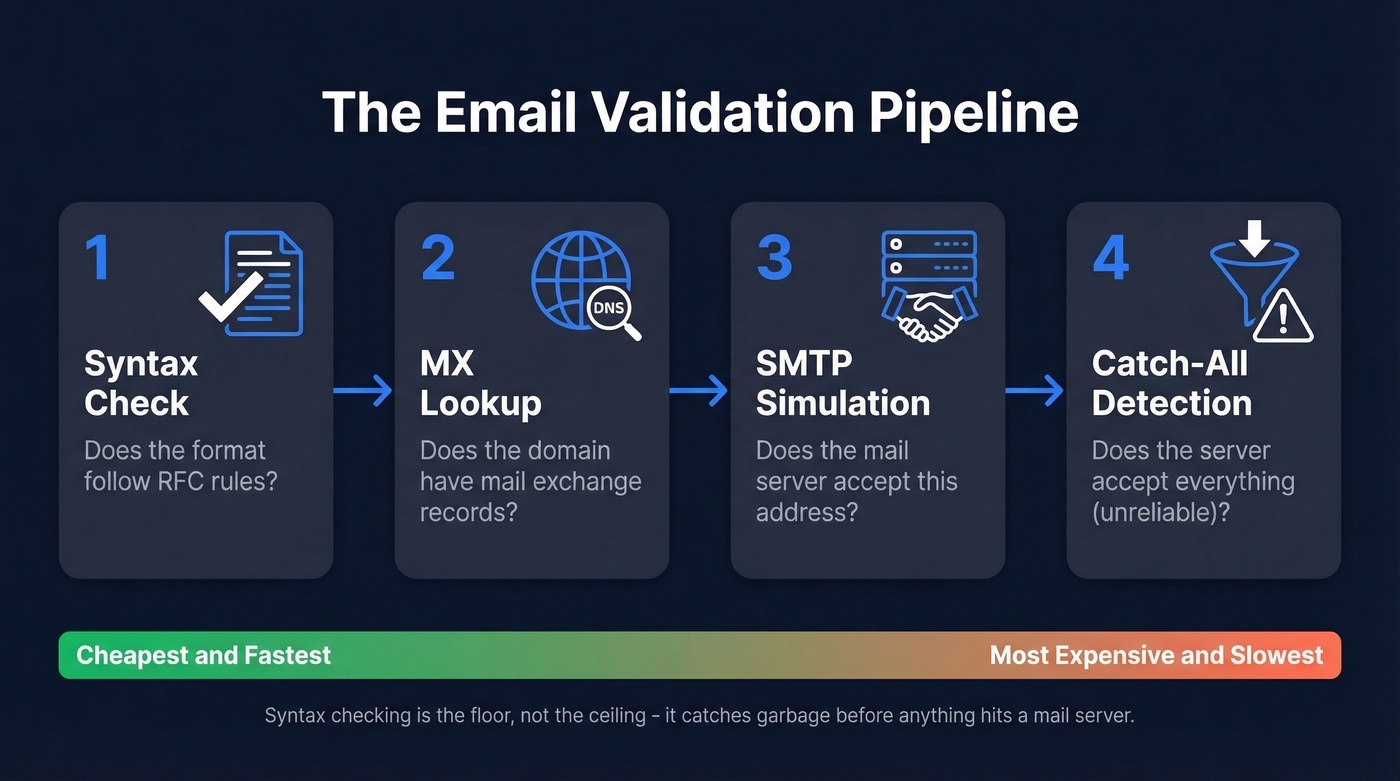
That distinction matters more than most people realize. Syntax validation asks "could this address exist?" while verification asks "does it exist?" Syntax checking is the first step of validation - and validation itself is only step one of a four-stage pipeline:
- Syntax check - does the format comply with RFC rules?
- MX lookup - does the domain have mail exchange records? (If you need the full workflow, see our guide to the email verification process.)
- SMTP simulation - does the mail server accept the address? (More detail: SMTP verification.)
- Catch-all detection - does the server accept everything, making results unreliable?
Syntax checking is the cheapest, fastest filter. It catches typos and garbage data before anything hits a mail server. But it's a floor, not a ceiling.
Anatomy of a Valid Email
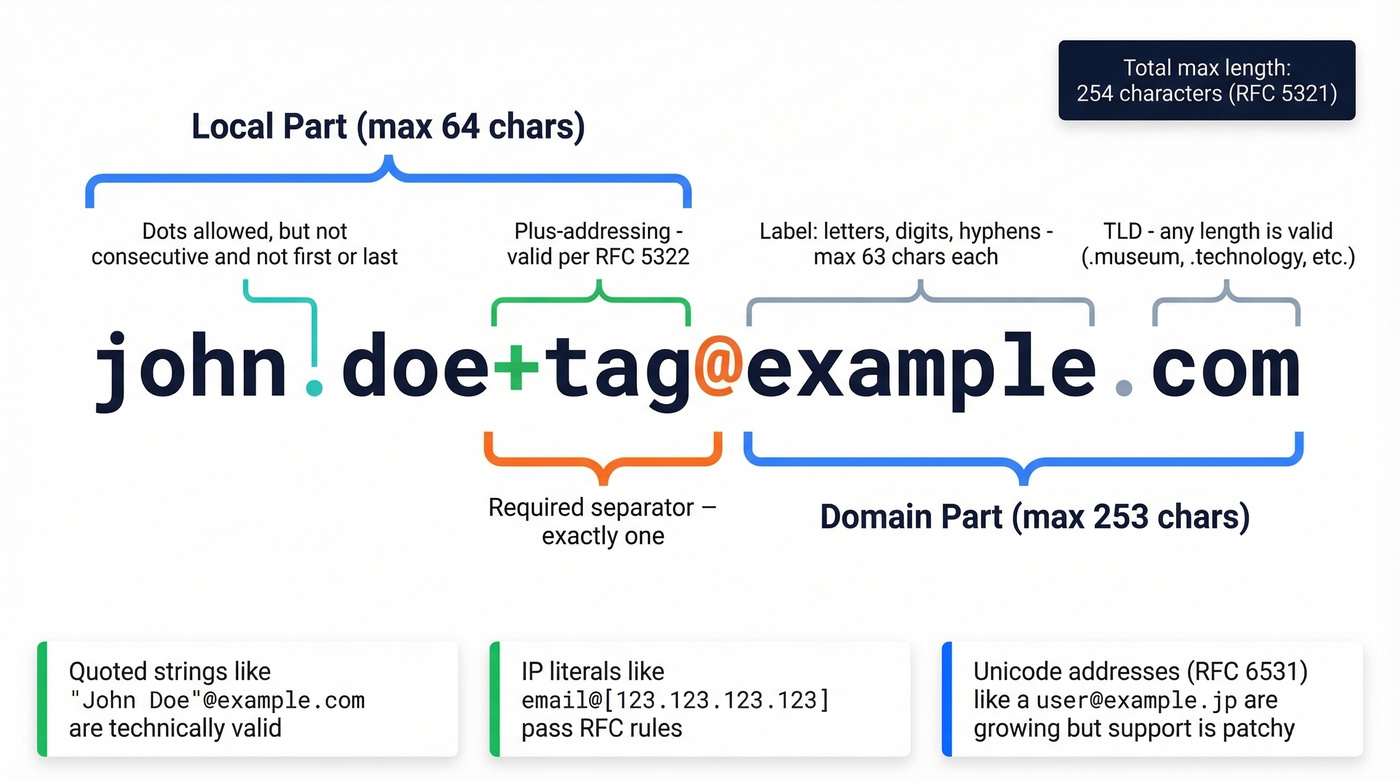
RFC 5322 defines the grammar as local-part "@" domain. Simple enough on the surface. The complexity hides in what each part allows.
The Local Part
The local part - everything before the @ - supports two formats: dot-atom and quoted-string.
In dot-atom form, you can use letters, digits, and these special characters: ! # $ % & ' * + - / = ? ^ _ { | } ~. Periods are allowed but can't appear consecutively, and can't be the first or last character. So john.doe@example.com is valid, but .john@example.com and john..doe@example.com aren't. The local part can't exceed 64 characters.
Quoted-string form is where things get strange. Wrapping the local part in double quotes allows spaces and other characters that dot-atom rejects. "John Doe"@example.com is technically valid per RFC 5322. So is "abc\"def"@example.com with an escaped quote. Almost no real-world mail provider creates these addresses, but a strict syntax checker should accept them. RFC 5322 even allows comments in email addresses - user(comment)@example.com is syntactically legal - though most mail systems ignore this entirely.
The Domain Part
The domain follows standard DNS rules: labels separated by dots, each label up to 63 characters, total domain up to 253 characters. Labels can contain letters, digits, and hyphens, but hyphens can't start or end a label. The total email address can't exceed 254 characters per RFC 5321. IP-literal domains are also valid syntax: email@[123.123.123.123] passes RFC rules, though you'll almost never see these in production.
Internationalized Addresses
RFC 6531 (SMTPUTF8) extends email syntax to support Unicode characters in both local and domain parts. An address like 用户@例え.jp is valid under the extended spec. Real-world support is growing but still patchy - many providers still don't accept non-ASCII local parts. If you're building a global product, your format verifier should at least not reject these outright.
Provider Quirks That Break the Rules
Here's the thing: the RFC-to-reality gap causes almost every email validation argument on the internet. Gmail ignores dots in the local part entirely - john.doe@gmail.com and johndoe@gmail.com deliver to the same inbox. Outlook supports plus-addressing like myname+newsletters@outlook.com. But both providers are stricter than RFC 5322 for address creation, rejecting many special characters the spec technically allows.
The RFC allows local parts made entirely of permitted special characters - for example, !#$%&'*+/=?^_{|}~@example.com. Gmail won't let you create it. Your regex has to decide whose rules to follow.
| Constraint | Limit |
|---|---|
| Local part length | 64 chars max |
| Domain part length | 253 chars max |
| Total address length | 254 chars max |
| Domain label length | 63 chars max |

Syntax validation is step one. Prospeo handles all four - format, MX lookup, SMTP simulation, and catch-all detection - through a proprietary 5-step verification pipeline that delivers 98% email accuracy. Every record refreshes every 7 days, not the 6-week industry average.
Stop building regex and start sending to emails that actually exist.
Valid and Invalid Email Examples
| Address | Valid? | Why |
|---|---|---|
| user@example.com | ✅ | Standard format |
| firstname+tag@example.com | ✅ | Plus-addressing is RFC-valid |
| "email"@example.com | ✅ | Quoted-string local part |
| email@[123.123.123.123] | ✅ | IP-literal domain |
| user@example.museum | ✅ | Long TLDs are valid |
| !#$%&'*+/=?^_{|}~@example.com | ✅ | RFC-permitted special chars |
| plainaddress | ❌ | No @ symbol |
| .email@example.com | ❌ | Leading dot in local part |
| email..email@example.com | ❌ | Consecutive dots |
| email@example@example.com | ❌ | Multiple @ symbols |
| email@-example.com | ❌ | Domain starts with hyphen |
| email@example..com | ❌ | Consecutive dots in domain |
The "surprisingly valid" entries trip up most regex patterns. That's the core problem - and why overly strict validation causes more harm than it prevents.
Regex for Email Format Validation
The Simple Pattern That Works
For most applications, this is the regex you want:
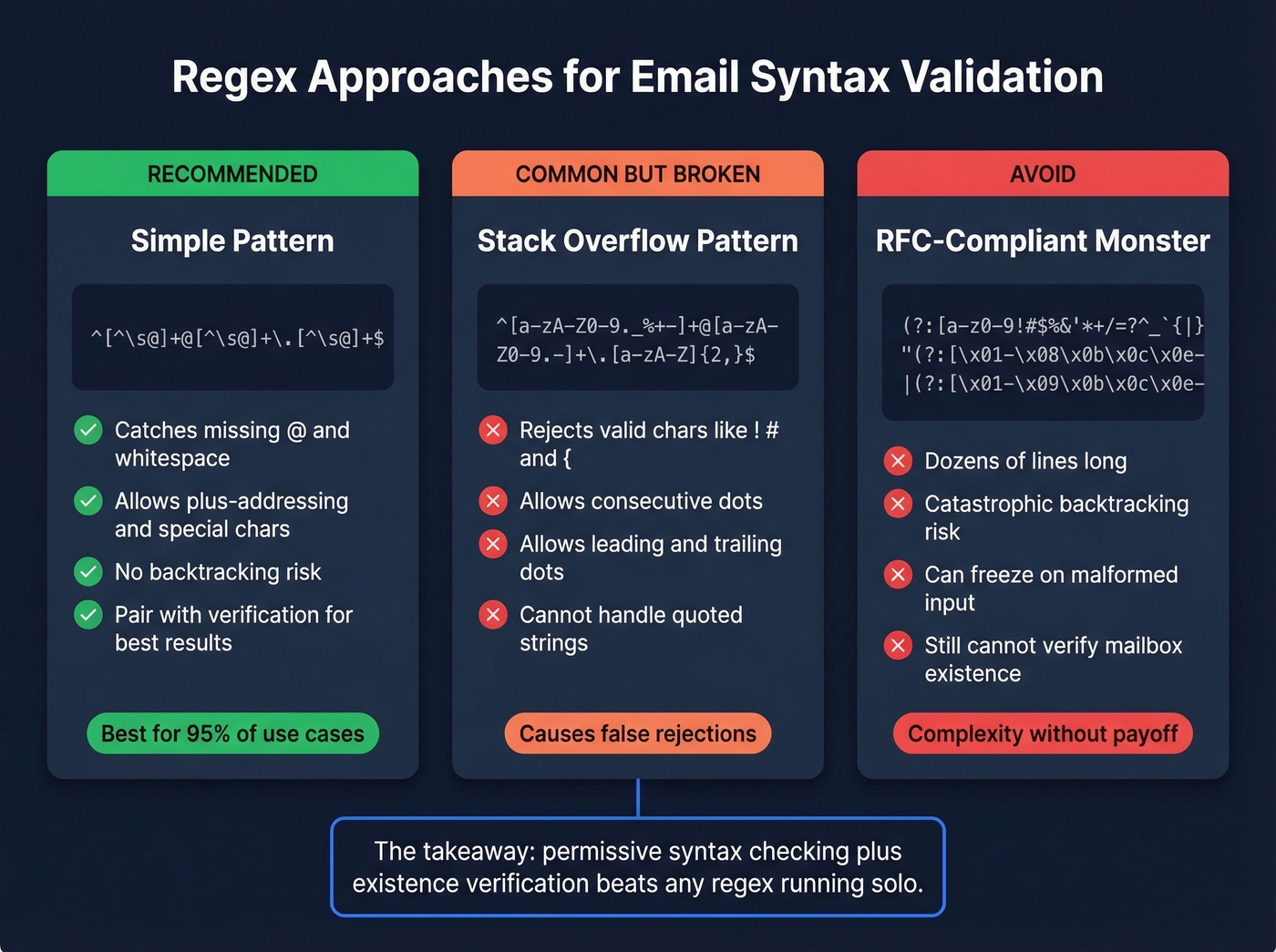
^[^\s@]+@[^\s@]+\.[^\s@]+$
Three checks: something before the @, something after it, and at least one dot in the domain. It won't reject plus-addressing, special characters, or quoted strings. It will reject whitespace and missing @ symbols. For form validation and list hygiene, that's the right tradeoff.
Why Common Regex Fails
The pattern most developers copy from Stack Overflow - ^[a-zA-Z0-9._%+-]+@[a-zA-Z0-9.-]+\.[a-zA-Z]{2,}$ - is everywhere, and it's broken in at least three ways. It rejects valid characters like !, #, and {. It accepts consecutive dots and even leading/trailing dots in the local part. And it can't handle quoted strings at all.
The "fix" is the RFC-compliant monster regex. Here's a taste:
(?:[a-z0-9!#$%&'*+/=?^_`{|}~-]+(?:\.[a-z0-9!#$%&'*+/=?^_`{|}~-]+)*
|"(?:[\x01-\x08\x0b\x0c\x0e-\x1f\x21\x23-\x5b\x5d-\x7f]
|\\[\x01-\x09\x0b\x0c\x0e-\x7f])*")@(?:(?:[a-z0-9](?:[a-z0-9-]*
[a-z0-9])?\.)+[a-z0-9](?:[a-z0-9-]*[a-z0-9])?|\[(?:...
That's truncated. The full version runs dozens of lines and introduces catastrophic backtracking risks in some regex engines - a single malformed input can freeze your validation for seconds. Don't use it.
Stop Chasing the Perfect Regex
Let's be honest: no regex will tell you whether a mailbox is live. No regex will catch a typo in a real domain name. The simple pattern above plus a verification step beats any RFC-compliant regex monster running solo. If you want a practical checklist, use our email validation rules guide.
The developer who locked users out of password resets with a "better" regex caused more damage than a thousand unvalidated email addresses ever would. Permissive syntax checking plus existence verification is the correct architecture.
Why Syntax Validation Matters
Industry data puts 5%-30% of email lists as containing invalid or outdated addresses. Not all of those are syntax errors - most are dead mailboxes and expired domains - but format failures are the easiest to catch and the cheapest to prevent. Benchmarks vary by industry too: software companies average around 0.93% bounce rates while e-commerce sits closer to 0.29%, according to Mailchimp's benchmark data.
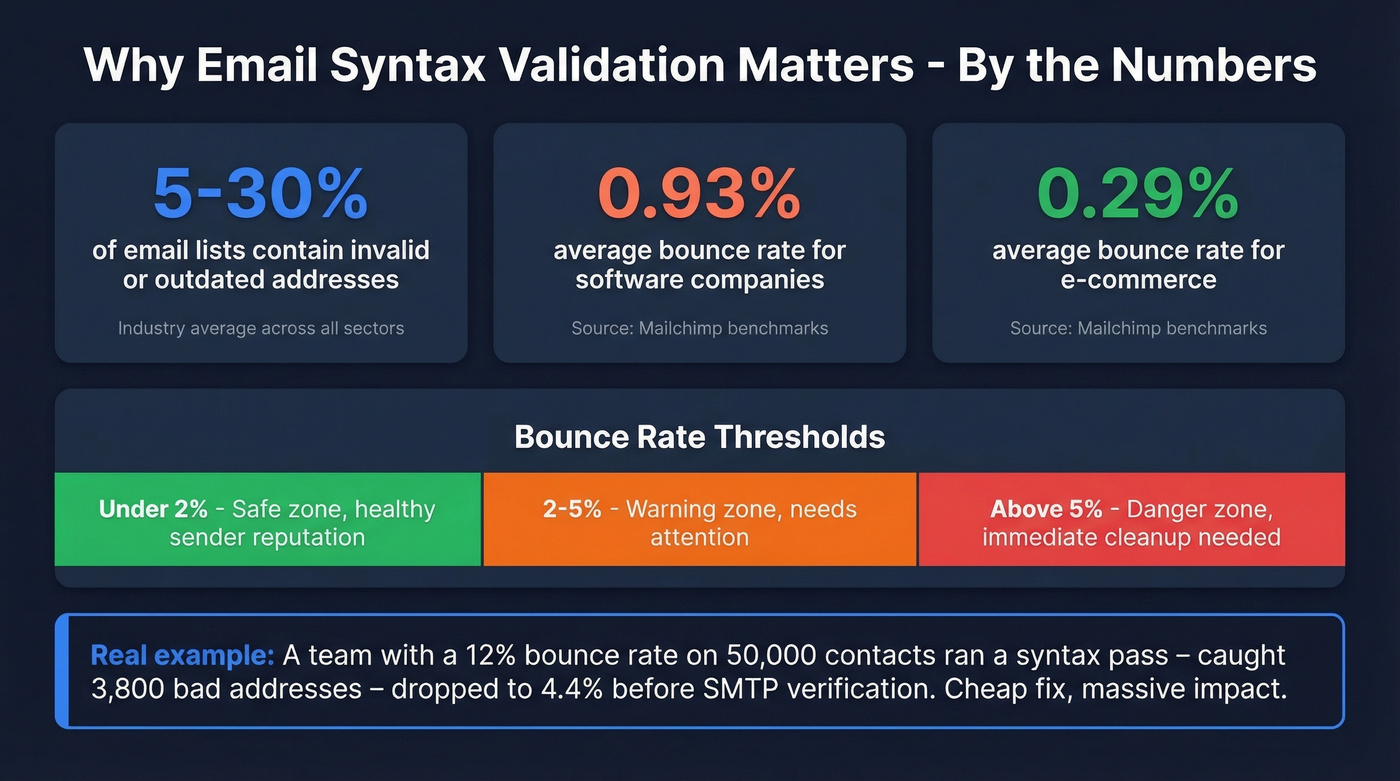
Bounce rate thresholds are well-established. Under 2% is safe. Above 5% needs immediate cleanup. Hard bounces from permanently invalid addresses damage sender reputation fast, while soft bounces from temporary issues are more forgiving but still add up. Running a valid email format checker as part of your import workflow serves as a first-line defense against fake signups - flagging disposable domains and obvious garbage before they pollute your database.
One team we worked with had a 12% bounce rate on a 50,000-contact list they'd bought from a data broker. A simple syntax pass caught 3,800 addresses with missing TLDs, double @ symbols, and spaces in the local part. That alone dropped their bounce rate to 4.4% before they even ran SMTP verification. Cheap fix, massive impact.
Hot take: If your deal sizes are sub-$10k and your list is under 5,000 contacts, a free syntax checker plus a $16/month verification tool is all you need. The enterprise verification platforms are selling you insurance you can't afford to use.
Best Tools for Email Syntax Checking
Most syntax checkers are bundled into broader verification platforms. Here's what's worth your time - and what you can skip.
| Tool | Best For | Verification Depth | Free Tier | Paid From |
|---|---|---|---|---|
| Prospeo | B2B pre-verified data | Full 5-step | 75 emails/mo | ~$0.01/email |
| Hunter | List cleaning | Full pipeline | 100 verifs/mo | ~$49/mo |
| ZeroBounce | Bulk cleanup | Full + scoring | 100 verifs/mo | ~$15/mo |
| Verifalia | API-first devs | Full pipeline | Limited free | ~$10/mo |
| Mailmeteor | Non-technical users | Full pipeline | 50 verifs/mo | ~$10/mo |
| EXPERTE | Quick one-off checks | Full 4-step | 25 addresses | Free |
| Email Hippo | Bulk/API | Full pipeline | 100 checks/day | ~$15/mo |
Prospeo
Use this if you're building B2B prospect lists and want emails that are already verified before they hit your sequencer. The 5-step verification pipeline - syntax, MX, SMTP, catch-all handling, spam-trap and honeypot removal - runs on 143M+ verified emails. The 98% email accuracy rate means syntax errors are filtered out long before you export anything, and data refreshes every 7 days.
The free tier gives you 75 emails per month. Paid plans run about $0.01 per email with no contracts. Skip this if you just need a one-off format check on a single address - use EXPERTE for that.
Hunter
Hunter runs syntax checks, domain checks, server response checks, and accept-all detection, and it also cross-checks addresses against its own B2B database. The free tier covers 100 verifications per month, and paid plans start around $49/mo. A solid choice for marketers who already have lists to clean and want a straightforward UI. We've found their verification documentation to be one of the better public references on how multi-step validation works. If you're comparing options, see our roundup of email verifier websites.

ZeroBounce
ZeroBounce offers real-time email validation and adds a deliverability score on top of standard format verification - useful if you're managing large lists and need to prioritize sends. You get 100 free monthly verifications with signup. Best for teams doing regular list hygiene on 10k+ contact databases.
Verifalia
API-first verification with a well-structured REST API and detailed reporting. A strong pick for developers embedding validation into a signup flow who need to check address formatting at the point of entry. For API comparisons, start with our email check APIs benchmarks.
Mailmeteor
Mailmeteor's Email Checker runs 15+ checks including format, DNS/MX, and SMTP, and it's free with no sign-up. It also offers a Google Sheets add-on with 50 free verifications per month. Paid plans land in the low tens per month.
EXPERTE
Free, no signup required, checks up to 25 addresses simultaneously through a 4-step pipeline. The best option for quick one-off checks when you need to validate email format online without committing to a paid tool. For more free options, see our free email validation checker list.
Email Hippo
100 free checks per day with quota resets at midnight UTC. Paid plans start around $15/mo for bulk and API access. A reliable workhorse for teams that need occasional verification without committing to a full platform. If you're evaluating similar tools, our email address validation checker guide breaks down what to look for.
That import file with 800 bounces? Prospeo's CRM enrichment returns verified contact data at a 92% match rate with 50+ data points per record. Bounce rates under 4% are the norm - not the exception - for teams using Prospeo's verified database of 143M+ emails.
Clean your lists before they clean out your sender reputation.
FAQ
What's the difference between an email syntax check and email verification?
An email syntax check validates formatting rules from RFC 5322 - confirming the string is shaped like an address. Verification goes further with MX lookups, SMTP simulation, and catch-all detection to confirm the mailbox actually accepts mail. Syntax is step one of a four-stage pipeline; verification covers all four.
Can a syntactically valid email still bounce?
Absolutely. An address can have perfect formatting yet point to a non-existent mailbox or expired domain. Syntax checking catches structural errors only, not dead accounts, full inboxes, or deactivated users. Always pair format checks with full-pipeline verification for production use.
What's the best regex for validating email format?
Use ^[^\s@]+@[^\s@]+\.[^\s@]+$ for most applications. It catches obvious formatting issues without rejecting valid edge cases like plus-addressing or RFC-permitted special characters. Pair it with an SMTP verification step - no regex alone confirms deliverability.
How many invalid emails are in a typical list?
Industry data puts it at 5%-30% of email lists containing invalid or outdated addresses. Bounce rates under 2% are considered safe; above 5% signals you need immediate cleanup. Full-pipeline verification tools eliminate bad data before it damages sender reputation.
Can I skip syntax checking if I use a verification tool?
Yes. Full-pipeline verification tools run syntax validation as their first step automatically. If you're sourcing emails from a pre-verified database, format errors are already filtered out before you ever see the data.