

SMTP Verification: How It Works in 2026 (and Where It Breaks)
Roughly one in six emails never reach the inbox. That's not a spam problem - it's a data quality problem. The first line of defense most teams reach for is SMTP verification: a process that talks to a mail server to check whether an address actually exists. The trouble is, this approach has real limits that most guides gloss over.
Before we go further: email validation checks whether an address could exist - proper format, no typos, valid domain. Email verification confirms whether the mailbox actually exists and can receive mail. The term "SMTP verification" covers both server configuration testing and mailbox existence checking. This guide focuses on the second, because that's where things get interesting and where most tools fall short.
Quick version: An SMTP-level check determines whether a mailbox exists by talking to the mail server - without sending an email. It works on standard domains but breaks down on catch-all servers (30-40% of B2B addresses) and can't reliably confirm mailbox existence at major providers like Gmail. If you're verifying a prospect list, use a tool that layers the handshake with catch-all detection and spam-trap removal. If you're testing your own server config, free tools like MxToolbox work fine.
What Is SMTP Verification?
It's a handshake with a mail server. The process walks through the early steps of sending an email - connecting, identifying itself, presenting a recipient address - then listens to the server's response. If the server says "yes, that mailbox exists," the address is marked deliverable. If it says "no such user," the address is flagged invalid. Some people describe this as pinging an email address - you're knocking on the server's door to see if the mailbox is home.
The critical thing to understand: verification doesn't send an actual email. It initiates the conversation, gets a verdict at the recipient stage, and disconnects before any message is transmitted.

This same protocol applies when you're testing your own SMTP server's configuration - checking whether your MX records resolve, your TLS handshake works, and your server responds correctly to incoming connections. Same protocol, different purpose.
How SMTP Email Verification Works
The Verification Flow
Every check follows the same sequence, whether you're running a command-line probe or using a SaaS tool that abstracts it away:
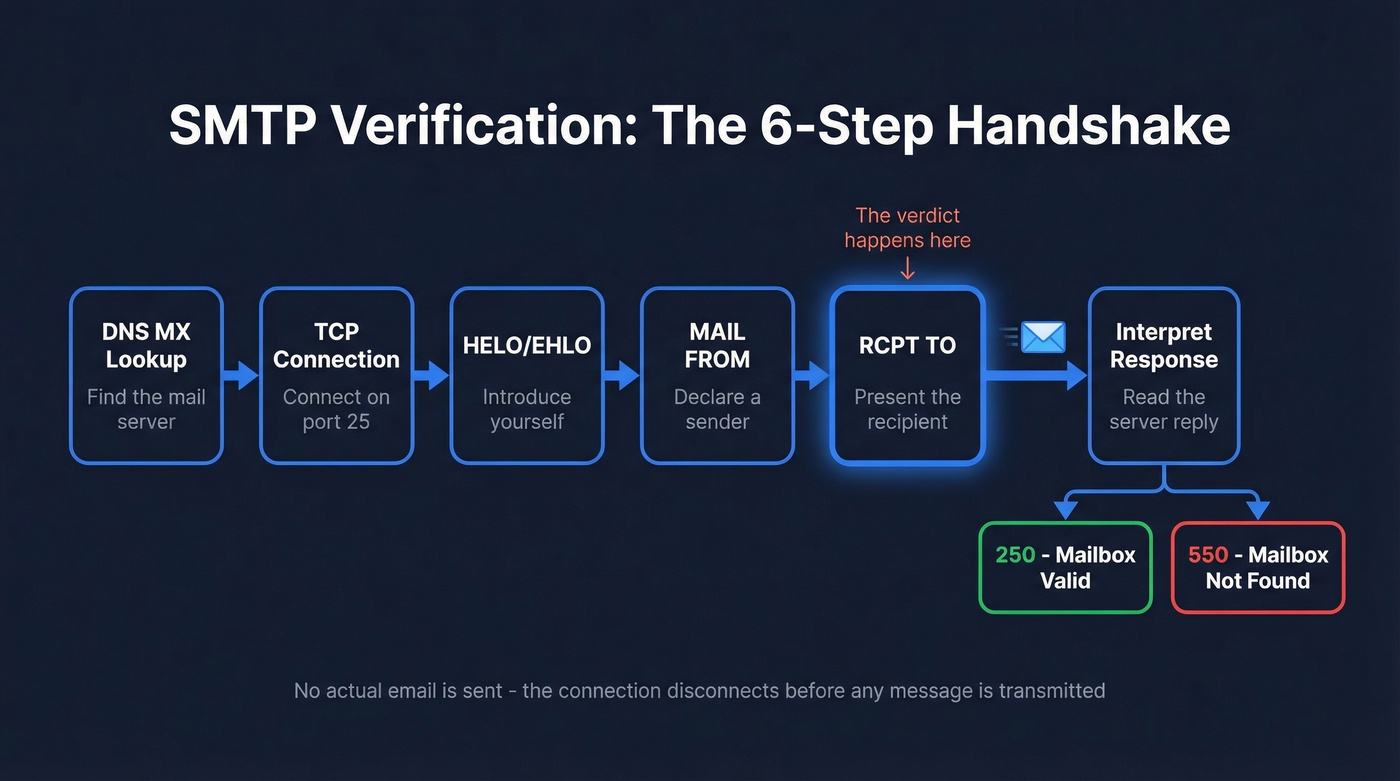
- DNS MX lookup - resolve the recipient domain's mail exchange records to find the server that handles its email. Without valid MX records, there's no server to talk to.
- TCP connection - open a connection to that server on port 25.
- HELO/EHLO - introduce yourself to the server.
- MAIL FROM - declare a sender address.
- RCPT TO - present the recipient address you're verifying.
- Interpret the response - the server's reply code tells you whether the mailbox exists.
Here's what that conversation looks like on the wire:
$ telnet mx.example.com 25
220 mx.example.com ESMTP ready
EHLO verify.yourdomain.com
250-mx.example.com Hello
MAIL FROM:<test@verify.yourdomain.com>
250 2.1.0 Ok
RCPT TO:<jane@example.com>
250 2.1.5 Ok                    ← mailbox accepted
RCPT TO:<fakename99@example.com>
550 5.1.1 No such user          ← mailbox does not exist
QUIT
221 2.0.0 Bye
The verdict happens at RCPT TO. A 250 response means the server accepted the recipient. A 550 means permanent rejection - that address is dead. Everything before that is setup; everything after is cleanup.
Three Layers of Verification
The SMTP handshake is the deepest check, but it isn't the only one. Professional verification runs three layers in sequence.
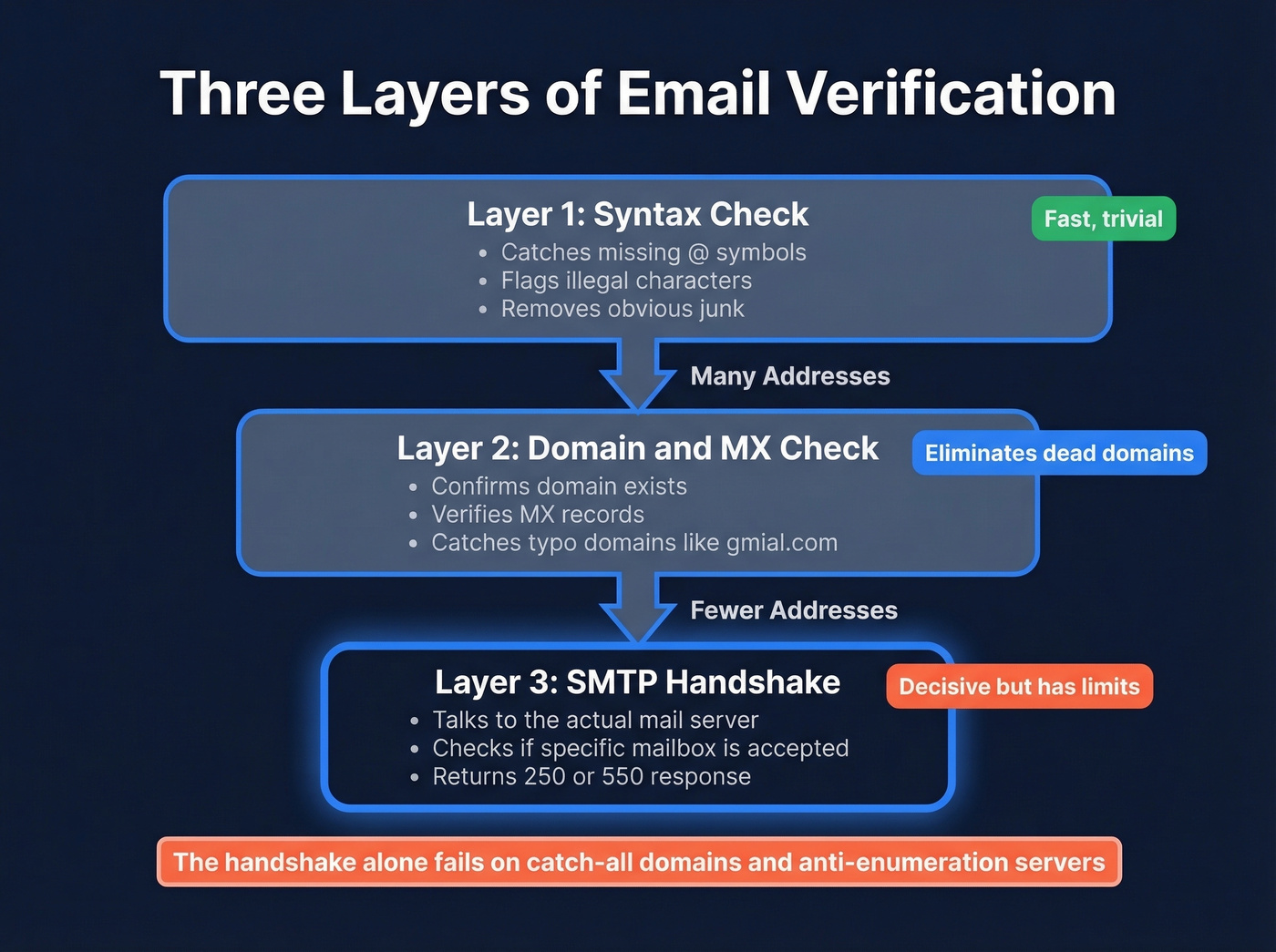
Syntax check catches formatting errors - missing @ symbols, illegal characters, double dots. Trivial, but it eliminates obvious junk before you burn a server connection.
Domain and MX check confirms the domain exists and has mail exchange records. A domain without MX records can't receive email. Period. This layer also catches typo domains like gmial.com and outlok.com.
SMTP handshake is the decisive layer - the actual conversation with the mail server described above. It's the only check that can tell you whether a specific mailbox is accepted on a valid domain. But "decisive" comes with serious asterisks, which we'll get into next.
SMTP Response Codes Cheat Sheet
The first digit tells you the category: 2xx means success, 4xx means temporary failure, 5xx means permanent failure. Here's the reference table for verification-relevant codes:
| Code | Meaning | Verification Read |
|---|---|---|
| 250 | Requested action OK | Mailbox valid |
| 252 | Cannot verify, will accept | Anti-enumeration signal |
| 421 | Service not available | Retry later |
| 450 | Mailbox unavailable | Temporary - greylisting? |
| 451 | Local error in processing | Retry later |
| 452 | Insufficient storage | Retry later |
| 550 | Mailbox not found | Invalid - hard bounce |
| 551 | User not local | Forward required |
| 552 | Storage exceeded | Mailbox full |
| 553 | Mailbox name invalid | Bad address format |
| 554 | Transaction failed | Rejected outright |
Pay special attention to 252. It means "I can't confirm this mailbox exists, but I'll accept the message anyway." That's the server refusing to play the enumeration game - a perfectly valid response that leaves you with no definitive answer.

Basic SMTP verification fails on 30-40% of B2B addresses. Prospeo layers catch-all detection, spam-trap removal, and honeypot filtering on top of the handshake - 5 steps that deliver 98% email accuracy at $0.01 per lead.
Stop guessing on catch-all domains. Verify with 98% accuracy.
Where SMTP Verification Fails
Here's the thing: the SMTP step everyone obsesses over is actually the least reliable part of modern email verification. The real value comes from what happens around the handshake - the layers before and after it.
Catch-All Domains
30-40% of B2B email addresses sit on catch-all domains - servers configured to accept email sent to any address, whether the mailbox exists or not. The handshake returns 250 OK for every address on these servers: real employees, former employees, and completely invented names.
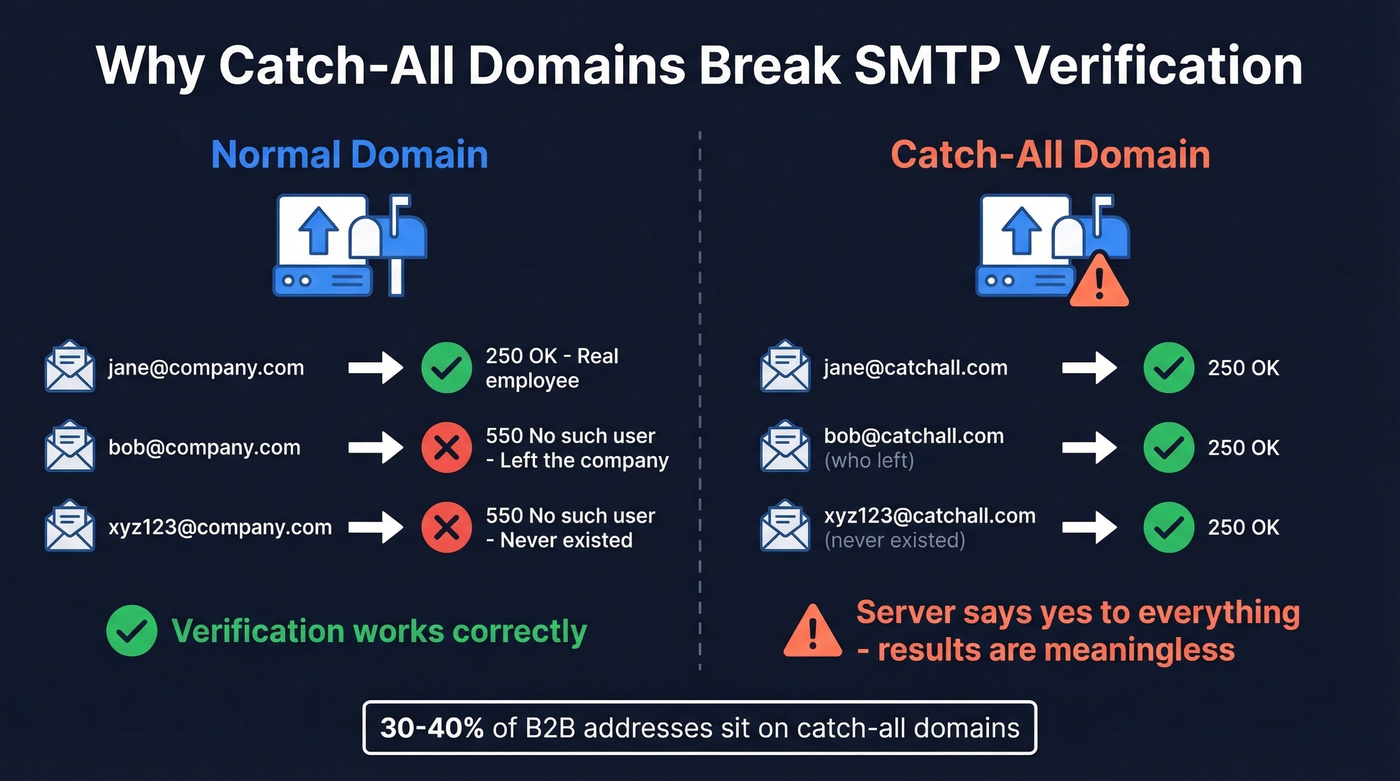
We've seen teams run 5,000 leads through a free tool and get 40% back as "unknown" or "accept-all." That's the catch-all problem in action. The server always says "yes," which makes the result meaningless.
This is where professional tools earn their keep. Prospeo's 5-step verification process layers catch-all detection, spam-trap removal, and honeypot filtering on top of the standard SMTP handshake - delivering 98% email accuracy even on domains where basic checks are useless.
Anti-Enumeration Defenses
Major consumer providers often prevent mailbox enumeration over SMTP. In practice, checks frequently return acceptance-style responses (like 250 or 252) even when the mailbox doesn't exist, specifically to stop spammers from harvesting valid addresses by probing the server.
Can you ping an email address on these providers and get a reliable answer? Not through the handshake alone. Any tool claiming 100% accuracy on consumer email addresses is either misleading you or using non-SMTP signals to make the determination.
VRFY Is Dead, RCPT Gets You Blocked
SMTP has a built-in command for checking mailbox existence: VRFY. It's been disabled on virtually every production mail server for over a decade because spammers abused it. That leaves RCPT TO as the only probe - and repeated RCPT TO checks from the same IP trigger rate limiting and outright blocking on most major providers.
Port 25 is also restricted by many cloud providers. AWS, GCP, and Azure all restrict outbound port 25 by default, which means DIY verification scripts often can't even establish the initial connection.
Greylisting False Negatives
Greylisting is an anti-spam technique where the server returns a 450 temporary rejection on the first connection attempt, expecting legitimate senders to retry. A common retry window is 15-30 minutes with exponential backoff. Impatient verification tools that don't retry - or that retry too quickly - misclassify greylisted addresses as invalid. That's a false negative on a perfectly good mailbox.
Email Verification Tools
Two categories of tools solve different problems here. Free SMTP test tools check your server configuration. SaaS verification tools check whether specific email addresses are deliverable. Don't confuse them.
Free SMTP Test Tools
MxToolbox is the go-to for checking MX records, blacklist status, and SMTP server responses. Free and thorough for diagnostics. DNSChecker handles DNS and MX lookups across global servers. GMass offers a test that shows the full SMTP conversation to troubleshoot delivery issues. SMTPer runs a send test to confirm a server is responding - useful as a quick email ping test. Zoho ZeptoMail provides a test tool that shows the exact SMTP conversation for troubleshooting.
These tools are great for diagnostics and connection testing, but they don't solve catch-all ambiguity or anti-enumeration behavior.

SaaS Verification Platforms
| Tool | Price/10K | Accuracy | Catch-All Handling | Best For |
|---|---|---|---|---|
| Prospeo | ~$100 | 98% | Yes (5-step) | Accuracy + catch-all |
| ZeroBounce | $64 | 99% claimed | Flags as risky | High-volume batch |
| NeverBounce | $50 | 97-99% claimed | Flags as accept-all | Pay-as-you-go |
| EmailListVerify | $24 | Not published | Basic flagging | Budget teams |
| Hunter | $149 | Not published | Marks accept-all | Bundled with finder |
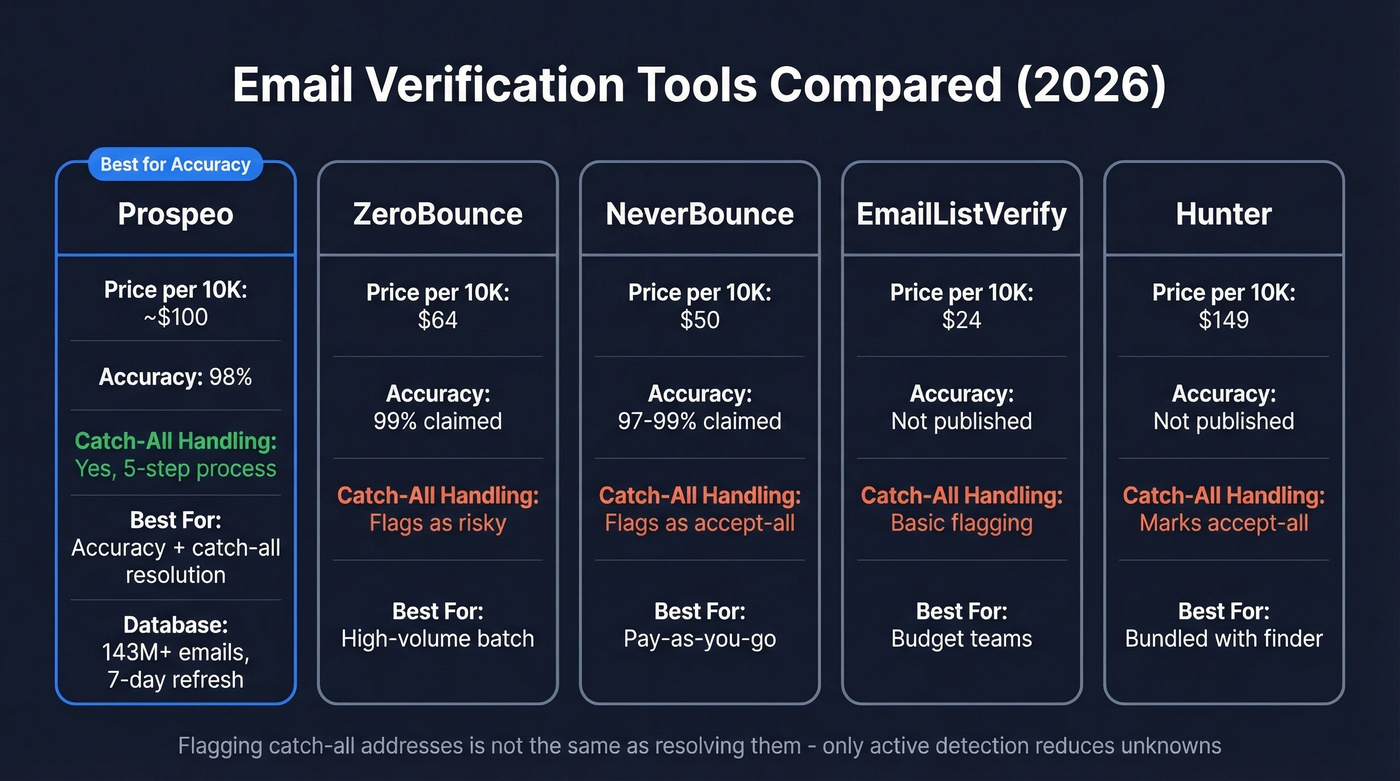
Prospeo runs a 5-step email validation process: syntax validation, MX/domain check, SMTP handshake, catch-all detection, and spam-trap/honeypot removal. That last mile - the catch-all handling and trap removal - is what separates it from tools that just run the handshake and call it a day. The database holds 143M+ verified emails refreshed on a 7-day cycle. Pricing works out to roughly $0.01 per email, with a free tier covering 75 emails per month. No contracts, no sales calls required.
ZeroBounce handles high-volume batch verification well. At $64 per 10K, it's competitively priced for teams that need pure list cleaning without an attached prospecting database. It flags catch-all addresses as "risky" rather than attempting to resolve them, which means you still end up with a chunk of unknowns.
NeverBounce offers pay-as-you-go pricing at $50 per 10K. Like ZeroBounce, it flags catch-all addresses rather than resolving them - fine for list hygiene, less useful if your prospect list is heavy on catch-all domains.
EmailListVerify is the budget option at $24 per 10K. Catch-all handling is basic. If you're cleaning a massive list and can tolerate some unknowns, the price-per-verification is hard to beat.
Your SMTP handshake returns 250 OK on catch-all servers whether the mailbox is real or not. Prospeo's proprietary verification infrastructure resolves what the protocol can't - across 143M+ verified emails refreshed every 7 days.
Get verified emails that actually reach inboxes, not spam traps.
DIY vs. SaaS: Build or Buy?
We've seen dev teams spend two weeks building a verification script in Python or Go. Gmail blocked their IP after 200 checks. The script worked great on their test domain and failed on every major provider in production.
There are legitimate open-source options. A Go-based verifier can handle MX lookups, disposable domain detection, and basic domain validation. It's solid for filtering obvious junk - typo domains, disposable addresses, domains without MX records.
But the moment you need to verify email addresses at scale, DIY falls apart. Port 25 is restricted by most cloud providers. Your verification IP's reputation degrades with every batch. Catch-all domains return useless results. Greylisting requires retry logic with exponential backoff. The disposable email landscape now includes 110K+ domains - a list no manual script can maintain.
Let's be honest: if your team is spending engineering hours on email verification infrastructure in 2026, you're solving the wrong problem. The maintenance cost of a DIY validation system exceeds SaaS pricing within weeks for any team running more than a few hundred checks per day. The open-source route makes sense for basic hygiene filters. For actual mailbox verification, buy a tool and spend your engineering time on something that moves pipeline.
Why Verification Matters for Deliverability
Only 23.6% of B2B marketers verify email lists before campaigns. That stat alone explains a lot about the state of B2B email.
The industry benchmark is to keep total bounces below 2%, with hard bounces under 1%. Exceed those thresholds and your sender reputation takes damage that compounds over time - and recovering a burned domain is far more expensive than cleaning a list ever was. (If you want a deeper bounce-code breakdown, see our email bounce rate guide.)
The provider-level data makes this even starker. Gmail inbox placement sits at 87.2%, Microsoft at 75.6%, Yahoo at 86.0%, and Apple Mail at 76.3%. Even with perfect authentication, roughly one in four emails to Microsoft domains never reaches the inbox. Dirty lists make those numbers worse fast.
Only 7.6% of domains enforce DMARC at quarantine or reject level, which means authentication alone won't save you - list quality is still the primary lever. Meritt cut their bounce rate from 35% to under 4% and tripled their connect rate after implementing proper verification. That's not a marginal improvement; it's the difference between a sequence that works and one that gets your domain flagged. (For the authentication side, see DMARC alignment and SPF record examples.)
At $0.01 per verification, cleaning a 10K list costs about $100. Bad data costs you deliverability. Deliverability costs you pipeline. SMTP verification - done right, with catch-all handling and trap removal - is the cheapest insurance policy in your entire outbound stack. If you're building outbound sequences, pair verification with a real email deliverability guide and safe email velocity limits.
FAQ
Does SMTP verification send an email?
No. It initiates a handshake with the mail server up to the RCPT TO command, then disconnects before any message is transmitted. The server's response code reveals whether the mailbox accepts mail - without delivering a single byte of content.
What ports does SMTP use?
Port 25 handles server-to-server relay, 587 handles submission with STARTTLS, 465 handles implicit TLS, and 2525 serves as an alternate when 25 is blocked. Verification typically targets port 25 to reach the destination MX server directly.
Can you verify Gmail addresses via SMTP?
Not reliably. Gmail and other major consumer providers block mailbox enumeration, so the handshake alone won't confirm whether a specific address exists. Accurate verification requires non-SMTP signals layered on top of the protocol check.
What is a catch-all domain?
A domain configured to accept email sent to any address, real or invented. The SMTP handshake returns 250 OK for every address on these servers, making it impossible to distinguish valid mailboxes from fake ones. Roughly 30-40% of B2B addresses sit on catch-all domains, which is why standalone protocol checks leave large gaps.
How accurate is SMTP verification alone?
On non-catch-all domains with honest RCPT responses, accuracy is high - typically 95%+. But with 30-40% of B2B addresses on catch-all domains and major providers blocking enumeration, standalone checks leave a large share of real-world lists in "unknown" territory. Tools that add catch-all resolution and spam-trap removal reach 98% accuracy across the full spectrum.