

How the Email Verification Process Actually Works (and Why Your "Clean" List Still Bounced)
A RevOps lead we know ran a 10,000-contact enrichment last quarter. The list came back "verified." The first sequence bounced 19%. That's not an edge case - it's what happens when you treat the email verification process as a checkbox instead of a workflow. Email lists decay at least 23% per year, and if your "clean" list still bounced, the culprits are almost always catch-all domains or stale data.
What Verification Actually Means
There's a terminology mess worth clearing up. Validation checks whether an email could exist - proper format, no illegal characters, a real-looking domain. Verification goes further: it confirms the mailbox exists and can receive mail via SMTP handshake.
Don't confuse either with identity verification like OTP codes or fraud checks. When sales and marketing teams say "email verification," they mean deliverability verification - will this address accept my email without bouncing? (If you're troubleshooting bounces end-to-end, see our Email Deliverability Guide.)
Why It Matters More in 2026
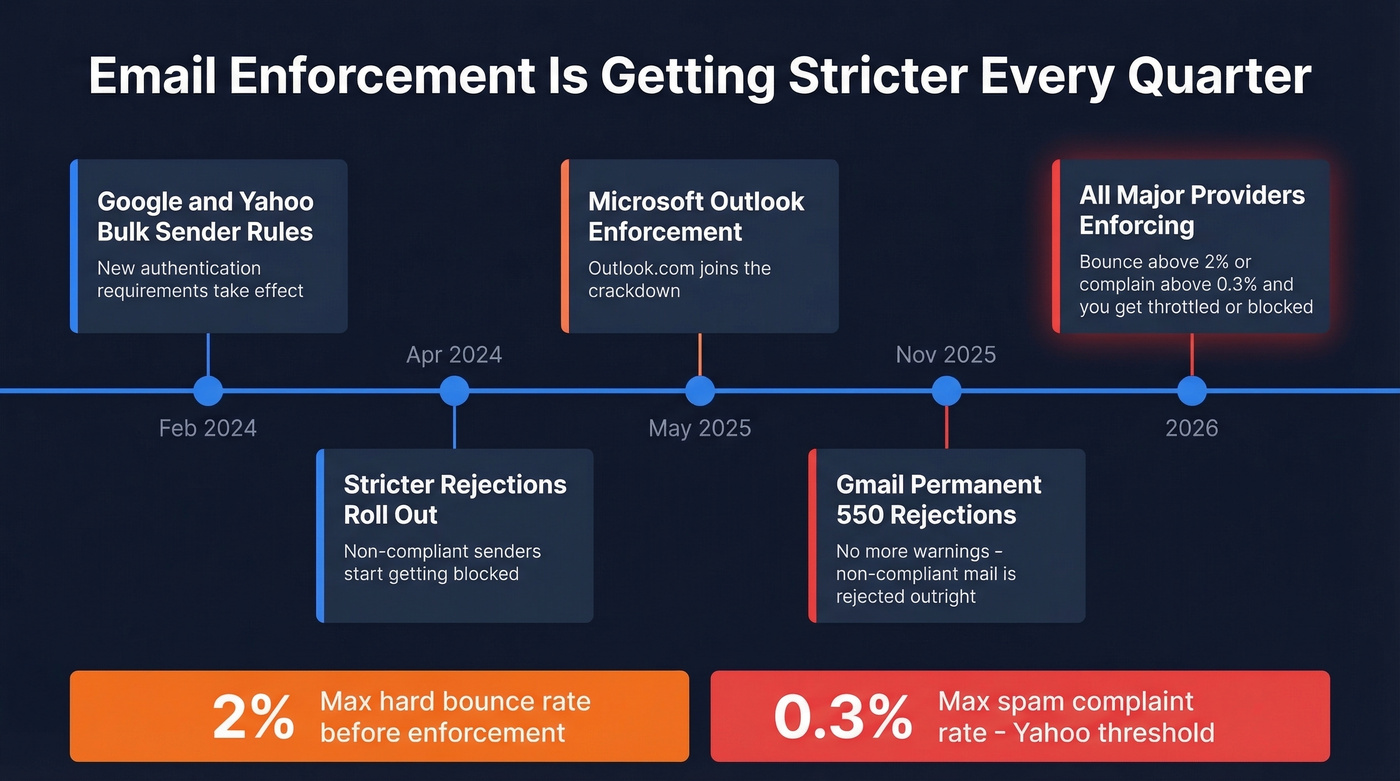
The enforcement landscape has tightened fast. Google and Yahoo started enforcing bulk sender requirements in February 2024, with stricter rejections rolling out through April. Microsoft's Outlook.com enforcement kicked in May 2025. By November 2025, Gmail began issuing permanent 550 rejections for non-compliant senders. Yahoo's threshold is blunt: keep spam complaints below 0.3%, or face throttling. (Related: Bulk Email Threshold Guide.)
Bad data costs U.S. businesses an estimated $3.1 trillion annually. Sales reps waste roughly 27.3% of their time - over 500 hours a year - pursuing leads built on decayed contact data. ZeroBounce processed 11+ billion email addresses in 2025 and found that at least 23% of any list degrades within a year. Their year-by-year figures swing between 22% and 28% from 2021-2025, which is exactly why "verified once" doesn't stay verified. (If you're fixing upstream data quality, start with data enrichment services.)
The 5-Step Email Verification Process
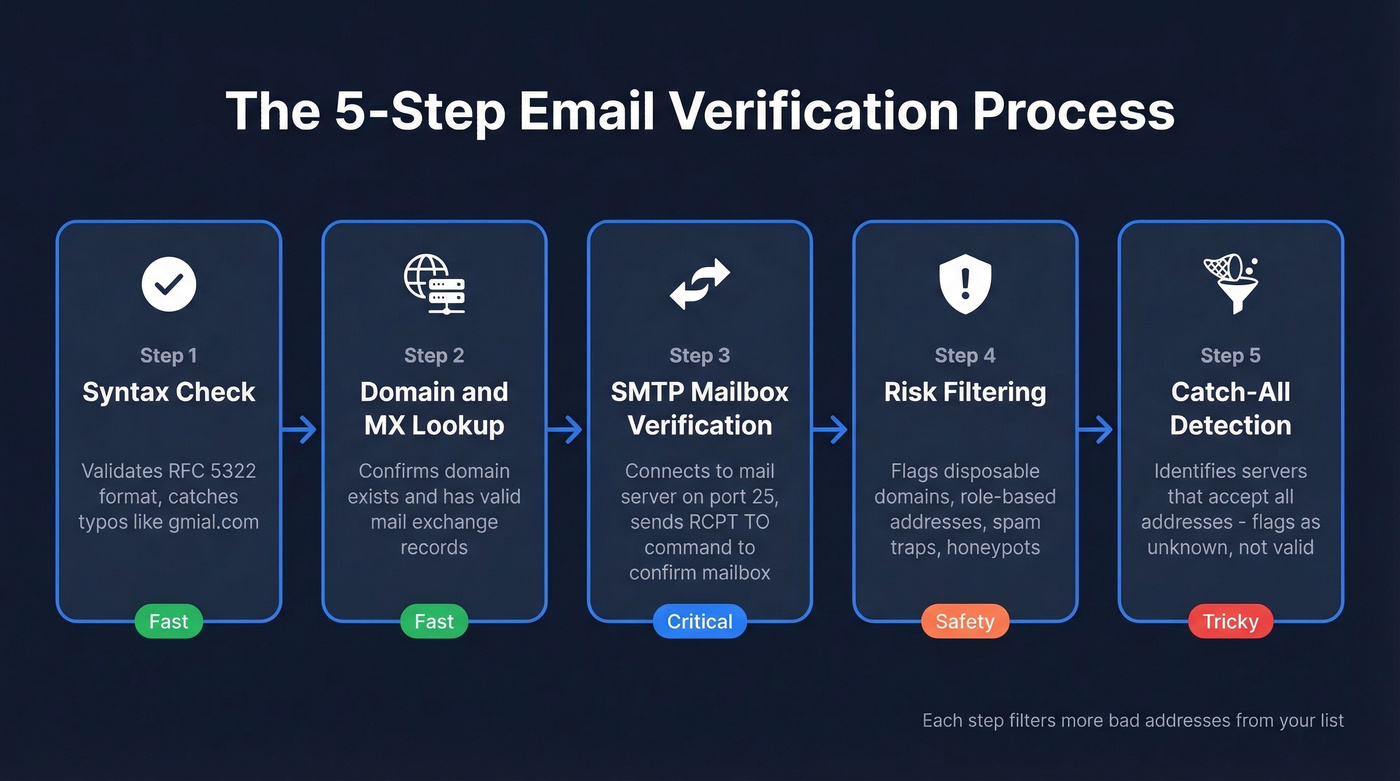
Every serious verification tool runs some version of these five steps. Understanding the full workflow helps you diagnose why "verified" emails still bounce. (If you're building lists from scratch, see How to Generate an Email List.)
Step 1: Syntax Check
Pure pattern matching. Does the address follow RFC 5322 format? Is there an @ symbol, a valid domain structure, no spaces or illegal characters? This catches typos like "gmial.com" and formatting errors. Fast, cheap, and effective at eliminating obvious garbage.
Step 2: Domain & MX Lookup
The tool queries DNS to confirm the domain exists and has valid MX (mail exchange) records pointing to a mail server. No MX record means no mail server. The address is dead regardless of what comes after the @.
Step 3: SMTP Mailbox Verification
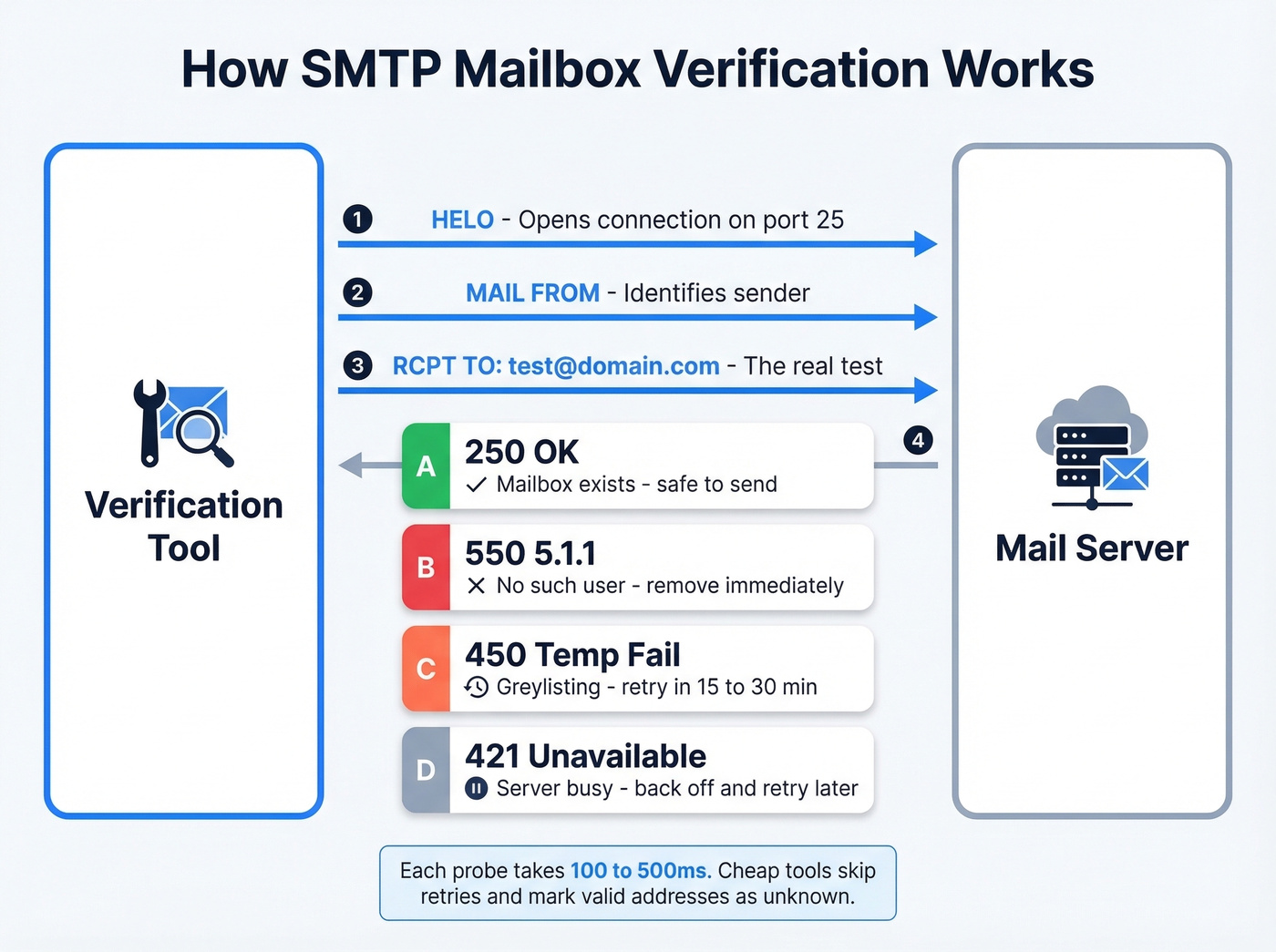
This is where real verification happens. The tool opens a connection to the mail server on port 25, performs the SMTP handshake, and issues a RCPT TO command. The server's response tells you everything:
| Response Code | Meaning | Action |
|---|---|---|
| 250 | Valid mailbox | Safe to send |
| 550 5.1.1 | No such user | Remove immediately |
| 450 | Greylisting/temp fail | Retry in 15-30 min |
| 421 | Service unavailable | Back off, retry later |
Each SMTP probe often completes in 100-500ms, though greylisting retries extend this to minutes. Many mail servers temporarily reject the first connection from an unknown sender. A good verification tool implements exponential backoff and retries. Cheap tools skip the retry and mark the address as "unknown" - which is how you end up with a "verified" list full of false negatives. (For bounce codes and what they mean operationally, see Email Bounce Rate.)
Step 4: Risk Filtering
Even if an SMTP check returns 250, the address might be dangerous. This step flags disposable email domains like Guerrilla Mail and Mailinator, role-based addresses like info@, support@, and sales@, known spam traps, and honeypots. Sending to spam traps is one of the fastest ways to get your domain blacklisted - and they're designed to look like real addresses. (If you suspect traps in your database, use this Spam Trap Removal playbook.)
Step 5: Catch-All Detection
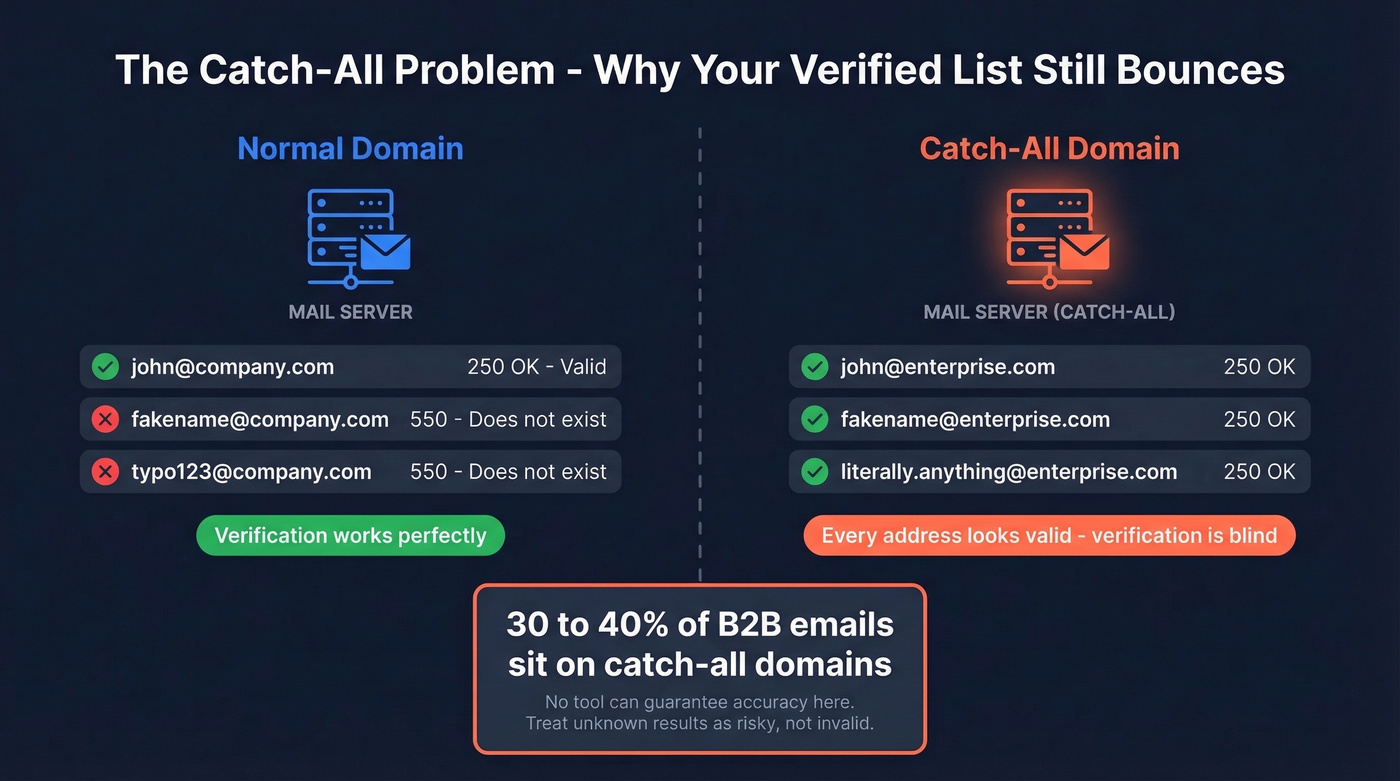
Catch-all servers accept mail for any address at their domain, real or fake. The SMTP check returns 250 for everything, making mailbox-level verification impossible. Good tools flag these as "catch-all/unknown" rather than "valid."

Prospeo's 5-step verification runs at the point of discovery - not as an afterthought. Catch-all handling, spam-trap removal, and honeypot filtering are built in, delivering 98% email accuracy on a 7-day refresh cycle. One customer dropped from 35% bounce to under 4%.
Skip the export-upload-clean-reimport cycle entirely.
The Catch-All Problem
Here's the thing: 30-40% of B2B email addresses sit on catch-all domains. That's a third of your prospect list returning ambiguous results.
Enterprise targets make it worse. Secure Email Gateways from Proofpoint, Mimecast, and Microsoft Defender actively block or greylist SMTP verification attempts. A perfectly valid mailbox behind a SEG can come back as "unknown" because the gateway refused the probe. On Reddit's r/coldemail and r/Emailmarketing, the most common complaint is lists that "looked fine" after enrichment but still produced brutal bounce rates - almost always traced back to catch-all domains or stale data. (If you're doing outbound at scale, pair verification with email reputation tools.)
Let's be honest: anyone claiming 99% accuracy on catch-all domains is selling you a fantasy. Catch-all verification is probabilistic, not deterministic. Treat "unknown" results as risky, not invalid, and adjust your sending volume accordingly. (More on safe sending limits: Email Velocity.)
Best Practices for 2026
Verify at capture AND before every campaign. A list verified three months ago has already lost contacts. We've seen teams skip pre-campaign verification because they "just cleaned the list" - and then eat a 12% bounce rate on launch day.
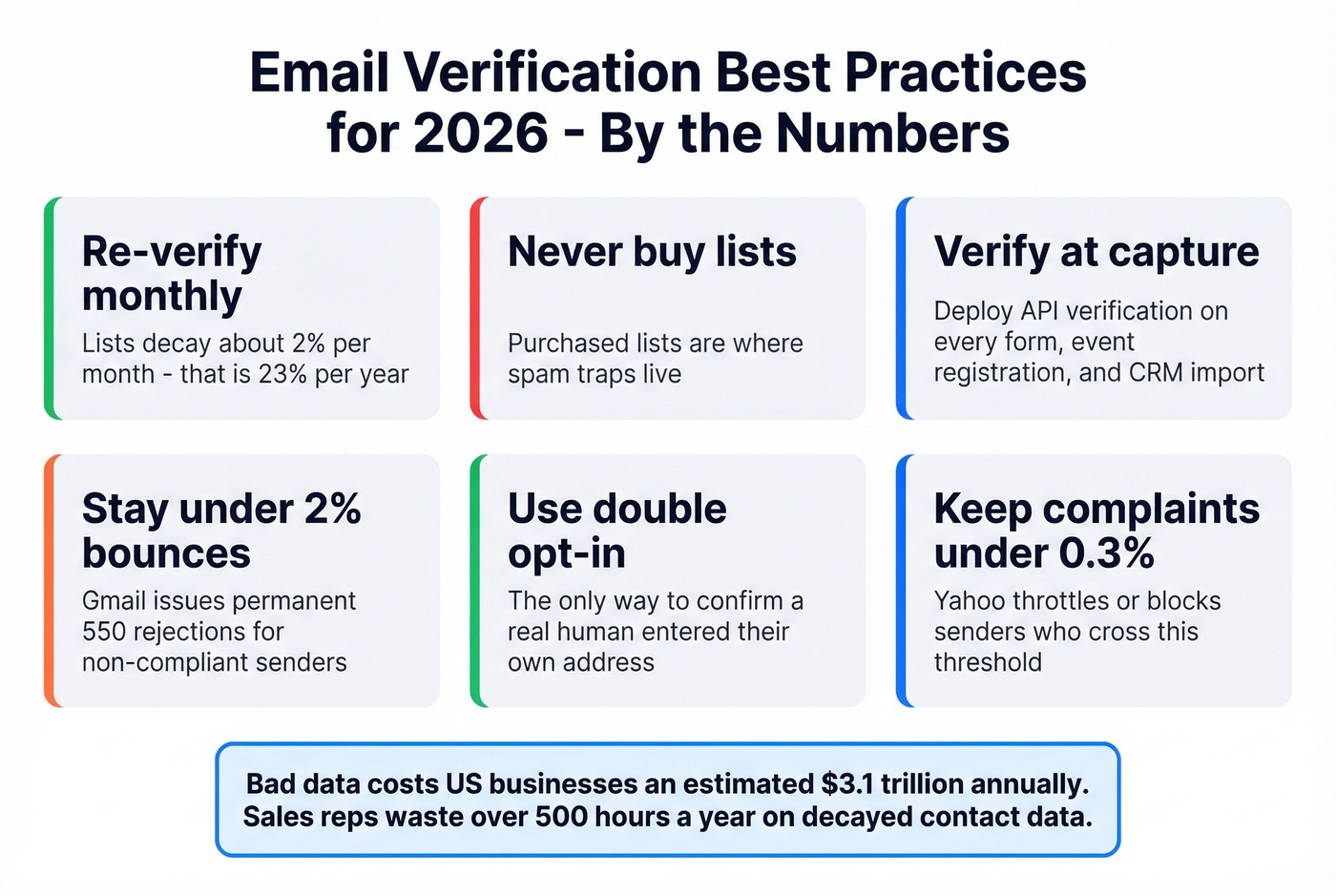
Re-verify monthly minimum for active outbound lists. Quarterly means 90 days of sending to dead addresses. That's roughly 6% degradation you're absorbing for no reason.
Don't buy lists. Purchased lists are where spam traps live. If you're tempted, skip it. (If you're weighing the risk/compliance side, read Is It Illegal to Buy Email Lists?.)
Monitor hard bounce rate below 2% and spam complaints below 0.3%. These are the thresholds that trigger mailbox provider enforcement. Cross them and you're looking at throttling or outright blocks.
Deploy API verification at every data entry point - signup forms, event registrations, POS systems, and CRM imports. Real-time verification catches bad addresses before they ever hit your database.
Use double opt-in for marketing lists. It's the only way to confirm a real human entered their own address.
Tools Worth Considering
The cheapest verification is never needing to verify separately. If your tool finds emails and verifies them in the same step, you skip the entire export-upload-clean-reimport cycle.
Prospeo runs its proprietary 5-step verification at the point of discovery, delivering 98% email accuracy with catch-all handling and spam-trap removal built in. A 7-day data refresh cycle means contacts don't go stale between campaigns. Meritt dropped their bounce rate from 35% to under 4% after switching. Pricing starts at roughly $0.01/email with a free tier and no contracts. (If you're comparing stacks, see our roundup of SDR tools.)
For standalone bulk verification, ZeroBounce starts around $18/month and processes billions annually. NeverBounce runs roughly $8 per 1,000 with pay-as-you-go pricing. One 1,000-email benchmark found accuracy varies significantly - NeverBounce scored around 93% in that test, and the same benchmark found Emailable struggled with @yahoo domains.
For real-time API on forms, Clearout starts around $21/month with solid documentation. Kickbox is the lightweight option at around $5 for 500 credits - good for low-volume form validation but not built for outbound at scale.
Your list decays 23% per year. Prospeo refreshes every 7 days - not every 6 weeks like competitors. At roughly $0.01 per verified email with no contracts, you never send to stale data again.
Stop paying to verify emails that were already wrong when you bought them.
FAQ
How often should I re-verify my email list?
Re-verify monthly at minimum for active outbound lists. Lists decay roughly 23% per year - about 2% per month - so any list older than 30 days has meaningful degradation. Always run verification before a major campaign regardless of your regular cadence.
What's a safe bounce rate for cold outreach?
Keep hard bounces under 2% per campaign. Above 5%, mailbox providers like Gmail and Outlook start throttling or blocking your domain entirely. Gmail now issues permanent 550 rejections for non-compliant senders, so there's no recovering once you cross the line.
Can verification tools accurately check catch-all emails?
No tool can guarantee mailbox-level accuracy on catch-all domains, because catch-all servers return "valid" for every address - real or fake. The best tools flag catch-all domains and apply behavioral analysis, but you should treat those results as risky and throttle send volume accordingly.
What's the difference between email validation and verification?
Validation checks formatting - correct syntax, valid domain structure, no illegal characters. The email verification process goes further by connecting to the mail server via SMTP to confirm the mailbox actually exists and can receive messages. You need both; validation alone won't catch dead mailboxes.