

How to Write an Introduction Email That Actually Gets a Reply
You spent 20 minutes crafting the perfect introduction email. You nailed the subject line, kept it short, even added a personalized opening about their latest funding round. Then it bounced. The address was wrong, your domain reputation took a hit, and that prospect will never see your name.
The average cold email reply rate sits at 3.43% - and that's for emails that actually arrive. Most introduction emails fail before the recipient even has a chance to ignore them.
Three Rules That Matter More Than Anything Else
- Keep it under 80 words. Shorter emails consistently outperform longer ones. One practitioner cut from 141 words to under 56 and doubled their reply rate.
- Personalize the subject line in 2-4 words, question format. Personalized subjects hit 46% open rates vs. 35% without. Questions outperform every other format.
- Verify the email address before you hit send. A bounced email doesn't just waste your time - it damages your sender reputation. Verify addresses with a tool like Prospeo before sending.
Benchmarks Worth Knowing
Let's ground this in real numbers. The Instantly 2026 benchmark report analyzed large-scale cold email campaigns and found clear patterns.
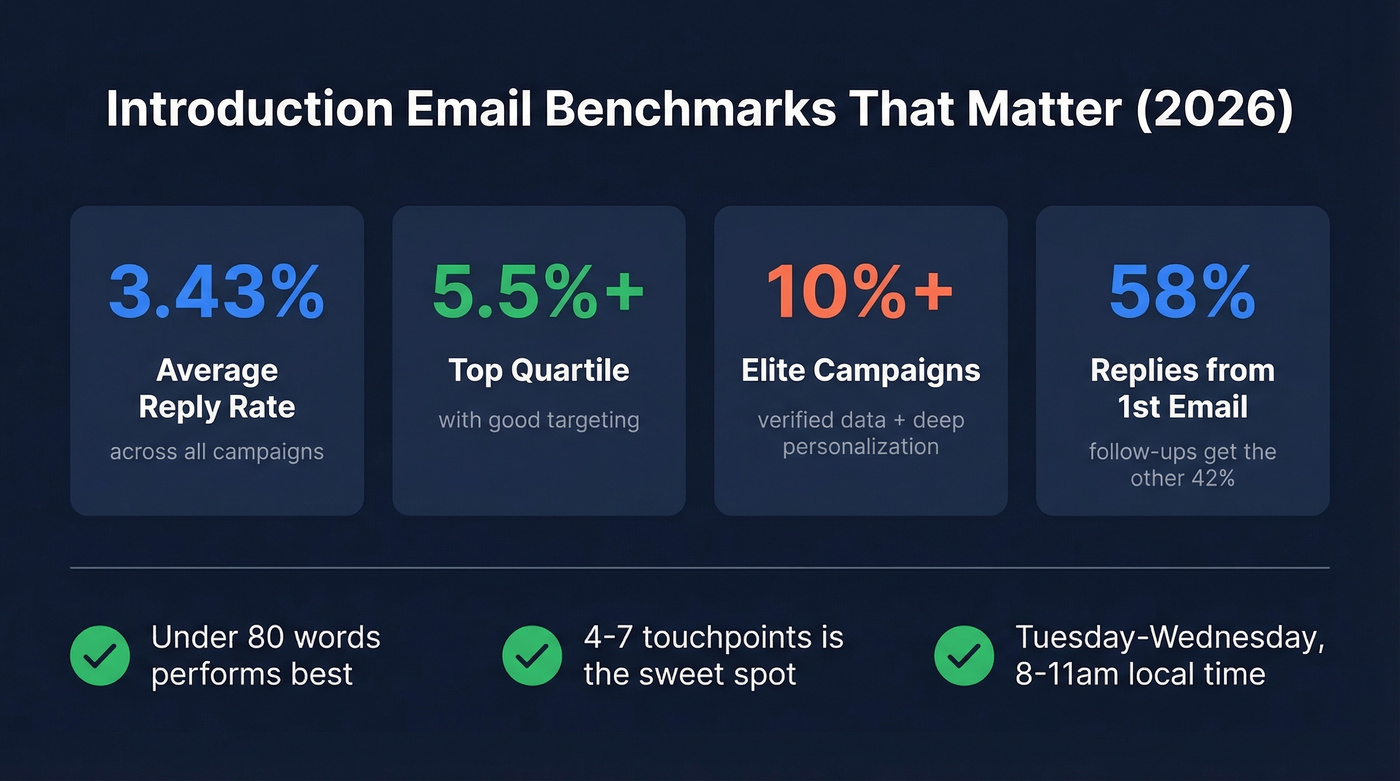
The overall reply rate average is 3.43%. Top-quartile performers hit 5.5%+. Elite campaigns - the ones with tight targeting, verified data, and genuine personalization - exceed 10%. That's a 3x gap between average and great, and we've seen it firsthand running outbound for our own team.
First email matters most. 58% of replies come from the initial send. Follow-ups contribute the remaining 42%, which means they're absolutely worth sending, but your first message carries the heaviest load.
Length: Best-performing campaigns keep emails under roughly 80 words. One Reddit practitioner reported cutting email length from 141 words to under 56 and watching their reply rate jump from 3% to 6%.
Touchpoints: The sweet spot is 4-7 total. Fewer quits too early; more than 7 shows diminishing returns unless each touch adds new value.
Timing: Tuesday through Wednesday performs best, with Wednesday showing the highest engagement. Send between 8-11am in the recipient's timezone - that same practitioner reported a 16% improvement in opens after switching to recipient-local morning sends. A/B testing separates the top quartile from everyone else. Top campaigns test weekly: subject lines, opening sentences, CTAs. Small changes compound fast when you're sending at volume.
Email Types at a Glance
Before getting into the how-to, here's a quick reference for the eight types we'll cover:
| Type | Purpose | Tone | Ideal Length | Key Element |
|---|---|---|---|---|
| Self-introduction | Establish contact | Formal | 50-80 words | Role + reason |
| Sales / cold outreach | Generate reply | Direct, value-led | 40-60 words | Trigger + CTA |
| Third-party intro | Connect two people | Warm, contextual | 60-80 words | Double opt-in |
| New job / team | Build rapport | Friendly, concise | 60-100 words | Role + excitement |
| Client onboarding | Set expectations | Professional | 60-80 words | Role + agenda |
| Networking follow-up | Continue conversation | Casual-professional | 40-60 words | Reference prior interaction |
| Referral-based | Use a connection | Warm, direct | 40-60 words | Name the referrer |
| Partnership | Propose mutual value | Professional | 50-70 words | Lead with benefit |
How to Write One, Step by Step
Six steps. Each one tied to data.
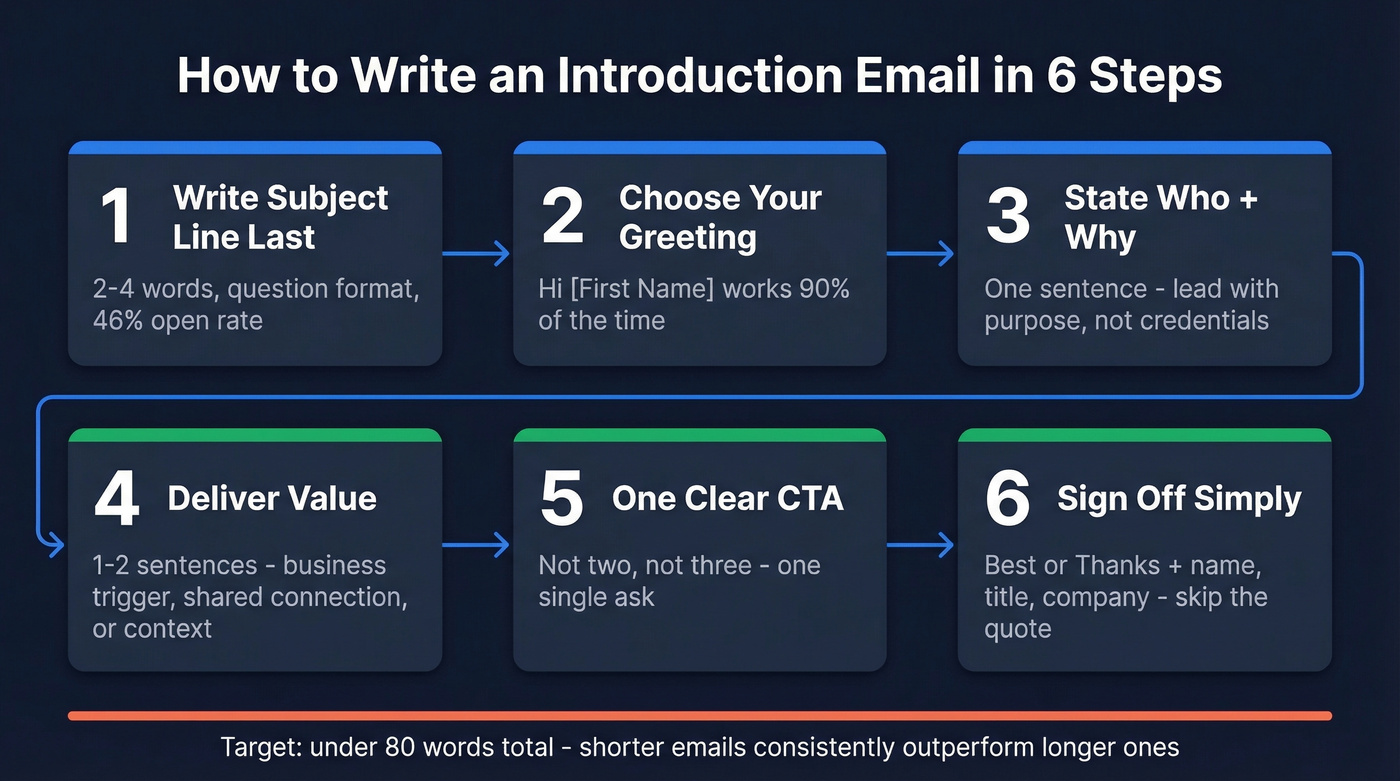
Step 1: Write the subject line last. Counterintuitive, but it works. Once you know exactly what your email says, the subject line writes itself. Personalized subject lines hit 46% open rates. Questions outperform statements. Keep it to 2-4 words when you can, and short enough to avoid mobile truncation, which kicks in around 35-50 characters.
Step 2: Choose the right greeting. "Hi [First Name]" works for 90% of scenarios. "Dear" reads formal and dated unless you're writing to a government official or academic. Skip "To Whom It May Concern" entirely.
Step 3: State who you are and why you're reaching out - in one sentence. This is where most people fail. They lead with their title, their company history, their credentials. The recipient doesn't care yet. Lead with purpose. "I run growth at [Company] and noticed you're hiring three SDRs" beats "I'm the VP of Growth at [Company], a leading provider of..." every time. The consensus on r/CustomerSuccess is that purpose-first intros outperform what one practitioner called "tacky peacocking."
Step 4: Deliver value or context in 1-2 sentences. Why should they care? For sales emails, this is your business trigger. For networking emails, it's the shared connection or mutual interest. For new-job emails, it's your relevant experience. Busy executives scan for solutions, not pitches - frame everything through their lens.
Step 5: End with one clear CTA. Not two. Not three. One. "Worth a 15-minute call next week?" or "Open to a quick intro?" or "Mind if I send over a case study?" Ambiguity kills reply rates. The reader should know exactly what you're asking them to do.
Step 6: Sign off simply. "Best," "Thanks," or "Cheers" - all fine. Include your name, title, and company. Skip the inspirational quote in your signature. Skip the 14-line footer with three phone numbers and a legal disclaimer.
A note on tone: Each template below defaults to professional. For warmer relationships - someone you've met, a referral from a close contact - drop the last name, swap "Best" for "Cheers," and shorten by 10-15 words. Warmth comes from brevity and specificity, not exclamation points.

A bounced introduction email doesn't just waste your send - it tanks your domain reputation and kills future deliverability. Prospeo's 5-step email verification catches bad addresses, spam traps, and honeypots before you hit send. 98% accuracy at $0.01 per email.
Stop crafting perfect intro emails that bounce. Verify every address first.
Subject Lines That Actually Work
A study of 5.5M emails by Belkins and Reply.io gives us hard data on what performs.
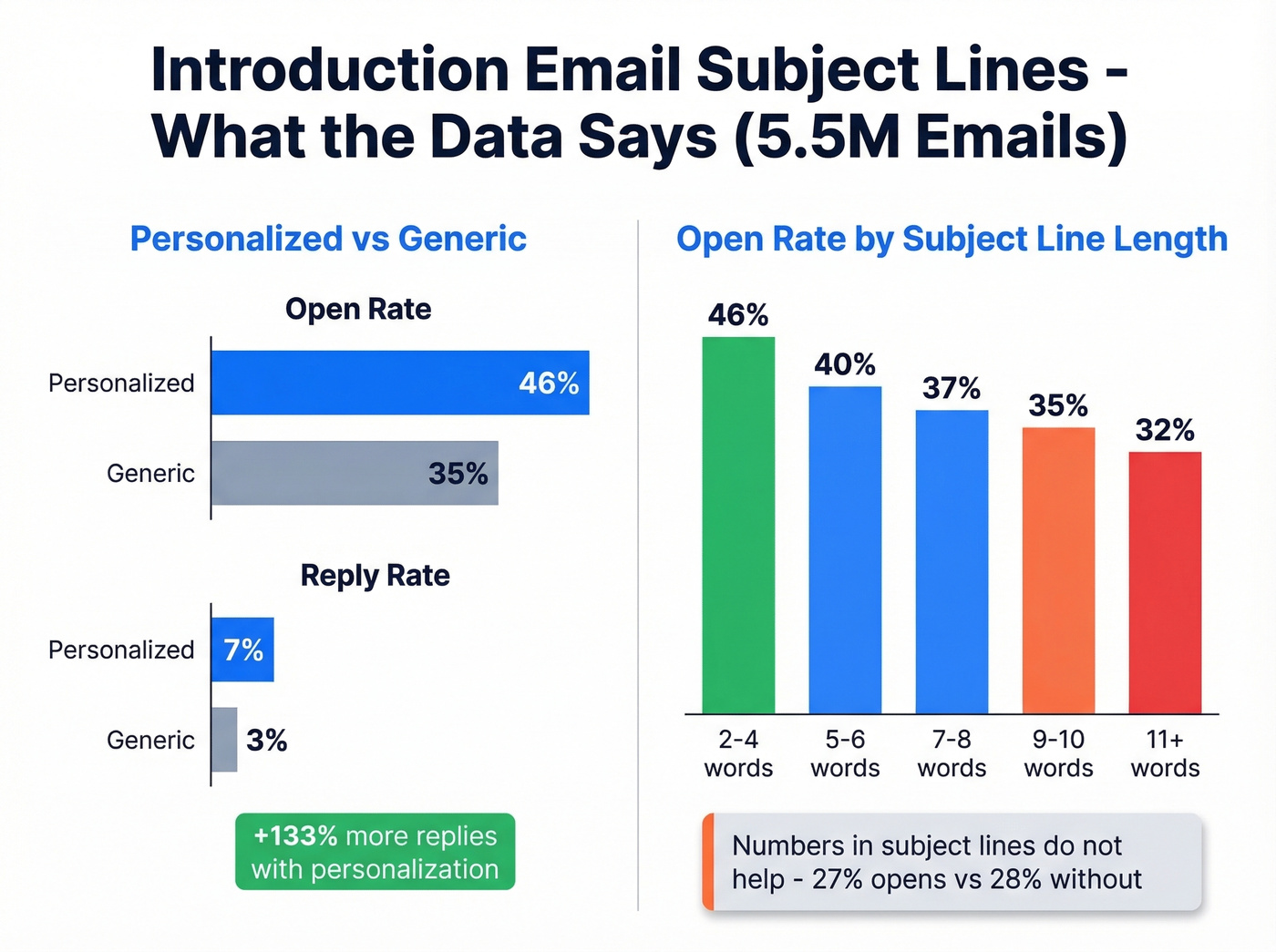
Personalized subject lines - ones that include the recipient's name, company, or a specific reference - average 46% open rates vs. 35% for generic ones. That's a 31% lift on opens and a 133% lift on reply rates (7% vs. 3%). The data is unambiguous: personalization isn't optional.
Length matters more than most people think. The sweet spot is 2-4 words at 46% opens. Performance drops steadily after 7 words, and by 9-10 words you're down to 34-35%. Mobile truncation kicks in around 35-50 characters, which means half your subject line disappears on a phone screen.
Here's the thing: numbers in subject lines don't help. Subject lines with numbers averaged 27% opens vs. 28% without. That "5 Tips" or "3 Ways" format that content marketers love? It doesn't translate to email introductions.
One practitioner's A/B test tells the story perfectly. "Quick question" pulled 39% opens. Their company-name subject line hit 33%. "Partnership opportunity" landed below 19%. The more generic and salesy the subject line, the worse it performs.
Subject lines by scenario:
| Scenario | Example | Why It Works |
|---|---|---|
| Sales outreach | Quick question about [goal] | Question format, 4 words |
| Sales outreach | [Name], saw the Series B | Personal, specific trigger |
| Sales outreach | Idea for [Company]'s SDR team | Specific, value-forward |
| Self-introduction | [Name] - intro from [event] | Context + brevity |
| Networking | Great meeting you at [event] | Specific reference |
| Referral | [Referrer name] suggested we connect | Warm signal, name-drop |
| Third-party intro | Intro: Alice (Co X) <> Bob (Co Y) | Clear format, both names |
| New job | Your new [role] - quick hello | Friendly, role-specific |
| Client onboarding | Your new CSM - next steps | Purpose-first |
| Partnership | Collab idea: [their product] + [yours] | Mutual benefit |
| Re-engagement | Still thinking about [topic]? | Question, low-pressure |
| Follow-up | Bumping this - still relevant? | Casual, low-pressure |
Avoid anything that sounds like marketing copy. "Unlock your potential," "Exciting opportunity," and "Don't miss out" all push open rates below 36%. Urgency words like "ASAP" perform even worse.
Templates by Scenario
Self-Introduction (Professional)
Subject: [Name] - quick intro
Hi [Name],
I'm [Your Name], [role] at [Company]. We work with [type of company] on [specific outcome], and I came across your work on [specific detail].
Would love to connect - are you open to a quick call next week?
Best, [Your Name]
Why this works: 52 words. Clear role, specific reference, single CTA. No company history, no credentials dump.
Sales / Cold Outreach
Subject: Quick question about [specific goal]
Hi [Name],
Noticed [Company] just [specific trigger - hiring, funding round, product launch]. When we worked with [similar company], they were dealing with [related challenge] - we helped them [specific result].
Worth a 15-minute call to see if that's relevant?
[Your Name]
Why this works: 48 words. Business trigger in the first sentence. Social proof compressed into one line. Single, low-commitment CTA.
Use this when you have a specific business trigger - a funding round, a new hire, a product launch. Skip it if you're mass-sending without personalization. Without a real trigger, this template reads as spam and your reply rate will sit around 1%.
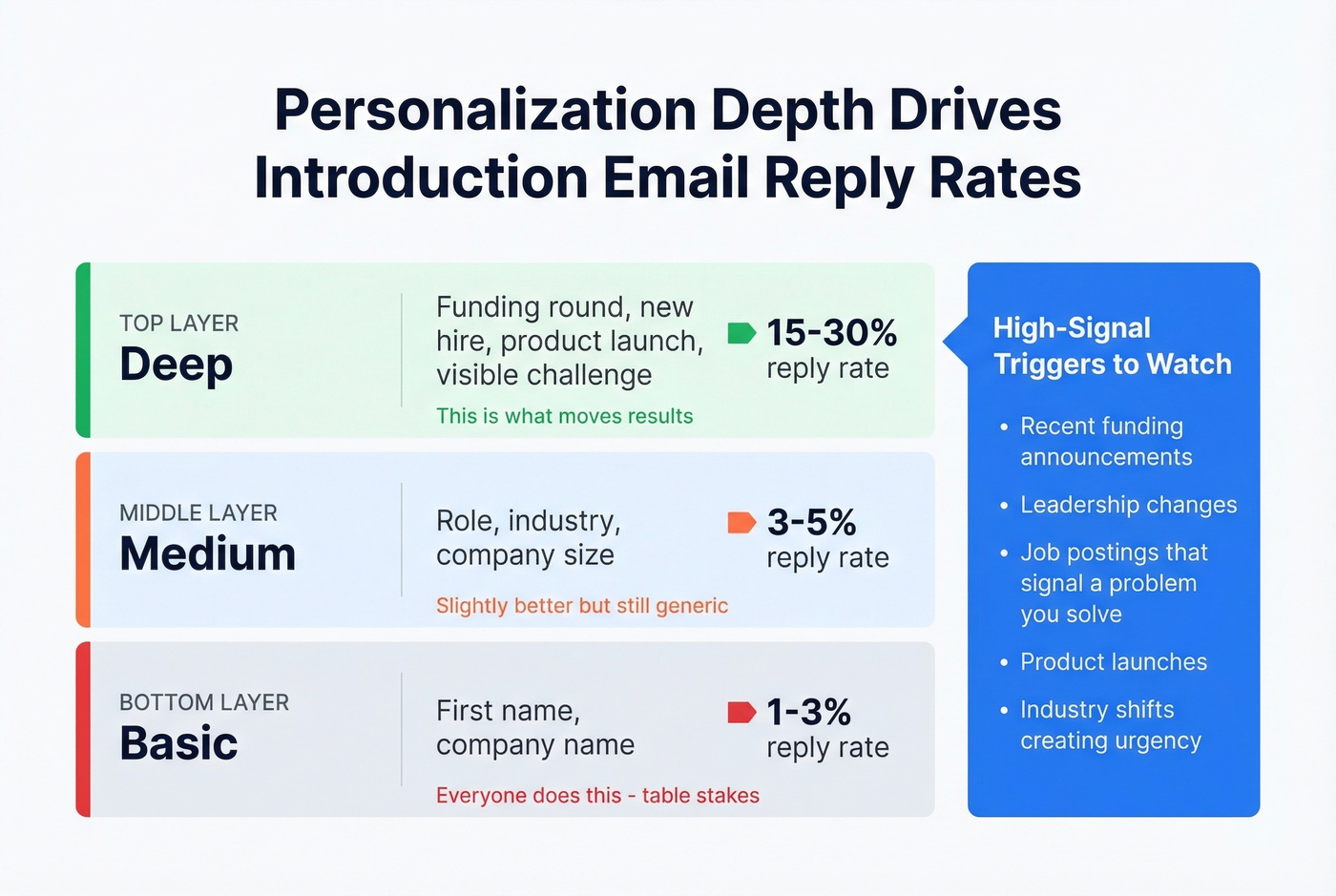
The difference between a 1-5% reply rate and a 15-30% reply rate comes down to personalization depth:
| Level | What You Reference | Impact |
|---|---|---|
| Basic | First name, company | Table stakes - everyone does this |
| Medium | Role, industry, company size | Slightly better, still generic |
| Deep | Funding round, new hire, product launch, visible challenge | This is what moves results |
High-signal triggers to watch for: recent funding, leadership changes, job postings that signal a problem you solve, product launches, and industry shifts that create urgency. The deeper the trigger, the higher the reply rate. In practice, finding these triggers means monitoring news feeds, setting Google Alerts for target accounts, and checking company career pages weekly. The teams that build this into a repeatable workflow - not a one-off research sprint - are the ones hitting 15%+ reply rates consistently.
Third-Party Intro (Double Opt-In)
Single opt-in introductions - where you CC two people who didn't ask to be connected - are the fastest way to annoy both parties. They create awkward social obligation and extra work. The double opt-in approach is better: email each person separately, provide context, and only connect them if both say yes.
The opt-in ask (sent privately to each person):
Subject: Intro to [Name] at [Company]?
Hi [Name],
I know [Person] at [Company] - they're working on [relevant context]. I think you two would have a great conversation about [topic].
Want me to make an intro? No pressure either way.
[Your Name]
The actual connection (only after both say yes):
Subject: Intro: [Alice] (Company X) <> [Bob] (Company Y) - [topic]
[Alice], meet [Bob]. [Bob] leads [role] at [Company] and is working on [context].
[Bob], [Alice] runs [role] at [Company] and has deep experience in [relevant area].
I'll let you two take it from here. [Bob], feel free to BCC me on the reply so I'm not clogging your scheduling thread.
The subject line format - "Intro: Alice (Company X) <> Bob (Org Y) - [topic]" - gives both parties instant context. And the BCC tip keeps the introducer out of the inevitable back-and-forth about calendar availability.
New Job / Team
Starting a new role is one of the few times people actually want to hear from you. Use that window.
Subject: Your new [role] - quick hello
Hi team,
I'm [Name], joining as [role] on [date]. Previously I was at [Company] working on [relevant experience]. Really excited to dig into [specific area] with this team.
I'd love to learn what you're working on - feel free to grab time on my calendar: [link].
[Name]
Send this before your first day. It gives people context before you show up, and it means your first in-person interactions aren't cold.
Client Onboarding
Subject: Your new CSM - next steps
Hi [Name],
I'm [Your Name], your new Customer Success Manager. I'll be your primary point of contact for [scope - renewals, support escalations, strategic reviews].
I'd love to set up a 15-minute intro call to cover:
- What success looks like for your team this quarter
- Any open issues or priorities
- How you prefer to communicate
Here's my calendar: [link]
[Your Name]
Purpose-first. No lengthy background about your career or the company's mission. Customers don't care about your resume - they care about whether you'll make their life easier. Lead with role clarity and a concrete next step.
Networking / Event Follow-Up
Most "great meeting you" emails get deleted because they could've been sent to anyone. The fix is dead simple: reference one specific thing from the conversation.
Subject: Great talking [topic] at [event]
Hi [Name],
Really enjoyed our conversation about [specific topic] at [event]. Your point about [specific detail] stuck with me.
Would love to continue the conversation - coffee or a quick call next week?
[Your Name]
That specific reference is the entire email. Without it, you're just another name in a post-conference inbox avalanche.
Referral-Based
Subject: [Referrer name] suggested we connect
Hi [Name],
[Referrer] mentioned you'd be the right person to talk to about [topic]. I'm [Your Name] at [Company] - we help [type of company] with [outcome].
Worth a quick chat?
[Your Name]
41 words. The referrer's name appears in both the subject line and the first sentence, which immediately establishes trust. Referral-based emails consistently outperform cold outreach because the social proof is built in - and r/sales regularly points to referral intros as the highest-converting email type.
Partnership / Collaboration
Subject: Collab idea: [their product] + [your product]
Hi [Name],
I've been following [Company]'s work on [specific area]. We're building [your product/service] and I see a clear overlap - [specific mutual benefit].
Would you be open to exploring this? Happy to share a quick one-pager.
[Your Name]
Leads with mutual benefit, not your company story. The "one-pager" offer gives them a low-effort way to evaluate the idea before committing to a call.
How to Follow Up
Follow-ups aren't optional. Woodpecker's data shows campaigns without follow-ups average roughly 9% reply rates. Add at least one follow-up and that jumps to roughly 13%. For experienced users who've dialed in their targeting and copy, the gap is even wider: 16% without follow-ups vs. 27% with them.
The optimal number is 2-3 follow-up emails. Returns diminish sharply after the third, and pushing past 5-6 follow-ups risks spam complaints and reputation damage. Space them 2-3 days apart - anything sooner feels pushy.
Here's a detail most guides miss: "reply-like" follow-ups outperform formal ones by roughly 30%. Your follow-up should read like you're casually bumping the thread, not sending a new pitch.
Follow-up template (send 2-3 days after initial email):
Bumping this - still relevant to what you're working on?
If timing's off, no worries. Happy to reconnect next quarter.
That's 21 words. It works because it's low-pressure, acknowledges they're busy, and gives them an easy out that still keeps the door open.
When to stop: If you've sent the initial message plus 2-3 follow-ups with no response, move on. The 42% of replies that come from follow-ups mostly arrive after the first or second - not the fifth.
Deliverability: The Hidden Factor
I've seen teams obsess over subject lines and templates while ignoring the thing that actually determines whether their email arrives: data quality.
A practitioner on r/Entrepreneur shared their infrastructure overhaul: they moved from 3 sending domains to 7, capped sends at 26 emails per domain per day, and - critically - stopped buying lists. Their bounce rate dropped from 11% to under 2%. That infrastructure work mattered more than any template change.
B2B buyers now touch 10+ channels before buying, up from roughly 5 in 2016. Email is just one touchpoint, which means every send has to count. A bounced email doesn't just waste that touchpoint - it actively damages your domain reputation, making future emails less likely to land in the inbox.
Look, if your average deal size is under $15K, you probably don't need a $15K/year data platform. But you absolutely need verified emails. The ROI on data quality isn't about the tool's price - it's about the pipeline you lose to bounces. One team cut their bounce rate from 35% to under 4% after switching to verified data, and their pipeline tripled from $100K to $300K per week.
The best introduction email in the world is worthless if it bounces. Before sending cold outreach at scale, verify your contact list. Real-time verification catches dead addresses, spam traps, and catch-all domains before they tank your sender reputation.

If your bounce rate is above 5%, fix the data first. Everything else is rearranging deck chairs. For benchmarks and fixes by bounce type, see bounce rate and the full deliverability breakdown.
You nailed the subject line, kept it under 80 words, and wrote a killer CTA. But none of that matters if you're emailing the wrong person. Prospeo gives you 143M+ verified emails with a 7-day refresh cycle - so the address you find today is still valid tomorrow.
Find the right email address before you write the perfect introduction.
Common Mistakes
Writing too much. If your email is over 80 words, you're hurting your reply rate. Cut the company backstory, the credential list, and the second CTA.
Generic subject lines. "Partnership opportunity" pulls under 19% open rates. "Quick question about [specific thing]" pulls 39%. The data isn't close. If you want more tested options, pull from these cold email subject line examples.
No clear CTA. Every message needs exactly one ask. "Let me know your thoughts" isn't an ask - it's a vague invitation to do nothing. Reddit's r/sales community flags this as the #1 reason intro emails get ignored: the recipient literally doesn't know what you want them to do. (More rules and examples: email call to action.)
Single opt-in third-party intros. Don't CC two strangers and hope for the best. Ask both parties privately first. Double opt-in respects everyone's time.
Sending to unverified addresses. A bounced email damages your sender reputation and makes every future email less likely to land. Verification takes seconds and saves weeks of deliverability recovery. If you're running any kind of outbound program, this should be step one - before you write a single word of copy. If you're scaling sequences, also watch your email velocity.
FAQ
How long should an introduction email be?
Under 80 words. The Instantly 2026 benchmark report shows shorter emails consistently outperform longer ones. One practitioner cut from 141 to under 56 words and doubled their reply rate. If you're over 80 words, start cutting - the company history paragraph goes first.
When's the best time to send?
Tuesday through Wednesday, 8-11am in the recipient's timezone. Wednesday shows the highest engagement in large-scale benchmark data. Avoid Monday mornings and Friday afternoons - engagement craters at both ends of the week.
How many follow-ups should I send?
Two to three. Woodpecker data shows follow-ups lift reply rates from roughly 9% to roughly 13%, but returns diminish sharply after the third. Space them 2-3 days apart and keep them short - a casual bump outperforms a formal re-pitch by about 30%.
Should I use a template or write from scratch?
Start with a template, then personalize every email with a specific detail - their role, a recent company event, or a visible business challenge. Templates without personalization perform like spam. The template gives you structure; the personalization gives you replies.