

Introduction Email to Customer: Templates & Guide (2026)
You just inherited 40 accounts from a CSM who left last Friday. Renewal conversations start next week, and half these customers don't know your name yet. Most introduction email guides are written for cold outreach - if you already have the customer and you're introducing yourself as their new point of contact, those templates are useless.
Let's fix that.
What You Need (Quick Version)
Three customer introduction emails matter most:
- Welcome email - 83.63% average open rate. Send within 24 hours of deal close.
- CSM/AM handoff email - sets the relationship tone when a customer gets a new point of contact.
- Onboarding kickoff email - drives activation and gets the first meeting on the calendar.
Lead with what you'll do for the customer, not your background. Personalize 2-3 lines per recipient, and verify your contact list before sending.
How to Write a Customer Introduction Email
Subject Line
47% of recipients open an email based on the subject line alone. And 69% report emails as spam because of it. The sweet spot for length is 61-70 characters, which hits a 43.38% open rate.
Stop obsessing over subject line hacks. For introductory emails to customers, the job is simple - tell them who you are and why you're writing. "Your New Account Manager at [Company]" beats "Quick question" every time. Save the clever stuff for marketing campaigns (and keep a swipe file of email subject line formulas for later).
Body Structure
Here's the thing: listing your background and tenure in an intro email is what one CSM on Reddit called "pointless peacocking." Customers don't care that you've been in SaaS for eight years. They care that you'll solve their problems.
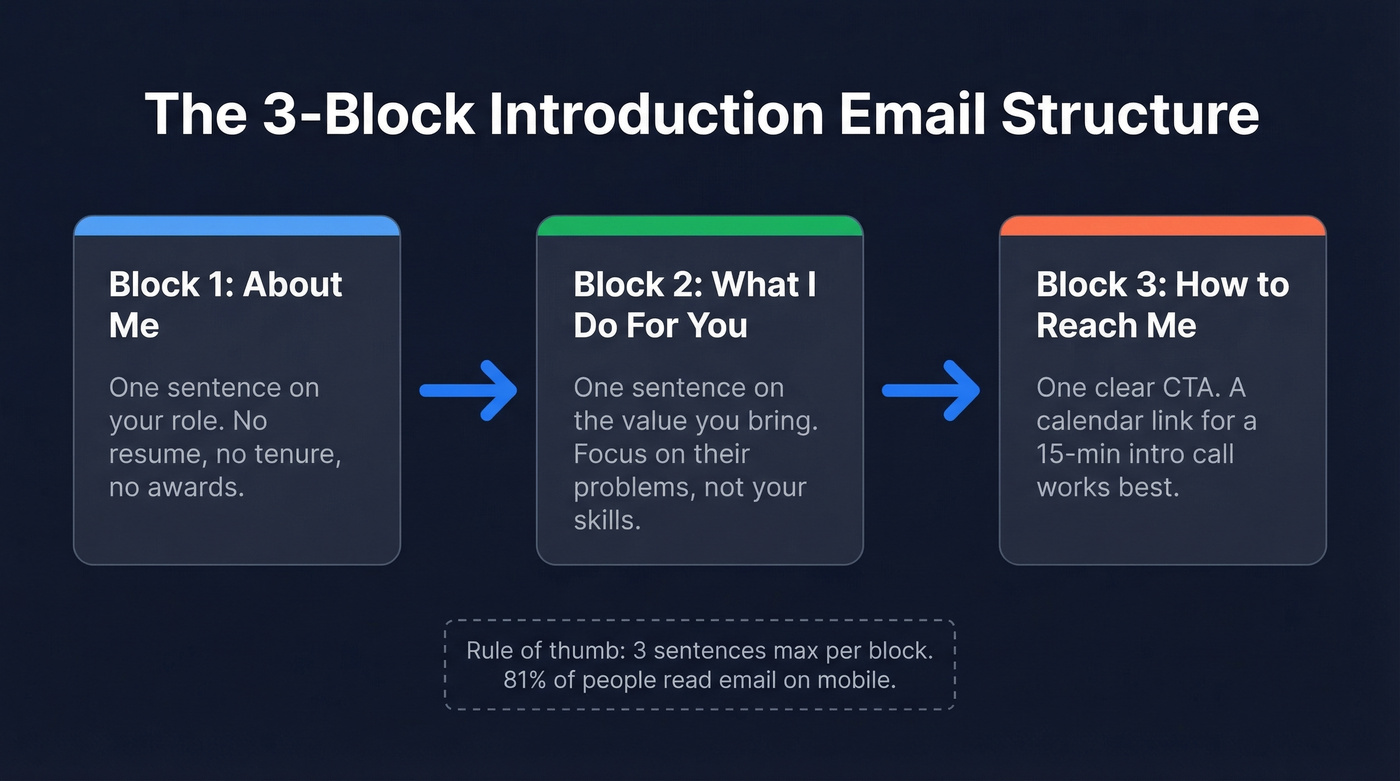
Think of it as three blocks: About Me (one sentence on your role), What I Do (one sentence on what you'll do for them), How to Reach Me (one clear CTA). That's it. A calendar link for a 15-minute intro call works best. For context, average campaign open rates sit at 31% across industries, but welcome and handoff emails consistently outperform that because the recipient already knows your company.
81% of people check email on a smartphone. Long paragraphs get skimmed or abandoned on mobile. Three sentences per block, max.
Personalization Tips
Personalized emails see 29% higher open rates and 41% higher click-through rates. But personalization doesn't mean rewriting every email from scratch.
A rep on r/sales shared a hack worth stealing: add a PS line referencing something specific - "PS: Congrats on the Series B announcement" or "PS: Saw your team's booth at SaaStr, looked great." It takes 30 seconds and makes the whole email feel custom. We've tested this approach on handoff sequences ourselves, and the reply rate difference is noticeable even on small batches.
One detail most guides skip: use the customer's full name. Avoid gendered honorifics like "Mr." or "Mrs." - you risk misgendering someone, and it reads formal in a way that doesn't match modern B2B communication. A/B test your subject lines across the first 10 sends; even small changes compound across a 50-account handoff.
Sample Templates for Every Scenario
You don't need 15 templates. Template hoarding is procrastination disguised as preparation. You need three core emails (welcome, handoff, kickoff) plus a few situational ones you can reuse. Each sample below follows the same tight structure - role, value, CTA - so you can adapt it in under two minutes (or pull more from our customer email templates library).
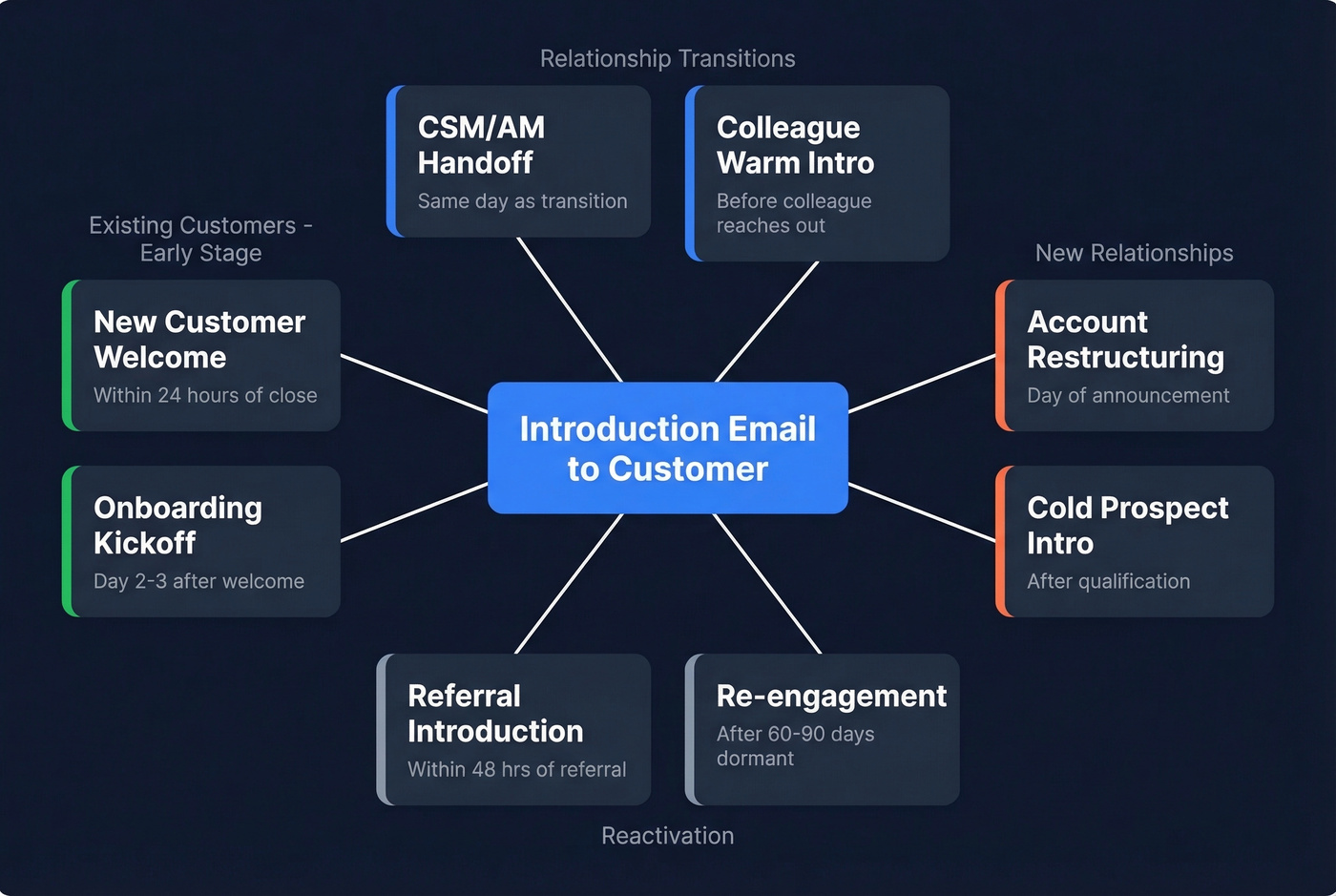
| Scenario | When to Send | Key Element |
|---|---|---|
| New customer welcome | Within 24 hrs of close | Expectations + next steps |
| Onboarding kickoff | Day 2-3 after welcome | Meeting invite + agenda |
| CSM/AM handoff | Same day as transition | Role clarity + availability |
| Colleague warm intro | Before colleague reaches out | Context + permission |
| Account restructuring | Day of announcement | Continuity reassurance |
| Cold prospect intro | After qualification | Personalized value prop |
| Referral intro | Within 48 hrs of referral | Mutual connection reference |
| Re-engagement | After 60-90 days dormant | New value or check-in |
New Customer Welcome Email
Subject: Welcome to [Company] - Your Next Steps
Hi [First Name], welcome aboard! I'm [Your Name], your [role] at [Company]. My job is to make sure you get value from [product] fast. Here's what happens next: [one-sentence onboarding overview]. I'll send a kickoff invite tomorrow.
Reply if anything's on your mind. I'm here.
Post-Sale Onboarding Kickoff
Subject: Kickoff Call - [Company] + [Customer Company]
Hi [First Name], I'd love to schedule a 30-minute kickoff to align on your goals and walk through the onboarding timeline. Agenda: your top priorities, first-30-day milestones, and who else should be involved.
Does [date/time] work? If not, grab a slot here: [calendar link].
CSM/Account Manager Handoff
This is the one that matters most when you're stepping into inherited accounts. It's also the one most reps rush through. Don't.
Subject: Your New CSM at [Company]
Hi [First Name], I'm [Your Name], your new Customer Success Manager. My job is to be your advocate on the inside and make sure you're getting what you need. I'd love 15 minutes to hear what's top of mind heading into [quarter]. Here's my calendar: [link].
PS: [Personalized detail - recent news, product usage, or something from their site].
The PS line does the heavy lifting here. It signals you've done your homework and aren't just blasting a form letter to 40 people.
Introducing a Colleague
Subject: Introducing [Colleague Name] - [Their Role]
Hi [First Name], I wanted to introduce [Colleague Name], our [role], who'll be supporting [specific area] for your account. I've briefed them on your setup and priorities - no need to repeat context. [Colleague]'s email: [email].
If you do this often, keep a standardized email introduction between two parties format so it stays consistent.
Account Restructuring
Subject: Update on Your [Company] Account Team
Hi [First Name], going forward [New Contact Name] will be your primary point of contact due to [brief reason]. Nothing changes about your service or priorities. [New Contact] has full context and will reach out within 24 hours.
Prospecting Introduction
Skip this template if you're only dealing with existing customers - it's built for cold outreach where you don't have an established relationship yet.
Subject: [Specific Value Prop] for [Customer Company]
Hi [First Name], I noticed [specific observation - funding, job postings, tech stack signal]. At [Your Company], we help [similar companies] [achieve specific outcome]. Would a 15-minute call next week make sense to see if there's a fit?
If you are prospecting, use a dedicated sample outreach email instead of forcing a customer-style intro.
Referral-Based Introduction
Subject: [Mutual Connection] Suggested We Connect
Hi [First Name], [Mutual Connection] mentioned you're [working on specific challenge]. We recently helped [similar company] with [specific result]. Worth a quick conversation? Open to 15 minutes this week?
For more variations, see these referral email examples.
Re-Engagement Email
Subject: Checking In - [Company] + [Customer Company]
Hi [First Name], it's been a while. We've shipped [new feature/update] since we last spoke, and I think it's relevant to [their use case]. Worth a quick catch-up? I'd love to hear what's changed on your end too.
If you need more angles, borrow from re-engagement email examples.
Other scenarios - post-meeting thank-yous, questionnaire follow-ups - use the same structure. Swap the purpose line and CTA.

Before you send that handoff email to 40 accounts, make sure every address actually works. Prospeo verifies emails with 98% accuracy through a 5-step process - catch-all handling, spam-trap removal, honeypot filtering. One bounced intro email tanks your credibility with a customer you haven't even met yet.
Verify your entire customer list in minutes for $0.01 per email.
Mistakes That Kill Your Intro Email
Peacocking. Leading with your resume, your company's awards, or your tenure. Customers care about what you'll do for them, not your headline.
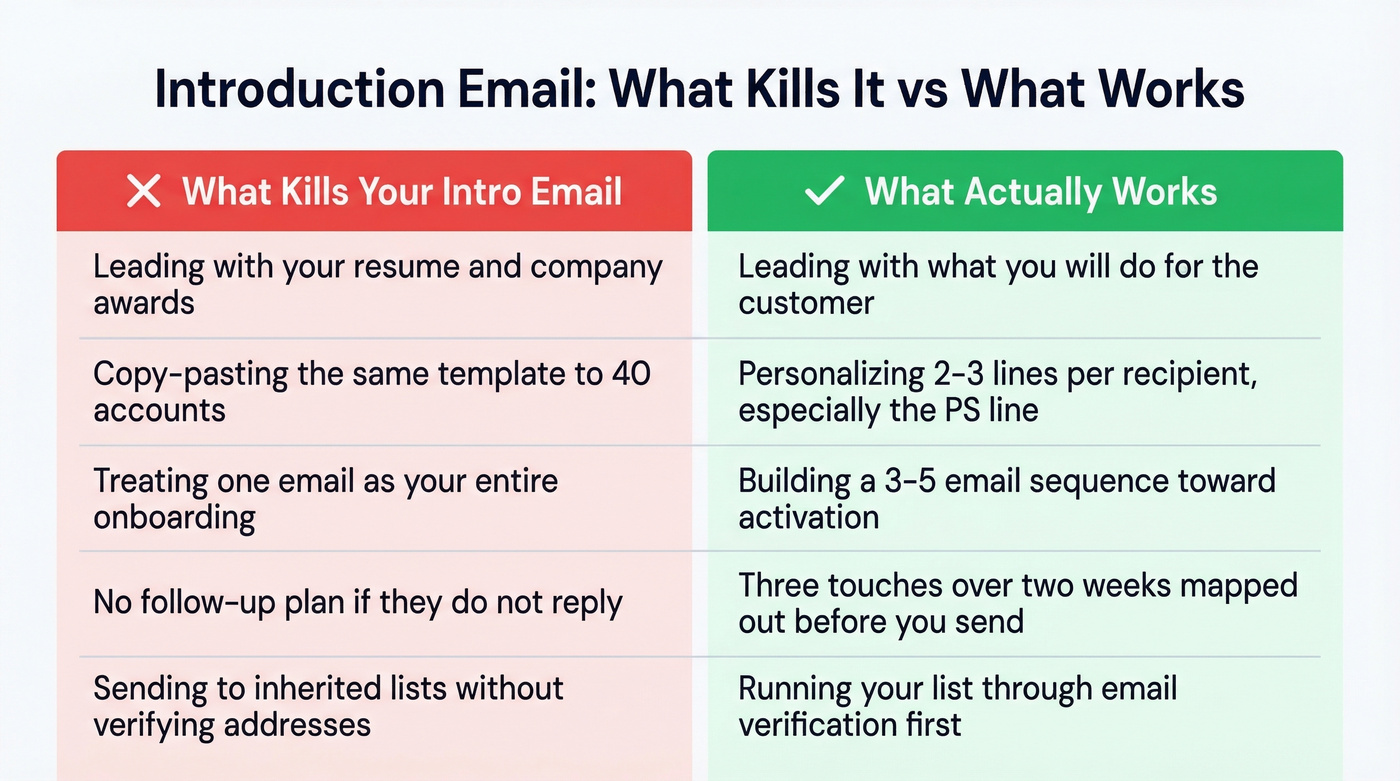
Generic templates that feel like templates. Recipients spot copy-paste instantly. If you can't personalize at least 2-3 lines, wait until you can.
Treating one email as onboarding. A single welcome email isn't onboarding - it's a notification. Build a 3-5 email sequence that moves the customer toward activation. HubSpot's onboarding email guide breaks down sequence design well if you want to go deeper.
No follow-up plan. If they don't reply, what's your next move? Map it out before you hit send. The consensus on r/sales is that three touches over two weeks is the minimum before you escalate internally (use a simple follow-up email template so you don’t overthink it).
Sending to stale data. This one drives us crazy. Inherited account lists often have 10-15% outdated addresses, and a bounced first impression doesn't just fail - it damages your domain reputation. Run your list through an email verification tool before you send. Even a quick pass catches bad addresses, catch-all domains, and spam traps that would otherwise tank your deliverability.
Late-night sends. 22% of campaigns are opened within the first hour. If that first hour is 11 PM, you're buried by morning.
Let's be honest: if your average deal size is under five figures, you probably don't need a fancy email sequence tool. A well-written handoff email sent to a verified address will outperform a 12-step automated drip blasted to stale contacts every single time.
Verify Before You Send
A bounced introduction email is worse than no email at all. It signals to the customer's mail server that you're sloppy, and it chips away at your sender reputation with every bounce.
We've seen this pattern repeatedly with inherited account lists: a CSM leaves, the new rep blasts 50 intro emails, and 8 of them bounce because contacts changed roles months ago. One team using Prospeo cut their bounce rate from 35% to under 4% after cleaning their lists - the 7-day data refresh cycle caught role changes that a monthly update would've missed. The free tier covers 75 email verifications per month, which is enough to clean a 50-account handoff list before your first send.

Great personalization needs real data. Prospeo's Chrome extension gives you 40+ data points per contact - job title, company news, tech stack - so your PS line writes itself. 40,000+ users already prospect this way.
Turn every introduction email into a personalized first impression.
Legal Quick Reference
| Jurisdiction | Key Requirements | Penalties |
|---|---|---|
| US (CAN-SPAM) | Physical address, opt-out link, truthful subject lines | $51,744-$53,088/violation |
| EU (GDPR) | Legitimate interest basis, opt-out honored, DPA | Up to EUR 20M or 4% of global turnover |
| Canada (CASL) | Consent first, opt-out within 10 business days | Up to $10M CAD |
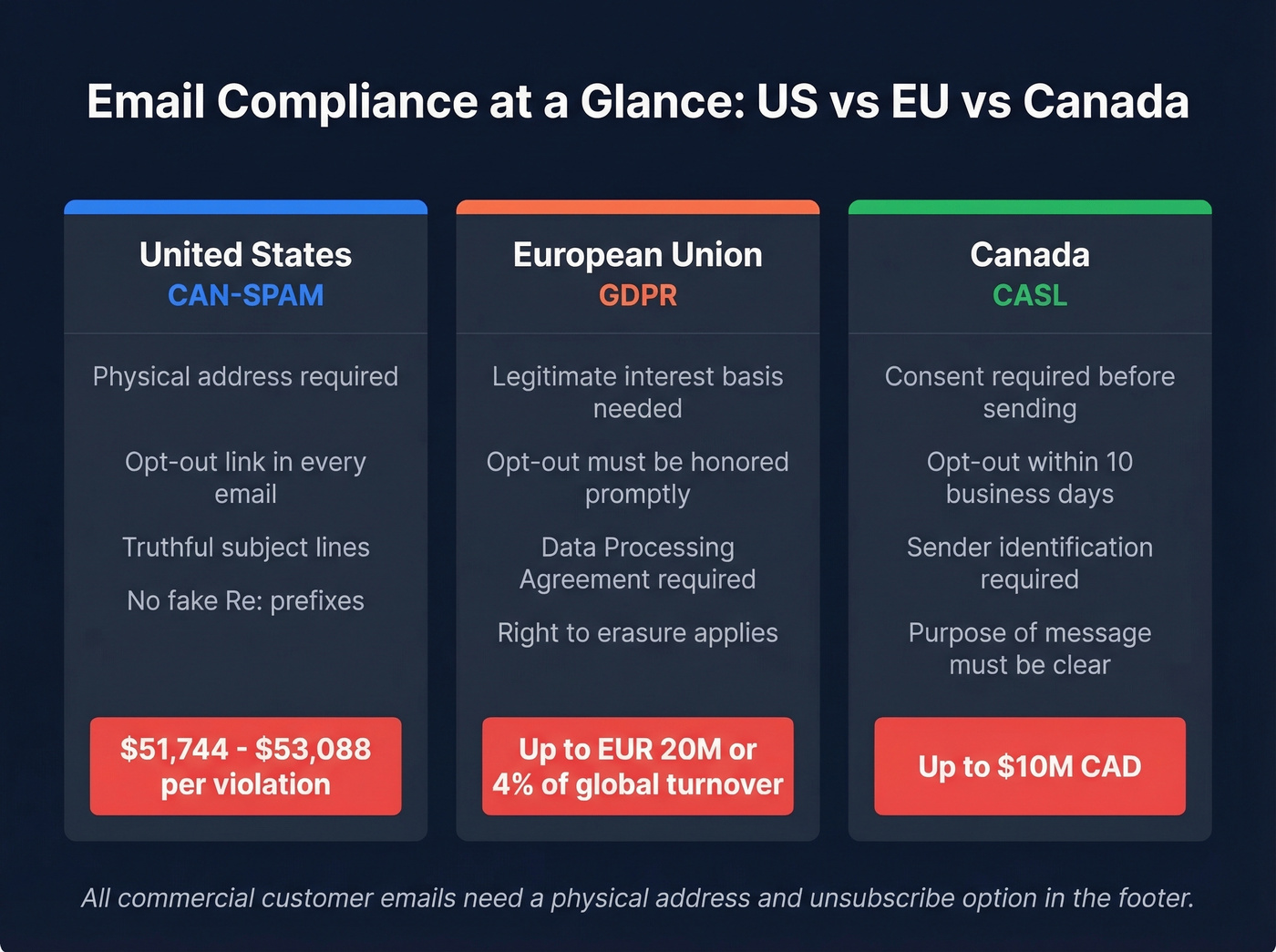
Customer emails that are part of commercial communications need a physical mailing address and an unsubscribe option in the footer. Never use fake "Re:" prefixes in subject lines. It's deceptive, it violates CAN-SPAM, and your customers will notice.
FAQ
How long should a customer introduction email be?
Under 150 words. Lead with your role, the value you'll provide, and one clear CTA. Save the details for the first meeting - the email's job is to get that meeting booked, not to tell your life story.
When's the best time to send an introductory email?
Tuesday through Thursday, 9-11 AM in the recipient's time zone. 22% of campaigns are opened within the first hour, so timing your send for business hours matters more than crafting the perfect subject line.
What if my customer's email address bounces?
Stale contact data is common with inherited accounts - expect 10-15% bad addresses. Run your list through an email verification tool before sending to protect your domain reputation and avoid a bounced first impression. Prospeo's free tier covers 75 verifications per month, which handles most handoff lists.