

40+ Customer Email Templates That Cover the Entire Relationship
Most collections of customer email templates are just support ticket scripts dressed up as a guide. That covers a slice of the emails you actually send. The rest - onboarding sequences, renewal nudges, win-back campaigns, expansion asks - you're writing from scratch at 11 PM.
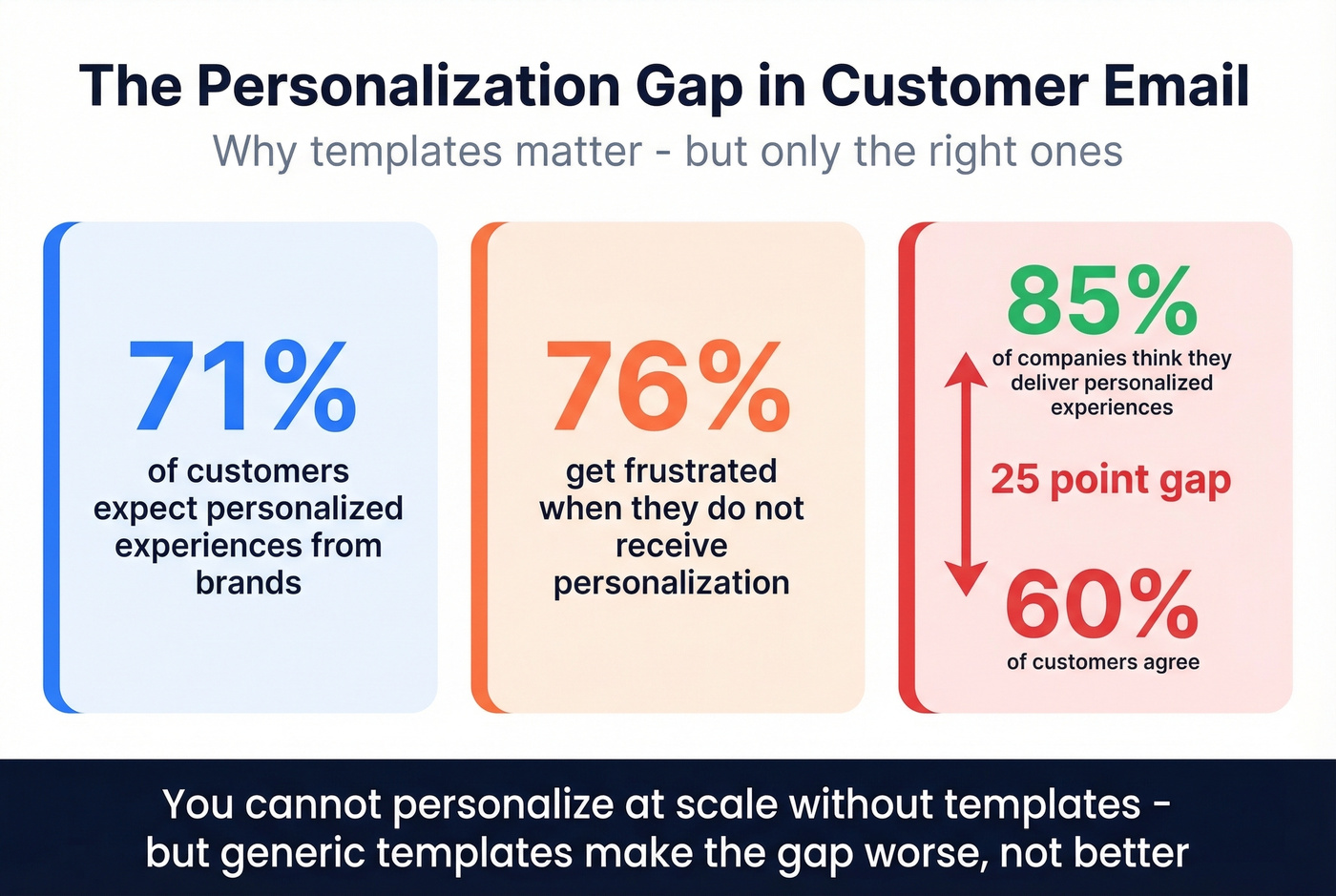
Here's the reality: 71% of customers expect personalized experiences, and 76% get frustrated when they don't get them. Meanwhile, 85% of companies think they're delivering personalized experiences, but only 60% of customers agree. That gap is where bad templates live. You can't personalize at scale without templates, but you need the right ones, organized by where the customer actually sits in their lifecycle.
What follows covers relationship emails across seven lifecycle stages. It doesn't cover transactional triggers like order confirmations or shipping updates - those are a different animal with different rules.
Every Template at a Glance
You don't need 62 templates. You need 30-40 great ones organized by lifecycle stage. Volume is vanity. Relevance is revenue.
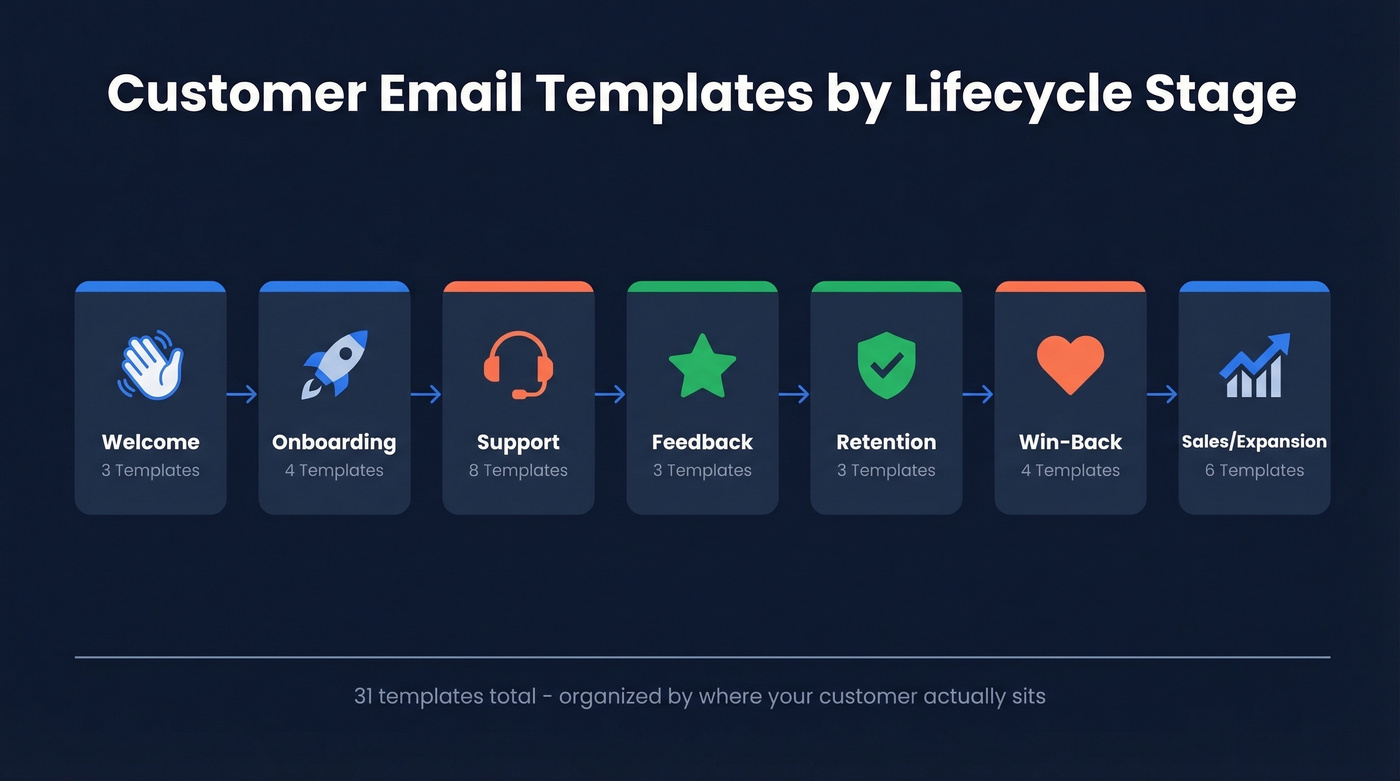
| Stage | Template | One-Line Description |
|---|---|---|
| Welcome | 1. Warm Welcome | Single CTA to get started immediately |
| 2. What to Expect | Sets cadence and content expectations | |
| 3. Personal Touch (B2B) | Named account manager intro + booking link | |
| Onboarding | 4. Quick Win | One action that drives early value |
| 5. Feature Spotlight | Introduces the feature most people miss | |
| 6. B2B Account Setup | Portal access, contacts, and kickoff scheduling | |
| 7. Check-In | Day 7-10 pulse check on progress | |
| Support | 8. Ticket Acknowledgment | Confirms receipt with timeline |
| 9. Escalation Notice | Hands off to senior team with full context | |
| 10. Refund Approval | Confirms amount, method, and timeline | |
| 11. Service Disruption | Real-time outage notification | |
| 12. Outage Resolution | Post-mortem with prevention steps | |
| 13. Complaint Response | Empathetic acknowledgment with action plan | |
| 14. Issue Resolved | Confirms fix, asks for verification | |
| 15. Post-Resolution Check-In | Follow-up to ensure stability | |
| Feedback | 16. NPS Request | One-click score, 10 seconds |
| 17. Post-Interaction Feedback | Thumbs up/down on support experience | |
| 18. Quarterly Survey | 3-question pulse on overall value | |
| Retention | 19. Renewal Reminder | 60-day heads-up with usage snapshot |
| 20. Pricing Change | Transparent notification with lock-in date | |
| 21. Retention Save | At-risk intervention with offer | |
| Win-Back | 22. Friendly Reminder | Soft re-engagement after 90 days |
| 23. We Miss You | Emotional reconnection | |
| 24. Incentive Offer | Concrete discount or free month | |
| 25. Final Notice | Last chance before sequence ends | |
| Sales/Expansion | 26. Cold Outreach | Trigger-based personalized intro |
| 27. Follow-Up | Context-rich day-3 nudge | |
| 28. Upsell | Usage-based upgrade suggestion | |
| 29. Referral Ask | Social proof + incentive | |
| 30. Cross-Sell | Complementary product introduction | |
| 31. Break-Up Email | Graceful close to outreach sequence |
Welcome Email Templates
The moment someone signs up is what HubSpot calls the "subscriber honeymoon period." Attention is at its peak. Waste it with a generic confirmation, and you've lost the best engagement window you'll get.
Every welcome email needs four things: a clear value statement, a warm tone, expectation-setting for what's next, and a single CTA. Don't cram your feature list in here.
Template 1 - The Warm Welcome
Subject: Welcome to [Company] - here's your first step
Hi [First Name],
You're in. We're glad you're here.
[Company] helps you [one-sentence value prop]. Over the next few days, we'll send you a quick-start guide, but here's the single most important thing to do right now:
[CTA Button: Complete Your Profile / Start Your First Project / Book Your Kickoff]
Questions? Hit reply - a real person reads these.
[Sender Name]
Template 2 - The "What to Expect" Welcome
Subject: What's coming your way this week
Hi [First Name],
Thanks for joining [Company]. Here's what you'll get from us:
- Today: Your account is live - log in here: [link]
- Tomorrow: A 3-minute setup guide
- This week: Tips from customers who got results fast
We email 2x/week. Every message has a point. If it ever doesn't, unsubscribe guilt-free.
[Sender Name]
Template 3 - The Personal Touch (B2B)
Subject: Quick hello from your account team
Hi [First Name],
I'm [Name], your account manager at [Company]. I'll be your main point of contact going forward.
I've looked at your setup and have a couple of ideas for getting you to value fast. Want to grab 15 minutes this week?
[CTA: Book a Time]
[Sender Name + direct phone]
The best welcome emails skip the feature dump entirely. They confirm the signup, show one clear next step, and include a direct support link. No noise.
Onboarding Email Templates
A welcome email isn't an onboarding sequence. The welcome is a handshake. Onboarding is the guided tour.
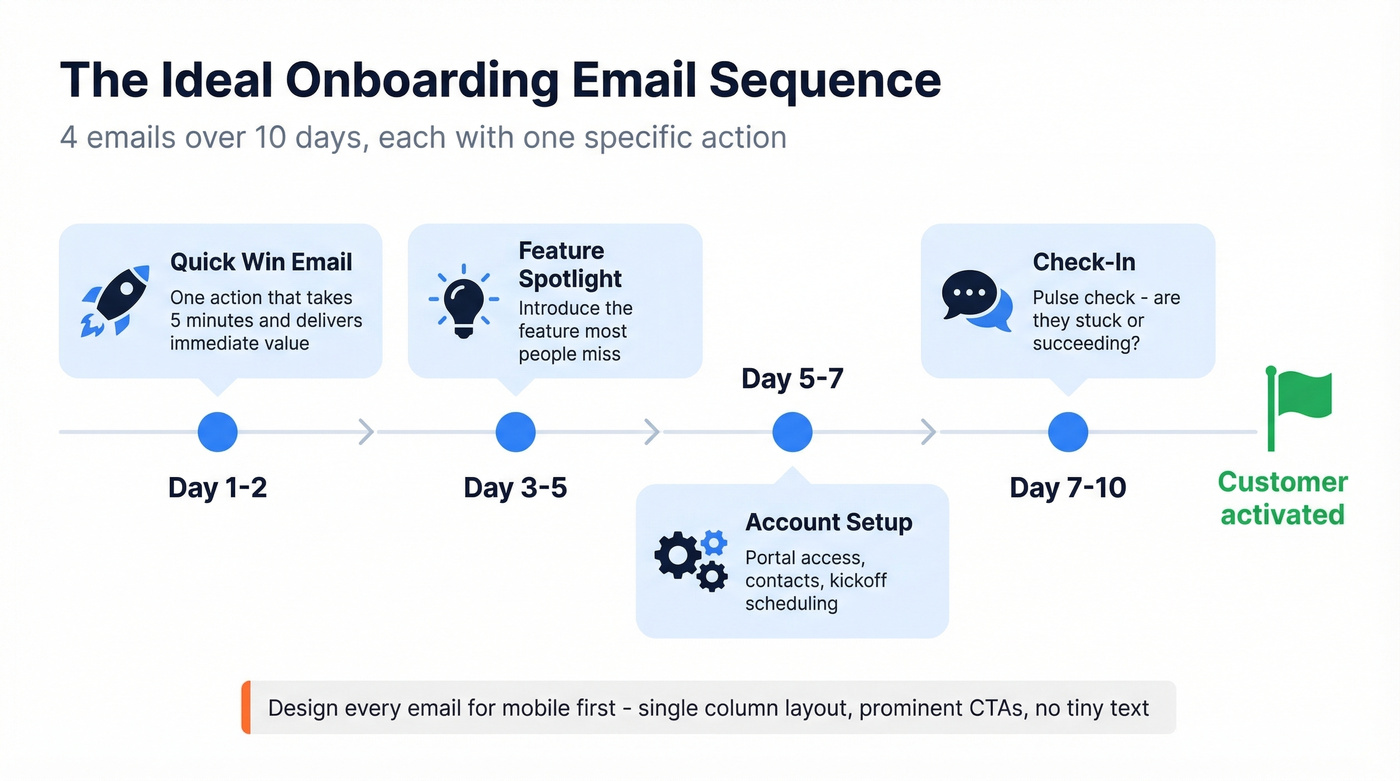
Most onboarding fails for three reasons: information overload, no quick win in the first session, and generic messaging that ignores what the customer actually signed up for. Your welcome email fires immediately. Your onboarding sequence is 3-5 emails over 7-14 days, each with one specific action. Design every email for mobile first - single-column layout, prominent CTAs, no tiny text that forces pinch-zooming.
Template 4 - Quick Win (Day 1-2)
Subject: Do this one thing first
Hi [First Name],
Most [Company] customers who see results in the first week start with [specific action]. It takes about 5 minutes.
[CTA: Try It Now]
Here's a 90-second walkthrough if you want it: [link]
Template 5 - Feature Spotlight (Day 3-5)
Subject: The feature most people miss
Hi [First Name],
Now that you've [completed quick win], here's something that'll save you time: [feature name].
[2-sentence explanation of what it does and why it matters]
[CTA: See How It Works]
Template 6 - B2B Account Setup
Subject: Your [Company] account is ready - here's your team
Hi [First Name],
Your account is live. Here's what you need:
- Account Manager: [Name] - [email] / [phone]
- Support Portal: [link]
- Getting-Started Guide: [link]
[Name] will reach out within 24 hours to schedule your kickoff. In the meantime, the guide above covers the basics.
Template 7 - Check-In (Day 7-10)
Subject: How's it going so far?
Hi [First Name],
You've been with us for a week. Quick check: have you been able to [key outcome]?
If yes - great. Reply and tell me what's working. If not - also reply. I'll get you unstuck personally.
[Sender Name]
Customer Support Email Templates
Support emails are where trust is built or destroyed. Respond within one business day minimum - within an hour if you can. And use these templates as starting points, not scripts. Identical copy-paste responses backfire the moment a customer realizes they're talking to a wall.
We saw this firsthand during a product outage: half the team was copy-pasting from a broken Google Doc, and one rep accidentally promised a full refund that wasn't authorized. Templates prevent chaos, but only if they're maintained and customized for each situation.
Acknowledgment & Escalation
Template 8 - Ticket Acknowledgment
Subject: We got your message - here's what happens next
Hi [First Name],
Thanks for reaching out. We've received your request about [brief issue summary] and assigned it ticket #[number].
You'll hear back from us within [timeframe]. If anything changes or you have more details, reply to this email - it goes straight to your ticket.
Template 9 - Escalation Notice
Subject: Your case has been escalated
Hi [First Name],
I've escalated your issue to our [senior support / engineering] team. [Name] will take over from here and reach out within [timeframe].
You don't need to re-explain anything - they have the full history.
Refunds & Returns
Template 10 - Refund Approval
Subject: Your refund has been processed
Hi [First Name],
We've processed a [full/partial] refund of [amount] to your [payment method]. It should appear within 3-5 business days.
Sorry for the trouble. If there's anything else, just reply.
Outage Communication
Template 11 - Service Disruption
Subject: [Company] service update - [date]
Hi [First Name],
We're experiencing [brief description of issue]. Our engineering team is on it, and we expect resolution by [estimated time].
What's affected: [specific features/services] What's working normally: [unaffected areas]
We'll update you within [timeframe] or as soon as it's resolved. Status page: [link]
Template 12 - Outage Resolution
Subject: Resolved: [issue summary]
Hi [First Name],
The issue affecting [feature/service] has been resolved as of [time]. Everything should be back to normal.
What happened: [1-2 sentence root cause] What we're doing: [prevention step]
We know downtime is disruptive. Thanks for your patience.
Handling Angry Customers
Template 13 is the most important template in this entire guide. Get it wrong and you lose the customer forever. Get it right and you can actually strengthen the relationship.
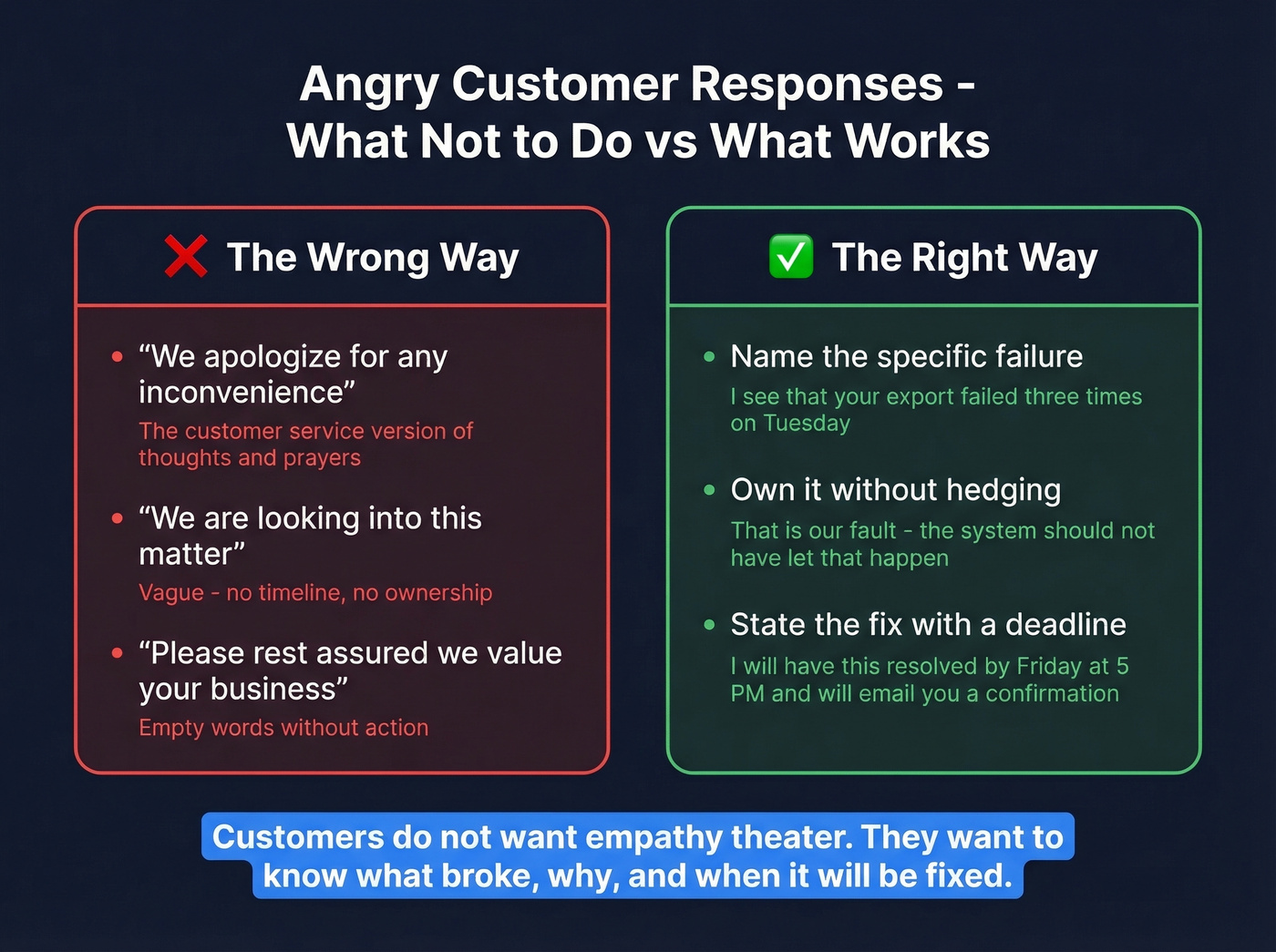
Three rules for angry customer responses. First, never use "we apologize for any inconvenience" - it's the customer service equivalent of "thoughts and prayers." Second, name the specific failure and own it. Third, state the fix with a deadline, not a vague promise. Customers don't want empathy theater. They want to know what broke, why, and when it'll be fixed.
Template 13 - Empathetic Complaint Response
Subject: Re: [original subject]
Hi [First Name],
I hear you, and I'm sorry. [Specific acknowledgment of what went wrong - not a generic apology.]
Here's what I'm doing about it: [concrete action + timeline].
I'll follow up by [date] with an update. If you need anything before then, I'm at [direct contact].
Resolution & Follow-Up
Template 14 - Issue Resolved
Subject: Your issue is fixed - quick follow-up
Hi [First Name],
Good news: [issue] has been resolved. [Brief explanation of what was done.]
Can you confirm everything's working on your end? If anything still looks off, reply here and I'll jump back in.
Template 15 - Post-Resolution Check-In
Subject: Just checking - everything still good?
Hi [First Name],
It's been [timeframe] since we resolved [issue]. Wanted to make sure everything's still running smoothly.
If you have 30 seconds, a quick reply either way helps us close the loop. Thanks!
Feedback, Retention & Win-Back Templates
Feedback & Survey Templates
Template 16 - NPS Request
Subject: One question - takes 10 seconds
Hi [First Name],
On a scale of 0-10, how likely are you to recommend [Company] to a colleague?
[NPS Scale / Button]
That's it. One click. Your answer helps us get better.
Template 17 - Post-Interaction Feedback
Subject: How'd we do?
Hi [First Name],
You recently worked with [agent name] on [issue]. Quick question: did we solve it?
👍 Yes, all good | 👎 Not quite
Either way, your feedback goes directly to the team.
Template 18 - Quarterly Check-In Survey
Subject: 3 questions, 2 minutes - help us improve
Hi [First Name],
We run a quick survey every quarter to make sure [Company] is actually helping you [key outcome]. Three questions, no fluff.
[CTA: Take the Survey]
We read every response. Last quarter's feedback led to [specific improvement].
Renewal & Retention Templates
Template 19 - Renewal Reminder (60 Days Out)
Subject: Your [Company] renewal is coming up
Hi [First Name],
Your subscription renews on [date]. Here's a quick snapshot of what you've accomplished this year:
- [Metric 1]
- [Metric 2]
Want to discuss your plan before renewal? Reply or book time here: [link]
Template 20 - Pricing Change Notification
Subject: A change to your [Company] pricing
Hi [First Name],
Starting [date], your plan will move from [old price] to [new price]. Here's why: [brief, honest explanation - new features, infrastructure costs, etc.]
Your current rate is locked until [date]. If you have questions, reply to this email or call [number].
Template 21 - Retention Save (At-Risk Customer)
Subject: Before you go - can we talk?
Hi [First Name],
I noticed [signal - reduced usage, cancellation request, downgrade]. I'd hate to see you leave without making sure we've done everything we can.
Would 15 minutes help? I can [offer - extended trial, plan adjustment, dedicated support session].
[CTA: Book a Call]
Win-Back Templates
The standard trigger is 90 days of inactivity. The sequence structure that works: friendly reminder, emotional reconnection, incentive, final notice. Space them about a week apart. Sending all four in a week screams desperation.
Template 22 - Friendly Reminder
Subject: It's been a while, [First Name]
Hi [First Name],
We noticed you haven't logged in since [date]. No pressure - just wanted to make sure you know [new feature or update] is available.
[CTA: See What's New]
Template 23 - "We Miss You"
Subject: Things have changed since you left
Hi [First Name],
A lot has happened at [Company] since [date]. Here are three things you missed:
- [Update 1]
- [Update 2]
- [Update 3]
Worth another look? [CTA: Log Back In]
Template 24 - Incentive Offer
Subject: Come back? Here's [incentive]
Hi [First Name],
We'd love to have you back. To make it easy, here's [specific incentive - 20% off next month, free month, extended trial]:
[CTA: Claim Your Offer]
Offer expires [date].
Template 25 - Final Notice
Subject: Last chance: [incentive] expires [date]
Hi [First Name],
This is the last time we'll reach out about this. Your [incentive] expires on [date].
If [Company] isn't the right fit anymore, no hard feelings. But if timing was the issue, this is a good moment to come back.
[CTA: Reactivate Now]

Personalized templates only work when they reach real inboxes. Prospeo gives you 143M+ verified emails at 98% accuracy - so your welcome, onboarding, and win-back emails land instead of bounce.
Stop writing perfect emails to dead addresses.
Sales & Expansion Templates
Outreach Emails
Every outreach email needs a personalization hook, a relevance statement tied to the recipient's world, social proof, and a clear ask. The "just checking in" follow-up is dead - in cold outbound testing, timeline-based hooks can outperform problem hooks by 2.3x in reply rate (benchmarks here).
Before sending outreach at scale, verify your contact list. If too many emails bounce because contacts changed jobs, your sender reputation takes a hit and even your good emails start landing in spam. Prospeo's real-time verification catches invalid addresses, spam traps, and catch-all domains with 98% accuracy - the free tier covers 75 verifications a month.
Template 26 - Cold Outreach
Subject: [Specific observation about their company]
Hi [First Name],
I noticed [Company] just [trigger - new hire, funding round, product launch]. When that happens, teams like yours usually run into [specific challenge].
We helped [similar company] [specific result]. Would it make sense to chat for 15 minutes next week?
[Sender Name]
Use this as your starting outreach template and adapt the trigger line for each prospect - a generic version defeats the purpose.
Template 27 - Follow-Up (Day 3)
Subject: Re: [original subject]
Hi [First Name],
Quick follow-up on my note from [day]. I know [their role] gets buried in email, so the short version:
[One-sentence value prop]. [Social proof]. How's your calendar [specific day]?
Upsell, Referral & Cross-Sell
Template 28 - Upsell Based on Usage
Subject: You're outgrowing your current plan
Hi [First Name],
You've hit [usage metric] this month - that's [X%] more than when you started. Nice.
The [next tier/add-on] would give you [specific benefit]. Want me to walk you through it?
Template 29 - Referral Ask
Subject: Know someone who'd benefit from [Company]?
Hi [First Name],
You've been getting great results with [Company] - [specific metric if available]. If you know someone dealing with [problem you solve], I'd love an intro.
We offer [referral incentive] for every referral that signs up.
Template 30 - Cross-Sell
Subject: Something new that pairs with what you're already using
Hi [First Name],
Since you're already using [current product/feature], check out [new product/feature]. It [one-sentence benefit].
Teams using both see [X% improvement in Y].
[CTA: Learn More]
Template 31 - The Break-Up Email
This is the closer for a cold outreach sequence that hasn't gotten a reply. It works because it removes pressure and gives the recipient an easy out - which, counterintuitively, often triggers a response.
Subject: Should I close your file?
Hi [First Name],
I've reached out a few times and haven't heard back - totally fine. I don't want to be that person clogging your inbox.
If the timing's wrong, no worries. If something changes down the road, I'm at [email]. Closing the loop on my end for now.
[Sender Name]
6 Template Mistakes That Kill Response Rates
1. Sounding robotic. Read every template out loud before saving it. If it sounds like a press release, rewrite it. This is the #1 complaint about templated emails, and AI-generated first drafts make it worse. Customers can smell a template from the first sentence - the goal is for them to suspect it's a template but not be sure.
2. Broken personalization tags. Nothing kills trust faster than "Hi {first_name}." Always preview before sending, and set fallback text for every merge field. "Hi there" beats "Hi {{contact.first_name}}" every time.
3. Information overload. One goal per email. If it takes longer than 30 seconds to scan, it's too long. Cut the second CTA. Cut the third paragraph. Cut the "P.S." you added because someone told you P.S. lines boost engagement in 2014.
4. Vague or buried CTAs. "Let me know your thoughts" isn't a CTA. "Book 15 minutes on Thursday" is. Make it specific, actionable, and visually prominent.
5. Follow-ups missing context. Your follow-up should restate who you are and why you're emailing. The recipient doesn't remember your first message - they get 100 emails a day. Give them context in the first sentence.
6. Skipping email authentication. Before you worry about template copy, make sure your emails actually arrive. Set up SPF, DKIM, and DMARC records for your sending domain. Without authentication, inbox providers treat your emails as suspicious and your beautifully crafted templates land in spam. Most email platforms walk you through this in about 15 minutes. Do it once and forget about it. For a deeper walkthrough, run an email deliverability audit and review your DMARC reports.
Here's the thing most people miss: the most expensive template mistake isn't bad copy - it's bad data. We've seen win-back sequences sent to 2,000 churned customers where 340 bounced because contacts changed jobs and nobody updated the CRM. Once your bounce rate creeps above 5%, deliverability starts taking real damage and even your good emails hit spam folders. Verify before you send. Always.
Writing Personalized Emails at Scale
Personalized emails get 29% higher open rates and 41% higher click-through rates. And 80% of businesses report customers spend 38% more when the experience feels personalized. But personalization doesn't mean stuffing someone's first name into a subject line. It means the email feels relevant to their situation.
Write like you talk. If you wouldn't say "I hope this email finds you well" to someone's face, don't type it.
The best approach we've found: take one core template and create 3-4 variants by persona. Same structure, different framing. A business development email should emphasize revenue impact when sent to a VP of Sales, and process efficiency when sent to a Director of Ops. Same skeleton, different muscle. If you want more examples, see our guide to personalized emails.
Quick personalization checklist:
- Reference something specific - recent company news, role, industry
- Match tone to the recipient's seniority and industry
- Use their name once, not five times
- Include one detail that proves you didn't batch-send this
- Keep merge fields to a minimum and always set fallbacks
- Design for mobile first - single-column layout, large CTA buttons, no tiny text
Organizing Your Template Library
Let's be honest about the state of most template libraries: they're a mess. A Google Doc with 47 templates, half of them outdated, some with broken links, and the emojis rendering differently on every device. A Reddit thread on r/ecommerce flags this exact problem - Google Docs can change emoji rendering, Slack converts emojis to text codes, and tools like Guru destroy formatting when you paste.
The fix isn't another shared doc. It's using a purpose-built help desk or CRM with native template features - saved replies, snippet libraries, shared inboxes with template access baked in. Your team won't adopt a seventh tool just for templates, so pick one that lives where they already work.
Good template storage looks like templates organized by lifecycle stage (not alphabetically), version dates on every template, and a quarterly review scheduled to check for broken links, outdated references, and declining engagement. Assign one owner per template category who's accountable for updates. And tie list hygiene to the same cadence: identify non-openers over 6 months and non-clickers over a year, run a re-engagement sequence, then remove the dead weight. (If you need subject ideas for that sequence, start with re-engagement email subject lines.)
Best Tools for Managing Templates
| Tool | Starting Price | Best For | G2 Rating |
|---|---|---|---|
| Zendesk | $19/agent/mo | Complete support suite | 4.3/5 |
| Freshdesk | Free tier | Small teams on a budget | 4.4/5 |
| Help Scout | ~$25/user/mo | Personal-feeling support | 4.4/5 |
| HubSpot Service | Free tier | Teams already on HubSpot | 4.4/5 |
| Gorgias | $10/mo | Ecommerce / Shopify | 4.6/5 |
| Front | $19/seat/mo | Shared inbox workflows | 4.7/5 |
Zendesk is the most complete option, but the learning curve is real. Freshdesk's free tier is genuinely generous for small teams and handles template management surprisingly well. Help Scout keeps conversations feeling human rather than like ticket numbers, which matters if your brand voice is warm. HubSpot Service Hub is the obvious pick if you're already running HubSpot CRM - don't add a separate tool just for templates. Gorgias is purpose-built for ecommerce with deep Shopify integration and macro support. Front wins on shared-inbox workflows where multiple people touch the same customer thread.
For teams under five people, start with Freshdesk's free tier or Help Scout. You don't need Zendesk's complexity until you're handling hundreds of tickets a month. Skip Gorgias entirely unless you're running a Shopify store - it's great at what it does, but it's not a general-purpose tool.
If you’re building a sales + support stack at the same time, compare a few sales CRM tools and keep your email thread best practices consistent across teams.
Your lifecycle emails need the right contact data behind them. Prospeo enriches your CRM with 50+ data points per contact at a 92% match rate - so every template hits the right person at the right stage.
Enrich your customer list before you hit send.
FAQ
How many customer email templates does a team actually need?
30-40 templates organized by lifecycle stage covers most businesses. Focus on welcome, onboarding, support, feedback, retention, win-back, and expansion - then cut any template that doesn't get used within a quarter. Quality and relevance beat volume every time.
Should I use the same templates for B2B and B2C?
No. B2B onboarding needs named account managers, portal access links, and a more formal kickoff structure. B2C can be warmer, more casual, and more visual. The underlying frameworks are similar, but tone, content length, and CTA style differ significantly.
How often should I update my template library?
Review every quarter at minimum. Check for broken links, outdated product references, and declining open or reply rates. If a template's response rate drops below your baseline for two consecutive months, rewrite it - don't just tweak the subject line.
What's the fastest way to verify email addresses before sending?
Upload a CSV to a real-time verification tool to catch invalid addresses, spam traps, and catch-all domains before they damage your sender reputation. Bulk verification with 98% accuracy is standard for good tools, and free tiers exist that cover enough for small teams to start cleaning lists immediately.
Can I use AI to write customer email templates?
Yes, as a first draft - but always rewrite in your brand voice and read the result out loud. AI copy tends to sound polished but generic, and "sounding robotic" is the single most common template complaint from customers. Use AI for structure, then humanize the language.