

Email Thread Best Practices That Actually Work
The average office worker receives 121 emails per day. Heavy email professionals burn roughly 28% of their workweek just managing their inbox. Most of that time isn't spent reading or writing - it's spent searching for a client approval that split into a separate conversation three weeks ago, buried under a subject line that no longer matches anything you remember typing.
These eight rules fix that.
What Is an Email Thread?
An email thread is a series of replies grouped together as a single conversation. Gmail calls them "conversations," Outlook calls them "conversation view." Under the hood, email clients group messages using subject lines plus headers like Message-ID, In-Reply-To, and References. When those signals align, replies stack neatly. When they don't, threads break and decisions vanish.
Why Threads Break
Most people blame their email client. The real culprit is almost always human behavior - though the technical layer matters too.
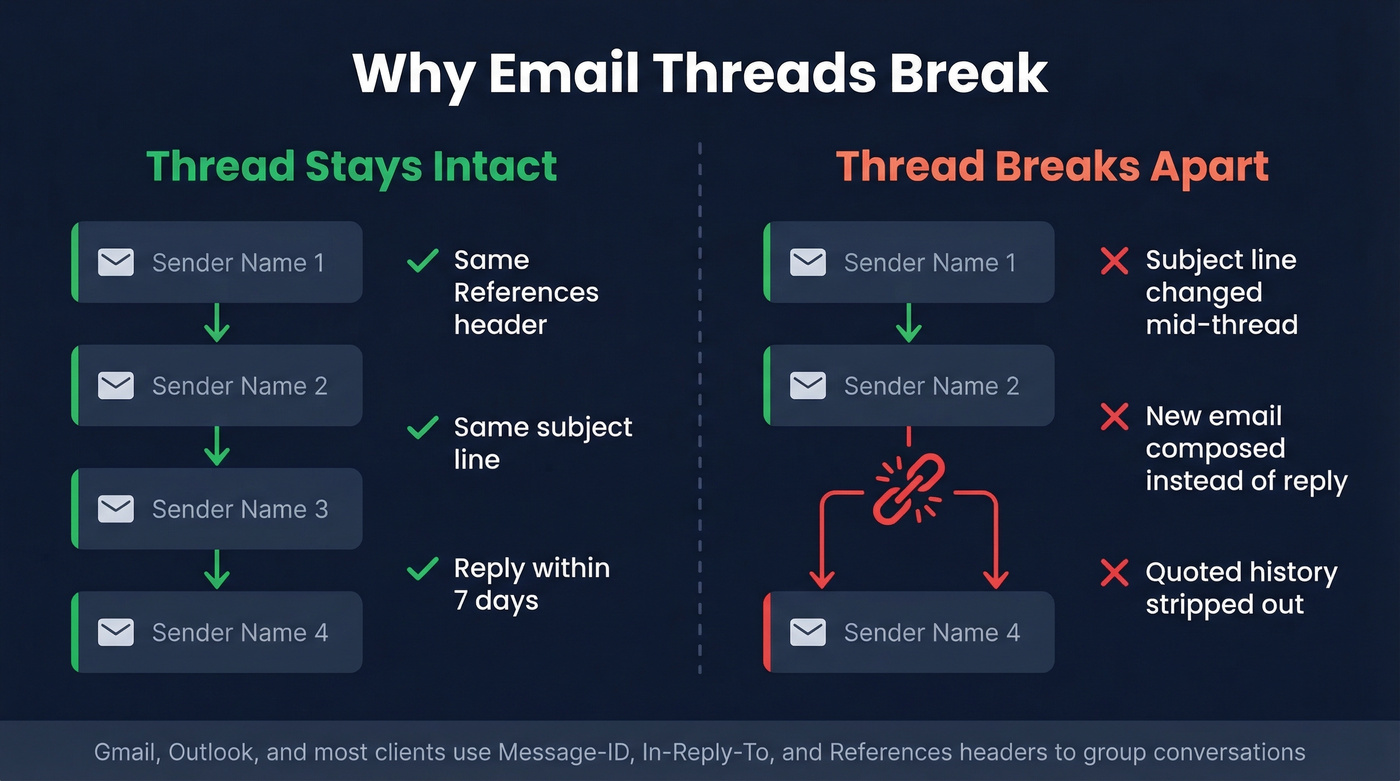
Gmail groups emails into a conversation when messages share matching References headers pointing to the same Message-ID, have the same recipients or subject as a previous message, and arrive within one week of the last reply. Break any of those conditions and Gmail treats it as a new conversation. Outlook relies on similar reply/thread headers and subject continuity, but threading behavior isn't perfectly consistent across platforms.
Then there's the subject-only threading pitfall. Some email setups thread purely by subject line. If you've got a recurring subject like "Invoice" or "Weekly Update," you end up with mega-threads spanning years - hundreds of unrelated messages jammed together because the subject never changed.
The behavioral causes are just as destructive. Starting a brand-new email instead of replying to the existing chain. Stripping the quoted history. Changing the subject line mid-conversation. Each one severs the thread and kills your paper trail.
8 Rules for Clean Email Threads
Here's the hot take before we get into specifics: individual discipline doesn't fix threading. If half your team ignores these rules, your threads still break. Agree on these norms as a team, or don't bother.
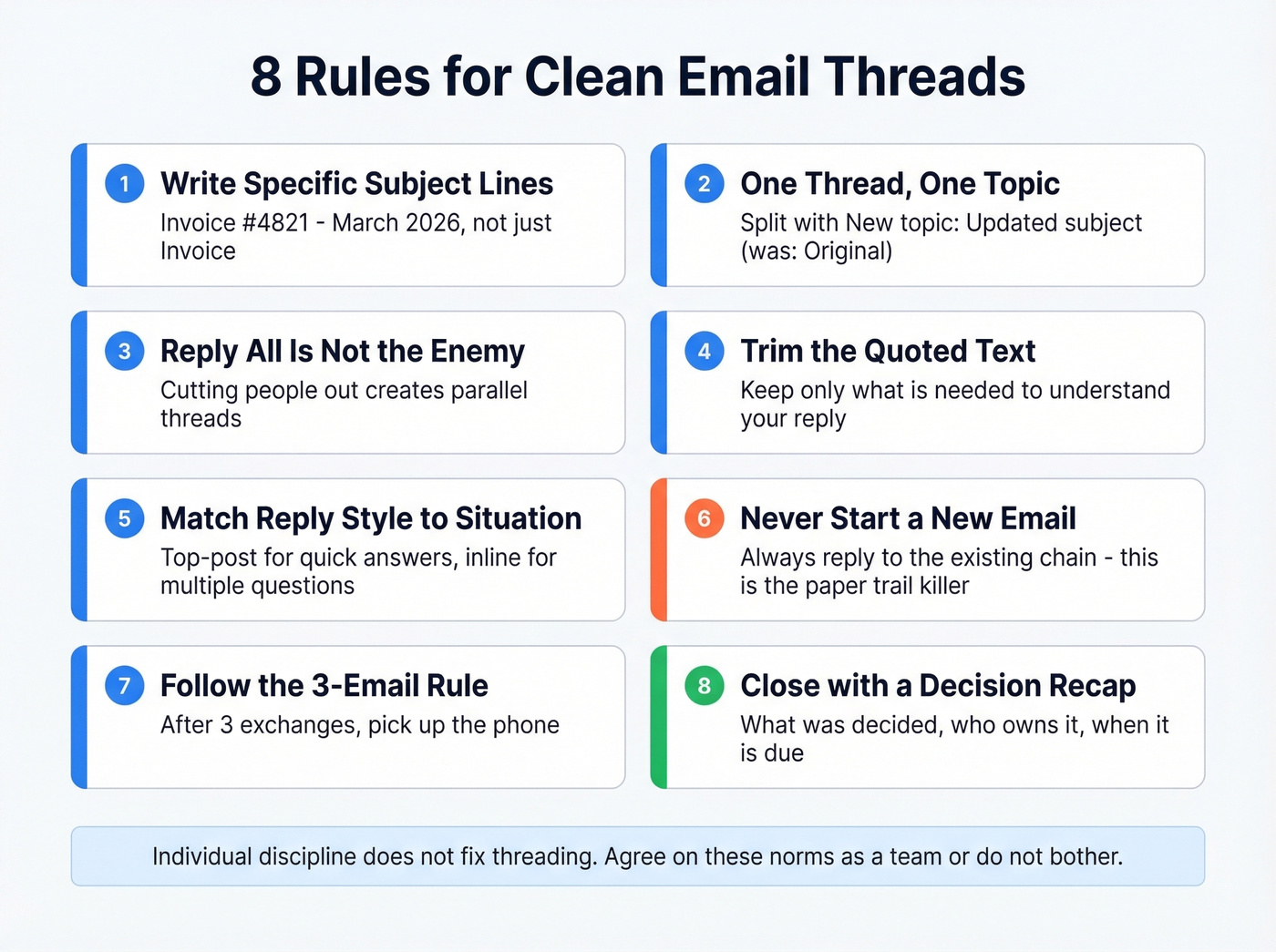
1. Write Specific Subject Lines
"Invoice #4821 - March 2026" threads correctly. "Invoice" creates a mega-thread that swallows every invoice email you've ever sent.
Specific subjects prevent accidental grouping and make threads searchable months later. This is the single highest-impact habit you can build. We've seen teams cut their email search time in half just by enforcing subject-line specificity - no other change required. If you want swipeable ideas, use these email subject lines as a starting point.
2. One Thread, One Topic
When the conversation drifts, don't just keep replying. Use the format "New topic: Updated subject (was: Original subject)" to signal a split while preserving continuity. It takes five seconds and saves everyone from scrolling through irrelevant context.
3. Reply All Isn't the Enemy
Here's the thing: hitting Reply when you should've hit Reply All is the actual problem. Important stakeholders get cut out of decisions, then someone forwards the chain, and suddenly there are two parallel threads with different information. Pause before you click. If people were CC'd for a reason, keep them there.
4. Trim the Quoted Text
Keep only the text needed to understand your reply. The full history lives in the thread - you don't need to repeat it. Untrimmed chains become walls of nested text that nobody reads. Cut aggressively, keep the relevant question or decision point, and move on.
5. Match Your Reply Style to the Situation
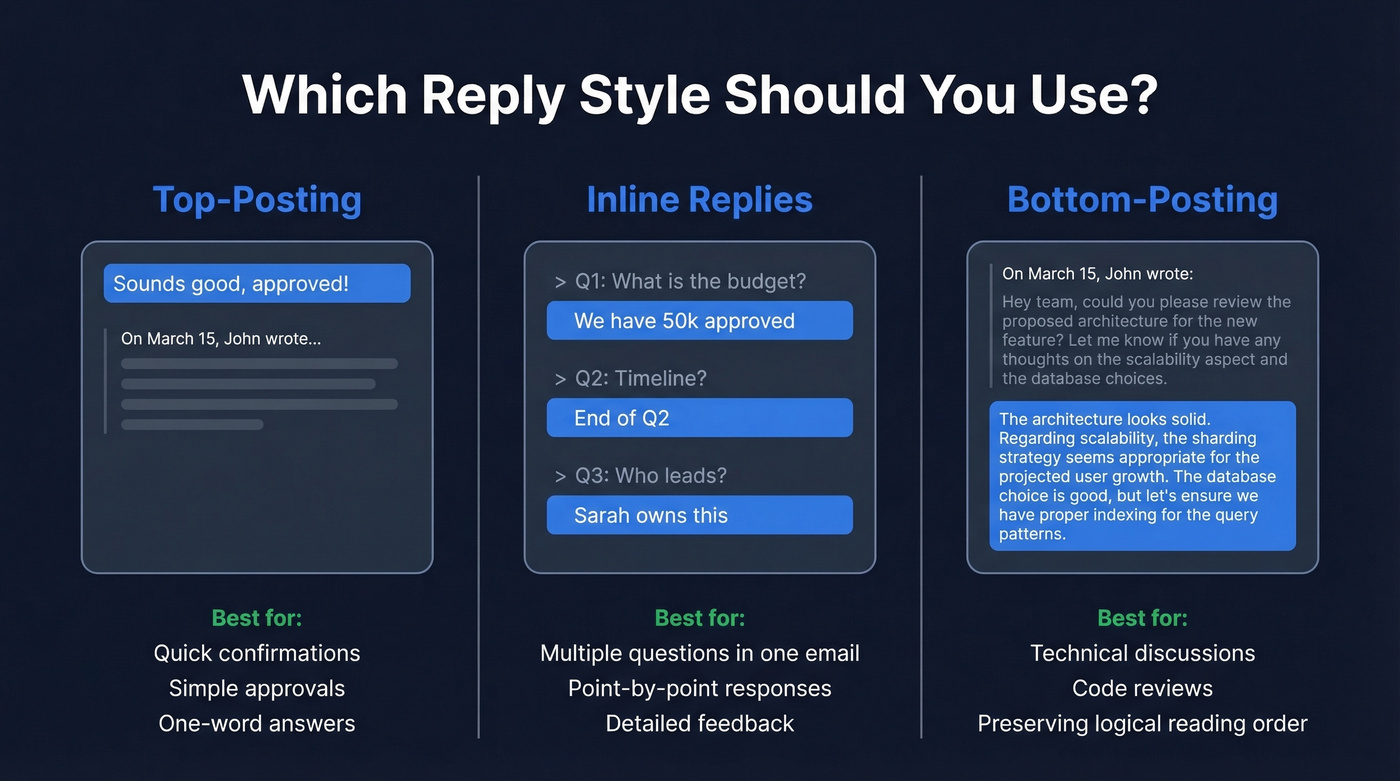
For a quick "approved" or "sounds good," top-posting is fine - everyone expects it. But when you're responding to three separate questions in one email, inline replies directly below each question are dramatically easier to follow. For technical discussions or code reviews, bottom-posting keeps the logical flow intact.
6. Never Start a New Email
This is the paper-trail killer.
When someone composes a fresh email instead of replying to the existing thread, ticket numbers vanish, case references disappear, and searching for the conversation later becomes nearly impossible. The frustration is real - we've watched entire deal histories evaporate because a rep started a new compose window instead of hitting reply. Always reply to the existing chain.
7. Follow the 3-Email Rule
If you're on email number four and still going back and forth, stop typing. Pick up the phone or jump on a call. Email is great for documentation and async decisions. It's terrible for real-time negotiation or nuanced discussion. Three exchanges is the threshold - after that, you're wasting everyone's time. If you're in a sales context, it helps to have a consistent sales communication standard across the team.
8. Close Every Decision Thread with a Recap
Don't let decisions live only in the middle of a 12-message thread where nobody will find them. Send a recap reply that captures what was decided, who owns what, and when it's due. This single habit has saved our team more arguments than any other practice on this list. If you need a follow-up structure, borrow from these sales follow-up templates.

Broken threads kill deals. But so do bounced emails. Prospeo delivers 98% verified email accuracy so every thread you start actually reaches the right person - no dead addresses cluttering your inbox.
Stop threading into the void. Start with emails that land.
Template: Decision Recap Reply
Most email guides stop at etiquette tips. Here's the template that actually prevents decisions from getting lost. Drop it at the end of any thread where a decision was made, within 24 hours while the context is still fresh.
Subject: RE: [Original Thread Subject]

Hi all   -   locking in what we decided:

**Decision:** [One-sentence summary of what was agreed]

**Action Items:**
1. [Task] → Owner: [Name] | Due: [Date] | Success = [specific outcome]
2. [Task] → Owner: [Name] | Due: [Date] | Success = [specific outcome]
3. [Task] → Owner: [Name] | Due: [Date] | Success = [specific outcome]

If I've missed anything, reply to this thread by [date]. Otherwise, we're locked.
Each action item needs three things: an owner, a due date, and a clear definition of done. Skip any one of those and the task drifts into "I thought you were handling that" territory, which is where projects go to die.
When to Start a New Thread
Not every conversation belongs in the same chain. Start a fresh thread when:
- The topic has genuinely shifted, not just drifted
- New stakeholders are joining who don't need the prior context
- A decision is needed on a sub-issue that deserves its own paper trail
- The thread exceeds roughly 15 messages
The project management crowd on Reddit has debated this endlessly. The consensus: one mega-thread per project sounds organized in theory, but once five or more stakeholders are involved, important decisions get buried. Split deliberately and link back to the original thread when needed.
When to Leave Email Entirely
Email works best for documentation, formal communication, and external stakeholders. Slack dominates real-time internal collaboration. Calls win whenever you need back-and-forth negotiation or nuance. If you're trying to reduce back-and-forth, a clear sequence management approach helps.
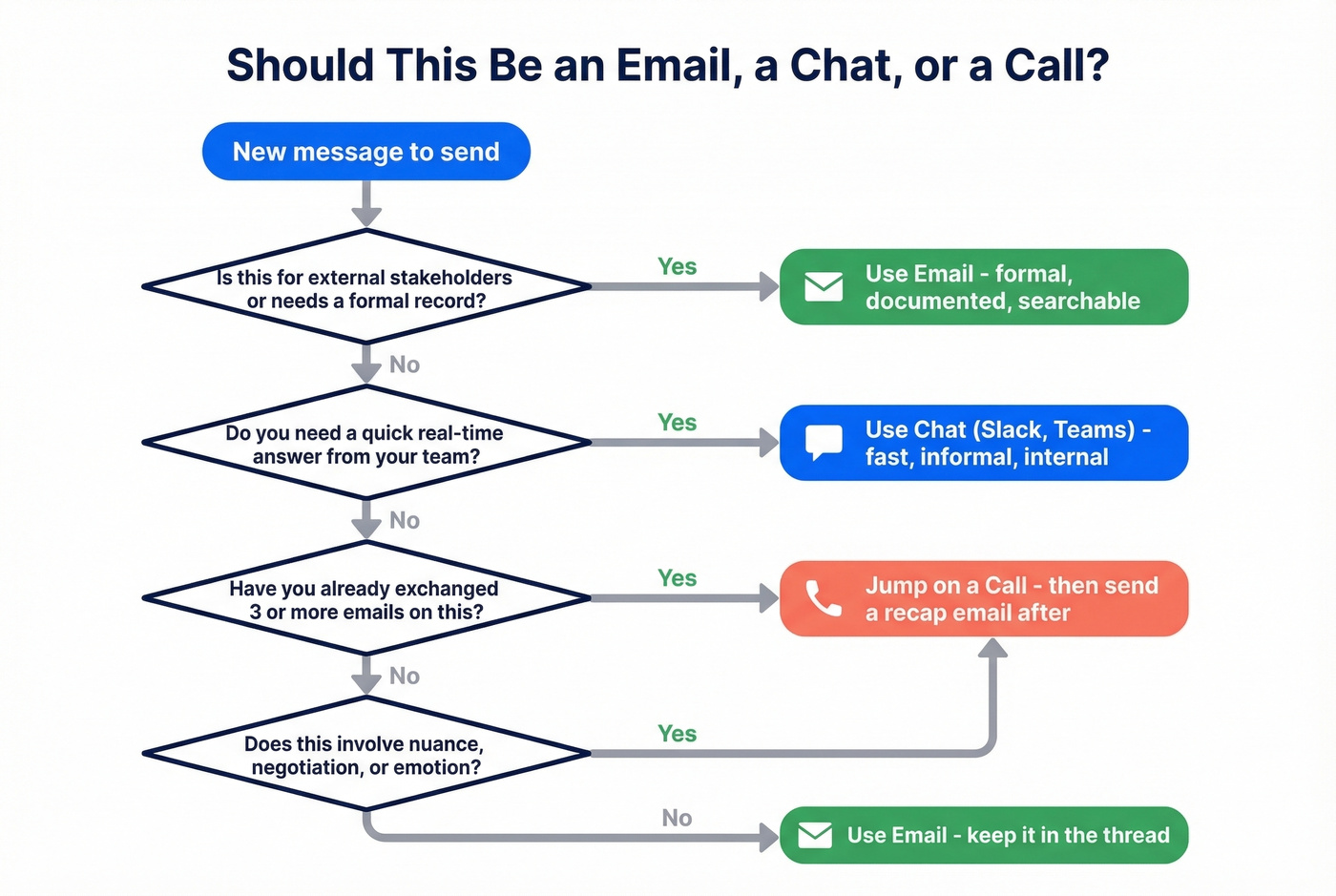
If a thread is turning into a chat conversation, move it to chat. If it's turning into a debate, get on a call and send the recap email afterward. Let's be honest - most 20-message email threads should've been a 10-minute call after message three.
For outbound teams, thread hygiene starts before the first send. If your contact data is stale, your carefully crafted thread bounces before anyone reads it. Tools like Prospeo verify emails in real time with 98% accuracy, so your outreach threads actually reach someone and your sender reputation stays healthy. If you're building lists at scale, pair that with data enrichment to keep records current.
You just built the perfect decision recap. Now make sure the people on that thread are real buyers. Prospeo gives you 143M+ verified emails refreshed every 7 days - at $0.01 per contact.
Great email hygiene starts before you hit compose.
FAQ
What's the difference between an email thread and an email chain?
Most people use "thread" and "chain" interchangeably. Some guides draw a distinction - threads stay on one topic while chains can become a looser set of forwarded messages - but in day-to-day work they mean the same thing: a grouped conversation in your inbox.
Why does my Gmail thread keep splitting?
Gmail groups messages when they share matching References headers, the same recipients or subject, and arrive within one week of each other. Change the subject, compose a new email instead of replying, or wait too long between replies, and Gmail treats it as a separate conversation.
How many emails is too many in one thread?
Once a thread passes 15 messages or spans more than two distinct decisions, start a new one. Link back to the original for context. Beyond that length, critical action items get buried and participants stop reading.
Should I use BCC to manage thread recipients?
Skip BCC for ongoing threads - it creates confusion when the BCC'd person replies and nobody knows they were included. Use BCC only for mass announcements where replies aren't expected, like company-wide updates or event invitations.