

Email Deliverability Audit: 2026 Step-by-Step Guide
One practitioner reported open rates jumping from 12% to 58% in three weeks after running this exact checklist. That's not a fluke - it's what happens when you stop guessing and start running a proper email deliverability audit.
Almost 20% of permission-based emails never reach the inbox. If your open rates have cratered and nothing else changed, you've got a deliverability problem. Here's how to find and fix it.
The step most people skip: verifying your contact list before you send. Bounces above 3% tank your reputation faster than any misconfigured DNS record.
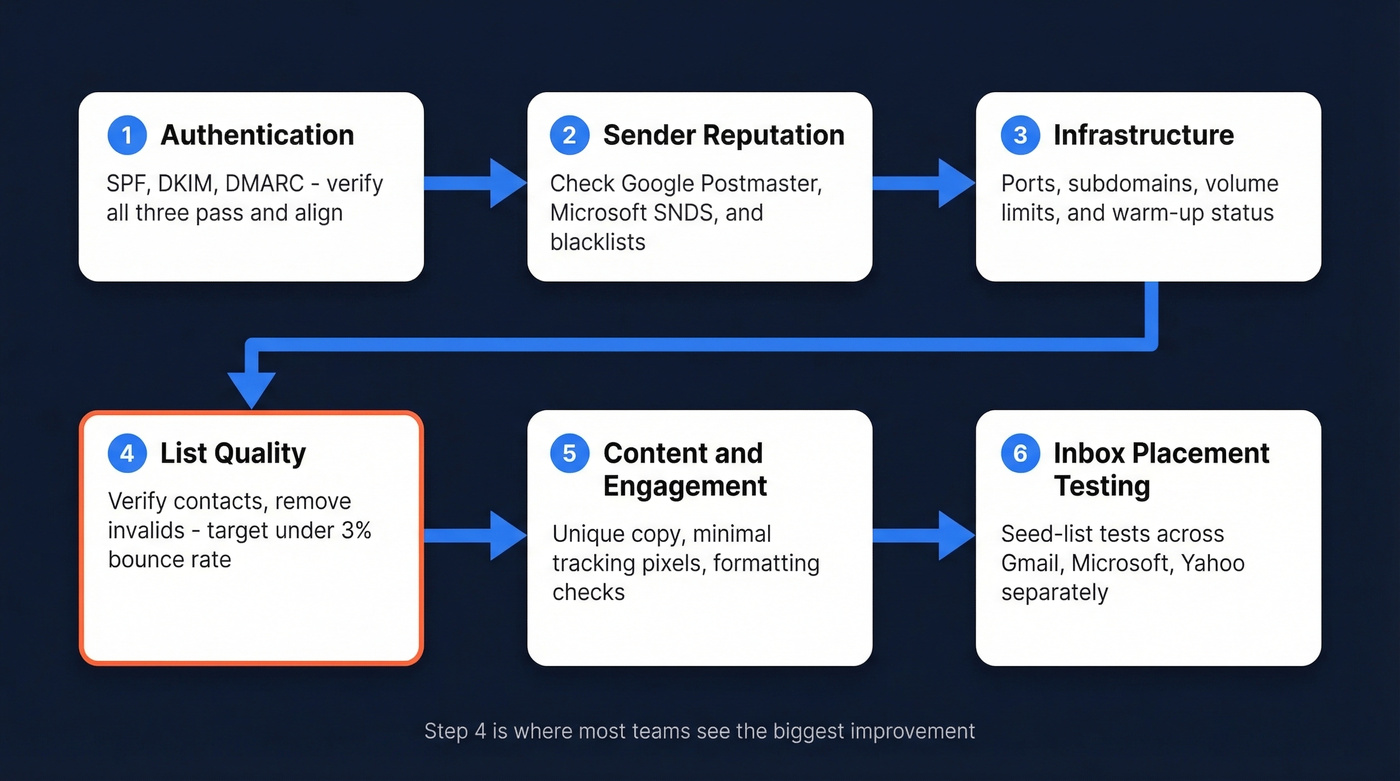
The quick version - six steps, in order:
- Verify authentication (SPF, DKIM, DMARC)
- Check sender reputation across ISPs
- Audit sending infrastructure
- Clean your list and measure bounce rates
- Review content and engagement signals
- Run inbox placement tests
What Deliverability Audits Actually Measure
Delivery rate measures whether the server accepted your email. Deliverability measures whether it landed in the primary inbox versus spam. You can have 98% delivery and 60% inbox placement - that gap is the problem most teams don't realize they have.
Since Yahoo began enforcing bulk sender authentication requirements in 2024, audits aren't optional. You're being graded whether you check or not. Think of each audit as an email risk assessment: a systematic way to surface the vulnerabilities silently killing your inbox placement before they compound.
The 6-Step Audit Checklist
Step 1 - Authentication
Run dig TXT yourdomain.com to verify your SPF record. SPF has a hard 10-DNS-lookup limit - exceed it and the record fails silently. DKIM keys should be 2048-bit (1024-bit minimum), rotated every 6-12 months.
DMARC is where teams procrastinate. Ramp from p=none to p=quarantine to p=reject. If you're still at p=none after six months, you're stalling. Bulk senders now need all of the following:
- SPF + DKIM passing and aligned
- A DMARC record (p=none minimum) with DMARC passing
- One-click unsubscribe via the List-Unsubscribe header
- Unsubscribes honored within 2 days
Step 2 - Sender Reputation
Google Postmaster Tools shows your domain reputation - it's free and takes five minutes to set up. Microsoft SNDS provides sender data for Outlook/Hotmail traffic, primarily IP-level signals. Run your domain and IPs against Spamhaus and major blacklists via MXToolbox.
Reputation is tracked per-domain AND per-IP. A clean domain on a dirty shared IP still has a problem. If you need a deeper playbook, see our sender reputation guide.
Step 3 - Infrastructure
Use SMTP port 587 or 465 for secure transmission - never 25. Separate subdomains for marketing versus transactional email so a bad campaign doesn't tank your password-reset deliverability.
For cold email infrastructure specifically, volume thresholds matter. More than 50 emails per day per mailbox triggers filtering. The safe zone is 25-35 per sender per day with random delays, and you should warm domains for 21-30 days minimum. (More on safe sending limits in our email velocity guide.)
Step 4 - List Quality
This is the step that actually moves the needle. A perfectly authenticated email sent to a dead address still generates a hard bounce that damages your reputation. The consensus on r/coldemail is clear: bounce rates above 3% are one of the fastest ways to burn a domain. Yahoo's hard ceiling for spam complaints is 0.3% - stay below 0.1%. If you're troubleshooting spikes, start with bounce rate benchmarks and fixes.
We've seen this play out firsthand. Prospeo's 5-step verification catches invalid addresses, spam traps, and catch-all domains before they hit your sender reputation, with 98% email accuracy on a 7-day refresh cycle. The results are concrete: Meritt went from 35% bounce to under 4%, and Stack Optimize maintains 94%+ deliverability across all their clients. If you're comparing vendors, see our roundup of email verification tools.

Step 5 - Content and Engagement
78% of consumers mark emails as spam if they "look like spam" - that's formatting, not content. Turn off open tracking on first-touch cold emails; removing the tracking pixel alone can noticeably improve inbox placement. (Related: email tracking pixels and how they affect deliverability.)
Unique copy matters more than ever. Mailbox providers run NLP similarity detection, so blasting the same template across thousands of recipients is a red flag. Even small variations in sentence structure, greetings, and CTAs help you avoid pattern-based filtering. For examples you can adapt, use these cold email subject line examples.
Step 6 - Inbox Placement Testing
Seed-list testing with GlockApps or Validity Everest shows you exactly where emails land - Gmail inbox, Microsoft spam, Yahoo promotions. Test each provider separately; they all have different filtering logic.
One caveat: seed tests have no engagement history, so real deliverability is often slightly higher than what the tool reports.
Deliverability Benchmarks by ISP
ISP-level inbox placement based on industry benchmark data:
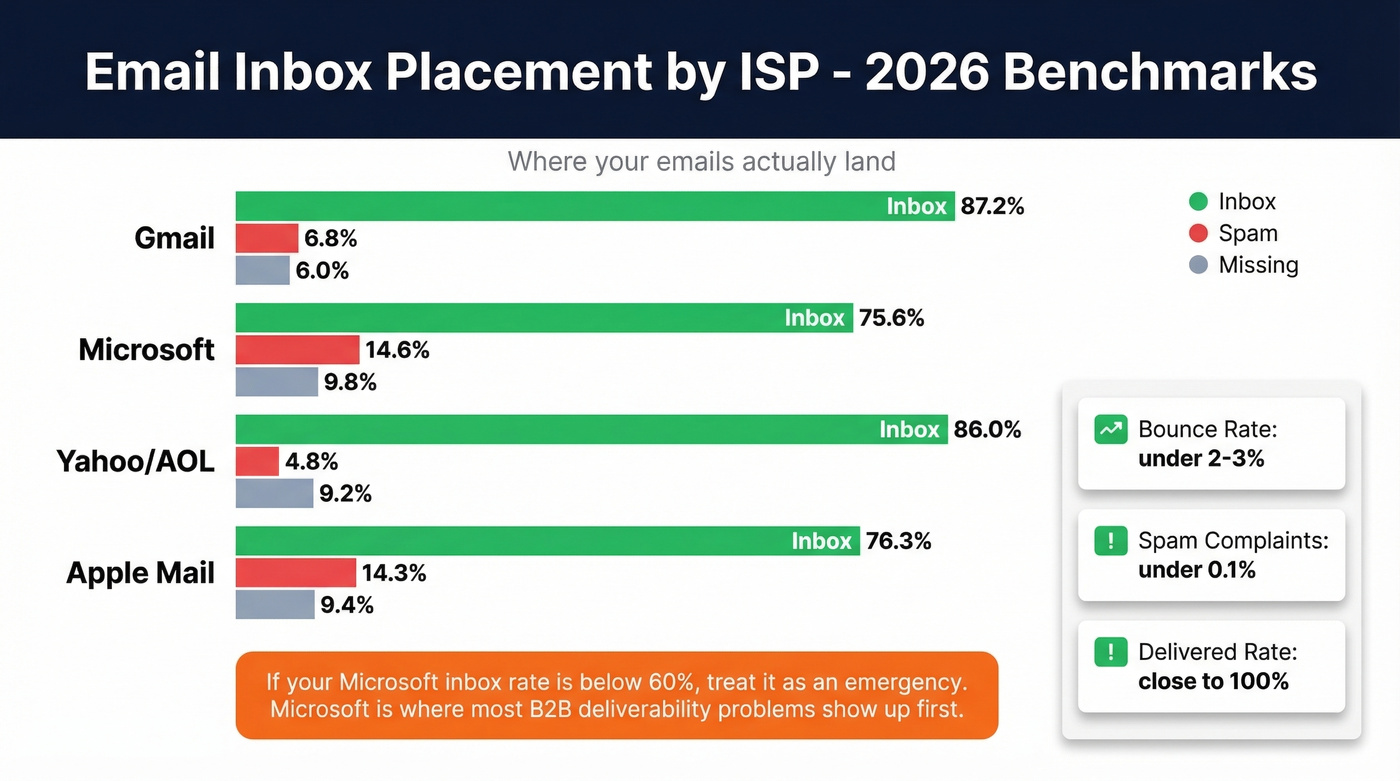
| ISP | Inbox | Spam | Missing |
|---|---|---|---|
| Gmail | 87.2% | 6.8% | 6.0% |
| Microsoft | 75.6% | 14.6% | 9.8% |
| Yahoo/AOL | 86.0% | 4.8% | 9.2% |
| Apple Mail | 76.3% | 14.3% | 9.4% |
Target thresholds:
| Metric | Target |
|---|---|
| Bounce rate | < 2-3% |
| Spam complaints | < 0.1% |
| Delivered rate | ~100% |
If your Microsoft inbox placement is below 60%, you've got an emergency. In our experience, Microsoft is where most B2B deliverability problems surface first - and it's the ISP teams check last.
Common Mistakes That Fail Audits
Let's be honest: we see the same five mistakes on every audit.
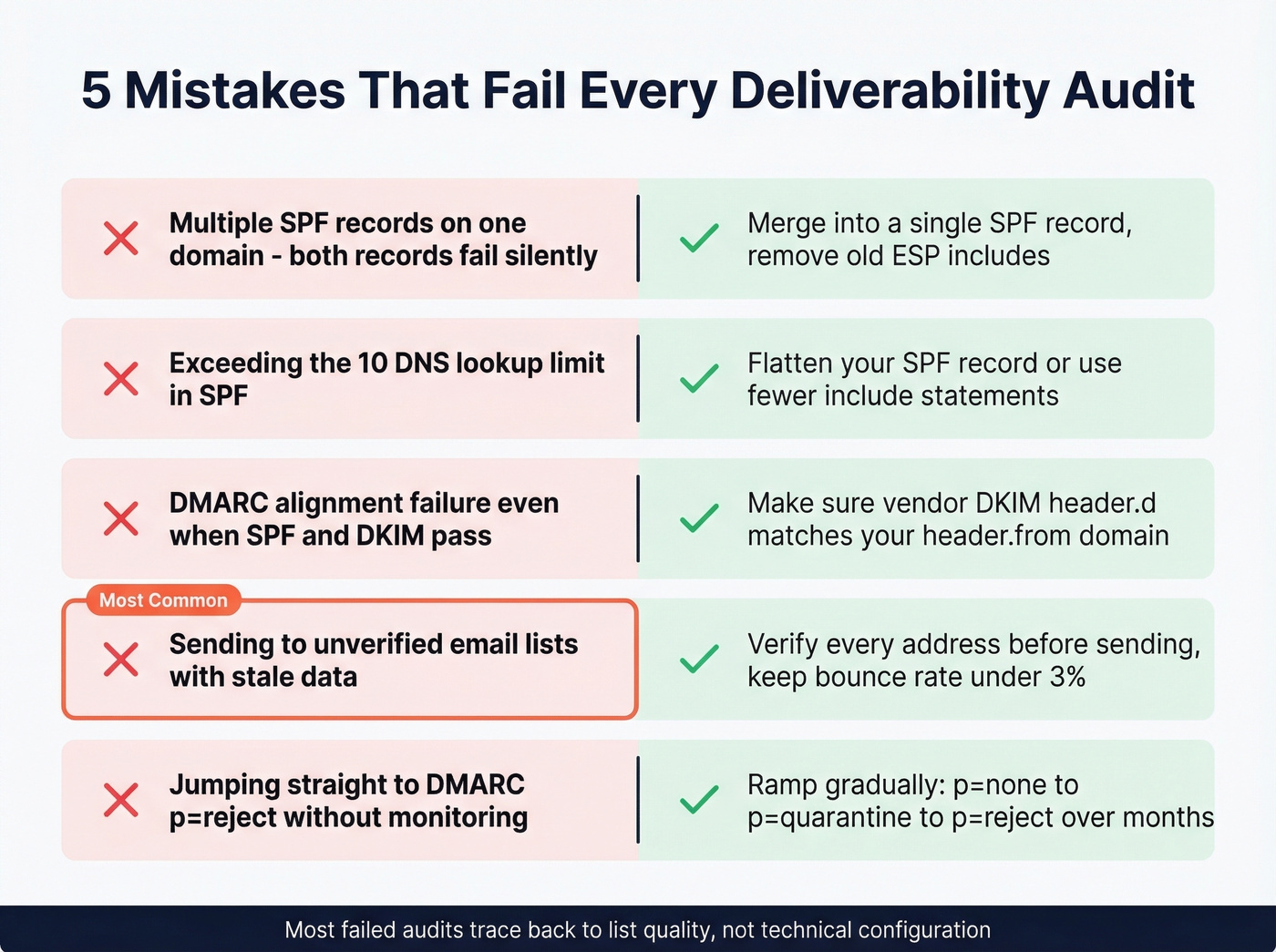
Multiple SPF records. Only one is allowed per domain. Two records means both fail. This trips up teams more often than you'd expect, especially after switching ESPs and forgetting to remove the old include. If you need syntax help, use these SPF record examples.
Exceeding the SPF 10-DNS-lookup limit. Every include: counts. Flatten if needed.
DMARC alignment failure. SPF and DKIM can both pass while DMARC still fails - this happens when a vendor's DKIM header.d doesn't match your header.from. Fix: have the vendor sign with your domain. (Deep dive: DMARC alignment.)
Sending to unverified lists. This is the most common and most damaging. Practitioners on r/Emailmarketing report deliverability degrading even when "all the boxes are checked" - and it almost always traces back to list quality.
Jumping straight to DMARC p=reject without monitoring aggregate reports. You'll block legitimate email from third-party senders you forgot about.

Step 4 of your audit will fail if your list is full of dead addresses. Prospeo's 5-step verification catches invalid emails, spam traps, and catch-all domains before they touch your sender reputation. 98% email accuracy on a 7-day refresh cycle - not stale data from six weeks ago.
Stop auditing damage. Start preventing it at the source.
Tools for Your Audit
| Tool | What It Does | Free? | Paid From | Best For |
|---|---|---|---|---|
| Google Postmaster | Domain reputation | Yes | Free | Gmail reputation tracking |
| Microsoft SNDS | Sender data (IP signals) | Yes | Free | Outlook/Hotmail visibility |
| MXToolbox | Auth + blacklists | Yes | $129 | DNS and blacklist checks |
| Mail-Tester | Spam scoring | Yes | Free | Quick pre-send check |
| GlockApps | Inbox placement | Limited | $59/mo | Seed-list testing |
| Validity Everest | Deliverability monitoring | No | ~$29/mo | Ongoing monitoring |
You don't need all of these. Google Postmaster Tools + MXToolbox + Mail-Tester cover the core checks at zero cost. Add GlockApps if you want inbox placement data. Skip Validity Everest unless you're running high-volume campaigns and need continuous monitoring - it's overkill for teams sending under 50K emails a month. If you want a broader stack view, see our list of email reputation tools.
How Often to Audit
| Situation | Cadence |
|---|---|
| Regular senders | Quarterly |
| Low-volume senders | Every 6 months |
| After ESP migration | Immediately |
| After metric drops | Immediately |
Here's the thing: treat audits as a release gate, not just a diagnostic. Block launch if authentication checks fail. Block launch if critical templates fail inbox placement. That's governance, not busywork.
Building a Repeatable Audit Process
The real value isn't a one-time fix - it's building a repeatable system. Each quarterly cycle should compare current metrics against your previous baseline so you can spot regression before it becomes a crisis, and we've found that teams who document their baseline numbers in a shared spreadsheet are far more likely to catch problems early than those who rely on memory or gut feel. Over time, consistent auditing compounds: cleaner lists feed better reputation scores, which earn more favorable filtering, which drive higher engagement. The cycle reinforces itself. For the bigger picture, see our email deliverability guide.
The ROI of Fixing Deliverability
17.7% of legitimate marketing emails never reach the inbox. Recovering even half of that gap yields roughly a 10% lift in email ROI. On 100,000 monthly sends, that's 5,000+ extra inbox landings per campaign. At any reasonable revenue-per-email, a few hours of audit work pays for itself within a single send.
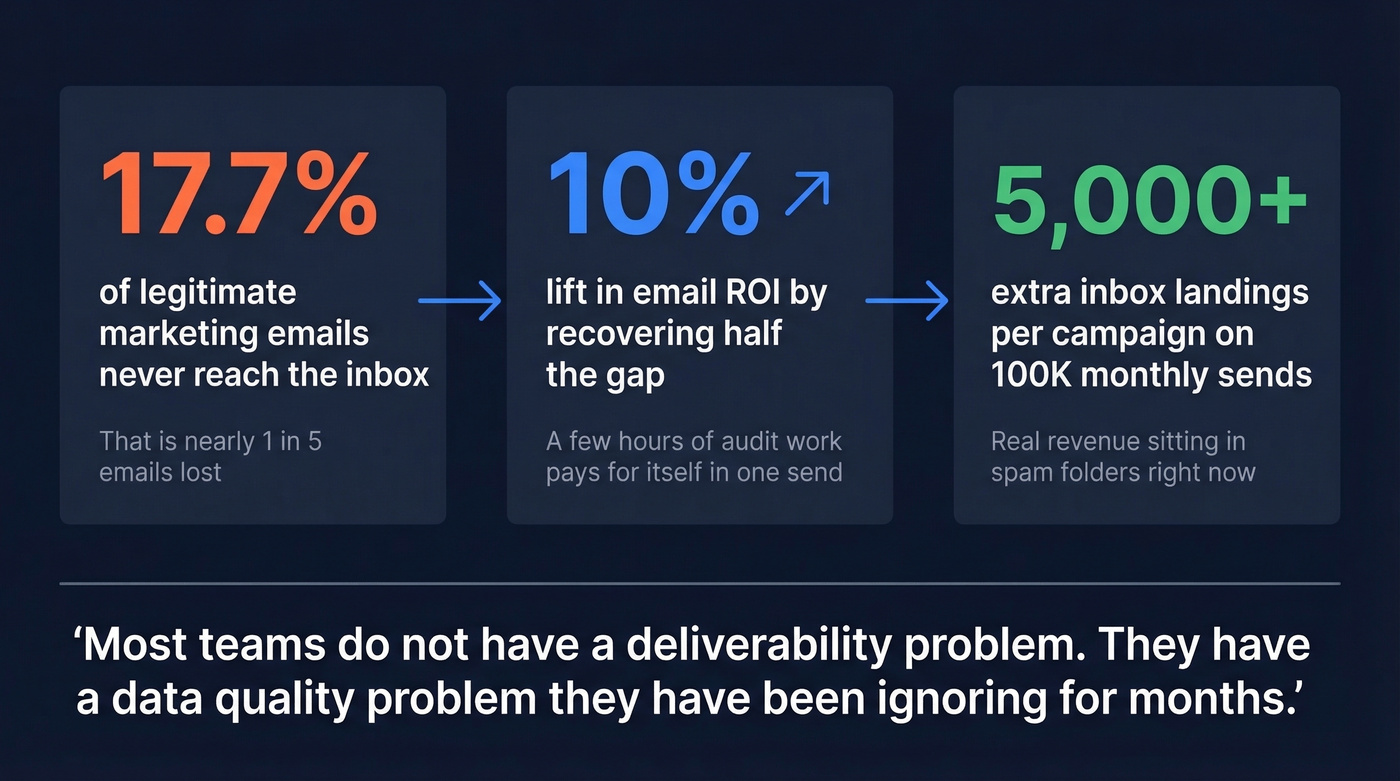
Most teams don't have a "deliverability problem." They have a data quality problem they've been ignoring for months. Fix the list first. Everything else is optimization. If you're cleaning lists at scale, compare data enrichment services that include verification.

Meritt cut bounce rates from 35% to under 4%. Stack Optimize holds 94%+ deliverability across every client. The difference wasn't authentication or content - it was switching to verified contact data at $0.01 per email. Your deliverability audit keeps failing at list quality. Fix that layer first.
Clean data is the deliverability fix no DNS record can replace.
FAQ
What's the difference between delivery rate and deliverability?
Delivery rate measures whether the receiving server accepted your email without bouncing it. Deliverability measures whether it reached the primary inbox versus spam. You can have 98% delivery and 60% inbox placement - that gap is the problem most teams miss entirely.
How long does a full audit take?
A practitioner-style email deliverability audit covering authentication, reputation, and bounce rates takes 2-3 hours with free tools like Google Postmaster and MXToolbox. A full expert-led engagement with inbox placement testing and remediation can take up to two weeks.
Can I audit deliverability for cold email?
Yes, but thresholds are stricter. Cold email has no engagement history, so mailbox providers scrutinize it harder. Keep volume under 35 per sender per day, warm domains for 21-30 days, and verify every address before sending. A single 3%+ bounce spike can tank a cold domain fast.
What free tools cover the core audit checks?
Google Postmaster Tools for reputation, MXToolbox for authentication and blacklist checks, and Mail-Tester for a quick spam score. These three cover authentication, reputation, and content scoring at zero cost. GlockApps offers limited free seed testing if you need inbox placement data.
How is an audit different from an email risk assessment?
An email risk assessment evaluates the likelihood that your sending practices will trigger filtering or blacklisting - it's forward-looking. An audit diagnoses what's already happening: where emails land, why reputation is low, and which technical gaps exist. In practice, a thorough audit includes risk assessment as part of the process.