

Re-Engagement Email Examples That Actually Work (2026)
A RevOps lead we know inherited a list of 2,230+ contacts - some one to two years old, others even older. She wanted to promote a new course but was terrified of spam complaints torching her sender reputation. Turns out, around a quarter of those addresses were dead. No amount of clever copywriting saves an email that bounces.
That's the gap most guides ignore. 79% of consumers already ignore or delete marketing emails from brands they've subscribed to - half the time or more. If your list is stale on top of that, you're fighting with both hands tied. The re-engagement email examples below fix the copy problem, but they only work if your data is clean first.
Before You Scroll: The Skeleton
- Step zero: Verify your list. Email lists decay 22-30% per year. Skip this and nothing else matters.
- The sequence is 2-3 emails over roughly 2-4 weeks. Email 1 is a warm nudge. Email 2 adds value and an incentive. Email 3 is a last-chance sunset.
- The metric that matters: CTR, not opens. Apple Mail Privacy Protection has been inflating open rates since 2021, and they're still unreliable in 2026. Track clicks and conversions.
- Anyone who doesn't engage after all three emails gets suppressed. Keeping dead weight hurts everyone else on your list.
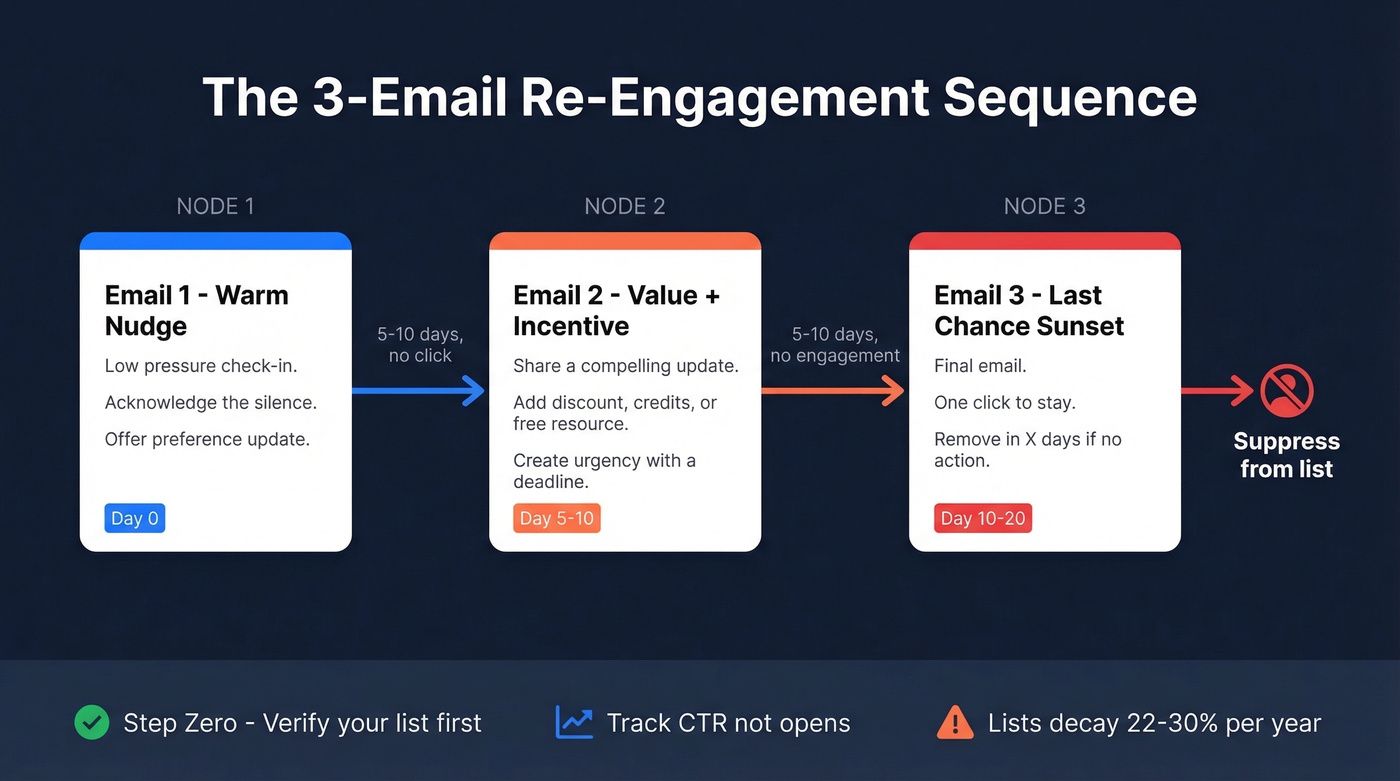
The examples and templates are below. The data quality fix most guides skip is in the Bad Data section.
What Is a Re-Engagement Email?
A re-engagement email targets subscribers or users who've gone quiet - no opens, no clicks, no logins - and tries to pull them back. It's different from a regular promotional blast because it's triggered by inaction, not a calendar date.
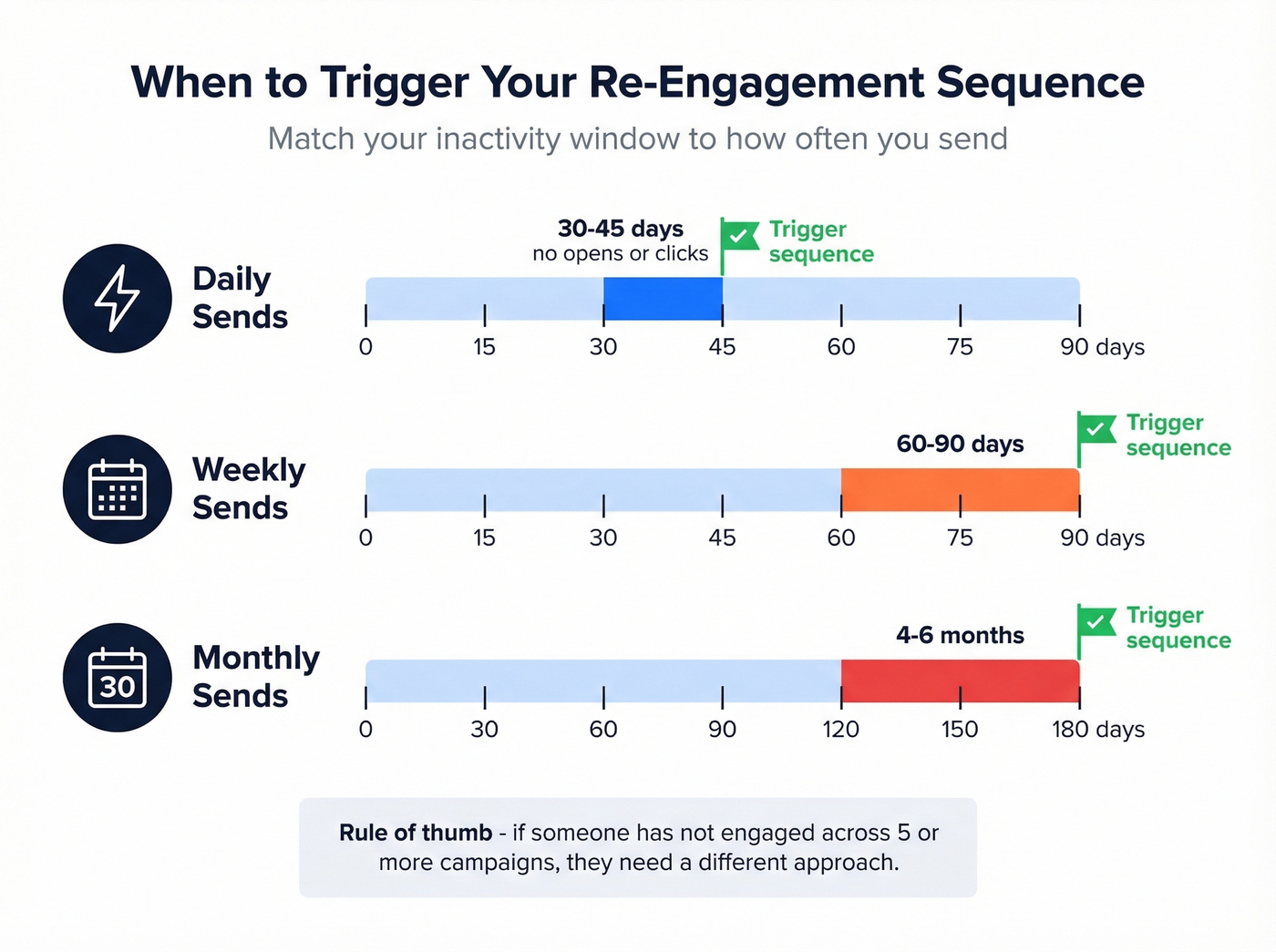
Only 24% of marketers use inaction-triggered win-back emails. That means three-quarters of email programs just keep blasting inactive contacts until deliverability craters. Don't be in that group.
Industry estimates put the cost of reactivating an inactive subscriber at roughly 5x less than acquiring a new one. Even a modest reactivation rate pays for itself almost immediately. The tricky part is defining "inactive," because it depends entirely on how often you send.
| Send Frequency | Inactivity Window | Action |
|---|---|---|
| Daily | 30-45 days no opens/clicks | Trigger sequence |
| Weekly | 60-90 days | Trigger sequence |
| Monthly | 4-6 months | Trigger sequence |
If someone hasn't opened a single email across 5+ campaigns, they're either disengaged or the address is dead. Either way, they need a different approach.
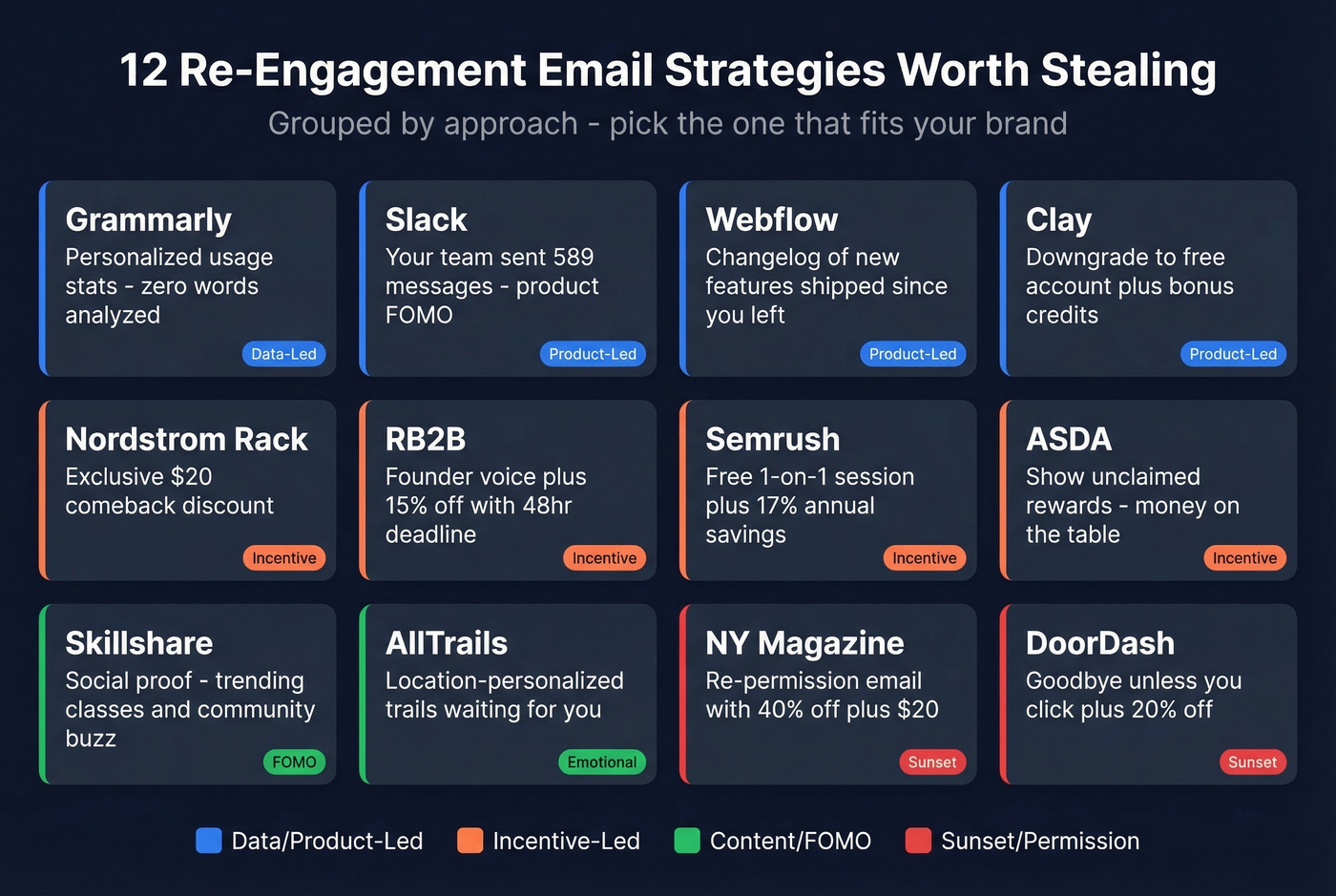
12 Win-Back Emails Worth Studying
Grammarly - "Your Writing Stats Miss You"
Grammarly sends an inactivity-triggered email showing personalized usage stats - specifically, "zero words analyzed" - to make the silence feel concrete. The subject line leans on the product's core value rather than guilt-tripping. It works because it's data-driven and personal without being needy.
Slack - Activity Reminder
Slack takes a utilitarian approach. Instead of emotional copy, they surface what the user is missing: "Your team has sent 589 messages this month." It's a product-led nudge that creates mild FOMO without saying "we miss you." For B2B tools where the value is collaboration, showing what's happening without the user beats any discount.
Nordstrom Rack - Exclusive Comeback Offer
Nordstrom Rack leads with a $20 discount framed as "exclusive" to returning subscribers. The email is clean, visual, and the CTA is a single button. The exclusivity framing is what makes it work - this isn't a site-wide sale, it's positioned as a reward for coming back. Incentive emails like this typically drive the highest immediate conversion in reactivation sequences.
RB2B - Founder-Style 15% Off (48-Hour Window)
RB2B's founder sends a personal-feeling email announcing a major product update paired with a 15% discount valid for 48 hours. The urgency is real, the update is substantive, and the founder voice makes it feel like a note from a colleague rather than a marketing blast. This is the template to steal if you're in B2B SaaS.
Semrush - Free 1:1 Session + Annual Savings
Semrush doesn't just ask you to come back - they offer a free one-on-one session with a specialist plus 17% savings on annual plans. It's a high-value offer that reframes the relationship from "you stopped using us" to "let us help you get more value." For tools with a learning curve, offering human support beats offering a discount every time.
Webflow - "Here's What You Missed"
Webflow sends a product changelog-style email highlighting new features shipped since the user went quiet. No discount, no guilt - just "look what's new." This works especially well for SaaS products that ship frequently. The subtext is clear: the product you left is better now.
Skillshare - Community Momentum
Skillshare leans on social proof, highlighting trending classes and community activity rather than the individual's absence. You're not missing out on Skillshare - you're missing out on what everyone else is doing.
AllTrails - "Trails Are Waiting"
AllTrails personalizes based on location and past activity, showing nearby trails the user hasn't explored. "Trails are waiting" sells the outcome - adventure - rather than the product. For any brand with contextual data, personalize using location, device type, time of day, or even weather to make the email feel like it was written for one person. The broader principle here applies well beyond outdoor apps: emotional angles outperform discounts when you've got the data to back them up.
New York Magazine - "Still Want to Hear From Us?"
This is a re-permission email - it asks the subscriber to actively confirm they want to stay on the list. It's bold because it risks losing subscribers, but it's the right move for list health. The hook is concrete: "Resubscribe and get 40% plus an extra $20 off unlimited access." If your list is old and you're nervous about complaints, this is one of the safest first emails to send.
ASDA - Personalized Rewards Wrap-Up
ASDA adapts their personalized rewards summaries to show accumulated but unclaimed rewards. It turns inactivity into a tangible cost - "you're leaving money on the table." Any loyalty program can replicate this.
Clay - Trial Expired, Free Account + Bonus Credits
Clay's approach after trial expiration is smart: instead of asking for payment, they move the user to a free account and add 100 bonus credits. The email mentions paid plans but doesn't push them. The Slack community invite adds a human touch. This "downgrade gracefully" strategy keeps users in the ecosystem rather than losing them entirely.
DoorDash - "This Is Goodbye (Unless...)"
DoorDash's sunset email pairs finality with an easy out - one click to stay - and it also includes a 20% off offer. It's effective because it respects the reader's choice while making the stakes clear.
Copy-Paste Templates
You've probably read five articles about re-engagement email examples today and none of them gave you actual copy you can use. These three templates form a complete sequence. Space them 5-10 days apart. Adjust the tone for your brand, but keep the structure.
Template 1 - The Warm Nudge
Subject line: It's been a while, {{first_name}}
Body:
Hi {{first_name}},
We noticed you haven't opened our last few emails. No guilt trip - just checking in.
When you first signed up, you were interested in [core value proposition]. That hasn't changed on our end. [One sentence about what's new or improved since they went quiet.]
If you're still interested, no action needed - we'll keep sending. If not, you can update your preferences or unsubscribe below. Either way, no hard feelings.
[Button: Update My Preferences]
When to use: First touch. Warm, low-pressure, acknowledges the silence without being dramatic.
Template 2 - Value + Incentive
Subject line: A quick reason to come back (+ something for you)
Body:
Hi {{first_name}},
Since we last connected, we've [shipped feature / published resource / hit milestone]. Here's the highlight:
[One specific, compelling update - a stat, a feature, a result.]
To make it easy to jump back in, here's [incentive: discount code / free trial extension / bonus credits / exclusive content]. It's valid for [timeframe].
[Button: Claim Your [Incentive]]
P.S. - If this isn't relevant anymore, [unsubscribe link]. We'd rather have a clean list than a big one.
When to use: Five to ten days after Email 1 if no click. Adds concrete value and a reason to act now.
Template 3 - Last Chance / Sunset
Subject line: We're cleaning up our list (last email)
Body:
Hi {{first_name}},
This is the last email we'll send unless you tell us to keep going.
We don't want to clutter your inbox if you've moved on. But if you still want to hear from us, one click keeps you on the list:
[Button: Keep Me Subscribed]
If we don't hear from you, we'll remove you in [X days]. You can always re-subscribe later.
Thanks for being here - even if this is goodbye.
When to use: Five to ten days after Email 2 if no engagement. This is the sunset trigger. Anyone who doesn't click gets suppressed.

Email lists decay 22-30% per year. That means a quarter of your re-engagement emails are bouncing before anyone sees your perfect copy. Prospeo's 5-step verification catches dead addresses, spam traps, and catch-all domains - delivering 98% email accuracy on a 7-day refresh cycle.
Fix your data before you fix your copy. Start free with 75 verifications.
Re-Engagement Subject Lines
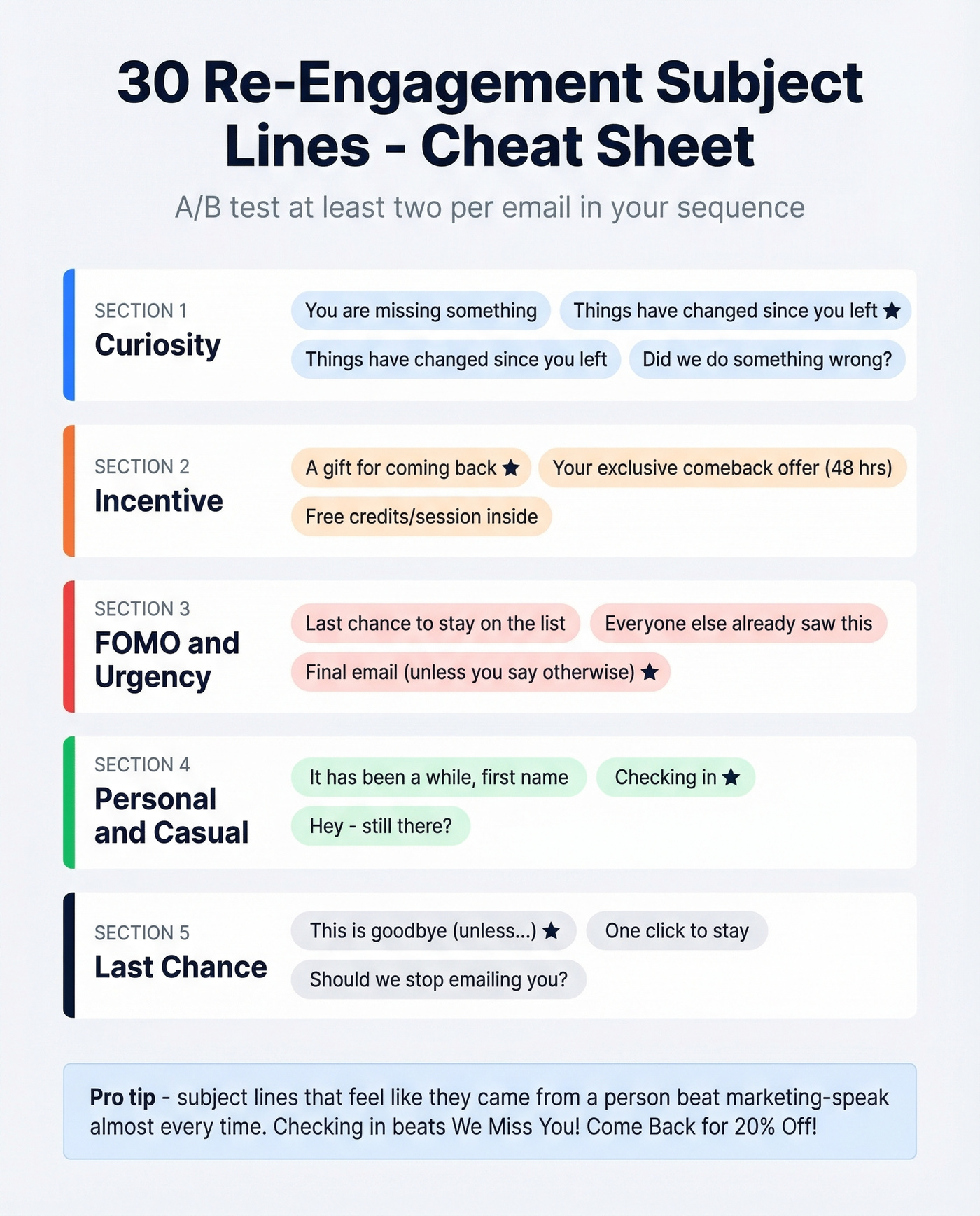
A/B test at least two subject lines per email in your sequence. Here are 30 to start with, grouped by angle.
Curiosity:
- "You're missing something"
- "Things have changed since you left"
- "Quick question, {{first_name}}"
- "Did we do something wrong?"
- "Here's what happened while you were away"
- "Something new for you"
Incentive:
- "A gift for coming back"
- "{{first_name}}, this one's on us"
- "Your exclusive comeback offer (48 hrs)"
- "15% off - but only if you're still interested"
- "Free [resource/credits/session] inside"
- "We saved something for you"
FOMO / Urgency:
- "Last chance to stay on the list"
- "We're cleaning up - are you in or out?"
- "Your spot is about to expire"
- "Everyone else already saw this"
- "Don't miss what's coming next"
- "Final email (unless you say otherwise)"
Personal / Casual:
- "It's been a while, {{first_name}}"
- "Checking in"
- "Hey - still there?"
- "Miss you (but no pressure)"
- "Can we talk?"
- "Real quick"
Last Chance:
- "This is goodbye (unless...)"
- "We're removing inactive subscribers"
- "One click to stay"
- "Should we stop emailing you?"
- "Your last email from us"
- "Unsubscribing you in 7 days"
In our testing, the subject lines that consistently outperform are the ones that feel like they came from a person, not a marketing team. "Checking in" beats "We Miss You! Come Back for 20% Off!" almost every time.
Benchmarks - What Good Looks Like
Re-engagement benchmarks are all over the place, but these ranges give you a realistic target.
| Metric | Industry Avg | Re-Engagement Avg | Top Performers |
|---|---|---|---|
| Open rate | 23.44% | 20-25% | 30%+ |
| CTR | 2.62% | 2-4% | 5%+ |
| Reactivation rate | - | 14-29% | 30%+ |
Open rates are a vanity metric in 2026. Apple Mail Privacy Protection auto-loads tracking pixels, which means a chunk of your "opens" are machines, not humans. Salesforce's benchmark guidance recommends focusing on CTR and click-to-open rate, and I'd go further - track downstream conversions. A 25% open rate means nothing if nobody clicks.
Userpilot's benchmark roundup adds useful context: win-back emails average a 29% open rate, and 45% of recipients who re-engage will read future emails too. The payoff compounds.
The reactivation range of 14-29% is wide because it depends heavily on how stale your list is and how good your offer is. Above 20%? You're doing well. Below 10%? Your list is probably too far gone, or your data is bad.
What "great" looks like in practice: Slazenger ran a multi-channel re-engagement campaign and pulled a 49X ROI in 8 weeks, with a 700% increase in customer acquisition and 40% of abandoned revenue recovered. That's an outlier, but it shows what's possible when the data is clean and the sequence is dialed in.
How to Build a Re-Engagement Sequence
This works in any ESP - Klaviyo, HubSpot, ActiveCampaign, Mailchimp, whatever you're running. The logic is the same.
Define inactivity. Filter contacts who haven't opened or clicked your last 5 campaigns, per Automizy's framework. Adjust based on your send frequency using the thresholds table above.
Segment and tag. Create a dynamic segment for inactive contacts. In Klaviyo, segments update automatically; in other tools, you might need a scheduled filter. Tag them so you can track outcomes separately from your main list.
Trigger the sequence. Email 1 (warm nudge) -> wait 5-10 days -> Email 2 (value + incentive) -> wait 5-10 days -> Email 3 (last chance). Use the templates above or adapt the examples to your brand.
Measure what matters. CTR and conversions, not opens. If your re-engagement CTR is above 3%, the sequence is working. Below 1%? Revisit your offer or your list quality. (If you want to get precise, use a consistent click rate formula across campaigns.)
Sunset non-responders. Anyone who doesn't engage after all three emails gets suppressed - not deleted, suppressed. You can always re-add them later if they come back through another channel. Keeping them on your active list damages deliverability for everyone else.
Timing matters more than most people realize. Userpilot's research shows that after one month of inactivity, reactivation effectiveness drops significantly. The sooner you trigger the sequence, the better your odds. Look for capabilities like predicted churn risk, smart send time, expected next order date, and dynamic segmentation in your ESP - they make the automation smarter without adding manual work. Quarterly touchpoints keep you on the radar without overwhelming anyone.
Bad Data Kills Re-Engagement Campaigns
Here's the thing: if your average deal size is under five figures, you probably don't need a 12-email nurture sequence. You need a clean list and three good emails. The #1 reason re-engagement campaigns fail isn't bad copy - it's bad data.
Email lists decay 22-30% per year. If you haven't touched your list in 12 months, roughly a quarter of those addresses are dead. Send to them anyway and you're looking at bounces, spam traps, and a sender reputation that takes months to rebuild. Litmus found that 70% of emails show at least one spam-related issue, and their team flags anything below 90% inbox placement as an immediate investigation trigger.
The irony is brutal: some of your "inactive" subscribers aren't ignoring you - they never received your emails because their addresses bounced silently or landed in spam. You're trying to re-engage people who were never engaged because the data was bad from the start.
We've seen this pattern repeatedly. Snyk's sales team was running bounce rates of 35-40% - after switching to verified data, they dropped under 5%. Stack Optimize built an entire agency to $1M ARR on the back of maintaining 94%+ deliverability and sub-3% bounce rates across all clients. The common thread? They verified before they sent. (If you're diagnosing issues, start with email bounce rate and work backward.)
Before you send your re-engagement sequence, verify your list. Prospeo's 5-step verification process catches spam traps and honeypots that would torch your sender reputation, with 98% accuracy on a 7-day refresh cycle. For B2B teams re-engaging a cold sales pipeline, the database of 300M+ profiles lets you replace dead contacts with fresh, verified ones - so you're not just shrinking your list, you're upgrading it. Upload a CSV, get results in minutes, and push clean contacts straight to your ESP.
Suppressing dead contacts is step one. Step two is replacing them with verified buyers. Prospeo's database has 143M+ verified emails across 300M+ profiles - filtered by intent, job change, and technographics so you're reaching people who are actually in-market.
Stop re-engaging ghosts. Start reaching real buyers at $0.01 per email.
Mistakes That Tank Reactivation Campaigns
Sending a single email instead of a sequence. A single "we miss you" email isn't a re-engagement campaign. It's a coin flip. Build a 2-3 email sequence minimum. (If you're doing this for outbound too, a B2B cold email sequence uses similar timing logic.)
Skipping list verification. If 25% of your list is dead, your deliverability tanks before anyone sees your brilliant copy. Verify first. (A full email deliverability guide helps you spot the upstream causes.)
No clear CTA. Every win-back email needs one obvious action - click to stay, claim an offer, update preferences. Don't make them guess. (Use these email call to action rules to keep it tight.)
No unsubscribe option. This isn't just a legal requirement. A visible unsubscribe link builds trust and keeps your list clean. The consensus on r/Emailmarketing is clear: make opting out easy.
Not A/B testing subject lines. Your subject line determines whether the email gets opened at all. Test at least two variants per send. If you need more options, pull from our email subject line examples.
Waiting too long to re-engage. After one month of inactivity, effectiveness drops. Don't let contacts go cold for six months before you act.
FAQ
How long should I wait before sending a win-back email?
It depends on send frequency. Weekly senders should trigger after 60-90 days of no opens or clicks; monthly senders can wait 4-6 months; daily senders should act at 30-45 days. Waiting beyond one month significantly reduces reactivation rates, so build your automation trigger early.
How many emails should a re-engagement sequence include?
Two to three emails spaced over 2-4 weeks. Email 1 is a warm nudge, Email 2 adds value plus an incentive, and Email 3 is a last-chance sunset. A single "we miss you" email converts at roughly half the rate of a structured three-touch sequence.
What should I do with subscribers who don't respond?
Suppress them immediately after the full sequence completes. Keeping non-responders on your active list damages sender reputation and inbox placement for every other subscriber. You can re-add them later if they engage through another channel - suppression isn't permanent.
Should I verify my list before a re-engagement campaign?
Always. Lists decay 22-30% annually, and sending to dead addresses tanks deliverability before anyone sees your copy. Run your CSV through a bulk verification tool before you hit send. It takes minutes and protects months of sender reputation work.
Where can I find more re-engagement email examples?
The 12 examples above cover the most common strategies - product-led nudges, incentive offers, sunset emails, and re-permission requests. For extra inspiration, study the actual emails landing in your own inbox from brands you've gone quiet on. Real-world win-back emails are the best way to spot patterns that work in your industry.
The Whole Playbook
Clean data, a three-email sequence built from proven re-engagement email examples, and the discipline to sunset non-responders. That's it. Verify before you send, measure clicks instead of opens, and suppress anyone who stays silent. Everything else is optimization on top of those fundamentals.