

IP Blacklist Check Tool: Diagnosis, Delisting, and Prevention
Your bounce rate just tripled overnight. The follow-up sequence you spent two weeks writing? It's landing in spam - or not landing at all. You run an IP blacklist check tool and get back a wall of red flags across lists you've never heard of, with zero guidance on which ones matter or what to do next.
Here's the reality: 70% of emails show at least one spam-related issue, and the global inbox placement average sits around 84%. That means roughly one in six emails never reaches the inbox. A blacklist hit makes those numbers dramatically worse. What actually matters isn't the number of blacklists you check - it's knowing which ones affect deliverability, which tools are worth using, how to get delisted, and how to stop it from happening again.
Quick Recommendations
Three tools, three use cases:
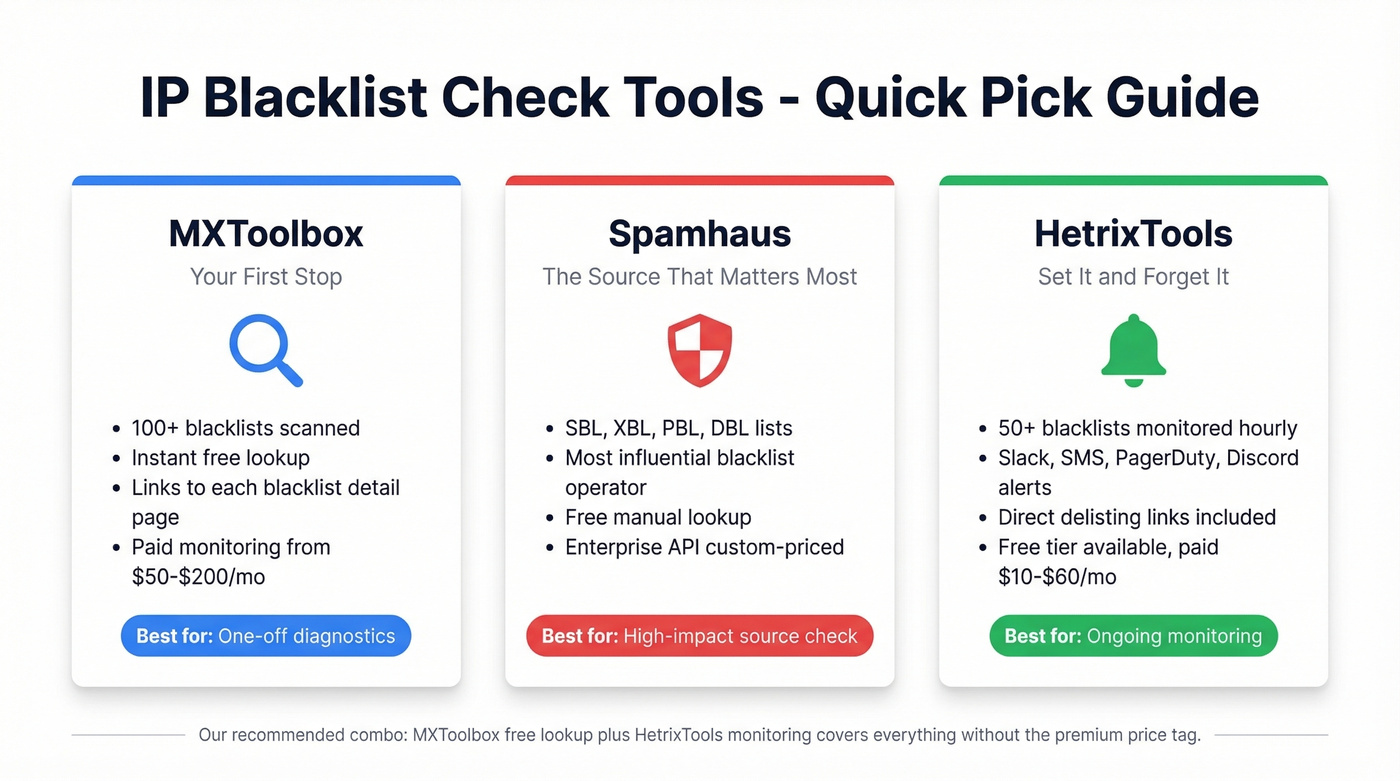
- MXToolbox - Scans 100+ blacklists, free, instant results. Your first stop when something feels wrong.
- Spamhaus - One of the most influential blacklist operators in email. If you're listed here, it's a big deal.
- HetrixTools - Hourly checks, 10+ alert channels including Slack, SMS, and PagerDuty. Free tier available.
Knowing you're listed is only step one. Let's get into which blacklists actually affect your deliverability, how to get off them, and how to prevent the whole mess in the first place.
What Is an IP Blacklist?
An IP blacklist - technically called a DNSBL (DNS-based Blackhole List) or RBL (Realtime Blackhole List) - is a database of IP addresses flagged for sending spam or exhibiting suspicious behavior. There are 300+ publicly available blacklists, and they vary wildly in impact.
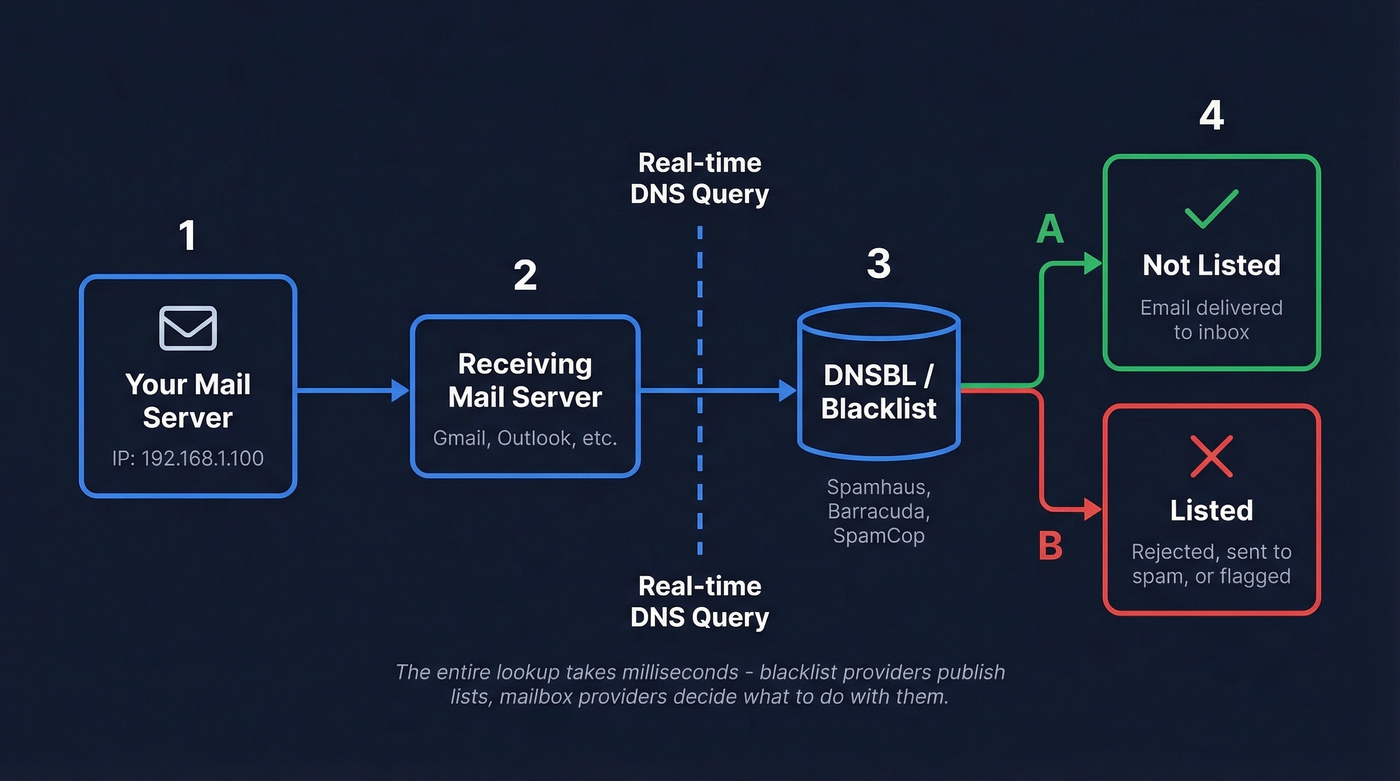
The mechanics are straightforward. When your mail server sends an email, the receiving server performs a DNS lookup against one or more blacklists in real time. If your IP appears on a queried list, the receiving server can reject the message, route it to spam, or flag it for additional scrutiny. The whole check takes milliseconds.
One critical distinction most guides skip: blacklist providers don't block your mail. They publish lists. Mailbox providers decide whether to block based on those lists combined with their own internal reputation signals. A listing on an obscure blacklist with no real adoption has zero impact. A listing on Spamhaus can tank your deliverability overnight.
There's also a difference between IP blacklists and domain/URL blacklists like Spamhaus DBL, SURBL, and URIBL. Domain blacklists flag URLs inside your email body rather than the sending IP. Even if your IP is spotless, a blacklisted link in your message can sink deliverability. We'll cover both, but IP blacklists are the primary focus here.
Best Tools for Checking IP Blacklists
| Tool | Lists Checked | Monitoring & Alerts | Pricing | Best For |
|---|---|---|---|---|
| MXToolbox | 100+ | Paid; email alerts | Free lookup; monitoring ~$50-$200/mo | One-off diagnostics |
| Spamhaus | Own lists | No | Free lookup; API custom | High-impact source check |
| HetrixTools | 50+ | Hourly; 10+ channels | Free tier; paid ~$10-$60/mo | Ongoing monitoring |
| IPVoid | 80+ | No | Free | Broad reputation check |
| BlacklistMaster | RBL checks | Yes; Slack/Telegram | ~$10-$30/mo | DevOps workflows |
| CleanTalk | Own database | Hourly | Free check; API ~$10+/mo | Standalone reputation DB |
| AbuseIPDB | Community | No | Free; paid API tiers | Security-focused checks |
MXToolbox
MXToolbox is the default first stop for a reason. Paste an IP, get results across 100+ blacklists in seconds. The interface is cluttered with upsells, but the free lookup is genuinely useful - it shows which lists you're on, links to each blacklist's details, and gives you a starting point for remediation.

The free tier handles one-off lookups fine. If you need continuous monitoring, their paid plans land in the ~$50-$200/month range depending on features and volume. For most teams, the free lookup plus a dedicated monitoring tool like HetrixTools is a smarter combination than paying MXToolbox for both. We've used this exact pairing and it covers all the bases without the premium price tag.
Spamhaus
Spamhaus isn't a monitoring tool - it's a source. Understanding its taxonomy matters more than understanding any other single list.
Four lists to know:
- SBL flags known spam sources - editor-driven, manual additions
- XBL flags compromised systems like botnets and open proxies, incorporating CBL data
- PBL flags dynamic and residential IPs that shouldn't be sending mail directly
- DBL is their domain blacklist, covering URLs rather than IPs
The free manual lookup on Spamhaus's site tells you exactly which list you're on and why. Enterprise API access is custom-priced - expect to negotiate if you need programmatic checks at scale.
HetrixTools
Skip this if you send fewer than 1,000 emails per week. For everyone else, HetrixTools is the monitoring platform that justifies its existence the first time it catches a listing before your bounce rate craters.
It checks your IPs as often as every hour and fires alerts through Slack, SMS, email, phone call, Telegram, Discord, Microsoft Teams, PagerDuty, Opsgenie, and webhooks. The free tier gives you monitoring with basic email reports showing listing counts. Paid plans run ~$10-$60/month and add detailed change data, direct delisting links so you can act immediately without hunting for the right form on each blacklist's site, and agency-friendly features like white-label reports and bulk reporting.
Other Tools Worth Knowing
IPVoid scans an IPv4 or IPv6 address through more than 80 IP reputation and DNSBL services. It's free, fast, and useful when you want a broader picture beyond email blacklists - think of it as a second opinion after MXToolbox.
BlacklistMaster targets teams that want API-driven monitoring with Slack and Telegram alerts. It supports checking IPv4, IPv6, or a domain name and fits well into DevOps workflows where you want blacklist status piped into existing notification channels. Plans run ~$10-$30/month.
CleanTalk maintains its own database of over 6.3 million IPs and 778,000 email addresses tracked over three years, updated once an hour. More of a standalone reputation database than a multi-DNSBL aggregator, but useful for checking if your IP has been flagged in their network. AbuseIPDB takes a community-driven approach where sysadmins report abusive IPs - more relevant for security teams than email deliverability, but worth a quick check if you suspect your IP has been compromised.
A few supplementary reputation tools are worth bookmarking: SenderScore provides a 0-100 reputation score used as a common deliverability benchmark, Google Postmaster Tools shows how Gmail specifically views your domain, and Proofpoint's Dynamic Reputation lookup uses machine-learning driven content classification.
Which Blacklists Actually Matter
Look - stop obsessing over how many blacklists a tool checks. Start obsessing over the five or six that actually affect your inbox placement.
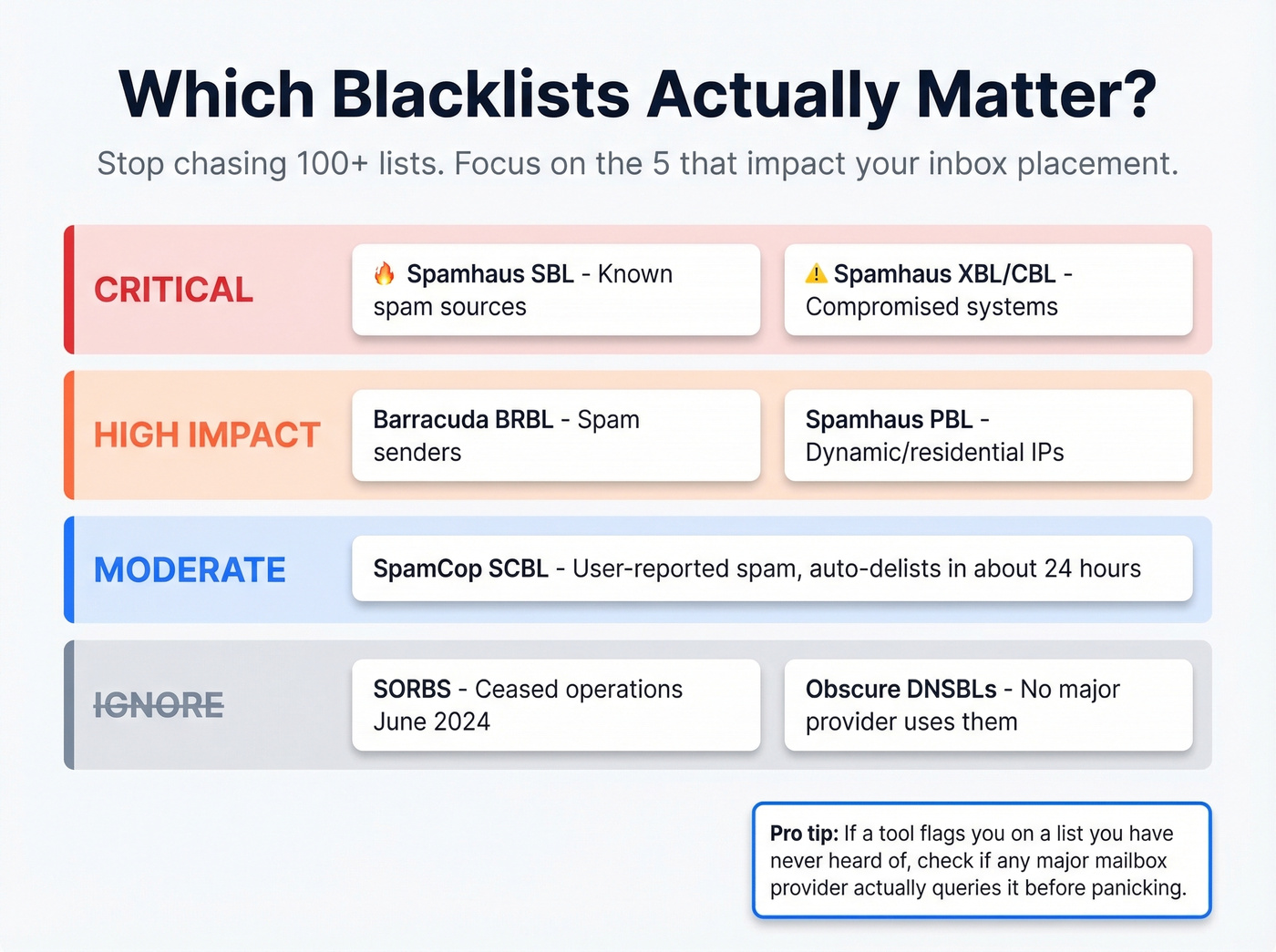
Every tool competes on list count. "We check 100+ blacklists!" But real-world impact is concentrated. Being listed on some obscure DNSBL that hasn't been updated since 2019 doesn't affect your deliverability. Being listed on Spamhaus does. Focus your energy on the high-impact ones rather than chasing every minor listing.
| Blacklist | What It Flags | Impact | Delisting |
|---|---|---|---|
| Spamhaus SBL | Known spam sources | Critical | Manual, 24-48h |
| Spamhaus XBL / CBL | Compromised systems | Critical | Fix issue, clears fast |
| Spamhaus PBL | Dynamic/residential IPs | High | Removal request process |
| Barracuda (BRBL) | Spam senders | High | Manual, 12-24h |
| SpamCop (SCBL) | User-reported spam | Medium-High | Auto after ~24h |
| SORBS | Various | Low-signal | Ceased June 2024 |
Prioritize Spamhaus and Barracuda first - they're consistently treated as high-impact in operational deliverability playbooks. SpamCop is user-report driven and auto-delists after about 24 hours if reports stop, making it less of a long-term threat but still worth monitoring. Sysadmins on the DirectAdmin forums recommend SpamCop and PSBL as reliable additions with very low false-positive rates.
One important note: SORBS officially ceased operations in June 2024. If a tool flags you on SORBS, ignore it.
Domain and URL blacklists deserve a brief mention. Spamhaus DBL, SURBL, and URIBL check the URLs inside your email body rather than your sending IP. Even a clean IP won't save you if your email contains a blacklisted link. Shortened URLs get checked too - be careful with link shorteners in outbound campaigns.

Blacklist hits don't happen randomly - they start with bad contact data that spikes bounces and triggers spam traps. Prospeo's 5-step email verification with spam-trap removal and honeypot filtering keeps bounce rates under 4%, so your sending IP stays off every list that matters.
Stop fixing blacklist damage. Prevent it with 98% accurate emails.
Why You're Blacklisted
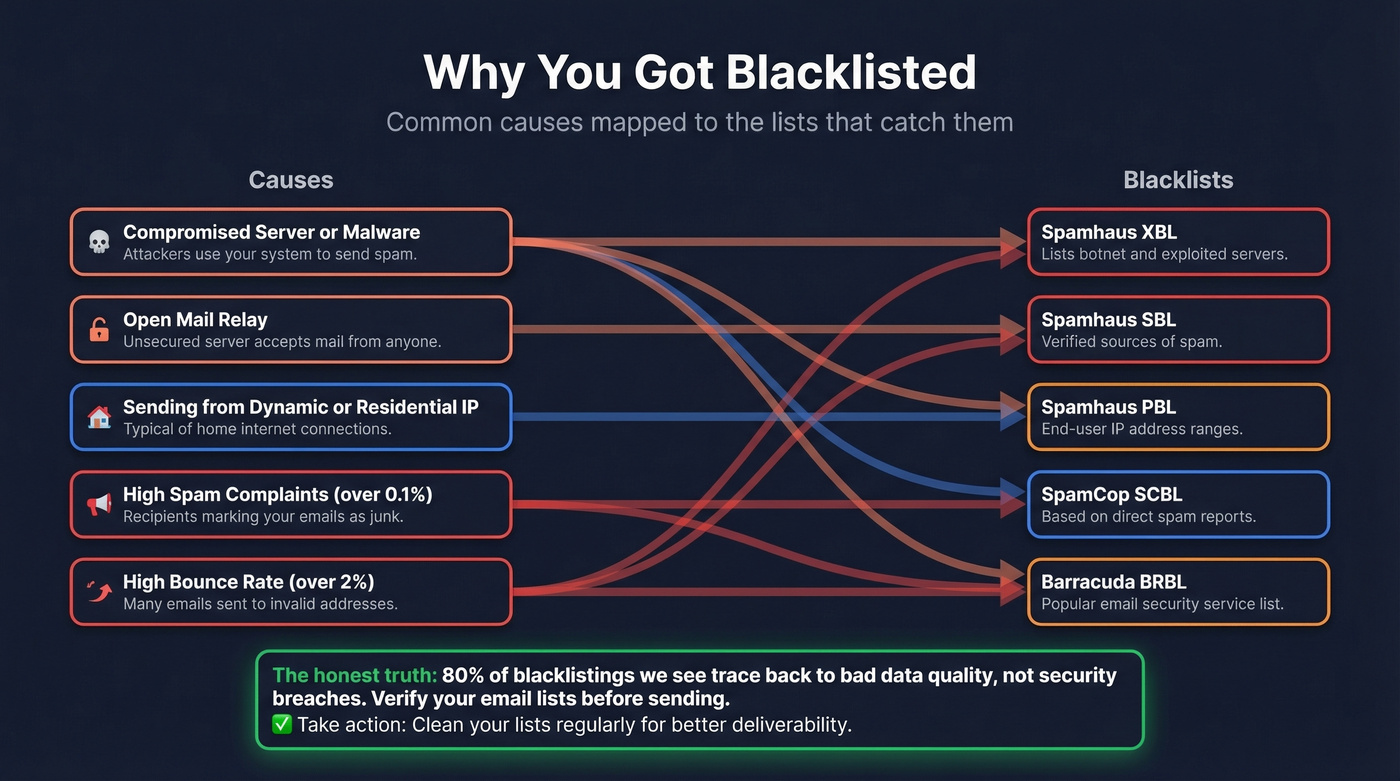
Blacklisting rarely happens randomly. Here's how common causes map to specific lists:
| Cause | Likely Lists |
|---|---|
| Compromised server/malware | XBL, Barracuda, SpamCop |
| Open relay | SBL |
| Dynamic/residential IP | PBL |
| High spam complaints | SpamCop, Barracuda |
| High bounce rates | Barracuda, SBL |
The thresholds are tighter than most people realize. A spam complaint rate over 0.1% or a bounce rate over 2% are common alert thresholds - and they often correlate with deliverability problems and blacklist risk. Sending to unverified email lists is the fastest way to spike your bounce rate past that 2% line, and it's also the most preventable cause.
If you're on shared hosting and you've been blacklisted, it's probably not your fault - but it's still your problem. We've seen this pattern repeatedly: one compromised account on a shared server sends spam, the shared IP gets blacklisted, and every tenant's mail starts bouncing. Running a blacklist check on your shared server's entire IP range can reveal whether the problem is isolated to your address or affecting the whole neighborhood.
Our honest take: Most blacklisting isn't a security problem. It's a data quality problem. Compromised servers and open relays get the dramatic headlines, but the majority of blacklistings we encounter trace back to someone uploading a purchased list or sending to addresses they never verified. Fix your data, and you fix 80% of your blacklisting risk.
To test if your server is an open relay, connect via telnet to port 25 and issue MAIL FROM / RCPT TO commands with external addresses. If the server accepts the relay, close it immediately - an open relay is a guaranteed path to major blocklists.
How to Get Delisted
No tool can automatically remove you from a blacklist. Delisting is a manual process with each blacklist operator, and submitting a request without fixing the root cause guarantees re-listing. Here's the step-by-step:
- Stop sending from the listed IP immediately. Every email you send while listed makes things worse.
- Identify the root cause. Cross-reference the cause-to-list mapping above. Check server logs for unauthorized sending, open relays, or malware.
- Fix the underlying issue. Secure your server, close open relays, remove malware, patch vulnerabilities.
- Configure SPF/DKIM/DMARC if you haven't already. These aren't optional for legitimate sending.
- Clean your email list. Remove addresses that bounced, generated complaints, or look like spam traps.
- Submit delisting requests to each blacklist operator. Start with Spamhaus and Barracuda - they have the most impact.
- Monitor for re-listing over the next 7-14 days. If you get re-listed, you didn't fully fix the root cause.
When you submit a removal request, include four things: identify yourself and your organization, explain the root cause you identified, describe the specific fix you implemented, and confirm you have ongoing monitoring in place. Blacklist operators reject vague requests. Specificity is what gets you delisted.
| Blacklist | Process | Timeline |
|---|---|---|
| Spamhaus (manual listings) | Manual request | 24-48 hours |
| Spamhaus XBL / CBL-style listings | Fix issue, clears automatically | Hours to 24h |
| Barracuda (BRBL) | Manual request | 12-24 hours |
| SpamCop (SCBL) | Auto if reports stop | ~24 hours |
| Spamhaus PBL | Removal request process | Often fast |
In our experience, most re-listings happen within 48 hours when the root cause wasn't fully addressed. If you survive two weeks clean, you're likely in the clear.
Preventing Future Blacklisting
Prevention is cheaper than remediation in every possible way.
- Keep spam complaint rate below 0.1%
- Keep bounce rate below 2% (see bounce rate benchmarks and fixes)
- Verify every email address before sending
- Configure SPF, DKIM, and DMARC on every sending domain (see DMARC alignment and SPF record examples)
- Set up ongoing blacklist monitoring with HetrixTools or BlacklistMaster
- Audit your sending list quarterly - remove inactive, bounced, and unengaged contacts
- If on shared hosting, consider a dedicated IP for email
- Investigate immediately if inbox placement drops below 90%
Before you send any outbound campaign, verify every email address. Prospeo's 5-step verification process - including catch-all handling, spam-trap removal, and honeypot filtering - catches the exact data quality issues that cause blacklisting. With 98% email accuracy and a 7-day data refresh cycle, your lists stay clean and your bounce rate stays under that 2% threshold. Stack Optimize, for example, maintains 94%+ deliverability and under 3% bounce rate across all clients using Prospeo-verified data with zero domain flags.
If you want the broader playbook, start with an email deliverability guide and then tighten your sender reputation process.
The distinction between one-off verification and ongoing list hygiene matters. Verifying once at import isn't enough - email lists decay quickly as people change jobs, companies restructure, and domains expire. If you're running outbound, pair hygiene with a safer email velocity ramp.
One in six emails never reaches the inbox, and bad data makes it worse. Teams using Prospeo cut bounce rates from 35%+ to under 4% - the kind of sender behavior that keeps you off Spamhaus SBL and every other DNSBL. 143M+ verified emails, refreshed every 7 days.
Your IP reputation is only as good as your contact data.
One-Off Lookup vs. Ongoing Monitoring
A one-off lookup answers "am I listed right now?" You already suspect a problem - bounce rates spiked, a client complained, deliverability tanked. MXToolbox or Spamhaus handles this in seconds. It's reactive by definition.
Ongoing monitoring answers "alert me the moment I get listed." HetrixTools checks your IPs hourly and fires a Slack message or SMS before your bounce rate has time to crater. The free tier shows listing counts in email reports; paid plans include direct delisting links so you can act immediately without hunting for the right form on each blacklist's site.
For teams sending more than 1,000 emails per week, monitoring isn't optional. The difference between catching a listing in one hour versus one week can be thousands of bounced emails and lasting reputation damage that takes months to repair. Pairing an IP blacklist check tool with proactive monitoring is the only way to stay ahead of deliverability problems rather than constantly reacting to them. If you're sending at scale, it's also worth using dedicated email reputation tools alongside blacklist monitoring.
FAQ
How long does delisting take?
Most blacklists process removal requests within 24-48 hours. SpamCop auto-delists after roughly 24 hours if spam reports stop. Barracuda typically resolves in 12-24 hours. Spamhaus manual requests take 24-48 hours. Always fix the root cause first - submitting without fixing guarantees re-listing.
Can I check my IP blacklist status for free?
Yes. MXToolbox, IPVoid, and Spamhaus all offer free lookups without creating an account. MXToolbox scans the broadest range at 100+ databases, while Spamhaus focuses on its own high-impact lists. For ongoing monitoring, HetrixTools offers a free tier with hourly checks and email reports.
Can I check IPv6 addresses?
Yes. IPVoid and BlacklistMaster both support IPv6 lookups. Not all blacklists track IPv6 yet, and coverage varies by list - but checking both protocols is becoming standard practice for any serious deliverability operation.
What if shared hosting caused my listing?
Contact your hosting provider - they should investigate the compromised account causing the listing. If it keeps happening, move to a dedicated IP or a host with outbound mail filtering. Sometimes the only real fix is leaving the neighborhood entirely.
How do I prevent blacklisting in outbound sales?
Verify every email address before sending. Keep bounce rates under 2%, warm up new sending domains gradually, and monitor your IPs against high-impact lists at least weekly. Bad data is the most common and most preventable trigger - and it's the one you have the most control over.